Disclosure: airfryerkitchensupply.com is reader-supported. When you buy through links on our site, we may earn an affiliate commission at no extra cost to you.
Where to buy
Every chair in this guide was confirmed as a real, current Amazon listing, and — because the under $100 tier is a price claim — every pick below also passed a fresh price check on 2026-11-22 confirming it sat at or under $100 at the time of checking. Prices in this category move constantly, and a chair that is under the line this week can drift above it next week, so no price is printed in this guide: use the links to see the live price on the day you buy, and treat any chair that has drifted above the tier as a next-tier purchase rather than a bargain.
Furmax Office Chair (Best Overall): Check on Amazon
BestOffice Ergonomic Office Chair (Best Simple Setup): Check on Amazon
Sweetcrispy Ergonomic Computer Desk Chair (Best for Small Spaces): Check on Amazon
DUMOS Home Office Chair (Best Rocking Motion): Check on Amazon
NEO CHAIR Office Desk Chair with Adjustable Lumbar (Best Adjustable Lumbar): Check on Amazon
Synorla Ergonomic Office Chair (Best for Tall Sitters): Check on Amazon
Best Quality Office Chairs Under 100: What the Budget Tier Can and Cannot Do
Finding the best quality office chairs under 100 starts with an honest definition of quality at this tier. Under $100 you are not buying a ten-year ergonomic instrument. You are buying a mesh or padded task chair with a steel or nylon base, a basic height piston, fixed or lightly adjustable arms, and lumbar support that ranges from a shaped backrest to a genuinely adjustable pad. The chairs that earn the word quality here are the ones that assemble cleanly, roll without wobbling, keep their mesh tension, and support a normal working day without the seat foam packing flat in a month.
The six chairs below were chosen from verified listings because their titles confirm the features that matter most at this price: mesh backs for airflow, lumbar support, adjustable height, and swivel bases. What the titles do not confirm — and what we therefore do not claim anywhere in this guide — are weight capacities, seat dimensions, and warranty terms, except where a listing states them. One of the six headline picks — the Synorla — states a 330 lb capacity in its own listing title; the other five do not state a capacity, and the spec boxes below repeat only what each listing title actually says.
There is also a market reality to name plainly: the under $100 shelf is crowded with near-identical chairs sold under many brand names, and the differences that matter are boring ones — piston quality, mesh density, arm design, and whether the lumbar support adjusts or is simply molded in. This guide is organized around those differences, so you can pick the chair whose confirmed features match how you actually sit, rather than the chair with the longest feature list.
Key Takeaways
- Under $100 buys a competent mesh task chair, not a decade-long ergonomic investment — judge by piston, mesh, and lumbar design.
- All six picks here passed a fresh Amazon listing data price check on 2026-11-22 confirming the under-$100 tier; prices are never printed because they move weekly.
- Adjustable lumbar support and flip-up or adjustable arms are the two upgrades most worth prioritizing at this tier.
- High-back designs with headrests suit taller sitters; mid-back chairs suit smaller frames and smaller rooms.
- Assemble carefully and re-tighten bolts after the first week — the most common budget-chair failure is loosening hardware, not broken parts.
In this guide
Quick Picks
Furmax Office Chair — Best Overall. A long-running budget staple whose listing confirms the essentials: mesh back, lumbar support, adjustable height, and a swivel base with armrests. Check on Amazon
BestOffice Ergonomic Office Chair — Best Simple Setup. A sponge-seat mid-back chair with lumbar support and rolling wheels — the straightforward pick for a first home office. Check on Amazon
Sweetcrispy Ergonomic Computer Desk Chair — Best for Small Spaces. Flip-up arms are the headline: push them up and the chair slides fully under the desk, which small rooms genuinely need. Check on Amazon
DUMOS Home Office Chair — Best Rocking Motion. The listing states a rocking mode alongside the usual mesh-and-lumbar package — a small feature restless sitters genuinely use. Check on Amazon
NEO CHAIR Office Desk Chair with Adjustable Lumbar — Best Adjustable Lumbar. A high-back mesh chair whose listing states adjustable lumbar support outright — the pad can be positioned where your lower back actually curves, which is the upgrade that separates it from most of the tier. Check on Amazon
Synorla Ergonomic Office Chair — Best for Tall Sitters. A high-back chair whose listing states a 330 lb capacity and flip-up armrests — the roomiest confirmed specification in this guide, and the natural pick for taller or heavier sitters. Check on Amazon
How These Picks Were Chosen
Each candidate had to be a complete office chair — not a chair mat, seat cushion, or replacement part — confirmed in Amazon listing data cache with a title stating its core configuration. We favored mesh backs because airflow is the comfort feature budget buyers feel most across a full workday, and we favored listings that state lumbar support explicitly over listings that use the word ergonomic with no supporting detail. Chairs aimed at children were excluded, as were premium chairs whose positioning plainly sits far above this tier, since including them would make the under $100 promise meaningless.
Each pick also had to pass the tier gate: a fresh Amazon listing data price check on 2026-11-22 confirmed every chair below at or under $100 at the time of checking, which is why each carries a purchase link. Prices move after any check, so the live price at the link is the one that counts. Feature claims in every review below are drawn strictly from the verified listing titles, and anything a title does not state — capacity, dimensions, warranty — is described as not stated rather than guessed.
The 6 Best Quality Office Chairs Under 100
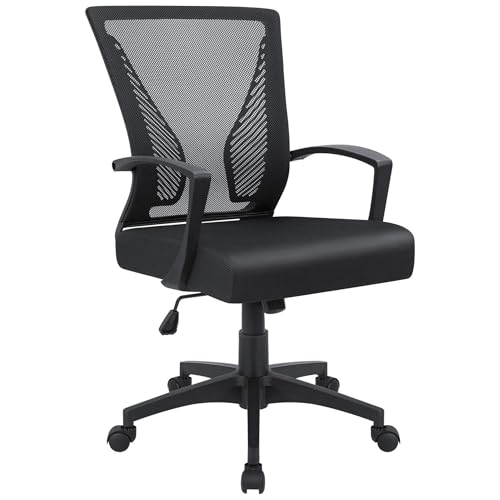
Furmax Office Chair — Best Overall
The Furmax is the chair that defined this tier for years: a mesh mid-back task chair with lumbar support, adjustable height, and a breathable backrest, sold in a simple slip-on specification that keeps the price of entry low. It suits home-office workers and students who sit four to eight hours a day and want airflow more than plushness. It is not a chair for very tall sitters — mid-back designs end support below the shoulders — and it is not a chair for anyone who needs adjustable arms, because the armrests are part of the fixed design language of this class.
Strengths
- Mesh backrest keeps air moving on warm days
- Lumbar support is stated in the listing, not implied
- Simple specification usually means straightforward assembly
Trade-offs
- Mid-back height leaves shoulders unsupported
- Armrests are not described as adjustable
- Seat is not described as mesh, so seat airflow is not stated
Key specs (from the verified listing title):
- Ergonomic computer desk mesh chair
- Lumbar support
- Adjustable height and breathable backrest
- Mid-back, 360-degree swivel, armrests
What makes the Furmax a sensible default is the match between its confirmed features and the actual failure modes of budget chairs. The mesh back avoids the peeling bonded-leather problem that kills cheap executive chairs, the lumbar shaping addresses the lower-back ache that dominates budget-chair complaints, and the height piston covers the standard desk range. Treat it as a three-to-five-year chair with honest expectations: keep the bolts tight, keep weight centered when you lean back, and it does the job its listing promises — no more, and importantly, no less.
Best for: everyday home-office and student use on a strict budget / Not suited for: very tall sitters or anyone needing adjustable arms
Check the current price on Amazon
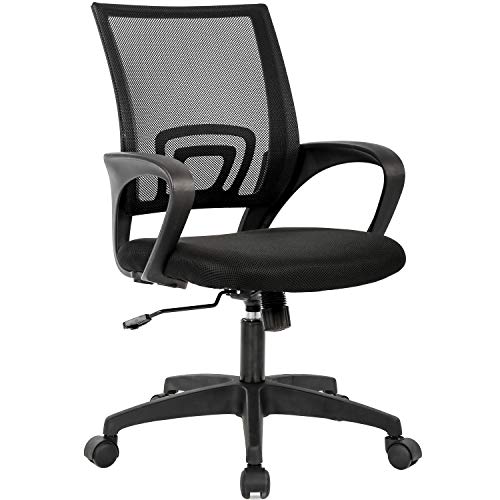
BestOffice Ergonomic Office Chair — Best Simple Setup
BestOffice’s chair pairs a breathable backrest with a sponge seat, which is the combination buyers who dislike mesh seats usually prefer: the back breathes, the seat cushions. The listing states lumbar support, adjustable height, and rolling wheels, and it is sold singly, which matters if you are furnishing one desk rather than a row. It suits lighter daily use — a few hours of study, admin, or hybrid-work days at home. It does not suit buyers who want a headrest or high-back support, and the listing does not describe adjustable arms.
Strengths
- Sponge seat suits buyers who find mesh seats too firm
- Lumbar support and height adjustment both stated
- Single-chair pack suits one-desk purchases
Trade-offs
- No headrest or high-back support stated
- Arm adjustability not stated
- Sponge seats compress faster than quality foam over years
Key specs (from the verified listing title):
- Mid-back swivel desk chair
- Lumbar support, adjustable height, breathable backrest
- Sponge seat and rolling wheels
- Sold as a pack of 1
The honest way to read this listing is as a comfort-first budget chair: the padded seat will feel kinder in week one than a mesh seat, while the breathable back keeps the part of you that sweats most ventilated. The trade is longevity of the seat pad, which is why this chair fits hybrid schedules better than ten-hour daily marathons. If your work pattern is two or three desk days a week, the value equation works; if you sit full time, one of the mesh-seat or adjustable-lumbar picks in this guide is the better spend.
Best for: hybrid workers and students who prefer a padded seat / Not suited for: full-time sitters who need maximum seat longevity
Check the current price on Amazon

Sweetcrispy Ergonomic Computer Desk Chair — Best for Small Spaces
The Sweetcrispy’s flip-up arms solve the most common small-room problem with budget chairs — fixed arms that stop the chair tucking under the desk, eating floor space all day. The listing confirms a mesh mid-back, lumbar support, and a rolling swivel base, and it positions the chair for home offices, bedrooms, and study corners, which matches its compact footprint. It suits students, bedroom desks, and anyone whose office is also their living space. It does not suit buyers who lean heavily on armrests all day, since flip-up arms prioritize stowability over arm support.
Strengths
- Flip-up arms let the chair stow under the desk
- Mesh back and lumbar support both confirmed
- Compact mid-back footprint fits small rooms
Trade-offs
- Flip-up arms are less supportive for all-day arm resting
- No headrest stated
- Fixed specification — little to adjust beyond height
Key specs (from the verified listing title):
- Mesh office chair, mid-back
- Comfortable lumbar support
- Rolling swivel with flip-up arms
- Listed for home office, bedroom, and study
Small-space chairs live or die on what happens when you are not sitting in them, and that is where this design earns its place. Tucked fully under a desk, it returns the floor to the room; pulled out, the mesh back and lumbar shaping cover the basics of a study session. The compromise is real but narrow: if your sitting style parks your forearms on the rests for hours, choose a chair with padded fixed or adjustable arms instead. For the bedroom-desk reality most buyers in this tier actually live in, stowability wins.
Best for: small rooms, bedroom desks, and student setups / Not suited for: sitters who rely on armrests for long sessions
Check the current price on Amazon

DUMOS Home Office Chair — Best Rocking Motion
DUMOS lists the standard budget package — mid-back mesh, lumbar support, height adjustment, swivel — and adds a rocking mode, which lets the backrest recline with a gentle rock rather than locking upright. That matters more than it sounds: micro-movement is how many sitters get through long calls without fidgeting their posture apart. The chair suits conference-style and home-office use where sessions are varied rather than marathon-length. Its armrests are fixed, per the listing, so buyers needing arm adjustment should look at the NEO CHAIR or Synorla picks instead.
Strengths
- Rocking mode confirmed in the listing
- Mesh back with lumbar support
- Fixed armrests are simple and rattle-free by design
Trade-offs
- Fixed armrests cannot adapt to desk height
- No headrest stated
- Rocking range and tension details not stated
Key specs (from the verified listing title):
- Ergonomic mid-back mesh chair
- Lumbar support
- Height adjustable, fixed armrest
- Rocking mode and 360-degree swivel
Budget chairs usually force a binary: locked upright or a single recline stop. A rocking mode is the budget-friendly middle path, letting you shift weight through the day without leaving the chair. Pair that with the confirmed mesh back and this becomes the pick for people whose work mixes typing, calls, and thinking-leaning-back in roughly equal thirds. The fixed arms keep the design simple and are fine at standard desk heights; measure yours before ordering, because fixed arms plus a tall desk is the one combination this chair cannot adapt to.
Best for: mixed workdays with calls, reading, and typing / Not suited for: desks much higher than standard height
Check the current price on Amazon

NEO CHAIR Office Desk Chair with Adjustable Lumbar — Best Adjustable Lumbar
Most budget chairs shape the lumbar curve into the backrest and call it support. The NEO CHAIR listing states adjustable lumbar support in so many words, which means the pad can be positioned where your lower back actually curves — a meaningful difference for sitters whose backs ache in fixed-curve chairs. It is a high-back design in black breathable mesh, with flip-up armrests, pitched by its listing at home-office and computer work. The flip-up arms also help it stow under a desk, and the high back gives taller sitters support a mid-back cannot. The listing does not state a weight capacity, so heavier buyers should weigh the Synorla pick, whose title states its capacity outright.
Strengths
- Adjustable lumbar support confirmed in the listing title — rare at this tier
- High-back breathable mesh for airflow and shoulder support
- Flip-up armrests let the chair stow under the desk
Trade-offs
- Weight capacity not stated in the listing title
- Headrest not stated as a separate adjustable component
- Flip-up arms are less supportive for all-day arm resting
Key specs (from the verified listing title):
- High-back mesh office desk chair, black
- Adjustable lumbar support
- Ergonomic high-back design with breathable mesh
- Flip-up armrests
Lumbar adjustability matters because lower backs are not standardized: a curve molded for the average sitter misses everyone taller, shorter, or simply built differently. Being able to position support at the right height turns a generic mesh chair into one that fits a specific spine, and it is the single feature most worth paying attention to in this price band. Everything else here is competent budget standard — mesh, swivel base, height adjustment — which is exactly the point: the value sits in the feature that decides whether your back aches by late afternoon. This chair passed the same fresh price check as every other pick in this guide, verified at or under the tier on 2026-11-22.
Best for: sitters whose lower backs ache in fixed-curve chairs / Not suited for: buyers who need a stated weight capacity before ordering
Check the current price on Amazon

Synorla Ergonomic Office Chair — Best for Tall Sitters
The Synorla is the roomiest confirmed specification in this guide: its listing states a high-back design, a 330 lb capacity, flip-up armrests, and positioning for long hours of comfortable sitting. That combination is exactly what taller and heavier sitters need from the budget tier — a back tall enough to support the shoulders, a capacity stated in writing rather than implied, and arms that flip up when a larger frame needs the space or the chair needs to stow under the desk. It is sold as an executive task chair for home office use, in black, with a rolling swivel base.
Strengths
- 330 lb capacity stated in the listing title — the only pick here that states one
- High-back design suits taller frames
- Flip-up armrests adapt to desk clearance and larger sitters
Trade-offs
- Seat dimensions are not stated in the title, so check the listing’s detail section against your measurements
- Lumbar design is not described as adjustable
- Larger footprint than the mid-back picks
Key specs (from the verified listing title):
- Ergonomic desk chair, 330 lb capacity
- High-back computer chair for long hours
- Rolling swivel executive task chair
- Flip-up armrests, black
Height in a chair is not a luxury feature for tall sitters; it is the difference between a backrest that supports the shoulder blades and one that ends mid-back and pushes the sitter into a slouch. The Synorla’s high back, paired with a capacity stated plainly in its title, makes it the honest tall-sitter pick of this tier — and it passed the same fresh price check as the other five, verified at or under $100 on 2026-11-22. Buyers willing to spend ten minutes setting seat height and arm position will get the tier’s best long-day support for larger frames; buyers of average build who sit shorter days will be just as well served by the Furmax or BestOffice above.
Best for: tall and heavier sitters who want a stated capacity / Not suited for: small rooms that need the smallest possible footprint
Check the current price on Amazon
Comparison Table
| Pick | Badge | Key spec | Best for |
|---|---|---|---|
| Furmax Office Chair | Best Overall | Mesh mid-back, lumbar support | everyday home-office and student use on a strict budget |
| BestOffice Ergonomic Office Chair | Best Simple Setup | Sponge seat, mesh-style breathable back | hybrid workers and students who prefer a padded seat |
| Sweetcrispy Ergonomic Computer Desk Chair | Best for Small Spaces | Flip-up arms, mesh mid-back | small rooms, bedroom desks, and student setups |
| DUMOS Home Office Chair | Best Rocking Motion | Rocking mode, mid-back mesh | mixed workdays with calls, reading, and typing |
| NEO CHAIR Office Desk Chair with Adjustable Lumbar | Best Adjustable Lumbar | Adjustable lumbar support, high-back mesh, flip-up arms | sitters whose lower backs ache in fixed-curve chairs |
| Synorla Ergonomic Office Chair | Best for Tall Sitters | High back, stated 330 lb capacity, flip-up arms | tall and heavier sitters and long workdays |
How to Choose the Best Quality Office Chairs Under 100
Start with the back. Mesh is the default recommendation at this tier because it cannot peel, it breathes through summer, and its tension is the support — there is no foam to pack flat. Padded backs feel plusher on day one and age worse. Within mesh chairs, separate fixed lumbar shaping from adjustable lumbar support: fixed shaping is fine if your build is average and your current chair’s curve feels right; adjustable support is worth prioritizing if chairs usually miss your lower back.
Next, match back height to your frame and your work. Mid-back chairs support up to roughly the shoulder blades and suit sitters under average height and anyone in a small room. High-back chairs with headrests suit taller sitters and people who recline to read or take calls. Then check the arms against your desk: fixed arms must clear your desktop height, flip-up arms solve tight rooms, and adjustable arms are the upgrade to want if you type for long stretches, because elbow height decides shoulder tension.
Finally, accept the tier’s real trade-offs and buy accordingly. Pistons, casters, and bases at this price are adequate, not premium; the practical quality checks are clean assembly, no wobble at full height, and mesh that feels evenly tensioned. Plan to re-tighten bolts after the first week and again at three months. A budget chair maintained that way outlasts a neglected chair costing twice as much, which is the only honest definition of quality under $100.
What ‘Quality’ Actually Means at This Price
Quality under $100 is not materials luxury; it is the absence of early failures. The failures to screen for are pistons that sink, arms that loosen, mesh that sags, and casters that crack on hard floors. You cannot test any of these from a listing, which is why this guide leans on confirmed design features instead: mesh over bonded leather, stated lumbar support over the bare word ergonomic, and simple mechanisms over complicated ones with more parts to fail.
It also means buying the chair whose compromises sit where you will not feel them. A student sitting three hours a day will never feel a sponge seat compress; a full-time remote worker will feel it by spring. A small-room buyer feels fixed arms every single day when the chair will not stow; a dedicated-office buyer never notices them. Rank the six picks by the compromise you are least likely to meet, and the tier stops being a gamble.
Setting Up a Budget Chair So It Fits You
Set seat height so your feet rest flat and your knees sit at roughly ninety degrees, with the desk at elbow height when your arms hang relaxed. If the chair’s lumbar support adjusts, slide it into the curve of your lower back — it should fill the hollow, not push you forward. If it is fixed, sit fully back so the shaping meets your spine; perching on the seat edge defeats every ergonomic feature the chair has.
Give any new chair a two-week settling period before judging it: re-tighten every bolt after the first few days, confirm the piston holds height overnight, and check that casters roll freely on your floor type. On hard floors, a chair mat protects both floor and wheels; on carpet, confirm the base rolls without dragging. Small setup care is where budget chairs repay their owners, and it costs nothing but ten minutes.
Budget Chairs and Your Back: What the Evidence-Free Zone Looks Like
Office-chair marketing borrows the language of medicine freely, and this tier borrows it most freely of all, so it is worth stating what a budget chair can and cannot do for your back. A chair does not fix posture; it permits posture. The permission a good budget chair grants is specific: a seat height that lets your feet rest flat, a backrest that meets your lumbar curve, and enough stability that you are not bracing against wobble all day. Every pick in this guide was screened for those permissions in its listing, and none is presented as a treatment for back pain, because no chair at any price is one.
What actually protects backs across a workday is variation — sitting back for calls, upright for typing, standing for a few minutes each hour — and the budget tier supports variation better than its reputation suggests. The DUMOS rocking mode, the Synorla’s tall high back, and even the simple act of a swivel that lets you turn instead of twisting all serve movement. Buyers with diagnosed back conditions should take chair advice from their clinician or physiotherapist; buyers with ordinary desk ache should buy fit, move often, and be suspicious of any listing — at any price — that promises therapy from a piston and a mesh back.
There is one more honesty item for this tier: assembly quality is part of ergonomics. A cross-threaded bolt or a mechanism plate mounted one hole off will tilt a seat by degrees you will feel in your hips by Friday. The setup section of this guide exists because budget chairs transfer some of their cost from the factory to your first twenty minutes. Pay that cost carefully and the tier’s ergonomics are real; skip it and no feature list can save the chair.
The True Cost of a Cheap Chair: A Three-Year View
A budget chair’s price is only its first cost, and comparing chairs on first cost alone is how buyers end up purchasing three chairs in the span one better chair would have covered. The honest arithmetic for this tier runs like this: a well-chosen chair from this guide, maintained with bolt checks and caster cleaning, should serve three to five years. A poorly chosen one — bonded leather that peels, a piston that sinks, arms that loosen past tightening — can become landfill in eighteen months, and its replacement resets the clock at full price.
That arithmetic argues for buying the top of the budget tier rather than the bottom of it: the picks here were chosen because their listings describe the constructions — mesh instead of bonded leather, stated lumbar systems, simple mechanisms — that survive the three-year view. It also argues for the verification discipline this guide applies to the under $100 promise itself. A chair that drifts above the tier at purchase time is not a scandal; it is a data point, and the buyer who checks the live price and chooses with open eyes will always out-buy the buyer who trusts a headline.
Finally, count the soft costs honestly. A chair that fits badly taxes concentration in a way no receipt records, and a chair returned costs a Saturday. The cheapest chair in this guide is the one you set up once, sit in for years, and never think about again — and that outcome depends at least as much on the fit checks in the buying guide as on which of the six names is on the box.
Office Chair Terms, Translated
Listings in this category speak a dialect, and a short translation helps. Ergonomic, unaccompanied by specifics, means nothing measurable; followed by stated features — lumbar support, adjustable height, a headrest — it means those features and only those. A 3D armrest adjusts in three directions: height, width or angle, and forward-back position. A mid-back chair supports to about the shoulder blades; a high-back continues to the head, usually with a headrest. A rocking or tilt mode lets the backrest recline against spring tension rather than locking at one angle.
Mesh deserves its own sentence because it is this tier’s defining material: a tensioned woven back that supports by suspension, breathes in summer, and cannot peel the way bonded leather does. Sponge seat, as the BestOffice listing puts it, is foam padding — comfortable immediately, and the component most likely to soften first over years of use. Lumbar support comes in two species in this guide: fixed shaping molded into the back, and adjustable pads that slide to your curve, with the NEO CHAIR listing stating the adjustable kind.
None of these terms carries a standard or a certification behind it in this category, which is precisely why this guide anchors every claim to what each listing states and refuses the rest. Read any chair listing — here or anywhere — by hunting for the specific, stated feature and ignoring the adjectives around it, and you will shop this tier as well as it can be shopped.
Desk, Chair, and Monitor: Fitting the Whole Station
A chair is fitted in relation to things that are not the chair, and budget buyers who fit the whole station get more comfort from a modest chair than buyers who fit a premium chair to a broken station. Desk height is the fixed point: with feet flat and shoulders relaxed, your forearms should rest near horizontal on the desktop. If the desk sits high, the chair must rise to meet it, and then a footrest — even an improvised one — becomes part of the chair’s job, because feet dangling undo the seat height you so carefully set. The picks in this guide all state adjustable height; the station thinking around them is what makes that adjustment useful.
Monitor position completes the geometry the chair begins. The top of the screen belongs near eye level, an arm’s length away, so that the high back of a chair like the Synorla meets a head that is actually upright rather than craned forward. A surprising share of chair dissatisfaction is monitor dissatisfaction in disguise: the best lumbar support in this tier cannot compensate for a laptop screen six inches too low, pulling its owner into a slump no backrest was shaped for. Raise the screen with whatever is at hand and judge the chair again before blaming it.
Lighting and floor finish the station audit. A chair that rolls poorly on deep carpet will be dragged and twisted, loosening its own joints — the easy-rolling question is a floor question. Glare that makes you lean toward the screen is a posture problem wearing a lighting costume. None of these fixes requires leaving the budget tier, and together they explain why two owners of the identical chair report different backs: they bought the same chair and built different stations around it.
When to Repair, When to Replace: Budget Chair Triage
Budget chairs invite a repair-or-replace decision around year two or three, and a clear triage saves money in both directions. Repair — meaning maintain — when the problem is hardware: loosening bolts respond to tightening, gritty casters respond to cleaning and a drop of lubricant, and a sinking piston, the classic budget failure, is a replaceable component on many chairs, though at this tier the economics only favor it when the rest of the chair is sound. Mesh that still tensions evenly and a frame without play are a sound chair; keep it and fix the small things.
Replace when the structure itself has gone: a seat that lists because the mechanism plate has bent, mesh that has stretched into a hammock, foam that has compressed into a board, or joints that loosen again within days of tightening. Those are not maintenance items; they are the chair announcing its term. The three-year view from earlier in this guide applies here — replacing a structurally finished budget chair with a fresh pick from this list is not defeat, it is the plan working as priced.
Between the two sits the upgrade temptation: replacing a working budget chair because a premium chair promises transformation. Sometimes that promise is real — all-day professional sitters do outgrow this tier — but the honest test is specificity. If you can name the exact failure your current chair commits daily, an upgrade aimed at that failure is rational. If the complaint is a general sense that sitting should feel better, fit the station first, move more, and let the budget chair finish its honest service.
A Final Word on Value at This Tier
Value in this tier is a relationship between price, fit, and time, and it cannot be read off a price tag alone. The most expensive budget chair is the one bought twice; the cheapest is the one bought once, fitted carefully, and maintained with ten minutes of attention a few times a year. Everything in this guide — the insistence on stated features, the refusal to guess at capacities and prices, the insistence on checking every pick’s live price against the tier before linking it — serves that single definition of value. A chair that fits your body, your desk, and your room, at a price verified to be what the search promises, is not a compromise purchase. It is simply a correct one.
So the closing advice is procedural rather than preferential: measure your desk, name the feature your back actually needs, choose the pick in this guide whose listing states that feature, and check its live price with the same skepticism this guide applied on your behalf. Do those four things and the under $100 tier will treat you as well as it can treat anyone — which, as the six chairs above demonstrate in their different ways, is considerably better than its reputation suggests.
How to Assemble and Set Up Your New Office Chair
Unbox onto a soft surface and inventory the hardware against the manual before touching a bolt; budget chairs occasionally ship with one missing screw, and discovering that mid-build is far worse than discovering it at the start. Attach casters to the base first, then the piston, then the seat mechanism, keeping every bolt finger-tight until the whole frame is together — final tightening comes last, in a cross pattern, so nothing binds.
Attach the backrest and arms, sit, and run the setup sequence from the buying guide: height, lumbar position, arm clearance against your desk. Then set a calendar reminder for one week out to re-tighten everything; hardware settles as parts seat under load, and that single habit prevents most of the wobble complaints budget chairs collect.
Maintain the chair monthly with thirty seconds of care: wipe mesh with a damp cloth, clear hair and grit from caster axles, and check the piston by sitting at full height for a minute. None of this requires tools beyond the hex key the chair shipped with, which is worth taping to the underside of the seat so it is always where the chair is.
Common Buying Mistakes
Chasing a feature list instead of a fit. A headrest you never touch and arms you never adjust add cost without comfort. Buy the confirmed features that match your body and your room.
Assuming ‘ergonomic’ on a listing means support. The word is unregulated. Look for the specific stated feature — lumbar support, adjustable height, mesh back — as every pick in this guide was screened.
Ignoring desk height. Fixed-arm chairs and tall desks collide. Measure the underside of your desktop before choosing fixed arms.
Judging the chair in the first hour. Foam, mesh tension, and your own posture all settle over two weeks. Set up properly, re-tighten, then judge.
Skipping the price check at purchase time. Budget-tier prices move weekly. The chair that was under $100 in a guide may not be today — check the live price at the link before you buy, which is exactly why this guide verifies the tier fresh rather than printing prices.
Final Recommendation
For most buyers, the Furmax is the safe default: confirmed mesh, lumbar support, and a simple specification that does its job. If your back is the deciding factor, the NEO CHAIR’s adjustable lumbar support is the tier’s most meaningful upgrade, and if your room is the deciding factor, the Sweetcrispy’s flip-up arms solve the stowage problem outright. Tall and heavier sitters should take the Synorla: a high back and a capacity stated in its own listing title, verified under the tier at the same fresh price check as the rest of this guide.
Whichever chair you choose, do the two things that actually determine budget-chair happiness: set it up properly in the first ten minutes, and re-tighten it in the first week. The chairs are close in quality; the ownership habits are not. Related guides in this program cover the neighboring decisions:
Best Ergonomic Office Chairs Home
Best Customizable Office Chairs
Best Easy Rolling Office Chairs
Best Area Rugs For Under Office Chair
Best Folding Chairs With Back Support
Frequently Asked Questions
Can a chair under $100 really be ergonomic?
It can be ergonomic in the specific, limited sense that matters: correct height range, a breathable back, and lumbar support where your spine curves. What it cannot offer is the adjustment depth, materials, and longevity of chairs costing several times more. Judge the tier by fit and early-failure resistance, not by the label.
How was the under-$100 tier verified for these picks?
Because the search promises a price tier, every pick in this guide passed a fresh Amazon listing data price check on 2026-11-22 confirming it sat at or under $100 at the time of checking. Our rule is that a price-tier pick only gets a link after passing that gate. Prices move after any check, so the live price shown at each link on the day you buy is the one that counts — and no price is printed here, because a printed price would go stale within weeks.
Mesh seat or padded seat at this price?
Most budget chairs in this guide use mesh backs with either mesh or padded seats. Padded sponge seats feel softer initially and compress sooner; mesh seats feel firmer and hold their shape longer. Hybrid workers usually prefer padded; full-time sitters usually do better with mesh and lumbar support.
How long should a budget office chair last?
With bolts re-tightened and casters kept clean, a realistic expectation is three to five years of regular use. Pistons and seat foam are the usual first failures. That lifespan, honestly stated, is what quality means under $100.
What if I am tall?
Choose a high-back design with a headrest and confirm the listing’s stated features match that need — in this guide, the Synorla is the tall-sitter pick. Mid-back chairs end support at the shoulder blades, which taller sitters feel within the first long session.
Are flip-up arms worth it?
In small rooms, yes: they let the chair stow completely under the desk, returning floor space daily. If your room is large and you rest your forearms while typing, padded fixed or adjustable arms serve you better.


