Disclosure: airfryerkitchensupply.com is reader-supported. When you buy through links on our site, we may earn an affiliate commission at no extra cost to you.
Where to buy
If you are shopping for the best office chairs for long use, start here: every chair in this guide is sold through Amazon, and each model below was confirmed against Amazon’s own product data before it earned a link. Start with the Herman Miller Embody if budget is no object, the Steelcase Leap for proven all-day adjustability, the HON Ignition 2.0 for a dependable mid-range seat, the SIHOO M18 for mesh value, the Furmax Office Chair for a simple budget setup, or the BestOffice Ergonomic Office Chair for a compact spare-room desk. Prices move often, so check the current price on Amazon before you decide.
Introduction
Finding the best office chairs for long use is less about padding and more about what a chair does to your body in hour seven of a workday. A chair that feels wonderful in a five-minute showroom sit can turn into a source of stiffness, heat build-up and constant fidgeting once you have been in it since breakfast. Long-use seating rewards adjustability, breathable materials and a backrest that moves with you instead of locking you into one posture.
This guide focuses on chairs that hold up across full workdays: mesh and flexible backs that shed heat, lumbar systems you can actually position, armrests that get out of the way of your desk, and seat pans deep enough to support your thighs without cutting off circulation behind your knees. We also weighed the less glamorous side of long use — assembly, caster behaviour on carpet and hard floors, and how a chair’s footprint fits a home office that doubles as a spare bedroom.
We also kept an eye on the total cost of ownership that long use implies. A chair sat in for two thousand hours a year wears its foam, its cylinder and its casters at a rate occasional seating never approaches, so build tier is not snobbery in this category — it is arithmetic. The guide therefore orders its picks by the job they can honestly do: decade-scale flagships first, then the mid-tier chairs most people should actually buy, then budget seats whose limits we state plainly rather than hide.
Six chairs made the cut, spanning premium ergonomic flagships down to honest budget mesh chairs. None of them will fix a bad desk setup on its own, and the buying-guide sections below explain how to pair a chair with the right desk height, monitor position and break routine. But if your current chair leaves you sore by mid-afternoon, one of these six is a meaningful step up.
In this guide
Quick Picks
- Best Overall: Herman Miller Embody — a flexible, fully adjustable flagship built for people who sit all day, every day.
- Best for Proven Adjustability: Steelcase Leap — LiveBack technology and a Natural Glide System that tracks your spine as you recline.
- Best Mid-Range Workhorse: HON Ignition 2.0 — adjustable lumbar support and arms in a no-nonsense black task chair.
- Best Mesh Value: SIHOO M18 — headrest, adjustable lumbar support and a wide cushion with a stated 330 lb capacity.
- Best Budget: Furmax Office Chair — a simple mid-back mesh chair with lumbar support and easy assembly.
- Best Compact Budget: BestOffice Ergonomic Office Chair — a sponge-seat mid-back swivel chair sized for smaller rooms.
How These Picks Were Chosen
Every product in this guide was cross-checked against Amazon listing data product data for this site before it received a purchase link: the listing title, brand and configuration had to match the chair described. That process matters for long-use chairs because the same model name is often sold in several trims — with and without a headrest, with fixed or adjustable arms — and the listing title is the only reliable way to know which trim you are actually buying.
From the verified listings, we shortlisted chairs against five long-use criteria. First, back support that adapts: a flexible back, an adjustable lumbar pad, or a recline mechanism that does not fight you. Second, seat comfort over hours, which favours contoured cushions and waterfall front edges. Third, arm adjustability, because fixed arms at the wrong height are a leading cause of shoulder tension. Fourth, breathability for warm rooms. Fifth, honest capacity and footprint figures stated in the listing itself, rather than marketing claims we could not verify. Chairs that failed the verification step, or that were really chair accessories and cushions rather than complete chairs, were excluded.
The 6 Best Office Chairs for Long Use
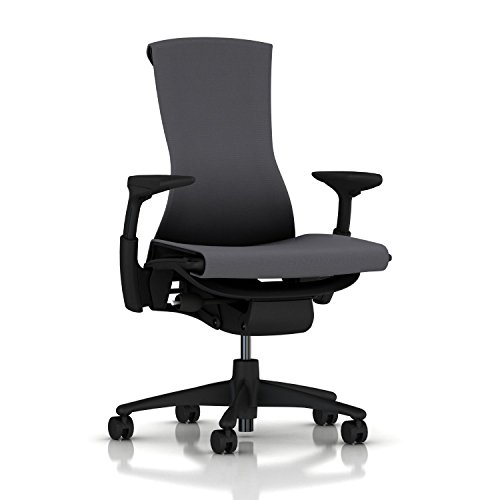
Herman Miller Embody — Best Overall
The Embody is the chair people buy when they are done compromising. Its listing confirms fully adjustable arms and carpet casters in the Charcoal Rhythm finish, and the design idea behind it is simple to state and hard to copy: instead of a rigid shell, the back and seat are built from a flexible support structure that distributes pressure and lets you shift position without the chair pushing back. For long use, that freedom to micro-move is the whole game — static posture, even “good” posture, becomes uncomfortable over eight hours.
Strengths
- Flexible seat and back structure that moves with you through the day
- Fully adjustable arms confirmed in the listing, so elbows can sit at true desk height
- Carpet casters included, which roll predictably on typical home-office carpet
Trade-offs
- Premium pricing places it far above the rest of this list
- The unconventional look divides opinion in shared or client-facing spaces
- No headrest, which some recliners-for-thinking readers will miss
Key specs (from the verified listing): Fully adjustable arms; carpet casters; Charcoal Rhythm upholstery.
In practice, the Embody suits knowledge workers who sit in long, unbroken blocks — writers, programmers, analysts — because it does not force a single “correct” position. You can sit forward to type, lean back to read, and perch sideways during a call, and the chair supports each posture instead of punishing it. The seat’s flexible structure also avoids the hard front edge that can press into the backs of your thighs on cheaper chairs.
It is not the right buy for everyone. If your workday is genuinely two or three hours at a desk, the Embody is more chair than you need, and the HON or SIHOO below will serve you well for far less. It also asks you to learn its adjustments; the first week involves some dial-turning before it disappears underneath you.
Best for: full-time desk workers who sit 8+ hours daily and want one chair for a decade. Not suited for: occasional desk users or tight budgets. Check the current price on Amazon.

Steelcase Leap — Best for Proven Adjustability
The Leap is the other long-standing answer to all-day sitting, and its verified listing names the two technologies that built its reputation: LiveBack, which changes shape to follow your spine, and the Natural Glide System, which keeps your eyes and arms in position as you recline instead of sliding you away from your desk. The listing specifies the Onyx finish and wheels intended for carpet.
Strengths
- LiveBack backrest flexes to match your spine’s changing curve
- Natural Glide recline keeps your workstation in reach as you lean back
- Ergonomic back support designed around varied body shapes, per the listing
Trade-offs
- Also a premium-priced chair, firmly in flagship territory
- Upholstered back traps more heat than mesh rivals in warm rooms
- Carpet wheels are not ideal on bare hardwood without a mat
Key specs (from the verified listing): LiveBack technology; Natural Glide System; Onyx finish; wheels for carpet.
Where the Embody encourages movement, the Leap excels at support: the backrest’s flex zones firm up where your lower back needs pushing in and soften where your upper back needs to move. People who have been told to “sit up properly” often find the Leap the first chair that makes proper feel natural rather than forced. The recline glide is subtle but real — on most chairs, leaning back pushes your hands away from the keyboard; on the Leap, the seat glides forward to compensate.
Heat is the honest caveat. A padded, upholstered back insulates, and in a sun-facing room in summer you will notice it by mid-afternoon. Mesh loyalists should look at the SIHOO M18 or the Furmax instead. But for air-conditioned offices and cooler climates, the Leap remains one of the safest long-use purchases in this guide.
Best for: workers who want structured, spine-following support all day. Not suited for: hot rooms or buyers who strongly prefer mesh. Check the current price on Amazon.

HON Ignition 2.0 — Best Mid-Range Workhorse
HON is a contract-furniture brand, and the Ignition 2.0 shows it: the verified listing describes an ergonomic office desk chair in black with lumbar support and adjustable arms, pitched at workstation comfort for focused productivity. There is no gaming styling, no racing stripes — just the adjustments that matter for long use, in a chair designed to be bought by the dozen for offices and to survive it.
Strengths
- Adjustable lumbar support and adjustable arms, both confirmed in the listing
- Understated black styling that suits shared and professional spaces
- Contract-grade design intent: built for daily office use, not occasional sitting
Trade-offs
- Less sculptural support than the Leap or Embody flagships
- No headrest on this configuration
- Styling is deliberately plain, which not everyone wants at home
Key specs (from the verified listing): Lumbar support; adjustable arms; black finish; task/desk chair format.
The Ignition 2.0 is the chair we would hand to a facilities manager equipping a home-office stipend programme, because it offends nobody and supports most bodies well. The lumbar support adjusts to meet the small of your back rather than sitting at a fixed, take-it-or-leave-it height, and the arms move enough to clear most desk aprons while still supporting your forearms during long typing stretches.
For long use specifically, its virtue is consistency: it feels the same in hour one and hour eight, with no novelty feature to tire of. Buyers cross-shopping the flagships should understand the trade — you give up the Embody’s movement and the Leap’s glide, and you keep a solid, adjustable chair at a mid-range tier.
Best for: professionals who want dependable all-day support without flagship pricing. Not suited for: buyers who want a statement chair or a headrest. Check the current price on Amazon.

SIHOO M18 — Best Mesh Value
The SIHOO M18 packs the long-use checklist into a value-tier mesh chair: the verified listing confirms a mesh back, a headrest, adjustable lumbar support, 2D armrests, a wide cushion and tilt lock, with a stated capacity of 330 lbs. That combination — headrest plus adjustable lumbar plus breathable mesh — is exactly what most people shopping this search actually need, and it rarely appears together at this tier.
Strengths
- Mesh back sheds heat during long sessions in warm rooms
- Headrest and adjustable lumbar support both included, per the listing
- Wide cushion and a stated 330 lb capacity suit larger users
Trade-offs
- 2D armrests adjust less completely than flagship 4D arms
- Mesh seat support feels firmer than thick foam for some sitters
- Assembly and adjustment quality vary more at this tier; check every bolt
Key specs (from the verified listing): Mesh back; headrest; adjustable lumbar support; 2D armrests; wide cushion; tilt lock; 330 lb stated capacity.
The M18’s headrest is its long-use party trick: during reading, calls and thinking time, being able to lean back and rest your head changes the chair from a typing perch into a genuine all-day seat. The tilt lock lets you fix a slight recline, which takes pressure off the front of the seat pan — a small thing at 9 a.m. and a big thing at 4 p.m.
Set expectations correctly and the M18 delights: it is a value chair, so plastics and finish sit a class below HON and Steelcase, and the armrests, while adjustable, do not glide in every direction. For the price tier, though, the feature-per-dollar ratio for long sitting is the best in this guide.
Best for: warm rooms, long sessions and buyers who want a headrest without flagship money. Not suited for: buyers who want premium materials or fully 4D arms. Check the current price on Amazon.
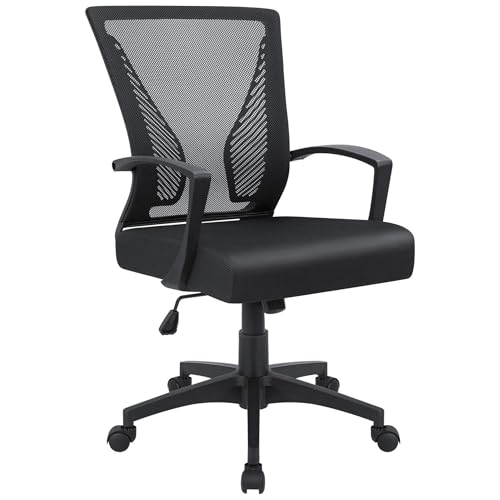
Furmax Office Chair — Best Budget
The Furmax is the honest end of the market: a mid-back mesh computer chair with lumbar support, an adjustable height, a breathable backrest and 360-degree swivel with armrests, and a listing that calls out easy assembly. It will not pamper you, but for a first home-office chair or a student desk, it covers the long-use basics — a back that breathes, support in the lumbar zone and a seat height you can set correctly.
Strengths
- Breathable mesh backrest at a budget tier
- Lumbar support built in, per the listing
- Easy assembly, which matters when the chair arrives the night before a deadline
Trade-offs
- Mid-back design leaves shoulders and head unsupported when reclining
- Armrests are fixed rather than adjustable
- Sponge seat padding compresses sooner than premium foams over years of use
Key specs (from the verified listing): Mid-back mesh design; lumbar support; adjustable height; 360° swivel; armrests included.
Used within its limits, the Furmax is a sensible long-use chair for shorter daily sessions — three to five hours — and for lighter users. The mesh back genuinely helps in rooms without air conditioning, and the mid-back shape encourages an upright working posture rather than a slouch.
The honest limitation is endurance: budget foams and mechanisms are built to a price, and a heavier user sitting ten-hour days will wear this chair out faster than the flagships. Treat it as a strong starter chair or a second-desk chair, and it earns its place here.
Best for: students, first home offices and moderate daily sitting on a tight budget. Not suited for: very long daily sessions or users who need adjustable arms. Check the current price on Amazon.

BestOffice Ergonomic Office Chair — Best Compact Budget
The BestOffice chair mirrors the Furmax formula with a sponge seat: the verified listing describes a mid-back swivel desk chair in dark black with lumbar support, adjustable height, a breathable backrest, a sponge seat and rolling wheels, sold as a pack of one for home and office. It is the pick for small rooms, spare desks and anyone equipping a second workstation cheaply.
Strengths
- Compact mid-back footprint suits small home offices
- Lumbar support and breathable backrest at a budget tier
- Sponge seat gives a softer initial sit than bare mesh seats
Trade-offs
- Fixed armrests and mid-back height limit long-session support
- Budget build is not intended for a decade of daily use
- One-size ergonomics fit average frames best
Key specs (from the verified listing): Mid-back swivel design; lumbar support; adjustable height; sponge seat; rolling wheels; dark black finish.
Think of this chair as the supporting act: the desk in the guest room, the homework station, the chair a partner uses on their two work-from-home days. In those roles its compact size is an advantage — it tucks under desks and into corners that a flagship ergonomic chair would dominate.
For a primary eight-hour seat, we would step up to the SIHOO M18 or HON Ignition 2.0 in this same list. But judged as a budget compact, the BestOffice covers the essentials honestly, and its verified listing promises nothing it does not deliver.
Best for: second desks, small rooms and light daily use. Not suited for: a primary all-day workstation for larger users. Check the current price on Amazon.
Comparison Table
| Pick | Badge | Key spec | Best for |
|---|---|---|---|
| Herman Miller Embody | Best Overall | Fully adjustable arms, carpet casters | All-day professionals |
| Steelcase Leap | Best for Proven Adjustability | LiveBack + Natural Glide System | Structured spine support |
| HON Ignition 2.0 | Best Mid-Range Workhorse | Adjustable lumbar support and arms | Dependable daily office use |
| SIHOO M18 | Best Mesh Value | Headrest, mesh back, 330 lb stated capacity | Warm rooms, long sessions |
| Furmax Office Chair | Best Budget | Mid-back mesh, lumbar support | Students and starter offices |
| BestOffice Ergonomic Chair | Best Compact Budget | Sponge seat, mid-back swivel | Small rooms, second desks |
Key Takeaways
- For long use, adjustability beats padding: lumbar position, arm height and recline behaviour matter more than a thick first impression.
- Mesh backs (SIHOO M18, Furmax) run cooler; flexible and upholstered backs (Embody, Leap) support and move better.
- Match casters to your floor — two picks here ship with carpet wheels, so hard floors may need a mat.
- Set the chair up properly (next sections) before judging it; most “uncomfortable chair” complaints are setup problems.
How to Choose an Office Chair for Long Use
Start with the backrest, not the seat
New buyers squeeze seat cushions; experienced sitters test backs. Over a long day your backrest decides your posture, your shoulder position and how often you shift. Look for one of three proven approaches: a flexible back that moves with you (Embody), a shape-changing support system (Leap’s LiveBack), or an adjustable lumbar pad you can raise, lower and firm up (HON Ignition 2.0, SIHOO M18). A fixed lumbar bump molded into foam is the weakest option, because it only fits the one spine height its designer imagined.
Armrests: adjustable or removable, never just present
For long typing sessions, your forearms should rest with shoulders relaxed and elbows near a right angle. Fixed arms that sit too high shrug your shoulders all day; arms that sit too low are decoration. Height-adjustable arms are the minimum for long use; width and pivot adjustment (as on the flagships) help broader and narrower shoulders. If a budget chair’s fixed arms collide with your desk, check whether they unbolt — many do, and armless is better than wrong-height.
Seat depth and the two-finger rule
Sit fully back and check the gap between the seat’s front edge and the back of your knees: roughly two fingers’ width is right. Much more and your thighs lose support; much less and the edge presses into your legs during hour six. A waterfall front edge softens this. Wider cushions, like the SIHOO M18’s, suit larger frames; petite users should beware deep seats that force a perch.
Mesh vs upholstery for long sessions
Mesh breathes, stays cooler and holds its shape for years, but can feel firm and offers less of a “cushioned” sit. Upholstered foam feels plush initially and insulates — lovely in winter, warm in August. Flexible polymer structures like the Embody’s split the difference. Choose by your room temperature and your honest preference, not by which looks more expensive in photos.
Capacity, casters and floor type
Respect stated capacities — the SIHOO M18 lists 330 lbs — and remember that long daily use accelerates wear near the limit. Check the caster type in the listing: carpet casters on hardwood can skate and scratch, while hard-floor casters drag on carpet. A chair mat solves most mismatches and also makes rolling — and the micro-movement long sitting needs — easier.
How to Set Up Your Chair for Long Workdays
Ten minutes of setup buys you months of comfort. Work through these steps in order, in the shoes you normally wear at your desk.
- Seat height: adjust until your feet rest flat on the floor and your knees sit at roughly hip height or a touch lower.
- Seat depth check: sit fully back; confirm the two-finger gap behind your knees described above.
- Lumbar position: raise or lower the lumbar support until it fills the small of your back without pushing you forward.
- Arm height: set arms so your forearms rest level with shoulders dropped and relaxed, elbows near 90 degrees.
- Recline tension: loosen or firm the tilt so you can lean back with gentle pressure, not a fight and not a collapse.
- Desk and screen: raise the monitor so the top third of the screen is near eye level; the best chair cannot rescue a laptop-height screen.
- Move hourly: even the best long-use chair is a tool for sitting, not a substitute for standing, stretching and walking between tasks.
Common Buying Mistakes
- Judging by the first five minutes. Plush chairs win showrooms and lose workdays. Prioritise support systems over initial softness.
- Ignoring arm adjustability. Fixed arms at the wrong height cause more shoulder tension than a modest backrest ever will.
- Buying a headrest chair for typing. Headrests serve reclining and calls; they do nothing while you lean forward to type, so do not pay for one as a posture fix.
- Skipping the caster check. Carpet wheels on hardwood (or the reverse) annoy you every single day.
- Assuming one chair fits the household. A chair dialled in for a 6-foot user will fight a 5-foot-2 partner; shared desks need easy, remembered adjustments.
- Forgetting the room. A heat-trapping upholstered chair in a sunny, un-airconditioned room will be abandoned by July.
Final Recommendation
If you sit for a living, buy once and buy well: the Herman Miller Embody is our Best Overall for its movement-friendly design, with the Steelcase Leap the equal-choice for structured support. The HON Ignition 2.0 is the sensible mid-range default, and the SIHOO M18 is the value pick we would buy with our own money for a warm room. On a strict budget, the Furmax and BestOffice chairs cover the basics honestly for shorter days and second desks.
Shopping for a specific situation? See our related guides: Best Office Chairs For 12 Hour Days, Best Office Chairs For Long Sitting And Comfort, Best Ergonomic Office Chairs Home, Best High Use Office Chairs, and Best Inexpensive Office Chairs For Long Hours.
Ergonomics Deep Dive: What Actually Matters After Hour Six
Dynamic sitting beats perfect posture
The most persistent myth in office seating is that there is one correct posture and a good chair holds you in it. In reality, comfort over long use comes from movement: shifting weight, changing recline angle, crossing and uncrossing your legs, leaning in and leaning back. This is why the two flagship picks in this guide take opposite philosophies that both work — the Embody flexes to follow your movement, while the Leap’s glide system keeps your work in reach as your posture changes. A rigid chair with a textbook shape will still leave you stiff by mid-afternoon, because the discomfort of long sitting is mostly the discomfort of stillness.
Practically, this means you should test a chair’s recline behaviour as seriously as its upright support. A chair that reclines smoothly, with tension you can set to your body weight, invites the posture changes that keep blood moving and muscles from locking up. Tilt lock, as listed on the SIHOO M18, is useful for focused upright work, but leave the back unlocked for at least part of the day so the chair can move with you.
Lumbar support: position first, firmness second
Buyers fixate on how firm a lumbar pad feels, but where it sits matters more. Your lumbar curve peaks at roughly belt height, and a support pad parked two inches too low pushes on your pelvis instead, rotating you into a slouch. This is the core argument for adjustable lumbar systems — the HON Ignition 2.0 and SIHOO M18 both list adjustable lumbar support — over fixed foam bumps. When you set up any chair in this guide, spend your first adjustment minute on lumbar height, pressing the pad into the small of your back until the backrest feels like it is gently holding you upright rather than shoving you forward.
Firmness is a secondary dial. People with a pronounced lumbar curve usually prefer firmer, higher support; flatter backs often find aggressive pads intrusive. If a chair’s support cannot be softened or lowered enough for you, a small folded towel experiment before purchase day can tell you how much support your back actually wants.
Seat foam, suspension and the “bottoming out” problem
The classic long-use complaint — “the chair was fine for a month, now I feel the frame” — is bottoming out: foam compressed past the point where it can distribute your weight. Dense, high-quality foams resist it for years; budget sponges, like those in the Furmax and BestOffice picks, resist it for a shorter working life, especially under heavier users and longer days. Suspended designs sidestep foam fatigue altogether: mesh seats and the Embody’s flexible structure carry you on tension rather than compression, which is one reason they anchor the top of this guide.
You can slow foam fatigue on any chair: avoid kneeling on the seat, keep the chair out of direct sun and heat vents, and rotate a second chair into service if your household has one. None of this rescues a chair that was wrong for your weight and hours, though — matching the chair’s tier to your real sitting time, as the verdicts above try to do, is the durable fix.
Matching the Chair to Your Work Style
The deep-focus typer
If your day is long blocks of keyboard work, prioritise arm adjustability and lumbar position above all else; your shoulders and lower back file the complaints first. The HON Ignition 2.0 and Steelcase Leap fit this profile best here, with the Leap’s glide system keeping your hands at the keyboard as you shift.
The call-heavy mover
If you alternate typing with calls, reading and thinking, a headrest and an easy recline earn their keep. The SIHOO M18’s headrest-plus-tilt-lock combination is built for exactly this rhythm, and the Embody’s flexible back supports the widest range of thinking postures in this guide.
The warm-room worker
No air conditioning, a south-facing window, or a small room that heats up by noon: choose mesh and choose it early. The SIHOO M18 for a primary seat, the Furmax for a budget seat — both breathe in a way upholstered chairs simply cannot, and heat discomfort is the fastest route to abandoning an otherwise good chair.
The shared-desk household
Two people, one chair, different heights: favour chairs whose adjustments are quick and obvious, and agree on two remembered settings — a tape mark on the height cylinder is a low-tech lifesaver. The mid-range picks here adjust fastest; the flagships adjust widest. Either way, a chair that takes five minutes to re-dial will silently stay set for the taller user, and the shorter user will pay for it.
What to Expect at Each Tier
Budget tier (Furmax, BestOffice): you get the honest basics — mesh or breathable backs, built-in lumbar shaping, height adjustment and a swivel base. What you give up is adjustment range, arm adjustability and long-term foam resilience. For three to five hours a day, that trade is rational. For ten hours a day, it is a false economy, because the chair will feel tired before the year is out and your back will notice first.
Mid tier (HON Ignition 2.0, SIHOO M18): this is where long-use value concentrates. Adjustable lumbar support, adjustable arms and, on the SIHOO, a headrest and tilt lock arrive together, in chairs designed for daily service. Materials and finish sit a step below the flagships, but the ergonomic essentials — the things your body actually registers at hour seven — are present and correct.
Flagship tier (Embody, Leap): you are paying for movement systems, decade-scale durability and adjustment ranges that fit unusual bodies. The difference is real but it is a difference of refinement, not of category: a mid-tier chair set up carefully will beat a flagship left at factory settings. Buy the flagship when the chair is your primary workplace for years; buy mid-tier when it is one tool among several in a varied day.
Long Use at Different Body Sizes
Taller users should watch seat depth and back height first: a mid-back budget chair leaves long thighs unsupported and shoulders above the backrest. The wide-cushion SIHOO M18 and the high-adjustment flagships serve tall frames best in this guide. Petite users face the opposite problem — seats too deep, arms too wide, feet dangling — and should look at our petite-specific chair guides linked in the Final Recommendation, because a chair that forces you to perch on its edge defeats every other feature it has.
Heavier users should respect stated capacities with margin: the SIHOO M18 lists 330 lbs, and sitting close to any chair’s limit for ten hours a day shortens its life and sags its foam. Big-and-tall designs with reinforced mechanisms are a separate category with their own guide in our allocation; do not ask a standard task chair to do that job. Whatever your size, the two-finger seat-depth check and flat-feet test in the setup section are the fastest truth-tellers: a chair that fails them in the first minute will not improve by hour eight.
Accessories That Pair With a Long-Use Chair
A footrest helps shorter users keep feet supported when the desk forces a higher seat; a chair mat protects floors and makes rolling — and therefore posture changes — easier; and a monitor arm or stand fixes the screen height that no chair can compensate for. Lumbar cushions and seat cushions are legitimate rescue tools for a chair you already own, but treat them as diagnostics as much as solutions: if a cushion transforms your comfort, your next chair should build that support in. What does not help long use is a thicker seat pad on a chair whose back is wrong — pressure moves, it does not disappear. Fix the back first, the arms second, and only then fine-tune the seat.
Care and Longevity for a Chair You Sit In Daily
Long-use chairs repay small maintenance. Vacuum mesh and upholstery monthly so dust does not grind into fibres; wipe mechanisms and the cylinder quarterly; check and hand-tighten the arm and back bolts every few months, because daily movement works them loose and most “my chair feels wobbly” reports are really “my chair’s bolts relaxed.” Casters pick up hair and grit — pop them off once or twice a year, clean the axles, and rolling resistance drops noticeably. Keep foam seats out of prolonged direct sunlight, which dries and crumbles foam, and avoid leaning the chair back against a wall on two legs: it is the fastest way to stress a tilt mechanism beyond its design. Finally, if a gas cylinder begins to sink, it is a replaceable part on most task chairs; replacing it restores a chair whose back and arms still have years left.
When to Replace a Chair Instead of Repairing It
Some long-use problems are maintenance: a sinking cylinder, a wobbling arm with a loose bolt, a caster full of hair. Those are cheap, satisfying fixes, and the care section above covers them. Others are the chair telling you it is done. Foam that has bottomed out — you can feel the seat pan through it within the first hour — does not recover, and a cushion on top only raises you above the backrest’s lumbar zone, trading one problem for another. A tilt mechanism that creaks, sticks or leans permanently a few degrees off true is a structural failure, not an adjustment issue. And a backrest whose support has softened asymmetrically will quietly train your posture crooked.
The subtler signal is behavioural: you have started avoiding your desk, working from the sofa, or finishing the day with a stiffness that a weekend no longer clears. Before blaming your body, audit the chair honestly against the setup steps in this guide. If a correctly set-up chair still leaves you worse at 6 p.m. than at 9 a.m., the chair — not your discipline — is the variable to change, and the six picks above are ordered exactly for that decision, from decade-long flagships down to honest budget seats.
Setup Notes for Each Pick
Embody: give yourself a week. Start with the back-fit adjustment set to follow your spine’s natural curve, set the tilt limiter to allow a gentle recline rather than full travel, and resist re-tuning daily — small changes need a full workday each to judge. Most owners find their setting in four or five iterations and then never touch it again.
Steelcase Leap: set the lumbar height first, then the firmness dial, because the two interact: a pad in the right place needs less force than a pad compensating for the wrong place. Use the Natural Glide recline during reading tasks to feel what it does — the seat moving forward as you lean back is subtle, and once noticed, it explains the chair’s reputation.
HON Ignition 2.0: the arms are the setup story. Set their height so your forearms rest without shoulder lift, then check they clear your desk’s edge or apron when you pull in close; if they collide, lower them rather than sitting further from the desk, which would undo your lumbar contact.
SIHOO M18: position the lumbar pad before judging the mesh back — mesh chairs feel unsupportive when the pad sits low and transform when it meets your belt line. Set the headrest so it meets the back of your head only when you lean into the tilt; it should not touch you while typing upright. Lock the tilt at a slight recline for reading sessions and unlock it for typing.
Furmax: with fixed arms, the desk becomes the adjustment: if the arms trap you away from the desk, remove them (they unbolt on this class of chair) rather than perching forward. Set seat height so the mid-back’s lumbar shaping meets your lower back — on mid-back chairs, sitting too high slides the support into the wrong zone.
BestOffice: treat it like the Furmax — height first, arms checked against the desk, and expectations set for shorter sessions. Its sponge seat feels best in the first hours of the day, so in shared households it suits the partner with the shorter desk shift, leaving the primary chair to the longer one.
Frequently Asked Questions
How long should a good office chair last with daily use?
Premium chairs like the Embody and Leap are built for a decade or more of daily use. Mid-range chairs typically serve five to eight years, while budget mesh chairs used all day may show foam and mechanism wear in two to four years. Long daily hours accelerate wear, so heavier use argues for stepping up a tier.
Is mesh or foam better for sitting all day?
Neither is universally better. Mesh runs cooler and keeps its shape; foam feels plusher and warmer. Flexible structures, as on the Embody, aim to combine support with movement. Choose based on your room temperature and whether you prefer a firm, suspended feel or a cushioned one.
Do I need a headrest for long workdays?
Only if you recline during your day — for calls, reading or thinking. While typing, your head balances over your spine and a headrest does nothing. The SIHOO M18 includes one at a value tier, which makes it a good test of whether you actually use one. One caution: a headrest set too far forward can push your head into a chin-down posture, so set it to meet your head only when you lean back, and ignore it the rest of the time. If you never recline, save the money and put it toward better arms or a better backrest instead — both work for you every minute of the day rather than a few.
What seat height range do I need?
Enough range that your feet rest flat with knees near hip height. Most task chairs cover average heights; very petite or very tall users should check the listing’s adjustment range and consider the petite-specific guides linked above.
Are gaming chairs good for long office use?
Some are comfortable, but racing-style bucket seats often fix your posture rather than adapt to it, and many lack adjustable lumbar support. The task and ergonomic chairs in this guide are designed around varied working postures, which suits long office days better.
How do I stop my chair damaging my floor?
Match casters to floor type — carpet casters are specified on the Embody and Leap listings here — or add a chair mat. Mats also make rolling smoother, which encourages the small position changes that keep long sitting comfortable.


