Disclosure: airfryerkitchensupply.com is reader-supported. When you buy through links on our site, we may earn an affiliate commission at no extra cost to you.
Where to buy
This shortlist of the best ergonomic office chairs with adjustable arms was verified end to end: every chair in this roundup was verified through the marketplace listings data for this site, and the armrest type in each name — 2D, 3D, 4D or flip-up — is quoted exactly as the verified listing title states it. If a title did not name an adjustable arm system, the chair did not make this list, however good its backrest looked.
- SIHOO M18 Ergonomic Office Chair — check price on Amazon
- Marsail Ergonomic Office Chair — check price on Amazon
- HON Ignition 2.0 Ergonomic Office Chair — check price on Amazon
- Herman Miller Embody Ergonomic Office Chair — check price on Amazon
- Hbada E3 Air Ergonomic Office Chair — check price on Amazon
- CAPOT Ergonomic Mesh Office Chair — check price on Amazon
If you are shopping for the best ergonomic office chairs with adjustable arms, the armrests are not a cosmetic extra — they are the part of the chair that decides whether your shoulders stay relaxed through a long afternoon or creep up toward your ears. Arms set too high shrug your shoulders; arms set too low leave your elbows hanging and your neck doing the work. The right chair lets you dial the rests to your desk height and your body, then forget about them.
The honest complication is that ‘adjustable arms’ means very different things across listings. Some chairs adjust only up and down. Others add width, forward-and-back sliding, or pivoting tops, and the listing titles use the shorthand 2D, 3D and 4D for those combinations. Flip-up arms are a different idea again: they rotate out of the way so the chair slides under a desk or lets you sit cross-legged. This guide only includes chairs whose verified titles actually name the arm system, and it labels each one exactly as the title does.
Below you will find six verified chairs spanning the main arm styles, from a straightforward 2D setup to a fully adjustable premium model. After the reviews there is a buying guide that explains what each arm dimension does, a fitting routine you can run in the first week with any new chair, the mistakes that make people return otherwise good chairs, and answers to the questions buyers ask most.
In this guide
Quick Picks
Best Overall — SIHOO M18 Ergonomic Office Chair. The balanced default: a mesh-back chair whose title states 2D armrests, adjustable lumbar support, a headrest and a wide cushion, with a stated 330 lb capacity. Check the current price on Amazon.
Best 3D Armrests — Marsail Ergonomic Office Chair. A high-back mesh chair whose title confirms 3D armrests, adjustable lumbar support and a headrest — the step up for people who angle their arms while they work. Check the current price on Amazon.
Best Established Brand — HON Ignition 2.0 Ergonomic Office Chair. From a long-standing office-furniture brand, with adjustable arms and lumbar support both stated in the title — the safe, facilities-approved style of pick. Check the current price on Amazon.
Best Premium — Herman Miller Embody Ergonomic Office Chair. The flagship end of the category: the title states fully adjustable arms outright, paired with carpet casters in the listed Charcoal Rhythm finish. Check the current price on Amazon.
Best 4D Armrests — Hbada E3 Air Ergonomic Office Chair. The adjustability maximalist: 4D armrests, a 3-zone dynamic lumbar system and a 3D adjustable headrest, all stated in one title. Check the current price on Amazon.
Best Flip-Up 4D Arms — CAPOT Ergonomic Mesh Office Chair. The space-saver with muscle: 4D flip-up arms, a stated 400 lb capacity, three tilt levels and a 3D headrest in a high-back mesh frame. Check the current price on Amazon.
How These Picks Were Chosen
Each pick started as a marketplace search for ergonomic office chairs, and every candidate was cross-checked against the verified listing data held for this site. A chair qualified only if its title explicitly stated an adjustable arm feature — the words 2D, 3D or 4D armrests, adjustable arms, fully adjustable arms, or flip-up arms. Chairs with fixed armrests, and chairs whose titles said nothing about the arms at all, were excluded even when the rest of the specification looked strong.
The second filter was completeness and honesty. Only complete chairs were considered — no replacement arm pads, no chair mats, no seat cushions. Listings that were colour or size variants of the same chair were de-duplicated so each pick is a genuinely different product. Where a title stated a capacity, a lumbar feature or a headrest, that detail is reported as stated; where a title was silent about something, this guide says so rather than guessing.
Finally, the six were spread across arm styles and tiers on purpose. Most buyers do not need the most adjustable chair ever made; they need the arm system that matches their desk, their tasks and how often they change position. The badges reflect that spread, so you can shortlist by the way you actually work.
The 6 Best Ergonomic Office Chairs With Adjustable Arms

SIHOO M18 Ergonomic Office Chair — Best Overall
The M18 suits the home-office worker who wants the core ergonomic adjustments — arm height and position, lumbar support, tilt lock — without paying for a flagship. The mesh back and headrest fit long desk days, and the wide cushion suits broader frames better than the narrow seats on many entry chairs.
Strengths
- Title states 2D armrests, so height and a second direction of adjustment are confirmed, not assumed
- Adjustable lumbar support and a headrest are both named in the verified title
- Stated 330 lb capacity and a wide cushion widen the range of bodies it fits
Trade-offs
- 2D arms do not pivot, so angled keyboard work is less supported than on 3D or 4D models
- The title does not state seat-depth adjustment — Not stated in the verified title
- Mesh-and-cushion hybrid feel will not suit buyers who want a fully padded executive seat
Key spec (from the verified listing title): 2D armrests; adjustable lumbar support; headrest; wide cushion; stated capacity 330 lbs; tilt lock
What makes the M18 the sensible centre of this list is the combination, not any single feature. Adjustable lumbar support matters because fixed lumbar bumps land in the wrong place on many backs; being able to position it is what turns a mesh chair from tolerable to genuinely comfortable over six or seven hours. Pair that with 2D arms you can raise to desk height, and the two most common sources of desk discomfort — lower-back ache and shrugged shoulders — are both addressed by adjustments the title actually confirms.
It is also a forgiving chair to live with. Tilt lock lets you fix a working angle instead of fighting spring tension, the swivel base and rolling format suit shared desks, and the stated capacity gives heavier users a clear, checkable number rather than a vague ‘heavy duty’ claim. If you only read one review in this guide, make it this one — then check whether the 2D limitation in the trade-offs actually matters for how you type.
Ownership note: the M18’s combination of a mesh back and a cushioned seat makes it a good year-round chair in rooms that swing between warm afternoons and cold mornings. Expect the setup to take fifteen minutes and one revisit after the first week, when the cushion has settled and the arm height wants a final nudge.
Best for: home-office workers who want confirmed 2D arms, adjustable lumbar support and a headrest in one mid-tier chair / Not suited for: buyers who need pivoting arm tops or seat-depth adjustment
Check on Amazon — check the current price on Amazon before you decide, because configurations and colours change.

Marsail Ergonomic Office Chair — Best 3D Armrests
The Marsail fits taller desk workers and anyone who splits the day between typing, mousing and calls. The high back and headrest support a more upright, full-length posture, while 3D arms add the pivot or slide dimension that 2D arms lack.
Strengths
- 3D armrests confirmed in the title — one more direction of adjustment than 2D rivals
- High-back mesh design with a headrest for taller users
- Adjustable lumbar support is stated, not implied
Trade-offs
- The title does not state a weight capacity — Not stated in the verified title
- No flip-up function is stated, so the arms stay in place when you slide the chair in
- Mesh back will feel firmer than padded leather-style backs
Key spec (from the verified listing title): 3D armrests; high-back mesh; adjustable lumbar support; headrest; rolling swivel task format
The practical difference between 2D and 3D arms shows up at the keyboard. When you type, your forearms angle slightly inward; when you mouse, one arm reaches forward. A third direction of adjustment — typically a pivot or a forward slide, as the manufacturer defines it — lets the arm top meet your forearm where it actually rests instead of where the chair designer guessed. If you finish long days with tension on the outside of one shoulder, that extra direction is usually the fix.
The rest of the package supports the same long-day brief: breathable high-back mesh, a headrest for lean-back moments between calls, and a rolling swivel base for shared or L-shaped desks. Check the listing for the exact definition of its 3D movement before ordering, because brands do not all count the dimensions the same way — the title confirms 3D armrests, and the detail of which three movements is a listing-level check worth doing.
Ownership note: high-back mesh chairs reward a weekly habit — a quick brush-down of the mesh and a check that the arm settings have not drifted after being knocked by a desk edge. Taller users should confirm the headrest reaches the head rather than the neck before the return window closes.
Best for: taller users and keyboard-heavy workers who want 3D arms with a high mesh back and headrest / Not suited for: buyers who need flip-up arms to tuck the chair fully under a low desk
Check on Amazon — check the current price on Amazon before you decide, because configurations and colours change.

HON Ignition 2.0 Ergonomic Office Chair — Best Established Brand
The Ignition 2.0 suits buyers who prefer an established contract-furniture brand over a marketplace-native label: home offices that double as guest rooms, small businesses buying several chairs at once, and anyone who values a conservative black workstation look.
Strengths
- Adjustable arms are explicitly stated in the verified title
- Lumbar support is stated as a headline feature
- Established office-furniture brand with a conventional workstation design that suits shared offices
Trade-offs
- The title does not specify whether the arms are 2D, 3D or 4D — Not stated, so check the listing if the count matters to you
- No headrest is mentioned in the verified title
- The restrained styling will not appeal to buyers wanting a gaming or statement chair
Key spec (from the verified listing title): Adjustable arms (dimension count Not stated in the verified title); lumbar support; black workstation format
There is a real argument for buying the boring chair. Contract brands design for facilities managers who purchase by the dozen and warranty by the year, so the Ignition line is built around adjustability that survives daily use by different people. For a home office that hosts two workers on different days, arms and lumbar support that reset quickly and predictably matter more than exotic features.
The one homework item is the arm specification. The verified title confirms adjustable arms without naming the dimension count, so if you specifically need pivoting tops or width adjustment, confirm the movement set on the listing before ordering. If simple, reliable height adjustment is what you need, the ambiguity matters much less — and the brand’s track record in offices is the reason this chair earns its badge.
Ownership note: this is the chair to buy twice — for a couple sharing an office or a small team equipping identical desks, its conservative design and brand support make repeat purchases painless. Keep the receipt and model details; contract-brand parts and service channels are the quiet advantage of the badge.
Best for: shared home offices and small businesses that want a proven brand with confirmed adjustable arms / Not suited for: buyers who need the exact arm-dimension count guaranteed before purchase
Check on Amazon — check the current price on Amazon before you decide, because configurations and colours change.
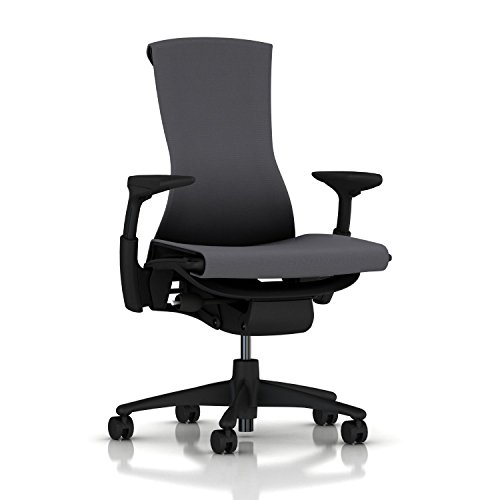
Herman Miller Embody Ergonomic Office Chair — Best Premium
Embody suits the full-time professional who sits eight-plus hours daily, has already tried mid-tier chairs, and wants the most complete arm adjustability in this roundup. It is the pick for people who treat the chair as a ten-year tool rather than a seasonal purchase.
Strengths
- Title states fully adjustable arms — the strongest arm claim in this list
- Carpet casters are specified in the title, useful for carpeted home offices
- A flagship ergonomic design from the best-known name in the category
Trade-offs
- Sits in the premium tier — the qualitative top of this roundup’s range
- The title does not state a capacity figure — Not stated in the verified title
- Its distinctive back design and firm, responsive feel divide opinion; it is not a plush chair
Key spec (from the verified listing title): Fully adjustable arms; carpet casters; Charcoal Rhythm finish as listed
Fully adjustable arms, as the title phrases it, is the claim to weigh if your work mixes typing, writing by hand, calls and reading: the more directions the rests move, the more postures they can support without you adapting to the chair. Buyers upgrading from a fixed-arm chair usually notice the difference in the first week, in shoulders that stay down and elbows that stay supported at desk height across tasks.
Be honest about the tier, though. This is a premium purchase, and the sensible way to judge it is cost per year of daily use, not the headline moment at checkout. If you sit all day, every workday, the arithmetic can favour the flagship; if you sit two hours in the evening, the SIHOO or Marsail above will serve you just as well in practice. The guide’s job is to match the chair to the hours, and Embody is matched to the longest ones.
Ownership note: allow a genuine adjustment period with this chair. Its responsive back feels unfamiliar for the first several days if you arrive from a padded chair, and many owners only judge it fairly in week two. Buy it for the long term and give it the fortnight it asks for.
Best for: full-time professionals sitting eight-plus hours who want fully adjustable arms and a flagship build / Not suited for: part-time desk users, for whom the mid-tier picks deliver the same daily comfort
Check on Amazon — check the current price on Amazon before you decide, because configurations and colours change.

Hbada E3 Air Ergonomic Office Chair — Best 4D Armrests
The E3 Air fits the tinkerer — the buyer who will actually spend twenty minutes dialling in a chair and then enjoy the result for years. The dynamic lumbar concept suits people whose back discomfort moves around, and the 4D arms suit mixed keyboard, mouse and tablet work.
Strengths
- 4D adjustable armrests confirmed in the title — the fullest movement set short of the premium pick
- 3-zone dynamic lumbar support is a distinctive, stated feature
- 3D adjustable headrest adds rare head-and-neck positioning
Trade-offs
- More adjustments mean more setup time; impatient buyers may never dial it in properly
- The title does not state a weight capacity — Not stated in the verified title
- Grey is the listed colour in the verified title; other colours are separate listings to check
Key spec (from the verified listing title): 4D adjustable armrests; 3-zone dynamic lumbar support; 3D adjustable headrest; grey
Four-dimensional arms typically combine height, width, forward-back sliding and pivot. In practice the width adjustment is the one people underestimate: narrow-shouldered users often find fixed-width arms force their elbows out, while broader users feel crowded. Being able to set width as well as height is what lets the armrests disappear from your attention entirely, which is the real goal of ergonomics.
The dynamic lumbar idea is the other half of this chair’s pitch. A support that responds across zones aims to keep contact as you shift between upright typing and a slight recline, instead of a single bump that only aligns in one posture. If you are a fidgeter who changes position every few minutes, that behaviour suits you better than a static support — and the 3D headrest completes a chair that adjusts at every contact point the title names.
Ownership note: photograph your final settings. With this many adjustments, a knocked lever or a helpful cleaner can undo twenty minutes of dialling-in, and a photo of the arm, headrest and lumbar positions restores your fit in seconds instead of another full setup session.
Best for: adjustment enthusiasts and position-changers who want 4D arms plus dynamic lumbar support / Not suited for: buyers who want to unbox, sit and never touch a lever again
Check on Amazon — check the current price on Amazon before you decide, because configurations and colours change.

CAPOT Ergonomic Mesh Office Chair — Best Flip-Up 4D Arms
CAPOT suits heavier users and compact rooms at the same time — an unusual combination. The flip-up arms let the chair push fully under the desk in a small home office, while the stated capacity and high back serve bigger, taller frames during long desk work.
Strengths
- 4D flip-up arms confirmed in the title — full adjustability plus fold-away storage
- Stated 400 lb capacity is the highest figure named in this roundup
- 3-level tilt backrest and 3D headrest are both stated features
Trade-offs
- Flip-up mechanisms add a moving joint; check the listing for how the arms lock in the down position
- PU wheels are named in the title — confirm they suit your floor type
- The feature list is long, so expect a longer assembly and setup session
Key spec (from the verified listing title): 4D flip-up arms; adjustable lumbar; stated capacity 400 lbs; 3-level tilt backrest; 3D headrest; PU wheels
Flip-up arms solve a problem the other five chairs cannot: storage. In a bedroom-office or a shared dining-table workspace, a chair that cannot slide under the desk eats floor space all evening. Arms that rotate up and away let this chair disappear under the desk, and because they are also 4D adjustable when down, you do not trade away working comfort for that trick.
The stated 400 lb capacity deserves emphasis because it is a number a buyer can actually verify against their needs, unlike vague heavy-duty language. Combined with the three-position tilt and adjustable lumbar support, this is the pick for the bigger user who has been burned by undersized chairs before — read the capacity in the title, check your desk clearance for the flip-up motion, and the rest of the decision is straightforward.
Ownership note: make the flip-up motion part of your daily routine from day one — arms up when the chair goes away, arms down and adjusted when work starts. Owners who build that habit report the storage benefit constantly; owners who do not, rarely use the feature they paid for.
Best for: heavier users and small rooms that need flip-up storage without giving up 4D adjustment / Not suited for: buyers who prefer the simplest possible arm mechanism with no folding joint
Check on Amazon — check the current price on Amazon before you decide, because configurations and colours change.
Comparison Table
| Pick | Badge | Key spec | Best for |
|---|---|---|---|
| SIHOO M18 Ergonomic Office Chair | Best Overall | 2D armrests; adjustable lumbar support; headrest; wide cushion; stated capacity 330 lbs; tilt lock | home-office workers who want confirmed 2D arms, adjustable lumbar support and a headrest in one mid-tier chair |
| Marsail Ergonomic Office Chair | Best 3D Armrests | 3D armrests; high-back mesh; adjustable lumbar support; headrest; rolling swivel task format | taller users and keyboard-heavy workers who want 3D arms with a high mesh back and headrest |
| HON Ignition 2.0 Ergonomic Office Chair | Best Established Brand | Adjustable arms (dimension count Not stated in the verified title); lumbar support; black workstation format | shared home offices and small businesses that want a proven brand with confirmed adjustable arms |
| Herman Miller Embody Ergonomic Office Chair | Best Premium | Fully adjustable arms; carpet casters; Charcoal Rhythm finish as listed | full-time professionals sitting eight-plus hours who want fully adjustable arms and a flagship build |
| Hbada E3 Air Ergonomic Office Chair | Best 4D Armrests | 4D adjustable armrests; 3-zone dynamic lumbar support; 3D adjustable headrest; grey | adjustment enthusiasts and position-changers who want 4D arms plus dynamic lumbar support |
| CAPOT Ergonomic Mesh Office Chair | Best Flip-Up 4D Arms | 4D flip-up arms; adjustable lumbar; stated capacity 400 lbs; 3-level tilt backrest; 3D headrest; PU wheels | heavier users and small rooms that need flip-up storage without giving up 4D adjustment |
How to Choose the Best Ergonomic Office Chairs With Adjustable Arms for Your Desk
Start with the desk, not the chair. Measure the height of your desktop and the clearance underneath it. Your armrests should be able to rise to just under desktop height so your forearms rest level while your shoulders stay down, and if the chair must store under the desk, the arms need to drop low enough — or flip up — to clear the apron. A chair with wonderful arms that cannot reach your desk height is the wrong chair, whatever its other features.
Next, count the adjustment directions you will genuinely use. Height-only adjustment fixes the most common problem. Width adjustment matters if you are notably narrow or broad across the shoulders. Forward-back sliding matters if you sit close to the desk or far back. Pivot matters for angled keyboard and mouse work. The 2D, 3D and 4D labels in the verified titles are shorthand for how many of those directions the arms cover — but brands count differently, so treat the number as a starting point and confirm the actual movements on the listing.
Then match the rest of the chair to the arms. Adjustable lumbar support that you can position beats a fixed bump. A headrest helps taller users and anyone who leans back for calls. Mesh backs breathe better in warm rooms; padded seats feel plusher in cold ones. None of these is universally better — the right combination is the one that matches your room, your clothing and your hours.
2D vs 3D vs 4D Arms: What the Numbers Actually Buy You
Two-dimensional arms typically adjust for height and one horizontal direction. For a single-user desk with a standard keyboard tray, that covers the great majority of real-world fitting problems, which is why the 2D pick leads this guide as Best Overall. If your shoulders are average width and your work is mostly straight-ahead typing, 2D is not a compromise — it is the correct amount of adjustment.
Three-dimensional arms add a third movement, often a pivot or a slide. The benefit appears in mixed work: one hand on a mouse reaching forward, drawing tablets, or keyboards used at a slight angle. Four-dimensional arms add the remaining direction, usually width or the full pivot set, and suit shared chairs and unusual body proportions best. The honest caveat is that each added dimension is another setting you must actually adjust; a 4D chair left at factory settings fits no better than a fixed-arm chair.
Flip-up arms sit outside the numbering entirely. Their job is clearance, not micro-fitting: they rotate away so the chair stores under the desk or lets you sit cross-legged. The CAPOT in this roundup combines both ideas — 4D adjustment plus flip-up storage — which is why it earns its own badge rather than competing directly with the fixed-position models.
Seat, Back and Capacity: The Checks Beyond the Arms
Arm adjustability gets the headline in this search, but returns are usually caused by the seat. Check the stated capacity in the title against your weight with a margin, and prefer chairs that print the number, as the SIHOO and CAPOT do here. If a title is silent on capacity, treat that as Not stated and check the listing’s specification section rather than assuming.
Back height decides who a chair really fits. High-back models with headrests suit taller users; mid-back models suit shorter users whose shoulders would otherwise meet the headrest at the wrong point. Lumbar support should be adjustable or dynamic if your back is particular — a fixed lumbar curve is designed for an average spine that may not be yours.
Finally, wheels and floors. The Embody listing specifies carpet casters; other titles name PU wheels or say nothing. Hard floors want softer wheels to avoid marking and noise, thick carpet wants larger casters to roll at all. It is a small detail that affects every single day of ownership, so it earns its place on the checklist.
Armrest Pads, Width and Desk Edges: The Details That Decide Comfort
Two arm details rarely appear in titles but decide daily comfort. The first is pad length: a longer pad supports the forearm through typing and mousing, while a short pad supports only the elbow and lets the forearm float. The second is the gap between the armrest and the desk edge. When you pull your chair in, the pads should slide under or stop just short of the desktop without a collision that jolts your shoulders — a daily annoyance that buyers rarely predict and always resent.
Width deserves a second mention because it interacts with clothing and season. Arms set for a summer shirt can feel tight in a winter jumper; arms with a little width travel forgive that. If two people share the chair, width and height are the two settings that will be changed most often, so favour chairs whose arm adjustments move by hand without tools — every pick in this guide adjusts without dismantling anything, which is part of why they were chosen.
Finally, think about what your forearms rest on during non-typing work. Reading, video calls, handwriting and drawing all change the forearm’s angle and position. That variety is the practical argument for 3D and 4D arms: not a spec-sheet contest, but the number of your actual working postures the pads can meet. Count your postures before you count the dimensions, and the right tier usually chooses itself.
How Long Adjustable Arms Should Last, and What Wears Out First
Arm mechanisms are moving parts, and moving parts are where chairs age. The height ratchets and sliding tracks in adjustable arms take a small load every time you push yourself up from the chair — which most people do by the armrests, several times a day, for years. A well-built mechanism stays tight; a cheap one develops a wobble that no adjustment fully hides, and a wobbling armrest undermines the entire point of buying adjustability.
You can extend the life of any of these chairs with two habits. Push up from the seat or the desk sometimes, rather than always levering your full weight through the pads. And once or twice a year, work through the arm adjustments through their full range and check for looseness or grit in the tracks; catching a slack fitting early is the difference between a two-minute fix and a permanent rattle.
Judge longevity claims the way this guide judges everything else: by what is stated. Established brands and stated capacities are the available evidence. The chairs here were chosen because their titles make concrete, checkable claims — and a seller willing to print a capacity and an arm specification in the title is generally a seller expecting the product to be examined.
Sharing an Adjustable Chair: Making Resets Fast
Shared chairs are where adjustable arms prove or lose their value. In a two-worker home, the chair is refitted at least twice a day, and any adjustment that needs a tool, a manual or real force simply stops being adjusted — the second user sits in the first user’s fit and concludes the chair is overrated. Every pick in this guide adjusts by hand, but they differ in how memorable their settings are: numbered or clicking positions reset reliably, while friction sliders drift into approximations.
If your chair will be shared, build a reset ritual and write it down. A card on the desk with each user’s arm height, width and lumbar position turns a five-minute fiddle into a thirty-second routine. Photograph the card, not just the chair, because numbers survive where memory of a slider position does not.
For a small business buying several chairs, the same logic scales: choose one model, publish one setup card per employee build, and the fleet stays fitted. The HON pick’s badge exists for this scenario. Adjustability that is easy to reset is a feature in its own right, and in shared spaces it outranks one more direction of exotic movement that only one person will ever set correctly.
Assembly Day: Getting Adjustable Arms Right From the First Bolt
Most arm problems are born during assembly. Armrests are usually fitted late in the build, when patience is shortest, and a bracket mounted one hole off or a bolt left a quarter-turn loose becomes the wobble an owner blames on the design for years. Assemble on a clear floor, lay the arm parts out in pairs, and tighten fixings evenly on both sides before the chair is first sat in. If the instructions offer a choice of arm width positions at the bracket stage — some chairs do — choose the middle setting and refine later from the adjustments, rather than guessing your width with a wrench.
After assembly, run the full fitting routine from this guide before the packaging leaves the house. Arms should travel their whole range smoothly, hold position under a firm downward push, and sit level with each other at identical settings; a visible mismatch at equal settings means a bracket needs reseating, and it is far easier to fix on day one than to prove in month three. Keep the tools and spare bolts in a labelled bag taped under the seat — future you, mid-wobble, will be grateful.
Finally, register the purchase details somewhere durable and keep the order confirmation. Chairs are long-lived, support is model-specific, and the buyer who can name their exact model and purchase date gets help fastest. It is unglamorous advice, and it is the difference between a two-day fix and a retired chair.
A Final Word on Trying Before You Commit
No specification sheet settles how a chair feels at hour six, so use the return window as part of the purchase rather than as a failure state. Order one chair, fit it properly with this guide’s routine, and work in it for several full days before deciding. If the arms cannot reach the position your shoulders need, that is data, not disappointment — the next pick on this list adjusts in a different direction, and your first trial has told you exactly which direction matters. Buyers who treat the first chair as a measurement, not a marriage, almost always end up in the right seat.
How to Set Up Adjustable Arms in the First Week
A new chair rarely fits on day one, because your old chair trained your expectations. Use this sequence across the first week, changing one setting at a time so you can feel what each adjustment does. Keep the tools the chair shipped with until the setup is finished, and photograph your final settings if the chair is shared.
- Set seat height first: feet flat on the floor, knees at roughly a right angle, thighs level or sloping very slightly down.
- Raise the armrests until your forearms rest on them with shoulders completely relaxed — if your shoulders lift, the arms are too high.
- Set arm width so your elbows hang naturally at your sides, not pushed out or pulled in.
- Slide the arm tops forward or back until the pad supports the forearm, not just the elbow point, while your hands reach the keyboard.
- Set any pivot so the pads align with the natural inward angle of your forearms while typing.
- Work a full day, then adjust lumbar support position and tilt tension; repeat the arm check on day three and day seven as the cushion settles.
Common Buying Mistakes
Buying the highest D-count by default. A 4D chair you never adjust fits worse than a 2D chair you set once, properly. Buy the adjustment set that matches your body and habits, not the biggest number.
Ignoring desk clearance. Arms that cannot drop or flip below the desktop apron mean the chair never stores away and the arm tops collide with the desk edge all day. Measure before ordering.
Trusting the phrase ‘adjustable arms’ without checking the title. Some listings use vague language. Every pick here was chosen because its verified title states the arm system plainly; apply the same standard to any chair you consider elsewhere.
Setting arms once and never revisiting them. Cushions compress and seasons change your clothing thickness. A two-minute re-check each month keeps the fit you paid for.
Forgetting the floor. The wrong casters on hard floors or thick carpet make a good chair feel broken. Confirm wheel type against your floor before the box is opened, not after.
Final Recommendation
If you want one recommendation: the SIHOO M18 is the chair most readers should buy — confirmed 2D arms, adjustable lumbar support, a headrest and a stated capacity at a mid-tier position. Step up to the Marsail or the Hbada E3 Air if you know you need pivot or width adjustment, choose the CAPOT if your room demands flip-up storage or its stated capacity, and treat the Herman Miller Embody as the long-hours flagship it is. The HON Ignition 2.0 is the quiet, safe choice for shared and small-business desks.
Whichever you choose, run the first-week setup routine in this guide. Adjustable arms only earn their name when someone adjusts them.
Related reading on this site: Best Ergonomically Correct Desk Chairs Best Executive Chairs For Short Women Best Ergonomic Chairs For Posture Best Desk Chairs For Sitting Long Hours Best Ergonomic Office Chairs Home
Frequently Asked Questions
What does 2D, 3D and 4D mean for chair arms?
The number counts the directions the armrests adjust — height plus combinations of width, forward-back sliding and pivot. Brands do not all count identically, so the verified titles here quote each chair’s label exactly, and the listing itself is the place to confirm which specific movements a given model includes.
Are flip-up arms as good as adjustable arms?
They solve a different problem. Flip-up arms give clearance for storage and cross-legged sitting; dimensional adjustment gives precise forearm support. The CAPOT in this guide offers both, which is why it is listed separately rather than ranked against the fixed-position chairs.
How high should my armrests be?
High enough that your forearms rest lightly with shoulders relaxed and elbows near a right angle while typing. If your shoulders rise, lower the arms; if your elbows hang below the pads, raise them. Your desk height is the reference point, not a number printed on the box.
Do I need a headrest on an ergonomic chair?
Not for upright typing, where your head balances over your spine. A headrest earns its place during calls, reading and reclined breaks, and it matters more the taller you are. Several picks here state a headrest in the title; the HON does not mention one, which is flagged in its review.
What if a chair’s title does not state a weight capacity?
Treat it as Not stated and check the specification section of the listing before buying. Two picks in this roundup print capacities in their titles — 330 lbs for the SIHOO M18 and 400 lbs for the CAPOT — which makes them the safer choices for heavier users.
Can adjustable arms help shoulder and neck tension?
Arms set at the right height let your shoulders stay down instead of holding your arms up all day, which is a common source of end-of-day tension. This is a comfort point, not a medical claim: persistent pain deserves professional advice, and no chair in this guide is presented as a treatment.


