Disclosure: airfryerkitchensupply.com is reader-supported. When you buy through links on our site, we may earn an affiliate commission at no extra cost to you.
Where to buy
If you are comparing the best compact audio mixers micromix shoppers actually need — the smallest boards that still mix properly — start with the verified shortlist below.
Micromix-class boards are sold through music retailers and Amazon’s instrument storefronts, often alongside audio interfaces — because, as this guide explains, that is the family they truly belong to. Buy by exact model: the two-channel boards below differ mainly in inputs, phantom power, and monitoring, and those small differences are the whole purchase. Every linked pick was verified against Amazon listing data feed, so the listing matches the device reviewed. Check the current price on Amazon before ordering.
Because these boards are small and light, they are also easy to buy from the wrong listing — confirm the model suffix letter by letter, since several picks here have near-identical siblings with different input counts.
- Behringer XENYX 302USB 5-Input Mini Mixer — Check on Amazon
- Yamaha AG03MK2 Live Streaming Mixer (Black) — Check on Amazon
- Mackie Mix5 5-Channel Compact Mixer — Check on Amazon
- CAD Audio MXU2 2-Channel USB Audio Mixer — Check on Amazon
- BOMGE M12 USB Audio Interface / 2-Channel Mixer — Check on Amazon
- Astatic M2 2-Channel Mixer with USB Interface — Check on Amazon
Shoppers searching for the best compact audio mixers micromix style are usually after the smallest possible thing that still deserves the name mixer: two to five inputs, one real microphone preamp, a headphone output, and a USB connection that turns the whole handful of hardware into a streaming or recording front end. That class — call it micromix — is what this article covers, with six verified picks: Behringer’s XENYX 302USB, Mackie’s Mix5, the CAD Audio MXU2, the BOMGE M12, Yamaha’s AG03MK2, and the Astatic M2. The bigger compact consoles live in the sibling article on compact audio mixers; this one is about the minimum viable mixer, done properly.
Honesty about the class matters. A micromix is not a small live console: it will not run a band, it has little or no EQ to speak of, and its second “channel” is often a line input rather than a second preamp. What it does superbly is sit between one microphone and one computer, or blend two sources inside a larger rig, in less space than a paperback. Buy it for that job and it is a delight; buy it for a four-piece band and no badge below can save the evening.
Terminology note: “micromix” is a shopper’s word, not a manufacturer’s category — you will not find it stamped on a box. It describes the bottom end of the compact class by size and intent, and this article uses it exactly that way, gathering the two-to-five-input boards that the broader compact article leaves behind. If a product below looks like an audio interface wearing a mixer’s name, that is because the two families genuinely merge at this size, and the buying guide explains how to tell which side of the merge a given board favors.
In this guide
Quick Picks
Six micromix-class boards, each the right answer to a slightly different one-microphone problem. Badges are identical in the Quick Picks and the full reviews — scan them, then read the two reviews that match your setup.
All six connect a microphone to the world with a minimum of fuss; they differ in whether that world is a stream, an interview, a speaker, or a spare-parts drawer in a working rig.
Behringer XENYX 302USB 5-Input Mini Mixer — Best Overall Micromix — Check on Amazon
The original micromix formula, still the default: one XENYX preamp, stereo line and RCA inputs, a proper headphone section, and USB that makes it an interface and a mixer at once. More small streams have started on this board than on any other in the list.
Yamaha AG03MK2 Live Streaming Mixer (Black) — Best Premium Micromix — Check on Amazon
Yamaha’s AG series is the micromix idea executed by a company that also builds broadcast consoles: loopback for stream audio, onboard DSP for voice polish, and a bundled software suite. The premium pick for streamers who will live in it daily.
Mackie Mix5 5-Channel Compact Mixer — Best Analog-Only Micromix — Check on Amazon
The purist’s micromix: one Mackie preamp, a tape path, headphone out, and a metal box — with no USB at all. For submix duty, small PA corners, and analog chains, the Mix5 is the board that will outlive the computer it never connects to.
CAD Audio MXU2 2-Channel USB Audio Mixer — Best Two-Channel for Interviews — Check on Amazon
Two proper XLR combo inputs and USB: the MXU2 is the smallest board here that can host a genuine two-microphone interview without adapters or compromises. CAD’s microphone heritage shows in a speech-first design.
BOMGE M12 USB Audio Interface / 2-Channel Mixer — Best Budget Micromix — Check on Amazon
The budget floor of the class, and a surprisingly complete one: XLR and 3.5mm inputs, 48V phantom power, USB plug-and-play. For karaoke, first recordings, and testing whether the streaming life is for you, the M12 risks the least money.
Astatic M2 2-Channel Mixer with USB Interface — Best Simple Voice Mixer — Check on Amazon
Astatic’s M2 is the no-drama two-channel: plug a microphone in, plug USB into the computer, be heard. From the CAD/Astatic family with deep roots in communication microphones, it is the presenter’s and announcer’s micromix.
How These Picks Were Chosen
The six picks were verified feed, matching each listing’s inputs, phantom power, and interface claims to its maker’s model line. The micromix class attracts a flood of generic two-channel devices whose listings could not be matched to any manufacturer specification; those were excluded, which is why this list is built from Behringer, Yamaha, Mackie, CAD, BOMGE, and Astatic rather than from alphabet-soup brands.
Ranking within the class followed three questions. Does it have at least one honest microphone preamp with phantom power? Does its USB path work without driver drama? And is its brief — solo streaming, two-voice interview, analog submix, budget start — executed completely rather than broadly? Each pick is the most complete execution of one of those briefs.
Durability of the recommendation itself was a final filter. The micromix shelf churns quickly at the generic end, with models appearing and vanishing between seasons; every pick here is a current, supported model from a maker with a catalog and a service channel, because a buying guide that points at a discontinued board has failed its only job. Where a budget brand earned a place — BOMGE — it did so on a verified current listing and a clearly stated starter brief.
The 6 Best Compact Audio Mixers (Micromix Class)
Each review names the exact brief the board serves, three strengths, three trade-offs, its verified specifications, and a bold verdict. Prices are not printed, as they move frequently in this class — check the current price on Amazon for the boards that fit your format.
Notice, as you read, how each review returns to the same question — what is the one job this handful of hardware must never fail at — because in the micromix class that question, answered honestly, is the entire buying decision.
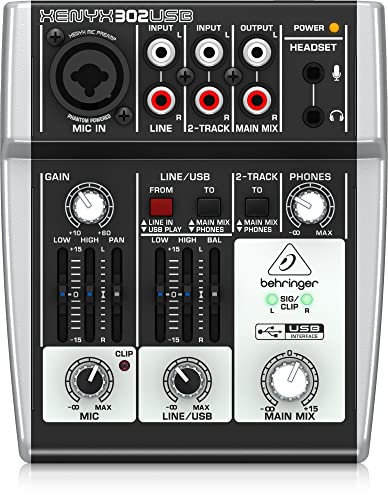
Behringer XENYX 302USB 5-Input Mini Mixer — Best Overall Micromix
The 302USB suits a solo streamer, podcaster, or voice-over beginner whose world is one microphone plus a computer. Its single preamp takes a dynamic or condenser mic (phantom power is on board), the line inputs carry game audio, music, or a second device, and the USB connection presents the blend to the computer as one clean source. The headphone output monitors the mix directly, which keeps your own voice out of the delayed-software-echo trap.
Strengths
- Mixer and USB interface in one tiny unit
- Phantom power for condenser microphones
- Headphone monitoring with its own level control
Trade-offs
- One preamp only — no second live microphone
- Minimal EQ: a basic 2-band on the mic channel
- Plastic-era Behringer build — desk duty, not road duty
| Inputs | 5 (1 mic, stereo line, RCA) |
| Preamps | 1 XENYX, phantom power |
| Interface | USB audio interface (per Amazon listing title) |
The 302USB’s longevity in the market is its review: the layout — mic on the left, playback in the middle, phones on the right — has been copied because it matches how a one-person show actually runs. Gain is adequate for the dynamic microphones most beginners own, and the RCA tape path doubles as an easy way to pull audio from older devices.
Its ceiling is the class ceiling, reached sooner: the day a co-host appears, this board retires to submix duty. That is not a failure — micromix boards make excellent second devices, blending a keyboard rig or a drum submix into a larger console — but buyers should purchase it knowing the succession plan.
Desk note: the 302USB’s small size invites clutter to swallow it. Mount it or weight it — a board this light migrates under its own cables, and a strip of hook-and-loop under the chassis is the two-minute fix every owner eventually discovers.
Best for: Solo streamers and podcasters starting with one microphone / Not suited for: Two-host formats or live bands
Check the current price on Amazon

Yamaha AG03MK2 Live Streaming Mixer (Black) — Best Premium Micromix
The AG03MK2 suits dedicated streamers and creators for whom the desk setup is a workplace, not a hobby corner. Its loopback function folds computer audio — game, music, alerts — into the stream mix under hardware control, the DSP provides compression and EQ shaped for voice without a plug-in chain, and the build and knobs feel like Yamaha’s larger MG line rather than a gadget. A software suite in the box covers recording from day one.
Strengths
- Loopback built for live streaming workflows
- Onboard DSP polishes voice without plug-ins
- Yamaha build, layout, and software bundle
Trade-offs
- Premium tier for the micromix class
- Feature depth means a real learning curve
- Still fundamentally a one-presenter device
| Type | Live streaming loopback mixer / USB interface |
| Channels | 6-channel streaming layout (per Amazon listing title) |
| Extras | Steinberg software suite included |
The AG03MK2 rewards the streamer who sets it up once, properly: voice chain dialed, loopback balanced against the mic, scenes understood. After that investment it is the fastest daily driver in this list — sit down, unmute, go live — because every recurring decision has a hardware control instead of a software menu. That speed compounds across hundreds of sessions.
Compare it honestly with the 302USB: the Behringer is the sketch, the Yamaha is the finished drawing. If streaming is occasional, the premium is hard to justify; if it is your job or your serious ambition, the AG03MK2 is the board in this class that you will not replace next year.
One more audience: musicians who stream performances. The AG03MK2’s input handling suits a voice-plus-instrument format with computer backing, and Yamaha’s preamp keeps an instrument honest. It is the micromix most likely to be found in a performer’s rig rather than a gamer’s, and that breadth is part of its value.
Best for: Serious streamers and creators wanting loopback plus voice DSP / Not suited for: Occasional users who need the simplest possible board
Check the current price on Amazon

Mackie Mix5 5-Channel Compact Mixer — Best Analog-Only Micromix
The Mix5 suits analog jobs: a keyboard player’s personal submix, a drummer blending click and tracks, a small room’s mic-plus-playback corner feeding powered speakers, a broadcaster’s backup board. One preamp with phantom power, a stereo line channel, and tape in/out cover the classic utility brief, and Mackie’s metal chassis and proven preamp make it the durability pick of the class.
Strengths
- Mackie preamp quality and metal build
- Dead-simple analog operation — nothing to configure
- Ideal submix and utility board inside bigger rigs
Trade-offs
- No USB — cannot feed a computer by itself
- One preamp, minimal EQ
- Streamers will need an interface as well
| Channels | 5 (1 mic/line, stereo line, tape) |
| Preamps | 1, with phantom power |
| Build | Metal chassis |
There is a philosophy in the Mix5 worth respecting: it refuses the streaming era entirely and does the older job flawlessly. In rehearsal rooms and small venues, that refusal is a feature — no drivers, no sample rates, no firmware, just gain and level that work identically every time power is applied. Engineers keep boards like this in the kit bag for the day the clever device misbehaves.
Buyers should be equally clear-eyed: as a streaming purchase the Mix5 is incomplete by itself, and pairing it with a separate interface costs more than buying a USB micromix. Its Best Analog-Only badge is a genuine recommendation and a genuine boundary at once.
Keyboard players, take note: as a personal submixer feeding the main board one stereo pair, the Mix5 is close to ideal — small, quiet, and tough enough for the top of a keyboard rig. That single use case has kept this board in production while flashier devices cycled out.
Best for: Submix duty, small analog rigs, and utility mixing / Not suited for: Direct-to-computer streaming without an interface
Check the current price on Amazon

CAD Audio MXU2 2-Channel USB Audio Mixer — Best Two-Channel for Interviews
The MXU2 suits interviewers, two-person podcasters on a budget, and field recordists who want two real microphones into one USB stream. Combo inputs accept XLR microphones or line sources, which makes the board flexible about guests who bring their own gear. CAD Audio’s background is microphones for broadcast and studio work, and the MXU2’s gain and voicing are tuned for speech intelligibility above all.
Strengths
- Two XLR combo inputs — a real two-mic setup
- USB connection for direct recording/streaming
- Speech-first design from a microphone maker
Trade-offs
- Two channels is the whole story — no expansion path
- Fewer extras than the Yamaha streaming pick
- Less widely stocked than Mackie or Behringer
| Channels | 2 |
| Inputs | XLR combo (per Amazon listing title) |
| Interface | USB audio mixer |
For the two-voice format, the MXU2 removes the usual micromix apology. Each speaker gets a preamp, a level, and a balanced connection; the USB feed carries the conversation as one track. Podcast pairs who record together in one room — still the most natural way to interview — get a setup that fits in a jacket pocket and sets up in two minutes.
The limits are structural and should be accepted at purchase: no third channel for music playback at level, no effects, no loopback tricks. It is an interview tool, superbly focused. Formats that are conversations will love it; formats that are productions should look at the Yamaha above or the compact article’s larger boards.
Field note: two-channel USB boards like this one have become the quiet standard for conference and deposition-style recording kits, where reliability and speech clarity outrank every feature. If your recording must simply never fail and never confuse, this is the shape of the answer.
Best for: Two-microphone interviews and podcast pairs / Not suited for: Productions needing music, effects, or a third source
Check the current price on Amazon

BOMGE M12 USB Audio Interface / 2-Channel Mixer — Best Budget Micromix
The BOMGE M12 suits beginners, karaoke hosts, and anyone equipping a spare or travel setup. The input mix is pragmatic — XLR for a real microphone, 3.5mm for the headsets and phones the real world actually contains — and 48V phantom power means a condenser mic is not locked out. As a USB sound card it is plug-and-play, which matters for the non-technical users who make up much of its audience.
Strengths
- Lowest-cost entry to the class in this guide
- 48V phantom power at a budget tier
- Plug-and-play USB — no driver wrestling
Trade-offs
- Build and preamp refinement trail the name brands
- Support and documentation are thinner
- A starter device most serious users will outgrow
| Channels | 2 |
| Inputs | XLR / 3.5mm (per Amazon listing title) |
| Phantom | 48V |
| Interface | USB, plug-and-play |
Judged as a first step, the M12 does the important things right: it gets a microphone sounding presentable into a computer with zero configuration drama, which is the moment beginners either catch the bug or quit. The karaoke framing in its listing is honest — living-room singing with effects from the host software is a real and joyful use, and the board serves it well.
The upgrade path should be understood, not feared. Everything learned on the M12 — gain, monitoring, levels — transfers directly to the Yamaha or Behringer picks when the hobby becomes a habit. Buying the budget board first and the serious board second costs slightly more than buying serious first; it costs far less than buying serious, quitting, and owning a monument.
Travel and backup kits are the M12’s second life: owners who upgrade often keep it, because a working two-channel USB mixer that fits anywhere is the definition of a useful spare. Few budget devices earn that retirement; most earn a drawer.
Best for: Beginners, karaoke, and spare/travel setups on a tight budget / Not suited for: Daily production work or critical recording
Check the current price on Amazon

Astatic M2 2-Channel Mixer with USB Interface — Best Simple Voice Mixer
The Astatic M2 suits announcers, presenters, houses of worship with a single announcement mic plus playback, and voice users who want the fewest possible decisions between them and intelligible audio. Astatic’s heritage is communication microphones — the voices of arenas and dispatch desks — and the M2 carries that priorities list: speech first, simplicity always, USB to the computer without a driver saga.
Strengths
- Extreme simplicity — a two-minute setup
- Speech-clarity heritage from Astatic/CAD
- USB interface built in
Trade-offs
- Minimal feature set by design
- Two channels only
- Less suited to music production than rivals
| Channels | 2 |
| Interface | USB (per Amazon listing title) |
| Type | Compact mixer / interface |
There is a real market wisdom in devices like the M2: most voice problems in small venues are not equipment-quality problems but equipment-complexity problems — the wrong knob, the muted channel, the software that updated itself overnight. A two-channel hardware mixer with almost nothing to misconfigure removes that entire failure class, which is why announcers’ booths and sacristies keep choosing this shape of tool.
Musicians and producers should look elsewhere in this list — the M2 has no ambitions in their direction and says so by omission. Voice-first users, conversely, should weigh it seriously against flashier streaming boards: every feature it lacks is a feature that cannot be set wrong before the event starts.
Pairing advice: the M2 with a good dynamic microphone is a complete announcement and narration station. Spend the savings against fancier boards on the microphone and a decent pair of headphones for monitoring — the two places a voice chain actually shows its quality.
Best for: Announcers, presenters, and single-voice installations / Not suited for: Music production or multi-source formats
Check the current price on Amazon
Comparison Table
| Pick | Badge | Key spec | Best for |
|---|---|---|---|
| Behringer XENYX 302USB 5-Input Mini Mixer | Best Overall Micromix | 5 inputs, 1 XENYX preamp, USB interface | Solo streamers and podcasters starting with one microphone |
| Yamaha AG03MK2 Live Streaming Mixer (Black) | Best Premium Micromix | Streaming mixer/interface, loopback, DSP, software suite | Serious streamers and creators wanting loopback plus voice DSP |
| Mackie Mix5 5-Channel Compact Mixer | Best Analog-Only Micromix | 5 channels, 1 mic preamp, metal chassis, no USB | Submix duty, small analog rigs, and utility mixing |
| CAD Audio MXU2 2-Channel USB Audio Mixer | Best Two-Channel for Interviews | 2 channels, XLR combo inputs, USB | Two-microphone interviews and podcast pairs |
| BOMGE M12 USB Audio Interface / 2-Channel Mixer | Best Budget Micromix | 2 channels, XLR/3.5mm input, 48V phantom, USB plug-and-play | Beginners, karaoke, and spare/travel setups on a tight budget |
| Astatic M2 2-Channel Mixer with USB Interface | Best Simple Voice Mixer | 2 channels, USB interface, Astatic (CAD family) | Announcers, presenters, and single-voice installations |
The table’s honest message is how small the differences look and how large they feel: one preamp versus two, USB versus none, loopback versus plain. In the micromix class you are not buying capability in bulk — you are buying the presence or absence of exactly one feature your format needs.
One row to study if you are new to the class: the Mix5, the only board here without USB, often confuses shoppers who assume every modern mixer connects to a computer. It does not, by design — and its presence in the list is a useful reminder to check the interface line of any board before assuming the streaming setup in your head is the one in the box.
How to Choose the Best Compact Audio Mixers Micromix Boards?
Start by admitting which of three buyers you are. The solo voice buyer — one microphone, one computer — needs one preamp, phantom power, headphone monitoring, and USB; that is the 302USB, AG03MK2, and M12 territory, separated by budget and ambition. The two-voice buyer needs two genuine preamps, which in this class means the CAD MXU2’s combo inputs — check this carefully, because many “2-channel” boards hide one preamp and one line input. The analog utility buyer needs no USB at all and should take the Mix5’s build quality.
Next, monitoring. Every micromix here offers some headphone path; the question is whether you can hear yourself without software delay. Direct or hardware monitoring is non-negotiable for comfortable speaking and singing — a delayed echo of your own voice is the fastest way to hate a setup that is otherwise fine. Confirm the board monitors the input directly before buying.
Finally, be honest about growth. A micromix is a commitment to a format size. If a co-host, a second instrument, or live speakers are plausible within the year, the correct purchase may be a compact mixer from the sibling article rather than the finest micromix in this one.
Micromix vs Compact Mixer vs Interface: Drawing the Borders
An audio interface converts; a micromix converts and blends a little; a compact mixer blends properly. The interface is the right tool for recording sources one at a time into software. The micromix is right when one or two sources must be blended live — with hardware levels and monitoring — on their way into a computer or a small speaker. The compact mixer is right when the blend itself is the performance: several microphones, EQ per channel, monitors, a room listening.
Money follows the same borders. Micromix money buys preamp quality for one voice; compact money spreads across channels. Creators routinely overspend by buying a compact for a one-mic desk — desk space and complexity they never use — or underspend by asking a micromix to run a duo’s live set. The two articles in this batch are written as a pair so the border is unmissable.
Getting a Clean Voice Recording from a Micromix
Technique outweighs tier in this class. Place the microphone close — a hand’s breadth for most dynamics — and slightly off-axis to soften plosives. Set gain so your loudest laugh stays clean; speech recorded a little quietly can be raised in software, but clipped speech is ruined permanently. Monitor on closed headphones so the microphone hears your voice, not the speakers.
Room beats gear at the next level: soft furnishings, a closet of clothes behind you, or even a blanket fort of cushions will improve a budget micromix recording more than an equipment upgrade will. And record a ten-second test before every session — levels drift, inputs get reselected by software updates, and the test is the cheapest insurance in audio.
How Much Should You Spend on a Micromix?
The class divides into three honest tiers. The starter tier, represented here by the BOMGE M12, buys a working voice chain and nothing else — the right spend for testing a format. The working tier — the 302USB, MXU2, Mix5, and M2 — buys preamp quality, build, and support that a daily user can feel, and it is where most buyers should land. The premium tier, the AG03MK2, buys workflow: loopback, DSP, and software that save minutes every session for someone who streams constantly.
The error at both ends is mismatching tier to usage. A daily streamer on a starter board pays in friction every single session; an occasional user on the premium board bought features that will never once be opened. Estimate your sessions per month honestly, multiply by the minutes each tier saves or costs, and the correct tier usually names itself.
How to Set Up a Micromix for Streaming or Podcasting
Step 1 — Connect the microphone with an XLR cable; enable phantom power only if the mic is a condenser. Step 2 — Connect USB directly to the computer, not through an unpowered hub. Step 3 — Select the board as the input and output device in your system and your recording or streaming software — both places, or you will hear nothing and record less. Step 4 — Set gain: speak at show volume, raise gain until levels are strong and clean, back off slightly.
Step 5 — Balance the blend: bring computer audio (game, music, co-host feed) up under your voice until it supports without competing; on loopback boards like the AG03MK2, this balance is a hardware knob — use it. Step 6 — Monitor on headphones plugged into the board, and confirm you hear yourself without delay. Step 7 — Record a test, listen back on the headphones and once on speakers, then save a photo of the knob positions. Step 8 — Label the USB cable at both ends; in a dark desk tangle, the labeled cable is the one that gets replugged correctly.
Step 9 — Save the setup as a scene, even if the scene is paper. Photograph the knobs, note the software’s selected devices, and keep both with the board. Step 10 — Do a cold restart test. Power everything down, restart in your show order, and confirm the setup returns without adjustment. The setup that survives a restart is the setup you actually own.
Common Buying Mistakes
Buying a “2-channel” board for two microphones without checking preamps. One preamp plus one line input is the class’s classic trap. Phantom power confusion. Condensers need it; ribbons of the classic type can be harmed by it; dynamics ignore it — know your microphone. Monitoring through software. The delay will make you stumble; use the board’s headphone path. Gain at the top. Clipped speech cannot be repaired; leave headroom. USB through a bargain hub. Dropouts follow; plug the board in directly. Outgrowing in a month. If the format is already growing, buy the compact class instead and skip a purchase cycle.
Treating the headphone jack as an afterthought. Monitoring is half the product in this class; a board whose headphone path you hate is a board you will replace. Buying for the studio you imagine. Buy for the format on this week’s calendar; the class is cheap enough that upgrading when the format truly grows is a rational plan, not a failure.
Phantom Power, Combo Jacks, and Other Micromix Terms Decoded
Phantom power is 48 volts sent down the microphone cable to run condenser microphones, which contain electronics that need power. Dynamic microphones — the handheld stage type — do not need it and safely ignore it. Combo jacks are sockets that accept either an XLR plug (microphone) or a quarter-inch plug (line or instrument) in the same hole, which is how tiny boards offer flexible inputs without a forest of connectors. Loopback is the streaming feature that folds the computer’s own audio back into the outgoing mix, so your audience hears the game and the alerts along with your voice.
Two more terms decide purchases. Direct monitoring means the headphones hear the microphone from the hardware, before the computer — no delay. Multitrack means each input records to its own track; no board in this article does it, because multitrack is an interface-class feature, and formats that need it should shop in that class with this article’s blessing.
The Micromix as a Submixer: Second Lives for Small Boards
Owners of growing rigs often discover that a micromix’s best years come after its first job ends. As a keyboard submixer, it blends two keyboards into one stereo pair for the main board. As a drum submix, it tames electronic pads or a kick-and-overhead pair. As a broadcast spare, it sits in the kit bag waiting to rescue a failed main setup — a role where its simplicity is worth more than features. As a teaching board, it lets a student learn gain and balance on hardware that cannot be misconfigured into silence.
This second-life value changes the buying math slightly in favor of the durable picks. The Mix5 and the Yamaha will serve a decade of odd jobs; the budget boards serve their first job honorably and may or may not be asked for a second. Neither outcome is a mistake — but knowing which you are buying is the difference between a tool and a toy.
Karaoke, Classrooms, and Other Places Micromix Boards Quietly Rule
Not every audio job is a production. The karaoke host needs a microphone blended with a laptop’s backing tracks into a small speaker, with a volume knob a guest cannot bury in a menu. The teacher recording lessons needs one good microphone and a record button that works the same way every morning. The community-hall volunteer needs the announcement mic louder than the slideshow audio and nothing else from the equipment, ever. These are micromix jobs, and the boards in this guide — BOMGE’s karaoke-friendly M12, Astatic’s announcement-bred M2, Behringer’s classroom-standard 302USB — serve them better than any full console precisely by refusing to be one.
The shared trait of these venues is that the operator is not an audio person and should not have to become one. Hardware with five honest controls beats software with fifty hidden ones in every such room. When you equip a space like this, choose the board whose front panel you could explain over the phone, and write the two settings that matter on a card taped to it. That card, more than any specification, is what the next operator will thank you for.
Troubleshooting a Micromix: No Sound, Hiss, and USB Gremlins
Problem: nothing records. Check the chain in order — microphone cable seated, phantom power on if the mic is a condenser, gain up, the board selected as the input device in both the operating system and the app. Two selection points is the step everyone misses. Problem: constant hiss behind the voice. The gain is likely low and the software volume high; raise the hardware gain until your voice is strong, then lower downstream levels. Problem: USB disconnects mid-session. Move the board to a direct computer port with a short, quality cable; hubs are the first suspect and usually the culprit.
Problem: the second input is whisper-quiet. You have likely plugged a microphone into a line input — the class’s signature trap — and the fix is a preamp, not volume: use the board’s mic channel, or choose a two-preamp board like the MXU2. Problem: voice sounds boxy. The microphone is too far away or off to the side; move it closer and on-axis before touching any EQ. Micromix troubleshooting is refreshingly physical: cables, gain, distance, and selection solve nearly everything.
Choosing a Microphone to Match a Micromix
The microphone matters more than the board in this class, and the pairing logic is simple. Dynamic microphones forgive rooms: they hear mostly what is close to them, so an untreated bedroom or a lively hall stays out of the recording. They pair naturally with every preamp here and need no phantom power. Condenser microphones hear everything, beautifully — including the refrigerator, the traffic, and the room’s echo — and reward treated, quiet spaces with detail dynamics cannot match. They need the phantom power these boards provide.
For most micromix buyers, the honest recommendation is a good dynamic first. It makes the whole chain forgiving: gain staging is easier, monitoring is cleaner, and the recording sounds intentional in almost any room. Add a condenser later, when the room deserves one. Spend the board-class savings there, in that order, and a micromix setup will embarrass far more expensive rigs that got the order backwards.
Final Recommendation
For the classic one-microphone desk, the Behringer 302USB remains the value default, and the Yamaha AG03MK2 is the upgrade that serious streamers will keep for years. Two voices belong on the CAD MXU2. Analog utility belongs to the Mackie Mix5, announcements to the Astatic M2, and the tightest budgets to the BOMGE M12, which asks the least and delivers a working start. Match the board to the format you truly run, check the current price on Amazon, and spend what you save on the microphone.
Whichever board you choose, make the purchase complete in one order: the board, one good XLR cable, and headphones if you do not own a pair you trust. A micromix without its cable and monitoring is a promise, not a setup — and the difference between the two is about ten minutes of shopping done now instead of a second delivery waited on later.
- Behringer XENYX 302USB 5-Input Mini Mixer (Best Overall Micromix) — Check on Amazon
- Yamaha AG03MK2 Live Streaming Mixer (Black) (Best Premium Micromix) — Check on Amazon
- Mackie Mix5 5-Channel Compact Mixer (Best Analog-Only Micromix) — Check on Amazon
- CAD Audio MXU2 2-Channel USB Audio Mixer (Best Two-Channel for Interviews) — Check on Amazon
- BOMGE M12 USB Audio Interface / 2-Channel Mixer (Best Budget Micromix) — Check on Amazon
- Astatic M2 2-Channel Mixer with USB Interface (Best Simple Voice Mixer) — Check on Amazon
Keep exploring the mixer range on this site: Best Compact Audio Mixers Best Compact Digital Mixers Best Compact Portable Sound Mixers Best Compact Mixers Under $100 Dollars Best Podcast Mixers
Frequently Asked Questions
What is a micromix mixer?
A micromix is the smallest class of real mixer: roughly two to five inputs, at least one microphone preamp, basic level control, and usually a USB connection. It serves one or two sources — typically a single microphone plus a computer — rather than a whole band or room.
Can I run two microphones on a micromix?
Only if the board has two preamps. In this guide that is the CAD MXU2 with its two XLR combo inputs. Boards like the 302USB have one preamp; their second input is line-level and cannot properly amplify a second microphone.
Do I need phantom power?
If your microphone is a condenser, yes — it will not work without it. Dynamic microphones do not need it. All the USB picks in this guide provide phantom power on their preamp, so either microphone type is safe to choose.
Is a micromix good enough for streaming?
For a solo streamer, it is not merely good enough — it is the standard shape of the job, providing hardware gain, direct monitoring, and a blend of voice and computer audio in one small device. The Yamaha AG03MK2 exists specifically to do this at a premium level.
Can a micromix connect to speakers for a live event?
A micromix can feed powered speakers for very small voice-and-playback duties — the Astatic M2 and Mackie Mix5 do this in announcement and utility roles. For music performance or rooms of any size, step up to the compact mixers in the sibling article.
What is loopback and do I need it?
Loopback sends the computer’s audio back into your outgoing stream mix, so viewers hear games, music, and alerts. Streamers who play or react to content need it — the AG03MK2 provides it in hardware. Podcasters recording only voices generally do not.
Why does my voice echo in my headphones?
You are monitoring through software, which delays the signal. Plug the headphones into the mixer’s own output and enable its direct monitoring path so you hear your voice from the hardware instantly.
Should I buy a micromix or an audio interface?
Buy the micromix if you blend sources live — voice plus computer audio — and want hardware control. Buy an interface if you record sources one at a time and do all blending in software, or if you need multitrack recording.


