Disclosure: airfryerkitchensupply.com is reader-supported. When you buy through links on our site, we may earn an affiliate commission at no extra cost to you.
Where to buy
If you are shopping for the best beginner passive mixers, start with the shortlist below. A passive mixer — the term the live-sound world uses for an unpowered mixing console — shapes and combines your microphone and instrument signals but contains no power amplifier, so it must feed powered speakers or a separate amplifier. Every board below is a current model sold through Amazon, which is where we recommend buying a first mixer: the listing states the exact channel layout and interface type, and returns are straightforward if you count your inputs wrong the first time, as many beginners do.
- Mackie Mix8 8-Channel Mixer — check the current price on Amazon and confirm the exact variant on the listing before you order.
- Behringer XENYX 802S 8-Input Mixer — check the current price on Amazon and confirm the exact variant on the listing before you order.
- Yamaha MG10 10-Input Stereo Mixer — check the current price on Amazon and confirm the exact variant on the listing before you order.
- Soundcraft Notepad-8FX Mixing Console — check the current price on Amazon and confirm the exact variant on the listing before you order.
- Allen & Heath ZED-6 Compact Mixer — check the current price on Amazon and confirm the exact variant on the listing before you order.
- Behringer XENYX 502S 5-Input Mixer — check the current price on Amazon and confirm the exact variant on the listing before you order.
Buy the board that matches the inputs you actually own today plus one spare channel, not the biggest board you can stretch to. On a first passive mixer, clean gain, honest metering and a layout you can learn beat a long feature list you will never open.
The best beginner passive mixers solve a specific first problem: you have two, three or four sound sources — a voice, a guitar, a keyboard, a phone playing backing tracks — and one pair of speakers, and you need one place where levels, tone and a touch of reverb come together. The word passive confuses newcomers, so let us settle it in the first hundred words: a passive (unpowered) mixer does not make sound louder by itself. It needs powered speakers, or a power amplifier driving passive speakers, downstream. That is not a weakness. It is the normal architecture of almost every small venue, rehearsal room, classroom and home studio, because it lets you upgrade the mixer and the speakers independently as your needs grow.
Beginners are also sold two wrong ideas about this category. The first is that more channels automatically means better; in practice a beginner uses four to six inputs for the first year, and an eight-input board with good preamps serves longer than a sixteen-input board with noisy ones. The second is that a mixer with a built-in amplifier is simpler. A powered mixer locks your amplifier and your console into one box, one failure point and one upgrade path. The six unpowered boards in this guide are the boards experienced players consistently hand to beginners: small, honest, widely understood, and easy to resell or hand down when you outgrow them.
Every pick below was confirmed as a current Amazon listing before writing, and the range deliberately spans the real beginner budgets: an ultra-compact five-input starter, two eight-input all-rounders, an effects-equipped board for singers, a compact premium option, and a ten-input step-up for a beginner who already knows a small band is coming. If your sources are mostly a single microphone and a laptop, the smallest boards here are not a compromise — they are the correct tool.
In this guide
Quick Picks
Six unpowered boards, six different beginner situations. Badges are consistent between this list and the full reviews further down.
Best Overall — Mackie Mix8 8-Channel Mixer
The Mix8 is the board we would hand a beginner who wants one purchase to last. Eight channels in Mackie’s Mix Series format means real microphone inputs for a voice and an instrument or two, stereo inputs for a keyboard or phone, and a famously rugged metal chassis at this size. It has no USB and no effects, and that simplicity is the point: every knob does one obvious thing while you learn gain staging.
Best for Streaming and Home Recording — Behringer XENYX 802S 8-Input Mixer
The 802S is the beginner board for people whose audience is partly online. The listing confirms an eight-input premium analog mixer with a USB streaming interface, so the same board that mixes your microphone and guitar for a room can send a stereo mix to a computer for a stream or a simple recording. It is the natural first board for podcasters, lesson teachers and hybrid performers.
Best Step-Up for a Small Band — Yamaha MG10 10-Input Stereo Mixer
The MG10 is the pick for a beginner who is not really a solo beginner: a duo becoming a trio, a school group, a small worship team. Ten inputs with proper XLR connectivity, in Yamaha’s long-running MG format, give you headroom in both channels and audio quality, without stepping into the complexity or cost of a mid-size console. Buy it when you can already name the extra sources you will plug in.
Best with Built-In Effects — Soundcraft Notepad-8FX Mixing Console
Singers notice dry vocals. The Notepad-8FX is a small-format analog console whose listing confirms USB I/O and Lexicon effects — Lexicon being a name with genuine reverb heritage — so a beginner vocalist gets tasteful space around a voice without buying a separate effects unit. It is the pick for solo performers and duos who perform live and want to sound finished in the room.
Best Compact Premium — Allen & Heath ZED-6 Compact Mixer
The ZED-6 is the small board for a beginner who buys tools carefully and keeps them. The listing confirms an ultra-compact six-input mixer from Allen & Heath, a maker whose live consoles are a professional standard. You get fewer inputs and no effects or USB — what you pay for is build quality, clean sound and a board that feels precise every time you touch it.
Best Ultra-Budget Starter — Behringer XENYX 502S 5-Input Mixer
The 502S is the honest minimum viable mixer: a premium analog five-input board with a USB streaming interface, per its listing. One microphone, one instrument or stereo source, a pair of powered speakers or headphones, and a computer connection for streaming or recording. For a bedroom creator, a student or a first karaoke and practice setup, it teaches the same fundamentals as its bigger siblings at the smallest commitment.
If you only remember one line: count your microphone inputs first. Channel counts on the box include stereo line inputs that cannot take a microphone, and that single misunderstanding causes more returns than any other in this category.
How These Picks Were Chosen
These picks were chosen the way a working sound volunteer would choose a first board for a friend. First, every model had to be a true passive (unpowered) analog mixer from a maker with a real service and documentation footprint — no generic boards with invented specifications. Second, every model had to be verified as a current, orderable Amazon listing, with the exact model name matching the listing title; anything we could not verify that way was left out rather than guessed at.
Third, we weighted the things beginners actually feel in the first month: microphone preamp gain that does not hiss when a quiet singer leans back, EQ knobs that make an obvious, musical difference, a headphone output for silent practice and troubleshooting, and a layout with enough space between knobs for learning hands. Fourth, we favoured boards whose manuals, tutorial videos and community knowledge are easy to find, because a beginner’s real product is the learning curve, not the hardware.
Finally, we spread the six across size and intent rather than picking six near-identical boards: one ultra-compact starter, two eight-input generalists that differ on USB streaming versus plain reliability, one board with proper built-in effects for vocalists, one compact premium build, and one ten-input step-up. Prices move constantly in this category, so this guide uses check-price links instead of printed figures that would be stale within weeks.
- True passive design: unpowered console that pairs with powered speakers or a separate amplifier
- Verified current Amazon listing, exact model match
- At least two genuine microphone preamps on all but the ultra-compact starter pick
- Beginner-legible layout: clear channel strips, visible metering, standard XLR and jack connections
- Documented maker with manuals and tutorials a first-time owner can actually find
- No fixed prices or ratings printed — check price on Amazon for the current figure
The 6 Best Beginner Passive Mixers
Each review states plainly who the board suits, where it is strong, where it honestly falls short, and the listing-verified specifications. Badges match the Quick Picks above.

Mackie Mix8 8-Channel Mixer — Best Overall
The Mackie Mix8 earns Best Overall because it teaches the fundamentals without distractions and survives being taught on. Mackie’s Mix Series was designed as the affordable end of a professional live-sound line, and the Mix8 keeps the family traits that matter: a steel chassis instead of flexing plastic, smooth-feeling knobs, and microphone preamps with enough clean gain for dynamic microphones of the kind beginners actually own. For a first passive mixer feeding a pair of powered speakers at a coffeehouse gig, a classroom, a place of worship or a rehearsal room, this is the reference layout to learn on.
Strengths
- Rugged metal construction that tolerates bags, classrooms and shared spaces
- Clean, forgiving preamps for common dynamic microphones
- Simple, spacious channel strips that make gain staging easy to learn
Trade-offs
- No USB interface, so recording to a computer needs a separate interface
- No built-in effects — vocal reverb requires an external unit or a different pick
- Eight channels is a ceiling a growing small band will eventually reach
Key specs (from the manufacturer’s Amazon listing title):
- Channels: 8 (Mix Series 8-channel layout, per listing title)
- Finish: Black, per listing title
In daily beginner use, the Mix8’s virtues are quiet ones. The channel EQ is voiced to be useful rather than surgical, so a new owner hears an obvious improvement when they cut a little low end from a boomy acoustic guitar instead of wondering whether the knob did anything. The auxiliary send gives you a path to a single monitor mix or an external effects unit later, which means the board grows one step with you instead of being replaced the first time you want a wedge. Paired with any decent powered speakers, it covers solo and duo performance, presentations with music playback, and small ensemble rehearsals. What it will not do is record multitrack to a laptop or add hall reverb to a voice — if either is on your first-year list, look at the Behringer 802S or the Soundcraft Notepad-8FX below before deciding.
Best for: beginners who want a durable, learn-it-once board for live sound with powered speakers / Not suited for: streamers who need USB recording or singers who need built-in reverb from day one
Check the Mix8 on Amazon — check price on Amazon and read the full listing details for the current configuration.

Behringer XENYX 802S 8-Input Mixer — Best for Streaming and Home Recording
Behringer’s XENYX line is the value benchmark of small mixers, and the 802S is its modern beginner expression: an eight-input analog console whose listing highlights a USB streaming interface. That one feature changes the board’s job description. Instead of being only a live mixer, it becomes the front end of a small content setup — microphone and instrument in, a balanced stereo mix out to powered speakers for the room and to a laptop for the stream or the lesson call. For a beginner whose music lives both in a room and on a screen, that dual role is worth more than extra channels.
Strengths
- USB streaming interface built in for recording and live streaming
- Eight inputs cover voice, instrument and stereo playback sources
- XENYX preamp family is well documented, with abundant beginner tutorials
Trade-offs
- USB carries a stereo mix rather than separate multitrack channels
- Compact top panel is denser than the Mackie, so knobs sit closer together
- No built-in effects processor for live vocal polish
Key specs (from the manufacturer’s Amazon listing title):
- Inputs: 8, per listing title
- Design: Premium analog mixer, per listing title
- Interface: USB streaming interface, per listing title
The honest way to judge the 802S is by the beginner workflows it completes without extra boxes. A singing teacher can run a microphone and a piano or backing track, hear themselves properly through powered speakers, and send the same mix to a video lesson. A podcaster with a co-host can balance two voices against a phone or laptop feed and record the result in one pass. The trade-off is depth: the USB path is a stereo sum, so you cannot remix individual channels afterwards, and there is no onboard reverb, so a dry vocal stays dry unless your streaming software adds it. Beginners who mainly perform live in rooms, with no computer involved, will find the simpler Mackie Mix8 calmer to learn; beginners who mainly create at a desk will find this board the more complete first purchase.
Best for: beginners who stream, teach online or record simple stereo mixes at a desk / Not suited for: bands who need many microphone inputs or multitrack recording
Check the XENYX 802S on Amazon — check price on Amazon and read the full listing details for the current configuration.

Yamaha MG10 10-Input Stereo Mixer — Best Step-Up for a Small Band
Yamaha’s MG series is one of the most widely used small-mixer families in the world, and the MG10 is its natural beginner step-up: a ten-input stereo mixer with XLR connectivity, per the verified listing. Beginners meet MG boards in schools, churches and rental inventories everywhere, which has a practical benefit nobody puts on a spec sheet — whatever you learn on this layout transfers, and whoever you ask for help has probably used one. The MG10 suits a beginner whose source count is already real: two or three voices, instruments, and stereo playback, all needing to sound clean at once.
Strengths
- Ten inputs give a small group room to grow without a second purchase
- Yamaha MG layout is an industry-common language in schools and venues
- XLR connectivity throughout the microphone channels for proper balanced cables
Trade-offs
- No USB and no built-in effects in this base MG10 configuration
- Larger and heavier than the eight-input picks — less of a throw-in-a-bag board
- Beginners using only two sources will leave most of the board idle
Key specs (from the manufacturer’s Amazon listing title):
- Inputs: 10, per listing title
- Format: Stereo mixer, per listing title
- Connectivity: XLR, per listing title
- Finish: Black, per listing title
What the step-up money buys here is composure under load. With several microphones open at once — the situation that makes cheap boards sound thin and hissy — the MG10 keeps individual voices separable and lets the operator ride levels instead of fighting noise. That matters for a beginner leading a small group, because your attention should be on the performers, not on rescuing the sound. The omissions are equally clear: this configuration has no USB path and no effects engine, so a singer who wants reverb needs an external processor and a recording plan needs an interface. Treat the MG10 as a live-sound instrument first. If your group performs in rooms far more than it records at desks, that priority is exactly right, and this is the board in the list most likely to still be in regular use five years from now.
Best for: beginners running a duo, trio, school or worship group with several microphones / Not suited for: solo desk creators who need USB streaming or built-in effects
Check the MG10 on Amazon — check price on Amazon and read the full listing details for the current configuration.
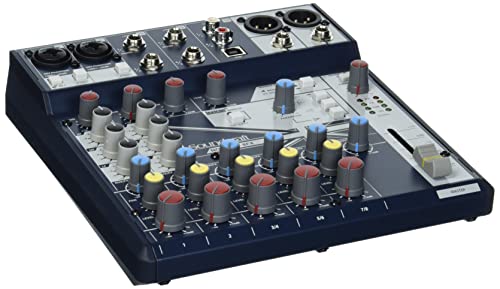
Soundcraft Notepad-8FX Mixing Console — Best with Built-In Effects
The Soundcraft Notepad-8FX answers the most common beginner complaint about small passive mixers: my voice sounds flat and exposed. Its verified listing describes a small-format analog mixing console with USB I/O and Lexicon effects, and that effects name matters. Lexicon reverbs are a studio staple, and even a modest selection of well-voiced halls and delays transforms a solo set in a hard-surfaced cafe or hall. Soundcraft’s console heritage shows in the layout, too: this is a small board that behaves like a shrunken professional desk rather than a gadget.
Strengths
- Lexicon effects built in — the key upgrade for live vocalists
- USB I/O covers simple recording and playback alongside live mixing
- Soundcraft console layout feels orderly and professional to learn on
Trade-offs
- Effects are shared across channels rather than a full processor per channel
- Small-format panel packs a lot into little space; read the manual first
- Still a passive board — powered speakers or an amplifier remain essential
Key specs (from the manufacturer’s Amazon listing title):
- Format: Small-format analog mixing console, per listing title
- Interface: USB I/O, per listing title
- Effects: Lexicon effects, per listing title
For a performing beginner, the Notepad-8FX removes an entire category of extra purchase and extra cabling. There is no external reverb unit to power, patch and balance; the effect is simply there on the channel, at the twist of a knob, which means a nervous first-time performer actually uses it. The USB I/O is the quiet second benefit: rehearsals can be recorded as a stereo mix for honest self-review, which improves beginners faster than any gear upgrade. Where expectations need managing is scale and depth. This is a small board for solo and duo work, not a band console, and its effects, while genuinely good, are a shared resource with sensible rather than endless editing. If your act is a voice, an instrument and an audience in a real room, this is the most performance-ready beginner board in the six.
Best for: solo singers and duos who perform live and want polished vocals without extra gear / Not suited for: groups needing many mic inputs or engineers wanting deep effects editing
Check the Notepad-8FX on Amazon — check price on Amazon and read the full listing details for the current configuration.

Allen & Heath ZED-6 Compact Mixer — Best Compact Premium
Allen & Heath’s ZED family brings the company’s touring-console standards down to desktop size, and the ZED-6 is its ultra-compact six-input member, exactly as the verified listing states. This is the connoisseur’s beginner pick. A presenter, a classical or jazz duo, a voice-over artist or a careful home player who needs only a handful of inputs will appreciate what the money buys: a solid-feeling chassis, smooth controls and a clean, unhyped sound that flatters good microphones. It is a board about quality per channel rather than quantity of channels.
Strengths
- Premium Allen & Heath build and control feel at desktop size
- Clean, honest sound that suits speech, acoustic instruments and good microphones
- Ultra-compact footprint fits a desk, lectern or small stage corner
Trade-offs
- Six inputs is a hard ceiling — no room for a growing ensemble
- No USB interface and no built-in effects at this size
- Premium positioning means fewer features per unit of budget than value rivals
Key specs (from the manufacturer’s Amazon listing title):
- Inputs: 6, per listing title
- Format: Ultra-compact audio mixer, per listing title
- Model: AH-ZED-6, per listing title
The ZED-6 makes most sense when the beginner’s real requirement is trust. A speech at a wedding, a recorded interview, a livestreamed lesson with a fine microphone: in those moments a board that simply never adds hiss, crackle or confusion is worth more than two spare channels. Its compactness is also honest — it disappears onto a desk or a small table in a way the ten-input Yamaha never will. The discipline it demands is foresight about inputs. Count a microphone for each simultaneous voice and instrument that needs its own level, add playback, and if the total is anywhere near six, choose a bigger board now. Within its ceiling, though, the ZED-6 is the pick a beginner is least likely to replace out of dissatisfaction; people outgrow its size, not its sound.
Best for: beginners with few inputs who value build, clarity and a compact footprint / Not suited for: anyone whose group might expand beyond six inputs
Check the ZED-6 on Amazon — check price on Amazon and read the full listing details for the current configuration.
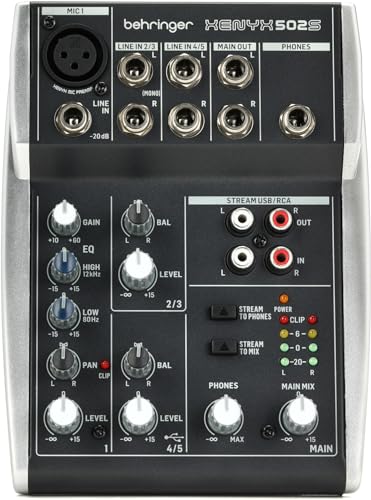
Behringer XENYX 502S 5-Input Mixer — Best Ultra-Budget Starter
Every category needs an honest entry point, and the Behringer XENYX 502S is this one: a five-input premium analog mixer with a USB streaming interface, as its verified listing states. It exists for the beginner whose whole rig is one microphone and one more source — a guitar, a keyboard or a phone — and who wants to hear that combination properly through powered speakers, headphones or a stream. Small boards like this are sometimes dismissed as toys; used within their limits, they are actually the fastest way to learn what a mixer does, because every control maps to something you can hear.
Strengths
- Smallest, simplest way to learn real mixer fundamentals
- USB streaming interface connects the same setup to a computer
- Tiny footprint suits a student desk or bedroom studio corner
Trade-offs
- Five inputs with limited microphone capacity — a duo is already a stretch
- No built-in effects and minimal EQ compared with larger boards
- Most owners who get serious will upgrade within a year or two
Key specs (from the manufacturer’s Amazon listing title):
- Inputs: 5, per listing title
- Design: Premium analog mixer, per listing title
- Interface: USB streaming interface, per listing title
Judge the 502S as a teaching tool and a starter interface and it succeeds completely. Set a microphone level, blend an accompaniment underneath it, balance the result in headphones, then send it to a laptop — that loop, repeated for a month, teaches gain, EQ and monitoring more thoroughly than reading about them. Its ceiling is equally obvious and should be stated plainly: there is no spare capacity. A second singer, a stereo keyboard plus a phone, or any small-group ambition outgrows it at once, and there are no effects to sweeten a voice. Buy it when the budget is genuinely tight or the use is genuinely solo, and buy it knowing an upgrade path exists through the 802S and beyond. Bought with those eyes open, it is money well spent rather than money spent twice.
Best for: solo beginners, students and bedroom creators with one microphone and one source / Not suited for: duos, groups or anyone who needs a spare channel from the start
Check the XENYX 502S on Amazon — check price on Amazon and read the full listing details for the current configuration.
Comparison Table
The six boards side by side. Note how the differences are about role — streaming, effects, scale, build — rather than a simple ladder of better and worse.
| Pick | Badge | Key spec | Best for |
|---|---|---|---|
| Mackie Mix8 8-Channel Mixer | Best Overall | 8 channels, Mix Series compact format | beginners who want a durable, learn-it-once board for live sound with powered speakers |
| Behringer XENYX 802S 8-Input Mixer | Best for Streaming and Home Recording | 8 inputs with USB streaming interface | beginners who stream, teach online or record simple stereo mixes at a desk |
| Yamaha MG10 10-Input Stereo Mixer | Best Step-Up for a Small Band | 10 inputs, XLR connectivity, stereo MG format | beginners running a duo, trio, school or worship group with several microphones |
| Soundcraft Notepad-8FX Mixing Console | Best with Built-In Effects | Analog console with USB I/O and Lexicon effects | solo singers and duos who perform live and want polished vocals without extra gear |
| Allen & Heath ZED-6 Compact Mixer | Best Compact Premium | 6 inputs, ultra-compact ZED format | beginners with few inputs who value build, clarity and a compact footprint |
| Behringer XENYX 502S 5-Input Mixer | Best Ultra-Budget Starter | 5 inputs with USB streaming interface | solo beginners, students and bedroom creators with one microphone and one source |
How to Choose a Beginner Passive Mixer
Start with the sentence beginners most need to hear: a passive mixer is half of a sound system. The other half is amplification. Your mixer takes microphones and instruments at whisper level, balances them, and sends out a line-level mix; powered speakers (with amplifiers built in) or a power amplifier plus passive speakers turn that mix into room-filling sound. Budget and plan for the whole chain — mixer, two speaker cables or balanced leads, microphone cables, and the speakers themselves — or the best board in this guide will sit silent on your desk.
Next, count microphone inputs, not headline channels. A board advertised with eight or ten inputs typically offers two to four true microphone preamps, with the remaining inputs as stereo line channels for keyboards, phones and playback. List everything you will plug in at the same time, mark which items are microphones, and choose a board whose preamp count covers that list with one to spare. That single exercise prevents most beginner returns.
Then decide honestly about two features: USB and effects. USB matters if a computer is part of your music — streaming, online lessons, recording rehearsals. Effects matter if a human voice performs live in real rooms, where a little reverb is the difference between exposed and polished. Neither matters much for instrumental rehearsal or speech-only presentation, and skipping both buys you a simpler, sturdier board like the Mackie Mix8.
- Count simultaneous sources, then count microphones separately
- Plan the full chain: mixer plus powered speakers or amplifier, plus cables
- Choose USB only if a computer is genuinely part of your workflow
- Choose built-in effects if live vocals are central to your use
- Leave one spare input beyond today’s list — guests and growth happen
Passive vs Powered Mixers: Which Should a Beginner Buy?
A powered mixer combines the console and the amplifier in one box and drives unpowered speakers directly. It is a legitimate format for a fixed small venue that values one-box simplicity, and it is the format most beginners picture when they hear the word mixer. Its costs are hidden: the amplifier’s power is fixed forever, a failure in either half sidelines both, and the combined box is heavier and harder to place than a small console on a table near the performer.
A passive mixer separates the jobs. That separation is why professionals work this way at every scale: the console lives within arm’s reach, the amplification lives in or near the speakers, and each half can be repaired, borrowed or upgraded on its own. For a beginner building a first rig that should grow — better speakers next year, a bigger board the year after — the passive route in this guide is the flexible default. Choose powered only when the setup is truly fixed, simple and unlikely to change.
One more vocabulary trap deserves clearing up. Passive can also describe certain DI boxes and summing devices with no power supply at all. Those are studio accessories, not consoles. Every board in this guide is an active electronic mixer in the engineering sense — it plugs into the wall — and is called passive only in the live-sound sense of having no speaker power amplifier inside. If a listing seems to promise a mixer that needs no power at all, it is not a beginner console; keep looking.
What Else a First Passive Mixer Setup Needs
The board is the centre of a first rig, not the whole of it. You will need a microphone and a balanced XLR cable for each voice or amplified instrument, a pair of powered speakers (or an amplifier and passive speakers), and the leads to connect mixer to speakers. A microphone stand, a small table or stand for the mixer itself, and headphones for setup and silent practice complete a working kit. None of this is optional decoration: a beginner who budgets only for the console cannot make sound.
Buy cables a step better than the cheapest. Intermittent crackle from a failing cable is the most common beginner fault of all, and it masquerades as a broken mixer. Label both ends of every cable with tape while the rig is new; the habit will save you at every setup for years. Finally, keep the manuals. Small mixers reward a careful first read — signal flow diagrams in particular — more than any other document in your music room.
- Microphone plus XLR cable per simultaneous voice or instrument
- Powered speakers, or amplifier plus passive speakers
- Mixer-to-speaker leads of the correct type for your speakers
- Headphones for gain setting, troubleshooting and silent practice
- A stand or stable surface that puts the board within arm’s reach
How to Set Up a Beginner Passive Mixer for the First Time
Your first setup teaches the signal chain in the right order and, done carefully once, becomes a five-minute routine forever after. Work with everything powered off, connect in order from sources to speakers, and only then bring levels up slowly. Keep master volume low until every channel has been tested one at a time — feedback is almost always a level problem, and it is always avoidable at setup volume.
- Place the mixer where the operator sits or stands, and the powered speakers ahead of the microphones, facing the audience area — never behind the singers.
- With everything off, connect each microphone with an XLR cable to a microphone input, and instruments or playback devices to line inputs.
- Connect the mixer’s main outputs to the powered speakers (or to the amplifier) with the correct balanced leads.
- Set every channel gain and the master level to minimum, channel EQ to its centre detent, and power the system on — speakers last.
- One channel at a time: sing or play at real performance level while raising that channel’s gain until the signal is strong and clean, then bring up its fader to a sensible balance.
- Add any stereo playback source and balance it underneath the live sources rather than against them.
- If your board has effects, add a small amount to the vocal channel only, then stop — beginners almost always use too much.
- Finish by walking the room while someone performs: check the back corners and the sides, and adjust the master level and EQ for the room, not for the mix position.
To shut down, reverse the power order — speakers or amplifier first, then the mixer — so switch-off thumps never reach the drivers. Coil cables loosely, and note any channel, cable or input that misbehaved while you still remember it. Troubleshooting a small rig is mostly memory plus substitution: swap the cable, then the channel, then the source, one change at a time, and the fault will identify itself.
Common Buying Mistakes
First mixers are rarely ruined by bad buying; they are undermined by a handful of predictable setup and expectation errors. These are the ones worth avoiding from day one.
- Expecting the mixer to power speakers by itself — a passive board needs powered speakers or an amplifier, every time
- Counting headline channels instead of microphone preamps, then discovering the third singer has nowhere to plug in
- Setting gain by eye or copying someone else’s knob positions instead of by ear at real performance level
- Buying the biggest board available and then never learning it, when a smaller board would have been mastered in a month
- Skipping headphones, which are the beginner’s best tool for isolating noise, crackle and imbalance
- Running microphone cables and power cables in one tangled loom, then chasing the resulting hum for weeks
Final Recommendation
If you buy one board from this guide and stop thinking about mixers for a year, make it the Mackie Mix8: it is the durable, legible centre of a first live rig. If your music lives at a desk as much as in a room, the Behringer XENYX 802S adds the USB streaming path that workflow needs, while the Soundcraft Notepad-8FX is the pick we would give a performing vocalist for its Lexicon effects. A beginner with a real small group should step straight to the Yamaha MG10, a beginner with two sources and high standards to the Allen & Heath ZED-6, and a beginner with a tight budget and a solo act to the Behringer XENYX 502S — each is the right answer to a different first question.
Whichever board you choose, pair it with powered speakers you have heard, cables a step above the cheapest, and one spare input of headroom. The mixer cluster in this programme covers the neighbouring decisions in depth: start with Best Beginner Mixers for the wider beginner field, compare the value end in Best Bang For Your Buck Audio Mixers, and step up to Best 12 Channel Audio Mixers and Best Behringer Mixers when a growing group outgrows a first board. The brand-focused companion to this guide is Best Behringer Mixers, and the stand-mixer side of the same category word lives in Best Bowl Mixers.
Before you decide, re-check the shortlist leaders at their current listings: Mackie Mix8 8-Channel Mixer, Behringer XENYX 802S 8-Input Mixer, Yamaha MG10 10-Input Stereo Mixer — check price on Amazon for each and confirm the exact variant.
- Best Beginner Mixers
- Best Bang For Your Buck Audio Mixers
- Best 12 Channel Audio Mixers
- Best Behringer Mixers
- Best Bowl Mixers
Frequently Asked Questions
What does passive mean in a passive mixer?
In live sound, passive (unpowered) means the mixer has no built-in power amplifier for speakers. It shapes and combines signals at line level and must feed powered speakers, which contain their own amplifiers, or a separate amplifier driving passive speakers. The mixer itself still plugs into mains power for its electronics. Almost all professional small-format mixing follows this pattern because it lets you place, upgrade and replace the console and the amplification independently.
Can I use a passive mixer without an amplifier?
Only through powered speakers, headphones or a recording device — all of which contain their own amplification for their own drivers. You cannot connect a passive mixer’s outputs directly to unpowered speakers and expect usable volume; there is no speaker-level power present. If your speakers are passive, a power amplifier between mixer and speakers is essential, and its power rating should suit the speakers as the speaker maker specifies.
How many channels does a beginner really need?
Most beginners use between two and six simultaneous inputs in their first year: one or two microphones, an instrument, and a stereo phone or keyboard feed. An eight-input board therefore fits most first rigs, with the crucial check being microphone preamps rather than total channels. Buy one spare input beyond today’s list. Only choose ten or more inputs if you can already name the sources that will fill them, as with a small band or worship group.
Do I need USB on my first mixer?
You need it if a computer is part of the act: streaming, online teaching, recording rehearsals or performances, or playing backing tracks you want integrated and recorded together. USB on these small boards carries a stereo mix to and from the computer, not separate multitrack channels. If you perform only in rooms and never record, a simpler board without USB is calmer to learn and often sturdier for the money. Desk-based creators should treat USB as close to essential.
Why does my microphone sound quiet and hissy on a small mixer?
Usually the channel gain is too low and the fader or master is compensating, which raises the noise floor along with the voice. Set gain first, with the singer performing at real level, until the channel signal is strong and clean; then balance with the fader. Also check that a dynamic microphone is close enough to the singer’s mouth — a few centimetres makes more difference than any knob — and that the cable is a proper balanced XLR lead in good condition.
Can a beginner passive mixer record a small band?
It can record the stereo mix of a performance if it has USB or you add a small interface or recorder on its outputs — a useful rehearsal and demo tool. It cannot record each instrument on its own track for later remixing; that requires a multitrack interface or a digital mixer with per-channel USB. Many beginners happily work in stereo for the first year or two, because a well-balanced live mix recorded in stereo teaches balance faster than any multitrack safety net.


