Disclosure: airfryerkitchensupply.com is reader-supported. When you buy through links on our site, we may earn an affiliate commission at no extra cost to you.
Where to buy
The six mixers below are current Amazon listings, each with a USB audio path that Pro Tools can use: the Mackie Onyx16 for true multitrack recording, the Allen & Heath ZEDi-10FX as a compact 4×4 hybrid, the Soundcraft Signature Plus 12 for premium stereo tracking, the Yamaha MG12XU for simple reliability, the Behringer XENYX QX1204USB on a budget, and the Mackie ProFX12v3+ for modern hybrid features. Check the current price on Amazon on the exact listing, and confirm the USB specification in the manual before ordering — that one detail decides everything in this category.
Introduction
Searching for the best analog mixers that work with Pro Tools raises a question most roundups dodge: what does “work with Pro Tools” actually require? The honest answer is simpler than marketing suggests. Modern Pro Tools records from any compatible USB audio interface — it no longer demands proprietary hardware — so an analog mixer works with Pro Tools exactly to the extent that its USB connection works as an audio interface. That means the real buying decision is not compatibility in the abstract; it is the mixer’s USB architecture. Some boards send only the finished stereo mix. A few send several discrete channels. One class of board in this guide sends every channel separately, which is what serious Pro Tools tracking usually wants.
This guide covers six analog mixers whose USB paths are verified against their current Amazon listings, and it labels each one’s recording architecture plainly, because that specification — not the brand, not the channel count in the product name — determines your Pro Tools workflow. We also explain how each class of board is actually used with Pro Tools in practice: as a multitrack front end, as a stereo tracking and summing surface, or as a monitor-and-mix hub alongside the DAW. Pro Tools itself appears in several tiers and versions; every board here works on the same principle, as a standard USB audio device the software can select as its playback engine.
One more honesty note: an analog mixer is not a control surface for Pro Tools. Its faders move analog audio, not the DAW’s mixer, and its knobs do not send MIDI or HUI commands unless a specific model says so. What you are buying is an analog front end — preamps, EQ, summing, and monitoring — that feeds Pro Tools beautifully. For the many engineers who track through hardware and mix in the box, that is exactly the right tool, and the six below are its best current forms.
In this guide
Quick Picks
- Best Overall for Pro Tools: Mackie Onyx16 — multitrack USB sends every channel to Pro Tools separately, with SD recording as a safety net.
- Best Compact: Allen & Heath ZEDi-10FX — a 4-in/4-out USB interface inside an analog mixer, ideal for small Pro Tools rigs.
- Best Stereo Tracking: Soundcraft Signature Plus 12 — Ghost preamps and USB-C for engineers who print stereo mixes and overdubs.
- Best Simple and Reliable: Yamaha MG12XU — class-friendly stereo USB, D-PRE preamps, and one-knob compression for tracking vocals and instruments.
- Best Budget: Behringer XENYX QX1204USB — stereo USB recording with effects and compression at the friendliest tier here.
- Best Modern Hybrid: Mackie ProFX12v3+ — USB recording, Bluetooth playback for reference tracks, and GigFX+ effects.
How These Picks Were Chosen
We began with analog mixers that present themselves to a computer as USB audio devices, then verified each model against its live Amazon listing. Boards without any USB path were excluded from the picks — they can feed Pro Tools only through a separate interface, which is a different purchase (and a legitimate one, discussed in the buying guide). Within the USB field we scored: recording architecture first (multitrack over multi-channel over stereo, matched to use case), preamp quality for tracking, the monitoring path (analog direct monitoring matters for latency-free overdubs), and build quality for studio installation. We describe Pro Tools behavior generically and accurately — select the mixer as the playback engine, arm tracks, set levels — without inventing version-specific claims, and we flag where a manufacturer’s driver or class-compliant design affects setup.
The 6 Best Analog Mixers That Work With Pro Tools

Mackie Onyx16 — Best Overall for Pro Tools
The Onyx16 is the only board in this guide that treats Pro Tools the way a studio interface does: its multitrack USB connection delivers the individual channels to the DAW as separate tracks, so a band tracked live through its Onyx preamps and Perkins EQ lands in Pro Tools ready to edit, balance, and mix. An SD card recorder built into the board captures the same performance with no computer attached — insurance that has saved real sessions — and the analog surface remains a complete mixer for monitoring and rehearsals when the DAW is closed.
Strengths
- True multitrack USB into Pro Tools — every channel its own track.
- SD recording backup removes the computer as a single point of failure.
- Perkins EQ and Onyx preamps make tracking decisions at the source.
Trade-offs
- The largest investment and the most setup of any pick here.
- Multitrack sessions demand file management discipline afterward.
- Size suits a fixed studio installation.
In a Pro Tools workflow the Onyx16 occupies the role of console-plus-interface: performers monitor through the analog path with no perceptible latency, the engineer rides real faders during the take, and Pro Tools quietly records everything discretely for the mix stage. Overdubbing against the multitrack session works the same way — the new part tracks through a channel strip with EQ printed if you choose, while the DAW plays back through the board’s returns. If your Pro Tools room records real ensembles, this is the board the rest of the guide is measured against.
Best for: Pro Tools studios tracking bands and ensembles / Not suited for: one-source-at-a-time producers who need only an interface. Check the current price on Amazon.
Allen & Heath ZEDi-10FX — Best Compact
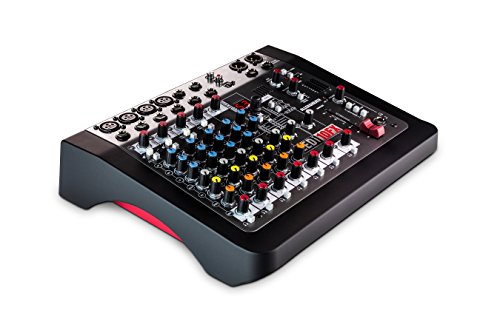
The ZEDi-10FX is the compact answer to the multitrack question: its built-in USB interface is 4-in/4-out, so Pro Tools receives up to four discrete channels — enough for a vocal plus guitar plus a stereo source, recorded as separate tracks — while the analog side provides zero-latency monitoring, GSPre preamps, and two dedicated guitar DI inputs for direct tracking. For small Pro Tools rigs that record small combinations, it delivers the essential multitrack experience at desktop scale.
Strengths
- 4×4 USB interface records discrete tracks into Pro Tools, not just a stereo mix.
- Guitar DI inputs simplify direct guitar and bass recording.
- Analog monitoring keeps overdubs latency-free.
Trade-offs
- Four inputs cap the size of a simultaneous recording.
- EQ is a simpler design than the larger ZED boards’.
- Compact surface suits desks, not large control rooms.
Songwriters and small-studio owners use this board exactly as its designers intended: the Pro Tools session lives on the computer, the performances live on the board, and the 4×4 bridge between them is wide enough for the way they actually record — one or two sources at a time, occasionally a small group. The onboard ZED effects let a vocalist track with reverb in the headphones while Pro Tools records dry, which is the professional overdub workflow in miniature. As a first hardware front end for a Pro Tools rig, it teaches the right habits on honest equipment.
Best for: small Pro Tools studios, songwriters, and podcast-plus-music rooms / Not suited for: full-band tracking. Check the current price on Amazon.

Soundcraft Signature Plus 12 — Best Stereo Tracking
The Signature Plus 12 serves the other legitimate Pro Tools philosophy: track beautifully in stereo and overdub with intent. Its Ghost preamps are the quietest-feeling front end in this guide, the EQ is voiced for musical shaping at the source, and the USB-C connection feeds Pro Tools a polished stereo capture — a live band mix, a piano-and-voice performance, a summed synth rig — while its low-latency monitoring and Lexicon effects keep performers comfortable. Engineers who print decisions rather than deferring them will feel at home immediately.
Strengths
- Ghost preamps deliver premium tracking quality for stereo and overdub work.
- USB-C suits modern laptops and clean desk setups.
- Lexicon effects for performer monitoring without printing.
Trade-offs
- Stereo USB only — no per-channel tracks for remixing.
- Premium tier pricing.
- Twelve channels fill quickly on full-band sessions.
The honest use case is a studio whose Pro Tools sessions are built from performances and overdubs rather than giant simultaneous takes: track the rhythm section as a crafted stereo print, overdub leads and vocals through the same lovely preamps, and mix in the box with everything already sounding like a record. Singer-songwriter and jazz or acoustic studios work this way by tradition, and the Signature Plus 12 is the board that flatters the method most. Choose it for sound quality per channel over channel count.
Best for: stereo tracking, overdub-based studios, acoustic and songwriter work / Not suited for: engineers who remix full bands from discrete tracks. Check the current price on Amazon.

Yamaha MG12XU — Best Simple and Reliable
The MG12XU is the board Pro Tools beginners and working small studios reach for when they want the setup to simply work. Its stereo USB connection is selected as the playback engine, levels are set on D-PRE preamps that stay quiet under condenser microphones, and one-knob compressors on the main channels keep vocal takes out of the red without plug-in assistance. The layout is the clearest in this guide, which matters when the engineer is also the performer.
Strengths
- D-PRE preamps and simple USB make tracking dependable and quiet.
- One-knob compression protects takes at the source.
- Clear layout suits engineer-performers and small teams.
Trade-offs
- Stereo USB only; no discrete multitrack path.
- SPX effects are functional rather than luxurious.
- Monitor sends are limited for complex cue mixes.
Voice-over and podcast studios, rehearsal rooms that archive every session into Pro Tools, and project studios built on overdubs all run happily on this formula: record the stereo board mix or track sources in passes, monitor in analog, and let Pro Tools handle editing and mixing. The MG12XU’s reliability is its feature — it behaves identically every session, which is what a working room actually needs from its front end.
Best for: small Pro Tools studios, voice and podcast work, overdub workflows / Not suited for: multitrack band recording. Check the current price on Amazon.

Behringer XENYX QX1204USB — Best Budget
The QX1204USB brings a Pro Tools-compatible analog front end down to the most accessible tier in this guide. Its stereo USB interface records the board mix into Pro Tools, the XENYX preamps and per-channel one-knob compressors handle the tracking basics, and the Klark Teknik effects engine provides monitoring ambience for performers. For a first Pro Tools room, a school studio, or a rehearsal space that archives sessions, it covers the workflow honestly at a budget level.
Strengths
- Lowest-cost entry here to mixer-plus-USB tracking with Pro Tools.
- Onboard compressors and effects support complete beginner workflows.
- Twelve-input format covers small-group stereo recording.
Trade-offs
- Stereo USB only, and preamps get noisy at extreme gain.
- Build quality trails the Yamaha, Mackie, and Soundcraft picks.
- Confirm driver/OS behavior for your system during setup.
Expectations set correctly, the QX1204USB is a rational purchase: it teaches the full analog-front-end workflow — gain staging, EQ at the source, analog monitoring, stereo printing — on equipment a student budget can reach, and its recordings are limited more by the room and microphones than by the board at this level. Studios commonly keep one as the rehearsal-room board after graduating the main room to a multitrack setup, which is a sensible second life.
Best for: first Pro Tools rooms, schools, and rehearsal archiving / Not suited for: multitrack work or high-gain quiet-source recording. Check the current price on Amazon.

Mackie ProFX12v3+ — Best Modern Hybrid
The ProFX12v3+ fits Pro Tools rooms that also stream, teach, and publish. Its USB connection records the stereo mix into Pro Tools for sessions and lessons, Bluetooth streams reference tracks and playback from a phone without repatching, and the GigFX+ engine supplies monitoring effects. Onyx preamps keep the tracking side respectable, and the single-knob compressors protect the channels most likely to carry a lead vocal or a loud guest.
Strengths
- Bluetooth reference playback integrates naturally with Pro Tools sessions.
- Onyx preamps deliver clean stereo tracking and overdubs.
- USB blend and monitoring suit hybrid recording/streaming rooms.
Trade-offs
- Stereo USB only.
- One monitor send limits complex cue setups.
- Feature-rich surface takes an evening to learn fully.
Teachers and content-producing studios get the most from this board: a lesson records into Pro Tools, a reference track plays from a phone for comparison, a student’s performance tracks in stereo with effects in their headphones — all without touching a cable. It is the lifestyle end of the Pro Tools front-end market, and within its stereo architecture it is complete and well judged.
Best for: teaching studios, hybrid record/stream rooms, small overdub studios / Not suited for: multitrack recording. Check the current price on Amazon.
Comparison Table
| Pick | Badge | Key spec | Best for |
|---|---|---|---|
| Mackie Onyx16 | Best Overall for Pro Tools | Multitrack USB + SD recording | Tracking bands into Pro Tools |
| Allen & Heath ZEDi-10FX | Best Compact | 4×4 USB interface, guitar DI inputs | Small multitrack rigs |
| Soundcraft Signature Plus 12 | Best Stereo Tracking | Ghost preamps, USB-C, Lexicon FX | Printed stereo and overdubs |
| Yamaha MG12XU | Best Simple and Reliable | D-PRE preamps, stereo USB, compressors | Small studios and voice work |
| Behringer XENYX QX1204USB | Best Budget | Stereo USB, Klark Teknik FX | First rooms and schools |
| Mackie ProFX12v3+ | Best Modern Hybrid | USB recording, Bluetooth, GigFX+ | Teaching and streaming studios |
How to Choose an Analog Mixer for Pro Tools
Start by deciding how your Pro Tools sessions are actually built. If you record ensembles and expect to rebalance them later, only multitrack architecture serves you — in this guide, the Onyx16 — and that requirement should be settled before any other comparison. If you record small combinations, the ZEDi-10FX’s four discrete channels cover the realistic takes. If you print stereo performances and overdub, every stereo board here qualifies, and the choice turns on preamp quality and monitoring, where the Signature Plus 12 and MG12XU lead their tiers. Naming your session style first converts a confusing market into a short list, which is why this guide is organized by architecture rather than by brand.
Second, verify the USB reality of any board you consider, in the manual rather than the marketing. Look for the explicit statement of how many channels the interface sends to the computer. “USB audio interface” without a channel count almost always means stereo. Multitrack boards state their count proudly because it is their headline feature. Third, consider the monitoring path: overdubbing demands that performers hear themselves without delay, and analog direct monitoring through the mixer is the dependable solution at every tier here — confirm the board lets you monitor inputs while Pro Tools plays back, which all six picks do.
Fourth, remember what the mixer does not do. It does not control Pro Tools’ faders, does not provide DSP plug-in processing inside the DAW, and does not replace the computer’s role in the system. Buy it as a front end and monitoring hub — the role where analog genuinely improves a Pro Tools room — and you will be satisfied for years. Buy it expecting a control surface and no mixer at any price will meet the expectation.
How to Set Up an Analog Mixer With Pro Tools, Step by Step
Connect the mixer to the computer with a quality USB cable, directly rather than through an unpowered hub, and power the mixer on before launching Pro Tools so the software sees the device at startup. In Pro Tools, open the Playback Engine settings and select the mixer as the audio device; then open the I/O Setup window and confirm the input and output paths reflect the mixer’s channels — on a multitrack board you should see the individual inputs, on a stereo board a single stereo pair. Create a session at your standard sample rate, and set the hardware buffer generously at first; because you will monitor through the analog board, latency settings can favor stability over speed.
Wire the monitoring deliberately: studio monitors connect to the mixer’s control-room or main outputs, and performers’ headphones to the board’s headphone or aux feeds, so all monitoring happens in analog with no delay. Set each channel’s gain with the performer playing at full energy, watching the Pro Tools track meters peak healthily below clipping, and enable input monitoring on the board rather than relying on software monitoring through the DAW. Record a thirty-second test, play it back through the board, and only then start the session in earnest — this test catches wrong I/O assignments, a muted return, or a sample-rate mismatch while they are still free to fix.
For overdubs, the routine is: play the session back through the mixer’s USB return or line inputs, give the performer a headphone mix built on the board, track the new part through a channel strip with any EQ or gentle compression you intend to print, and keep the recorded track dry of effects by feeding monitoring reverb from the board’s effects engine to the headphones only. That separation — print the tone, monitor the space — is the professional pattern, and every board in this guide supports it within its architecture.
Common Buying Mistakes
The category’s defining mistake is assuming “works with Pro Tools” means multitrack. Most USB mixers send stereo; the phrase only promises that Pro Tools can record from the board, which is true of every pick here but means very different workflows. Read the interface specification, not the headline. The second mistake is expecting the mixer’s faders to control Pro Tools. Analog boards do not send control data; if DAW control matters to you, that is a separate control-surface purchase, and conflating the two leads to returns.
Third, buyers neglect the return path: a board used with a DAW must play the session back conveniently for overdubs and mixing reference, so check how USB playback routes and whether it can sit on its own channel or return. Fourth, they buy channel count instead of architecture — a sixteen-channel stereo board does less for a band-tracking Pro Tools room than a sixteen-channel multitrack one, at any price. Fifth, they skip the compatibility check with their current operating system and Pro Tools version during the return window, when it is free. And sixth, they forget the room around the system: monitors, headphones, cables, and a desk layout that puts the board’s surface where hands actually work.
Final Recommendation
For a Pro Tools studio that records real ensembles, buy the Mackie Onyx16 — it is the complete multitrack answer. For small-scale multitrack and direct guitar work, choose the Allen & Heath ZEDi-10FX. For printed stereo tracking at premium quality, the Soundcraft Signature Plus 12; for simple dependability, the Yamaha MG12XU; for a first room on a budget, the Behringer XENYX QX1204USB; and for hybrid teaching and streaming work, the Mackie ProFX12v3+.
It is also worth deciding, before the board arrives, where it will sit and how the room’s cabling will reach it: a front end that lives in its working position, permanently wired to the monitors and the main microphones, gets used on every idea, while one that must be assembled per session quietly discourages recording. Permanence is a workflow feature, and in Pro Tools rooms it is often the difference between a demo that exists and one that was only ever discussed.
Before ordering, run one final check that takes five minutes and prevents the most common return in this category: open the manual of the board you have chosen, find the USB specification, and read the exact sentence that states how many channels it sends to the computer. Compare that sentence with the workflow you actually run — multitrack, four-track, or stereo — and confirm they match. Then check the board against your computer’s ports and your operating system. Do those two things and the mixer that arrives will be the mixer you meant to buy, which sounds obvious and is, empirically, where most buyers in this category go wrong.
Continue with the series: Best Analog Mixers With Usb, Best Analog Mixers For Studios, Best Analog Mixers For Live Sound And Studio, Best Analog Mixers For Live Sound, Best Analog Mixers Synthesizer.
Using a Non-USB Analog Mixer With Pro Tools
It is worth stating clearly, because many excellent analog boards have no USB at all: they still work with Pro Tools perfectly well — through an audio interface. The mixer becomes the front end, its main or direct outputs feed the interface’s inputs, and Pro Tools records whatever the interface receives. Studios have worked this way for decades, and the arrangement has real advantages: the interface can be upgraded independently, its converters and drivers are purpose-built, and the mixer can be chosen purely for its analog qualities. A board like a classic VLZ or ZED without USB, paired with a competent interface, is a legitimate professional Pro Tools front end.
The trade is an extra device, extra cables, and one more gain stage to manage. Levels must be set so the mixer’s outputs arrive at the interface in its healthy range, and the interface’s channel count decides how much of the mixer you can record discretely — a two-input interface records the stereo mix, an eight-input interface can take direct outputs or subgroup feeds from a larger board. If you already own a good interface, this path may beat every USB board in this guide on sound per dollar. If you own nothing, the integrated boards above are simpler to buy, wire, and learn. Either way, the deciding document is the same: a written map of which sources become which Pro Tools tracks.
Mixing and Summing: The Board’s Second Job in a Pro Tools Room
Once tracking is done, an analog mixer can stay in the signal path for the mix itself. The classic hybrid method sends groups of Pro Tools tracks — drums, guitars, backing vocals, the stereo keys — out through an interface into the mixer’s channels, sums them in analog, and records the result back into a new Pro Tools track as the final mix. Engineers who work this way value the board’s EQ for broad shaping, its faders for performed balance rides, and the subtle cohesion analog summing can give dense material. The multitrack-capable Onyx16 is unusually convenient here because the same USB connection that recorded the band can play stems back through its channels.
Stereo boards play a smaller but still useful mix role: as the monitor controller and headphone hub during mixdown, as a summing point for a few hardware instruments printed live alongside the DAW tracks, and as the front end for last-minute overdubs that always appear during mixing. The practical lesson is that a mixer in a Pro Tools room is never only an input device. Buy one whose monitoring and routing you enjoy, because you will use those parts of it on every session, including the ones where nothing is recorded at all.
Troubleshooting: When the Mixer and Pro Tools Disagree
Most mixer-and-DAW problems are configuration, not failure, and they yield to a fixed order of checks. If Pro Tools records silence, verify in order: the mixer channel is unmuted and routed to the USB send, the track’s input in Pro Tools matches the channel you think it does, the track is record-enabled, and the test recording is played back through the board to prove the return path. If the recording is distorted while the board sounds clean, the digital gain staging is at fault — the channel is likely sending hotter than the track’s input expects — so reduce the board’s output or channel gain until peaks sit comfortably below the top of the meter.
If playback crackles, raise the hardware buffer in the Playback Engine and shorten the USB path to a direct cable; crackle that tracks with buffer size is a computer load issue, not a mixer fault. If the performer hears an echo while overdubbing, software input monitoring and analog monitoring are both active — mute one path, normally the software one, since the analog path is the latency-free design. And if the mixer vanishes from Pro Tools between sessions, suspect power and connection order: mixers connected after the software launches, or through sleeping USB hubs, are the usual cause. Work the list in order, change one thing at a time, and nearly every disagreement between a board and Pro Tools resolves in minutes.
A Decision Walk-Through: Matching Workflows to Boards
Walk through three real Pro Tools rooms and the choice makes itself. The first room records a worship band live every week and mixes the services afterward for release. Sources arrive together, balances change in post, and the recording must not depend on a laptop behaving. That room needs multitrack with a safety net: the Onyx16, recording to Pro Tools over USB and to SD simultaneously. The second room belongs to a songwriter-producer who records alone or with one guest: a vocal, an acoustic guitar, a keyboard in stereo, occasionally a bass. Four discrete tracks cover every session that room will ever run, monitoring must be effortless, and the desk is small — the ZEDi-10FX, with the MG12XU as the simpler stereo alternative if the songwriter prints pairs rather than separating them.
The third room is a teaching studio: lessons, student recitals, and ensemble classes recorded for review, with reference tracks played from phones and a stream running alongside. Nothing there needs remixing, but everything needs to be captured reliably and monitored comfortably. The ProFX12v3+ was designed for that room, with the QX1204USB as its budget form. Notice that in none of the three rooms did the decision turn on brand loyalty or on the largest channel count; it turned on how recordings are built and what happens to them afterward. Answer those two questions for your own room and this guide’s six boards sort themselves into a first choice and a runner-up almost automatically.
Session Habits for Mixer-Based Pro Tools Rooms
Rooms that pair an analog board with Pro Tools develop a few habits that keep the hybrid system painless. Keep a saved Pro Tools session template whose inputs are already named for the board’s channels — “Kick,” “Snare,” “Vocal,” mapped to the correct interface paths — so a session starts at the music instead of the I/O window. Keep the board’s channel plan identical to the template’s order; when channel 3 on the surface is always the bass, nobody arms the wrong track at midnight. Save a photograph of the board’s settings at the end of any session you may need to recall, because analog boards have no save button and the photo is the recall sheet.
Back up at the session’s end, not the week’s: copy the Pro Tools session folder to a second drive before breaking down, and if the board recorded to SD, treat that card as the emergency master until the backup is verified. Finally, maintain the analog half with the same regularity as the digital half — exercise the pots monthly, keep the surface covered, and re-run the thirty-second test recording at the start of every session day. The hybrid room’s promise is the best of both worlds; these small habits are the price of collecting on it, and they are cheaper than any piece of gear in this guide.
What the Analog Front End Actually Buys a Pro Tools Session
It is easy to speak of analog character in vague terms, so here is the concrete version. First, it buys gain you can trust: the preamp families in this guide — Onyx, GSPre, Ghost, D-PRE, XENYX — give microphones clean level before conversion, which is the single largest determinant of how a track sounds after the DAW has done its work. Second, it buys decisions at the source: a high-pass filter engaged while tracking removes rumble from every later stage at once, and a swept-mid cut that fixes a boxy guitar in the room fixes it in the recording permanently and correctly. Third, it buys monitoring that never glitches: the analog path does not care about buffer sizes, plug-in load, or operating system updates, so performers hear a stable, immediate mix on the worst computer day of the year.
Fourth, it buys resilience. A Pro Tools session can crash and be relaunched while the band keeps hearing itself through the board; a computer can be replaced entirely and the room’s sound — which lives in the board’s channels — survives intact. None of this requires believing analog is magic. It requires noticing that a recording chain has an analog beginning whether you plan it or not, and that planning it with a good mixer is better than inheriting whatever a minimal interface happens to provide. That is the whole case for this category, and it is a strong one.
Settings That Matter, in Plain Terms
Two Pro Tools settings interact with a mixer front end, and both are simpler than forum arguments suggest. The first is the session sample rate: choose one rate for your room — most music rooms standardize and stay there — and make sure the mixer and the session agree, because a mismatch produces recordings that play back at the wrong speed or sessions that refuse to open the device. Consistency beats chasing the highest number; the analog board in front of the converters contributes far more to the sound than the difference between adjacent sample rates. The second is the hardware buffer, which trades computer latency against stability. In a mixer-based room the trade mostly disappears: because monitoring happens in analog, you can run a large, stable buffer for recording and mixing alike, and let the computer work without strain. This is one of the quiet daily pleasures of the hybrid setup — the buffer argument that dominates interface-only rooms simply never happens.
One more setting deserves a mention: input monitoring. Pro Tools can monitor a track through the software or leave monitoring to the hardware, and in a mixer room the correct choice is the hardware, as the setup walkthrough described. Double monitoring — both paths live — produces the telltale echo or comb-filtered vocal that beginners mistake for a broken mixer. Set it once in your session template, and the issue never recurs. Templates, in fact, are the theme of every painless hybrid room: the technology is stable, so the wins come from deciding everything decidable in advance.
A Note on Pro Tools Versions and Tiers
Pro Tools is sold in tiers with different track counts and feature sets, and buyers reasonably ask whether the mixer choice interacts with the tier. The mixer does not know or care which tier is running: it presents its USB channels to the computer, and the software records as many of them as the session allows. The practical interaction is at the multitrack end — a large multitrack session from a board like the Onyx16 needs a Pro Tools tier whose track count accommodates your sessions, which is a software question to settle with your session sizes in mind. For stereo and four-channel boards, every tier is comfortably sufficient. Keep the two purchases conceptually separate — the board for sound and workflow, the tier for track count and features — and neither will surprise you.
Frequently Asked Questions
Does Pro Tools require special hardware to record?
No. Current versions of Pro Tools work with standard USB audio interfaces and class-compliant devices, which is why analog mixers with USB audio can serve as its front end. You select the mixer as the playback engine in Pro Tools, and its inputs appear as recordable sources according to its architecture — stereo on most boards, multitrack on the Onyx16, four channels on the ZEDi-10FX. This openness is a relatively modern convenience — earlier generations of the software were tied to specific hardware — and it is the entire reason the category in this guide exists. Any of these boards, a computer, and a Pro Tools installation constitute a complete recording system, with the board contributing the analog front end and monitoring that a bare computer lacks.
Can I record each instrument on its own Pro Tools track with a USB mixer?
Only if the mixer’s USB interface is multitrack. Most analog USB mixers send the stereo mix, so all instruments land on one stereo track. The Mackie Onyx16 sends channels individually for full multitrack recording, and the Allen & Heath ZEDi-10FX sends up to four discrete channels — enough for small combinations recorded as separate tracks. Before buying any board for multitrack purposes, confirm the channel count in the manual’s USB specification rather than inferring it from the mixer’s total channel count, because the two numbers are independent and only one of them reaches Pro Tools.
Will the mixer’s faders and knobs control Pro Tools?
No. An analog mixer’s controls operate on the analog audio passing through it; they do not send MIDI or control-surface commands to the DAW. The mixer shapes and monitors the sound before and after Pro Tools, while the DAW’s own mixer is controlled with the mouse, keyboard, or a dedicated control surface. This separation is worth understanding as a feature rather than a limitation: the board’s settings are the recording’s settings, visible and physical, unaffected by which session is open on the computer. Engineers who print their sound at the source prefer exactly this independence, and it is why a mixer and a control surface are complements in a serious room rather than substitutes for each other.
How do I avoid latency when overdubbing through a mixer?
Monitor through the mixer, not through the software. Route the performer’s headphones from the board, where their live input mixes with the Pro Tools playback in the analog domain with effectively no delay. This is the standard workflow for every board in this guide and the reason analog front ends remain popular in DAW studios. Singers are the most sensitive to delay — even a small lag between voice and headphones disturbs pitch and timing — so route vocal monitoring through the board first, verify it with the singer rather than with a meter, and only then fine-tune the balance between the live voice and the backing tracks.
Is a stereo USB mixer still useful with Pro Tools?
Very. Stereo boards record finished performances, rehearsals, and stereo sources (keyboards, summed synth rigs, a stereo microphone pair) directly into Pro Tools, and they serve as the monitoring hub for mixing and overdubbing one or two sources at a time. Most project-studio work is overdub-based, and a good stereo board covers it completely. There is also a discipline argument in stereo’s favor: printing a balanced stereo performance forces the engineer and the musicians to commit to a musical balance in the room, the way records were made for decades, and many engineers find their work improves under that discipline. Multitrack offers safety; stereo offers decisiveness. The right choice is the one that matches how you finish records, not the one with the longer specification list.
What should I check first if Pro Tools does not see my mixer?
Power the mixer on before launching Pro Tools, connect USB directly to the computer, and confirm the mixer is selected in the Playback Engine dialog. Then check the I/O Setup window and re-default the input and output paths. If the board requires a driver for your operating system, install the current version from the manufacturer. These steps resolve nearly all detection problems. If the mixer still does not appear, test it with another application that records audio; a board that works elsewhere has proven its hardware, and the remaining fault lies in the Pro Tools configuration, which narrows the search considerably.


