Disclosure: airfryerkitchensupply.com is reader-supported. When you buy through links on our site, we may earn an affiliate commission at no extra cost to you.
Where to buy
Every meter below was confirmed against a live Amazon listing at review time. Check price on Amazon before ordering, and check whether the listing includes the shunt, cable and mounting hardware the install needs — shunt-based monitors in particular are sometimes listed with different cable lengths at different prices, and the cheap listing is not always the complete kit.
- Renogy 500A Battery Monitor with Shunt — check price on Amazon
- Victron Energy SmartShunt 500A — check price on Amazon
- bayite DC 8-100V 0-100A Battery Monitor with 100A Shunt — check price on Amazon
- LNEX 500A Shunt Battery Monitor with Color Screen — check price on Amazon
- CGELE DC Multifunction Battery Monitor with 100A Shunt — check price on Amazon
- SUPNOVA Smart Battery Monitor 7-100V with Buzzer Alarm — check price on Amazon
The best 12 volt meter for your system depends on a distinction most product pages blur: do you want to know your battery’s voltage, or do you want to know its state of charge? A voltmeter answers the first question for very little money. A shunt-based battery monitor answers the second — the question people actually mean — by counting every amp-hour that enters and leaves the battery. This guide covers both, because both have a place, but it will not pretend they are the same instrument.
Voltage alone misleads in predictable ways. A lead-acid battery under load reads low, at rest reads higher, and while charging reads the charger’s voltage rather than its own; lithium batteries hold an almost flat voltage curve until they are nearly empty, then fall off a cliff. A simple gauge still earns its keep as a quick health glance and a charging-system check. But anyone running a fridge, an inverter or lights off a 12 volt battery — in an RV, a boat, a solar shed or a camper — eventually asks ‘how much do I actually have left?’, and only a shunt monitor counting coulombs can answer it.
Our six picks span that spectrum deliberately. The Renogy 500A monitor is the balanced default: a proper shunt monitor with a clear display at a mid-range tier. Victron’s SmartShunt removes the display entirely and puts everything in a phone app, brilliantly. The bayite monitor is the budget shunt classic. LNEX adds a colour screen, CGELE suits solar and DIY benches, and the SUPNOVA gauge covers the simple end with an alarm-equipped percentage meter for people who honestly only need a gauge. Match the instrument to the question, and every one of these is the right buy for somebody.
In this guide
Quick Picks
Shunt monitors first — they measure what you really want to know. The last pick is a simple gauge with an alarm, included honestly for jobs where a gauge is enough.
- Best Overall: Renogy 500A Battery Monitor with Shunt — a full shunt monitor with a 500A shunt, 20 ft shielded cable and programmable alarms — the default recommendation for most 12V systems.
- Best Smart Monitor: Victron Energy SmartShunt 500A — no display at all — a 500A Bluetooth shunt that turns your phone into the most detailed battery instrument in this guide.
- Best Budget: bayite DC 8-100V 0-100A Battery Monitor with 100A Shunt — the long-running budget shunt monitor — volts, amps, watts and amp-hours on one LCD for small to mid-size systems.
- Best Display: LNEX 500A Shunt Battery Monitor with Color Screen — a 500A shunt monitor whose 2.4-inch colour screen makes battery state readable at a glance from across the cabin.
- Best for Solar and DIY Benches: CGELE DC Multifunction Battery Monitor with 100A Shunt — a wide-range 0-200V, 0-100A multifunction meter for solar arrays, benches and multi-voltage experiments.
- Best Simple Gauge: SUPNOVA Smart Battery Monitor 7-100V with Buzzer Alarm — a voltage-based percentage gauge with a buzzer alarm and temperature reading — honest simplicity for small systems.
How These Picks Were Chosen
Every meter here was verified against its manufacturer’s Amazon listing through the Creators API before it earned a link, and the ranges and shunt ratings in the spec boxes come from those verified titles. We excluded the anonymous clone gauges that flood this category with no identifiable maker, because a measuring instrument you cannot trust is worse than none — it gives wrong answers with confidence.
Selection criteria started with measurement integrity: a proper shunt monitor must count current in both directions, let you set battery capacity, and hold its calibration. Display readability in real light, alarm usefulness, cable length for real installs, and the quality of instructions all counted. For the phone-based SmartShunt we weighed the app experience and the absence of a dash display as a genuine trade-off rather than a flaw. We also mixed tiers on purpose: this category has a legitimate budget end, and pretending otherwise would waste readers’ money.
A note on ratings we do not print: we do not quote star ratings or review counts anywhere in this guide, because they change constantly and say little about whether a meter suits your system. The specs and the measurement method are what matter.
The 6 Best 12 Volt Meters
Shunt size is the spec to watch: the shunt must exceed the largest current your system can draw or charge with. A 100A shunt suits modest systems; inverters and large chargers demand the 500A class.
Renogy 500A Battery Monitor with Shunt — Best Overall
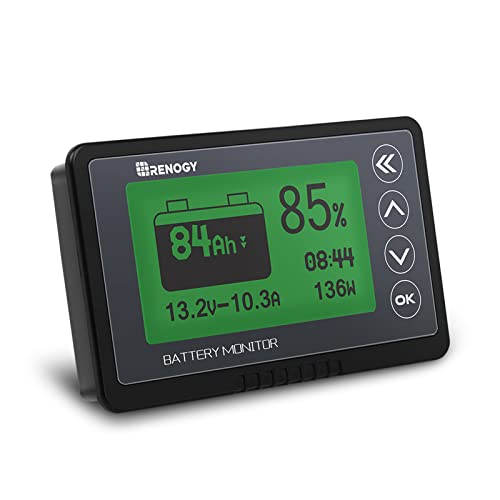
If you want one instrument that answers ‘how much battery do I have left?’ accurately and you do not want to involve your phone, this is it. Renogy’s monitor pairs a 500A shunt with a backlit display that shows voltage, current, power, amp-hours consumed and percentage remaining, works across 10V-120V systems, and ships with a generous 20 ft shielded cable that actually reaches from battery bank to a sensible display location in most RVs and boats.
Strengths
- True coulomb-counting state of charge, not a voltage guess dressed up as a percentage
- 500A shunt covers inverter-sized loads that overwhelm 100A budget monitors
- Programmable high and low voltage alarms warn you before damage, not after
Trade-offs
- Display is monochrome and functional rather than beautiful
- Setup requires entering battery capacity and a full-charge sync to read accurately
- The display needs a mounting spot and a cable run, unlike phone-based rivals
| Type | Shunt battery monitor |
| Shunt | 500A |
| Voltage range | 10V-120V |
| Cable | 20 ft shielded |
| Batteries | Lithium, sealed, gel and flooded 12V types |
| Alarms | Programmable high/low voltage |
The Renogy earns Best Overall by being complete. The shielded cable matters more than it sounds: shunt signals are tiny voltages, and unshielded runs near inverter cables pick up noise that shows up as wandering current readings. Twenty feet of proper cable means the display can live where you can see it — by the door of the RV, at the nav station — rather than wherever a short lead forced it. The alarm programmability is the second grown-up feature: set a low-voltage warning that sounds while there is still time to start a generator or shed load.
Accuracy in any shunt monitor is a partnership between instrument and owner. Enter the true capacity, charge the bank fully so the monitor can sync to 100 percent, and it will track faithfully for weeks; skip the sync and even the best monitor drifts. Renogy’s instructions walk through this properly, which is part of why it gets the nod over cheaper equivalents with identical-looking hardware.
Best for: RV, boat and off-grid owners who want an accurate, always-visible battery gauge without a phone / Not suited for: minimalists who would rather have no display at all, or systems needing current measurement beyond 500A
Check on Amazon — check the current price on Amazon before you buy, because listings and bundle contents change over time.

Victron Energy SmartShunt 500A — Best Smart Monitor
Victron took the display off the wall and put it in your pocket. The SmartShunt is a 500A shunt with a brain and a Bluetooth radio: it counts amp-hours like any proper monitor, then serves history, trends and alarms to Victron’s phone app, which is genuinely excellent. For systems where a display cutout is impossible, ugly or simply unwanted, and for owners who like data, this is the connoisseur’s pick.
Strengths
- Superb app with consumption history, time-to-go estimates and configurable alarms
- No display to mount, cut holes for or read in glare — the shunt hides at the battery
- Victron ecosystem integration for owners with Victron chargers and inverters
Trade-offs
- No local display at all; a flat phone means no battery information
- Bluetooth range limits checking to near the battery bank, not from the other end of a large boat or site
- Premium-tier pricing, and the app-centric design divides opinion
| Type | Shunt battery monitor, Bluetooth |
| Shunt | 500A |
| Voltage range | 6.5V-70V |
| Display | Phone app (no built-in display) |
| Features | History, trends, alarms via app |
The hidden advantage of the SmartShunt is what history does to your understanding of your own system. After a month you stop guessing: you know the fridge’s overnight appetite, the real cost of the inverter’s standby draw, the exact morning deficit your solar must repay. That knowledge prevents more dead batteries than any alarm. The hardware is equally serious — a proper 500A shunt, a wide 6.5 to 70 volt operating range covering 12, 24 and 48 volt banks, and build quality aimed at permanent installation.
The honest cost is dependency. Everything lives behind Bluetooth and an app, so a quick glance means a phone in hand, and crew or family without the app see nothing. Many owners solve this later by adding Victron’s physical display; budget for that possibility if your household shares the system. As a measurement instrument, though, this is the most capable pick here.
Best for: data-minded owners, Victron-system boats and RVs, and installs with no good display location / Not suited for: anyone who wants a battery reading at a glance without a phone, or dislikes app-dependent hardware
Check on Amazon — check the current price on Amazon before you buy, because listings and bundle contents change over time.
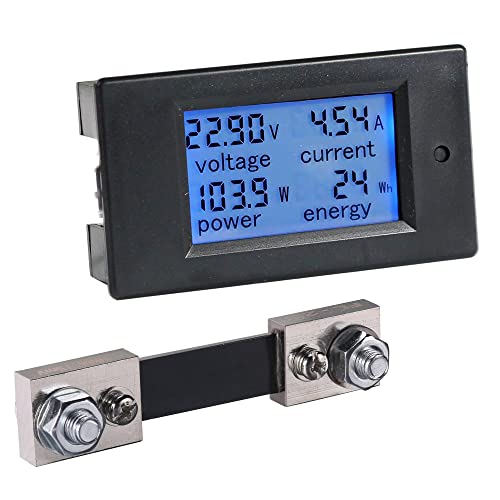
bayite DC 8-100V 0-100A Battery Monitor with 100A Shunt — Best Budget
The bayite is the monitor that introduced a generation of DIY solar and RV builders to shunt metering, and it remains the budget pick because it does the essential job — measuring current both ways through a real shunt and accumulating amp-hours — at a fraction of premium prices. Its 100A shunt suits systems without big inverters: lights, fans, a fridge, USB loads and modest charging.
Strengths
- Real bidirectional shunt measurement at a budget-tier price
- Shows voltage, current, power and accumulated energy on one screen
- Huge owner community means wiring diagrams and troubleshooting help are everywhere
Trade-offs
- 100A shunt is undersized for inverter-heavy systems; know your maximum current before buying
- No percentage state-of-charge smarts or alarms of the Renogy’s sophistication
- Cable and mounting hardware are basic; plan on supplying your own finishing touches
| Type | Shunt battery monitor / energy meter |
| Shunt | 100A |
| Voltage range | 8-100V |
| Display | LCD, V/A/W/Ah |
| Use | Solar, RV, DIY 12V systems |
Judged for what it is, the bayite is excellent: an honest instrument for small systems. A camper van with LED lights, a compressor fridge and a 40A charger never asks its shunt for more than the bayite can give, and the owner gets the single most valuable number — amp-hours used since full — that separates guessing from knowing. The display is plain, the buttons are basic, and the manual rewards a careful read, but the measurement is real.
Respect its ceiling. The day you add a 2000W inverter, its 166A appetite at 12 volts exceeds this shunt, and the correct upgrade is a 500A monitor like the Renogy or Victron above, not hope. Within its class, though, this remains the budget benchmark, and its longevity in the market is its own evidence.
Best for: DIY solar, camper and small RV systems without large inverters, on a budget / Not suited for: systems with inverters or chargers that can push current beyond 100A
Check on Amazon — check the current price on Amazon before you buy, because listings and bundle contents change over time.

LNEX 500A Shunt Battery Monitor with Color Screen — Best Display
Some instruments get used because they are easy to read, and the LNEX is built around that truth. Its 2.4-inch colour display presents state of charge, voltage and current in a layout a non-technical crew member can interpret instantly — green and full, red and urgent — backed by a proper 500A shunt, a 16 ft shielded cable and programmable alarms. It is the family-friendly face on serious measurement.
Strengths
- Colour screen communicates state of charge faster than any monochrome rival
- 500A shunt and shielded cable match the serious end of this category
- Supports lithium, sealed, gel and flooded chemistries across 8-100V
Trade-offs
- Colour screen draws a little more power and can be bright at night in a sleeping cabin
- Brand support and documentation are thinner than Renogy’s or Victron’s
- 16 ft cable is generous but shorter than the Renogy’s 20 ft for big installs
| Type | Shunt battery monitor |
| Shunt | 500A |
| Display | 2.4 inch colour screen |
| Cable | 16 ft shielded |
| Voltage range | 8-100V |
| Alarms | Programmable high/low voltage |
There is a real argument that the best battery monitor is the one everyone in the vehicle actually checks, and colour is a legitimate feature in that argument. A percentage arc that changes colour as it empties teaches energy awareness to the whole crew without a single lecture about amp-hours. Underneath the friendly face, the specification is correct: a 500A shunt that will not be outgrown by an inverter upgrade, shielded signal cable, and alarms to catch the forgetful days.
Choose it with eyes open about the ecosystem. You are buying hardware, not a platform: no app, no firmware roadmap, no dealer network. For a self-contained RV or boat electrical system that you maintain yourself, that trade is often exactly right, and the LNEX’s screen will make it the most-consulted instrument on the panel.
Best for: families and crews who want battery state readable at a glance, with serious shunt hardware behind it / Not suited for: owners who value brand ecosystem, app data or the deepest documentation
Check on Amazon — check the current price on Amazon before you buy, because listings and bundle contents change over time.

CGELE DC Multifunction Battery Monitor with 100A Shunt — Best for Solar and DIY Benches
The CGELE is the tinker’s meter. Its 0-200V measurement range reaches far beyond 12 volt systems, its 100A shunt handles car, RV and solar currents, and its LCD presents the full panel of volts, amps, watts and energy that a person commissioning or troubleshooting a system actually wants. If your ‘system’ is a workbench, a solar shed or a vehicle you are actively building, this flexibility is the point.
Strengths
- Very wide 0-200V range covers 12/24/48V systems and bench experiments alike
- Full multifunction display: voltage, current, power and accumulated energy
- Equally at home in a vehicle panel or a solar combiner project
Trade-offs
- Generalist design means fewer battery-specific smarts than dedicated monitors like the Renogy
- 100A shunt ceiling applies, as with all meters in this shunt class
- Panel-mount presentation is functional rather than finished-looking
| Type | Multifunction DC energy meter with shunt |
| Shunt | 100A |
| Voltage range | 0-200V |
| Display | LCD digital |
| Use | Car, RV, solar, bench |
Where dedicated battery monitors optimise for one job — tracking a house bank — the CGELE optimises for visibility across many jobs. Commissioning a solar install, you can watch array voltage, charge current and daily energy in one place; fault-finding a parasitic draw in a car, the same meter quantifies what you are hunting. That breadth explains its popularity in the DIY solar world, where systems evolve and instruments get repurposed.
It is not the pick for a finished RV where a non-technical partner needs a single trustworthy percentage. It is the pick for the person building that RV, who will extract more value from raw, wide-range data than from any summary. Every workshop in this hobby eventually wants one meter like this; the CGELE is a sound version of it.
Best for: DIY builders, solar tinkerers and troubleshooters who want one wide-range meter for many jobs / Not suited for: finished installs needing a simple, dedicated state-of-charge display
Check on Amazon — check the current price on Amazon before you buy, because listings and bundle contents change over time.

SUPNOVA Smart Battery Monitor 7-100V with Buzzer Alarm — Best Simple Gauge
Not every battery needs a shunt and a spreadsheet. For a trolling motor battery, a golf cart, a gate opener or a single-battery camper setup, a voltage-based gauge that shows an approximate percentage and buzzes before you run the battery flat is proportionate, cheap and easy to wire — two connections, no shunt in the main cable. The SUPNOVA is that gauge, done properly, with a 7-100V range covering 12 to 72 volt systems and a temperature display as a bonus.
Strengths
- Dead simple two-wire install with no shunt to fit in the main battery cable
- Buzzer alarm warns of low charge before you damage the battery
- Wide 7-100V range and lead-acid/lithium modes cover carts, boats and small systems
Trade-offs
- Percentage is inferred from voltage, so it is approximate — especially with lithium’s flat curve and under load
- Cannot count amp-hours or show current draw; it is a gauge, not a monitor
- No substitute for a shunt monitor on any system with an inverter or serious loads
| Type | Voltage-based battery gauge |
| Voltage range | 7-100V |
| Display | Digital, percentage + voltage + temperature |
| Alarm | Buzzer, low charge |
| Batteries | Lead-acid and lithium-ion |
We include this gauge with its limitation printed in bold, because the limitation is manageable when you know it. Voltage-based percentages are honest at rest and optimistic or pessimistic under load; experienced owners learn to read them the way sailors read a barometer — as a trend, not a verdict. For a small system, that is enough, and the buzzer alarm converts the gauge from decoration into protection: it speaks up at the moment a distracted user would otherwise murder a battery.
If you read this review and feel vaguely dissatisfied, that is the signal to buy a shunt monitor instead — the Renogy above costs more and answers the real question. If instead you thought ‘that is all I need’, you are right, and the SUPNOVA will serve you well for years.
Best for: small single-battery systems — carts, trolling motors, simple campers — needing a warning more than a measurement / Not suited for: any system where accurate remaining capacity actually matters
Check on Amazon — check the current price on Amazon before you buy, because listings and bundle contents change over time.
Comparison Table
| Pick | Badge | Key spec | Best for |
|---|---|---|---|
| Renogy 500A Battery Monitor with Shunt | Best Overall | 500A shunt, 10-120V, 20 ft cable | RV, boat and off-grid owners who want an accurate, always-visible battery gauge without a phone |
| Victron Energy SmartShunt 500A | Best Smart Monitor | 500A shunt, Bluetooth app, 6.5-70V | data-minded owners, Victron-system boats and RVs, and installs with no good display location |
| bayite DC 8-100V 0-100A Battery Monitor with 100A Shunt | Best Budget | 100A shunt, 8-100V, LCD | DIY solar, camper and small RV systems without large inverters, on a budget |
| LNEX 500A Shunt Battery Monitor with Color Screen | Best Display | 500A shunt, 2.4in colour screen | families and crews who want battery state readable at a glance, with serious shunt hardware behind it |
| CGELE DC Multifunction Battery Monitor with 100A Shunt | Best for Solar and DIY Benches | 100A shunt, 0-200V, multifunction | DIY builders, solar tinkerers and troubleshooters who want one wide-range meter for many jobs |
| SUPNOVA Smart Battery Monitor 7-100V with Buzzer Alarm | Best Simple Gauge | 7-100V gauge, buzzer alarm | small single-battery systems — carts, trolling motors, simple campers — needing a warning more than a measurement |
The table’s dividing line is measurement method. The first five picks count current through a shunt and therefore know your state of charge; the SUPNOVA infers it from voltage and is priced and wired accordingly. Neither approach is dishonest — but buying the gauge while expecting the monitor’s knowledge is the most common disappointment in this category.
How to Choose a 12 Volt Meter
Decide what question you are asking. ‘Is my charging system working?’ and ‘roughly how full is this battery?’ are voltmeter questions. ‘How many amp-hours have I used, and how long until empty at this load?’ are shunt-monitor questions. Most disappointment in this category comes from buying the first instrument to do the second job. If you run a fridge overnight, an inverter at all, or solar you depend on, you are a shunt-monitor buyer; the rest of this guide assumes that while still respecting the simple gauge’s place.
Size the shunt to your worst current
The shunt sits in series with your battery’s negative cable and must carry everything: the largest load and the largest charge current, whichever is bigger. Add up honestly. A 2000W inverter on 12 volts draws roughly 165A at full tilt; a 60A charger pushes 60A the other way. Systems like that need a 500A shunt — not because they run at 500A, but because headroom is what keeps a shunt accurate and cool. Lights-and-fridge systems live happily on 100A shunts like the bayite’s and CGELE’s.
Voltage lies; amp-hours do not
A rested lead-acid battery at 12.2 volts is roughly half full; under load the same battery may show 11.6 volts and recover later; on charge it shows the charger’s 14-plus volts regardless of fullness. Lithium iron phosphate holds near 13 volts from almost-full to nearly-empty. Any percentage derived purely from voltage inherits all of that confusion. A shunt monitor sidesteps it by bookkeeping: it knows what left, what returned, and what the bank holds, which is why its percentage stays believable under load and at rest alike.
Displays, apps and alarms
Choose the interface you will actually use. A fixed display — Renogy’s clarity, LNEX’s colour — serves everyone in the vehicle and works with gloves and glare. An app-based shunt like Victron’s serves the owner’s curiosity with history and trends, and nobody else at all. Alarms are the underrated feature in both worlds: a low-charge warning delivered while options remain is worth more than precision delivered after the lights go out.
Installing a Shunt Monitor Correctly
Every shunt monitor fails the same way when installed badly: some load bypasses the shunt. The rule is absolute — the shunt goes in the negative line, and it must be the only path between battery negative and everything else. Every load, every charger, every chassis ground on the system side of the shunt; nothing, not even a ‘tiny’ wire, connected directly to the battery negative post except the shunt itself. One stray ground wire quietly un-measures part of your system and the percentages drift into fiction.
The signal cable between shunt and display carries millivolts, so route it away from inverter cables and alternator leads, or use the shielded cable the better kits supply, with the shield grounded as the instructions direct. Then configure honestly: enter the battery’s true rated capacity, set the chemistry, and fully charge the bank so the monitor can synchronise its 100 percent point. Recheck that sync after any long storage or battery change. A monitor installed and configured with this care will stay trustworthy for seasons; one slapped in will be doubted within a month, and doubted instruments get ignored, which is the same as not owning one.
Reading a Battery System Like a Professional: A Worked Routine
Instruments only pay when they become a routine, so here is the routine the owners of well-kept systems actually run. On arrival at any stop — campsite, anchorage, driveway — glance at the monitor and note the percentage. In the morning, note it again: the difference is your overnight cost, the single most useful number in off-grid life. If that cost is stable, your system is healthy. If it creeps upward over weeks, something is changing — a fridge door seal, a new standby load, a battery losing capacity — and the monitor has just earned its price by telling you early, while the fix is still cheap.
Monthly, do a deliberate full charge and let the monitor synchronise at 100 percent, then run a known load — lights and fridge for an evening — and sanity-check the amp-hours consumed against your expectation. Quarterly, compare the monitor’s voltage against a handheld multimeter at the battery posts; agreement within a small margin confirms the sense wiring is honest. Annually, re-audit the battery negative post for stray connections that bypass the shunt, because systems accrete wiring the way boats accrete barnacles.
Keep a tiny log — a notebook in the electrical locker beats an app you will abandon — of morning percentages and full-charge dates. Patterns in that log predict battery replacement a season before failure does, which is the difference between replacing a bank at your leisure, at a good price, and replacing it at a marina chandlery at whatever price the harbour dictates. The meter provides the numbers; the routine turns numbers into foresight, and foresight is what this entire category is really selling.
Battery Testers Versus Battery Monitors: Clearing a Common Confusion
Search results for this keyword constantly smuggle in a third instrument that this guide has deliberately kept in the wings: the battery tester. Testers — the conductance and load testers sold for cars — interrogate a battery’s health: its cranking ability, its internal resistance, whether it is dying. They answer ‘is this battery good?’ in a two-minute test, then go back in the drawer. Monitors answer a different question — ‘how full is this battery, continuously?’ — and live permanently in the system. Confusing the two leads buyers to purchase a tester hoping for a fuel gauge, or to condemn a monitor for not diagnosing a failing cell.
The instruments are complements, not rivals. A sound electrical routine uses the monitor daily and the tester seasonally, or whenever the monitor’s data starts telling a strange story — overnight costs creeping up, capacity apparently shrinking. The monitor notices; the tester diagnoses. Several testers appear in this program’s verified cache because they are legitimate tools; they are simply not this keyword’s answer, and a buying guide serves its readers by saying so rather than padding a list with them.
If your real question is a sick battery — a car that cranks slowly, a bank that will not hold charge — start with a tester or a workshop’s test, not a monitor. If your question is managing energy in a system that works, the six picks above are your instruments, and the monitor you install will, as a side effect, give you the earliest possible warning when a battery does begin to fail. Knowing which question you are asking is, as ever in this category, most of the answer.
A Final Word on Trusting Your Instruments
Every instrument in this guide shares one final requirement: an owner who occasionally checks it against reality. Compare the monitor’s voltage with a handheld multimeter twice a year. Watch whether a full charge still ends where it used to. Notice when the numbers change their story, because a meter’s greatest value is not the reading it gives today but the difference between today’s reading and last season’s. Instruments do not maintain battery systems; attentive owners with instruments do. Choose yours from the six above, install it with the discipline this guide describes, build the small routine of glancing and logging, and your batteries will repay you in the only currency they have: years of unremarkable, dependable service, and mornings that start exactly as planned. That, in the end, is the entire promise of the category — not excitement, but the deep, repeatable calm of a system you understand, watched by instruments you trust, in a vehicle that is always ready when you turn the key.
How to Install a 12 Volt Battery Monitor
This covers a shunt monitor install, the type most readers are fitting. Work methodically, disconnect the battery before starting, and remember the golden rule throughout: after the shunt, nothing touches the battery negative post except the shunt.
Step 1: Plan the layout
Choose a display location you can see in normal use, and a shunt location close to the battery on a surface where the heavy negative cable can reach it without strain. Confirm the signal cable length in your kit spans the distance before cutting anything.
Step 2: Disconnect and prepare
Switch the system off and disconnect the battery negative cable first. Clean the battery posts and cable lugs; a shunt install is the perfect moment to fix the corroded terminals that were quietly taxing your system.
Step 3: Fit the shunt in the negative line
Bolt the battery’s main negative cable to one side of the shunt and the cable running to your loads, grounds and chargers to the other, exactly as the diagram in your kit shows. Torque the connections firmly — the shunt carries full system current and a loose joint here is a heater, not a connection.
Step 4: Run the signal cable
Route the shielded signal lead from shunt to display, away from inverter and alternator cables, securing it against chafe. Connect the monitor’s power lead as directed, typically to battery positive through a small fuse.
Step 5: Mount the display and power up
Fit the display in its cutout or bracket, reconnect the battery, and power the system. The monitor should wake showing voltage immediately and current once a load or charger runs.
Step 6: Configure and synchronise
Enter your battery type and true amp-hour capacity. Then charge the bank fully — a complete charge cycle until the charger finishes — so the monitor can set its 100 percent reference. Verify by running a known load and watching amp-hours count down at the expected rate.
If readings look wrong afterwards, audit in this order: a load bypassing the shunt, a reversed shunt connection, an un-synced monitor, or noise from an unshielded signal run. Those four explain nearly every ‘faulty meter’ that was actually a faithful meter reporting an untidy install.
Common Buying Mistakes
Buying a voltmeter to answer a capacity question
The classic error of this category. Voltage cannot tell you remaining amp-hours with any reliability, above all with lithium batteries. If the question is ‘how much is left’, the answer is a shunt monitor.
Letting a load bypass the shunt
One charger lead or ground wire landed directly on the battery negative post makes the monitor under-count forever. Every conductor in the system belongs on the system side of the shunt; there are no exceptions for small wires.
Undersizing the shunt
A 100A shunt behind a 2000W inverter is a bottleneck and a heat source. Size the shunt to the largest current the system can produce in either direction, with headroom to spare.
Never synchronising the monitor
Shunt monitors count from a reference. Skip the initial full charge and the percentage will be a confident fiction. Re-sync after battery changes, long storage or any deep accidental discharge.
Reading voltage under load and panicking
A healthy battery sags under a heavy load and recovers at rest. Owners condemn good batteries — and good meters — by treating a loaded voltage reading as a state of charge. Rest the battery, or better, trust the amp-hour count.
Mounting the display where nobody looks
A battery monitor in a locker is a diary nobody reads. Put the display where daily life passes it — helm, nav station, RV doorway — or choose an app-based shunt and accept the phone as the panel.
Final Recommendation
Most readers should buy the Renogy 500A monitor: it is the complete, honest instrument — real shunt metering, a clear always-on display, long shielded cable and useful alarms — at a mid-range tier. If you love data and hate cutting display holes, the Victron SmartShunt is the connoisseur’s alternative, and its app will teach you your own system. On a budget with a small system, the bayite remains the right answer it has been for years.
Pick the LNEX if your crew will actually watch a colour screen, the CGELE if your meter must moonlight on a solar bench, and the SUPNOVA if your system is small enough that a warning buzzer is all the instrumentation it honestly needs. Whichever you choose, check price on Amazon, confirm the shunt size against your largest load, and install it with the discipline the how-to section describes — in this category, installation quality is product quality.
Shop the top picks: Renogy 500A Battery Monitor with Shunt, Victron Energy SmartShunt 500A, bayite DC 8-100V 0-100A Battery Monitor with 100A Shunt — check price on Amazon for each before you buy.
Related guides in this series: Best 12 Volt Meter For Marine Battery Best 12 Volt Marine Water Pump Best 12 Volt Milwaukee Best 12 Volt Mini Drill
Frequently Asked Questions
What is the difference between a voltmeter and a battery monitor?
A voltmeter measures voltage at a moment in time. A battery monitor adds a shunt that measures current flowing in and out, accumulating amp-hours to calculate true state of charge. Voltage hints at fullness; a monitor knows it.
What size shunt do I need?
Bigger than the largest current in your system in either direction. Add your biggest load (an inverter’s draw is the usual maximum) and your biggest charger. Small systems suit 100A shunts; inverter systems should use the 500A class.
Why does my monitor’s percentage drift over time?
Usually a missed synchronisation or a load bypassing the shunt. Fully charge the bank to re-sync, and audit the battery negative post: nothing but the shunt should be connected there. Small standby draws on the wrong side of the shunt are the classic culprit.
Can one monitor work for both lead-acid and lithium batteries?
Yes — the shunt monitors in this guide support lithium, sealed, gel and flooded chemistries. Select the correct type and capacity in setup; lithium’s flat voltage curve is exactly why shunt counting beats voltage guessing for those banks.
Do I need a display, or is a Bluetooth shunt enough?
That depends on who uses the system. A display serves everyone at a glance; a Bluetooth shunt serves the owner’s phone with richer data and history. Shared vehicles and boats lean display; single-owner, data-loving installs thrive on the app.
Where exactly does the shunt go?
In the main negative cable, immediately at the battery, with every load, charger and ground on its system side. It must be the only connection path to the battery’s negative post. The signal cable then runs from the shunt to the display.
Can a battery monitor extend my battery’s life?
Indirectly, yes — it is one of the best life-extension tools you can buy. Most batteries die from chronic undercharging and unnoticed deep discharges. A monitor makes both visible while they are still habits rather than damage, and owners who see their real state of charge simply stop committing the two errors that kill banks early.
Will a battery monitor work with solar charging connected?
Yes — in fact solar is where monitors prove themselves, because the shunt counts current in both directions: discharge out, charge in. You will watch the morning deficit, the solar harvest refilling it amp-hour by amp-hour, and the moment the bank reaches full and the monitor synchronises. The one installation condition is the standing rule of this guide: the solar controller’s negative must land on the system side of the shunt, like every other load and charger. Wire it directly to the battery post instead and the monitor will under-report charging forever, showing a bank that mysteriously never quite fills. Route every conductor through the shunt’s accounting and a monitor-plus-solar system becomes the most informative pairing in off-grid power — the instrument that finally makes an invisible harvest visible, and lets you size panels and batteries from evidence rather than folklore.