Disclosure: airfryerkitchensupply.com is reader-supported. When you buy through links on our site, we may earn an affiliate commission at no extra cost to you.
Where to buy
All six chairs in this guide to the best office chairs for hamstrings are sold on Amazon and were verified. Use the links to check current prices and confirm each listing’s stated seat features on the product page before ordering.
- ErgoSift Ergonomic Office Chair (Seat Depth Adjustable) — check price on Amazon
- Vonesse Ergonomic Office Chair (Adjustable Depth, White) — check price on Amazon
- ATORPOK Ergonomic Reclining Office Chair (Footrest) — check price on Amazon
- SIHOO B300 Pro Ergonomic Office Chair (No Footrest) — check price on Amazon
- SONGMICS Ergonomic Mesh Office Chair — check price on Amazon
- YORSERNY Mesh Office Chair (Headrest) — check price on Amazon
If tight, aching hamstrings are part of your desk life, the culprit is usually geometry: a seat that is too deep presses its front edge into the back of your thighs, and a seat set too high leaves your feet dangling so your body weight hangs on exactly that edge. The best office chairs for hamstrings are therefore not a special product category — they are chairs whose stated features let you control that geometry, above all adjustable seat depth.
That is why this guide is built around listings that state seat-depth adjustment in so many words. Four of the six picks state it directly, letting you slide the seat pan so a fist-width of space remains behind your knees and the edge stops digging into the underside of your thighs. The remaining picks contribute wide, supportive seats and controlled tilt that let you shift load off the seat edge through the day.
One honesty note: no listing in this guide states a waterfall seat edge, so this guide does not claim one for any pick. Where the front-edge design matters to you, check the product page photos and specifications. What the listings do state — depth adjustment, recline ranges, cushion thickness — is quoted exactly, and it is enough to choose well.
A quick test before the picks, because it will tell you which half of this list is yours. Sit in your current chair, fully back, feet flat. Now slide one hand, palm up, between the front edge of the seat and the back of your knee. If your hand is squeezed, your seat is too deep and you belong with the four depth-adjustable picks. If you have room to spare but your thighs still ache by afternoon, your issue is more likely pressure distribution and stillness — the wide-seat and wide-tilt picks, plus the habits section, were chosen for you.
Important: Chairs do not treat hamstring injuries or strains. This guide is about seating comfort — mainly how the front edge of the seat and the seat’s depth interact with the back of your thighs. If you have a hamstring injury, persistent pain, bruising or weakness, see a doctor or physical therapist, and follow their guidance on sitting and activity.
Key Takeaways
- Seat depth is the decisive feature: aim for a fist-width of space between the seat edge and the back of your knees.
- Four picks state adjustable seat depth in their listings. The other two are honest alternatives built on width and tilt — know which you are buying.
- Feet must rest flat. Dangling feet hang your body weight on the seat edge and your hamstrings.
- No pick states a waterfall seat edge, so none is claimed. Check product photos if edge shape matters to you.
In this guide
Quick Picks
Best Overall — ErgoSift Ergonomic Office Chair (Seat Depth Adjustable). The complete hamstring answer: adjustable seat depth to move the edge away from your thighs, an extra-thick padded seat, a breathable mesh back, a stated 126-degree recline and a stated 330 lb capacity. Every relevant number is in the listing, and depth adjustment is the one that matters most.
Best Adjustable Depth Design — Vonesse Ergonomic Office Chair (Adjustable Depth, White). A white ergonomic chair whose listing states an adjustable-depth breathable mesh seat — depth control applied to the seat material that runs coolest. Add dynamic lumbar support and 3D headrest and armrests, and it is the airflow-first way to solve the seat-edge problem.
Best Depth Adjustment with Footrest — ATORPOK Ergonomic Reclining Office Chair (Footrest). Depth adjustment and the break your hamstrings actually want: this ATORPOK chair states adjustable seat depth and height, a 135-degree recline and a retractable footrest. Extending your legs on the footrest changes the stretch on the back of your thighs completely — the strongest posture change in this guide.
Best Backrest and Depth Control — SIHOO B300 Pro Ergonomic Office Chair (No Footrest). SIHOO’s B300 Pro coordinates the two adjustments that interact: seat depth and backrest position, with 4D lumbar support, 6D flip-up armrests, a 3D wide headrest, breathable mesh and a stated 135-degree recline. This configuration is listed without a footrest, keeping the focus on seated geometry.
Best Wide-Seat Alternative — SONGMICS Ergonomic Mesh Office Chair. The simpler route: a wide-seat mesh chair with adjustable lumbar support, a headrest, flip-up armrests and a stated 90–105-degree tilt. No depth slider — instead, width spreads thigh load and the gentle tilt lets you shift it. Choose it if you prefer fewer mechanisms and a roomier seat.
Best Gentle-Tilt Mesh Pick — YORSERNY Mesh Office Chair (Headrest). A breathable mesh chair with lumbar support, 5D armrests and the widest stated tilt lock here — 90 to 135 degrees. Like the SONGMICS it states no depth adjustment; its strategy is angle. Rocking and reclining through the day keeps any single pressure point, including the seat edge, from owning your afternoon.
How These Picks Were Chosen
Candidates came from office chairs verified, screened for the features that decide hamstring comfort at a desk: adjustable seat depth first, then seat height range, tilt that unloads the seat front, and stated cushion construction. Four picks state seat-depth adjustment in their listing titles — ErgoSift, Vonesse, ATORPOK and SIHOO’s B300 Pro — and they anchor the guide.
The final two picks, from SONGMICS and YORSERNY, contribute wide seats and tilt ranges that help redistribute pressure, and their listings are quoted only for what they state. As with the sibling health-related guide in this batch, comfort is the only promise made: nothing here treats a strain or injury, and medical wording is kept out of the claims even where a reader’s situation is medical.
We also checked for the usual traps: no cushions or accessories posing as chairs, no duplicate variants of the same product across picks, and no invented specifications.
We should also explain what did not make the cut. Several otherwise good ergonomic chairs were excluded because their listings do not state seat-depth adjustment and offer nothing specific for thigh pressure — in a guide organised around one physical problem, a generally good chair is not enough. Conversely, two picks without depth adjustment were kept, deliberately and transparently, because width and tilt range are legitimate alternative strategies. The guide tells you which strategy each chair represents; choosing between them is the reader’s real decision.
The 6 Best Office Chairs for Hamstrings

ErgoSift Ergonomic Office Chair (Seat Depth Adjustable) — Best Overall
ErgoSift’s chair leads this guide because it states the decisive feature plainly: adjustable seat depth. Slide the pan back and the front edge retreats from the underside of your thighs; slide it forward and longer legs regain support. Around that headline sit an extra-thick padded seat, breathable mesh back, 4D armrests, lumbar support, a stated 126-degree recline and a stated 330 lb capacity — the fullest relevant spec sheet here.
Strengths
- Adjustable seat depth directly removes front-edge pressure on the hamstrings
- Extra-thick padded seat spreads load across the thighs instead of concentrating it at the edge
- Stated 330 lb capacity and 126-degree recline give checkable numbers, not adjectives
Trade-offs
- Thick padding plus depth adjustment needs a careful first setup to feel right
- No footrest is mentioned in the listing title
- Mesh back with padded seat is a hybrid feel some buyers need a week to judge
Listing-stated features (from the Amazon listing title): Adjustable seat depth; 4D armrests; Lumbar support; Extra-thick padded seat stated in listing; Breathable mesh back; 126 degree recline stated in listing; 330 lb capacity stated in listing.
Set this chair up from the seat edge backwards. Sit fully back, then adjust depth until you can fit a loose fist between the seat edge and the back of your knees — that gap is the whole game for hamstring comfort, because it guarantees the edge is not compressing the underside of your thigh. Then set height so your feet rest flat, which stops your weight sliding forward onto the edge. The recline earns its keep across the day: leaning back shifts load from the seat front to the backrest. Judge the result over a week of real sitting, adjusting depth in small steps.
The stated 330 lb capacity deserves a note for larger readers: depth adjustment matters more, not less, at higher loads, because a seat edge under more weight presses harder. This is the pick where the hamstring feature and the capacity feature reinforce each other.
Best for: anyone whose hamstrings ache from a seat edge pressing behind the knees / Not suited for: people who want a footrest included
Check the current price on Amazon

Vonesse Ergonomic Office Chair (Adjustable Depth, White) — Best Adjustable Depth Design
Vonesse’s white chair applies the depth solution to a mesh seat. The listing states an adjustable-depth breathable mesh seat with dynamic lumbar support, plus adjustable 3D headrest and armrests. For hamstrings, the mesh seat matters beyond airflow: a tensioned mesh pan distributes pressure differently from foam, and combined with depth adjustment it gives sensitive thighs two kinds of relief at once.
Strengths
- Adjustable seat depth in a breathable mesh seat — geometry and material both addressed
- Dynamic lumbar support keeps contact as you shift through the day
- 3D headrest and armrests complete the fit for upper body comfort
Trade-offs
- Mesh seats feel firmer than padded ones — sensitive sitters should test over several days
- White finish shows wear and needs more cleaning
- The listing title does not state a weight capacity — check the product page
Listing-stated features (from the Amazon listing title): Adjustable depth stated in listing; Breathable mesh seat; Dynamic lumbar support; Adjustable 3D headrest; Adjustable 3D armrests; White finish.
Depth adjustment on a mesh seat has a subtle advantage: because the mesh flexes, small depth changes translate into smooth changes in where pressure peaks under your thighs, rather than an abrupt edge moving. Work in small steps and give each setting a full session. The dynamic lumbar support complements this by keeping your pelvis positioned as you settle — posture drift forward is what usually re-loads the seat edge. If your room is warm and your hamstrings complain by afternoon, this combination of breathable seat and correct geometry is the most targeted answer in the guide.
White mesh has a maintenance quirk: it shows dust that black mesh hides, and dusty mesh breathes marginally less well. A monthly brush-down keeps both the colour and the airflow honest — thirty seconds of upkeep for the chair’s main feature.
Best for: people who want depth control in a breathable mesh seat and a light finish / Not suited for: people who prefer thick foam padding under the thighs
Check the current price on Amazon

ATORPOK Ergonomic Reclining Office Chair (Footrest) — Best Depth Adjustment with Footrest
ATORPOK’s reclining chair pairs the guide’s key adjustment — seat depth, stated in the listing alongside height — with the guide’s best break: a retractable footrest under a stated 135-degree recline, with headrest and lumbar support in a mesh body. Depth handles the working hours; the footrest handles the pauses, letting you extend your legs and change the angle at hip and knee entirely.
Strengths
- Adjustable seat depth and height together control both hamstring pressure points
- Retractable footrest enables leg-extended rest breaks without leaving the desk
- Stated 135-degree recline gives a real posture change, not a token lean
Trade-offs
- The listing title does not state a weight capacity — verify on the product page
- Footrest and recline hardware add bulk under and behind the seat
- Mesh body will feel firm to buyers used to thick padding
Listing-stated features (from the Amazon listing title): Adjustable seat depth and height stated in listing; 135 degree recline stated in listing; Headrest included; Lumbar support; Retractable footrest; Mesh home desk chair design.
Hamstring comfort across a day is really two problems: the working position, solved by depth and height, and accumulated stiffness, solved by changing the leg’s position entirely. This chair is the only pick that states tools for both. Use the footrest in short, regular breaks rather than as a permanent posture — extended legs all day brings its own issues — and keep some lumbar contact while reclined so your back is not slumping while your legs rest. For readers whose afternoons are defined by tight hamstrings, that rhythm of work, extend, work is the most practical routine any chair here can support.
Use the recline and footrest as a pair on a timer rather than by feel — by the time hamstrings announce stiffness, you have usually been still too long. Short, scheduled extensions beat occasional long ones, and the chair makes each one a ten-second operation.
Best for: people who want depth control plus a footrest for leg-extended breaks / Not suited for: people who need a stated weight capacity
Check the current price on Amazon

SIHOO B300 Pro Ergonomic Office Chair (No Footrest) — Best Backrest and Depth Control
The B300 Pro earns its slot by coordinating adjustments. Seat depth alone can strand your back away from its support; this SIHOO states adjustable backrest and seat depth together, so the lumbar — a 4D system — stays where your back actually is after you slide the seat. Add 6D flip-up armrests, a 3D wide headrest, breathable mesh and a stated 135-degree recline, and it is the engineer’s answer to the hamstring geometry problem.
Strengths
- Backrest adjusts alongside seat depth, keeping lumbar support correctly placed
- 4D lumbar support fine-tunes the back while the seat handles the thighs
- Stated 135-degree recline supports regular posture changes
Trade-offs
- This configuration is listed without a footrest — recline breaks rest your back, not extended legs
- The adjustment count is the highest here; setup takes patience
- The listing title does not state a weight capacity — check the product page
Listing-stated features (from the Amazon listing title): Adjustable backrest and seat depth stated in listing; 4D lumbar support; 6D flip-up armrests; 3D wide headrest; Breathable mesh; 135 degree recline stated in listing.
The interaction this chair solves is real: slide a seat forward for thigh support and a fixed backrest’s lumbar pad lands in the wrong place; slide it back for the hamstrings and you may perch away from support entirely. Adjusting the backrest with the depth keeps the whole system coherent. Set depth first for the fist-width gap behind your knees, then bring the backrest and lumbar to meet you. If you are the kind of buyer who will spend an evening dialling a chair in — and your hamstrings will thank you for it — this is the most complete seated-geometry toolkit in the guide.
Because the backrest adjusts with the seat, keep a note of your paired settings — depth position and backrest position together. Either number alone does not reproduce your fit; the combination is the setting, and it is worth writing down once it works.
Best for: people who want depth control coordinated with backrest adjustment / Not suited for: people who want a footrest — this configuration is listed without one
Check the current price on Amazon
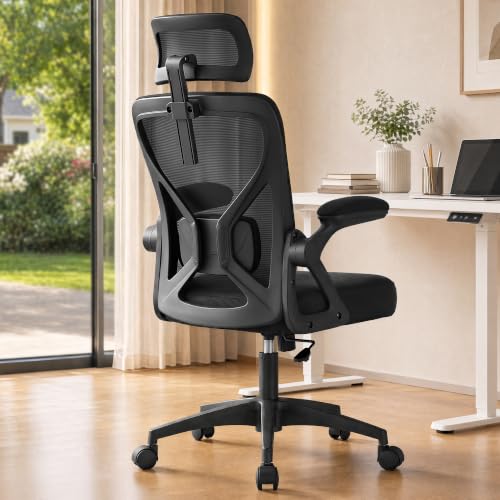
SONGMICS Ergonomic Mesh Office Chair — Best Wide-Seat Alternative
SONGMICS’ mesh chair is this guide’s honest alternative for buyers who do not want mechanisms: a wide seat, adjustable lumbar support, headrest, flip-up armrests and a tilt function the listing states at 90 to 105 degrees. It does not state seat-depth adjustment, and this guide will not pretend otherwise. Its hamstring case rests on width — a broader pan spreads load across more of the thigh — and on tilt that lets you rock load off the front edge.
Strengths
- Wide seat distributes thigh pressure over a larger area
- Adjustable lumbar support and headrest cover back and neck comfort
- Flip-up arms and mesh body keep it practical for home offices
Trade-offs
- No seat-depth adjustment is stated — the front-edge position is fixed
- Tilt range is gentle and work-focused rather than a recline
- The listing title does not state a weight capacity
Listing-stated features (from the Amazon listing title): Ergonomic mesh design; Adjustable lumbar support; Headrest included; 90–105 degree tilt function stated in listing; Wide seat; Flip-up armrests.
Be clear-eyed about the compromise. If your hamstring discomfort comes specifically from a seat edge at the wrong depth for your legs, a fixed-depth chair — however wide — cannot move that edge, and one of the four depth-adjustable picks above is the correct buy. Where this SONGMICS wins is for buyers whose issue is general pressure and heat rather than geometry: width, mesh and a working tilt address those honestly and simply. Match the chair to the actual cause of your discomfort, not to the longest feature list.
The flip-up arms make this the easiest pick here to share with a partner of different proportions — arms away for one, down for the other, no tools. In a shared home office, that adaptability partially compensates for the fixed seat depth.
Best for: people who prefer a wide seat and gentle tilt over depth mechanisms / Not suited for: people who specifically need seat-depth adjustment
Check the current price on Amazon

YORSERNY Mesh Office Chair (Headrest) — Best Gentle-Tilt Mesh Pick
YORSERNY’s mesh chair closes the guide with the angle strategy. Its listing states a 90–135-degree tilt lock, a breathable backrest with lumbar support, a headrest and 5D armrests. There is no stated seat-depth adjustment, so its hamstring case is movement: a wide, lockable tilt range lets you repeatedly shift your weight between seat and backrest, resting the underside of your thighs without leaving the chair.
Strengths
- Widest stated tilt range here — posture change is always available
- Breathable mesh backrest and lumbar support cover back comfort
- 5D armrests keep shoulders supported across those angles
Trade-offs
- No seat-depth adjustment is stated — fixed edge geometry
- Tilt only helps if you actually use it through the day
- The listing title does not state a weight capacity
Listing-stated features (from the Amazon listing title): Mesh office chair design; Headrest included; 90–135 degree tilt lock stated in listing; Breathable backrest; Lumbar support; 5D armrests.
This chair asks something of its owner: discipline. Its comfort model is active — tilt back for calls, lock upright for typing, shift often — and a buyer who sits frozen in it for six hours gets a standard mesh chair, no more. But for fidgeters and angle-shifters, the wide lockable range is a genuine tool, and the breathable build suits long days. Read it as the guide’s second philosophy: where the depth-adjustable picks fix geometry, this one fixes stasis. Choose the philosophy that matches how you actually sit.
The 5D armrests have a hamstring-relevant use that is easy to miss: correctly set arms take your upper body’s weight through your elbows, subtly unloading the seat. It is a small effect, but across six hours the seat edge feels every gram you route elsewhere.
Best for: people who manage thigh pressure by changing angle often / Not suited for: people who need seat-depth adjustment to fix edge pressure
Check the current price on Amazon
Comparison Table
The key-spec column tells the strategic story of this guide at a glance: four chairs that move the seat edge, two that work around it. Find your strategy first — the fist test in the introduction tells you which — then compare within that family.
| Pick | Badge | Key spec (listing-stated) | Best for |
|---|---|---|---|
| ErgoSift Ergonomic Office Chair (Seat Depth Adjustable) | Best Overall | Seat depth adjustment, extra-thick seat, 126 degree recline, 330 lb stated | anyone whose hamstrings ache from a seat edge pressing behind the knees |
| Vonesse Ergonomic Office Chair (Adjustable Depth, White) | Best Adjustable Depth Design | Adjustable depth breathable mesh seat, dynamic lumbar, 3D headrest and arms | people who want depth control in a breathable mesh seat and a light finish |
| ATORPOK Ergonomic Reclining Office Chair (Footrest) | Best Depth Adjustment with Footrest | Seat depth and height adjustable, 135 degree recline, retractable footrest | people who want depth control plus a footrest for leg-extended breaks |
| SIHOO B300 Pro Ergonomic Office Chair (No Footrest) | Best Backrest and Depth Control | Seat depth plus backrest adjustment, 4D lumbar, 135 degree recline | people who want depth control coordinated with backrest adjustment |
| SONGMICS Ergonomic Mesh Office Chair | Best Wide-Seat Alternative | Wide seat, adjustable lumbar, 90–105 degree tilt, flip-up arms | people who prefer a wide seat and gentle tilt over depth mechanisms |
| YORSERNY Mesh Office Chair (Headrest) | Best Gentle-Tilt Mesh Pick | 90–135 degree tilt lock, breathable backrest, lumbar support, 5D arms | people who manage thigh pressure by changing angle often |
How to Choose an Office Chair for Hamstring Comfort
Measure first. Sit in your current chair and notice where the seat edge lands: if it presses into the underside of your thigh well before the knee, the seat is too deep for you, and no amount of cushioning will fix that geometry. The target is a fist-width of clearance between the seat edge and the back of your knees, with your back against the backrest and feet flat. Adjustable seat depth — stated by four picks in this guide — is the direct way to hit that target on a new chair.
Then check the pair of adjustments that work together: seat height and tilt. Feet dangling means your weight hangs on the seat edge, so height must let your feet rest flat. A tilt you can lock at a slight recline shifts load from the seat front onto the backrest, resting the hamstrings without standing. Stated recline ranges in this guide run from a gentle 90–105 degrees to a fuller 135 — choose based on how much posture change your day allows.
Finally, be sceptical of unstated features. No pick here states a waterfall front edge, so none is claimed. If edge shape is decisive for you, examine product photos and specifications closely, and use the return window to test the actual chair — your thighs are the only reliable instrument for this particular measurement.
Sitting Habits That Help Tight Hamstrings
Geometry starts the job; habits finish it. Stand and walk briefly at regular intervals — the single most effective break for the back of the thigh is simply unloading it. When seated, avoid tucking one leg under you or sitting on a foot, both of which compress one hamstring asymmetrically for hours. Keep your feet flat and your weight even.
Gentle movement beats aggressive stretching at a desk, especially if you are managing a strain — and if you are, your clinician’s programme replaces any general advice. For everyday tightness from sitting, the pattern that helps is boring and effective: correct seat depth, flat feet, regular standing, and a chair that makes all three easy to repeat tomorrow.
How to Set Up Seat Depth and Height for Hamstring Comfort
This five-minute setup is the practical heart of the guide. Do it in order, in the shoes you normally wear at your desk, and repeat it whenever you change chairs or desks.
- Sit fully back in the chair so your back touches the backrest. If you cannot reach the backrest without the seat edge pressing your thighs, the seat is too deep as currently set.
- Adjust seat depth, if your chair states it, until a loose fist fits between the seat edge and the back of your knees. Small steps — a centimetre changes the feel.
- Set seat height so both feet rest flat on the floor with knees at roughly ninety degrees. Dangling feet mean your hamstrings are carrying your leg weight.
- Set lumbar support to keep you sitting back in the chair rather than perching forward — perching slides your weight onto the seat edge.
- Choose a slight working recline if your chair locks its tilt, so some load rests on the backrest instead of the seat front.
- After one full session, note exactly where pressure remains. Adjust depth once more in a small step rather than changing everything at once.
The setup is right when you stop noticing the seat edge entirely. If a chair without depth adjustment cannot reach that point for your legs, that is a fit verdict — use the return window and choose a depth-adjustable model.
The Geometry of the Seat Edge, Explained Simply
Everything in this guide reduces to one small region: the front five centimetres of the seat and the underside of your thigh just behind the knee. Your hamstrings run down the back of your thigh, and the nerves and blood vessels of the leg pass through the same neighbourhood. A seat edge that presses firmly into that region for hours is compressing exactly the structures you are trying to rest. The pressure does not need to be dramatic — modest pressure, unrelieved, for a working day, is quite enough to produce the familiar afternoon ache and stiffness.
Three variables control that pressure. Depth decides whether the edge reaches the sensitive zone at all — hence the fist-width rule. Height decides how much of your weight the edge carries: feet planted transfer load to the floor; feet dangling transfer it to the edge. Tilt decides the split between seat and backrest: a slight recline hands some of your weight to your back, where broad contact handles it easily. Every pick and every setup step in this guide is one of those three levers being pulled.
Which is also why miracle claims should be ignored in this category. No foam formulation repeals geometry, and no cushion stacked on a too-deep seat moves its edge. Fix depth, height and tilt — in that order — and most desk-related hamstring misery turns out to have been a measurement problem wearing the disguise of a medical one. When it is genuinely medical, the disclaimer at the top of this guide applies: get it seen to, and let the chair play its supporting role.
Desk Height and Other Hidden Accomplices of the Seat Edge
The seat edge rarely acts alone. Desk height is its usual accomplice: a desk that is too high forces the chair up, feet leave the floor, and the edge inherits your leg weight. If your desk height is fixed and tall, the correct purchase may be a footrest rather than a different chair — several setups in this guide’s orbit work exactly that way, chair set for the legs, feet supported at the height the desk demands. Measure the desk before blaming the chair; the numbers will tell you which one is guilty.
Monitor position is the second accomplice. A screen set low or far pulls you forward into a perch, and perching slides your weight onto the seat edge no matter how perfect its depth. Screen at eye level, at arm’s length, is a hamstring intervention disguised as an eye one. Keyboard position completes the triangle: reaching forward for a distant keyboard produces the same forward slide.
Treat the station as one system with three measurements — seat depth, seat height, screen position — and the hamstring problem usually resolves into whichever measurement was wrong. That is genuinely good news: measurements can be fixed in an afternoon, and two of the three fixes cost nothing at all.
Care and Maintenance for Depth-Adjustable Chairs
Seat-depth mechanisms live under the seat, where dust and crumbs migrate. Keep the slider rails clean and dry, and work the adjustment through its full travel occasionally — a mechanism used only at one setting for years can stiffen at exactly the moment you need to move it. The same applies to tilt locks and lumbar dials: exercise every adjustment monthly.
If depth settings start drifting under load, stop and inspect rather than compensating with your posture. A slipping slider is a mechanical fault with a mechanical fix, and sitting around it re-creates the edge pressure the chair was bought to eliminate.
Chair Too Deep, Legs Too Short: Solving the Mismatch Without a New Chair
Not everyone reading this guide can buy a chair today, so here is the honest interim playbook for a seat that is too deep. A firm cushion or folded towel placed against the backrest effectively shortens the seat, moving your back — and therefore your knees — forward relative to the edge. It is the classic fix, and it works because it changes the same geometry a depth slider changes. Set it so the fist-width gap appears behind your knees, and confirm your back still feels supported rather than perched on the cushion.
Feet come next. If raising the chair to meet a fixed desk leaves your feet short of the floor, a footrest, a sturdy box or even a stack of books restores flat-footed sitting and unloads the seat edge immediately. These are unglamorous objects doing precise ergonomic work, and they cost almost nothing.
Know the limits of improvisation, though. A cushion changes your relationship to the lumbar support, and a makeshift footrest wanders. If the interim setup helps — and it usually helps quickly — it has also diagnosed your problem as geometry, which means a depth-adjustable chair is a confirmed, not speculative, purchase when the time comes. Let the experiment teach you exactly what to buy.
Before You Order: A Five-Point Check
Hamstring comfort is geometry, and geometry can be checked before money moves. Five checks:
- Measure your current seat depth and the gap behind your knees — know your number before shopping.
- Confirm the listing states seat-depth adjustment if that is your reason for buying; do not infer it.
- Check the seat height range lets your feet rest flat at your desk’s height.
- Note the stated tilt or recline range if posture change is part of your plan.
- Confirm the return process — your thighs are the final instrument, and they need days to vote.
A chair that passes these checks addresses the actual mechanism of your discomfort. Everything else — colour, brand, styling — is decoration on a solved problem.
Common Buying Mistakes
Buying a deeper, plusher seat to fix edge pain. Plushness does not move the edge. If the seat is too deep, more padding can press the hamstrings harder. Depth adjustment is the fix; cushion is the finish.
Sitting on the front half of the chair. Perching feels like relief and works like a trap — it concentrates all your weight on the edge zone. Sit back, use the backrest, and let the geometry do its job.
Raising the chair to match a high desk without a footrest. Feet off the floor means hamstrings under load all day. Lower the chair to your legs and raise the desk or use a footrest under your feet instead.
Assuming every ergonomic chair adjusts depth. Many do not, including two honest picks in this guide. If depth control is your reason for buying, confirm the listing states it — in words — before ordering.
Which Pick for Which Buyer
For a clear seat-depth problem: the ErgoSift, without hesitation. Stated depth adjustment, a thick seat, stated capacity and recline — it is the complete toolkit for the exact geometry that is hurting you.
For depth control with maximum airflow: the Vonesse. Its adjustable-depth mesh seat solves the geometry while keeping the sitting surface as cool and pressure-spreading as mesh allows.
For breaks as much as for working posture: the ATORPOK. Depth adjustment for the work, footrest and deep recline for the pauses — the only pick that states a full answer to both halves of the day.
For perfectionists who will tune two adjustments together: the SIHOO B300 Pro. Coordinated seat-depth and backrest adjustment is the engineer’s solution, and it rewards the patient owner every single day.
For general pressure rather than a depth problem: the SONGMICS wide seat — chosen knowingly, with eyes open about its fixed depth, for the width and simplicity it offers instead.
For angle-shifters and fidgeters: the YORSERNY, whose wide lockable tilt range turns posture change into the therapy-adjacent habit it should be. Buy it if you know you will actually use the tilt.
Final Recommendation
For most readers, the ErgoSift is the complete answer: stated depth adjustment, a thick seat, a stated capacity and recline. The Vonesse brings depth control to a breathable mesh seat, the ATORPOK adds the footrest for leg-extended breaks, and the SIHOO B300 Pro coordinates depth with backrest adjustment for perfectionists. The SONGMICS and YORSERNY serve buyers who prefer width and tilt over mechanisms — chosen knowingly, they are good chairs; chosen by accident, they will not fix a depth problem.
Set up whichever you buy with the fist-width test, keep your feet flat, and stand regularly. And if your hamstrings are injured rather than just tight, let a clinician lead — the right chair supports recovery, it does not replace it.
Measure honestly, buy the geometry, and keep standing up. Tight hamstrings at a desk are usually a solvable fitting problem, and solving it properly once beats managing it forever.
And a closing note for readers who share a desk: hamstring-friendly settings are personal, because leg length is personal. If two people use one chair, write both depth and height settings down where both can find them. Thirty seconds of resetting per person is the entire cost of two comfortable sitters, and it is cheaper than every alternative — including the argument.
Related guides worth reading next: Best Office Chairs For Back Injury Pain Best Office Chairs For Swelling Legs Best Office Chairs For Bad Hips Best Ergonomic Office Chairs Back Pain Best Office Chairs With Lumbar
Frequently Asked Questions
Why do my hamstrings ache when I sit at my desk?
Commonly because the seat edge presses into the underside of your thighs — usually a seat that is too deep for your legs, or a chair set so high your feet dangle. Both are geometry problems with geometry fixes: correct depth, flat feet, and regular standing breaks.
What is adjustable seat depth and why does it matter?
It slides the seat pan forward or back. For hamstring comfort it is the key adjustment, because it moves the front edge of the seat away from the back of your knees. Four picks in this guide state it in their listings.
What seat depth is right for me?
The practical test: sit fully back with feet flat, and aim for a loose fist-width of space between the seat edge and the back of your knees. Less space risks edge pressure; much more leaves your thighs under-supported.
Do any of these chairs have a waterfall seat edge?
No listing in this guide states a waterfall edge, so none is claimed for any pick. If that design matters to you, check product photos and specifications, and use the return window to judge the actual edge against your legs.
Can a chair help a pulled hamstring?
A chair cannot treat a strain. It can avoid aggravating the area — correct depth, no dangling feet, easy standing — while you follow medical guidance. Pain with bruising, weakness or a pop at injury time needs a professional, not furniture.
Is a footrest useful for hamstrings?
Yes, as a break tool: extending your legs on a footrest changes the angles at hip and knee and unloads the seat edge entirely. Use it in regular short breaks, as with the ATORPOK pick, rather than sitting extended all day.


