Disclosure: airfryerkitchensupply.com is reader-supported. When you buy through links on our site, we may earn an affiliate commission at no extra cost to you.
Where to buy
This guide to the best inexpensive office chairs for long hours judges every chair on the features that decide how hour six feels, not how minute six feels. Every chair in this guide is sold through Amazon and was confirmed against the catalog data we checked for this article before a link was added. Start with the SIHOO M57 if you want the most adjustability in the group, the Furmax mesh chair if your budget is the tightest, or the Hbada P5 if a footrest for breaks matters to you. Inexpensive here is a tier, not a number, and prices in it move constantly, so check price on Amazon for the exact chair you choose.
The best inexpensive office chairs for long hours solve a harder problem than cheap chairs usually admit. A chair that feels fine for twenty minutes can become a torment by hour six, because long sitting punishes exactly the things budget chairs skimp on: seat foam that bottoms out, lumbar support that is a decorative curve, armrests at the wrong height, and backs that lock you into one posture until your whole body is negotiating with the furniture. This guide picks six inexpensive chairs that take long hours seriously, judged on the features their verified listings actually state, with the trade-offs of the tier stated just as plainly.
One honesty note before the picks. No listing in this group promises a specific number of sitting hours, and this guide will not invent one. When a verified title says a chair is built for long desk work, we say so and name the chair; where a title makes no such claim, the long-hours case rests on features, breathable mesh, adjustable lumbar, headrests, tilt that lets you shift position, and we argue it on those features openly. Comfort over a full workday also depends on your habits: the best budget chair in the world cannot cancel out six unmoving hours, and the how-to section below covers the movement pattern that makes any of these chairs feel twice as expensive.
The six picks spread across the inexpensive tier deliberately: a fully adjustable mesh chair at the tier’s top, a chair whose title names long desk work directly, a footrest model for people who take breaks in the chair rather than away from it, a high-back with a headrest, and two simple mesh workhorses for the tightest budgets. Each review separates what the listing confirms from what it leaves unstated, because at this end of the market the unstated things, capacity figures especially, are where disappointments hide.
In this guide
Quick Picks
Best Overall — SIHOO M57 Ergonomic Office Chair: The most adjustable chair in the group: mesh back, 3D armrests, adjustable headrest, lumbar support, and a stated 330 LBS capacity, at the top of the inexpensive tier.
Best for Long Desk Work — CAPOT Ergonomic Mesh Office Chair: The only pick whose verified title says it outright: a chair for long desk work, with a 400lbs stated capacity, 4D flip-up arms, three tilt levels, and a 3D headrest.
Best with Footrest — Hbada P5 Ergonomic Office Chair: The break-friendly pick: adjustable lumbar support, a 2D headrest, swivel tilt, and a footrest for stretching out between tasks without leaving the chair.
Best High-Back Value — Marsail Ergonomic Office Chair: A high-back mesh chair with adjustable lumbar support, 3D armrests, and a headrest: the tall-back support package at an inexpensive-tier position.
Best Budget — Furmax Office Chair: The tightest-budget honest chair: breathable mesh back, lumbar support, adjustable height, armrests, and easy assembly, with no pretense beyond its station.
Best Simple Workhorse — BestOffice Ergonomic Office Chair: The no-drama option: a mid-back swivel chair with lumbar support, a sponge seat, breathable backrest, and rolling wheels, sold as a single pack for one desk.
How These Picks Were Chosen
Every pick was verified against catalog data before a link was added, and only complete chairs qualified; seat cushions, chair mats, and other accessories that surface in searches for this search were excluded, because a cushion is not a chair and this guide does not pad its list with accessories. Premium ergonomic chairs that also appear in the catalog were excluded on tier: this search says inexpensive, and a guide that answers it with flagship chairs has not answered it.
Within the tier, picks were ranked for long-hours duty on confirmed features: adjustable lumbar support, a headrest, tilt range that permits posture changes, armrest adjustability, and mesh or other breathable construction for warm rooms. Where a listing states a capacity figure, it is printed exactly as stated; where it does not, the review says so. No chair here is presented as treatment for any condition; the frame throughout is comfort and posture support across a working day, and readers with persistent pain should talk to a medical professional rather than a product page.
The 6 Best Inexpensive Office Chairs for Long Hours

SIHOO M57 Ergonomic Office Chair — Best Overall
The M57 is for the budget buyer who refuses to buy twice. Its verified title lists the features that usually get cut first at this tier: 3D armrests that move in three directions to meet your elbows, an adjustable headrest, lumbar support, a mesh back that breathes through warm afternoons, and a stated capacity of 330 LBS, printed exactly as the listing states it. If your workday is long and your desk is your office, this is the chair in the guide built most completely for that life.
| Detail | What the verified listing states |
|---|---|
| Capacity | 330 LBS, as stated in listing title |
| Armrests | 3D armrests, per listing title |
| Headrest | Adjustable headrest, per listing title |
| Support | Lumbar support, per listing title |
| Back | Mesh back, per listing title |
| Color | Black, per listing title |
Strengths
- Fullest adjustment set in the group, all confirmed in the verified title
- Stated 330 LBS capacity removes the guesswork many budget listings leave
- Mesh back breathes through long, warm workdays
Trade-offs
- Sits at the top of the inexpensive tier; check price on Amazon against your ceiling
- Mesh seats and backs feel firmer than padded chairs to some sitters
- 3D armrests have more moving parts to keep adjusted than fixed arms
Long-hours comfort is mostly the ability to change your mind. Shoulders drop when armrests meet them at the right height; necks relax when a headrest is where your head actually is; backs tolerate the afternoon when lumbar support can be tuned rather than endured. The M57’s verified feature list is a checklist of exactly those adjustments, which is why it leads this guide despite sitting at the tier’s upper edge. It is the inexpensive chair least likely to be replaced in a year by the chair you should have bought.
The stated capacity deserves its sentence: many budget listings omit the figure entirely, leaving heavier buyers to gamble. SIHOO prints 330 LBS in the title itself. That does not make the M57 a big-and-tall chair, and buyers near or above that figure should shop the large-size guide instead, but within its stated range the chair is honestly specified, which at this tier is rarer than it should be.
Best for: Full-time remote workers who want one inexpensive chair that adjusts properly / Not suited for: Buyers above its stated 330 LBS capacity or who prefer a soft padded seat
Check the current price on Amazon for the exact configuration described above.

CAPOT Ergonomic Mesh Office Chair — Best for Long Desk Work
Pick the CAPOT if you want the long-hours claim in the manufacturer’s own words. Its verified title describes a chair built for long desk work and backs the claim with hardware: a stated 400lbs capacity, 4D flip-up armrests, a three-level tilt backrest for posture changes, a 3D headrest, and PU wheels that roll quietly on hard floors. It suits bigger sitters who are tired of budget chairs treating them as an afterthought, and anyone whose day alternates between typing posture and lean-back thinking.
| Detail | What the verified listing states |
|---|---|
| Capacity | 400lbs, as stated in listing title |
| Armrests | 4D flip-up arms, per listing title |
| Tilt | 3-level tilt backrest, per listing title |
| Headrest | 3D headrest, per listing title |
| Wheels | PU wheels, per listing title |
| Intended use | Long desk work, stated in listing title |
Strengths
- Long desk work is the title’s own stated purpose, not a reviewer’s inference
- Highest stated capacity in this guide at 400lbs, printed as the listing states it
- Flip-up 4D arms both adjust and clear the desk entirely
Trade-offs
- Feature-rich budget chairs ask more assembly and adjustment time to set up well
- Mesh and PU-wheel specification suits hard floors better than deep carpet
- At the upper edge of the inexpensive tier; confirm the current figure on Amazon
There is a refreshing directness to a listing that names its job. Long desk work is a specific promise: the chair expects to be sat in for a working day, and its stated features, tilt levels for movement, a real headrest, arms that adjust in four directions and then get out of the way, are the correct equipment for keeping that promise. The 400lbs capacity, stated in the title, also widens the chair’s honest audience beyond what most inexpensive chairs attempt.
The buyer’s job is setup. A chair with this many adjustments can be set badly in more ways than a simple chair, and the first week should be spent tuning it: armrest height to your relaxed elbows, tilt tension to your weight, headrest to your neck. Do that work and the CAPOT is the strongest long-hours value in this guide; skip it and you have bought a complicated chair that behaves like a cheap one.
Best for: Bigger sitters and posture-shifters who want the long-hours purpose stated by the maker / Not suited for: Anyone who wants a set-it-once chair with nothing to tune
Check the current price on Amazon for the exact configuration described above.

Hbada P5 Ergonomic Office Chair — Best with Footrest
Some people take breaks away from the desk; others take them in the chair, and the P5 is built for the second group. Its verified title lists adjustable lumbar support and height, a comfortable mesh build, a footrest, a 2D headrest, and swivel tilt. The footrest changes the long-hours equation: five minutes with your legs up between calls resets your posture in a way that makes the next two hours measurably easier, and it does so without a separate ottoman eating floor space.
| Detail | What the verified listing states |
|---|---|
| Footrest | Included, per listing title |
| Headrest | 2D headrest, per listing title |
| Support | Adjustable lumbar support, per listing title |
| Back | Mesh computer chair, per listing title |
| Motion | Swivel tilt function, per listing title |
| Capacity | Not stated in verified title |
Strengths
- Built-in footrest makes in-chair breaks genuinely restorative
- Adjustable lumbar and 2D headrest cover the two support points long days punish
- Mesh construction keeps air moving in warm rooms
Trade-offs
- Capacity is not stated in the verified title; heavier buyers should confirm on the product page or choose the CAPOT
- Footrests add a moving part that needs occasional tightening
- The recline-and-footrest posture is for breaks, not for typing
Ergonomics advice loves to say take breaks, and then sells you a chair that makes breaks inconvenient. The P5’s footrest is a small feature with outsized behavioral effect: because stretching out costs nothing, you actually do it, and the posture variety it creates across a day is worth more than any single static support. Paired with adjustable lumbar support and a proper headrest, the chair covers the full arc of a long day, work posture, lean-back reading posture, and legs-up reset posture.
Be honest about the unstated capacity, though. Hbada does not put a figure in the verified title, so if your weight is anywhere near the range where budget chairs get vague, verify on the product page before ordering, or take the CAPOT’s stated 400lbs as your safer route. Within a confirmed fit, the P5 is the pick most likely to change how a long day feels, rather than merely how its first hour feels.
Best for: Workers who recharge in the chair and want posture variety across the day / Not suited for: Buyers who need a stated capacity figure before they can commit
Check the current price on Amazon for the exact configuration described above.

Marsail Ergonomic Office Chair — Best High-Back Value
Taller sitters and anyone whose shoulders ache by mid-afternoon should look at the Marsail. A high back supports the shoulder blades that mid-back chairs abandon, and its verified title pairs that back with adjustable lumbar support, 3D armrests, and a headrest, the full support stack, in breathable mesh. It suits long torso, long day combinations that the smaller chairs in this guide serve least well.
| Detail | What the verified listing states |
|---|---|
| Back | High back mesh, per listing title |
| Support | Adjustable lumbar support, per listing title |
| Armrests | 3D armrests, per listing title |
| Headrest | Included, per listing title |
| Motion | Rolling swivel task chair, per listing title |
| Capacity | Not stated in verified title |
Strengths
- High back supports shoulders and upper back, not just the lumbar zone
- 3D armrests and headrest complete the adjustment set
- Mesh throughout keeps long sessions cooler than padded chairs
Trade-offs
- Capacity not stated in the verified title; confirm on the product page if you need the figure
- High-back chairs occupy more visual and floor space in small rooms
- Assembly and tuning of the full adjustment set takes longer than a basic chair
Mid-back chairs dominate the inexpensive tier because they use less material, but they quietly tax taller users, whose shoulder blades land above the chair’s support entirely. The Marsail’s high back is the corrective, and the rest of its verified specification, adjustable lumbar, 3D arms, headrest, reads like a deliberate attempt to offer the complete ergonomic checklist without leaving the tier. For long hours, that completeness matters more than any single premium feature.
As with the Hbada, the missing capacity figure is the caveat to manage, not a reason to dismiss the chair. Check the product page, and if the number fits your household, the Marsail is arguably the most chair in this guide for a tall sitter. If the number is nowhere to be found and that uncertainty bothers you, the SIHOO M57 states its figure in the title and covers a similar adjustment brief.
Best for: Taller sitters who need support above the lumbar zone through long days / Not suited for: Small rooms or buyers who require a title-stated capacity
Check the current price on Amazon for the exact configuration described above.
Furmax Office Chair — Best Budget
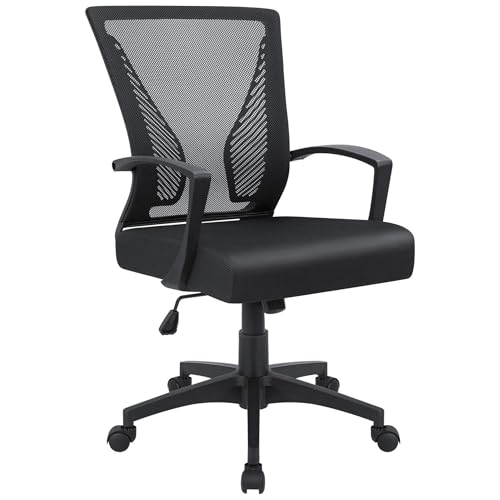
The Furmax is the chair for the smallest budgets that still refuse to buy junk. Its verified title promises the essentials and only the essentials: an ergonomic mesh computer chair with lumbar support, adjustable height, a breathable backrest, a mid-back 360 swivel format with armrests, and easy assembly. It suits students, first apartments, spare desks, and anyone whose long hours are real but whose budget is more real.
| Detail | What the verified listing states |
|---|---|
| Back | Mesh back, breathable backrest, per listing title |
| Support | Lumbar support, per listing title |
| Height | Adjustable height, per listing title |
| Format | Mid-back, 360 swivel, with armrests |
| Assembly | Easy assembly, per listing title |
| Capacity | Not stated in verified title |
Strengths
- Lowest-commitment entry in the guide; the essentials are all present and verified
- Breathable mesh back suits warm rooms and long sessions
- Easy assembly matters when the chair must work the day it arrives
Trade-offs
- No headrest and no armrest adjustability; long-day support is basic
- Capacity not stated in the verified title
- Foam and fittings at this level wear faster under daily full-time use
Every tier has a floor below which chairs stop being bargains and start being delays. The Furmax sits just above that floor, which is exactly its virtue: mesh where mesh matters, lumbar support that exists, height that adjusts, and nothing spent on decoration. For long hours it will not match the M57 or the CAPOT, and this review will not pretend otherwise; its seat and support are simpler, and a full-time professional will outgrow it. But for the student facing long study hours on a strict budget, it is the difference between a chair and a kitchen stool, and that difference is enormous.
Buy it with clear eyes and a plan: if your hours grow into a career, this chair is the bridge, not the destination. Its easy assembly and honest specification make it the budget pick we can recommend without crossing our fingers, which at the bottom of the inexpensive tier is the highest praise available.
Best for: Students and first-desk setups facing long hours on the tightest budget / Not suited for: Full-time professionals who will sit eight-plus hours daily for years
Check the current price on Amazon for the exact configuration described above.
BestOffice Ergonomic Office Chair — Best Simple Workhorse
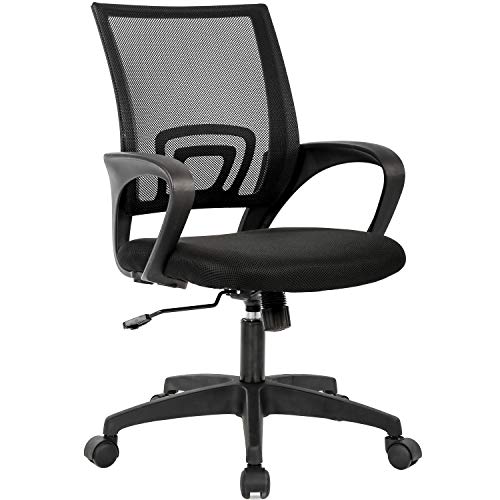
BestOffice’s chair is for buyers who want the fewest decisions. The verified title describes a mid-back swivel desk chair with lumbar support, adjustable height, a breathable backrest, a sponge seat, and rolling wheels, one chair, plainly specified. It suits home offices that need a competent seat today, guest desks, and anyone upgrading from a dining chair who wants the upgrade to be obvious but not complicated.
| Detail | What the verified listing states |
|---|---|
| Format | Mid-back swivel desk chair, pack of 1, per listing title |
| Support | Lumbar support, per listing title |
| Seat | Sponge seat, per listing title |
| Back | Breathable backrest, per listing title |
| Height | Adjustable height, per listing title |
| Capacity | Not stated in verified title |
Strengths
- Plain, complete specification with nothing oversold
- Sponge seat gives a softer first sit than mesh at this tier
- Rolling swivel format suits desks that serve several tasks
Trade-offs
- No headrest; tall sitters should look at the Marsail instead
- Capacity not stated in the verified title
- Support is fixed rather than adjustable, so fit depends on your proportions matching the chair’s
There is a large, underserved market for a chair that is simply fine: fine support, fine seat, fine price tier, no assembly saga, no fourteen-way adjustment ritual. The BestOffice chair serves that market honestly. Its sponge seat will feel kinder than mesh to sitters who dislike mesh’s firmness, its lumbar support is present rather than promised, and its mid-back format keeps it compact in small rooms.
For genuinely long hours it is a middle path: better than any dining chair, short of the M57’s tuning. That makes it the right recommendation for the second desk, the shared family desk, and the home worker whose hours are long but not extreme. Judge it as what it is, a workhorse, and it will not disappoint you; ask it to be an ergonomic flagship and the disappointment is in the asking, not the chair.
Best for: Second desks, shared desks, and moderate long-hour use without fuss / Not suited for: Anyone needing a headrest, adjustable arms, or a stated capacity
Check the current price on Amazon for the exact configuration described above.
Comparison Table
| Pick | Badge | Key spec | Best for |
|---|---|---|---|
| SIHOO M57 Ergonomic Office Chair | Best Overall | Holds 330 LBS per listing title; 3D armrests, adjustable headrest, lumbar support | Full-time remote workers who want one inexpensive chair that adjusts properly |
| CAPOT Ergonomic Mesh Office Chair | Best for Long Desk Work | 400lbs per listing title; 4D flip-up arms, 3-level tilt, 3D headrest; title names long desk work | Bigger sitters and posture-shifters who want the long-hours purpose stated by the maker |
| Hbada P5 Ergonomic Office Chair | Best with Footrest | Footrest and 2D headrest per listing title; adjustable lumbar and height, swivel tilt | Workers who recharge in the chair and want posture variety across the day |
| Marsail Ergonomic Office Chair | Best High-Back Value | High back mesh, adjustable lumbar, 3D armrests and headrest (per listing title) | Taller sitters who need support above the lumbar zone through long days |
| Furmax Office Chair | Best Budget | Mesh desk chair with lumbar support and adjustable height (per listing title) | Students and first-desk setups facing long hours on the tightest budget |
| BestOffice Ergonomic Office Chair | Best Simple Workhorse | Mid-back swivel desk chair, lumbar support, sponge seat (per listing title) | Second desks, shared desks, and moderate long-hour use without fuss |
How to Choose the Best Inexpensive Office Chairs for Long Hours
Shop for hour six, not minute six. Every chair feels acceptable in a quick sit; the inexpensive chairs that survive long days share three properties you can verify before buying: support that adjusts to you rather than asking you to adjust to it, a seat that does not bottom out, and construction that breathes or at least does not trap heat. The picks above were ranked on exactly those properties as their listings state them.
Prioritize adjustments in this order: lumbar support first, because your lower back files the first complaint; seat height and armrest height next, because they set your shoulders and wrists for every keystroke; tilt with tension control after that, because movement across the day is what separates tired from injured-feeling; and a headrest last, valuable for lean-back reading and calls but useless if the first three are wrong. The SIHOO M57 and CAPOT cover the full order; the budget picks cover its head, which is the correct place for a tight budget to concentrate.
What inexpensive means, honestly
Inexpensive in this guide is a qualitative tier, the low end of the office chair market, not a price this page will print, because prices in the tier shift constantly and a printed figure would mislead you within weeks. Within the tier there are real gradations: the Furmax end buys the verified essentials, the M57 and CAPOT end buys adjustability and stated capacities. The most expensive mistake in the tier is not overspending within it; it is buying below its floor, where chairs lack lumbar support entirely, and then buying again within the year.
Finally, check the capacity figure, or its absence. Two picks here state capacities in their titles, 330 LBS and 400lbs exactly as listed; the others do not state one in the verified title. If the figure matters to your household, treat its absence as homework for the product page, not as a detail to wave past.
Seat Foam, Mesh, and the Bottoming-Out Problem
The most common long-hours failure in budget chairs is a seat that bottoms out: thin, soft foam compresses fully under your weight, and by midday you are effectively sitting on the seat pan with a cushion-shaped rumor beneath you. Dense foam, a shaped seat, or a well-tensioned mesh all resist this; the reviews above note each chair’s seat construction as its listing states it so you can weigh the risk before ordering.
Mesh deserves its popularity for long hours because it distributes weight across a suspended surface and lets air move, which matters at hour seven in a warm room. Its trade is firmness: mesh feels supportive rather than plush, and sitters who love a soft chair sometimes read that as hardness. Neither preference is wrong, but know yours before choosing between the mesh majority in this guide and the sponge-seated BestOffice chair.
Whichever construction you choose, protect it with behavior: standing, walking, and posture changes are not breaks from the chair’s job, they are half of it. The how-to section turns that into a schedule simple enough to actually keep.
Setting Up a Budget Chair So It Feels Like a Better Chair
Half the comfort of an inexpensive chair is installed by its owner. Set the seat height so your feet rest flat and your knees sit near a right angle. Raise the lumbar support to the curve of your lower back, not your mid-back. Set armrests so your shoulders hang relaxed with your elbows near ninety degrees, and if the arms cannot reach that position, consider whether you are better with them removed than with them forcing a shrug. Loosen the tilt tension until the chair lets you lean back with gentle pressure, because a locked-upright chair turns your back muscles into the tilt mechanism.
Then give the setup a week before judging it. Bodies adapt to a corrected posture with a few days of unfamiliarity that feels like discomfort and is actually change. If a specific pressure point persists after a week of honest adjustment, that is fit information: the chair’s fixed geometry does not match yours, and a different pick from this guide, with a different back height or seat style, is the rational next step rather than another week of endurance.
The First Week With a New Budget Chair: A Tuning Diary
Day one is for geometry, not judgment. Set the seat height, lumbar position, armrest height, and tilt tension using the setup guide above, then work a normal day and write down, actually write down, the one place that complains by evening. A single complaint is data; a general sense of dissatisfaction is not. Most new-chair complaints trace to one adjustment a quarter-turn or one notch away from right, and the diary keeps you from condemning a chair for a fixable setting.
Days two and three are for posture variety. Deliberately rotate through the chair’s positions: upright for typing, tilted for reading and calls, and, if your chair has a footrest like the Hbada P5, legs up for one break per half day. You are teaching yourself the movement habit while the chair is new and interesting, which is when habits form most easily. Note which position you avoid; an avoided position is usually an adjustment that is still wrong, not a position you dislike.
By day five, re-check the hardware. Budget chairs settle, knobs loosen a fraction, and armrest bolts that were snug on day one may have a whisper of play. Tighten what needs it, re-set anything that drifted, and make your keep-or-return decision on the tuned chair, not the day-one chair. A week of this process is the difference between the inexpensive chair that serves for years and the one that gets replaced in frustration at month two, and it costs nothing but attention.
Accessories That Help, and the Ones That Quietly Do Not
Because this search’s searches surface endless accessories, a short buyer’s triage is worth printing. A footrest under the desk genuinely helps shorter sitters whose feet do not rest flat, and it is the one accessory that fixes a geometry problem a chair cannot. A monitor riser or a stack of sturdy books that brings the screen to eye level fixes the other geometry problem, the forward neck, and outperforms any chair feature aimed at the same complaint. Those two are worth their small cost at this tier.
Seat cushions are the ambiguous case. On a chair whose foam has aged, a cushion buys time; on a new chair in this guide, it usually signals that the chair’s seat does not fit you, and it raises your sitting height enough to disturb the armrest and desk geometry you just set. Buy the cushion to extend an old chair’s life, not to excuse a new chair’s misfit. Lumbar pillows follow the same logic: useful on a chair with no lumbar support, redundant on the adjustable chairs that lead this guide.
Everything else, posture correctors worn on the body, kneeling contraptions bought in a moment of afternoon desperation, should wait until the chair, desk, and habits in this guide have had their honest week. Most long-hours discomfort at this tier is solved by the boring fundamentals, and the fundamentals are already in your cart.
When to Replace a Budget Chair Instead of Repairing It
Inexpensive chairs invite a fair question at year two or three: repair or replace? The honest framework is component-based. A worn cylinder on an otherwise sound chair is a repair, as our hydraulic guide explains. A cracked base, a seat whose foam has collapsed into a bowl, or a back whose mesh has gone slack are structural failures, and on a budget chair they arrive as a group more often than singly, because the chair’s parts were specced to similar lifespans. One failure is maintenance; three are a verdict.
There is also a fit verdict, and it arrives earlier. If a chair never fit you, if the lumbar curve lands wrong no matter the adjustment, if the seat depth fights your legs, no repair changes its geometry, and the kindest economics are to replace it with a better-fitting pick from this guide while the old chair still serves someone it does fit. Budget chairs hold modest resale and donation value precisely because fit is personal; your misfit is a student’s perfect first chair.
Whichever verdict you reach, reach it deliberately at a scheduled review, say every spring, rather than in a moment of afternoon misery. Furniture decisions made at the point of maximum discomfort overspend in the wrong places. The chairs in this guide, honestly specified and honestly tuned, should make that annual review a short one for several years running.
A Note on Sharing an Inexpensive Chair Between Two People
Many budget chairs serve two sitters, partners on opposite schedules, a parent and a teenager, roommates splitting a desk. Sharing multiplies the value of adjustability and the cost of its absence: a chair set perfectly for one body is set wrongly for the other, and the second sitter, arriving to a chair tuned for someone else, often concludes the chair is uncomfortable when it is merely mis-set. The adjustable picks in this guide, the M57, the CAPOT, the Marsail, earn extra credit in shared homes precisely because each sitter can re-tune them in under a minute.
Make a household ritual of it: each sitter learns their own settings, seat height, lumbar position, arm height, and resets them on arrival the way a driver adjusts a shared car’s mirrors. It takes thirty seconds and converts one chair into two well-fitting ones across the day. Fixed chairs like the Furmax and BestOffice can still be shared, but their fit will favor one body, and the household should know whose, and let that person be the one with the longer hours.
How to Sit Long Hours Without Letting the Chair Decide
Use a movement rhythm you can keep on your worst day, not an ideal one for your best. A workable pattern is simple: sit and work, then change something every half hour or so, stand for a minute, walk for water, lean back with the tilt unlocked, or, in the Hbada P5, put the footrest out and reset your posture entirely. The specific interval matters less than the fact of variety; your body tolerates almost any posture briefly and almost no posture indefinitely.
- Set a quiet timer for posture changes rather than relying on discomfort to remind you; discomfort is a late signal
- Keep your screen at a height that lets your head stay neutral, since no chair can fix a monitor that pulls your neck forward
- Place your feet fully on the floor or a footrest; dangling feet undo a good seat within the hour
- Unlock the tilt and lean back for calls and reading instead of perching at the desk edge
- Stand and walk during one call per half day at minimum; the chair will feel new when you return
- Re-check your chair’s adjustments monthly, because knobs loosen and settings drift with daily use
None of this requires equipment beyond the chair you already bought, and together it is worth more than the price gap between the budget picks and the top of this guide. Long hours are a system, chair plus habits, and this is the half of the system that is free.
Common Buying Mistakes
Buying on the first sit. Showroom comfort and hour-six comfort are different products. Favor verified support features, adjustable lumbar, tilt, headrest, over a plush first impression.
Ignoring the capacity figure, or its absence. Two picks here state capacities in their titles and four do not. If the number matters to you, absence is homework, not a detail.
Locking the tilt and sitting bolt upright all day. A fixed upright posture is still a fixed posture. Unlock the tilt, set its tension, and let the chair move with you.
Spending below the tier’s floor. A chair with no lumbar support is not a bargain at any price for long hours. The Furmax end of this guide is the floor; below it, you are buying twice.
Expecting the chair to fix the desk. Monitor height, desk height, and foot position decide as much as the chair. Set the whole station up, using the guide above, before blaming the seat.
Final Recommendation
Start with the SIHOO M57 if your budget reaches the top of the inexpensive tier; it is the most completely adjustable chair here and states its 330 LBS capacity in its title. Choose the CAPOT if you are a bigger sitter or want the long-desk-work purpose in the maker’s own words, the Hbada P5 if in-chair breaks appeal, and the Marsail if you are tall. The Furmax and the BestOffice chair cover the tightest budgets and second desks without embarrassment.
Whichever you choose, pair it with the setup and movement habits in this guide. That combination, an honestly specified inexpensive chair plus a sitter who moves, is what actually delivers long hours in comfort, and it does so without pretending a budget chair is a medical device or a flagship in disguise.
Keep researching with these related guides from the same chairs program: Best Inexpensive Ergonomic Office Chairs Best Inexpensive Comfortable Office Chairs Best Inexpensive Office Chairs For Bad Backs Best Leather Office Chairs For Long Hours Best Office Chairs For Long Sitting And Comfort Best Office Chairs For 12 Hour Days
Frequently Asked Questions
How long can I sit in an inexpensive office chair each day?
No listing in this guide promises a specific number of hours, and you should distrust any that does. What decides your day is the combination of the chair’s support features and your own movement. With the setup and posture-change rhythm in this guide, the top picks here are built for full working days; without movement, no chair at any price makes unmoving hours healthy.
Which pick is best if I am heavier?
The CAPOT states a 400lbs capacity in its title, the highest figure in this guide, and the SIHOO M57 states 330 LBS. The other picks do not state a capacity in their verified titles, so check their product pages, or see our large-size office chair guide for chairs specified for bigger frames.
Is mesh or a padded seat better for long hours?
Mesh breathes and distributes weight evenly, which suits long sessions in warm rooms; padded seats feel softer initially but cheap foam can bottom out by midday. This guide includes both, and the reviews note each chair’s construction as its listing states it.
Do I need a headrest for long hours?
A headrest matters most if you lean back for calls, reading, or thinking, which you should be doing as part of a posture-variety habit. If you sit upright and forward all day, lumbar support and armrest height will do more for you, which is why the guide ranks adjustments in that order.
What does inexpensive mean in this guide?
It is a qualitative tier, the budget end of the office chair market, rather than a printed price, because prices in the tier change constantly. Use the tier framing to compare the picks, then check price on Amazon for the current figure on the chair you choose.
Can a better chair fix my back pain?
A well-fitted chair can support a neutral posture and stop making a long day worse, but it is not a treatment for any condition. If you have persistent or worsening pain, speak with a medical professional. This guide’s claims are about comfort and posture support only.
Should I buy the same inexpensive chair for a second desk?
If the first chair fits you and your hours at the second desk are shorter, yes: a matching pair, such as two of the BestOffice workhorses or a Furmax at the spare desk, keeps your setup familiar and your spare parts interchangeable. If the second desk is where your longest hours actually happen, put the better chair there instead; desks do not care about fairness, but your back keeps a precise ledger of where the good chair lives.


