Disclosure: airfryerkitchensupply.com is reader-supported. When you buy through links on our site, we may earn an affiliate commission at no extra cost to you.
Where to Buy
‘Virtual wall’ has meant three different technologies across the robot vacuum’s history — infrared barrier towers, magnetic floor strips, and app-drawn no-go zones — and this roundup covers all three honestly. Every linked pick below was verified against Amazon listing data (four through fresh verification run for this batch, one through our verified cache), and each linked listing confirms its boundary feature in its own wording. We do not print fixed prices; check the current price on Amazon through the links.
One structural warning before you buy anything in this category: in the classic Roomba system the virtual wall barriers are separate accessories, not box contents. Budget for the towers alongside the robot. In app-based systems the walls are software — free, instant and redrawn in seconds — but they live inside a map and an app, which is its own kind of commitment. Choose the generation that fits your household, not merely your floor.
- iRobot Roomba Robot Vacuum — 600-Series Class (Virtual Wall Compatible) — check price on Amazon
- ECOVACS DEEBOT T8 Robot Vacuum and Mop — check price on Amazon
- roborock Q7 L5 Robot Vacuum and Mop Combo — check price on Amazon
- ILIFE A30s Robot Vacuum — check price on Amazon
Key Takeaways
- Three generations of ‘virtual wall’ exist: infrared towers (Roomba), magnetic strips (Shark ION/RoboVac class), and app-drawn no-go zones (DEEBOT, roborock, ILIFE).
- Only four picks here carry links — each one’s listing explicitly confirms its boundary feature. Two slots are not linked, with reasons stated openly.
- Roomba Virtual Wall barriers are accessories sold separately from the robot — budget for them.
- App zones are the most flexible (redrawn in seconds, stored per floor); towers are the most robust (no app, map or Wi-Fi needed).
- Mapping alone does not confirm boundaries: check any listing for the actual words ‘no-go zone’ or ‘virtual wall’ before buying for that purpose.
Best Robotic Vacuums with Virtual Walls: What Actually Matters
The best robotic vacuums with virtual walls solve the problem every robot owner meets in the first week: the robot is diligent, tireless and completely indifferent to the places it should not go. The nursery during nap time. The pet’s feeding corner, with its splash radius of water and kibble. The home office during calls. The rug whose fringe the brush treats as a snack. A virtual wall — in any of its three technological generations — is how a robot’s territory gets edited, and the differences between the generations matter more than the differences between most robots.
This roundup was researched with fresh listing verification run specifically for it, supplemented by our verified cache, and it applies a strict rule that shapes everything below: a pick earns a purchase link only if its own listing explicitly confirms a boundary feature — virtual wall compatibility, a no-go zone, or their equivalent in the manufacturer’s wording. Four systems pass that test. Two more slots describe real, relevant options whose verification fell short of the rule in different instructive ways, and they are presented unlinked with the reason stated in plain sight. We would rather show you the rule working than hide its results.
Read the picks by generation. If your forbidden zones are few and fixed, the infrared original may still be the best tool. If they are many, changing or different on each floor, the app generation wins outright. And if you already own a strip-compatible robot, the magnetic middle generation is the cheapest upgrade in the article.
In this guide
Quick Picks
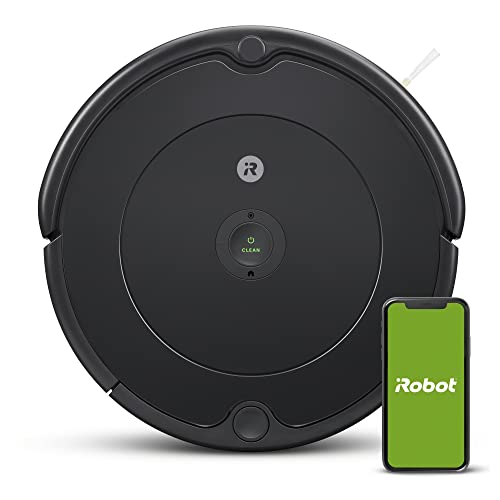
iRobot Roomba Robot Vacuum — 600-Series Class (Virtual Wall Compatible) — Best Classic Virtual Wall System
The Roomba line that built the virtual wall idea: a Wi-Fi Roomba with 3-stage cleaning and Dirt Detect, from the series iRobot’s own Dual Virtual Wall barriers are listed as compatible with.
Check the current price on Amazon

ECOVACS DEEBOT T8 Robot Vacuum and Mop — Best App-Based Virtual Boundaries
A laser-navigated robot whose listing explicitly confirms no-go and no-mop zones, multi-floor mapping and object avoidance — the complete app-era boundary toolkit.
Check the current price on Amazon

roborock Q7 L5 Robot Vacuum and Mop Combo — Best LiDAR No-Go Zones
This listing of the Q7 L5 explicitly confirms No-Go Zones alongside its 8,000Pa suction, LiDAR navigation and dual anti-tangle system — mapped boundaries plus serious pet-hair hardware.
Check the current price on Amazon
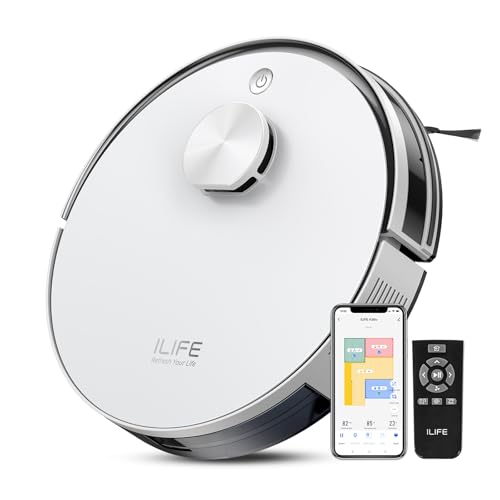
ILIFE A30s Robot Vacuum — Best Value No-Go Zone
ILIFE’s A30s lists 10,000Pa suction, LiDAR navigation, home mapping and an explicit No-Go Zone feature at a value tier — mapped boundaries without the flagship spend.
Check the current price on Amazon
Magnetic Boundary Strip Robots (Shark ION / eufy RoboVac class) — Best Tape-Based Boundaries — no link
The magnetic-strip generation: boundary tape laid on the floor that compatible robots treat as a wall. Verified strip listings confirm the system and its robot compatibility — but no complete robot listing for this class was confirmed in this roundup’s verification, so this slot is not linked.
Unlinked — no purchase link is given for this slot, for the reason stated above.
Slim App-Mapped Robots (eufy C10 class) — Best Slim Profile — no link
A verified slim self-emptying robot with LiDAR smart mapping — included as an unlinked slot because its listing confirms mapping but does not explicitly confirm a no-go or virtual-wall feature, and this article links only listings that name the boundary feature.
Unlinked — no purchase link is given for this slot, for the reason stated above.
How These Picks Were Chosen
Methodology, briefly and completely: we searched current listings for robots and boundary systems across all three generations — Roomba virtual wall barriers and compatible robots, magnetic boundary strips and their named robot families, and mapping robots whose listings name no-go zones. Each candidate was checked for an explicit boundary confirmation in its own listing text. Four robots passed and are linked. The magnetic-strip class passed at the level of its accessory ecosystem (multiple strip listings, with explicit robot compatibility statements) but returned no complete robot listing we could stand behind, so it is not linked. One slim mapping robot was verified as a product but its listing does not explicitly confirm a boundary feature, so it is not linked too — the rule applied symmetrically, to a product we otherwise like.
Accessory discipline was enforced throughout: virtual wall barrier units and magnetic strips are accessories, and none is presented as a pick — the picks are complete robots (or, in the unlinked strip slot, a described robot class). The Roomba barrier listing is cited as compatibility evidence for the robot pick, not sold to you as a vacuum. Renewed listings were excluded from picks.
A note on model naming honesty: the Roomba pick’s listing describes the robot by features rather than by a printed model number, though it was returned under the 600-series search and iRobot’s barrier listing names that series’ compatibility. We therefore name the pick by its series class and say exactly that in its review. Precision about what a listing does and does not say is this article’s whole method; it would be a poor show to abandon it at the headline.
The 6 Best Robotic Vacuums with Virtual Walls
iRobot Roomba Robot Vacuum — 600-Series Class (Virtual Wall Compatible) — Best Classic Virtual Wall System
The phrase ‘virtual wall’ was born here. iRobot’s Virtual Wall barriers are small infrared towers that project an invisible line a Roomba will not cross — the original answer to ‘keep the robot out of the nursery, the pet’s corner and the Christmas tree’. The robot in this pick is the Wi-Fi-connected Roomba returned by our verification for the 600-series class: its listing confirms Wi-Fi connection, Alexa compatibility, a 3-stage cleaning system, Dirt Detect, and a brief covering pet hair, carpets and hard floors. iRobot’s own Dual Virtual Wall listing, verified in the same research, names compatibility with the Roomba 600 series including the 694 — the system this robot belongs to.
Why choose the physical-barrier generation in an app era? Because it works without a map, a phone or a network. A barrier tower by the dog’s bowls works on day one, works for a house-sitter who does not have your app, and keeps working in a home where the robot is never connected to Wi-Fi at all. For single-room and single-floor cleaning with one or two forbidden zones, the infrared wall remains the simplest, most robust solution ever shipped in this category.
The honesty notes matter here. First, the barriers are accessories: iRobot sells Dual Virtual Wall units separately (singly and in two-packs), so budget for the towers alongside the robot if your home needs them — the robot’s box is the robot and its charging base. Second, our verification returned this robot under the Roomba 694 search, and its listing title describes it by features rather than by model number; we therefore name the pick by its series class, which the barrier listing’s compatibility statement supports, rather than printing a model number the robot’s own title does not state.
Choose this system if your forbidden zones are few, fixed and physical — a pet feeding station, a playroom, a rug with fringe the robot eats. Choose the app-based picks below if your zones are many, change often, or include whole rooms you want cleaned on some days and skipped on others. The generations are not rivals so much as tools for different floor plans, and this article treats them that way throughout.
Strengths
- The original virtual wall system — infrared barriers need no app, map or Wi-Fi
- iRobot’s own barrier listing confirms 600-series compatibility, as listed
- 3-stage cleaning with Dirt Detect, listed for pet hair, carpets and hard floors
Trade-offs
- Virtual Wall barriers are sold separately from the robot
- Physical towers need batteries and line-of-sight placement
- Random-era navigation is less methodical than LiDAR mapping below
| Specification | Detail (as listed) |
|---|---|
| Cleaning | 3-stage cleaning system, Dirt Detect (as listed) |
| Control | Wi-Fi connected, works with Alexa (as listed) |
| Boundary system | Dual Mode Virtual Wall barriers (separate accessories; compatibility as listed by iRobot) |
| Surfaces | Pet hair, carpets and hard floors (as listed) |
Best for: Homes with a few fixed forbidden zones and no appetite for apps / Not suited for: Complex floor plans needing mapped, changeable no-go zones
Check the current price on Amazon
ECOVACS DEEBOT T8 Robot Vacuum and Mop — Best App-Based Virtual Boundaries
The DEEBOT T8 is where the virtual wall grew up. Its listing confirms, in its own words, precise laser navigation, multi-floor mapping, intelligent object avoidance and fully customisable cleaning with no-go and no-mop zones. That last pair is the app-era virtual wall in its complete form: draw a line or a box on the map to keep the robot out (no-go), and separately tell the mop to lift or stay away from rugs (no-mop) — two kinds of boundary that physical towers could never distinguish.
Multi-floor mapping multiplies the value: the boundaries are stored per floor, so the ground floor’s pet corner and the upstairs nursery keep their own rules without re-drawing. Object avoidance adds the dynamic layer — the robot steers around the shoe, cable and toy that were not there when you drew the map. Together these systems answer the realistic version of the boundary problem, which is not one fixed forbidden room but a changing household geography.
The T8’s listing also notes compatibility with an auto-empty station — worth knowing, because it means the platform can grow with your tolerance for maintenance, though the station configuration is a separate purchase decision to check on the listing. As a vacuum-and-mop with laser navigation at its tier, it is the most complete boundary-focused package we verified for this roundup.
Choose the T8 if your home’s forbidden zones are numerous, changeable or different per floor, and if the mop boundary matters to you — homes with prized rugs in otherwise tiled spaces are exactly its brief. Choose the Roomba system above if you want boundaries that work with no app at all.
Strengths
- No-go AND no-mop zones confirmed in the listing — the complete boundary pair
- Precise laser navigation with multi-floor mapping
- Intelligent object avoidance for the zones you did not draw
Trade-offs
- App-dependent: boundaries live in the map and the phone
- Auto-empty station is a separate configuration decision
- Feature depth rewards setup time most households underestimate
| Specification | Detail (as listed) |
|---|---|
| Navigation | Precise laser navigation (as listed) |
| Boundaries | No-go and no-mop zones (as listed) |
| Mapping | Multi-floor (as listed) |
| Avoidance | Intelligent object avoidance (as listed) |
| Functions | Vacuum and mop |
Best for: Multi-floor homes with changeable zones and rugs to protect from the mop / Not suited for: App-averse households — see the Roomba pick
Check the current price on Amazon
roborock Q7 L5 Robot Vacuum and Mop Combo — Best LiDAR No-Go Zones
Readers of our companion roundup on robot vacuums for tile, carpet and pet hair will recognise the Q7 L5 — and should note that this is a different listing of it, verified fresh for this article, whose title explicitly confirms No-Go Zones alongside the model’s 8,000Pa suction, LiDAR navigation, multi-level mapping heritage and dual anti-tangle brush system. That explicit confirmation is why this listing, rather than any other, carries the pick here: in an article about boundaries, we link the listing that names the boundary feature.
The combination matters. No-go zones drawn on a LiDAR map are precise to the doorway and the rug edge, and the robot that honours them also brings this roundup’s most pet-capable brush system and strong suction to the areas it is allowed into. Forbidden zones in pet homes are usually pet zones — feeding stations, litter areas, the dog bed’s splash radius — so the machine that both respects the boundary and handles hair everywhere else is solving the whole problem rather than half of it.
Multi-level mapping (confirmed in the model’s other verified listing) means boundaries persist per floor. App control lets you redraw a zone in seconds when life changes — a new puppy gate, a drying rack’s temporary occupation of the hallway — which is the app generation’s decisive advantage over towers and tape: the wall moves when you say so, at no cost in batteries or strips.
Choose this listing of the Q7 L5 if you want mapped boundaries on a genuinely capable mixed-floor, pet-hair robot. If you do not need no-go confirmation and prefer the configuration assessed in our companion article, that listing is reviewed there; the two articles deliberately link the listings whose confirmed features match their own briefs.
Strengths
- No-Go Zones explicitly confirmed in this listing’s title
- 8,000Pa suction and dual anti-tangle brush for pet homes
- LiDAR mapping keeps boundaries precise and persistent
Trade-offs
- Boundaries are app-managed — no physical fallback
- Two listings of this model exist; this one is linked for its confirmed no-go wording
- Mopping remains maintenance-level, as with all combos here
| Specification | Detail (as listed) |
|---|---|
| Suction | 8,000Pa (as listed) |
| Boundaries | No-Go Zones (as listed) |
| Navigation | LiDAR (as listed) |
| Brush | Dual anti-tangle system (as listed) |
| Functions | Vacuum and mop combo |
Best for: Pet homes wanting mapped boundaries on a capable all-rounder / Not suited for: Anyone wanting boundaries without an app
Check the current price on Amazon
ILIFE A30s Robot Vacuum — Best Value No-Go Zone
The ILIFE A30s is the value proof that mapped boundaries are no longer a flagship luxury. Its listing confirms 10,000Pa maximum suction, LiDAR navigation, home mapping and — the feature this article exists for — a No-Go Zone function, with a 150-minute runtime and app, voice and remote control, for hard floor, carpet and pet hair. That is the complete app-era boundary feature set at the tier where most households actually buy robots.
ILIFE’s design philosophy shows in the control options: app for the map and the zones, voice for convenience, and a physical remote for everyone else. Boundary-drawing remains an app task — that is where maps live — but daily operation does not lock the household into one person’s phone, a detail families appreciate by the second week.
The vacuum-only configuration (this listing is vacuum only, no mop) simplifies ownership for homes whose forbidden zones are about access rather than water: the robot stays out of the study, the nursery and the pet corner, and there is no mop to threaten the rugs in the rooms it does enter. Buyers who need the no-mop boundary as well should take the DEEBOT above; buyers who need neither mop nor its maintenance will find the A30s the leanest route to mapped walls.
Choose the A30s if budget is real and boundaries are non-negotiable. It is the pick that disproves the assumption behind many buying guides — that virtual walls require premium money. They require a mapping robot and an honest listing, and this one confirms both.
Strengths
- No-Go Zone explicitly confirmed in the listing
- 10,000Pa max suction with LiDAR mapping at a value tier
- App, voice and remote control — not app-locked for daily use
Trade-offs
- Vacuum only — no mop and therefore no no-mop boundaries
- Value-tier app polish trails roborock and ECOVACS
- No self-emptying in this configuration
| Specification | Detail (as listed) |
|---|---|
| Suction | 10,000Pa max (as listed) |
| Boundaries | No-Go Zone (as listed) |
| Navigation | LiDAR, home mapping (as listed) |
| Runtime | 150 minutes (as listed) |
| Control | App, voice and remote (as listed) |
Best for: Budget buyers who refuse to give up mapped boundaries / Not suited for: Homes needing mop boundaries too — see the DEEBOT
Check the current price on Amazon
Magnetic Boundary Strip Robots (Shark ION / eufy RoboVac class) — Best Tape-Based Boundaries — no link
Between the infrared tower and the app-drawn zone sits the magnetic generation: strips of magnetic tape laid across a doorway or around a pet’s area, which a compatible robot’s sensors read as a wall. Our fresh verification confirmed the ecosystem in detail — boundary strips listed for Neato, Shark ION, Xiaomi, Roborock and eufy RoboVac robots, in lengths from about six and a half to sixteen feet — so the system is real, current and well supplied. What our verification did not return is a complete, confirmable listing for a current robot of this class to stand behind as a pick, and this roundup does not link what it cannot verify. Hence this slot’s unlinked status, stated openly rather than papered over.
The strip system’s virtues are genuine: no batteries (unlike towers), no app (unlike mapped zones), repositionable with scissors and a minute’s work, and invisible in use. Its limits are equally genuine: the tape is a physical object on your floor that must sit where the boundary is, it only guards lines it physically spans, and compatibility is specific — a strip listed for one robot family may explicitly not suit another, as at least one verified listing warns.
Who should still consider it? Owners of an existing compatible robot, first of all — if your Shark ION or RoboVac already patrols your home, strips are the cheapest boundary upgrade in this article. And households furnishing a single doorway boundary in a rental, where towers feel like hardware and apps feel like homework, may find tape the proportionate answer.
If you buy into this class, verify compatibility from the strip listing’s own wording against your exact robot model before ordering, and treat any listing that promises universal fit with the scepticism this article has applied throughout. When a confirmable robot listing for this class is verified in a future research pass, this slot will gain its link; until then, it remains an honest description without one.
Strengths
- No batteries, no app — the simplest boundary technology of the three
- Strips are cheap, cut-to-length and repositionable
- Well supplied: multiple verified strip listings across robot brands
Trade-offs
- No complete robot listing for this class verified in this roundup — hence unlinked, no link
- Tape is a physical object on the floor at the boundary line
- Compatibility is model-specific; universal-fit claims need scepticism
Best for: Existing owners of strip-compatible robots needing a doorway boundary / Not suited for: New buyers wanting a verified complete package — choose a linked pick above
Unlinked — no purchase link is given for this slot, for the reason stated above.
Slim App-Mapped Robots (eufy C10 class) — Best Slim Profile — no link
This final slot exists to demonstrate the article’s rule in action. During fresh verification we confirmed a current slim robot — eufy’s C10 class: self-emptying, a slim 2.85-inch profile, LiDAR-based smart mapping and an edge-expansion brush for pet hair. On paper it sounds like a boundary pick. But its listing’s confirmed wording stops at smart mapping; it does not explicitly name no-go zones or virtual walls, and in an article whose entire subject is boundary features, ‘mapping, so probably zones’ is not good enough to earn a link. The slot is therefore unlinked, and the robot is described without one.
Why include it at all? Because shoppers will meet this class constantly — slim, mapping, self-emptying robots are the market’s centre of gravity — and they deserve a worked example of how to read such listings. Mapping is the platform that makes app boundaries possible, and most mapping platforms do offer them; but ‘most’ is not ‘this one, confirmed’. The correct shopper behaviour is to check the specific listing (and its app description) for the words no-go zone, virtual wall or keep-out before buying for that purpose.
If the listing or app does confirm zones when you check, a slim mapper like this becomes a strong pick for homes whose main obstacle is furniture clearance — the low profile cleans under sofas and beds that taller LiDAR towers cannot enter, which is a boundary problem of the opposite kind: not keeping the robot out, but letting it in.
Until such confirmation exists in our verified data, though, the honest status stands: described, not linked. Readers who need a boundary pick today should choose among the four linked systems above, each of which names its boundary feature in its own listing. That short list is the honest state of the market as verified: boundary features are common in marketing copy and rare in listing titles, and this guide counts only the titles.
Strengths
- Slim 2.85-inch profile reaches under furniture taller robots cannot
- Self-emptying with LiDAR smart mapping, as listed
- A live example of this article’s verification standard
Trade-offs
- Listing does not explicitly confirm no-go/virtual-wall features — no link, no link
- Boundary capability must be confirmed by the buyer before purchase for that purpose
- Self-empty configuration and app details need listing-level checks
Best for: Under-furniture cleaning where the buyer verifies zone features at the listing / Not suited for: Anyone needing a boundary feature confirmed today — choose a linked pick
Unlinked — no purchase link is given for this slot, for the reason stated above.
Comparison Table
| Pick | Badge | Key spec | Best for |
|---|---|---|---|
| iRobot Roomba Robot Vacuum — 600-Series Class (Virtual Wall Compatible) | Best Classic Virtual Wall System | Virtual Wall barriers, 3-stage cleaning | Homes with a few fixed forbidden zones and no appetite for apps |
| ECOVACS DEEBOT T8 Robot Vacuum and Mop | Best App-Based Virtual Boundaries | Laser nav, no-go + no-mop zones | Multi-floor homes with changeable zones and rugs to protect from the mop |
| roborock Q7 L5 Robot Vacuum and Mop Combo | Best LiDAR No-Go Zones | 8,000Pa, LiDAR, No-Go Zones | Pet homes wanting mapped boundaries on a capable all-rounder |
| ILIFE A30s Robot Vacuum | Best Value No-Go Zone | 10,000Pa, LiDAR, No-Go Zone | Budget buyers who refuse to give up mapped boundaries |
| Magnetic Boundary Strip Robots (Shark ION / eufy RoboVac class) | Best Tape-Based Boundaries — no link | Magnetic tape boundaries (system described; no linked robot) | Existing owners of strip-compatible robots needing a doorway boundary |
| Slim App-Mapped Robots (eufy C10 class) | Best Slim Profile — no link | LiDAR smart mapping (boundaries unconfirmed) | Under-furniture cleaning where the buyer verifies zone features at the listing |
How to Choose a Virtual Wall System: Towers, Tape or App
Count your zones and ask how often they change. One or two permanent boundaries — the pet corner, a doorway that is never to be crossed — are tower or tape territory: set once, forget for months. Zones that change with life — a drying rack this week, a puppy pen next month, a Christmas tree in December — belong to the app generation, where redrawing a wall costs ten seconds and nothing else. Zones that differ by floor demand mapping with per-floor storage, which only the app generation offers.
Then ask who operates the system. Towers and tape work for everyone in the household, including the grandparent, the house-sitter and the child, because there is nothing to operate. App walls live on one person’s phone until shared properly, and they depend on Wi-Fi, accounts and a map that someone must maintain. Households that love their apps will find that trivial; households that do not should weight it honestly, because a boundary system nobody maintains becomes a robot in the nursery at nap time.
Finally, consider the failure modes. Towers fail when their batteries die or their line of sight is blocked by a moved chair. Tape fails when it is kicked out of place or when a robot without the right sensor meets it. App zones fail when a map corrupts, a floor changes enough to confuse localisation, or a firmware update rearranges the furniture of the software. None of these is common; all of them argue for walking your boundaries once after setting them, whichever generation you choose — the setup section below builds that walk in.
No-go versus no-mop zones: the distinction that matters
App-era boundaries come in two species that listings increasingly name separately, as the DEEBOT T8’s does. A no-go zone excludes the robot entirely. A no-mop zone lets it vacuum but keeps water off — the boundary that protects rugs in a tiled home. If your forbidden areas are about mopping rather than access, a vacuum-only robot with no-go zones solves a different problem from yours; read listings for both terms before assuming your need is covered.
Boundary precision: lines, boxes and rooms
Towers project a line (and, in dual-mode units, a circular halo around themselves for protecting a bowl or a plant). Tape is a line you lay physically. App systems offer lines, rectangles and whole-room exclusion, at a precision set by the mapping quality — LiDAR maps hold a doorway’s edge faithfully; simpler mapping is coarser. Match the precision to the boundary: a feeding station needs a halo or a tight box; a forbidden room needs only a line at its door, which every generation can draw.
What about door thresholds, cliffs and other non-walls?
Not every robot problem is a wall problem. Cliff sensors handle stairs on every modern robot — you do not need a virtual wall at a staircase, and none of these systems is sold for that purpose. Physical baby gates and closed doors remain undefeated technology for determined exclusion. And some zones are better solved by moving the object — the fringe rug rolled up on cleaning day — than by any boundary system. Buy the wall for the zones that are genuinely geographic.
Virtual Walls in Real Homes: Where People Actually Draw Them
Surveying our own research and the way these systems are marketed, the same zones recur: pet feeding stations (water plus robot equals a mopping incident), litter tray areas, nurseries and bedrooms during sleep, home offices during calls, delicate floor-standing items (guitar stands, floor lamps with trailing cables, Christmas trees), rug fringes and deep-pile rugs a particular robot handles badly, and the forest of cables behind entertainment units. Notice how many are about water, sleep and cables — the unholy trinity of robot incidents.
The practical pattern that emerges is that most homes need two or three boundaries, not ten — which is why the simple generations remain competitive. Draw your zones from your incident list, not from a floor plan’s theoretical completeness: the boundary you need is the one where the robot has actually caused, or obviously will cause, a problem. Every additional zone is a small tax on cleaning coverage, and a robot fenced out of half its home is a robot half wasted.
How to Set Up Virtual Walls and No-Go Zones (Any Generation)
Whichever generation you bought, the setup ritual is the same shape: place the boundary, test it deliberately, then trust it.
- Clean the zone’s edges first. Boundaries guard geography, not clutter. Clear the doorway, feeding corner or rug edge you are protecting so the test that follows measures the wall, not the obstacles.
- Towers: place for line of sight. Set the Virtual Wall unit at the boundary with its beam across the opening, per the unit’s markings, and keep its path unobstructed. For halo mode around a bowl or plant, centre the unit on the object it protects.
- Tape: lay it flat and complete. Magnetic strips must lie flat across the full width of the passage, with no gaps at the edges — a boundary with a gap is a suggestion. Confirm your robot’s compatibility from the strip listing before laying anything.
- App zones: map first, draw second. Let the robot complete a full mapping run with doors in their normal positions, then draw zones on the finished map — tight boxes around feeding stations and litter areas, lines across doorways you want closed, no-mop zones over rugs if your robot mops.
- Run the provocation test. Start a clean and watch the robot meet each boundary. It should turn away cleanly at every wall, tower, strip and drawn line. Fix failures now — a dead tower battery, a shifted strip, a zone drawn on the wrong side of a doorway — while you are watching, not after the first incident.
- Re-walk boundaries when life changes. New pet, new furniture, a moved feeding station, a map reset: each is a cue to re-check the walls. Put a reminder where you will see it — the systems are reliable, but they guard the geography you told them about, not the geography you have now.
Ten minutes of deliberate testing on the first day is the entire difference between a boundary system you can genuinely trust and a boundary hope you merely assume. Every generation — tower, tape and app alike — rewards that small investment equally, and every incident story in this category begins with someone skipping it.
Common Buying Mistakes
Assuming the barriers are in the box
In the classic Roomba system, Virtual Wall towers are accessories. Buyers who budget only for the robot discover the omission at setup. Check box contents for any boundary system — towers, tape or (in app systems) nothing physical at all — before the robot arrives.
Buying a mapping robot for its zones without confirming them
Mapping is the platform, not the feature. As this article’s unlinked slot demonstrates, a listing can confirm smart mapping without explicitly confirming no-go zones. If boundaries are your purpose, buy the listing that names them.
Drawing zones from the armchair without testing
Maps are slightly wrong in the places that matter — doorways, rug edges, the feeding corner’s true splash radius. Draw generously, then run the provocation test and adjust. An untested zone is a draft, not a wall.
Fencing the robot out of half the house
Every zone is coverage surrendered. Buyers who wall off every theoretical risk end up with a robot that cleans a corridor. Zone the incident list — water, sleep, cables, fringe — and let the robot work everywhere else.
Mixing boundary generations’ accessories
Towers talk infrared to their own robot families; strips are read by specific sensor types; neither is universal, and listings that promise universal fit deserve the scepticism this article applies throughout. Match accessories to your exact robot, from the accessory listing’s own compatibility wording.
Final Recommendation
Choose by generation and your zones will hold. Few and fixed zones, no app wanted: the Roomba 600-series system with its Dual Virtual Wall towers (bought alongside, as accessories). Many, changing or per-floor zones, with mop boundaries too: the DEEBOT T8. Mapped zones on the strongest pet-hair all-rounder: the roborock Q7 L5 listing that confirms No-Go Zones in its own title. Mapped zones on a budget: the ILIFE A30s. Already own a strip-compatible robot: the magnetic tape ecosystem, described honestly without a robot link. Tempted by a slim mapper: verify its zone features at the listing before buying for boundaries, as our unlinked slot explains.
Whichever system you choose, run the provocation test on day one and re-walk your boundaries when the house changes. Virtual walls are among the most reliable features in home robotics — provided they are guarding the geography you actually live in.
For the cleaning side of these robots, our companion roundups cover the best robot vacuums for tile and carpet and pet hair and the best ilife robotic vacuums in depth, and budget hunters should see the best economy robot vacuums before deciding how much robot their boundaries need.
Best Robot Vacuums For Tile And Carpet And Pet Hair
Best Robot Vacuums For Tile Floors
Best Vacuum For Hard Floors And Rugs
Frequently Asked Questions
What is a virtual wall for a robot vacuum?
A way to mark territory the robot must not enter. It exists in three generations: infrared barrier towers that project an invisible line (iRobot’s Virtual Wall system), magnetic strips laid on the floor that compatible robots sense, and app-drawn no-go zones on a mapping robot’s floor plan. All three are covered in this roundup, with links only where a listing explicitly confirms the feature.
Are virtual wall barriers included with the robot?
In the classic Roomba system, no — Dual Virtual Wall units are accessories sold separately, singly and in two-packs, and iRobot’s own listings describe them as replacement parts and accessories. App-based zones, by contrast, are software features of mapping robots like the DEEBOT T8, roborock Q7 L5 and ILIFE A30s picks here, with nothing physical to buy.
No-go zone or virtual wall — is there a difference?
They do the same job by different means. A virtual wall is a physical or projected boundary the robot senses in the room. A no-go zone is a drawn region on a digital map. App systems add a refinement physical walls cannot match: no-mop zones, which let the robot vacuum an area while keeping its mop off rugs — a distinction the DEEBOT T8’s listing names explicitly.
Can I use a virtual wall to protect my robot from stairs?
You do not need to. Every modern robot vacuum has cliff sensors that detect stair edges and turn the robot away; stairs are the one boundary the robot draws for itself. Virtual walls are for geography cliff sensors cannot know about — rooms, corners, feeding stations and fragile objects on flat floors.
Do magnetic boundary strips work with any robot?
No. Strips are read by specific sensor types, and compatibility is model-specific — verified strip listings name their robot families (Neato, Shark ION, Xiaomi, Roborock, eufy RoboVac among them) and at least one warns it is not compatible with other brands. Check the strip listing’s own compatibility wording against your exact model before ordering.
Why are two slots in this roundup unlinked without links?
Because verification, not enthusiasm, decides links here. The magnetic-strip class is real and well supplied, but our research verified its accessory ecosystem rather than a complete robot listing to recommend. The slim mapping robot we verified does not explicitly confirm a boundary feature in its listing. Both are described honestly with their status stated — and both will gain links in future research if verification catches up.