Disclosure: airfryerkitchensupply.com is reader-supported. When you buy through links on our site, we may earn an affiliate commission at no extra cost to you.
Where to buy
Extended use is the duty cycle that destroys ordinary desk chairs — eight-plus hours a day, every working day — so every chair below was verified in Amazon catalog data first, and each review separates what its title actually states about support and adjustability from the ergonomic adjectives around it. Use this box to check the current price on Amazon, and check the warranty and return terms at the same time: a chair for extended use is a multi-year relationship, and its paperwork matters.
- Herman Miller Embody Ergonomic Office Chair — Check on Amazon
- Steelcase Leap Office Chair — Check on Amazon
- Hbada E3 Air Ergonomic Office Chair — Check on Amazon
- SIHOO Doro C300 Pro V2 Ergonomic Office Chair With Footrest — Check on Amazon
- FLEXISPOT ErgoX Premium Ergonomic Office Chair — Check on Amazon
- SIHOO M18 Ergonomic Office Chair — Check on Amazon
The best desk chairs for extended use are not the most comfortable chairs for ten minutes, and confusing the two is the most expensive mistake in home office furniture. A chair that feels like a cloud in a showroom can leave you folded and aching by hour six, because extended use is an endurance event: what matters is not initial softness but whether the chair keeps your body in a supported, variable position across a whole working day, a whole working year, and the warranty period after that. This guide is built on that distinction, and every pick below was verified in catalog data with its support and adjustment claims checked in its own title.
The six picks span the honest range of the category. At the top sit two long-proven ergonomic designs — the Herman Miller Embody and the Steelcase Leap — whose reputations were built in offices that run chairs for a decade. Below them, the modern mesh generation: the Hbada E3 Air with its three-zone dynamic lumbar, the SIHOO Doro C300 Pro with a footrest and adaptive support, and the FLEXISPOT ErgoX with dynamic lumbar and a footrest of its own. And because extended use on a sane budget is a real brief, the SIHOO M18 anchors the value end with stated lumbar support, a headrest, and a stated 330-pound capacity. This is a comfort-and-fit guide, not a medical one: no chair here is presented as treating anything, and persistent pain belongs with a clinician, not a product page.
In this guide
Quick Picks
Read the adjustment columns as a checklist against your own body: lumbar that moves or adjusts, arms that adjust, a headrest if you recline to think, and a footrest only if your habits will actually use it. The badge on each chair names the extended-use scenario it serves best.
| Pick | Badge | Why it stands out | Check |
|---|---|---|---|
| Herman Miller Embody Ergonomic Office Chair | Best Overall for Extended Use | The endurance benchmark: a flagship ergonomic design with fully adjustable arms, verified in charcoal with carpet casters. | Check on Amazon |
| Steelcase Leap Office Chair | Best Proven Alternative | The other decade-tested design: LiveBack technology and a Natural Glide System stated in the title, built to follow the shape of your back as it changes. | Check on Amazon |
| Hbada E3 Air Ergonomic Office Chair | Best Dynamic Lumbar | The modern mesh answer: a 3-zone dynamic lumbar system, 3D adjustable headrest, and 4D adjustable armrests, in grey. | Check on Amazon |
| SIHOO Doro C300 Pro V2 Ergonomic Office Chair With Footrest | Best With Footrest | The recline-and-recover package: full-body adaptive support, 8D armrests, breathable mesh, and a footrest for the long day’s second shift. | Check on Amazon |
| FLEXISPOT ErgoX Premium Ergonomic Office Chair | Best Recline-and-Tilt Value in Mesh | A premium-position mesh chair with dynamic lumbar support, recline and tilt functions, adjustable armrests, and a footrest. | Check on Amazon |
| SIHOO M18 Ergonomic Office Chair | Best Value for Extended Use | The honest budget anchor: adjustable lumbar support, a headrest, 2D armrests, a wide cushion, and a stated 330-pound capacity. | Check on Amazon |
How These Picks Were Chosen
Picks were chosen from previously verified Amazon catalog entries in the airfry site’s research cache, each originally confirmed through the site’s own Amazon listing data connection. The screen for this search was adjustment and support, stated in the title: an adjustable or dynamic lumbar system, adjustable armrests, a headrest, a stated capacity, or a recline range. Dining chairs, kids’ study chairs, chair mats, and seat cushions that surfaced in the same research were excluded — this guide is about complete desk chairs built for long daily sitting, and a cushion is an accessory, not an answer.
Two honesty rules shaped the reviews. First, ergonomic language is treated as positioning until it is tied to a stated mechanism: a chair earns credit for a 3-zone dynamic lumbar or 4D armrests because its title names them, not because the word ergonomic appears in it, as it appears in nearly every title in the category. Second, no health claims are made or repeated as fact. These chairs support comfortable, varied, long-duration sitting; what they do for any individual’s back is a question this guide deliberately does not answer, and the sources record that discipline.
Capacity and fit figures are quoted only where titles state them — the M18’s 330 pounds is the example — and where a title does not state a chair’s dimensions or capacity, the review says so and sends you to the listing, because a chair bought for eight hours a day must fit the body that will live in it, and fit cannot be guessed from a silhouette.
The 6 Best Desk Chairs for Extended Use
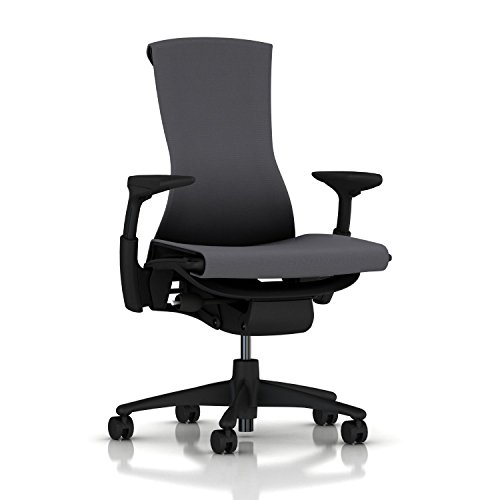
Herman Miller Embody Ergonomic Office Chair — Best Overall for Extended Use
The Embody is the chair this category is measured against, and its verified title is almost aggressively plain about it: an ergonomic office chair with fully adjustable arms and carpet casters, in charcoal. The reputation behind that plain title was earned in exactly the duty cycle of this search — full-time, years-long sitting — and the design’s premise is movement: a chair that responds as you shift, recline, and reach, rather than locking you into one approved posture. It suits the professional whose chair is their primary work tool, who sits eight to ten hours daily, and who prices furniture across a decade.
Strengths
- A flagship ergonomic design with a long record in full-time professional use — the safest extended-use bet in the guide
- Fully adjustable arms stated in the title, the adjustment that most affects shoulder and neck comfort across a long day
- A design philosophy built around movement and posture variety, which is what hour six actually demands
Trade-offs
- It sits at the premium summit of this guide — check the current price on Amazon with a decade-long horizon in mind, because that is the only math that flatters it
- The verified variant specifies carpet casters; hard-floor users should confirm the caster option for their flooring on the listing
- Its distinctive look divides rooms and tastes — it reads as professional equipment, not furniture
| Arms | Fully adjustable (per Amazon title) |
|---|---|
| Casters | Carpet casters (per Amazon title) |
| Verified variant | Charcoal Rhythm (per Amazon title) |
| Capacity / dimensions | Not stated in Amazon title — confirm on listing |
Extended use exposes a truth that short sits hide: no single posture, however correct, is comfortable for eight hours. The chairs that win the long day are the ones that let you change — lean back to read, come forward to type, shift weight, stretch — while staying supported through the changes. That is the Embody’s founding idea, and it is why professionals who sit for a living keep choosing designs in this class after cheaper chairs have taught them the alternative. Buy it as capital equipment for your working life, because that is what it is.
Ownership at this level is mostly about setup and time. Set it up properly on day one — seat height so feet rest flat, arms at desk height so shoulders drop — and then give your body two honest weeks to adapt if you are coming from a soft, unsupportive chair; support feels different before it feels better. Confirm the warranty terms on the listing, keep the receipt with the same care as any major appliance, and expect the relationship to be measured in years. For the heaviest extended-use brief in this guide, this is the recommendation.
Best for: full-time professionals who sit 8-10 hours daily and price chairs across a decade / Not suited for: budget-led buyers, or anyone who wants a plush, furniture-look chair
Check on Amazon — check the current price on Amazon before you decide, and confirm the exact size, color, or configuration on the listing, because several of these products are sold in more than one variant.

Steelcase Leap Office Chair — Best Proven Alternative
If the Embody is one philosophy of endurance, the Leap is the other, and its title states its mechanisms outright: LiveBack technology that supports the back’s changing shape, and a Natural Glide System, in an ergonomic work chair with wheels for carpet, in onyx. Where the Embody emphasizes whole-body movement, the Leap’s fame rests on its back — a backrest engineered to flex and follow as you move between upright work and reclined thought. It suits the extended-use buyer who wants the proven flagship class with a more conventional office silhouette.
Strengths
- LiveBack and Natural Glide are named mechanisms in the title, not adjectives — support that is specified, checkable, and central to the design
- A long-established flagship with the same decade-scale service record as its rival above
- A more traditional office appearance that disappears into a professional room instead of starring in it
Trade-offs
- The catalog entry reused for this pick does not record a verification date, so confirm the live listing’s configuration and terms with extra care
- Premium flagship pricing applies here as above — the value case is years of service, not the sticker
- The title specifies wheels for carpet; hard-floor users should confirm their caster option on the listing
| Back system | LiveBack technology (per Amazon title) |
|---|---|
| Movement | Natural Glide System (per Amazon title) |
| Casters | Wheels for carpet (per Amazon title) |
| Verified variant | Onyx (per Amazon title) |
The Leap versus Embody question is the classic of this category, and the honest answer is that both are right and the difference is emphasis. Choose the Leap if your long-day discomfort concentrates in your back and you want the backrest itself to be the active, adapting component. Choose the Embody if your sitting is more mobile and whole-body. Either way, you are buying out of the replacement cycle that budget chairs impose — the cycle where a chair is fine in month one, tired in month twelve, and replaced in month twenty, at a cumulative cost that approaches these flagships anyway.
That replacement-cycle math deserves its sentence in the sun, because it is the real argument of this entire guide’s top end. Extended use is measured in thousands of hours. A chair that serves ten years at eight hours a day has carried you through twenty thousand hours of work; priced per hour, the flagship is not the expensive chair in this guide — the repeatedly replaced one is. Confirm configuration, casters, and warranty on the listing, set it up with the same care as the Embody, and let the decade argument make itself, one comfortable year at a time.
Best for: back-focused extended users who want a proven flagship in a conventional silhouette / Not suited for: anyone whose budget cannot think in decades, or hard-floor users who skip the caster check
Check on Amazon — check the current price on Amazon before you decide, and confirm the exact size, color, or configuration on the listing, because several of these products are sold in more than one variant.

Hbada E3 Air Ergonomic Office Chair — Best Dynamic Lumbar
The E3 Air is where the new generation makes its case: its title stacks the three adjustments that matter most for long days into one chair — a 3-zone dynamic lumbar support, a 3D adjustable headrest, and 4D adjustable armrests — in a swivel mesh-format chair in grey. Dynamic is the operative word for extended use: a lumbar that responds in zones as you shift is a different proposition from a fixed pad you set once and forget. It suits the home professional who wants flagship-style adjustability at a midrange posture, and who works in a warm room where a mesh back earns its keep every afternoon.
Strengths
- A 3-zone dynamic lumbar is the most specific support mechanism stated by any midrange pick here
- 4D armrests and a 3D headrest complete the adjustment set that long days actually use — arms, head, and back all dial in
- Mesh-format construction suits warm offices and long summers better than upholstered backs
Trade-offs
- A newer-generation brand carries a shorter service record than the flagships — the warranty terms on the listing deserve a careful read
- The title does not state capacity or seat dimensions, so larger users must confirm fit on the listing before ordering
- Dynamic systems have more moving parts; set them deliberately rather than expecting the chair to configure itself
| Lumbar | 3-zone dynamic lumbar support (per Amazon title) |
|---|---|
| Headrest | 3D adjustable (per Amazon title) |
| Armrests | 4D adjustable (per Amazon title) |
| Verified variant | Grey (per Amazon title) |
Spend a moment on why zones matter, because it is the difference between this chair and a decade of lookalikes. A single lumbar pad supports one curve at one height; backs, however, are three-act structures, and a long day moves the load between them as you type, call, and recline. A zoned, dynamic system follows that migration, which is why chairs in this design family feel supportive at hour seven in a way that surprises people upgrading from a fixed-pad chair. It is the most meaningful midrange idea in this guide, and the E3 states it plainly.
The supporting cast is complete in the right places: 4D arms to bring the desk to your shoulders rather than your shoulders to the desk, and a headrest that adjusts in three dimensions for the recline-and-think posture that punctuates real knowledge work. Set aside twenty unhurried minutes for setup, adjust in the order seat, arms, lumbar, headrest, and then resist re-adjusting daily — extended-use comfort is a configuration you find once and keep. For most home professionals, this is the sweet spot of the guide.
Best for: home professionals who want dynamic, zoned support and full adjustability without flagship pricing / Not suited for: buyers who weight a decades-long brand service record above mechanism
Check on Amazon — check the current price on Amazon before you decide, and confirm the exact size, color, or configuration on the listing, because several of these products are sold in more than one variant.

SIHOO Doro C300 Pro V2 Ergonomic Office Chair With Footrest — Best With Footrest
Some extended-use days are not eight hours at a desk but twelve hours in a room — work, then calls, then the evening’s reading or gaming in the same chair. The C300 Pro is built for that day: its title states full-body adaptive support, 8D armrests, breathable mesh, a high-back design for long hours, a stated 135-degree recline, and a footrest. It suits the worker whose chair is also their lounge, who reclines to think and stretches out to read, and who wants one chair to cover the whole residency rather than a desk chair plus an armchair.
Strengths
- A footrest plus a stated 135-degree recline turns the chair into a genuine rest position, not just a seat
- 8D armrests are the most adjustable arms stated in this guide — every direction your elbows actually move
- Breathable mesh across a high back suits the longest, warmest working days
Trade-offs
- A footrest is only a feature if your habits use it; desk-pure workers are paying for a recline they may never deploy
- The title does not state capacity, so confirm fit and rating on the listing, especially for larger users
- Its do-everything brief makes it a bigger physical presence than a pure task chair — measure the recline clearance behind your desk
| Support | Full-body adaptive support (per Amazon title) |
|---|---|
| Armrests | 8D (per Amazon title) |
| Recline | 135 degrees stated (per Amazon title) |
| Extras | Footrest; breathable mesh high back (per Amazon title) |
The footrest question deserves the same honesty as the lounger question in a hot tub guide: it divides households by habit, not by quality. If your day includes deliberate reclined intervals — reading, reviewing, thinking, the evening’s second shift — the footrest converts dead time into recovery, and a chair that recovers you extends your useful day in a way a task chair cannot. If your day is upright from login to logout, the footrest is folded furniture and the Hbada’s lumbar deserves your money instead. Know your day, then choose.
Adaptive support, as stated in the title, is the claim to test in your first week: the chair should follow your shifts between upright and reclined work without manual reconfiguration, and the return window is the honest laboratory. Use it fully in that week — recline, footrest, long calls, long documents — because a chair for extended use that is only tested for an afternoon has not been tested at all. If it passes your real day, the C300 Pro is the most versatile seat in this guide.
Best for: long-residency workers whose chair doubles as their reading and reclining seat / Not suited for: upright-only task workers, or rooms without recline clearance
Check on Amazon — check the current price on Amazon before you decide, and confirm the exact size, color, or configuration on the listing, because several of these products are sold in more than one variant.

FLEXISPOT ErgoX Premium Ergonomic Office Chair — Best Recline-and-Tilt Value in Mesh
The ErgoX is the guide’s second footrest chair, and the comparison with the SIHOO above is the useful part: its title states adjustable armrests without the dimensional fanfare, dynamic lumbar support, recline and tilt functions, and a mesh build with a footrest, positioned as a premium model for home and office. It suits the buyer who wants the recline-and-footrest brief with a cleaner, less specification-dense presentation — the chair for the home office that is also a room in a home, where the equipment look is a cost, not a badge.
Strengths
- Dynamic lumbar plus recline and tilt covers the movement range a long day actually uses
- A footrest included for the reclined intervals, in a mesh build that stays cool through them
- Premium positioning with a restrained design that suits a home room better than gaming-adjacent styling
Trade-offs
- Its armrest adjustability is stated without dimensions — buyers who need 4D-or-better certainty should compare the Hbada and SIHOO titles carefully
- As with the C300 Pro, capacity is not stated in the title; confirm on the listing
- Two footrest chairs in one guide means the footrest decision matters — if you will not recline, both should yield to the Hbada
| Lumbar | Dynamic lumbar support (per Amazon title) |
|---|---|
| Movement | Recline and tilt functions (per Amazon title) |
| Armrests | Adjustable (per Amazon title) |
| Extras | Footrest; mesh build (per Amazon title) |
Think of the ErgoX and the C300 Pro as two answers to the same long-day question, separated by temperament. The SIHOO competes on enumerated adjustability — count the Ds — while the Flexispot competes on the integrated experience: dynamic support, a proper tilt, a footrest, and a design that does not shout. Extended use rewards both temperaments, and the honest tiebreaker is your own: if you love dialing a machine to your body, take the SIHOO’s specification sheet; if you want the chair to feel composed rather than configured, take this one.
Flexispot’s wider reputation in sit-stand desks gives this chair a home-office context its rivals lack: it is designed by a company whose other products are the desks this chair will serve, and that ecosystem awareness shows in the brief’s balance. Set it up with the same discipline as every pick — seat height, arm height, lumbar contact, then a week of honest use before judgment — and confirm warranty and capacity on the listing before ordering, as this guide instructs wherever a title leaves them unstated.
Best for: recline-and-rest workers who want dynamic support in a composed, home-friendly design / Not suited for: specification maximalists, or upright-only sitters
Check on Amazon — check the current price on Amazon before you decide, and confirm the exact size, color, or configuration on the listing, because several of these products are sold in more than one variant.

SIHOO M18 Ergonomic Office Chair — Best Value for Extended Use
Every extended-use guide owes its readers a chair that respects a budget, and the M18 is this guide’s: its title states an ergonomic mesh-back design with a headrest, adjustable lumbar support, a stated capacity of 330 pounds, 2D armrests, a wide cushion, and tilt lock. Nothing in that list is theatrical, and that is the point — it is the complete minimum viable specification for long daily sitting, from an established value brand, at the position in this guide where the flagships’ decade math does not apply because the money simply is not there.
Strengths
- Adjustable lumbar and a headrest at the value end — the two features budget chairs most often fake or omit
- A stated 330-pound capacity gives larger users a number to trust instead of a silhouette to guess from
- Mesh back and a wide cushion suit long, warm days and a range of body sizes
Trade-offs
- 2D armrests adjust less than the 4D and 8D systems above — shoulders notice the difference across years, less across months
- Value chairs wear faster under true extended use; expect a shorter service life than the flagships and budget the replacement honestly
- No footrest, no dynamic lumbar — the brief is competence, not luxury, and it knows it
| Capacity | 330 lb stated (per Amazon title) |
|---|---|
| Lumbar | Adjustable lumbar support (per Amazon title) |
| Armrests | 2D (per Amazon title) |
| Extras | Headrest, wide cushion, tilt lock, mesh back (per Amazon title) |
The M18’s role in this guide is to define the floor of respectability, and it defines it well. Below this specification — no adjustable lumbar, no headrest, unstated capacity — a chair for eight-hour days is a false economy that the sitter pays for in discomfort and the wallet pays for in early replacement. At this specification, a budget buyer gets a chair that will serve a real working day respectably, which is why it, and not a cheaper anonymous alternative, holds the value badge.
Buy it with the replacement-cycle honesty this guide applies at every level: under genuine extended use, a value chair’s foam, mesh tension, and gas lift will tire sooner than a flagship’s components, and planning a multi-year rather than decade-long service life is not pessimism, it is arithmetic. Set it up carefully — value chairs reward correct setup exactly as much as premium ones — and it will return more comfort per unit of money than anything else in this guide. For first home offices, spare workstations, and sane budgets everywhere, this is the starting point that needs no apology.
Best for: budget-led buyers, first home offices, and larger users who need a stated capacity / Not suited for: anyone expecting flagship service life at a value position
Check on Amazon — check the current price on Amazon before you decide, and confirm the exact size, color, or configuration on the listing, because several of these products are sold in more than one variant.
Comparison Table
Compare mechanisms, not adjectives: every chair here calls itself ergonomic, but the columns record what each title actually states — lumbar type, arm adjustability, extras, and stated capacity where one exists. The two flagships compete on service life, the mesh generation on adjustability, and the value pick on honest completeness.
| Pick | Badge | Key spec | Best for | Check |
|---|---|---|---|---|
| Herman Miller Embody Ergonomic Office Chair | Best Overall for Extended Use | Flagship ergonomic design, fully adjustable arms, carpet casters | full-time professionals who sit 8-10 hours daily and price chairs across a decade | Check on Amazon |
| Steelcase Leap Office Chair | Best Proven Alternative | LiveBack technology, Natural Glide System, onyx, carpet wheels | back-focused extended users who want a proven flagship in a conventional silhouette | Check on Amazon |
| Hbada E3 Air Ergonomic Office Chair | Best Dynamic Lumbar | 3-zone dynamic lumbar, 3D headrest, 4D armrests, mesh format | home professionals who want dynamic, zoned support and full adjustability without flagship pricing | Check on Amazon |
| SIHOO Doro C300 Pro V2 Ergonomic Office Chair With Footrest | Best With Footrest | Adaptive support, 8D armrests, 135-degree recline with footrest, mesh | long-residency workers whose chair doubles as their reading and reclining seat | Check on Amazon |
| FLEXISPOT ErgoX Premium Ergonomic Office Chair | Best Recline-and-Tilt Value in Mesh | Dynamic lumbar, recline and tilt, adjustable arms, footrest, mesh | recline-and-rest workers who want dynamic support in a composed, home-friendly design | Check on Amazon |
| SIHOO M18 Ergonomic Office Chair | Best Value for Extended Use | Adjustable lumbar, headrest, 2D arms, stated 330 lb capacity, mesh | budget-led buyers, first home offices, and larger users who need a stated capacity | Check on Amazon |
How to Choose a Desk Chair for Extended Use
Start with the duty cycle, stated plainly: how many hours a day, how many days a year, for how many years. Extended use — the brief of this search — means the chair is infrastructure, and infrastructure is bought on service life and daily support, not on first-sit softness. That single reframing explains the guide’s structure: flagships whose cost only makes sense across a decade, a mesh generation that trades some longevity for adjustability and price, and a value pick whose honest role is respectable service on a shorter horizon.
Adjustment is the second lens, and it should be read as a checklist against your body. Lumbar support that adjusts or responds dynamically, because backs differ and days vary. Armrests that adjust at least in height — and in more dimensions if your shoulders are particular — because arm height is shoulder comfort. A headrest if you recline to think or take calls leaning back. Seat height and depth that fit your legs, which is why dimensions and capacity, where a title omits them, must be confirmed on the listing: a chair that does not fit cannot support, whatever its mechanisms.
Material is the third lens. Mesh backs breathe through long, warm days and hold their tension for years; upholstered seats and backs feel plusher initially and can compress and warm with age. Extended users in warm rooms should weight mesh heavily — two of this guide’s three midrange picks and its value anchor all breathe — while buyers in cold rooms may prefer the upholstered flagship feel. Neither is wrong; a chair you overheat in by 3 p.m. is wrong, for you.
Finally, run the replacement math before the sticker math. Price each candidate across its honest service life under your hours: a flagship across a decade, a midrange mesh chair across its middle years, a value chair across its shorter span. Extended use multiplies everything — a small daily discomfort becomes a thousand hours of it, and a modest price difference becomes trivial per hour. Buy the chair whose per-hour cost you can defend, at the highest support level that math allows.
Setting Up a Chair for the Long Day: A Fifteen-Minute Protocol
Extended-use comfort is half purchased and half configured, and the configuration half is free. Begin with seat height: feet flat on the floor, knees at roughly a right angle, thighs uncompressed at the front edge. If your feet dangle, the chair is too high or your desk setup needs a footrest — do not solve it by perching, which is how long days go wrong in the first hour.
Next, the back and lumbar. Sit fully back so the chair’s backrest, not your muscles, holds your torso, and set the lumbar support — fixed, adjustable, or dynamic — so it meets the small of your back with gentle pressure when you are upright. Then the armrests: raise them to the height where your elbows rest with shoulders dropped and relaxed, forearms roughly level toward the desk. Shoulders that live beside your ears all day are an armrest setting, not a personal failing.
Finish with the headrest and the desk relationship. A headrest should meet your head when you recline, not push it forward when you sit upright; if it does the latter, adjust or accept it only as a recline feature. Bring the chair close enough that you are not reaching for the keyboard, set the monitor so its top is near eye level, and then — the step everyone skips — work a full day before judging, and a full week before concluding. Bodies adapt to support on a weekly clock, and chairs returned on day two are often chairs that would have won on day nine.
How to Make an Extended-Use Chair Last Its Full Service Life
A chair for eight hours a day accumulates wear like a car accumulates miles. The habits below are the maintenance schedule that separates a decade of service from a disappointing middle age, for every price level in this guide.
- Tighten the fasteners after the first month and check them seasonally; extended use loosens hardware gradually, and most chair wobbles and squeaks are a five-minute Allen key, not a failure.
- Keep casters clean — hair and grit in the wheels are the silent killers of smooth movement and hard floors — and confirm you have the right caster type for your flooring, as the flagship titles in this guide specify.
- Vacuum mesh and upholstery on a schedule, and clean spills promptly; dust ground into mesh across thousands of hours abrades the fibers that hold its tension.
- Use the chair’s adjustments as designed: do not perch on the front edge all day, do not treat the backrest as a coat rack under load, and keep weight within the stated capacity where one is given.
- Lubricate and inspect the gas lift and tilt mechanism if the maker provides guidance, and act on early sagging or listing — small mechanism issues are cheap early and terminal late.
- Rotate the sitting, not just the chair: stand, walk, and change posture through the day, because no chair in this guide — or any guide — makes eight motionless hours a good idea.
Treated this way, a good chair repays extended use with extended service, and the daily experience stays at the level you bought. The chair is the longest relationship in your working day; fifteen minutes of setup and a seasonal five minutes of care is a small rent for it.
Common Buying Mistakes
Judging a chair by the first ten minutes. Showroom softness and hour-six support are different properties, often inversely related. For extended use, judge mechanisms, adjustability, and service record — and use the return window across full working days.
Ignoring fit numbers the title does not state. Several strong chairs here do not state capacity or dimensions in their titles. That is not a detail to wave past in an eight-hour purchase — confirm both on the listing against your own body before ordering.
Buying a footrest you will never deploy. Two picks in this guide carry footrests, badged honestly for recline-and-rest workers. Upright-only sitters should spend the same money on lumbar and arms instead.
Setting the chair once, wrongly, forever. A premium chair at a bad setup underperforms a value chair at a good one. Run the fifteen-minute protocol in this guide, then give your body a week before concluding anything.
Treating a chair as a health intervention. Supportive chairs make long sitting more comfortable. They do not treat backs, and this guide makes no such claim for any pick. Persistent pain deserves a clinician; a good chair is what you sit in on the way to everything else.
Skipping the warranty read at flagship prices. At the top of this guide, the warranty is a substantial part of the product. Confirm its terms on the listing before purchase, keep the paperwork, and let it carry the weight it is meant to carry.
Final Recommendation
If the budget allows one answer, the Embody is the extended-use benchmark and the Leap is its proven, back-focused alternative — buy either with a decade in mind and set it up like you mean it. For most home professionals, the Hbada E3 Air is the sweet spot: dynamic zoned lumbar, full adjustability, and mesh coolness at a midrange posture. The SIHOO C300 Pro and the FLEXISPOT ErgoX serve the recline-and-rest day, footrests and all, in specification-led and composed registers respectively. And the SIHOO M18 proves the value end can be honest: adjustable lumbar, a headrest, and a stated capacity, with no apologies needed.
Before ordering, confirm the unstated numbers — capacity, dimensions, warranty — on the listing for your chosen chair, check the current price on Amazon, and plan your first week as a genuine trial across full working days. Extended use is the most demanding job a chair can hold, and the right one, properly set up, quietly disappears under thousands of hours of work. That disappearance is the product. Buy the chair that delivers it.
- Herman Miller Embody Ergonomic Office Chair (Best Overall for Extended Use) — Check on Amazon
- Steelcase Leap Office Chair (Best Proven Alternative) — Check on Amazon
- Hbada E3 Air Ergonomic Office Chair (Best Dynamic Lumbar) — Check on Amazon
- SIHOO Doro C300 Pro V2 Ergonomic Office Chair With Footrest (Best With Footrest) — Check on Amazon
- FLEXISPOT ErgoX Premium Ergonomic Office Chair (Best Recline-and-Tilt Value in Mesh) — Check on Amazon
- SIHOO M18 Ergonomic Office Chair (Best Value for Extended Use) — Check on Amazon
Best Chairs To Use For Long Hours Of Sitting Best Desk Chairs Around 300 Best Desk Chairs Cool Back Best Chairs For Sitting At Desk Best Customizable Office Chairs Best Chairs For Gamers That Are Comfy For Extended Play
Frequently Asked Questions
How long should a desk chair for extended use last?
By class: flagship ergonomic chairs are built and warranted for a decade-scale life under full-time use; midrange mesh chairs serve a solid middle span of years; value chairs under true extended use should be budgeted on a shorter horizon. The honest measure is your hours — a chair used nine hours daily accumulates a working life five times faster than a casual chair, and its purchase should be priced accordingly.
Is mesh or upholstery better for long sitting days?
Mesh breathes, which matters across long, warm days, and it holds its support character well; upholstery feels plusher at first contact and can run warmer and compress sooner. This guide’s midrange and value picks lean mesh for exactly the extended-use reasons, while the flagships succeed with their own engineered materials. Choose by your room’s temperature and your honest preference, tested across a full day where possible.
Do I need a footrest on my desk chair?
Only if your day includes reclined intervals — reading, calls, thinking, an evening second shift in the same chair. Two picks here include footrests for that worker. If your sitting is upright task work from login to logout, a footrest is folded furniture, and the same money serves you better in lumbar support and armrest adjustability.
What adjustments matter most for extended use?
In order of daily impact: seat height that fits your legs, lumbar support that meets your back and adjusts or responds, armrests that let your shoulders drop, and a headrest if you recline. The titles in this guide were screened on exactly those stated mechanisms, and any chair you consider elsewhere should be too — ergonomic as an adjective is not an adjustment.
Can a better chair fix my back pain?
No chair in this guide is presented as a treatment, and none should be bought as one. A supportive, well-adjusted chair makes long sitting more comfortable and varied, which is a legitimate and valuable goal. Persistent or worsening pain belongs with a clinician, whose guidance should shape any furniture decision — not the other way around.
How do I know if a chair fits me before buying?
Check the numbers the listing states — seat height range, seat depth, and capacity — against your own measurements and weight, and be suspicious of any chair whose title and listing both stay silent on all three. Then use the return window properly: full working days, correct setup, and a week of adaptation before judgment, because extended-use fit reveals itself on the extended clock, not the showroom one.


