Disclosure: airfryerkitchensupply.com is reader-supported. When you buy through links on our site, we may earn an affiliate commission at no extra cost to you.
Where to buy
The fastest way to compare the desk chairs for digital artists in this guide is to start with the top picks below. Prices and availability change often, so check the current price on Amazon before you decide, and confirm the exact size, colour and configuration on the listing page, because several of these products are sold in more than one variant.
- Primy Drafting Chair, Tall Office Chair with Flip-Up Armrests, Black — Check on Amazon
- AtHope Drafting Chair with 3D Lumbar and Head Support — Check on Amazon
- BOLISS Mid Back Mesh Ergonomic Drafting Chair, 400 lbs — Check on Amazon
- HYLONE Big and Tall Heavy Duty Drafting Chair, 400 lbs, 5-Inch Seat — Check on Amazon
- Herman Miller Aeron Chair, Size B, Fully Loaded, Posture Fit — Check on Amazon
- GABRYLLY Ergonomic Office Chair, High Back Mesh with Headrest — Check on Amazon
The best desk chairs for digital artists have to satisfy two postures, not one: the upright, close-in position for detailed pen work on a drawing tablet, and the leaned-back position for reviewing a full canvas. Artists also sit longer in a single stretch than almost any other desk worker, and many work at raised drawing desks or drafting-height surfaces. Every pick here was verified fresh, and the shortlist deliberately mixes tall drafting chairs — the natural artist’s chair — with two benchmark full-height ergonomic chairs.
Honesty about specs: chair listings state load capacities, tilt ranges and adjustment features, and this guide uses exactly what each title states — a 400 lb capacity where the title says 400 lbs, a 90-120 degree tilt lock where stated, a 5-inch thickened seat where stated. Where a title is terse, as the Herman Miller listing is, we say so rather than padding it with borrowed specifications.
The six picks run from accessible drafting chairs to the Aeron, the chair half the industry’s studios standardised on, so you can choose by desk height and budget logic rather than by hype.
In this guide
Quick Picks
| Pick | Badge | Why it stands out | Link |
|---|---|---|---|
| Primy Drafting Chair, Tall Office Chair with Flip-Up Armrests, Black | Best Overall Drafting Pick | Drafting height, lumbar support, adjustable footrest ring and flip-up arms in one accessible package. | Check on Amazon |
| AtHope Drafting Chair with 3D Lumbar and Head Support | Best Support Features | 3D lumbar, head support, mesh back — and a title that names drawing outright. | Check on Amazon |
| BOLISS Mid Back Mesh Ergonomic Drafting Chair, 400 lbs | Best Heavy-Duty Drafting | Stated 400 lb capacity, extra wide seat and two locking positions for standing-desk heights. | Check on Amazon |
| HYLONE Big and Tall Heavy Duty Drafting Chair, 400 lbs, 5-Inch Seat | Best Cushioned Drafting | Stated 400 lb capacity plus a 5-inch thickened seat for artists who dislike mesh seats. | Check on Amazon |
| Herman Miller Aeron Chair, Size B, Fully Loaded, Posture Fit | Best Premium Desk Chair | The studio benchmark: size B, fully loaded adjustments and Posture Fit support. | Check on Amazon |
| GABRYLLY Ergonomic Office Chair, High Back Mesh with Headrest | Best Value Desk Chair | Headrest, flip-up arms and a stated 90-120 degree tilt lock at a value level. | Check on Amazon |
How These Picks Were Chosen
We searched the API for ergonomic and drafting chairs and filtered for the artist’s actual requirements: height range that reaches drawing surfaces, a footrest solution for tall sitting — a footrest ring is stated on most drafting picks here — lumbar support for long sessions, and arms that flip up or adjust away when a pen arm needs freedom.
Load capacity and seat construction broke ties. Two picks state 400 lb capacities and one states a 5-inch thickened seat; those are real, comparable facts, and they matter for chairs that will hold a person for six to ten hours a day. Mesh backs were favoured for long-session ventilation, with the Aeron’s pellicle-style suspension represented by the Herman Miller pick itself.
One rule shaped the list’s honesty: drafting chairs and desk chairs are different tools. Rather than pretend otherwise, the guide labels which is which and tells you how to choose between them by your desk — a raised drawing table demands the drafting picks; a standard desk pairs with the full-height ergonomic picks.
The 6 Best Desk Chairs for Digital Artists

Primy Drafting Chair, Tall Office Chair with Flip-Up Armrests, Black — Best Overall Drafting Pick
The Primy is the drafting brief answered completely in one title: tall chair, flip-up armrests, lumbar support and an adjustable footrest ring. Each of those maps to an artist’s reality — height for the drawing surface, arms that vanish when your pen arm needs to travel, support for the fourth hour of a session, and a ring that keeps tall sitting from punishing your legs.
It is also the honest accessible pick: not the most exotic materials, but every artist-specific feature present and stated. If your studio runs on a raised desk or an adjustable table you often raise for drawing, start here and spend the savings on the tablet.
The Primy’s footrest ring deserves a moment of technique, because rings are often set once, wrongly, and then blamed. Set it so your feet rest flat with your thighs roughly level; a ring set too low recreates the dangling problem it exists to solve, and one set too high pushes you back into the seat and loads your lower back. Once set, the ring also becomes a fidget tool during long renders — shifting foot position across a session is genuine ergonomic variety, the kind chairs cannot give your upper body while a pen is down.
Strengths
- Flip-up arms clear the way for a pen arm during detailed work
- Footrest ring solves the dangling-feet problem of tall sitting
- Lumbar support included at an accessible level of the market
Trade-offs
- Executive styling is bulkier than studio-minimal tastes may want
- At this level, foam and mechanisms reward owners who do not abuse adjustments
- Casters suit hard floors; carpet artists should budget for a chair mat
| Spec | Detail (from the verified listing title) |
|---|---|
| Type | Drafting / tall office chair (stated in the listing title) |
| Arms | Flip-up armrests |
| Support | Lumbar support |
| Footrest | Adjustable footrest ring |
The Primy’s executive styling has a practical side for home studios: it reads as furniture rather than gaming equipment, which matters in shared living spaces where the studio corner is also the spare room. Artists working from a bedroom or a living-room desk often underestimate how much a chair’s appearance decides whether the household tolerates the workstation. A drafting chair that looks like an office chair, while doing drafting work, threads that needle — one less negotiation in a home that already hosts your entire practice.
Best for: artists at raised desks and drawing tables wanting one complete drafting chair / Not suited for: artists at standard-height desks, who should take a full-height pick instead
Check on Amazon — check the current price on Amazon and confirm the variant before ordering.

AtHope Drafting Chair with 3D Lumbar and Head Support — Best Support Features
AtHope’s drafting chair is the support maximalist: 3D lumbar, head support, a mesh back, flip-up arms and a footrest ring — and its listing title includes drawing among its stated uses, which is precisely this guide’s use case. The head support is the differentiator: artists spend real time leaned back judging a whole composition, and that posture deserves engineering too.
The bargain is complexity. A chair with this many adjustments rewards an owner who spends twenty minutes setting it up properly — lumbar depth, ring height, arm position — and punishes one who never touches the levers. Set it once, properly, and it disappears under you for years.
AtHope’s hanger detail, mentioned in its title, sounds like a gimmick until a studio winter arrives: a jacket or hoodie parked on the chair instead of the floor or the drawing surface is a small daily mercy. The serious point stands behind it — this chair is designed by people enumerating a desk worker’s actual day. Judge its 3D lumbar by the same standard when you set it up: adjust it in your working posture, mid-task, not in a showroom sit, because lumbar support set for a slouch will coach you into one for years.
Strengths
- The most support-led spec here: 3D lumbar plus head support for leaned-back review
- Mesh back keeps long sessions ventilated
- Its title explicitly includes drawing use, matching this guide’s brief
Trade-offs
- Feature-rich chairs have more adjustments to learn and set correctly
- Head support helps reviewing posture, not close-in pen posture
- Mesh feel is firmer than cushioned executive seats
| Spec | Detail (from the verified listing title) |
|---|---|
| Support | 3D lumbar and head support (stated in the listing title) |
| Back | Ergonomic mesh |
| Footrest | Footrest ring |
| Arms | Flip-Up arms; hanger included per title |
AtHope’s mesh back has a colour-and-light note for artists specifically: mesh does not hold a large, reflective surface behind you, which keeps stray reflections off a glossy display in a dim studio — a small thing, until you have chased a phantom highlight across a canvas for an hour. More seriously, its support set suits artists whose work splits between tablet and traditional media at the same raised bench, because the chair’s height and ring serve both postures without reconfiguration. Versatility across media is a studio virtue that spec sheets rarely price.
Best for: artists who alternate intense pen work with long leaned-back review sessions / Not suited for: artists who want a simple chair with nothing to adjust
Check on Amazon — check the current price on Amazon and confirm the variant before ordering.

BOLISS Mid Back Mesh Ergonomic Drafting Chair, 400 lbs — Best Heavy-Duty Drafting
BOLISS builds the drafting chair for the bodies and habits other chairs ignore: a stated 400 lb capacity, an extra wide seat, and two locking tilt positions. Artists rarely sit like the ergonomic diagrams — they perch, cross legs, lean in, sit back — and a wide, strongly built seat tolerates that reality instead of policing it.
The mid-back design is its honest limit: shoulders and head are on their own during leaned-back review. If your work is mostly close-in pen time at a raised surface, that trade is easily accepted for the structure you gain.
A wide seat changes drawing posture options in ways worth spelling out. Perching on one foot, sitting cross-legged during colour studies, shifting sideways to reach a reference shelf — a standard narrow seat punishes all of it, a wide seat permits all of it, and artists do all of it. The BOLISS’s two locking positions pair with that freedom: lock upright for inking, unlock and float for the loose sketching phase where a rigid chair fights the gesture. It is the most physically permissive chair in this guide, and for restless sitters that is the correct definition of comfort.
Strengths
- Stated 400 lb capacity is a real structural commitment, not a vibe
- Extra wide seat suits cross-legged and shifting sitting styles artists actually use
- Two locking positions let you fix a working angle for detailed sessions
Trade-offs
- Mid back gives up the head support the AtHope offers
- Heavy-duty build is heavier to move around a studio
- Wide seat may feel oversized for smaller-framed artists
| Spec | Detail (from the verified listing title) |
|---|---|
| Capacity | 400 lbs (stated in the listing title) |
| Seat | Extra wide seat |
| Tilt | 2 locking positions |
| Arms | Adjustable armrests; adjustable foot ring |
The BOLISS’s locking positions have a deadline-week application: lock the chair upright for the final, precise pass on a piece, and the fixed angle removes one variable from your posture when your attention is entirely in the pen. Many artists find their accuracy improves when the chair stops moving — the same reason some prefer a stool for inking. A chair that can be both, locked and floating, covers working styles that a single-mode chair forces you to choose between on purchase day, before you know your own habits.
Best for: bigger artists, and anyone who sits in varied positions through a session / Not suited for: artists wanting head support for leaned-back review
Check on Amazon — check the current price on Amazon and confirm the variant before ordering.
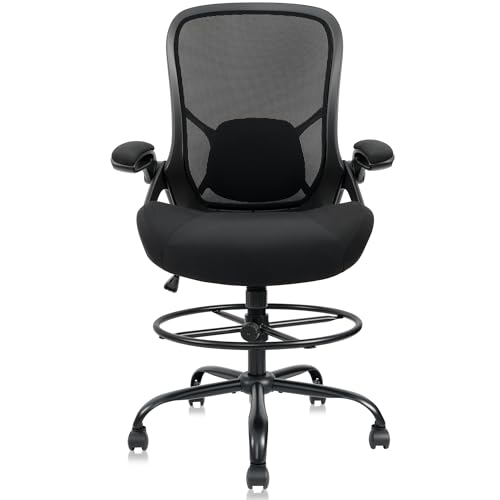
HYLONE Big and Tall Heavy Duty Drafting Chair, 400 lbs, 5-Inch Seat — Best Cushioned Drafting
HYLONE answers the mesh sceptics: a heavy-duty drafting chair with a stated 400 lb capacity and a stated 5-inch thickened seat. For artists whose work is long, still and detailed — inkers, colourists on deadline — that cushion is not luxury; it is the difference between hour two and hour six feeling the same.
Foam’s terms are known: it warms up, and over years it compresses. In a cool studio with an owner who values seat comfort over back ventilation, those terms are fair. Pair it with the flip-up arms and footrest ring it shares with the other drafting picks, and the artist-specific checklist is complete.
Foam thickness interacts with session length in a curve worth knowing: in the first hour, almost any seat is fine; in hours three to six, a thick, well-shaped cushion’s advantage compounds, because pressure distributes instead of concentrating. The HYLONE’s stated five inches is aimed squarely at that curve. The countervailing habit is to stand and reset at natural breaks — export, save, coffee — because even the best cushion is a surface your body wants variety from. Buy the thick seat, keep the breaks, and the combination outperforms either strategy alone.
Strengths
- The thickest stated seat cushion here — comfort for long, still sessions
- Heavy-duty capacity matches the BOLISS while keeping a cushioned feel
- Flip-up arms preserve pen-arm freedom like the other drafting picks
Trade-offs
- Thick foam seats run warmer than mesh over long sessions
- Foam compresses over years in a way mesh suspension does not
- Tall, heavy build needs a stable, level floor to feel its best
| Spec | Detail (from the verified listing title) |
|---|---|
| Capacity | 400 lbs (stated in the listing title) |
| Seat | 5-inch thickened seat (stated in the title) |
| Arms | Flip-up armrests |
| Support | Lumbar support; adjustable footrest ring |
A thick seat also changes break behaviour, subtly for the better: because the HYLONE stays comfortable longer, artists tend to take breaks by choice — at task boundaries — rather than being driven up by discomfort mid-flow. That sounds minor and is not; flow states are an artist’s capital. The discipline is to keep the chosen breaks real: stand, look at something far away, let the seat cool. A chair that supports long sessions creates the obligation to punctuate them deliberately, and owners who do, thrive on this pick.
Best for: artists who find mesh seats hard and want maximum cushion at drafting height / Not suited for: artists in hot studios, where a mesh seat breathes better
Check on Amazon — check the current price on Amazon and confirm the variant before ordering.

Herman Miller Aeron Chair, Size B, Fully Loaded, Posture Fit — Best Premium Desk Chair
The Aeron needs no embellishment, and this guide gives it none: the verified title states Size B, Fully Loaded and Posture Fit, and we flag that the listing’s full configuration details should be confirmed on the product page. What is well established is the chair’s role — the standard against which ergonomic task chairs are judged, sized in variants because one size does not fit every body.
For a digital artist at a standard desk, its case is longevity and adjustability across a career of long sessions. It is deliberately not the pick for a raised drawing table; forcing a task chair to drafting duty helps nobody. Buy it for the desk it was designed for, in the size that fits you.
An Aeron’s real cost curve is the argument its owners make, and it is worth hearing precisely: the chair is engineered to be serviced, re-gassed, re-armed and re-sold across decades, so its price divides by an unusual number of years. For a professional artist whose chair is a tool of trade used ten hours a day, that arithmetic can beat replacing a value chair three times — with three rounds of adaptation and disposal. It is not the right purchase for a hobby desk or a first studio; it is a considered one for a working professional at a standard-height desk.
Strengths
- The benchmark ergonomic task chair, with a decades-long studio track record
- Fully loaded configuration means the full adjustment set, not a stripped variant
- Suspension seating stays cool and supportive across very long sessions
Trade-offs
- Standard desk height only — it will not serve a raised drawing table
- The verified title is terse, so confirm the exact configuration and condition on the listing page
- Premium pricing buys engineering and longevity, not plushness
| Spec | Detail (from the verified listing title) |
|---|---|
| Model | Aeron Chair, Size B (stated in the listing title) |
| Configuration | Fully Loaded, Posture Fit (stated in the title) |
| Type | Standard-height task chair — not a drafting chair |
| Detail | Further specs not stated in the verified title; confirm configuration on the listing page |
One more Aeron consideration for artists: its arms, in fully loaded configurations, adjust in the dimensions that matter for switching between keyboard height and tablet height — but the exact arm behaviour depends on the specific configuration, which is why this guide insists on confirming the listing’s details rather than reciting catalogue copy. That insistence is not pedantry. At this price, the configuration is the product, and a careful read of what is actually being sold is the difference between the benchmark chair and an expensive approximation of it.
Best for: artists at standard desks who want to buy the chair once, properly / Not suited for: drafting-height workstations, or buyers wanting a soft cushioned seat
Check on Amazon — check the current price on Amazon and confirm the variant before ordering.

GABRYLLY Ergonomic Office Chair, High Back Mesh with Headrest — Best Value Desk Chair
GABRYLLY is the value route to the full-height ergonomic brief: high-back mesh, a headrest, flip-up arms, a wide cushion, and a stated 90-120 degree tilt lock. That tilt range maps neatly onto an artist’s two postures — near 90 degrees for pen work, eased back toward 120 for reviewing a finished piece.
It does not pretend to the Aeron’s engineering lifespan, and this guide does not pretend it for them. What it offers is the correct feature list at a level that lets a working artist upgrade the chair this year instead of someday — which, for backs, is the decision that actually matters.
The GABRYLLY’s tilt range deserves a practical translation: 90 degrees is your inking posture, spine tall, pen arm level; somewhere around 105 is sketching and general work; 120 is review, feet up, judging the whole canvas. A chair that locks across that range — as its title states — lets you assign postures to tasks, which sounds precious until a deadline week teaches you that posture variety is what gets you through it. Set the tension so reclining takes a deliberate lean, not a surprise, and the feature earns its keep daily.
Strengths
- A stated tilt-lock range lets you fix a review angle or sit upright for pen work
- Headrest included, which value chairs often omit
- Flip-up arms keep the pen-arm freedom of the drafting picks
Trade-offs
- Standard height only, like the Aeron
- Value-level mechanisms need gentler treatment than premium ones
- Wide cushion may feel broad for smaller artists
| Spec | Detail (from the verified listing title) |
|---|---|
| Tilt | 90-120 degree tilt lock (stated in the listing title) |
| Back | High back mesh with headrest |
| Arms | Flip-up arms |
| Seat | Wide cushion; big and tall positioning in title |
The GABRYLLY is also the natural recommendation when the chair must serve two people — a shared home office where partners alternate days. Its adjustments are quick and obvious, its wide cushion tolerates different bodies without complaint, and its value pricing removes the anxiety of a shared asset. It will not be either person’s perfect chair; it will be both people’s perfectly good chair, which for many households is the wiser purchase than one person’s dream chair that the other cannot bear to sit in.
Best for: artists at standard desks who want ergonomic features without premium pricing / Not suited for: raised drawing tables, or buyers wanting a lifetime chair
Check on Amazon — check the current price on Amazon and confirm the variant before ordering.
Comparison Table
| Pick | Badge | Key spec | Best for |
|---|---|---|---|
| Check on Amazon — Primy Drafting Chair, Tall Office Chair with Flip-Up Armrests, Black | Best Overall Drafting Pick | Drafting / tall office chair (stated in the listing title) | artists at raised desks and drawing tables wanting one complete drafting chair |
| Check on Amazon — AtHope Drafting Chair with 3D Lumbar and Head Support | Best Support Features | 3D lumbar and head support (stated in the listing title) | artists who alternate intense pen work with long leaned-back review sessions |
| Check on Amazon — BOLISS Mid Back Mesh Ergonomic Drafting Chair, 400 lbs | Best Heavy-Duty Drafting | 400 lbs (stated in the listing title) | bigger artists, and anyone who sits in varied positions through a session |
| Check on Amazon — HYLONE Big and Tall Heavy Duty Drafting Chair, 400 lbs, 5-Inch Seat | Best Cushioned Drafting | 400 lbs (stated in the listing title) | artists who find mesh seats hard and want maximum cushion at drafting height |
| Check on Amazon — Herman Miller Aeron Chair, Size B, Fully Loaded, Posture Fit | Best Premium Desk Chair | Aeron Chair, Size B (stated in the listing title) | artists at standard desks who want to buy the chair once, properly |
| GABRYLLY Ergonomic Office Chair, High Back Mesh with Headrest | Best Value Desk Chair | 90-120 degree tilt lock (stated in the listing title) | artists at standard desks who want ergonomic features without premium pricing |
How to Choose a Desk Chair as a Digital Artist
Measure your working surface first, because it eliminates half the market. A raised drawing table, a standing desk used high, or a tilted drafting board needs a drafting chair with a footrest ring — the Primy, AtHope, BOLISS and HYLONE territory. A standard desk pairs with a full-height ergonomic chair — the Aeron and GABRYLLY. No chair does both jobs well, and buying the wrong height family is the costliest mistake in this category.
Next, audit your pen arm. Drawing needs the elbow and wrist to travel without an armrest dictating their height. Flip-up arms, stated on most picks here, are the pragmatic answer: support while typing and reviewing, gone while drawing. Fixed high arms are the single most common reason artists abandon otherwise good chairs.
Then match support to your session shape. Close-in detail work lives at the lumbar and the seat; review work adds the headrest question. Mesh backs ventilate through long sessions; thick foam seats cushion stillness. The stated facts in each title — capacities, tilt ranges, seat thickness — let you make this call on evidence rather than showroom impressions.
Setting Up the Chair and Tablet Together
Chair setup is only half the ergonomics; the tablet decides the rest. Your drawing surface should sit so your pen arm’s elbow rests near a right angle without hiking your shoulder, and the display you judge colour on should be at a distance and height that does not pull your neck forward. A drafting chair’s extra height exists to meet a raised surface without perching you on a cushion pile.
Set the footrest ring so your feet rest flat with knees near a right angle; dangling feet quietly undo good lumbar support within the hour. If you use a standard chair at a desk, feet flat on the floor is the same rule in its original form.
Finally, build movement into long sessions regardless of chair quality. No chair in this guide — not even the Aeron — makes six motionless hours healthy. Stand between tasks, roll your shoulders, and let the chair’s tilt lock give you two or three genuinely different postures across a session rather than one perfect one held forever.
How to Adjust Your Chair for Drawing Work, Step by Step
Fifteen minutes of adjustment when the chair arrives pays back every session afterwards. Work through this order.
- Set seat height so your pen arm reaches the drawing surface with your shoulder relaxed and your elbow near a right angle.
- On a drafting chair, set the footrest ring so both feet rest flat and your knees sit near a right angle; on a standard chair, plant feet flat on the floor.
- Adjust lumbar support until it meets the small of your back in your upright working posture — not in a slouch, or you will set it for the slouch.
- Flip the arms up and draw for five minutes. If your pen arm travels freely, leave them up for drawing and drop them only for typing and review.
- Set the tilt lock near upright for detail work, then test your review angle — around the stated maximum on value chairs — and make sure both feel stable.
- After a full session, adjust one thing that annoyed you. Small corrections over the first week land better than a perfect guess on day one.
Common Buying Mistakes
Buying a desk chair for a drafting table
Height families are not interchangeable. A standard chair at a raised drawing surface forces perching and shoulder strain; a drafting chair at a low desk does the opposite. Measure the surface, then shop.
Keeping fixed armrests for pen work
An armrest at the wrong height steers your pen arm all day. Flip-up or removable arms are not a luxury feature for artists; they are the feature.
Judging a chair in a three-minute sit
Foam feels great at minute three and tells you nothing about hour four. Judge by stated construction — mesh suspension, foam thickness, capacity — and by support adjustability, not first impressions.
Ignoring stated capacity
Capacity figures in these titles are structural facts. A chair used daily near or beyond its stated limit will loosen and fail early. Match the chair’s stated capacity to its user with room to spare.
Assuming the premium name needs no checking
Even benchmark chairs come in sizes and configurations. The Aeron listing here is Size B, Fully Loaded — confirm size fit and the exact configuration on the listing page before ordering any premium chair.
Chair Mats, Casters and the Floor Under the Artist
The chair is half the workstation; the floor interface is the other half. On carpet, any wheeled pick in this guide will drag and dig without a chair mat — the internal guides linked below cover mats for exactly this pairing. On hard floors, check that casters suit the surface, and expect a drafting chair’s ring and base to want a level patch of floor to feel stable.
Artists also move differently: constant small shifts between tablet, keyboard and reference screen. A chair that rolls smoothly and swivels without fighting you saves a surprising amount of daily friction. When your chair arrives, test the roll across your actual floor before deciding it is fine — five metres of real travel tells you more than any specification.
Tablet Height, Chair Height and the Shoulder Equation
Most artist discomfort blamed on chairs is actually a height mismatch between chair, desk and tablet. The chain runs like this: the tablet should sit where your pen hand rests naturally; the desk must hold it there; the chair must then place your feet somewhere honest — floor or footrest ring — at that resulting seat height. Change any link and the others move. This is why drafting chairs exist: raising the surface for a tilted drawing board breaks the standard chain, and the ring restores the foot link that the floor can no longer provide.
Work the chain in order when you set up a new studio corner. Fix the surface height for your drawing posture first, then set the chair to meet it, then set the ring or check your feet, and only then judge the lumbar. Artists who adjust in the reverse order chase their own tail for weeks, because each later correction quietly undoes the earlier ones.
What Studios Know: Chair Buying at Career Scale
Working studios treat chairs as capital equipment, and their habits translate to home artists better than consumer advice does. They buy for the stated capacity with margin, because chairs fail at their mechanisms first. They standardise on models whose parts remain available. They keep one spare chair rather than one perfect chair, because a broken chair on deadline day is a production problem, not a shopping opportunity.
The home version of that wisdom: buy the best chair your current work genuinely justifies, keep the box and receipt until the first month proves the fit, and do not discard the old chair until the new one has survived a deadline. The picks in this guide span the ladder from sensible first drafting chair to career benchmark — climb it as your hours at the desk climb, because hours, not ambition, are what a chair must match.
Posture Myths Artists Should Retire
The first myth is the single perfect posture. Bodies are built for variety, and a chair’s real job is to make several good postures easy — upright for detail, eased for review, perched for sketching — rather than to freeze one correct position for eight hours. This is why tilt locks, flip-up arms and adjustable rings recur throughout this guide: they are variety mechanisms, and variety is the actual ergonomic intervention.
The second myth is that discomfort is a discipline problem. When your shoulder burns at hour three, the workstation is giving you data: the surface is high, the arm is trapped, the seat has you sliding. Artists who treat those signals as setup information — and spend twenty minutes answering them with the adjustments already on their chair — routinely fix in an afternoon what they endured for a year. Your chair in this guide has the levers; the myth-busting is learning to pull them.
The third myth is that a famous chair needs no fitting. Size, configuration and setup decide whether any chair, however engineered, serves your body. The benchmark pick in this guide is sold in sizes for a reason. Fit is not the garnish on a good chair purchase; it is the purchase.
The Studio Around the Chair
A chair is the centre of a system, and artists feel the system’s edges daily: the monitor whose height the chair cannot match, the tablet that slides, the lamp that throws a reflection the chair’s angle makes unavoidable. When you change chairs — especially between height families — expect to re-tune the whole corner: screen riser, tablet stand, lamp position, even where the reference books live. Budget an afternoon for that re-tuning rather than an hour, and do it with a piece of work in progress open, because only real work reveals whether the new geometry serves the hand or merely looks correct in an empty room.
Sound deserves a mention in close studios: casters on hard floors, a reclining mechanism’s click, a mesh back’s faint creak all enter a quiet room’s recordings and calls. If you stream, record voice work, or simply share thin walls, audition your finalist’s noises as honestly as its support. The chairs in this guide are mainstream designs without known acoustic vices, but your floor and your room complete the instrument, and only a real session in your real space settles it.
Finally, protect the purchase administratively: photograph the chair’s labels, keep the receipt with your equipment records, and note the stated capacity and configuration you bought. Artists deduct, insure and resell equipment as a matter of professional life, and a chair documented like equipment behaves like equipment — serviceable, warrantied, resaleable. Treat the chair as the tool it is, in the studio system it anchors, and it will repay the professionalism for years.
Renting, Borrowing and Second-Hand: Honest Shortcuts
Chairs are unusually good candidates for second-hand buying, because their quality is mechanical and inspectable: a used premium chair with smooth mechanisms, honest casters and an intact mesh or cushion is a rational purchase in a way a used mattress never is. If you go that route, inspect in person where possible — sit, recline, adjust everything, check the stated size and configuration against the listing’s claims, and price in a new set of casters. The Aeron pick in this guide is exactly the class of chair where the second-hand market is deepest, precisely because the chairs were built to outlast their first owners.
Borrowing is the other underused test: a studio mate’s chair for one full working day teaches more than a month of reviews, because your body files its report in hours, not minutes. However you acquire it, apply the same discipline as a new purchase — set it up properly, work a real session, judge at hour four. A chair is too central to an artist’s working life to be bought on a photograph and a hope, new or used.
One last piece of honest buying advice for this category: let your hours make the decision, and write them down before you shop. Count a real week’s hours at the desk — drawing, editing, admin, all of it. Under ten hours, the accessible picks serve you fully and the savings belong in your tablet or your rent. Between ten and thirty, the mid-range support features earn their keep every single day. Beyond thirty, you are a professional sitting worker who also makes art, and the career-grade logic of the benchmark pick stops being extravagance and becomes arithmetic. The chair does not know your ambitions; it only knows your hours. Buy for the hours.
Final Recommendation
At a raised desk or drawing table, start with the Primy for the complete accessible package, the AtHope if support features lead, the BOLISS for heavy-duty width and capacity, and the HYLONE if a thick cushioned seat is non-negotiable. At a standard desk, the Aeron is the buy-once benchmark in the size that fits you, and the GABRYLLY delivers the same feature checklist at a value level.
Whichever family you choose, set it up properly in the first week and give your pen arm its freedom. The best chair for an artist is the one that disappears — leaving only the work in front of you.
Related reading on this site: Best Carpet For Under Desk Chairs; Best Chair Mat For Carpets Rolling Chairs; Best Chairs Around 100; Best Built Chairs; Best Chairs Affordable.
Final picks at a glance:
Frequently Asked Questions
Is a drafting chair or a desk chair better for digital art?
It depends entirely on your surface. Raised drawing tables and high desks need a drafting chair with a footrest ring. Standard desks pair with a full-height ergonomic chair. Measure the surface first; the chair family follows from that number.
Why do artists need flip-up armrests?
Because drawing is arm travel. A fixed armrest at the wrong height steers your elbow and wrist through every stroke. Flip-up arms give support for typing and review, then clear out of the way for pen work.
Mesh or cushioned seat for long sessions?
Mesh ventilates and holds its shape for years; thick foam, like the stated 5-inch seat on the HYLONE, cushions still, detailed work but runs warmer and slowly compresses. Hot studio or restless sitter: mesh. Cool studio, still work: cushion.
What does a stated 400 lb capacity actually tell me?
That the chair’s structure is rated for users up to that weight — a genuine engineering commitment stated in the BOLISS and HYLONE titles. It also correlates with wider seats and sturdier mechanisms that suit varied sitting positions.
Which Aeron size should I buy?
The verified listing here is Size B, the middle size. Aeron sizing is fit-critical, so confirm the size guidance on the listing page against your height and build before ordering — a benchmark chair in the wrong size is just an expensive chair.
Do I need a chair mat as well?
On carpet, almost certainly yes: casters dig in, rolling resistance strains both you and the chair’s base, and the carpet wears. On hard floors a mat is optional and mainly protects the surface.


