Disclosure: airfryerkitchensupply.com is reader-supported. When you buy through links on our site, we may earn an affiliate commission at no extra cost to you.
Where to buy
Every chair below was verified as a current, complete desk chair listing, and the adjustment features quoted in this guide — lumbar systems, arm adjustability, weight capacities stated by the listings — come from those verified listings rather than from roundup articles.
- Steelcase Leap Office Chair — Best Overall: Check the current price on Amazon
- HON Ignition 2.0 Ergonomic Office Chair — Best for Focused Productivity: Check the current price on Amazon
- SIHOO M18 Ergonomic Office Chair — Best Mid-Range Value: Check the current price on Amazon
- Marsail Ergonomic Office Chair — Best High-Back Mesh: Check the current price on Amazon
- Furmax Office Chair — Best Budget Pick: Check the current price on Amazon
- BestOffice Ergonomic Office Chair — Best Simple Setup: Check the current price on Amazon
Desk chairs ship in large boxes and assembly quality varies; check the stated weight capacity and seat dimensions on the listing against your own measurements before ordering, because a chair that is the wrong size cannot be adjusted into the right one.
The best desk chairs for alertness start from an honest premise: no chair injects energy into a tired person, and any listing that promises one will keep you awake is selling you a story. What a chair genuinely can do is remove the physical causes of the afternoon slump that are actually mechanical — the slouched posture that rounds your back and shortens your breathing, the soft lounge-style seat that invites you to sink and drift, the fixed arms and wrong height that make you perch, twist and fidget until your focus is gone. Alertness at a desk is mostly the absence of those distractions, plus a chair that lets you move.
That is the standard this guide applies. Every pick was verified, and each earned its place with features that support an upright, active sitting posture: real lumbar systems rather than decorative curves, breathable mesh that keeps a long session from feeling stuffy, adjustable arms and height so the desk geometry works, and — in the premium picks — backrests engineered to move with you instead of locking you into one position. A chair will not fix a bad night’s sleep, and this guide will not pretend otherwise; but the difference between fighting your chair all afternoon and forgetting it exists is the difference between a mind on the work and a mind on its own discomfort.
In this guide
Quick Picks: The Best desk chairs for alertness
Six verified desk chairs that support alert, upright work — from a premium dynamic-back flagship to honest budget mesh chairs.
| Pick | Badge | Key spec | Best for |
|---|---|---|---|
| Steelcase Leap Office Chair | Best Overall | LiveBack dynamic backrest, Natural Glide system, onyx | full-time desk workers who move while they think |
| HON Ignition 2.0 Ergonomic Office Chair | Best for Focused Productivity | Lumbar support, adjustable arms, black | professionals wanting proven office ergonomics |
| SIHOO M18 Ergonomic Office Chair | Best Mid-Range Value | Mesh back, headrest, adjustable lumbar, 330 lb capacity, 2D armrests | long sessions needing headrest and strong capacity |
| Marsail Ergonomic Office Chair | Best High-Back Mesh | High-back mesh, adjustable lumbar, 3D armrests, headrest | taller users wanting full back coverage |
| Furmax Office Chair | Best Budget Pick | Mesh mid-back, lumbar support, adjustable height, 360 swivel | first home offices and students on a budget |
| BestOffice Ergonomic Office Chair | Best Simple Setup | Mid-back swivel, lumbar support, adjustable height, breathable backrest | buyers wanting straightforward ergonomic basics |
Notice the pattern in the table: mesh backs, adjustable lumbar support and adjustable arms appear again and again. Those are the alertness features. Thick padding, executive styling and lounge recline — the things that dominate chair marketing — are mostly working in the opposite direction.
How These Picks Were Chosen
The pool came from Amazon listing data searches across the desk and office chair category, filtered first for completeness: only finished chairs qualify — no chair mats, no seat cushions, no replacement parts, however often those accessories surface in chair searches. Each surviving listing then had to describe, in its verified title or details, the ergonomic hardware this guide cares about: lumbar support, adjustability, and a construction aimed at working hours rather than occasional seating.
Alertness was operationalized into four testable features, because the word itself is not a spec. One: an upright-supporting backrest with a lumbar system that can meet your spine where it actually curves. Two: breathability — mesh or ventilated construction — because heat buildup across a long session is a real and underrated drowsiness trigger. Three: adjustability of seat height and arms, so shoulders stay down and elbows stay near ninety degrees, the geometry that keeps a body working instead of compensating. Four: a seat that supports rather than swallows — deep, soft lounge cushions feel luxurious for twenty minutes and sedate you for the next six hours.
Weight capacity and build honesty were checked from the listings where stated — the SIHOO M18’s listing, for example, states a 330 lb capacity — because a chair working near its limit flexes, creaks and sags, and every one of those sensations is a small tax on concentration. Chairs were then deduplicated across their color and pack variants so each design appears once.
Finally, the guide spans the real price tiers of the category without printing prices: a premium ergonomic flagship, two strong mid-range mesh chairs, and honest budget options, because the alertness features that matter most — lumbar support, mesh, adjustability — now exist at every level, and the premium money buys refinement and durability rather than a different category of sitting.
The 6 Best desk chairs for alertness

1. Steelcase Leap Office Chair — Best Overall
The Leap is the chair this category is measured against, and its verified listing names the two technologies that make it an alertness pick rather than merely an expensive one: LiveBack, a backrest that changes shape as your spine moves, and the Natural Glide System, which lets you recline without the desk sliding away from your eyes and hands. It supports movement instead of punishing it — and movement, in small constant doses, is how a seated body stays awake.
Strengths
- LiveBack backrest flexes with your spine instead of forcing one posture
- Natural Glide keeps your reach and eyeline stable as you recline
- Steelcase build quality is measured in decades, not seasons
Trade-offs
- Premium tier of this guide by a wide margin
- Firm, supportive seat is not a plush sit
- Adjustment richness has a learning curve worth an afternoon
| Back system | LiveBack technology (per Amazon title) |
|---|---|
| Recline system | Natural Glide System (per Amazon title) |
| Color in listing | Onyx |
| Base | Wheels for carpet (per Amazon title) |
| Positioning | Ergonomic work chair (per Amazon title) |
Most chairs treat posture as a statue: set the angles, sit still, work. The Leap treats posture as a verb. Its backrest is built in sections that respond as you shift — leaning in to read, sitting back to think, twisting to think harder — so support follows you instead of expiring the moment you move. For alertness, that philosophy is exactly right: the micro-movements a dynamic backrest permits are the same movements that keep circulation and attention from flatlining across a long session.
The investment case is durability and fit range. Steelcase chairs are engineered for full-time, multi-year use, with adjustment ranges that fit more bodies than budget chairs can. If you work from home full-time and your chair is effectively your office, this is the pick where the premium is easiest to defend — cost it per year of daily use rather than per purchase, and the flagship maths changes character entirely.
A note on resale and longevity for the Leap: premium ergonomic chairs hold their value unusually well, because offices and home workers both know what they are. If your work changes and the chair must go, a Leap in good condition finds a buyer quickly – one more way the flagship tier defends its price over a lifetime of use.
Best for: full-time desk workers who move while they think / Not suited for: buyers wanting a plush lounge-style seat

2. HON Ignition 2.0 Ergonomic Office Chair — Best for Focused Productivity
HON is the quiet giant of American office furniture — the chairs in actual offices — and the Ignition 2.0’s verified listing describes an ergonomic desk chair with lumbar support and adjustable arms, positioned by HON itself for workstation comfort and focused productivity. That positioning is this guide’s brief in the manufacturer’s own words, and the chair earns its slot by being the complete, no-gimmicks version of it.
Strengths
- Genuine lumbar support with adjustable arms — the core alertness kit
- HON’s office-grade build and parts ecosystem
- Understated styling that suits a professional workspace
Trade-offs
- Headrest not featured in the verified listing
- Mesh-and-frame aesthetic is functional, not luxurious
- Sits firmer than padded executive chairs, by design
| Lumbar | Lumbar support (per Amazon title) |
|---|---|
| Arms | Adjustable arms (per Amazon title) |
| Color in listing | Black |
| Positioning | Focused productivity (per Amazon title) |
| Brand class | Contract office furniture |
The Ignition 2.0 represents the professional consensus on what a working chair should do: hold your lower back in its natural curve, put your arms where the desk needs them, breathe across a full day, and otherwise disappear. There is no single spectacular technology to describe, and that is the point — alertness at work rarely comes from a spectacular feature. It comes from the absence of the twelve small discomforts that accumulate into an afternoon of fidgeting, and a well-executed conventional ergonomic chair removes all twelve.
HON’s contract-furniture heritage adds a practical advantage the listings do not shout about: these chairs are designed to be maintained, re-covered and repaired in office fleets, which means parts and support exist in a way disposable-chair brands do not match. For a home office that is really an office, that serviceability is a genuine ownership feature.
For shared and hot-desking setups, the Ignition class of chair has a practical edge: its adjustments are intuitive enough that a new user can find a decent working posture in under a minute, without a manual. In a household where the desk changes occupants, that simplicity is a feature, not a compromise.
Best for: professionals wanting proven office ergonomics / Not suited for: buyers who want a headrest included

3. SIHOO M18 Ergonomic Office Chair — Best Mid-Range Value
The M18 is the feature-complete mid-range pick: a mesh-back desk chair with a headrest, adjustable lumbar support, 2D armrests, a wide cushion, tilt lock — and a stated 330 lb capacity in its verified listing, the strongest capacity figure in this guide. If your alertness checklist includes a headrest for thinking pauses and hardware that does not feel taxed by your frame, this is the chair that ticks every box without entering flagship territory.
Strengths
- Full adjustment set: lumbar, 2D arms, headrest, tilt lock
- Stated 330 lb capacity — the guide’s strongest
- Breathable mesh back for long, warm sessions
Trade-offs
- Wide cushion and frame suit average-to-larger bodies best
- Assembly is a real session, not a five-minute job
- Mesh firmness is a preference — sit-test if you can
| Capacity | 330 lbs (per Amazon title) |
|---|---|
| Back | Mesh with headrest (per Amazon title) |
| Lumbar | Adjustable lumbar support (per Amazon title) |
| Arms | 2D armrests (per Amazon title) |
| Features | Tilt lock, wide cushion (per Amazon title) |
Capacity is an alertness feature in disguise. A chair near its structural limit announces itself constantly — a flex here, a creak there, a gas lift that sighs down a centimeter an hour — and each announcement steals a sliver of attention. A chair rated well above your weight is silent, and silence is what concentration actually sounds like. The M18’s stated 330 lb rating, combined with its wide cushion, makes it the default recommendation in this guide for larger users, who are the most poorly served by the budget end of this category.
The headrest deserves its honest framing: it is not for working in — your head should be balanced over your spine while you type — but for the thinking pauses between work, when leaning back and resting the head for ninety seconds is how many people actually solve problems. A chair that supports both the work posture and the pause posture keeps you in one place, in one flow, instead of migrating to the sofa ‘for five minutes’ at 3 p.m.
The M18’s tilt lock deserves a specific mention for readers and reviewers: locking a slight recline for a long document, with the headrest taking the pause load, is a genuinely different working mode from typing upright. Chairs that support both modes keep long review sessions at the desk instead of on the sofa.
Best for: long sessions needing headrest and strong capacity / Not suited for: petite users who may find the frame generous

4. Marsail Ergonomic Office Chair — Best High-Back Mesh
The Marsail’s verified listing describes a high-back mesh chair with adjustable lumbar support, 3D armrests and a headrest — the most complete adjustment set among the guide’s mesh chairs, since 3D arms move in three directions rather than two. The high back extends support to the shoulders and head in one continuous surface, which taller users in particular will feel as the difference between a chair that fits and a chair that ends early.
Strengths
- 3D armrests — the most adjustable arms in this guide
- High-back mesh covers shoulders as well as spine
- Adjustable lumbar plus headrest completes the kit
Trade-offs
- High-back frame dominates a small room visually
- Mesh seat-and-back feel is firmer than padded chairs
- Feature richness means more to set up correctly
| Back | High-back mesh (per Amazon title) |
|---|---|
| Arms | 3D armrests (per Amazon title) |
| Lumbar | Adjustable lumbar support (per Amazon title) |
| Headrest | Included (per Amazon title) |
| Type | Rolling swivel task chair (per Amazon title) |
Arm adjustability is where alertness ergonomics gets quietly won or lost. Your arms carry real weight, and if the rests are too low your shoulders hold that weight all day; too high and your shoulders ride up toward your ears. Either error becomes neck tension by mid-afternoon, and neck tension becomes the fidgeting, stretching, focus-breaking restlessness that reads as tiredness. Arms that adjust in three directions — height, width and angle — are how you actually solve that geometry for your body and your desk, rather than approximating it.
The high back completes the same philosophy for the upper body. Shorter backs support the lumbar region and abandon everything above it, which is fine for many users and genuinely insufficient for taller ones. If you have ever felt a chair’s top edge land between your shoulder blades like a shelf, you already know the problem this design solves.
Tall users should measure the Marsail’s back height against their own torso before ordering – high-back chairs vary, and the benefit only lands if the headrest meets your head rather than your neck. The listing’s dimensions, checked against a tape measure and a seated partner, settle the question in two minutes.
Best for: taller users wanting full back coverage / Not suited for: small desks where a high back overwhelms the space
5. Furmax Office Chair — Best Budget Pick
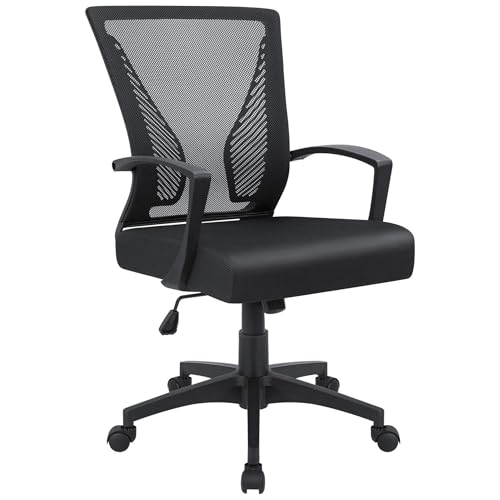
The Furmax is the budget reality check, and a good one: a mesh computer desk chair with lumbar support, adjustable height, a breathable mid-back, sponge seat and 360-degree swivel with armrests — every core alertness feature from the flagship checklist, at the accessible end of the category. Its verified listing does not promise a decade of service, and this guide will not promise it either; what it promises is a correct sitting posture at a student’s or first-job price.
Strengths
- Mesh back and lumbar support at the budget tier
- Adjustable height and swivel cover the essentials
- Compact mid-back suits small desks and bedrooms
Trade-offs
- Budget materials will show wear sooner under full-time use
- Adjustment range is narrower than the mid-range picks
- Seat padding is thinner — long sessions reveal it
| Back | Mesh mid-back, breathable (per Amazon title) |
|---|---|
| Lumbar | Lumbar support (per Amazon title) |
| Seat | Sponge seat (per Amazon title) |
| Movement | 360 swivel, rolling wheels (per Amazon title) |
| Height | Adjustable (per Amazon title) |
The most important sentence in this review is that a budget mesh chair with lumbar support will keep you more alert than a plush executive chair at three times its price. The executive chair’s deep padding and lounge recline are engineered for the boardroom photograph, not the working afternoon; the Furmax’s upright mesh geometry is engineered for the afternoon. Buyers cross-shopping by comfort-in-the-showroom consistently get this backwards, because twenty seconds of sitting rewards softness and eight hours of sitting rewards structure.
Set expectations on longevity and you will be satisfied: this is a chair for a first apartment, a student desk, a spare-room office — a few years of honest service at a fair commitment. When it eventually loosens or its lift tires, you will know exactly which of its features you actually used, and that knowledge is the best possible preparation for buying its mid-range successor.
Students take note: the Furmax class of chair pairs well with a cheap footrest if your desk is tall, because feet that dangle undo the posture the chair is trying to build. Flat feet on a surface – floor or footrest – are the foundation the whole ergonomic stack stands on.
Best for: first home offices and students on a budget / Not suited for: full-time heavy use over many years
6. BestOffice Ergonomic Office Chair — Best Simple Setup
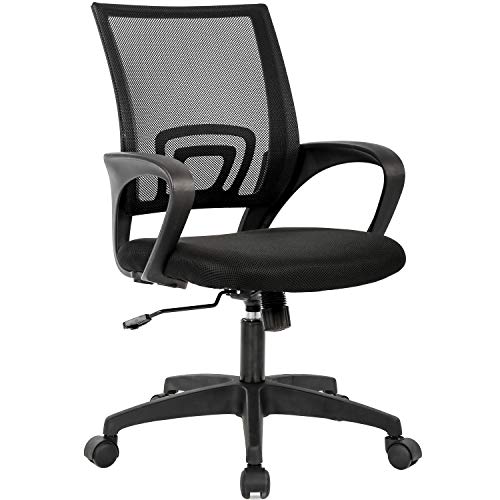
The BestOffice chair is the straightforward option: a mid-back swivel desk chair in black with lumbar support, adjustable height, a breathable backrest and a sponge seat on rolling wheels, for home and office. It makes no exotic claims, includes no exotic hardware, and for a great many desks that is precisely the correct specification — the alertness basics, executed plainly, in a chair that assembles without drama.
Strengths
- All the core features: lumbar, breathability, height adjustment
- Simple design assembles and adjusts without a learning curve
- Compact footprint suits bedrooms and shared spaces
Trade-offs
- No headrest and basic arm adjustability
- Mid-back support ends at the shoulder blades
- Budget-tier materials, like the Furmax
| Back | Mid-back, breathable backrest (per Amazon title) |
|---|---|
| Lumbar | Lumbar support (per Amazon title) |
| Seat | Sponge seat (per Amazon title) |
| Movement | Swivel with rolling wheels (per Amazon title) |
| Height | Adjustable (per Amazon title) |
There is a buyer this chair serves better than any other in the guide: the one who will never adjust a chair twice. Premium ergonomics only pays when its adjustments are actually dialed in, and a remarkable share of expensive chairs spend their lives at factory settings, delivering budget-chair posture at flagship prices. The BestOffice’s short adjustment list — height, and the lumbar support built into its backrest geometry — is short enough that everyone actually completes it, and a completed simple setup beats an abandoned complex one every working day.
As with the Furmax, judge it as a tier purchase: correct posture now, honest service life, and a clear picture of your own needs when replacement day comes. Paired with the desk-setup guidance in this article — monitor height, foot position, light — it delivers most of the alertness benefit available from furniture, at the smallest commitment in the guide.
One more BestOffice strength: its plain black mid-back profile disappears in video calls and small rooms alike. For a bedroom-office that must look like a bedroom again by evening, a chair that does not dominate the space is worth real money – just not flagship money.
Best for: buyers wanting straightforward ergonomic basics / Not suited for: users needing headrest or advanced arm adjustment
Comparison Table
The table compresses six chairs into the four features that decide alert sitting: back system, lumbar, arms and breathability. Everything else is refinement.
| Pick | Badge | Key spec | Best for |
|---|---|---|---|
| Steelcase Leap Office Chair | Best Overall | LiveBack dynamic backrest, Natural Glide system, onyx | full-time desk workers who move while they think |
| HON Ignition 2.0 Ergonomic Office Chair | Best for Focused Productivity | Lumbar support, adjustable arms, black | professionals wanting proven office ergonomics |
| SIHOO M18 Ergonomic Office Chair | Best Mid-Range Value | Mesh back, headrest, adjustable lumbar, 330 lb capacity, 2D armrests | long sessions needing headrest and strong capacity |
| Marsail Ergonomic Office Chair | Best High-Back Mesh | High-back mesh, adjustable lumbar, 3D armrests, headrest | taller users wanting full back coverage |
| Furmax Office Chair | Best Budget Pick | Mesh mid-back, lumbar support, adjustable height, 360 swivel | first home offices and students on a budget |
| BestOffice Ergonomic Office Chair | Best Simple Setup | Mid-back swivel, lumbar support, adjustable height, breathable backrest | buyers wanting straightforward ergonomic basics |
Read the table vertically, and read it against your own measurements rather than against the marketing order the chairs arrived in, and the market’s honesty appears: the budget column and the flagship column share the same core features, and the price climb buys dynamic movement, capacity, materials and years — all real, none magical. Buy the tier your hours justify.
How to Choose the Best Desk Chairs for Alertness
Start with the backrest, because it is the posture. You want a back that supports an upright S-curve: a lumbar system — adjustable ideally, well-shaped at minimum — that meets the small of your back and keeps it there when you tire. Flat backs and purely decorative curves let the pelvis roll backward into the slouch that rounds the spine, drops the chest and shallows the breath, and that slouch is the physical shape of the afternoon slump. If a chair’s listing cannot describe its lumbar support, the chair does not have any worth the name.
Choose breathability next. A working body generates heat, and a vinyl or thickly padded back traps it against you for hours. The resulting warmth and stuffiness is a genuine, measurable contributor to drowsiness — the same physiology that makes warm rooms sleepy. Mesh backs, which dominate this guide’s picks for exactly this reason, let a long session stay thermally neutral. If your workspace runs warm, weight this feature above padding every time.
Then fit the geometry: seat height that lets your feet rest flat with knees near ninety degrees, a seat depth that supports your thighs without pressing the backs of your knees, and arms that meet your elbows without lifting your shoulders. None of this is adjustable-in-the-brochure trivia — each wrong angle creates a compensation, each compensation becomes tension, and tension is what your mind is actually fighting at 4 p.m. when you blame the hour.
- Real lumbar support that meets your spine’s curve — adjustable preferred
- Mesh or breathable back for long sessions in warm rooms
- Seat height and depth fitted to your legs, feet flat on the floor
- Armrests that support elbows without raising shoulders
- A seat firm enough to sit on, not in — structure over plushness
- Stated weight capacity comfortably above your weight
Finally, be honest about what a chair cannot do, because that honesty protects the purchase. Sleep, light, movement breaks and workload decide your alertness ceiling; the chair decides how much of that ceiling your posture lets you reach. Buy the chair as the removal of obstacles — slouch, heat, tension, fidget — and it will deliver exactly that, every day, for years.
How to Set Up Your Desk Chair and Desk for an Alert Workday
Adjust the chair before the desk. Sit, set the seat height so your feet are flat and your thighs roughly level, then set the lumbar support into the small of your back — you should feel it fill the curve without pushing you forward. Set the arms so your elbows rest at about ninety degrees with shoulders relaxed and down. Only then arrange the desk around that posture: monitor top at or slightly below eye level, roughly an arm’s length away, keyboard where your forearms stay level.
Then manage light and movement, the two alertness levers bigger than any chair. Put the brightest light in the room in front of you or above you — daylight from a window you face is the single most alerting desk upgrade that exists, and it is free. Work in focused blocks with genuine movement between them: stand, walk, water, stairs. A dynamic chair encourages micro-movement while you sit, but no chair substitutes for standing up, and the workers who schedule both are the ones still sharp at the end of the day.
- Chair first: feet flat, lumbar filled, elbows at ninety degrees, shoulders down
- Monitor top at eye level, about an arm’s length away
- Face the brightest light source you have
- Work in blocks; stand and move between them
- Re-check chair settings monthly — hardware drifts, bodies change
How to Keep a Desk Chair Working Like New
Chairs fail quietly: a gas lift that sinks a centimeter a week, casters clogged with hair and grit, bolts that loosen into a creak. Each failure is small, and each is a direct tax on the concentration the chair was bought to protect. The maintenance is minutes per quarter: re-tighten the assembly bolts, vacuum or pick the casters clean, wipe mesh with a damp cloth, and test the lift by sitting at full height and checking again in an hour.
Treat the wear items as consumables with a plan. On budget chairs, expect the lift and casters to tire first and know that both are replaceable on many models; on premium chairs, use the manufacturer’s parts ecosystem — that serviceability is part of what the premium bought. And retire honestly: a chair whose lumbar support has collapsed or whose lift will not hold is no longer an ergonomic chair, whatever it cost, and replacing it is cheaper than the lost afternoons it is charging you.
Desk Chairs and Energy: What the Evidence-Shaped Habits Look Like
Strip away the marketing and the alertness routine around a desk chair is boring, physical and effective. You sit upright because the chair makes upright the path of least resistance. You stay cool because the back breathes. Your shoulders stay down because the arms are where your elbows actually are. You shift position often because the chair permits it, and every shift restarts a little circulation and a little attention. None of that photographs well, and all of it compounds across a working year.
The corollary is that the chair is the foundation, not the building. The same buyers who feel the largest difference from an ergonomic upgrade are the ones who pair it with the unglamorous rest: a monitor at eye level, the brightest light in front of them, real breaks on their feet, and a finish time that protects the sleep that follows. Buy the chair to remove friction, then spend the saved attention on the habits that actually generate energy.
Posture Deep Dive: The Four Angles That Decide Your Afternoon
Hip angle first. Sitting with your hips slightly above your knees — a seat height a touch higher than the classic right angle, with feet fully supported — opens the hip and lets the pelvis sit neutrally, which is the foundation the lumbar curve is built on. A seat that is too low rolls the pelvis backward and flattens the lower back no matter how good the lumbar pad is; a seat that is too high leaves feet dangling and pressure under the thighs. Both errors are chair-height errors, and both are fixable in ten seconds once you know to look.
Back angle second. The working recline for desk tasks is a few degrees behind vertical, not bolt upright and not lounging — enough to let the backrest carry some of your trunk weight, not so much that your neck cranes forward to see the screen. Third is the arm angle already covered: elbows near ninety degrees, shoulders visibly dropped. Fourth is the one nobody mentions: the eye angle. A screen whose center sits slightly below eye level keeps the head balanced; a laptop on a desk, unraised, bends the neck forward all day, and no chair ever made can compensate for a head held in front of the spine for eight hours. Raise the screen, then judge the chair.
Desk Chair or Standing Desk: Where the Alertness Money Works Harder
Buyers in this category often ask whether the money should go to a better chair or a standing desk, and the honest answer is sequential: chair first, because you will sit for the majority of even a standing-desk day, and a bad chair taxes every one of those hours. A standing desk added to a good chair then buys posture variety — the single most valuable commodity in desk work — letting you rotate sitting, standing and perching across the day so no single position accumulates into stiffness.
If the budget forces one purchase, judge by your current pain point. Slouch, heat and shoulder tension are chair problems; restlessness, afternoon heaviness in the legs and the urge to pace are variety problems, better answered by standing time. Most home workers who do both, in that order, report that the second purchase needed the first one in place to make sense — standing all day over a bad chair’s absence is just a new way to be uncomfortable, vertically.
Trying a Chair Properly: The Fourteen-Day Test
A desk chair cannot be judged in a showroom minute or an unboxing evening, because the qualities that matter — lumbar behavior at hour six, mesh comfort in a warm room, arm geometry across a full keyboard day — only exist at working duration. Use the return window as the test it actually is: assemble the chair fully, set it up with this guide’s sequence, and work your real schedule in it for at least a week before deciding. Judge it at the end of your hardest day, not the start of your easiest one.
During the test, change one variable at a time. If your shoulders ache, move the arms before blaming the back; if your lower back tires, work the lumbar through its range across two days. Chairs in this guide have enough adjustment to be wrong in several ways before they are right in one, and the buyers who iterate briefly are the ones who end up with a setup they stop thinking about — which, to say it one final time, is the entire goal.
- Work real full days in the chair during the trial, not evenings only
- Adjust one variable at a time and give each change a day
- Judge at the end of the hardest day of the week
- Note which adjustments you actually use — that list specifies your next chair
Common Buying Mistakes
Chair buying concentrates a remarkable number of expensive errors into one purchase. These are the ones this guide sees most:
- Choosing plush over structure. The softest chair in the showroom is the sleepiest chair in the office. Twenty seconds of sitting rewards padding; eight hours rewards support.
- Buying adjustments you will never set. A flagship at factory settings delivers budget posture. Count the adjustments you will honestly make, and buy that chair.
- Ignoring capacity. A chair near its weight limit flexes, creaks and sinks — a day-long drip of distractions. Buy capacity headroom, not capacity adequacy.
- Skipping the desk setup. The best chair cannot fix a monitor at navel height. Alertness is a workstation property, not a chair property.
- Expecting a chair to fix sleep. Furniture removes obstacles to alertness; it does not manufacture alertness. Protect the night and the chair will do the rest.
- Sitting still all day in a ‘good’ chair. Even perfect posture, frozen for eight hours, stiffens and dulls. The chair supports the work; movement breaks complete it.
Notice that none of these mistakes is about a brand. They are about matching — chair to body, body to desk, expectations to physics — and matching is a process you control completely.
Final Recommendation
For full-time desk work, the Steelcase Leap is the alertness chair perfected: a back that moves with you, a recline that keeps your work in reach, and a service life measured in decades. The HON Ignition 2.0 is its professional straight-line alternative, and the SIHOO M18 is the mid-range sweet spot — full adjustments, a headrest, and capacity headroom for larger users. Taller users should look at the Marsail, and honest budgets are genuinely well served by the Furmax and BestOffice, whose mesh-and-lumbar basics beat plush executive chairs at multiples of their tier.
Set the chair up properly, arrange the desk around it, face the light, and move between work blocks. Do those things and the chair disappears — which is the entire point. A chair that demands your attention is a chair that is failing at its one job, whatever its brochure says, and a chair you forget by mid-morning has already repaid a meaningful part of its price in reclaimed concentration. The best desk chair for alertness is the one you stop noticing by 10 a.m., leaving your attention where it belongs: on the work, not on the sitting. That disappearance is worth more than any single feature in this guide, and it is achievable at every tier in it — the flagship buys it with engineering, the budget picks buy it with honest basics, and you complete it with setup, light and movement. Spend accordingly, sit actively, and let the afternoons take care of themselves.
- Best Chairs Affordable
- Best Chairs Around 100
- Best Carpet For Under Desk Chairs
- Best Chair Mat For Carpets Rolling Chairs
- Best Built Chairs
- Best Chairs Glider Slip Covers
Frequently Asked Questions
Can a desk chair really make you more alert?
Indirectly, yes. A chair cannot create energy, but slouching, heat buildup, wrong heights and constant small discomforts all consume attention and encourage drowsiness. A chair that supports upright posture, breathes, and fits your desk geometry removes those drains — most people experience the result as a noticeably sharper afternoon.
Is mesh or padding better for long workdays?
For alertness, mesh usually wins: it supports firmly and lets heat escape, while thick padding feels better briefly and then holds warmth and invites sinking. Padding has its place for shorter sessions and cold rooms, but for full workdays the mesh chairs in this guide are the safer default.
Do I need a headrest on a desk chair?
Not for typing posture — your head should balance over your spine while you work. A headrest earns its place during thinking pauses and calls, when you lean back and rest. If your work includes a lot of reading, reviewing and calls, choose a pick that includes one, like the SIHOO M18 or the Marsail.
How long should a good desk chair last?
Premium chairs like the Steelcase Leap are built for a decade or more of full-time use. Mid-range chairs typically serve five-plus years; budget chairs a few years of regular use. In every tier, bolt checks, clean casters and honest retirement when the support collapses matter more than the brand on the box.
What is the best chair position for staying focused?
Feet flat on the floor, knees near ninety degrees, lumbar support filling the small of your back, elbows near ninety degrees with shoulders down, and the monitor top at eye level about an arm’s length away. That geometry, plus light in front of you and movement between work blocks, is the complete alertness setup.
Are gaming chairs good for alert office work?
Most are styled like racing seats — high bolsters, deep buckets, lounge recline — which hold a body in a fixed, reclined posture rather than supporting upright, adjustable work posture. A few modern models borrow real ergonomics, but as a class, the ergonomic office chairs in this guide serve alert desk work better.


