Disclosure: airfryerkitchensupply.com is reader-supported. When you buy through links on our site, we may earn an affiliate commission at no extra cost to you.
Where to buy
All six recording mixers below are sold through Amazon, frequently both as the standalone unit and in bundles with microphones or headphones. The links go to the mixer listings themselves; check price on Amazon and confirm exactly what a bundle includes before comparing one listing against another, however tempting the bundle arithmetic looks at first glance.
- Tascam Model 12 — check price on Amazon
- Zoom LiveTrak L-12 — check price on Amazon
- Mackie Onyx16 — check price on Amazon
- Soundcraft Signature 22MTK — check price on Amazon
- Yamaha MG12XU — check price on Amazon
- Allen & Heath ZEDi-10FX — check price on Amazon
Looking for the best usb mixers for recording means answering one question before all others: when the session ends, do you want a finished stereo mix, or do you want every microphone and instrument preserved on its own track so the real mixing can happen afterward? That single distinction divides this entire category. Traditional analog mixers with USB send the stereo bus to the computer — wonderful for capturing a rehearsed performance or a live gig exactly as it sounded, useless for rescuing a vocal that was buried under a guitar. Multitrack USB mixers send each channel separately, turning the mixer into the front end of a recording studio. Hybrid units like the Tascam Model 12 go further and record multitrack to a memory card with no computer involved at all.
The six picks below cover the honest spectrum. The Model 12 and LiveTrak L-12 are recorder-first machines for musicians who want to capture ideas and full band sessions anywhere. The Onyx16 and Signature 22MTK are serious analog desks whose multitrack USB makes them genuine studio front ends. The Yamaha MG12XU is the stereo-USB workhorse for people who mix live and record the result. And the ZEDi-10FX is the compact 4×4 compromise for a small desk. None of them is the “best” in the abstract — each is the best answer to a different recording situation, and the reviews below are written to make those situations unmistakable, including the sessions each desk would handle badly. That honesty matters more in recording than in most categories, because a mismatched desk does not merely underperform; it quietly decides what kinds of sessions you will never attempt. Every model was verified against Amazon’s catalog, so the channel counts and configurations described are the ones actually on sale.
In this guide
Quick Picks
- Best Overall — Tascam Model 12: a 12-track digital multitrack recorder, mixer, USB interface and DAW controller in one unit. Records to SD card with no computer, then hands every track to your software for mixing. Check the current price on Amazon
- Best for Recording a Live Band — Zoom LiveTrak L-12: a 12-channel digital mixer and multitrack recorder designed to capture a whole band at once and let each musician hear their own mix. Check the current price on Amazon
- Best Analog Multitrack — Mackie Onyx16: a 16-channel premium analog mixer with multitrack USB, Perkins EQ and Onyx preamps, for engineers who mix with their hands and record every channel. Check the current price on Amazon
- Best for Large Sessions — Soundcraft Signature 22MTK: a 22-channel analog multitrack mixer with Lexicon effects, built to put a full band — drums included — into the computer channel by channel. Check the current price on Amazon
- Best Stereo USB Workhorse — Yamaha MG12XU: a 12-input mixer with D-PRE preamps, SPX effects and a stereo USB interface, the dependable choice when you mix live and record the mix. Check the current price on Amazon
- Best Compact — Allen & Heath ZEDi-10FX: a hybrid mixer with a 4×4 USB interface and studio-quality effects, sized for a songwriter’s desk rather than a band room. Check the current price on Amazon
How These Picks Were Chosen
Recording makes different demands from live sound, so we judged these mixers as capture devices first. The primary test was what the USB connection actually delivers: discrete multitrack channels, a small multi-channel count like the ZEDi-10FX’s 4×4, or a stereo mix. The second test was independence from the computer — mixers that record multitrack to SD card keep working when a laptop is absent, asleep or misbehaving, and they double as live desks. Third came the input stage: preamp quality and count, because a recording preserves preamp noise forever in a way a live audience never notices. Fourth, monitoring — a band recording session collapses when the drummer cannot hear the click or the singer cannot hear enough of themselves, so flexible headphone and monitor mixes counted heavily. Finally we checked the analog side of each desk — EQ quality, effects worth using, and build — because a recording mixer that also serves as your only live mixer has to earn its place twice. We also weighed each manufacturer’s track record for driver and firmware support, since a recording desk is a long-term purchase whose usefulness depends on it continuing to talk to future computers; brands with a long support history scored accordingly. Every candidate was verified so model names and configurations match Amazon’s listings, and pure live-sound desks with no meaningful recording path were left out entirely.
The 6 Best USB Mixers for Recording

Tascam Model 12 — Best Overall
The Model 12 is what happens when a company famous for multitrack recorders builds a mixer: the recording is not a feature bolted onto a desk, it is the desk’s reason to exist. It suits songwriters, small bands and home producers who want to capture full arrangements without opening a laptop, then mix in software later. It does not suit engineers running large sessions — twelve tracks is its world, and drum-heavy productions will feel the ceiling.
Strengths
- Records twelve tracks to SD card standalone, with punch-in and overdub workflows borrowed from classic multitrack recorders
- Doubles as a multitrack USB audio interface and a DAW controller, so the same unit covers tracking and mixdown
- Mixer layout is immediate and physical — one knob per function for the essentials, no menu-diving mid-take
Trade-offs
- Channel count is fixed and modest; a full drum kit plus a band can consume it in one setup
- Effects and channel processing are functional rather than luxurious compared with larger digital desks
- The retro recorder workflow delights musicians and mildly confuses people expecting a pure live mixer
The Model 12’s insight is that most recording friction is computer friction: drivers, updates, a laptop fan whirring next to a microphone, a session lost to a software crash. By recording multitrack to a card with dedicated transport controls, it makes capturing a song feel like using a tape machine that happens to have perfect recall. Track a band live, overdub the vocal, punch in to fix one chorus line — all on the unit. Then connect USB and the same tracks appear in your DAW for editing and mixing, with the desk’s faders able to control the software. For a project studio built around one room and one machine, that closed loop is hard to beat, and it is why the Model 12 leads this guide despite not having the most channels here. Check the current price on Amazon
Best for: songwriters and small bands recording full arrangements without a computer in the loop / Not suited for: large-format sessions or engineers who need deep digital processing per channel

Zoom LiveTrak L-12 — Best for Recording a Live Band
The LiveTrak L-12 was designed around a rehearsal-room truth: bands record best when everyone can hear themselves properly, and most small mixers give the whole band one shared headphone mix. It suits gigging bands capturing live sets, rehearsals and demos with every instrument on its own track. It does not suit a solo producer, who would pay for twelve channels and use two.
Strengths
- Multitrack recording to SD card captures the full band while the desk simultaneously works as the live mixer
- Multiple independent headphone outputs with their own mixes — each musician hears what they need
- Scene recall stores the band’s setup, so soundcheck starts from last time instead of from zero
Trade-offs
- Digital workflow with menus is less immediate than a purely analog desk for some engineers
- Effects are serviceable for live use but mix engineers will still reach for plug-ins afterward
- Listing configurations vary between the bare unit and microphone-kit bundles — check what is in the box
What makes the L-12 special is the combination of capture and monitoring. A band can play a set exactly as they would on stage while the desk records every channel to the card and feeds each player a personal headphone mix — the drummer gets click and bass, the singer gets themselves loud and the room polite. That is the workflow of a proper live recording rig at a fraction of the complexity. Afterward, the tracks go to a computer over USB for mixing, or the desk itself handles a quick stereo mixdown for a demo. For bands, worship teams and anyone recording ensembles in one pass, the L-12 solves the two hardest problems — separation and monitoring — in a single box. Check the current price on Amazon
Best for: bands and ensembles recording live with per-musician monitoring / Not suited for: solo producers who need only two or three inputs

Mackie Onyx16 — Best Analog Multitrack
The Onyx16 is the pick for engineers who trust their ears and their hands: a premium analog desk where the EQ is a set of knobs, the routing is physical, and the USB connection quietly records every channel for the computer. It suits project studios and live engineers who record the gigs they mix. It does not suit producers who want presets, scene recall and digital processing — this desk’s intelligence is entirely in the operator.
Strengths
- Onyx mic preamps deliver the clean, high-gain capture that dynamic and condenser microphones both reward
- Multitrack USB turns a live mix into a fully editable recording with no extra interface
- Perkins EQ and an analog layout that can be run by touch, in the dark, mid-performance
Trade-offs
- No onboard recording — the computer must be present and behaving
- No digital recall; a returning session means re-setting the desk by hand or by photograph
- Size and weight reflect a real desk, not a desktop accessory
Analog multitrack desks occupy a sweet spot that pure interfaces cannot: the mix you craft live is informed by real EQ and real faders, while the multitrack recording preserves the option to rebuild that mix later with fresh ears. The Onyx16’s preamps are the headline for recording specifically, because tracks recorded through them need less rescue — quiet sources stay quiet, loud sources stay clean. Studios that record singer-songwriters one day and a five-piece the next, and live engineers who want every show captured properly, will find the Onyx16 the most honest tool here: it does nothing automatically and everything well. Check the current price on Amazon
Best for: engineers who mix analog and want every channel recorded / Not suited for: producers who rely on presets, recall and onboard capture
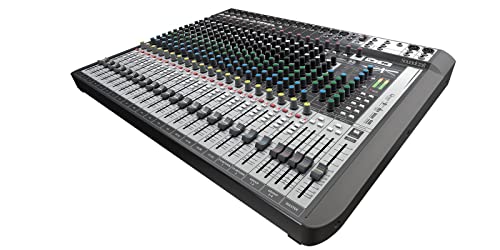
Soundcraft Signature 22MTK — Best for Large Sessions
Twenty-two channels changes what you can attempt. The Signature 22MTK exists for the sessions smaller desks cannot take: a full drum kit miked properly, a complete band, a choir with area microphones, a theatre production. It suits studios and venues recording ensembles where channel count is the hard constraint. It does not suit small desks, small rooms or small sessions — it is a lot of mixer to feed two microphones.
Strengths
- 22-channel multitrack USB — every input lands in the computer separately, drums and all
- Onboard Lexicon effects bring a respected studio name to the mixer’s own processing
- Soundcraft’s analog heritage shows in musical EQ and a layout built for fast, confident mixing
Trade-offs
- Physically large; measure your space before falling for the channel count
- No standalone card recording — it is a front end for a computer, not a recorder
- Premium-tier pricing that only makes sense if the channels will actually be used
The case for the 22MTK is arithmetic. A drum kit done properly takes seven or eight channels before a single vocal is plugged in. Add bass, two guitars, keys and backing vocals and a 12-channel desk is negotiating compromises before the red light goes on. The 22MTK ends the negotiation: everything gets a channel, every channel gets recorded, and the mix can be rebuilt afterward without a single “we had to combine the toms” regret. The Lexicon effects are more than a badge — reverbs and delays from that lineage are genuinely usable on a mix, not just live dressing. If your sessions are genuinely this size, this is the desk that stops being the limitation. Check the current price on Amazon
Best for: full-band and drum-heavy sessions needing maximum multitrack channels / Not suited for: small project desks or computer-free recording

Yamaha MG12XU — Best Stereo USB Workhorse
The MG12XU represents the traditional bargain honestly: a well-built, great-sounding analog mixer that records its stereo mix over USB. It suits live engineers, houses of worship, rehearsal spaces and performers who mix in real time and want that mix captured. It does not suit anyone who expects to rebalance sources after the fact — the recording is the performance, permanently.
Strengths
- D-PRE preamps and Yamaha’s famously solid build make it a fit-and-forget workhorse
- SPX effects and one-knob compressors on mic channels solve live problems quickly
- Stereo USB recording is dead simple — no drivers drama, no multitrack session to manage
Trade-offs
- USB carries the stereo mix only; individual channels cannot be separated later
- No onboard recording or multitrack of any kind
- Twelve inputs on paper translate to fewer full mic channels in practice
There is a real philosophy behind choosing a stereo recorder, and the MG12XU serves it well. Choirs, acoustic acts, conferences and live events often want a faithful document of a good performance, not a construction project. An engineer mixes the room, the USB captures that mix, and the file is ready to share the same evening. Yamaha’s contribution is reliability and sound: the D-PRE preamps are clean, the compressors tame an enthusiastic vocalist without a tutorial, and the chassis survives being moved weekly. Buy the MG12XU when the mix happens live by design — and read our mistakes section below before assuming stereo will be fine for a studio session, because that mismatch is the most expensive one in this category. Check the current price on Amazon
Best for: live mixing with a faithful stereo recording of the result / Not suited for: studio sessions that need per-channel editing afterward
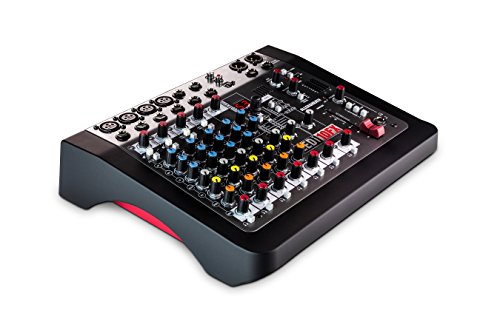
Allen & Heath ZEDi-10FX — Best Compact
The ZEDi-10FX is the small-desk answer to a real gap: a songwriter or duo does not need twelve channels, but does need more than a stereo mix. Its 4×4 USB interface records up to four sources separately — two voices and a stereo instrument, say — which covers most small-format recording honestly. It suits home studios, duos and producers with limited space. It does not suit band sessions, which will outrun four tracks immediately.
Strengths
- 4×4 USB interface gives genuine multitrack capture at a compact size and tier
- Allen & Heath’s studio-quality effects are built in, unusual at this footprint
- Hybrid design works as a small live mixer as happily as a recording front end
Trade-offs
- Four simultaneous USB channels is a firm ceiling on session complexity
- No SD recording — the computer is required
- Fewer hands-on mixing features than the full-size desks here
Small rooms produce a surprising amount of serious music, and the ZEDi-10FX respects that. A vocal, a guitar, a keyboard in stereo: four tracks, each preserved, each mixable later, from a desk that fits beside a laptop. The effects quality is the pleasant surprise — Allen & Heath built its reputation in studios and live venues far above this tier, and the processing here does not feel like a toy version. For the producer whose sessions are genuinely small, the ZEDi-10FX avoids the classic overbuy: a huge desk whose extra channels gather dust while its bulk dominates the room. Check the current price on Amazon
Best for: songwriters and duos recording a handful of sources at a small desk / Not suited for: full-band sessions or computer-free capture
Comparison Table
| Pick | Badge | Key spec | Best for |
|---|---|---|---|
| Tascam Model 12 | Best Overall | 12-track SD recorder + USB interface + DAW controller | Computer-free multitrack recording |
| Zoom LiveTrak L-12 | Best for Live Bands | 12-channel multitrack to SD, multiple headphone mixes | Capturing a full band in one pass |
| Mackie Onyx16 | Best Analog Multitrack | 16-channel analog, multitrack USB, Onyx preamps | Hands-on engineers recording live mixes |
| Soundcraft Signature 22MTK | Best for Large Sessions | 22-channel multitrack USB, Lexicon effects | Drum kits and full ensembles |
| Yamaha MG12XU | Best Stereo Workhorse | 12 inputs, D-PRE preamps, stereo USB | Recording a live mix as performed |
| Allen & Heath ZEDi-10FX | Best Compact | 4×4 USB multitrack, built-in studio FX | Small-desk songwriters and duos |
How to Choose the Best USB Mixer for Recording
Choose the recording path before the mixer. There are three: stereo USB (the mix is the recording), multitrack USB (channels stay separate in the computer) and standalone multitrack (the mixer records to a card itself). Stereo is right for live documents and wrong for studio construction. Multitrack USB is right when a reliable computer is part of the rig. Standalone is right when the session must survive laptop failures, or when recording happens where laptops are awkward — rehearsal rooms, stages, churches, fields. Many buyers discover their true category only after a painful session; deciding now, on paper, is cheaper.
Count channels the way a session consumes them, not the way marketing counts inputs. A stereo keyboard uses two. A drum kit uses five to eight. A “12-input” mixer may offer six or eight microphone preamps, and preamps — not line inputs — are what microphones need. Write out your largest realistic session, channel by channel, and buy for that list with one or two spare. Running out of preamps mid-session forces ugly compromises; having two spare channels costs nothing in daily use.
Weigh monitoring as heavily as capture. Musicians perform to what they hear. Desks with multiple independent headphone mixes, like the LiveTrak L-12, exist because a band where only the engineer hears properly records badly no matter how good the preamps are. Solo producers can ignore this entirely, which is why the Model 12’s simpler monitoring is no flaw for its audience. Match the monitoring to the number of performers, not to the feature list.
Finally, think about the second job. A recording mixer often doubles as the live desk, the podcast desk or the rehearsal PA. The analog picks here — Onyx16, 22MTK, MG12XU — shine in that double life because their controls are immediate. The recorder-first picks shine when capture is the main event. There is no universal winner; there is only the desk whose strengths align with the sessions you actually run.
Gain Staging and Session Habits That Make Recordings Sound Expensive
The difference between an amateur and a professional recording is more often gain staging than gear. Set each channel’s input gain so the loudest moment of the loudest song peaks with headroom to spare — digital recording rewards conservative levels, because a too-quiet track can be raised in mixing while a clipped track is ruined forever. Check levels with the full band playing the loudest passage, not with one polite voice at soundcheck volume, because ensemble energy adds level nobody predicts.
Record a safety strategy into every session: if the desk records to a card, let it, even when the computer is the main capture. Name and back up the session files the same day; multitrack projects have a way of becoming archaeology. Keep a one-page session log — microphone per channel, gain settings, anything unusual — because the overdub session next week will thank you. And print the mix decisions you make live: on the analog multitrack desks, the USB multitrack feed typically captures channels before or after the fader depending on configuration, so know which yours does before the take that matters, not after.
Preamps and Converters: The Two Components a Recording Cannot Forgive
Live sound forgives; recording does not. A preamp that hisses faintly will never be noticed by an audience over room noise and music, but that same hiss is printed into every quiet passage of a recording, waiting for the moment a compressor raises the intimate vocal and raises the noise floor with it. This is why the preamp names recur throughout this guide — Onyx, D-PRE, and the input stages of Soundcraft, Allen & Heath and Tascam — and why they matter more for recording than for any other use of a mixer. When you compare two desks for a studio, you are really comparing their quietest channels: how much clean gain they offer a soft singer with a dynamic microphone, and how gracefully they handle a drummer’s loudest transient without clipping.
Converters — the components turning analog sound into digital files — are the second unforgiving stage, and the honest news is that modern converters in established brands have converged on “transparent” for most sources. Differences that dominate forum arguments are dwarfed by microphone placement, room acoustics and gain staging in any real session. Spend your anxiety accordingly: preamp quality and session discipline first, converter specifications last. A well-run session on any desk in this guide will embarrass a sloppy session on a costlier one, and the multitrack files will tell the story either way.
One practical test separates good recording preamps from adequate ones before you commit: record the quietest source you own — a fingerpicked guitar, a soft vocal — at the gain it needs, then listen to the silence between phrases on headphones. That silence is your noise floor for every intimate moment you will ever record on the desk. It is a five-minute test that predicts years of satisfaction better than any specification table.
How to Record a Full Band Session with a USB Mixer, Step by Step
Begin with the drum kit, because it consumes the most channels and dictates the session’s level ceiling. Mic the kit, set gains on the loudest hits, and confirm no channel clips when the drummer plays at full performance intensity. Add bass and guitars next, checking each against the drums rather than alone — a guitar that sounds balanced solo can vanish or dominate in context. Vocals go last, with the singer performing at real volume into their actual microphone position.
Build the monitor mixes before the first take, not during it: ask each musician what they need more and less of, adjust, and save the scene if the desk allows it. Record one full song as a test and play it back to the whole band on headphones — performers catch balance and tuning problems in playback that nobody notices while playing. Fix microphone placement before reaching for EQ; moving a microphone a few inches solves problems that plug-ins argue with for hours. Then record in complete takes where possible, keep the card recording running as the safety, and log every take’s number and quality while the session’s memory is fresh. The best multitrack mixer in this guide cannot rescue a chaotic session, and a merely good one will make an organized session sound like a studio — the workflow is the instrument.
Latency, Drivers and the Computer Side of USB Recording
Multitrack USB recording moves the mixer’s output into a computer, and that partnership has its own physics. Latency — the delay between playing a note and hearing it back through software monitoring — is the one that shapes sessions. When latency is low, musicians can monitor through the computer with effects applied and everything feels immediate. When it creeps up, singers pull one headphone cup off and timing falls apart. The practical fix most mixer-based rigs use is direct monitoring: the desk lets performers hear their inputs from the mixer itself with effectively no delay, while the computer silently records. Every pick in this guide supports working this way, which is one reason mixer front ends remain popular with musicians who found pure interface-and-software monitoring fragile.
Driver stability is the unglamorous specification that decides whether a rig survives an operating system update. Established audio brands — Tascam, Zoom, Mackie, Soundcraft, Yamaha, Allen & Heath — maintain their drivers across computer generations, and that support history matters more for a recording rig than any single feature, because a mixer you record with becomes infrastructure. Before buying, confirm the mixer supports your current computer platform and check how recently the manufacturer updated its drivers or firmware. A desk that records to SD card sidesteps the question entirely for capture, which is a quiet but real part of the Model 12 and LiveTrak appeal: the session is safe on the card even if the computer side of the studio is mid-update, mid-crash or mid-replacement.
File management deserves the same seriousness. Multitrack sessions from card-based recorders arrive as folders of individual channel files; from USB desks, as DAW projects. Either way, adopt a naming habit from the first session — date, project, take — and keep the raw multitrack files untouched as the archive. Mixes can be redone; original performances cannot. Producers who treat the multitrack folder as sacred and the mix as disposable work faster and regret less.
From Multitrack Files to a Finished Mix: Where the Mixer Helps and Where It Hands Off
A multitrack recording is raw material, not a result, and it helps to know in advance which parts of finishing a song your mixer will handle and which belong to software. Editing — comping a vocal from three takes, tightening a drum hit, removing the cough between verses — is software work on every rig in this guide. Mixing splits by desk: the Model 12 can mix its own card recordings on the unit itself, faders and EQ included, which suits producers who think in performances rather than mouse clicks; the analog desks mix live sources beautifully but hand recorded tracks back to the DAW for their mixdown; the LiveTrak L-12 sits between, with scene-based live mixing and USB handoff for detailed work.
The healthiest workflow treats capture and mixing as separate crafts with separate tools. Capture on the desk, where reliability and monitoring live. Mix where editing lives, usually the computer. Producers get into trouble when they demand one box be brilliant at both and end up with a compromised recorder and a frustrating mixer. Notice how the strongest picks here are honest about the split: the Model 12 records superbly and mixes simply; the 22MTK captures everything and leaves the sculpting to you and your software. Buy with that division in mind and the rig will feel coherent instead of argumentative.
Common Buying Mistakes
Assuming “USB mixer” means multitrack. The costliest misunderstanding in this category. Stereo USB mixers record the mix only. If you plan to edit channels separately, confirm multitrack or a stated channel count in the USB specification before buying.
Counting inputs instead of preamps. Line inputs do not help a microphone. A session plan written in microphones must be matched against the preamp count, not the headline channel number.
Skipping the monitoring question. Bands record badly when they cannot hear themselves. If more than two performers record together, independent headphone mixes are a requirement, not a luxury.
Buying a recorder for a computer workflow, or the reverse. A standalone recorder’s charms fade if every session sits next to a DAW anyway; a USB-only desk is a liability in a rehearsal room with no laptop. Match the machine to where sessions actually happen.
Recording too hot. Chasing loud meters clips takes permanently. Conservative levels with headroom are the professional habit, and modern converters make quiet-but-clean far more usable than loud-and-clipped.
Forgetting storage and backup. Multitrack sessions are large and irreplaceable. Cards, a backup drive and a same-day copy routine belong in the budget alongside the mixer itself. Treat the card in the recorder as a shuttle, never as the archive, and verify the copy opens before you format anything.
Three Recording Scenarios, Matched to the Right Desk
Abstract specifications become concrete when you run real sessions through them. Consider the songwriter producing an album at home: vocals, acoustic guitar, a keyboard, occasional bass and a drum machine or programmed drums. The session never exceeds six simultaneous sources, and most recording is one overdub at a time. This producer’s binding constraints are sound quality, simplicity and desk space. The Model 12 is the natural fit — record everything to the card, mix on the unit or in the DAW — with the ZEDi-10FX as the smaller, computer-based alternative. Buying the 22MTK for this studio would spend the microphone budget on channels that record silence.
Now the gigging five-piece that wants every show captured and a rehearsal demo every month. Simultaneous sources run past a dozen once the drum kit is miked, and five musicians need to hear themselves. This is LiveTrak L-12 territory for rehearsals and demos — monitoring and card recording in one box — and Signature 22MTK territory when the shows get serious and a laptop rig is acceptable. The MG12XU would document their gigs faithfully but leave them unable to fix the night the bass swamped everything, which is precisely the night they will want to fix.
Finally, the church, school or community hall that records services and events. The operators are volunteers, the setup is permanent, and reliability outranks flexibility. A stereo document of a well-mixed event is usually exactly what is wanted, which rehabilitates the MG12XU completely — simple, sturdy, and honest. If the same hall starts producing a podcast or a youth band recording, the Onyx16’s multitrack becomes the growth path. The lesson generalizes: the right recording mixer is the one matched to the session you actually run, and the most expensive mismatch is buying a studio construction tool for a documentation job, or the reverse.
Keeping a Recording Rig Working for Years
A recording mixer becomes studio infrastructure, and a little maintenance discipline protects both the desk and the sessions stored around it. Keep firmware and drivers current on a schedule you choose — never the night before a session — and keep the previous installer handy in case an update misbehaves. Store SD cards as session media, not as the archive: copy every card to two drives, then reuse the card. Dust is the slow enemy of faders and rotary controls in rehearsal spaces, so a cover when the desk is idle is worth more than any cleaning product later. Label cables at both ends; a multitrack rig with unlabeled inputs turns every session’s first twenty minutes into detective work. Finally, keep one known-good spare of the cheap things — an XLR cable, a USB cable, a power supply if the desk uses an external one — because recording sessions are rarely cancelled by expensive failures. They are cancelled by a three-dollar cable, on a Sunday, with the band already in the room.
Final Recommendation
For most people building a recording setup around a mixer, the Tascam Model 12 is the recommendation: it removes the computer from the fragile part of the process, records every track, and still integrates with a DAW when it is time to mix. Bands should look first at the LiveTrak L-12 for its monitoring, engineers who think analog at the Onyx16, and genuinely large sessions at the Signature 22MTK. The MG12XU remains the right answer for live-first recording, and the ZEDi-10FX for small desks. Round out your research with the rest of the cluster: Best Usb Mixers for the full field, Best Usb Mixers For Home Studio for the studio-specific angle, Best Usb Mixers For Podcasting if voices are part of the work, and Best Usb Mixers For Guitar for instrument-focused setups. Creators who also broadcast live will find Best Usb Mixers For Streaming worth the detour.
Frequently Asked Questions
What is the difference between a USB mixer and an audio interface?
An audio interface converts inputs to digital tracks for the computer and does little else. A USB mixer adds physical mixing — faders, EQ, routing, monitoring — before and alongside that conversion. If you mix with your hands, run live sound, or record without a computer, the mixer earns its size; if you work entirely in software, an interface may be simpler. Many home studios eventually own both philosophies in one desk by choosing a multitrack mixer, which behaves like an interface during capture and like a mixer everywhere else.
Can a USB mixer record each instrument on its own track?
Only multitrack models can. In this guide that is the Tascam Model 12, Zoom LiveTrak L-12, Mackie Onyx16, Soundcraft Signature 22MTK and — up to four tracks — the Allen & Heath ZEDi-10FX. The Yamaha MG12XU records the stereo mix, which suits live documents rather than studio construction.
Do I need a computer to record with these mixers?
Not with the Model 12 or the LiveTrak L-12, which record multitrack to SD cards on their own. The analog desks here need a computer as the recorder, though they mix live perfectly well without one.
How many channels do I need to record a band?
Write the session out: a properly miked drum kit takes five to eight channels, then add one per instrument and vocal. Most four- or five-piece bands land between twelve and sixteen preamps, which is why the L-12 suits rehearsals and demos while the 22MTK suits full productions.
Is an analog mixer worse for recording than a digital one?
No — they trade strengths. Analog desks offer immediate control and, in the Onyx and Signature lines, excellent preamps and EQ, but no recall or onboard capture. Digital recorder-mixers offer scenes, processing and standalone recording. The recording quality depends on the preamps and converters in either design.
What should I buy first: a better mixer or better microphones?
Microphones, in most rooms. A mixer preserves what microphones capture, and one good microphone per main source improves a recording more than a tier jump in the desk. Upgrade the mixer when channel count, multitrack capability or monitoring — not sound quality alone — is the thing holding sessions back.
Can I use a recording mixer for live sound as well?
Yes — every pick here mixes live sources through speakers as well as recording them, though their talents differ. The analog desks (Onyx16, Signature 22MTK, MG12XU) are the most natural live tools because every control is immediate. The recorder-first units (Model 12, LiveTrak L-12) handle live mixing capably and add capture, making them the better choice when recording the event matters as much as running it.
How do I avoid clipping when recording drums?
Set drum channel gains against the drummer’s hardest hits at full performance energy, not against soundcheck taps, and leave visible headroom on every peak. Digital clipping is permanent and harsh, while a slightly conservative level costs nothing because quiet tracks can be raised in the mix. If a desk offers per-channel limiting or compression, a gentle safety setting on the kick and snare channels is cheap insurance for live capture.
Is it worth paying for more channels than I need today?
Only within reason. One or two spare preamps is wisdom — guests, a second guitar, a stereo source you forgot to count. Doubling your channel count “just in case” usually means the budget came out of microphones and headphones, which the recording will miss more than it would have missed the spare channels. Grow the desk when a real session plan demands it; session plans, not optimism, should size the mixer.


