Disclosure: airfryerkitchensupply.com is reader-supported. When you buy through links on our site, we may earn an affiliate commission at no extra cost to you.
Where to buy
Every mixer in this guide is sold through Amazon, and availability shifts between the standalone unit and the various microphone bundles built around it. Use the links below to check the current configuration for each pick, and check price on Amazon before you decide, because bundle contents change more often than the mixers themselves do.
- RØDE RØDECaster Pro II — check price on Amazon
- RØDE RØDECaster Duo — check price on Amazon
- Zoom PodTrak P4 — check price on Amazon
- Zoom LiveTrak L-8 — check price on Amazon
- MAONO MaonoCaster AME2 — check price on Amazon
- Mackie ProFX6v3 — check price on Amazon
Searching for the best usb mixers for podcasting quickly runs into a category problem: most products sold as “podcast mixers” are really one of three different machines wearing the same label. Some are broadcast consoles built specifically for spoken-word shows, with voice processing and sound pads. Some are portable recorders that happen to have USB output. And some are ordinary live-sound mixers with a USB port bolted on, designed for bands first and podcasters second. All three can produce a good show, but they fail in completely different ways, and the right choice depends on how many voices you record, whether your guests are in the room or on a call, and how much audio engineering you actually want to do after you press stop.
This guide sorts the six strongest options into those camps honestly. If you record a polished multi-host show and want processing done live, the RØDE consoles at the top are the benchmark. If your guests join by phone, the Zoom PodTrak P4 solves a problem the expensive consoles handle awkwardly. If your budget is tight, the MAONO AME2 gets a single host on air with a real XLR input and usable effects for a fraction of the cost — with limits we will spell out rather than gloss over. Every pick below was verified against Amazon’s catalog data, so the models, names and configurations described here are the ones actually being sold.
In this guide
Quick Picks
- Best Overall — RØDE RØDECaster Pro II: four studio-grade preamps, APHEX voice processing, eight programmable SMART pads and multitrack recording to computer, microSD or USB storage. The console most working podcasters measure everything else against. Check the current price on Amazon
- Best Compact — RØDE RØDECaster Duo: the same preamp and processing philosophy as its big sibling in a smaller body with two mic inputs, made for solo hosts and two-person shows that do not need a full production desk. Check the current price on Amazon
- Best for Remote Guests — Zoom PodTrak P4: four XLR inputs, four independent headphone outputs, a dedicated phone input with mix-minus, and battery power. Built from the ground up for interviews where not everyone is in the room. Check the current price on Amazon
- Best for Podcasts That Also Record Music — Zoom LiveTrak L-8: six combo inputs plus two stereo inputs, twelve-track recording to SD card, and battery operation. A real mixer-recorder for shows with live instruments or a house band segment. Check the current price on Amazon
- Best Budget — MAONO MaonoCaster AME2: a single XLR input with 48V phantom power, Bluetooth accompaniment input, eleven custom sound pads and voice effects. The sensible first console for a solo show on a strict budget. Check the current price on Amazon
- Best Traditional Mixer Layout — Mackie ProFX6v3: a compact analog mixer with Onyx mic preamps, a GigFX effects engine and USB recording to a computer. For podcasters who think in faders and knobs rather than touchscreens and pads. Check the current price on Amazon
How These Picks Were Chosen
We started from the questions podcasters actually ask after their first cheap interface disappoints them: How many microphones can I connect at once? Can I record each voice on its own track so I can fix one person’s level without touching the others? Can I bring in a phone guest without feeding their own voice back to them as an echo? And how much of the finished sound — compression, warmth, noise control — can the hardware do live, so the episode needs less editing?
Each candidate was checked against those four tests, plus three practical ones: headphone outputs (every person in the room needs their own, ideally with individual volume), onboard recording as a backup when the computer misbehaves, and the quality of the mic preamps, because a quiet preamp with enough gain is what lets a dynamic broadcast microphone sound full instead of thin and hissy. Products were verified so that model names, feature sets and configurations match what Amazon actually lists. Where a console is sold in several bundle configurations, we judged the base unit and treated bundle extras — a microphone here, a pair of headphones there — as a separate value question to settle at checkout rather than a reason to rank the console itself higher. Consoles that only offer a stereo USB mix with no way to separate voices were ranked below true multitrack units for any show with more than one host, and single-input budget consoles were judged as solo-host tools rather than pretending they compete with four-preamp production desks.
The 6 Best USB Mixers for Podcasting

RØDE RØDECaster Pro II — Best Overall
The RØDECaster Pro II is the console that turned “podcast mixer” into its own product category, and it remains the easiest recommendation for a serious show. It suits podcasters recording up to four people in the room who want the episode to sound close to finished the moment they stop recording. It does not suit minimalists who record alone into a laptop and prefer to do everything in software — for them, the smaller Duo below or even a plain interface is the smarter spend.
Strengths
- Four studio-grade preamps with enough clean gain for demanding dynamic broadcast microphones
- APHEX processing — including the well-known Aural Exciter and Big Bottom style voice shaping — plus compressor, gate and de-esser per channel
- Records multitrack or stereo to a computer over USB, or standalone to microSD or USB storage, so a computer crash cannot kill the episode
Trade-offs
- It is a premium-tier console, and the price of entry reflects that
- The touchscreen-driven workflow has a learning curve for anyone used to purely physical controls
- Eight SMART pads are generous, but shows wanting elaborate live sound design may still outgrow them
What separates the Pro II from ordinary mixers is how much broadcast engineering it hides. Each microphone channel gets its own processing chain, so the deep-voiced co-host and the quieter, brighter-voiced co-host can each be shaped independently and stored as presets. The SMART pads fire intros, jingles, sound effects and censor bleeps from the console itself, which keeps a live-to-tape show moving without anyone alt-tabbing to a soundboard app. Dual USB connections let it talk to two computers or a computer and a phone at once, which is how you record the show on the main machine while a backup or a streaming PC takes the same mix. For interview shows, Bluetooth and TRRS connectivity bring in remote guests, and the multitrack recording means a guest who coughs over the host’s best line can be muted in editing instead of ruining the take. It is, quite simply, the most complete answer to the podcasting brief that exists in a single box. Check the current price on Amazon
Best for: multi-host shows that record live-to-tape and want broadcast polish without a separate engineer / Not suited for: solo recorders who edit everything in a DAW anyway
RØDE RØDECaster Duo — Best Compact
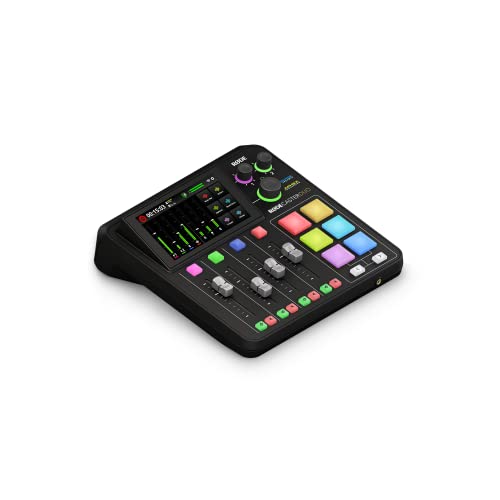
The RØDECaster Duo takes the Pro II’s philosophy — quiet preamps, per-channel voice processing, pads, multitrack capture — and trims it to the two-microphone reality of most podcasts. It suits solo hosts who regularly have one guest in the room, and two-host shows that will never expand to a panel. It does not suit three- or four-person roundtables; if your format might grow, the Pro II is the honest buy.
Strengths
- Same family of low-noise preamps and APHEX processing as the Pro II, in a smaller footprint
- Multitrack recording over USB plus onboard storage options for computer-free backup
- Sound pads and call-in connectivity carry over, so the production workflow is not watered down
Trade-offs
- Two mic inputs is a hard ceiling — there is no graceful way to add a third voice in the room
- Still a premium-tier price for a two-input device; you are paying for processing, not channel count
- Fewer physical controls than the Pro II, so more work happens on the touchscreen
The Duo is best understood as a bet on your format. Most podcasts are one or two voices, and for those shows the Pro II’s extra channels sit idle forever while its larger body eats desk space. The Duo keeps the parts that actually change how an episode sounds — the preamp quality, the per-voice processing presets, the ability to record each person separately, the pads for intros and stingers — and drops the parts most shows never touch. A solo host with a recurring in-person guest gets the full workflow: process both voices live, record a safety copy on the console, take a phone guest through the call inputs when the guest cannot come in. The honest warning is about growth: podcasts add co-hosts more often than they expect, and a Duo cannot stretch. Buy it when you are confident two inputs is your ceiling, and it will feel like the Pro II’s smarter, smaller sibling rather than a compromise. Check the current price on Amazon
Best for: solo hosts and two-person shows that want Pro II sound in a smaller body / Not suited for: panel formats or anyone likely to add a third microphone

Zoom PodTrak P4 — Best for Remote Guests
The PodTrak P4 was designed around a specific, common frustration: your guest is on the phone, and every cheap way of recording them either echoes their own voice back at them or captures them at tinny speakerphone quality. It suits interview podcasters whose guests are rarely in the same room, field recorders, and anyone who wants to record anywhere on battery power. It does not suit hosts who want live voice processing and sound-design pads — the P4 is deliberately simpler than the RØDE consoles.
Strengths
- Dedicated phone input with automatic mix-minus, so callers hear the host but never their own echo
- Four XLR inputs and four independent headphone outputs — every in-room voice gets a proper feed
- Runs on batteries and records to SD card, so it works as a complete studio in a bag
Trade-offs
- No per-channel voice processing comparable to the RØDE consoles; polish happens in editing
- The compact body and small controls feel less like a broadcast desk and more like a recorder
- Mic preamp gain is adequate for most dynamic mics but less generous than the Pro II for the quietest models
The P4’s party trick is how many guest configurations it handles without extra boxes. A guest can join by phone cable, by USB from a computer running a call app, or by an optional Bluetooth adapter, and in each case the mix-minus is handled for you — that single feature is the difference between a remote interview that sounds like a radio phone-in and one that sounds like two people shouting into a speaker. Meanwhile the four XLR inputs mean a local panel is not a problem either, and because each track records separately to the SD card, you can clean up the phone guest’s line in editing without touching your own. For journalists, documentary-style shows and anyone whose format is “find an interesting person and call them,” the P4 removes more friction per dollar than any other unit here. Pair it with the discipline of recording a local backup on the guest’s side when the conversation really matters, and you have a remote-interview rig that punches far above its tier. Check the current price on Amazon
Best for: interview shows built around phone and online guests / Not suited for: hosts who want live broadcast processing and sound pads

Zoom LiveTrak L-8 — Best for Podcasts That Also Record Music
The LiveTrak L-8 is a mixer and multitrack recorder first and a podcast console second, and that ordering is exactly right for a specific kind of show: podcasts with live music, comedy shows with a band, church and community recordings, and any format where the session might include instruments as well as voices. It suits creators who record up to twelve tracks to SD card and want mixer-style control. It does not suit pure talk podcasters, who will never use half its inputs and would be better served by the RØDE processing.
Strengths
- Six combo inputs plus two stereo inputs, with twelve-track recording straight to SD card
- Battery power plus sound pads for triggering intros and effects during a show
- Works as a USB audio interface, so the same session can land in your editing software
Trade-offs
- No broadcast-style per-channel voice processing; vocal polish is manual EQ and editing
- The mixer-first layout is more intimidating to a non-technical co-host than a podcast console
- Headphone monitoring is less flexible for a room full of talk-only guests than the PodTrak P4
Where the L-8 earns its place is session flexibility. A music podcast can mic two voices, take a guitar and a keyboard direct, run a stereo backing feed, and capture every element on its own track for a proper mixdown later — a job none of the talk-focused consoles here can do at all. The scene-saving and per-channel EQ come from live-sound mixing, which means a returning show can recall its setup instead of rebuilding it. For talk-only producers this is overkill, and we would not rank it above the RØDE units for a standard interview show. But podcasting formats keep blurring into performance, and if your show is really a small live production that happens to be published as a podcast, the L-8 is the tool shaped like your problem. Check the current price on Amazon
Best for: music-and-talk formats, live recordings and small performances captured as podcasts / Not suited for: talk-only shows that want automatic voice polish

MAONO MaonoCaster AME2 — Best Budget
The AME2 is the console we recommend when the budget is real and the show is one person. It suits a solo podcaster recording with a single XLR microphone who wants some live effects, a way to play music or clips into the show, and a simple path to a computer or phone for recording and streaming. It does not suit multi-host shows — there is one mic input, and no honest way around that.
Strengths
- A genuine XLR input with 48V phantom power, so it works with both dynamic and condenser microphones
- Eleven custom sound pads, voice-change and reverb effects, and Bluetooth for bringing in backing music
- Works with computers and phones, which suits podcasters who record or stream from a mobile setup
Trade-offs
- One microphone input, full stop — a second in-room voice means a different console
- Processing is effect-oriented rather than broadcast-oriented; easy to overdo reverb and voice effects
- Build and preamp quality sit in the budget tier, a clear step below the RØDE and Zoom units
Judged as a solo starter console, the AME2 gets the important things right. A real XLR input with phantom power means the microphone you buy for it now can move with you to a better console later, which is more than can be said for USB-only microphone setups. The pads and Bluetooth input cover the small production jobs — intro music, a clip, a sound effect — that make a solo show feel produced rather than merely recorded. The discipline it demands is restraint: the voice effects are fun for streaming and novelty segments, but a podcast built on heavy reverb dates itself quickly, and the cleanest setting is usually the best one. Think of the AME2 as a first season’s console. It will teach you routing, monitoring and live production at a price that does not hurt, and when your format outgrows one microphone, you will know exactly which of the consoles above you actually need. Check the current price on Amazon
Best for: solo podcasters on a strict budget recording with one XLR microphone / Not suited for: any show with two or more people in the room

Mackie ProFX6v3 — Best Traditional Mixer Layout
The ProFX6v3 is for podcasters who come from live sound, church audio or DJing and think in physical faders, channel EQ and an effects send — not touchscreens. It suits a one- or two-microphone show recorded into a computer, where the operator wants hands-on control and a mixer that can also handle a small live event. It does not suit producers who need per-voice multitrack files: its USB connection carries the stereo mix, so voices cannot be separated afterward.
Strengths
- Onyx mic preamps are quiet and respected well beyond this price tier
- GigFX effects engine and proper channel EQ give tactile, immediate control
- Compact analog mixer doubles for small live gigs, presentations and PA duties
Trade-offs
- USB sends a stereo mix to the computer — no multitrack separation of voices
- No onboard recording, no sound pads, no call-in mix-minus handling
- Two mic channels is the practical ceiling for voices, despite the larger channel count on paper
The ProFX6v3 earns its spot through sound quality and honesty about what it is. Mackie’s Onyx preamps give a dynamic microphone a clean, full capture, and the physical layout means an experienced operator can ride levels during a conversation the way radio engineers always have. For a two-person show recorded straight to a laptop, with both hosts disciplined about their microphone technique, the stereo limitation matters less than it does for chaotic panel shows. It is also the only pick here that happily leaves the studio: the same mixer can run a small live event, a workshop or a venue PA on the weekend. Buy it if your hands already know mixers and your format is stable. If you are learning audio from zero, the podcast consoles above automate more of the craft and will get you to a good sound faster. Check the current price on Amazon
Best for: experienced operators running one- or two-mic shows into a computer / Not suited for: multitrack editing workflows or remote-guest-heavy formats
Comparison Table
| Pick | Badge | Key spec | Best for |
|---|---|---|---|
| RØDE RØDECaster Pro II | Best Overall | 4 preamps, APHEX processing, multitrack to USB/microSD | Multi-host shows wanting live broadcast polish |
| RØDE RØDECaster Duo | Best Compact | 2 preamps, RØDE processing and pads, smaller body | Solo and two-host shows |
| Zoom PodTrak P4 | Best for Remote Guests | 4 XLR inputs, phone mix-minus, battery + SD recording | Interview shows with phone/online guests |
| Zoom LiveTrak L-8 | Best for Music + Talk | 8 inputs, 12-track SD recording, battery power | Shows that record live instruments |
| MAONO MaonoCaster AME2 | Best Budget | 1 XLR input with phantom power, 11 sound pads, Bluetooth | Solo podcasters on a budget |
| Mackie ProFX6v3 | Best Traditional Layout | Onyx preamps, GigFX effects, stereo USB | Operators who prefer physical mixers |
How to Choose the Best USB Mixer for Podcasting
Start with a headcount, not a feature list. Count the most voices that will ever be in the room at once — not your usual episode, your biggest one. A monthly panel or a co-host who might join permanently changes the answer. Each in-room voice needs its own microphone input and its own headphone output, and running out of either mid-format is the most common reason podcasters replace a mixer within a year. Solo hosts can honestly choose the budget tier. Two voices is the sweet spot the Duo and P4 serve. Four voices in the room points at the Pro II or the L-8.
Next, decide how you will edit. If you edit in multitrack — adjusting each voice separately, muting one person’s cough, compressing the quiet guest harder — you need a console that records channels separately, which is the RØDE pair, the PodTrak P4 and the LiveTrak L-8. If you record live-to-tape and publish with minimal editing, a stereo mixer like the Mackie is workable, but only if your hosts have consistent microphone technique, because a stereo mix bakes every level mistake in permanently. Many producers split the difference: record multitrack as the master and a stereo mix as the instant backup.
Then think about guests. A show built on remote interviews lives or dies on mix-minus — the guest must hear you without hearing themselves delayed. Consoles with a dedicated phone or call input handle this internally. Without one, you will be building workarounds with software routing that eventually fail on a deadline. If guests are central to your format, weight the PodTrak P4 and the RØDE consoles heavily and treat mix-minus as a requirement, not a feature.
Finally, be honest about processing. Broadcast processing — compression to even out levels, a gate to hush room noise between sentences, a de-esser to tame harsh sibilance — is what makes amateur recordings sound like radio. You can do all of it in software afterward, but that is time per episode, forever. Consoles with per-channel processing charge more because they give that time back. If you publish weekly, the arithmetic usually favors the console that processes live.
Mic Preamps, Gain and Why They Matter More Than Channel Count
The specification that decides how your voice actually sounds is rarely the one printed largest on the box. Dynamic broadcast microphones — the style most podcasters end up with — output a weak signal and need substantial clean amplification. A preamp that runs out of quiet gain forces you to choose between a recording that is too quiet or one padded with hiss when you raise it later. This is why the RØDE consoles’ reputation rests on their preamps as much as their pads, and why the Mackie’s Onyx preamps keep a traditional mixer competitive. When comparing any two units, look for how much gain the preamp offers and whether owners of dynamic microphones report needing an inline booster. Needing a booster is not a deal-breaker, but it is a real extra cost and another link in the chain, so count it in the budget from the start rather than discovering it on recording day.
How to Set Up a USB Podcast Mixer for Your First Recording Session
Set up in this order and your first session will go smoothly. First, connect microphones to the console with XLR cables and put every host on headphones before touching any software — if each person can hear themselves clearly with the channel faders up, the hardware side is working. Second, set gain per voice: have each person speak at their loudest natural level, the laugh-and-emphasis level, and adjust input gain so peaks stay comfortably below clipping; quiet speakers get more gain now, not more volume later. Third, if your console has processing, apply it gently in a fixed order — gate first to control room noise, then compression to even levels, then a touch of EQ — and save it as a preset per person. Fourth, connect USB to the computer, select the mixer as both input and output in your recording software, and confirm whether you are capturing multitrack or the stereo mix. Fifth, record thirty seconds of test audio with everyone talking over each other, then listen back on headphones specifically for echo, hiss and one voice swamping the others. Sixth, if a remote guest joins, do a two-minute test call and ask them directly whether they can hear themselves — echo problems are obvious to the guest and invisible to you. Finally, start the onboard recording as well as the computer recording. Redundant capture has saved more episodes than any other habit in podcasting.
Stereo USB vs Multitrack USB: The Line That Decides Your Editing Life
The most consequential phrase in any USB mixer’s description is also the easiest to skim past. “USB audio interface” can mean two radically different things. On a traditional mixer like the ProFX6v3, USB carries one stereo stream — the finished mix, exactly as the faders sat during recording. On the podcast consoles and the LiveTrak L-8, USB carries every channel separately, so the computer receives your voice, your co-host’s voice and the guest line as independent tracks. The hardware can look nearly identical on a desk while offering opposite editing futures.
Neither is automatically better; they serve different production philosophies. Stereo recording is honest, fast and unforgiving — it rewards a well-run live session and publishes quickly, which is why radio-style shows with experienced hosts still work this way. Multitrack recording is forgiving and slower — it assumes the session will be imperfect and gives you the tools to repair it, at the cost of editing time on every episode. The trap is buying stereo while imagining multitrack: producers discover the limitation the first time a guest’s level is wrong for forty minutes and there is no separate fader to fix in the mix. Read the USB description literally before you buy. If it does not say multitrack, per-channel or a channel count like “14-in/12-out,” assume it is a stereo mix and decide whether your workflow can live with that.
Building the Rest of the Chain: Microphones, Headphones and the Room
A mixer is the middle of a chain, and beginners routinely overspend in the middle while starving the ends. The microphone matters more than the console: a good dynamic broadcast microphone on the budget AME2 will sound better than a poor microphone on the Pro II, because the console can only amplify and shape what the microphone captures. Plan the budget as a chain — microphone first, mixer second, headphones third — and resist the urge to reverse that order because the mixer is the most interesting box.
Headphones are the quiet half of podcast quality. Closed-back headphones that seal well prevent the headphone feed from leaking back into the microphone, which is a subtle flaw that makes recordings sound hollow and phasey and is nearly impossible to fix afterward. Every host also needs to hear themselves at a comfortable level; people who cannot hear themselves drift off the microphone, and that wandering distance — not the preamp — is the most common cause of inconsistent episode audio. If your console has fewer headphone outputs than people, solve it with a proper headphone amplifier rather than passive splitters, which drop volume unevenly and invite exactly the drift you are trying to prevent.
The room, finally, is the cheapest upgrade in the whole chain. A small room with soft furnishings, a rug and something absorbent on the wall behind the microphone will flatter every console in this guide. Record a test in the room you plan to use before the mixer arrives; if the bare room echoes, treat that first and let the mixer’s gate and processing handle only what is left.
Common Buying Mistakes
Buying channel count you cannot use. A twelve-channel live mixer sounds like headroom, but if its USB output is a stereo mix and it has one headphone feed, it serves a two-person podcast worse than a four-input podcast console. Match the machine to the format, not the spec sheet.
Ignoring the headphone problem. Every person in the room needs to hear themselves and each other, at their own volume. Consoles with a single shared headphone output lead to splitter tangles and one host always straining to hear. Count headphone outputs the way you count mic inputs.
Forgetting the remote guest until the first interview. Hosts buy for the show they record alone, then scramble when the first phone guest echoes. If interviews are even a possibility, mix-minus capability belongs on the requirements list from day one.
Chasing effects instead of preamps. Voice changers and reverb are fun for a week. Clean gain for your microphone is useful for every episode you will ever record. Spend on the input stage first.
No backup recording. Computers freeze, software updates itself mid-session, cables fail. A console that records onboard — or at minimum a second device capturing the stereo mix — turns a disaster into a footnote. Producers who skip the backup eventually lose an episode they cannot re-record.
Assuming the mixer fixes the room. A hard-walled, echoing room will sound echoey through every console on this page. Processing helps at the margins; soft furnishings, closer microphone placement and lower gain help more. Budget a little for the room before upgrading the mixer a second time.
Matching the Console to Your Format: A Walkthrough
Abstract advice is easy to nod at and hard to apply, so here is how the decision plays out for the formats we see most often. The solo educational show — one host, scripted or semi-scripted, occasional clips — needs the least hardware and the most reliability. The AME2 covers it today; the Duo covers it with headroom and processing the host will grow into. Either way, spend the difference on the microphone, because a solo show is one voice carrying everything, and listeners forgive a simple setup but not a tiring sound.
The two-host conversational show is the format the Duo was drawn for, with the PodTrak P4 as the value alternative. Both record voices separately and give each host a headphone feed. The deciding question is processing: hosts with uneven levels, a noisy room or a weekly deadline benefit from the Duo’s live processing, while disciplined hosts who enjoy editing can save with the P4 and fix in post. The comedy panel — three or four voices, crosstalk, laughter peaks — needs the Pro II’s four preamps and per-channel compression to keep loud moments from clipping and quiet asides from vanishing, and it needs them live, because panel crosstalk is exactly what multitrack editing handles worst.
The interview show splits by geography. Guests in the room: any four-input console works, and the Pro II’s polish wins. Guests on the phone or online: the P4’s mix-minus and call handling matter more than processing, and the Pro II is the upgrade pick when the budget allows both. The narrative or documentary show — field interviews, location sound, studio links recorded later — belongs on the P4 or L-8, because battery power and SD recording matter more than pads when the studio is a kitchen table in someone else’s house. And the hybrid show that performs music should stop reading podcast guides and buy the L-8, the only unit here designed for its actual session.
Final Recommendation
For most podcasters, the RØDECaster Pro II is the console to build around: it is the only pick that combines four quiet preamps, real broadcast processing, pads, call-in handling and multitrack capture in one box, and it will not be the reason an episode sounds amateur. Two-person shows should take the Duo and spend the savings on microphones. Interview-led shows belong on the PodTrak P4, music-blended shows on the LiveTrak L-8, solo beginners on the AME2, and hands-on operators on the ProFX6v3. Whichever you choose, pair it with the wider mixer research in this series — start with Best Usb Mixers, compare the space-saving options in Best Small Usb Mixers, and if your show leans musical, see Best Usb Mixers For Home Studio and Best Usb Mixers For Recording. Streamers in the household will find their own angle covered in Best Usb Mixers For Streaming.
When It Is Time to Upgrade Your Podcast Mixer
Most podcasters do not need the best console on day one; they need the console that matches the show they are actually making, plus a clear sense of the signals that they have outgrown it. The first signal is the guest workaround: the moment you catch yourself recording a phone guest through a speaker, or asking a co-host to share a microphone, the mixer — not your technique — is the bottleneck. The second signal is editing time. If every episode needs an hour of level repair because voices were baked into a stereo mix at the wrong balance, multitrack hardware will pay for itself in recovered evenings within a season. The third signal is reliability anxiety: if you have ever finished a great conversation with a knot in your stomach about whether the computer actually captured it, onboard recording has stopped being a luxury.
Upgrade in the direction of your pain, not toward the flagship by default. Producers who move from the AME2 to the Duo usually cite processing and a second input; producers who move from a traditional mixer to the Pro II cite multitrack and call handling. Notice that none of them cite channel count alone. The console you outgrow teaches you exactly what your show needs, which is why starting honest and mid-priced beats starting maximal. Buy for the format you have, upgrade for the problem you can name, and the gear will stop being the interesting part of your podcast — which is precisely when the podcast gets good.
Frequently Asked Questions
Do I need a mixer for podcasting, or is a USB microphone enough?
A USB microphone is enough for a solo show recorded in one place. A mixer becomes necessary when you add a second in-room voice, want each voice recorded separately, need to bring in phone guests cleanly, or want live processing. Most shows hit one of those triggers within their first year.
What is multitrack recording and why does it matter?
Multitrack recording saves each microphone as its own file or track instead of one combined stereo mix. It lets you fix one person’s level, mute their interruptions and process a phone guest differently from the hosts. For any show with more than one voice, it is the single most valuable capability a console can offer.
What does mix-minus mean for phone guests?
Mix-minus sends the caller everything in the mix except their own voice. Without it, the guest hears themselves delayed, which makes normal conversation nearly impossible. Consoles with a dedicated phone or call input generate mix-minus automatically.
How many microphone inputs do I actually need?
One per person who will ever record in the room with you, plus headroom if your format might grow. A solo host needs one. A two-host show needs two. Buying exactly to today’s headcount is the most common reason podcasters replace a mixer early.
Can these mixers also work for streaming?
Yes — every unit here connects to a computer over USB and can feed streaming software. The podcast consoles add processing and call handling that streamers also value; the differences between the two use cases are covered in our streaming-specific guide.
Should I record on the console or on the computer?
Both, when the console allows it. The computer capture is usually the master that flows into your editing software, and the console’s onboard recording is the insurance policy. Storage is cheap; re-recording a great conversation is impossible.
Dynamic or condenser microphone — which suits a podcast mixer better?
For most home podcast rooms, a dynamic microphone is the safer match: it picks up less of the room, tolerates imperfect placement and pairs well with the higher-gain preamps on the RØDE and Mackie picks. Condensers capture more detail but also more of your untreated room, and they need the phantom power that every pick here except the most basic configurations provides. Choose based on your room first and your voice second.
Can I start with a budget console and keep my microphone when I upgrade?
Yes, and this is the strongest argument for an XLR-based budget console like the AME2 over a USB-only microphone. XLR microphones, cables and headphones all carry forward to any console in this guide. The mixer is the one component you expect to replace as the show grows, so build the rest of the chain to outlast it.


