Disclosure: airfryerkitchensupply.com is reader-supported. When you buy through links on our site, we may earn an affiliate commission at no extra cost to you.
Where to buy
Every pick in this guide to the best usb mixers for home studio use is a current model sold through Amazon and verified through Amazon listing, so you can check price on Amazon for the exact configuration your studio needs. Use the Check on Amazon link under any pick to confirm the listing before ordering — and read the USB specification line twice, because in a studio context the difference between stereo capture and multitrack recording is the difference between two entirely different ways of making music.
PreSonus StudioLive 16.0.2 USB Digital Console — Check on Amazon
Tascam Model 12 Mixer/Recorder — Check on Amazon
Allen & Heath ZEDi-10FX Hybrid Mixer/Interface — Check on Amazon
Soundcraft Notepad-12FX with USB I/O — Check on Amazon
Mackie ProFX10v3+ with Bluetooth and USB — Check on Amazon
Yamaha MG10XU 10-Input Stereo Mixer — Check on Amazon
Introduction: In a Studio, the USB Connection Is the Product
A home studio asks more of a USB mixer than any stage does. Live, the board’s job ends at the speakers; in a studio, everything the board captures is permanent, auditioned on headphones, and judged against commercial releases. That is why the best usb mixers for home studio work are chosen on different criteria from their live cousins: how many channels the USB connection records separately, how clean the preamps stay at the gain a condenser microphone demands, how honestly the monitoring path lets you hear what you actually recorded, and whether the board can serve as the studio’s permanent center — instruments in, monitors out, computer woven through — without being re-patched every session.
The multitrack question dominates, and this guide refuses to blur it. Three of the picks below record individual channels to your DAW — the PreSonus StudioLive 16.0.2 USB as a full digital console, the Tascam Model 12 as a mixer-recorder hybrid that also works without a computer, and the Allen & Heath ZEDi-10FX as a compact 4×4 interface with a real mixer’s surface. The other three capture a polished stereo mix, and they earn their places because a great many home studios — podcast-and-music hybrids, songwriter demo desks, electronic producers summing hardware — genuinely work in stereo and value surface, sound and simplicity over track count. We mark which is which in every review, in plain language.
A note on what “home studio” means in this guide, because the term covers a multitude: the spare-bedroom producer with acoustic panels and ambitions, the kitchen-table podcaster with one microphone and a deadline, the electronic musician whose studio is a wall of hardware, and the band that records its own demos in a garage. The picks span that range deliberately, and the comparison table’s “Best For” column is written against those real rooms rather than against an abstract ideal studio that none of us actually works in.
Every pick was verified as a current listing. Studio buyers should also read the buying guide sections carefully: in this category, the room, the monitoring and the workflow decide satisfaction as much as the board, and we would rather sell you the right expectations than the biggest console.
In this guide
Quick Picks
- Best Overall for Home Studio — PreSonus StudioLive 16.0.2 USB: a true digital console with multitrack USB recording, recallable processing and studio-grade conversion for the serious project studio. Check on Amazon
- Best Hybrid Recorder — Tascam Model 12: mixer, multitrack recorder and USB interface in one — record to SD with no computer, or straight into your DAW. Check on Amazon
- Best Compact Studio Desk — Allen & Heath ZEDi-10FX: 4×4 USB recording, guitar DIs and console-quality effects in a footprint a bedroom studio can hold. Check on Amazon
- Best Sound Quality per Inch — Soundcraft Notepad-12FX: Soundcraft preamps and Lexicon reverb for stereo-capture studios that prize tone over track count. Check on Amazon
- Best Modern Hybrid Desk — Mackie ProFX10v3+: Onyx preamps, USB recording and Bluetooth playback for the studio that also streams and takes calls. Check on Amazon
- Best Stereo Workhorse — Yamaha MG10XU: the dependable analog center for demo, podcast and summing duties, with SPX effects and clean stereo USB. Check on Amazon
How These Picks Were Chosen
Studio criteria led every decision: the USB implementation’s track count and conversion quality; preamp noise and headroom at condenser-microphone gains; the monitoring path (direct monitoring, control-room flexibility, headphone power); recall and processing where the studio’s work demands it; and the board’s ability to remain patched as a permanent studio center. General requirements — current verified Amazon listing, reputable brands with driver support, build quality — applied to all six.
Verification note: each board below was confirmed as a current Amazon listing during the research for this guide, and the USB capabilities described — stereo capture, 4×4 recording, full multitrack — are taken from those listings’ own specifications. In a category where a single ambiguous phrase in a product title has misled many buyers, we treated the USB specification as a fact to be verified per model, not inferred from the product line, and the reviews state the verified behavior of each specific board.
We deliberately included both studio philosophies. The multitrack boards serve producers who mix after tracking. The stereo boards serve creators who mix while tracking and publish quickly. Neither philosophy is the “real” studio; Abbey Road and a bedroom demo desk are both studios, and this guide’s job is to match the tool to the workflow you actually keep, not the one you describe at parties.
The 6 Best USB Mixers for Home Studio

PreSonus StudioLive 16.0.2 USB — Best Overall for Home Studio
The StudioLive 16.0.2 USB is the point where “USB mixer” becomes “digital console”: sixteen channels with XMAX preamps, per-channel digital processing — EQ, compression, gating — that can be saved and recalled, motorized-free but scene-based workflow, and multitrack USB recording that sends individual channels to your DAW for proper mixing. For a home studio that tracks bands, drums or full arrangements, it replaces a mixer, an interface and a rack of channel processing in a single surface.
Strengths
- True multitrack USB recording with per-channel processing and scene recall — a production workflow, not a capture compromise.
- XMAX preamps and studio-grade conversion hold up under critical headphone scrutiny.
- Fat Channel processing on every input teaches and enforces real engineering discipline at the source.
Trade-offs
- The largest footprint and the steepest learning curve here; it is a console to grow into, deliberately.
- Digital workflow means menus and concepts an analog beginner must learn before the first session flows.
- Premium tier investment — justified by replacing several devices, but real.
Buy the StudioLive if your home studio’s ambitions are production-shaped: full bands, layered arrangements, mixes you intend to release. It is the only pick that can remain your center while your skills grow from first sessions to serious work, and that longevity is its value argument.
Best for: project studios tracking bands and full productions / Not suited for: minimal desks or stereo-only workflows
Check on Amazon — check price on Amazon for the current StudioLive 16.0.2 USB listing.

Tascam Model 12 — Best Hybrid Recorder
The Model 12 revives a beloved idea — the all-in-one studio — with modern plumbing: an analog-feeling mixer whose channels record either to an internal SD multitrack recorder or over USB into your DAW, with MIDI synchronization for electronic rigs and a layout of knobs and faders that invites hands rather than menus. A songwriter can capture a full arrangement without opening a laptop; a producer can use the same desk as the DAW’s front end on the next session. No other pick here covers both working styles.
Strengths
- Standalone multitrack recording to SD removes the computer from the creative moment entirely when you want it gone.
- Full USB interface duty with per-channel capture when the DAW session is the point.
- Tactile, knob-per-function layout that keeps mixing physical and fast.
Trade-offs
- Twelve-channel class caps large-ensemble tracking; drum kits eat channels quickly.
- The hybrid feature set asks an evening of orientation — recorder, interface and mixer logic in one surface.
- Effects are workmanlike rather than a headline; polish mostly happens in post.
Choose the Model 12 if your studio alternates between “just capture it” and “now produce it” — which describes most home studios honestly. It is the most creatively liberating desk in this guide.
Best for: songwriters, hybrid DAW/DAW-less studios, electronic rigs / Not suited for: large-format tracking
Check on Amazon — check price on Amazon for the current Model 12 listing.
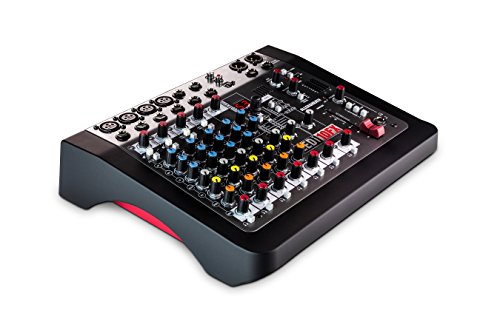
Allen & Heath ZEDi-10FX — Best Compact Studio Desk
Bedroom and small-room studios often cannot house a console, and the ZEDi-10FX is the answer that does not feel like a compromise: a compact hybrid with four channels of 4×4 USB recording — enough to track a vocal, a guitar DI, and a stereo source simultaneously to separate tracks — plus guitar DI inputs, a microphone preamp set with genuine pedigree, and effects of studio quality for monitoring polish. It is the smallest desk here that still records like a studio rather than a snapshot.
Strengths
- 4×4 multitrack USB in a compact footprint — the entry point to real per-channel recording.
- Guitar DIs make it the natural center for guitarist-producers.
- Allen & Heath build and effects; a desk that flatters critical listening.
Trade-offs
- Four recordable channels is a hard ceiling for ensemble tracking.
- Premium-for-size pricing.
- Compact surface means shared controls and a learning evening.
The ZEDi-10FX suits the solo producer and the duo: track voice and guitar properly, overdub freely, mix in the DAW with real separation. For small rooms it is not the budget option — it is the correct one.
Best for: solo producers, guitarist-producers, small rooms / Not suited for: band tracking
Check on Amazon — check price on Amazon for the current ZEDi-10FX listing.

Soundcraft Notepad-12FX — Best Sound Quality per Inch
The Notepad-12FX makes the stereo-capture case at its highest level: Soundcraft preamps that flatter voices and acoustic instruments, the company’s musical EQ, Lexicon reverbs that belong in finished recordings, and USB I/O to carry the polished mix to the computer, in a compact metal chassis. A studio that records one or two sources at a time — voice and guitar, a keyboard rig, a podcast with guests — and mixes by ear in the moment will not miss multitrack; it will hear the difference this board’s front end makes in every take.
Strengths
- Lexicon effects and Soundcraft voicing produce the most finished-sounding stereo captures in this guide.
- Four proper mic preamps cover the small studio’s simultaneous-source needs.
- Compact, quiet and desk-friendly — a permanent studio citizen.
Trade-offs
- Stereo USB capture: what you blend is what you keep, permanently.
- No standalone recording or scene recall; the computer is always the recorder.
- Rotary compact layout favors set-and-record over active mixing.
Buy the Notepad-12FX if your studio’s product is the performance itself — demos, voice work, acoustic recording, high-quality podcasting — and your ears outrank your track count. It is the connoisseur’s stereo desk.
Best for: voice, acoustic and podcast studios working in stereo / Not suited for: producers who mix after tracking
Check on Amazon — check price on Amazon for the current Notepad-12FX listing.

Mackie ProFX10v3+ — Best Modern Hybrid Desk
The ProFX10v3+ updates the working studio desk for how home studios actually operate now: ten channels with Onyx preamps, USB recording for the DAW or stream, GigFX+ effects, and Bluetooth playback so reference tracks, phone calls and backing material enter the mix without a cable hunt. For the studio that is also a streaming room and a content desk, that connectivity is not a gimmick — it is the daily workflow, integrated.
Strengths
- Onyx preamps record cleanly; the front end is a genuine studio citizen.
- Bluetooth return removes the most repeated small friction in a modern desk’s day.
- GigFX+ gives monitoring and live duties a produced polish.
Trade-offs
- USB recording is stereo-class; multitrack producers should choose from the first three picks.
- Feature breadth means a busier surface than the purist boards.
- Bluetooth is for playback convenience, not for critical monitoring — latency still applies to wireless audio.
Choose the ProFX10v3+ if your studio’s sessions mix recording, streaming and communication in the same hour. It is the most 2020s-shaped desk in this guide, and deliberately so.
Best for: creator studios, stream-and-record hybrids / Not suited for: multitrack production
Check on Amazon — check price on Amazon for the current ProFX10v3+ listing.

Yamaha MG10XU — Best Stereo Workhorse
The MG10XU is the analog studio utility perfected: four Yamaha preamps with pads, high-pass filters and one-knob compressors, SPX effects, three stereo channels for synths and playback, and clean stereo USB — the board a thousand home studios use to sum hardware, run podcasts, capture demos and feed monitors without drama. It does not multitrack, and it does not pretend to; what it does is everything else, reliably, for years.
Strengths
- The most dependable stereo center here — preamps, routing and build all proven at scale.
- Compressors on the mic channels are a genuine studio convenience for voice work.
- Excellent as a hardware summing and monitoring hub for electronic producers.
Trade-offs
- Stereo USB capture only — the guide’s recurring caveat, accepted knowingly.
- No recall, no standalone recording; an analog tool in a digital age, proudly.
- Ten-input footprint for a stereo recorder may exceed minimal desks.
Buy the MG10XU if your studio workflow is perform-and-capture and you want the board to disappear into reliability. It is also the safest recommendation in this guide for a first serious desk whose owner has not yet decided between the stereo and multitrack religions.
Best for: demo, podcast and summing studios; first serious desks / Not suited for: multitrack mixing workflows
Check on Amazon — check price on Amazon for the current MG10XU listing.
Comparison Table
| Pick | Badge | Key Spec | Best For |
|---|---|---|---|
| PreSonus StudioLive 16.0.2 USB | Best Overall | 16 ch digital, multitrack USB, recall | Full production studios |
| Tascam Model 12 | Best Hybrid Recorder | SD multitrack + USB interface | Songwriters, hybrid rigs |
| Allen & Heath ZEDi-10FX | Best Compact Desk | 4×4 USB, guitar DIs | Solo producers |
| Soundcraft Notepad-12FX | Best Stereo Sound | Lexicon FX, stereo USB | Voice and acoustic work |
| Mackie ProFX10v3+ | Best Modern Hybrid | Onyx pres, USB + Bluetooth | Creator studios |
| Yamaha MG10XU | Best Stereo Workhorse | SPX FX, stereo USB, compressors | All-round studio utility |
How to Choose a USB Mixer for a Home Studio
Decide your workflow religion first, with total honesty about your habits. Multitrack recording pays its costs — complexity, mixing time, storage — in exchange for control, and it only returns that investment if you actually mix. Producers who finish songs belong on the StudioLive, Model 12 or ZEDi-10FX. Creators who publish performances belong on the stereo boards, where the mix is the performance and the file is done when the playing stops. Studios that do both across different projects should buy the multitrack board and simply use its stereo path on fast days; the reverse upgrade does not exist.
Second, count simultaneous sources at your most ambitious realistic session — not your dream session. A drum kit alone can consume eight channels; a voice-and-guitar demo needs two. The gap between those numbers is the gap between the StudioLive and the ZEDi-10FX, and most home studios live nearer the second. Third, weigh your monitoring: the board will feed your studio monitors and headphones every day, so its control-room path, headphone power and direct-monitoring behavior matter more than any single recording specification. Audition your own voice through the board’s headphone output if you possibly can; that is the sound of your next several years.
One more studio-specific criterion deserves its own sentence: silence of operation. A board lives within microphone range of its own session, so fan noise, transformer hum and noisy controls are not conveniences but recording defects waiting for a quiet take. The analog boards here are effectively silent by nature; the digital console’s cooling is designed for studio duty but deserves a placement thought — a meter of distance and a shelf edge between the console and the nearest microphone is the traditional, sufficient answer.
Fourth, consider the studio’s other citizens. Synths and drum machines arrive as stereo line sources and reward boards with generous stereo channels (MG10XU, Notepad-12FX). Guitars arriving direct reward DI inputs (ZEDi-10FX). Guests and collaborators reward spare mic channels and a second headphone-friendly aux. The right board is the one whose channel map matches your room’s population — draw your actual setup on paper, every cable, before ordering anything.
How to Set Up a Home Studio Around a USB Mixer
Place the board at the center of a triangle: you, the monitors and the instruments you play most. Monitors belong on stands or isolation pads at ear height, angled to your listening position, away from walls as far as the room allows — the board cannot fix a monitoring geometry that lies to you, and most home-studio disappointment is geometry, not gear. Route permanently: instruments and microphones into their channels, board USB to the computer, main or control-room outputs to the monitors, a headphone feed ready. A studio that stays patched is a studio that gets used; re-patching is the tax that kills weekday sessions.
Set your gain structure once, carefully, at the start: condenser microphones at the gain where your loudest performance peaks safely below clipping, line sources trimmed to match, monitor level set by the board’s control room rather than by software sliders scattered across applications. Save the configuration — photograph the board, note the DAW template, save the scene if your board supports it (the StudioLive’s recall exists for exactly this). Then treat the room itself with whatever you can: soft furnishings, a rug, curtains, bookshelves. In home recording, the room is the most expensive-sounding upgrade available at any price, and it is mostly furniture you already own.
Power and cabling hygiene belong in a studio setup guide even though no one brags about them. Run the board, computer and monitors from one quality power strip where the room allows, so the system shares a ground and a switch; route audio cables away from power cables, crossing at right angles where they must meet; and label both ends of every permanent cable. The studio that hums, crackles or loses a channel mid-take is almost never suffering a gear failure — it is suffering an unlabeled, untested cable installed in a hurry, and the fix costs an afternoon rather than an upgrade.
Finally, build the template habit in your software: a session template with your channels named, your monitoring set and your usual effects waiting. The boards in this guide reward the prepared — the Model 12 records at a button press, the ZEDi-10FX is always patched, the StudioLive recalls the whole desk — and the five minutes of template discipline converts that hardware readiness into music captured instead of music described.
The Room Is Half the Mixer: Monitoring and Acoustics for Honest Work
Home studio buyers routinely spend their whole budget on the board and nothing on the listening, then blame the board for mixes that do not translate. The chain of judgment runs: performance, board, monitors, room, ears. A mid-priced board in this guide, heard through well-placed monitors in a furnished room, will produce better-judged recordings than the StudioLive heard through speakers on a desk in a bare box — not because the gear hierarchy inverted, but because decisions are only as good as the information reaching the decider. Budget accordingly: whatever you spend on the mixer, reserve something — even if it is only time and furniture rearrangement — for the listening environment.
There is a budget corollary worth stating before you order: in a home studio, the second thousand spent across microphones, monitors and room treatment almost always out-records the second thousand spent on the console alone. The picks in this guide are arranged so that a sensible total budget can be built at several levels — a stereo board plus a good microphone and honest monitors is a complete studio, while the StudioLive path assumes the rest of the chain will grow to meet it. Buy the system, not the centerpiece.
Headphones deserve the same respect as a second monitoring system rather than an accessory. Most home studios record at hours when monitors are antisocial, and the headphone path of your board — its power, its cleanliness, whether it can be fed independently — decides whether those sessions are productive or merely quiet. Every pick here offers competent headphone monitoring; the digital and hybrid boards add routing flexibility that night-owl producers come to treasure. Check your takes on both systems, always: the mix that survives headphones and monitors is the mix that survives the world.
Preamps at Studio Gains: The Test That Separates These Boards
Live sound forgives preamps; the studio interrogates them. A vocalist through a quality condenser microphone, recorded at conversational distance, can demand most of a preamp’s gain range, and at the top of that range lesser preamps announce themselves as a hiss floor beneath every quiet phrase. This is the single most audible difference among the boards in this guide, and it is why studio buyers should weight preamp pedigree — PreSonus’s XMAX, Allen & Heath’s and Soundcraft’s console lineages, Mackie’s Onyx, Yamaha’s D-PRE-derived designs — above almost any feature count. Each of these makers built its reputation in rooms where silence between notes is part of the recording.
Headroom is the companion virtue. A preamp that clips on a singer’s chorus or a snare’s transient destroys the take at its first inch, and no plug-in resurrects it. The boards here provide pads, honest metering and gain ranges designed by companies that record loud things professionally. The working discipline remains yours: set gain against the loudest moment of the loudest song, not the soundcheck murmur, and let the meters’ peaks live comfortably below the red. In the studio, headroom is not wasted level — it is insurance purchased with a knob, and it pays out on the one take that mattered.
Phantom power deserves its studio paragraph: condensers need it, ribbons of certain vintages fear it, and a board that switches it per-channel or in banks — rather than globally — gives the engineer control that mixed microphone collections require. Check the arrangement on your shortlist against the microphones you own or plan to own; it is a small line in the manual that becomes a weekly convenience or a weekly workaround.
Working With Your DAW: Templates, Latency and the Hybrid Session
The board and the DAW are one instrument played by two hands, and the studios that thrive treat their integration as a designed system. Build a template in your software that mirrors the board: channels named for what is actually plugged in, inputs mapped, a monitoring scheme decided. On multitrack boards, confirm the channel order the USB stream presents and label it once, permanently — the session where the kick drum arrives on the track named “Vocal” is a session that teaches this lesson at full price.
Latency management in the studio follows the tracking/mixing split: small buffers while recording, so overdubs sit in time; large buffers while mixing, so the computer breathes under a full session. Monitor through the board while tracking — every pick here offers that path — and the latency question mostly evaporates, because your ears hear the performance directly while the DAW captures it a few milliseconds later and aligns it on playback. The hybrid session, where a hardware synth, a live vocal and DAW playback coexist, is where a mixer-centered studio outshines an interface-only rig: the board sums the present moment without asking the computer’s permission, and the recording simply documents what the room already heard.
Growing Around the Board: What a Studio Buys Next
A well-chosen mixer anchors a studio for years, and knowing the growth path helps you choose the anchor. The usual sequence after the board: a second microphone of a different character (a dynamic to complement a condenser, or the reverse), because microphones are voices and one voice cannot sing every song; then monitoring improvements, stands and room treatment, which repay every recording you will ever make; then targeted outboard or plug-ins for the processing your mixes keep reaching for. Notice what is not on the list: a bigger board. Studios outgrow channel counts slowly and microphone closets quickly, which is why this guide steered you to buy the board that fits your sessions rather than your fantasies.
The boards divide by how gracefully they accept that growth. The StudioLive’s recall and processing absorb a maturing workflow without new hardware. The Model 12’s MIDI and hybrid recording grow with an electronic rig. The ZEDi-10FX remains the perfect front end even after a larger interface arrives, demoted gracefully to DI and monitoring duties. And the stereo boards become the studio’s utility citizens — podcast desk, summing hub, live rig — long after a production center takes the main chair. A purchase that degrades this gracefully is rarely a mistake, which is the final argument for buying the honest board over the impressive one.
Troubleshooting Studio Sessions
Problem: a buzz that appears only when the computer is connected. → USB ground noise is the home studio’s resident ghost, usually entering through a laptop’s power supply or a shared hub. Test with the laptop on battery; if the buzz vanishes, the supply is the path, and a powered hub, a different outlet arrangement or a USB isolator on the audio line is the cure. Keep the mixer’s USB cable short and routed away from power bricks, and never chase this noise with EQ — remove the path, not the symptom.
Problem: recordings sound fine in the room and boxy everywhere else. → That is the room’s signature, not the board’s: close-miked sources in a small untreated space record its reflections as a boxy coloration. Move the microphone nearer the source and farther from walls, hang the duvets and open the wardrobe during takes, and audition on a second system before touching the EQ. Studios are diagnosed in this order — placement, room, then processing — because each stage is cheaper and more truthful than the next.
Problem: the DAW records the wrong channels or none. → Work the chain in order: the board selected as the device in the operating system, then in the DAW, then the track’s input assigned to the channel the source actually occupies. On multitrack boards, the mapping between mixer channels and USB channels is fixed and documented — the five minutes spent labeling it in your template, as the setup section urges, is the permanent fix for this entire class of lost takes.
In Defense of the Stereo Studio
Because this guide insists on the multitrack distinction, it owes the stereo workflow its full respect, because some of the most durable home-studio work is made exactly that way. The electronic producer performing a hardware set, the folk duo recording a live take, the podcaster producing a show in real time, the songwriter capturing a demo while the song is still warm — all of them are served better by a great stereo board than by a multitrack rig whose flexibility they would spend as friction. Stereo recording imposes a discipline with a long pedigree: balance at the source, commit to decisions, capture performances rather than options. Entire eras of recording were made under that discipline, on equipment with less fidelity than the Notepad-12FX or MG10XU offer today.
The honest test is your own archive. If your finished work consists of files you mixed from multitrack sessions, buy multitrack and do not look back. If your finished work consists of recordings that were essentially complete when the playing stopped, the stereo boards are not your compromise — they are your category, and the money they save against the consoles belongs in microphones and room treatment, where it will be audible in every file you make. Studios fail from mismatched workflow far more often than from insufficient channels, and the mismatch is always visible in the archive before it is visible in the showroom.
Common Buying Mistakes in Home Studio Mixers
The first mistake is buying multitrack for a stereo life — a console whose depth becomes a daily tax on sessions that needed a record button and two good preamps. The second is its mirror: buying a stereo board while planning productions, then discovering the ceiling mid-album. Both errors come from shopping by aspiration instead of by the last ten sessions you actually ran; count those, and the right class chooses itself.
An eighth, quieter mistake is leaving the board unprotected in a room that also serves as a living space: dust in faders, drinks on the desk, a chair leg through a cable. Studios in spare rooms survive by small disciplines — a cover when idle, cables routed off the floor, liquids kept on a side table. The gear in this guide is built to last years; the room’s habits decide whether it gets them.
The third mistake is under-buying preamps for condenser microphones. A large-diaphragm condenser at working distance asks for substantial clean gain, and a budget preamp at its limit adds the hiss that haunts quiet passages. The fourth mistake is ignoring the monitoring path — boards bought for input counts, judged forever on headphone outputs nobody auditioned. The fifth is treating the purchase as the studio: board, monitors, room and habits are one system, and the buyer who budgets for all four, modestly, out-records the buyer who maximizes one.
A seventh mistake is acoustic: mounting the studio’s entire judgment on one pair of headphones because the room felt too small to bother with. Headphones exaggerate some details and hide others — stereo width, low-end balance, reverb levels — and a board feeding only headphones will produce mixes that surprise their maker on every other system. Even a modest pair of monitors, honestly placed, completes the judgment loop that the best board in this guide cannot complete alone.
The sixth mistake is future-proofing into paralysis — waiting for the perfect console while recording nothing on the adequate one available today. Every board in this guide can capture music worth keeping, and the catalog of finished work you build while learning will teach you more about your next purchase than any guide, including this one.
Final Recommendation
One closing piece of advice that outranks every pick: whatever board you buy, schedule the first month as learning, not output. Record things you intend to delete. Learn where the board’s meters lie to you and where they tell the truth, how its preamps behave with your actual microphones, which of its effects flatter your voice. Studios are not bought; they are calibrated — gear, room and engineer together — and the board you have calibrated will outperform the theoretically better board you have not, every single session.
For the serious home studio, the PreSonus StudioLive 16.0.2 USB is the best usb mixer for home studio work: multitrack recording, recallable processing and a console workflow that grows with the engineer. Songwriters and hybrid rigs should take the Tascam Model 12; small rooms and solo producers, the ZEDi-10FX; stereo-first studios that prize sound, the Soundcraft Notepad-12FX; creator hybrids, the Mackie ProFX10v3+; and anyone not yet sure of their workflow religion, the Yamaha MG10XU — the safest first serious desk in this guide.
The rest of the cluster: Best Usb Mixers covers the general field beyond the studio, Best Usb Mixers For Guitar serves the guitarist’s desk specifically, and Best Small Usb Mixers handles compact options for the smallest rooms. Analog-only shoppers should see Best Unpowered Mixers.
Frequently Asked Questions
Can one mixer serve a studio shared by two people?
Comfortably, if its channel map covers the pair’s combined sources and its monitoring serves two headphone listeners — via a second headphone output, an aux-fed headphone amp, or a simple splitter for undemanding work. Shared studios also benefit most from recall (the StudioLive) or from a photographed, agreed board state, because the second user’s first job is always reconstructing the first user’s settings.
Do I need a multitrack USB mixer for a home studio?
Only if your workflow mixes after recording — full bands, layered productions, anything you intend to rebalance later. If you record performances, podcasts, demos or electronic music performed live to stereo, a stereo board serves better and simpler. Judge by your last ten sessions, not your ambitions.
Can a USB mixer replace an audio interface entirely?
For the multitrack picks here — the StudioLive, Model 12 and ZEDi-10FX — yes, that is their design: mixer and interface in one surface. The stereo boards replace an interface for stereo capture only. What none of them replace is a dedicated interface’s minimalism, if your studio never mixes live sources.
How many channels does a home studio really need?
Count your largest realistic simultaneous session. Solo producers thrive on four; a voice-and-guitar duo on six to eight; a full band with drums needs twelve to sixteen. Line-level sources like synths consume stereo channels quickly, so electronic producers should count those as carefully as microphones.
What matters more for recording quality: the mixer or the microphone?
The microphone and the room, in that order — but the mixer’s preamps decide whether the microphone’s quality survives capture. A good microphone into a noisy preamp records the noise faithfully. The picks here all clear the bar where the board stops being the bottleneck, which is the correct standard for the purchase.
Should my studio mixer have built-in effects?
For monitoring and stereo capture, tasteful built-in effects — the Lexicon, SPX and GigFX libraries in this guide — are genuinely useful, letting performers hear themselves polished while they play. For multitrack production they matter less, because effects are usually added in the DAW where they stay editable. Buy them for the headphones and the live room, not as a substitute for your mix processing.
Can I use a home studio USB mixer for live gigs too?
Yes — every pick doubles as a live mixer feeding powered speakers, and the analog-leaning boards (MG10XU, Notepad-12FX, ProFX10v3+) are especially at home doing double duty. The StudioLive is equally capable live, with its processing and recall genuinely useful on stage.
Can I connect studio monitors and headphones at the same time?
Yes — that is the standard studio arrangement every pick here supports: monitors on the main or control-room outputs, headphones on the dedicated headphone feed. The better boards let you manage their levels independently, which matters at midnight, when the monitors go silent and the session continues in the cans.
What is scene recall and do I need it?
Scene recall saves the console’s processing and levels as a snapshot you can reload — invaluable if your studio alternates between set-ups, like a band rig on weekends and a podcast desk on weekdays. The StudioLive offers it as part of its digital workflow. Single-purpose studios that never reconfigure will rarely miss it; multi-use rooms come to depend on it.
How important is sample rate for a home studio mixer?
Less than marketing suggests. All picks here convert at quality beyond what microphones, rooms and listeners can distinguish in finished work; workflow fit, preamp cleanliness and monitoring honesty each outweigh sample-rate arithmetic by a wide margin. Choose the board for your sessions, and let the conversion specifications be the tiebreaker they deserve to be rather than the headline.
Is it better to record dry and add effects in the DAW?
For multitrack workflows, generally yes: dry tracks keep every option open, and the board’s effects can still serve your monitoring so the performance feels inspired while the file stays flexible. For stereo capture, the board’s effects are part of the performance and should be set with the care of a final mix — because they are one.


