Disclosure: airfryerkitchensupply.com is reader-supported. When you buy through links on our site, we may earn an affiliate commission at no extra cost to you.
Where to buy
Every pick in this guide to the best usb mixers for guitar is a current model sold through Amazon and verified through Amazon listing, so you can check price on Amazon for the exact configuration you need. Use the Check on Amazon link under any pick to confirm the listing before ordering — and check the input specification for the words “Hi-Z”, “DI” or “guitar input” on the channels you plan to use, because for a guitarist that single detail decides whether your instrument sounds like itself.
Allen & Heath ZEDi-10FX Hybrid Mixer/Interface — Check on Amazon
Yamaha AG03MK2 Live Streaming Mixer — Check on Amazon
Allen & Heath ZED-10FX with USB I/O — Check on Amazon
Mackie ProFX6v3 6-Channel Mixer with USB — Check on Amazon
Yamaha MG10XU 10-Input Stereo Mixer with Effects — Check on Amazon
Behringer XENYX QX1204USB 12-Input Mixer — Check on Amazon
Introduction: A Guitar Is Not a Microphone, and Your Mixer Should Know It
Guitarists shopping for the best usb mixers for guitar run into a problem other musicians do not: a guitar pickup is a high-impedance source, and plugging it into the wrong input quietly steals its top end and punch before the signal ever reaches the computer. The fix is a proper Hi-Z (high-impedance) or DI input, and it is the first specification a guitarist should look for — ahead of channel count, ahead of effects, ahead of everything. The second is how you intend to get your tone: direct with amp simulation software, from a modeler or pedalboard at line level, or from a microphone in front of a real amplifier. Each route asks something different of the mixer, and this guide maps the picks to the routes honestly.
The guitarist’s typical jobs are also distinctive: recording guitar and vocal together for demos and content, playing along with backing tracks and lessons with zero-latency monitoring, streaming performances, and looping or layering parts. The picks below were chosen for those jobs specifically — proper guitar inputs where direct recording matters, clean mic preamps where an amplifier gets miked, flexible monitoring everywhere, and USB implementations that range from the ZEDi-10FX’s 4×4 interface (which records channels separately) to dependable stereo boards for players who capture a finished mix.
One more framing note before the picks: a USB mixer is not a replacement for an amplifier in a live room with a band — it feeds powered speakers or a PA, and it records. Guitarists whose only need is a louder guitar in a rehearsal room should buy the amplifier and skip this category entirely. The boards here earn their place when a computer, an audience beyond the room, or a second sound source enters the picture — which, for the modern guitarist, is most of the time.
Every model was verified as a current listing. Where a pick’s strength is its guitar inputs, its monitoring or its price class, we say which — because “for guitar” means different things to a fingerstyle recording artist, a streaming metal player and a worship guitarist, and each deserves a direct answer.
In this guide
Quick Picks
- Best Overall for Guitar — Allen & Heath ZEDi-10FX: a hybrid mixer and 4×4 USB interface with proper guitar DI inputs and studio-quality effects — the most complete guitarist’s desk here. Check on Amazon
- Best for Guitar Streamers — Yamaha AG03MK2: a streaming-first mixer with a guitar input, loopback and one-knob compression built for players who broadcast. Check on Amazon
- Best Premium Analog Feel — Allen & Heath ZED-10FX: faders, twin guitar DIs and console-grade effects for the guitarist who mixes while playing. Check on Amazon
- Best Compact Guitar-and-Vocal Rig — Mackie ProFX6v3: Hi-Z inputs, Onyx preamps and GigFX in a six-channel board a solo performer can carry anywhere. Check on Amazon
- Best for Modeler and Pedalboard Rigs — Yamaha MG10XU: clean line inputs and headroom for players whose tone arrives from a modeler, with channels left for vocals and keys. Check on Amazon
- Best Value for Guitar Plus Band — Behringer XENYX QX1204USB: twelve inputs, Klark Teknik effects and USB at a tier that leaves money for the instrument itself. Check on Amazon
How These Picks Were Chosen
Guitar-specific criteria led: genuine Hi-Z/DI inputs on at least the channels a guitarist will use, or demonstrably clean line inputs for modeler rigs; preamp headroom that tolerates a hot humbucker without clipping; monitoring that lets a player hear themselves with effects while recording a manageable signal; and USB behavior — stereo or multi-channel — stated plainly for each pick. General mixer virtues (build, brand support, verified current listings) were required of all six.
Verification note: every board in this guide was confirmed as a current Amazon listing during research, and the guitar-relevant specifications cited — DI and Hi-Z inputs, USB channel counts, loopback — are taken from those listings’ own descriptions. Guitar input terminology varies by brand (DI, Hi-Z, instrument, guitar), and we matched each pick’s actual input provision rather than assuming it from the product family name.
We included both philosophies of guitar recording rather than preaching one: boards that excel at capturing a direct guitar for amp simulation, and boards that excel at capturing a finished tone from a modeler, pedalboard or miked amp. Most guitarists migrate between these philosophies across a playing life, and several picks serve both — the reviews mark which route each board flatters most.
The 6 Best USB Mixers for Guitar
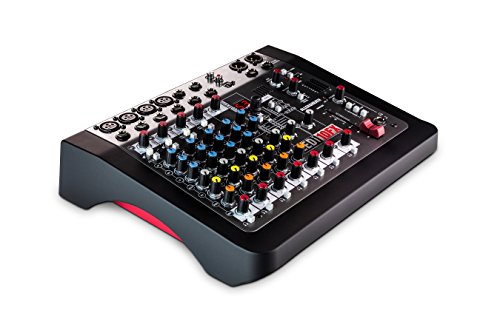
Allen & Heath ZEDi-10FX — Best Overall for Guitar
The ZEDi-10FX was designed as a hybrid — part live mixer, part recording interface — and guitarists are its natural constituency. Two of its inputs are proper guitar DIs voiced for instruments, its 4×4 USB interface records channels to separate tracks (the crucial difference from stereo boards: your guitar, your vocal and your backing can be balanced after the performance), and its effects section carries studio-quality reverbs and delays drawn from Allen & Heath’s larger consoles. For the guitarist who writes, records and performs from one desk, nothing else in this guide covers as much ground.
Strengths
- 4×4 USB recording means guitar and vocal land on separate tracks — real post-production flexibility for demos and content.
- Dedicated guitar DI inputs preserve pickup character for amp-sim recording.
- Console-grade effects and build; a desk that flatters both the playing and the engineering side of the job.
Trade-offs
- Premium tier pricing for a 10-input hybrid; casual players may not use its depth.
- The hybrid design asks an evening of learning — routing options reward readers of manuals.
- Four mic/instrument channels cap ensemble ambitions; it is a guitarist’s desk, not a band console.
If you record guitar seriously — songs, lessons, content — the ZEDi-10FX is the pick. It is the only board here that treats the guitarist as a recording artist first and a live mixer second, and its DI inputs mean the raw tracks you capture today can be re-amped and re-imagined for years.
Best for: recording guitarists, singer-guitarists, lesson creators / Not suited for: full-band live mixing
Check on Amazon — check price on Amazon for the current ZEDi-10FX listing.

Yamaha AG03MK2 — Best for Guitar Streamers
Yamaha’s AG series was built for the livestream era, and the AG03MK2 is its guitarist-friendly heart: a compact streaming mixer with an input ready for guitar, loopback for bringing computer audio — backing tracks, lesson videos, game sound — into your broadcast, one-knob compression and reverb to polish a live performance, and monitoring designed for a player wearing headphones for hours. It assumes your audience is online and your stage is a desk, and every control is arranged for that reality.
Strengths
- Loopback plus guitar input is the exact streaming-guitarist recipe: play along with anything on the computer, broadcast the blend.
- One-knob compression and tasteful reverb keep a live guitar-and-voice mix polished without engineering.
- Compact, bus-friendly format for desk and travel streaming rigs.
Trade-offs
- Three-channel class limits guests and bandmates; it is a solo broadcaster’s tool.
- USB records the stereo broadcast mix — the multitrack conversation belongs to the ZEDi-10FX.
- Streaming-first layout is less ideal as a pure live-gig mixer.
Choose the AG03MK2 if your guitar’s main venue is a stream, a lesson platform or a content channel. It removes every friction between “I want to play” and “I am live and sounding good,” which is the entire job.
Best for: streaming guitarists, online teachers, solo content creators / Not suited for: bands or multitrack recording
Check on Amazon — check price on Amazon for the current AG03MK2 listing.

Allen & Heath ZED-10FX — Best Premium Analog Feel
The ZED-10FX brings the same DI-equipped front end as its hybrid sibling to a more traditional performer’s console: two guitar DI inputs, two further mic/line channels, three stereo inputs, professional effects and real 60mm faders under your fingers, with stereo USB for capturing the performance or streaming it. For the guitarist who mixes while playing — riding the vocal, dipping the guitar under a guest — faders are not nostalgia; they are the interface that makes live adjustment musical.
Strengths
- Twin guitar DIs accommodate two instruments or a guitar plus a partner’s guitar without extra boxes.
- Faders and console layout reward the performing mixer; adjustments are visible at a glance mid-song.
- Effects and build quality at genuine professional standard.
Trade-offs
- USB is stereo-class — for separate-track recording, its hybrid sibling above is the Allen & Heath answer.
- Premium pricing; the value is in feel and longevity, not channel count.
- Heavier than the compact boards; a settled rig suits it best.
Buy the ZED-10FX if you perform guitar-and-voice live, record the stereo result, and expect to keep the desk for a decade. It is the connoisseur’s route through this guide, and its DI inputs mean the direct-guitar option is always one cable away.
Best for: performing singer-guitarists, duos, premium home rigs / Not suited for: multitrack producers or minimal budgets
Check on Amazon — check price on Amazon for the current ZED-10FX listing.

Mackie ProFX6v3 — Best Compact Guitar-and-Vocal Rig
The ProFX6v3 is the gigging soloist’s board: six channels with two Onyx preamps whose inputs accept instruments directly, the GigFX engine’s deep bench of reverbs and delays, a 3-band EQ, and USB recording of the stereo mix for capturing the night’s set. A singer-guitarist plugs guitar into one channel, microphone into the other, adds a backing device on the stereo input, and has a complete, professional small-venue rig in a bag.
Strengths
- Instrument-ready inputs and Onyx headroom handle hot pickups and dynamic playing without fuss.
- GigFX gives the solo performer produced-sounding reverb and delay with no extra pedals on the floor.
- Mackie build quality sized for real transport — this class of board lives in vehicles.
Trade-offs
- Two main channels is the solo/duo ceiling; a third performer needs a bigger board.
- Stereo USB recording only.
- No loopback streaming specialization like the Yamaha AG series.
For the working solo guitarist — weddings, wine bars, worship leading, busking with a battery rig downstream — the ProFX6v3 is the most complete small answer in this guide. It treats guitar and voice as equals, which is exactly the soloist’s requirement.
Best for: solo performers and duos who gig / Not suited for: studio multitrack work
Check on Amazon — check price on Amazon for the current ProFX6v3 listing.

Yamaha MG10XU — Best for Modeler and Pedalboard Rigs
If your tone is made before the mixer — by a modeler, a pedalboard into an amp-in-a-box, or a miked amplifier — then the mixer’s job changes: it must receive line-level tone without coloring or clipping it, and mix it gracefully with vocals and keys. The MG10XU is this guide’s best at that job. Its padded line inputs and generous headroom take a modeler’s output in stride, its compressors polish a vocal alongside, its SPX effects handle the room’s reverb so your presets can stay dry and consistent, and its stereo USB captures the finished blend faithfully.
Strengths
- Headroom and pads that accept modelers and hot line-level sources cleanly — the modern guitarist’s actual signal.
- Four mic/line channels cover a miked amp plus vocals, or a small band around the guitar rig.
- Yamaha reliability for the board that anchors a whole act’s sound.
Trade-offs
- No dedicated guitar DI inputs — direct-to-board guitarists should use the Allen & Heath or AG picks, or add a DI box.
- Stereo USB recording, as with most of this class.
- Ten-input footprint is the largest here; modeler minimalists may prefer smaller.
Choose the MG10XU if a modeler or pedalboard is your tone and the mixer is your band’s front-of-house in miniature. It is also the natural upgrade when a soloist’s rig grows into a trio.
Best for: modeler users, pedalboard rigs, guitar-led small bands / Not suited for: direct-recording purists without a DI solution
Check on Amazon — check price on Amazon for the current MG10XU listing.

Behringer XENYX QX1204USB — Best Value for Guitar Plus Band
The QX1204USB serves the guitarist who is also the band’s sound department: twelve inputs with four XENYX preamps and compressors, British-style EQ, Klark Teknik effects for the room, and USB recording of the stereo mix — a working band’s complete front end at the friendliest tier in this guide. A guitar through a modeler or a miked amp takes one channel, vocals take two more, and the board still has room for keys and playback.
Strengths
- Band-scale channel count and effects at a value tier, leaving budget for instruments and speakers.
- One-knob compressors tame enthusiastic vocalists and keep the guitar’s mix position stable.
- Klark Teknik effects are a genuine step above generic budget-board processing.
Trade-offs
- No dedicated Hi-Z guitar channel — direct guitar needs a DI box or a modeler in front.
- Build quality trails the premium picks; it is a working tool, not an heirloom.
- Stereo USB only, consistent with its class.
Buy the QX1204USB when the money must cover a band, not just a guitarist. It is the pragmatic center of many rehearsal rooms, and its compromises are the visible, priced-in kind.
Best for: guitarists running a band’s sound on a budget / Not suited for: direct-guitar recording without accessories
Check on Amazon — check price on Amazon for the current QX1204USB listing.
Comparison Table
| Pick | Badge | Key Spec | Best For |
|---|---|---|---|
| Allen & Heath ZEDi-10FX | Best Overall for Guitar | Guitar DIs, 4×4 USB, studio FX | Recording guitarists |
| Yamaha AG03MK2 | Best for Streamers | Guitar input, loopback, 1-knob comp | Streaming and lessons |
| Allen & Heath ZED-10FX | Best Premium Feel | Twin DIs, faders, stereo USB | Performing singer-guitarists |
| Mackie ProFX6v3 | Best Compact Rig | Hi-Z inputs, Onyx pres, GigFX | Solo gigging acts |
| Yamaha MG10XU | Best for Modelers | Padded line inputs, headroom | Modeler/pedalboard rigs |
| Behringer QX1204USB | Best Value | 12 in, Klark Teknik FX, USB | Guitar-led bands on budget |
How to Choose a USB Mixer for Guitar
Start with your tone route, because it dictates the input you need. Direct recording into amp simulation demands a Hi-Z/DI input — the Allen & Heath picks and the AG03MK2 provide it natively. A modeler or amp-in-a-box delivers line level and asks only for clean, padded inputs with headroom — the MG10XU’s specialty. A miked amplifier asks for a quiet mic preamp and nothing else exotic, which every pick here has. Guitarists who genuinely use two routes (direct at home, modeler live) should weight the DI-equipped boards, since a line input can serve a modeler adequately but a missing DI cannot be improvised for direct work — short of buying the DI box that closes the gap for any board.
One consideration specific to this search deserves emphasis before the recording question: cable reality. A guitar cable is unbalanced and increasingly noisy and tone-dulling as it lengthens, so the board belongs within a sensible cable run of your playing position — a desk beside you, not a rack across the room. Players who must cover distance should convert to balanced signal early with a DI near the guitar and run XLR the rest of the way, which is the touring solution and works identically at home. It is a small logistical point that quietly decides whether a setup feels effortless or faintly compromised every single session.
Second, decide your recording ambition. Separate tracks for guitar and voice (ZEDi-10FX) transform what you can fix and polish later, and for songwriters that flexibility is the product. A stereo capture (the other five) is the performance as it happened — perfect for gigs, streams and demos, final in the way a photograph is final. Third, count the rest of your act: a vocal microphone is one channel, a second guitar or a keyboard is another, a backing device a stereo pair. The soloist’s six channels and the band leader’s twelve are different products wearing similar badges, and the table above maps them.
A fifth, practical filter: where the board will live. A guitarist’s mixer migrates between desk, rehearsal room and stage more than most equipment, and the boards divide by temperament — the Mackie and Behringer picks are built to travel in bags, the Allen & Heath pair reward a settled home or a proper case, the AG03MK2 is a desk native. Buy for the life the board will actually lead, and if that life includes a car trunk, spend the small extra on the case in the same order; the first saved repair pays for it several times over.
Fourth, monitoring: guitarists monitor more critically than almost anyone, because amp simulation latency and feel live in the headphones. Every pick here offers direct monitoring at the board; if you monitor through amp-sim software instead, your computer and buffer settings — not the mixer — set the latency, and the setup section below explains how to keep it playable.
How to Record Guitar Through a USB Mixer
For direct recording, plug into the DI/Hi-Z input, set the preamp gain so your hardest strumming peaks healthily below clipping, and record the driest signal you can — amp simulation, reverb and delay belong to the software at this stage, where they remain editable. Monitor through the amp sim if your system keeps latency low (small buffer, modern computer), or split the difference: many players record direct while monitoring a scratch tone from the board’s own effects, accepting that the printed track stays clean. That dual habit — comfort in the headphones, honesty on the disk — is the professional pattern.
For modeler and pedalboard recording, treat the mixer as a capture device for a finished tone: set your preset at performance volume (patches voiced quietly change character when loud), feed the line inputs, resist adding board EQ beyond a gentle high-pass to clear rumble, and let the stereo USB carry the result. For a miked amplifier, the craft is in the room, not the board: a dynamic microphone near the speaker’s edge, the amp at the volume where it actually sounds right, and the mixer’s preamp gain staged so the performance’s loudest chorus stays clean.
Recording guitar and vocal together — the demo and content staple — rewards one discipline: balance at the source. Set the guitar’s level against the voice while both perform, not in separate passes, because the blend you hear is either the stereo file you keep (on five of these boards) or the tracks you can rebalance later (on the ZEDi-10FX). Either way, a thirty-second test recording played back on ordinary speakers will tell you more than an hour of meter-watching.
Latency, Amp Sims and Feel: The Guitarist’s Technical Core
Latency — the delay between plucking a string and hearing the processed result — is the subject guitarists feel in their hands rather than read in specifications. When you monitor through the mixer directly, latency is effectively zero and any board here serves. When you monitor through amp-simulation software, the round trip through the computer adds delay that depends on the interface’s drivers, the software buffer and the computer’s speed. Kept small, it is imperceptible to most players; allowed to grow, it disconnects the hands from the ears and quietly ruins takes that look fine on screen.
The practical disciplines are simple. Use the smallest buffer your system sustains without crackling while tracking, and raise it for mixing when latency no longer matters. Prefer boards and drivers with a reputation for stable, low-latency performance — one reason the established names dominate this guide. And if your rig must serve both worlds, adopt the split-monitoring habit from the recording section: direct board monitoring for feel, clean direct signal to disk for editing. Guitarists who internalize that pattern stop fighting latency entirely, because they have routed around it.
Feel has a second component players describe less often: the input itself. A guitar recorded through a proper Hi-Z input retains the high-end detail and dynamic bloom that pickups produce; the same guitar through a padded line input sounds subtly flattened, and no plug-in fully restores what the impedance mismatch discarded. This is why this guide treats DI inputs as the guitarist’s headline specification — it is the rare case where a single line in a spec sheet maps directly onto the sound in your headphones.
Acoustic and Electric Guitar Make Different Demands
Acoustic guitarists should read this category through a different lens than electric players. An acoustic with a pickup system — especially a piezo — is even more impedance-sensitive than an electric, and its players often blend the pickup with a microphone for a natural sound. That blend is a two-channel job on the mixer, and it rewards boards with a DI input and a clean mic preamp side by side: the Allen & Heath picks and the AG03MK2 serve it directly, while the Mackie ProFX6v3 covers the performing version of the same act. Acoustic players also lean harder on EQ — the midrange carve that removes boxiness and the high-pass that removes handling thump are the acoustic guitarist’s daily tools, and they are worth more than extra channels at buying time.
Electric players divide by tone route, as the buying guide describes, but they share one need acoustics do not: managing gain staging across a chain that may include pedals, a modeler and the board. Every stage that clips adds distortion you did not choose, and distortion chosen by accident is just noise with confidence. The discipline is to set each device to pass a clean, strong signal at your loudest playing, and let exactly one stage — the one you intend — do the saturating. Boards with input pads and honest metering, like the MG10XU, make that discipline visible, which is why they anchor so many electric rigs despite lacking a DI input of their own.
Bass guitar, though outside this search’s strict scope, follows the electric logic exactly and benefits from the same DI inputs — a note worth making for the many guitarists who double on bass for their own recordings, and one more reason the DI-equipped boards punch above their channel count in a home studio.
The Practice and Teaching Desk: Where These Mixers Earn Their Keep Daily
Between performances and recordings sits the use these boards serve most hours of their lives: practice and teaching. A guitarist practicing through a mixer gains things an amplifier alone cannot give — the backing track blended at the perfect level, the metronome or lesson audio in the same headphones, the loop of their own playing recorded and reviewed honestly. Teachers gain the ability to share their screen’s audio and their guitar in one feed, to play a student’s submission through the same system, and to record the lesson for the student to keep. The AG03MK2 was designed for precisely this desk, but every pick here assembles into it.
Setting up the practice desk well is a small craft. Position the board within arm’s reach of your playing position, because a control you must stand up to reach is a control you will not use. Keep the guitar cable’s run short and untangled — a coiled spare lives in the desk drawer of every teacher who has lost lesson minutes to a crackling lead. Save one configuration that works — photograph the board, note the software settings — and return to it after every experiment, so practice starts with playing rather than troubleshooting. The difference between a practice rig that gets used daily and one that gathers dust is almost never sound quality; it is the number of steps between sitting down and hearing yourself play.
Effects for Guitarists: Board, Pedals or Plug-Ins?
A USB mixer gives the guitarist three places to put effects, and choosing deliberately beats layering all three. The board’s built-in effects — GigFX, SPX, the Allen & Heath library — are the right home for the shared, environmental layer: the reverb that puts guitar and voice in the same room, a touch of delay for a live solo. They are audible to the audience and, on stereo boards, printed into the recording, which suits live capture perfectly. Pedals and modelers own the character layer: the drive, modulation and ambient textures that are part of your sound rather than the room’s. Plug-ins own the experimental layer in recording, where every choice stays reversible until the mix is final.
The mistake pattern is duplication — reverb from the pedalboard, reverb from the board and reverb from the plug-in stacking into a wash that no one chose. Assign each layer its home before the session: character in the rig, room on the board, experiments in the software. Guitarists who keep that ledger find their recordings cleaner and their live sound more consistent, because each effect exists exactly once, on purpose.
Two Guitars, One Desk: Duo and Teaching Configurations
The moment a second guitarist enters — a duo partner, a student in the room, a collaborator on a call — the channel arithmetic and the input types both matter at once. Two direct guitars need two DI inputs, which is the ZED-10FX’s quiet superpower in this guide and a configuration the single-DI boards solve with one external DI box. Two modelers need only line inputs, and the MG10XU or QX1204USB absorb them trivially. The teaching configuration deserves its own note: the teacher’s guitar, the student’s guitar (in person or returned over the call), a microphone for speech and the computer’s lesson audio are four simultaneous citizens of the mix, and the boards that route them without a tangle — loopback-equipped AG03MK2 for online work, the 10- and 12-input boards for in-person — are the ones teachers keep.
Monitoring divides duos as surely as inputs do. Two players sharing one headphone mix will compromise; a board with an aux send lets the second player hear a different balance — more of themselves, typically — and that small luxury is the difference between a duo that rehearses willingly and one that negotiates. If duo work is your plan rather than your hope, weight aux sends and the second DI input as heavily as the headline features; they are the features your second guitarist will judge the purchase by.
Guitar-Specific Troubleshooting
Problem: single-coil hum that follows your guitar around the room. → Single-coil pickups are antennas by design, and a mixer cannot repeal that — but your setup can minimize it. Rotate your playing position until the hum nulls (every room has a quiet orientation), keep the guitar away from the computer’s power supply and monitors, and confirm the hum exists before the board by listening to the amp alone. A hum that vanishes when you touch the strings is grounding behavior, normal for the instrument; a hum that persists regardless is a cable or a ground loop asking for attention.
Problem: the direct recording sounds fizzy and harsh with distortion. → A raw distorted direct signal lacks the speaker that normally smooths it — this is the classic beginner amp-sim discovery. The fix lives in the software: an amp simulation with a cabinet or impulse-response stage engaged. If the fizz exists even with a cabinet sim active, check that you are not double-processing — a pedal’s distortion into a sim’s distortion — and that the input gain is not clipping the converter on palm-muted peaks, which are hotter than they feel.
Problem: your guitar sounds great in headphones but thin on the recording. → Compare like with like: play the recording back through the same headphones, because laptop speakers discard the low end you balanced for. If it is still thin on the same phones, suspect the input — a line input where a DI was needed — or a high-pass filter engaged on the channel from a previous session, quietly removing your guitar’s body. Board settings persist between sessions; a thirty-second control audit before recording is the professional’s habit for exactly this reason.
Common Buying Mistakes Guitarists Make
The first mistake is plugging a guitar into whatever input is free and concluding that direct recording “sounds bad.” It was the input, not the idea — a Hi-Z mismatch dulls any pickup. The second mistake is recording with the board’s reverb and delay printed into a track destined for amp simulation, baking a room into a signal that software will process again; record dry, decorate in the mix. The third mistake is its mirror: capturing a modeler’s finished stereo tone and then trying to fix its reverb balance in post, when the fix was a drier preset at capture time.
The fourth mistake is buying for the band when you play solo, or for solo when you lead the band — the channel maps in this guide exist because a guitarist’s mixer serves an act, not an instrument. The fifth mistake is ignoring monitoring: headphones you trust and a board positioned where you can reach it mid-take are worth more than a marginal preamp upgrade. The sixth is chasing interface specifications while neglecting the guitar-side basics — fresh strings, a setup that intonates, a cable that does not crackle. The mixer records what it is given, and it is given what your hands and your instrument produce.
A seventh mistake is specific to streamers and teachers: forgetting that your audience hears the mix, not the room. A guitarist who balances by how an amplifier feels in the room while the stream hears a dry direct signal will undersell their own playing to the people who matter. Monitor the exact feed you send — headphones on the board’s output — for at least the soundcheck of every session, and let that, not the room, be the reference.
Final Recommendation
One last word of encouragement for guitarists new to recording themselves: the first honest playback of your own playing is a confronting experience for every guitarist who has ever lived, and the mixer is not the problem. Timing, touch and tone that an amplifier’s room-filling warmth forgave become visible in a recording — which is precisely why recording yourself, even roughly, improves playing faster than any other practice. Buy the board that makes that habit easy to keep, and keep it.
For most guitarists, the Allen & Heath ZEDi-10FX is the best usb mixer for guitar: real DI inputs, separate-track USB recording and effects worthy of the instrument. Streamers should take the Yamaha AG03MK2 and its loopback; performing singer-guitarists who mix live, the ZED-10FX or the compact Mackie ProFX6v3; modeler and pedalboard players, the Yamaha MG10XU; and band-leading guitarists on a budget, the Behringer QX1204USB. Match the board to your tone route first — that decision, made honestly, makes every subsequent one easy. Keep the mindset of this whole guide: the right board is the one still on your desk in three years because it fit the guitarist you actually are, not the one bought for a guitarist you briefly imagined becoming.
The wider cluster: Best Usb Mixers covers the general field, Best Usb Mixers For Home Studio re-ranks for studio-first guitarists, and Best Small Usb Mixers handles the smallest desks. Players who never record should also weigh Best Unpowered Mixers.
Frequently Asked Questions
What is a Hi-Z input and why does a guitar need one?
Hi-Z means high impedance. A guitar pickup is a high-impedance source, and feeding it into a low-impedance line input loads it down, dulling the top end and weakening the signal. A Hi-Z or DI input is designed for that source, preserving the pickup’s full character for recording or amplification.
Can I record my guitar and voice at the same time?
Yes — that is the standard use of every board here. On stereo boards like the Mackie and Yamaha picks, the pair is recorded as a finished blend, so balance them while you perform. On the ZEDi-10FX, the 4×4 USB interface records them to separate tracks you can balance afterward.
Does the mixer matter if I use a modeler?
Less for tone — the modeler makes the tone — and more for everything around it: clean headroom so the modeler’s output is captured without clipping, channels for vocals and other instruments, monitoring, and the live mix if the rig performs. That is why this guide routes modeler players to the MG10XU class rather than the DI-focused boards.
Should I record guitar direct or with a microphone on my amp?
Both are legitimate crafts. Direct recording through a DI input plus amp-simulation software is quiet, editable and apartment-friendly. Miking a real amp captures that amp’s genuine character and your room, at the cost of volume and permanence. Many guitarists record direct for writing and content, and miked or modeled tones for finished releases.
How do I play along with backing tracks through a USB mixer?
Return the computer’s audio into the mixer over USB and blend it with your guitar channel, monitoring the sum on headphones. Streaming-oriented boards like the Yamaha AG03MK2 formalize this as loopback; on the other picks, the USB playback path serves the same purpose for practice and lessons.
Why does my recorded guitar sound dull compared with my amp?
The most common cause is an impedance mismatch — the guitar plugged into a line input instead of a Hi-Z/DI input. The second is monitoring: headphones and speakers reveal a direct signal’s plainness that an amp’s speaker used to flatter. Correct the input first; then let amp simulation or a modeler supply the speaker character deliberately.
Can I use a USB mixer as my guitar amp for practice?
Through headphones or powered speakers, yes — with amp simulation supplying the amplifier and speaker character your direct signal lacks. The mixer provides the input, monitoring and blending with backing tracks; the software or a modeler provides the amp. Many guitarists practice exactly this way, quietly, at hours an amplifier would not permit.
What if my guitar has both a pickup and I want to mic it too?
Blend them on two channels: the pickup through the DI input for body and reliability, a microphone at the soundhole or twelfth fret for air and detail, balanced to taste. The DI-equipped picks in this guide with a spare mic channel handle the blend natively, and it is the standard recording approach for serious acoustic work.
Can I use effects pedals with a USB mixer?
Yes, in either of two places: between the guitar and the mixer’s DI input, as you would before an amp, or as a stereo chain fed from a modeler into line inputs. Pedals before a DI input behave exactly as they do before an amplifier’s input. Keep the chain’s output level in check — a boosted pedal can clip a mixer input that a guitar alone never would — and stage the gain as you would with any amplifier.
Do I still need a DI box if my mixer has a guitar input?
No — a built-in guitar DI input is the DI box’s job integrated into the channel. You would only add an external DI for a board without one, for very long cable runs to a distant mixer, or for splitting your signal to an amp and the board simultaneously.


