Disclosure: airfryerkitchensupply.com is reader-supported. When you buy through links on our site, we may earn an affiliate commission at no extra cost to you.
Where to buy
For best dj controllers and mixers, start here: Controllers need a laptop (or work standalone), mixers need players — judge listings on which half of the rig you actually need, the software they unlock, and whether the hardware works with the library you already own. Every linked pick below was matched by brand and model against Amazon’s catalog before this guide was written, so the product you land on is the product described. Linked picks say “check price on Amazon” because live pricing changes too often to print honestly. Any pick marked as unlinked is a real product without a stable listing-confirmed Amazon listing; it is described in full, with no purchase link, rather than swapped for a weaker substitute.
Pioneer DJ DDJ-FLX4 (Best Overall): Check on Amazon — check the current price on Amazon.
Denon DJ SC LIVE 4 (Best Standalone): Check on Amazon — check the current price on Amazon.
Pioneer DJ DJM-A9 (Best Professional Mixer): Check on Amazon — check the current price on Amazon.
Hercules DJControl Inpulse 500 (Best for Learning Seriously): Check on Amazon — check the current price on Amazon.
Numark Mixstream Pro+ (Best Standalone Value): Check on Amazon — check the current price on Amazon.
RANE PERFORMER (Best for Scratch and Performance): Check on Amazon — check the current price on Amazon.
Introduction: what actually matters here
Searching for the best DJ controllers and mixers lands you in a category that is really two categories sharing a search bar. A controller is a surface for software: it plays nothing alone and needs a laptop or, in standalone form, carries its own screen and engine. A mixer is the hub everything plugs into — turntables, media players, controllers — and outlives every laptop you will ever own. This guide shortlists the six strongest current options across both halves and is explicit about which job each one does, because buying the wrong half is the expensive mistake here.
The honest market picture: controllers now dominate bedrooms, bars and mobile work because one box plus a laptop replaces a van of gear, while dedicated mixers remain the standard in clubs and battle culture, where they are paired with players or turntables and expected to survive a decade of other people’s drinks and enthusiasm. Most working DJs eventually own one of each. The question is only which you buy first, and the reviews below answer it by use case rather than by hype.
Every pick was matched by brand and model against Amazon’s catalog before linking, and the specs quoted come from those verified listings. Software matters as much as hardware in this category — rekordbox, Serato and Engine DJ are ecosystems, not apps — so each review names its platform plainly.
In this guide
Quick Picks
Pioneer DJ DDJ-FLX4 — Best Overall: The controller most new DJs should buy: club-layout jog wheels and pads, rekordbox and Serato compatibility, smart mixing aids that teach rather than cheat, and streaming built in. — Check on Amazon
Denon DJ SC LIVE 4 — Best Standalone: No laptop, no problem: a four-deck standalone system with a touchscreen, Wi-Fi streaming and stems — the mobile and event DJ’s self-contained rig. — Check on Amazon
Pioneer DJ DJM-A9 — Best Professional Mixer: The current club standard: the four-channel mixer installed in the world’s serious booths, with dual USB for changeovers and the effects vocabulary headliners expect. — Check on Amazon
Hercules DJControl Inpulse 500 — Best for Learning Seriously: The thoughtful teacher: metal-feel jog wheels, beatmatch guides, a proper mixer section with hardware filter, and build quality that respects a beginner’s ambition. — Check on Amazon
Numark Mixstream Pro+ — Best Standalone Value: Standalone freedom at a controller price: Engine-powered, Wi-Fi streaming, stems, built-in speakers and a 7-inch touchscreen — the party-and-practice rig that needs nothing else. — Check on Amazon
RANE PERFORMER — Best for Scratch and Performance: Motorised seven-inch platters, four channels and Precision Feel faders: the controller for turntablists who want vinyl feel with a modern performance surface. — Check on Amazon
How These Picks Were Chosen
Selection covered the three real formats — laptop controllers, standalone controllers and club/battle mixers — and required each pick to be a current production model with an active software path. Products were verified (search brand and model, match the returned title, link only then), and anything without a confirmed listing was left out rather than approximated.
Ranking weighed the quality of the performance controls (jog wheels or platters, faders, pads), the audio path, the software unlocked or included, and the upgrade story: a first controller should teach skills that transfer to club gear, and a mixer should accept the sources a DJ will own in three years, not only today’s. Badges were assigned by job — overall, standalone, learning, scratch — because in this category the best product is meaningless without its job attached.
One deliberate stance: no toy-grade controllers with bundled-light-show priorities, and no discontinued legends sold as new. The used market has its place — the companion all-time guide discusses it — but a buying guide’s links should land on supported, warrantied, current hardware.
The 6 Best Options: Best dj controllers and mixers in detail
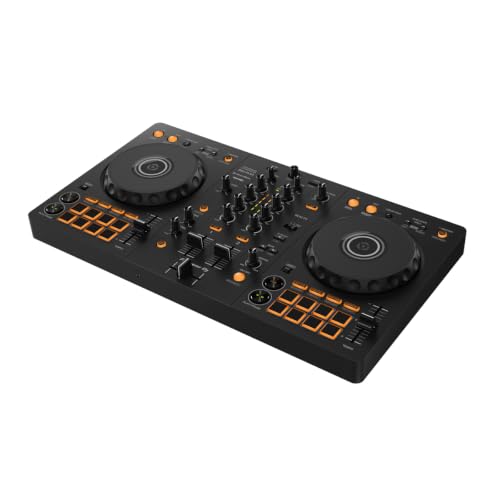
Pioneer DJ DDJ-FLX4 — Best Overall
The DDJ-FLX4 is the current default answer to ‘what controller should I buy’, and it earns it by being two products in one: a forgiving teacher for the first month — Smart Fader and Smart CFX help a beginner’s mixes sound intentional — and a genuine club-layout instrument afterwards, with full-size-feel jog wheels, sixteen performance pads and the same control arrangement as the gear in actual booths. Skills learned here transfer; that is the highest compliment a first controller can earn.
Strengths
- rekordbox and Serato DJ compatibility covers both major software worlds
- Club-standard layout: jog wheels, tempo sliders and pads where your hands will expect them forever
- USB-C powered and streaming-ready — a laptop and headphones are the whole rig
Trade-offs
- Two channels only; four-deck ambitions will outgrow it within a couple of years
- The smart features must be switched off deliberately as you improve, or they become a crutch
- No standalone playback — the laptop is a required part of the instrument
Key specs (verified): 2-channel DJ controller, 16 performance pads, rekordbox and Serato compatible, USB-C (per Amazon title)
What separates the FLX4 from the budget crowd is intent: everything on it points toward real DJing. The jog wheels reward proper cueing technique, the mixer section mirrors a club mixer (so a first booth invitation is not a foreign country), and the software unlocks are the full-featured paths, not demos. Buyers comparing it against cheaper controllers should price the difference against one avoided replacement — most DJs who start on toys buy twice.
Its streaming integration deserves mention for the current era: playing from streaming services inside the software makes a beginner’s library effectively infinite while taste forms, before the serious business of buying and organising a personal collection begins. Treat streaming as the library’s training wheels and the FLX4 as the bicycle — both judgements are compliments.
Best for: New and returning DJs wanting one controller that teaches real, transferable skills / Not suited for: DJs needing four channels or standalone playback without a laptop
Check on Amazon — check the current price on Amazon before you buy, and confirm the exact configuration in the listing title matches the model reviewed here.

Denon DJ SC LIVE 4 — Best Standalone
The SC LIVE 4 removes the laptop from the booth entirely: Engine DJ runs on the unit, a touchscreen runs the library, and Wi-Fi streaming fills requests your collection does not cover. Four decks, stem separation for live remixing, and built-in speakers on this class of unit for practice and small rooms make it the most complete standalone proposition in this guide — a rig that sets up in minutes and answers almost any event brief.
Strengths
- Fully standalone: no laptop to crash, update or have a drink spilled into
- Four decks plus stems give event DJs creative room no two-deck controller matches
- Wi-Fi streaming covers requests instantly — a genuine event-work superpower
Trade-offs
- Standalone ecosystems reward commitment: your library lives in Engine DJ
- Costs more than laptop controllers of similar control quality — the computer inside is the difference
- Purists who perform on club-installed gear may prefer practising on the Pioneer layout instead
Key specs (verified): Standalone 4-deck DJ controller, stem separation, Wi-Fi streaming, Bluetooth (per Amazon title)
For mobile, wedding and corporate work the SC LIVE 4’s argument is operational: one case, one power cable, music from USB, SD or the sky. The failure modes of the laptop rig — updates, cables, a borrowed charger — simply leave the building. DJs whose income is events rather than residencies consistently rate that reliability above layout familiarity, and this guide agrees with them: in event work, the best rig is the one that has never once been the story of the night.
Stems deserve a sentence of their own: separating vocals and instruments live turns a competent event set into a signature one — acapella-out transitions, instrumental bridges under speeches, on-the-fly clean edits. It is the feature clients will not name but will rebook you for.
Best for: Mobile, wedding and event DJs wanting a self-contained four-deck rig / Not suited for: Aspiring club residents who should practise on the installed layout
Check on Amazon — check the current price on Amazon before you buy, and confirm the exact configuration in the listing title matches the model reviewed here.

Pioneer DJ DJM-A9 — Best Professional Mixer
If a festival main stage has a mixer, it is probably this one or its predecessor. The DJM-A9 is the four-channel professional standard — the mixer on technical riders, in club installs and behind headline sets — with third-generation Magvel faders, a full colour and beat effects arsenal, dual USB-C connections so two laptops can share the booth, and audio quality a clear step beyond the previous generation. Buying one is buying the reference.
Strengths
- The installed standard: learn it and every serious booth in the world is familiar
- Dual USB audio interfaces make DJ changeovers seamless — the professional feature that matters nightly
- Superb effects, filters and sound quality, with Bluetooth input for the walk-in playlist
Trade-offs
- It is a mixer only: players, turntables or a controller-as-source are separate purchases
- Priced for professionals and venues; bedroom buyers should fund speakers and music first
- Its depth is wasted without sources that justify it — buy it as a system decision
Key specs (verified): Professional 4-channel DJ mixer, dual USB audio interface for recording and performance (per Amazon title)
The A9’s value is partly social: it is the mixer other DJs, venues and hire companies assume. A venue installing it never explains itself; a DJ arriving to find one never adjusts. That network effect, plus genuinely excellent sound and effects, keeps it at the top of the mixer half of this guide. For a home or studio, it is the last mixer most DJs would ever need — the purchase that ends the mixer conversation permanently.
Note the changeover engineering: two USB ports, input selectors per laptop, and a booth workflow designed for the moment one DJ hands to another mid-night. Home users rarely need it; anyone planning to play out with friends, or to host, will discover it is the feature they use most.
Best for: Clubs, venues and serious DJs standardising on the professional reference / Not suited for: Beginners — a controller teaches more per pound or dollar at the start
Check on Amazon — check the current price on Amazon before you buy, and confirm the exact configuration in the listing title matches the model reviewed here.

Hercules DJControl Inpulse 500 — Best for Learning Seriously
Hercules built the Inpulse 500 for the learner who already knows they mean it: larger, weightier jog wheels than the budget class, a hardware mixer section with proper gain, EQ and filter per channel, fold-out feet that raise it to mixer height beside other gear, and learning aids in its DJUCED software that explain the craft rather than automating it away. It is the controller equivalent of a good first instrument — nothing about it needs apologising for later.
Strengths
- Superior jog wheels and build for its class — it feels like equipment, not a peripheral
- Works with Serato and DJUCED, so the software path stays open
- Hardware filter and full mixer section teach real booth technique from day one
Trade-offs
- Two decks, and a layout slightly distinct from the Pioneer club standard
- Less of a streaming-and-smart-features showcase than the FLX4 — its aids teach rather than assist
- Heavier than ultra-portable controllers; it is a desk instrument, not a backpack one
Key specs (verified): 2-deck DJ controller for Serato and DJUCED, fold-out feet, built-in audio interface (per Amazon title)
The Inpulse 500 versus FLX4 decision is philosophical, and this guide will not fake a spec-sheet answer: Pioneer teaches toward the club’s layout and ecosystem; Hercules teaches toward the craft itself, with guides that show you what beatmatching is while your ears learn to do it. Both produce real DJs. Choose Pioneer if a residency is the dream; choose Hercules if the dream is mastery at home and parties first — and know that either transfers to the other within a weekend of adjustment.
Its audio outputs deserve a practical note: proper RCA master and booth-style connections mean it plugs into real PA systems without adaptor archaeology, which matters the first time a learner is asked to play a house party on a borrowed rig. Small professional courtesies like that recur across the whole design.
Best for: Serious learners wanting build quality and craft-first teaching aids / Not suited for: DJs set on the Pioneer club layout from day one
Check on Amazon — check the current price on Amazon before you buy, and confirm the exact configuration in the listing title matches the model reviewed here.

Numark Mixstream Pro+ — Best Standalone Value
The Mixstream Pro+ is the standalone idea at its most accessible: a two-deck Engine DJ system with a proper touchscreen, streaming over Wi-Fi, stem separation, and speakers built in — so practice happens at headphone-free volume in any room, and a small party needs literally nothing else in the car. For DJs whose work is house parties, bars and their own development, it collapses the rig to a single box more completely than anything else here.
Strengths
- Standalone with streaming and stems — laptop-free DJing at a mid-range price
- Built-in speakers make practice and small rooms a one-box affair
- Engine DJ library skills transfer upward to Denon’s professional standalone range
Trade-offs
- Two decks only, and jog wheels sized for its portable class
- Built-in speakers serve practice and small rooms — real events still need a PA
- Engine ecosystem commitment applies, as with all standalone picks
Key specs (verified): Standalone DJ controller, stem separation, Wi-Fi streaming, built-in speakers, 7-inch touchscreen (per Amazon title)
Its genius is friction removal. Every barrier between a developing DJ and another hour of practice — laptop, interface, speakers, cables — is engineered away, and practice hours are the only currency that buys skill. Owners consistently report playing more because the rig is always ready; that behavioural fact outweighs several spec-sheet losses to larger controllers. For its intended life it is not the cheap option; it is the used-daily option.
At events it shines as the second rig: ceremony music, the drinks-reception set, the backup that has saved more than one wedding when a main rig misbehaved. Professional mobiles who own flagship systems still buy these, which tells you where its value sits.
Best for: Party, bar and developing DJs wanting laptop-free simplicity / Not suited for: Four-deck performers or club-layout purists
Check on Amazon — check the current price on Amazon before you buy, and confirm the exact configuration in the listing title matches the model reviewed here.

RANE PERFORMER — Best for Scratch and Performance
The RANE PERFORMER is what happens when a battle-mixer company builds a controller: real motorised platters with seven inches of vinyl-feel surface, faders engineered for scratch technique, four channels for layered performance, and displays in the platters so your eyes stay on the hardware. It is unapologetically for DJs whose hands are the show — scratch, juggle and open-format performance — and who found standard controllers’ static jog wheels a compromise too far.
Strengths
- Motorised platters deliver genuine turntable feel with controller convenience
- Four channels and a full performance layout suit open-format and routine-based sets
- RANE fader quality — the component scratch DJs judge first — is best in class
Trade-offs
- Size, weight and price place it beyond casual or backpack use
- Its talents are wasted on press-play mixing styles; it is a specialist’s instrument
- Motorised platters need the same care as turntables — it is a machine, not a slab
Key specs (verified): 4-channel DJ controller, motorised 7-inch platters with displays, Precision Feel faders (per Amazon title)
Controllers spent a decade approximating turntables; the PERFORMER simply includes them, in modern form. For a scratch DJ the decision is emotional before it is technical — the platter either moves under your hand like the real thing or it does not — and RANE, whose mixers define battle culture, was never going to ship the approximation. If your style is hands-first performance, this is the controller that stops feeling like a compromise, and its four-channel depth keeps it relevant as your sets grow.
It also bridges worlds in a working rig: run it as the centre of a home studio, then play club sets on installed gear with your technique intact, because motorised-platter timing is turntable timing. That transferability is the quiet professional argument beneath the headline feel.
Best for: Scratch, battle and open-format performers wanting vinyl feel in a controller / Not suited for: Mobile DJs prioritising light weight and fast setup
Check on Amazon — check the current price on Amazon before you buy, and confirm the exact configuration in the listing title matches the model reviewed here.
Comparison Table
| Pick | Badge | Key spec | Best for |
|---|---|---|---|
| Pioneer DJ DDJ-FLX4 — Check on Amazon | Best Overall | 2-ch controller / rekordbox + Serato | New and returning DJs wanting one controller that teaches real, transferable skills |
| Denon DJ SC LIVE 4 — Check on Amazon | Best Standalone | 4-deck standalone / stems / Wi-Fi | Mobile, wedding and event DJs wanting a self-contained four-deck rig |
| Pioneer DJ DJM-A9 — Check on Amazon | Best Professional Mixer | 4-ch club mixer / dual USB / Beat FX | Clubs, venues and serious DJs standardising on the professional reference |
| Hercules DJControl Inpulse 500 — Check on Amazon | Best for Learning Seriously | 2-deck controller / Serato + DJUCED | Serious learners wanting build quality and craft-first teaching aids |
| Numark Mixstream Pro+ — Check on Amazon | Best Standalone Value | Standalone 2-deck / stems / speakers | Party, bar and developing DJs wanting laptop-free simplicity |
| RANE PERFORMER — Check on Amazon | Best for Scratch and Performance | 4-ch / motorised platters / battle faders | Scratch, battle and open-format performers wanting vinyl feel in a controller |
Why Do Club DJs Still Use Separate Players and a Mixer?
Because the booth is shared infrastructure: each DJ brings music on USB, plugs into the installed standard, and plays — no laptops to swap, no surfaces to learn, no single point of failure owned by one performer. The mixer-plus-players format also scales socially: four DJs in a night hand over in seconds on dual-USB mixers like the DJM-A9. Controllers win on personal cost and portability; the installed format wins on being a venue’s common language.
For the home DJ this has a practical corollary: practising on club-layout gear — the FLX4’s arrangement, a DJM-style mixer section — is rehearsal for the real booth. DJs who learn on the standard describe their first club set as familiar; DJs who learn on idiosyncratic layouts describe translation work. Both can succeed, but only one spends the first set on music alone.
What Should You Buy After the Controller or Mixer?
The second purchase defines the rig more than the first. For controller owners it is speakers with honest low end and a pair of headphones you can cue in all night — in that order — because a controller through laptop speakers is a rumour of DJing, while the same controller through real monitors is the thing itself. Add a stand that puts the laptop at eye level and out of drink range, a case that makes the rig one trip from the car, and a second USB cable, because the first will choose its moment.
For mixer owners the second purchase is sources, and the guide’s DVS discussion applies with full force: a pair of turntables plus a DVS-capable path, or media players that read your library’s format. Resist the third-purchase temptation — effects units, extra controllers, decorative lighting — until the core rig has played fifty hours. Gear acquisition is the hobby’s most respectable procrastination; the DJs who improve are the ones whose second purchase was speakers and whose fiftieth hour arrived before their fifth box.
How Do You Practise Effectively on a New Rig?
Structure beats duration. The practice pattern that produces working DJs has three repeating elements: technique drills (fifteen minutes of beatmatching by ear, transitions at fixed bar counts, one new skill isolated per week), recorded sets (one full hour weekly, listened back cold the next day with a notebook), and repertoire work (organising the library, setting cues and energy notes while the tracks are fresh in your mind). Every rig in this guide supports all three; none of them can do any of them for you.
Two habits separate the improvers from the shoppers. First, finish transitions: beginners abandon blends that wobble, professionals ride them out and learn the recovery, which is the skill audiences actually pay for. Second, play for someone monthly — a friend, a house party, a livestream to nobody — because performance pressure teaches in an hour what solitary practice teaches in a month. Your controller or mixer is ready when you are; the calendar, not the catalogue, is the upgrade path.
Laptop, USB Sticks or Standalone: Where Should Your Music Live?
The modern DJ’s library can live in three places, and the hardware in this guide maps to the choice. On a laptop, your whole collection travels with full software power — the controller path, and the mixer-plus-DVS path for turntablists. On USB sticks prepared in rekordbox, the library plugs into installed club gear — the path the DJM-A9 serves from the booth side. Inside a standalone unit, the library lives in the box itself, with streaming as the overflow. Each is a complete answer; the friction lives only at the borders, when a library organised for one world must perform in another.
The pragmatic settlement most working DJs reach: one master library, maintained in one home software, exported to the other formats as needed. That discipline — not the hardware — is what makes a DJ portable. Choose your home by destination (clubs: rekordbox; battle and open-format: Serato; events and independence: Engine), buy the hardware that serves that home from this guide, and let every other format be an export. DJs who organise this way can play any room they are invited into; DJs who do not are one unfamiliar booth away from a very quiet night.
What Do Hire Companies and Venues Know That Beginners Don’t?
That reliability is a specification. Hire fleets standardise on the gear in this guide’s upper half not from snobbery but from actuarial tables: the DJM line’s failure rates across thousands of wet, hot, transported nights; the standalone units that removed laptop variables from event work; the controllers whose jog wheels survive being learned on by a city. When a product appears in hire stock year after year, the market has run an experiment no review can replicate, and its results are printed in the fleet list.
The beginner’s translation: buying the same models the fleets buy is not a lack of imagination — it is free research. Parts exist, engineers know the units, resale buyers queue up, and your own experience accumulates on the industry’s common instruments. There will be time, later, for idiosyncratic gear bought for love. The first rig should be bought the way fleets buy: for the nights it must not fail.
One Rig, Many Rooms: Making Your Choice Travel
Whichever half of this guide you buy into, judge it finally by how it travels between the rooms of your life: bedroom to house party, house party to bar, bar to the booth or the wedding hall. The FLX4 and Inpulse 500 travel by teaching transferable layout; the standalone pair travel by removing dependencies; the PERFORMER travels by keeping a turntablist’s hands honest anywhere; the DJM-A9 travels by already being there when you arrive. Portability of skill matters more than portability of weight, and every pick was chosen with a destination in mind.
So make the purchase a direction, not a destination: the controller that points at the club, the standalone that points at the events business, the mixer that points at the booth you intend to stand in. DJs who buy directions rarely waste money, because even their first rig remains useful when the second arrives — as practice tool, backup, or the second room’s system. Buy the direction your music is actually heading, and the gear question answers itself for years.
Before You Order: The Rig Checklist
One page, five lines, before the purchase. Format: controller, standalone or mixer — chosen from the sources you own, not the photos you liked. Software: the ecosystem named (rekordbox, Serato, Engine) and matched to your destination, with the library’s home decided. Outputs: the path from this box to real speakers confirmed, adaptors counted. Completion: headphones, cables, stand and case inside the same budget, because a rig is finished only when it plays. And the second purchase — speakers or sources — identified and priced, so the first purchase is a plan rather than a down payment on confusion. Check those lines and the box that arrives will be the rig you meant to build.
Controller, Standalone or Mixer: Which Half of the Rig Do You Need?
Start from what you already own and where you will play. Own a laptop and play at home or parties? A controller is the complete instrument — surface, mixer and sound card in one. Hate laptops in the booth, or play events where reliability is the product? Standalone removes the computer and its failure modes for a higher box price. Own turntables or media players, or aim at club booths? A mixer is the hub, and the players are the other half of the budget — never buy a flagship mixer first and starve the sources.
Software is the second decision, and it is stickier than hardware. rekordbox dominates club preparation (your USB sticks must speak it), Serato dominates battle and open-format culture, Engine DJ powers the standalone world. Controllers that unlock two ecosystems, like the FLX4, defer the commitment; standalone systems make it for you. Choose with your destination in mind: the library and playlists you build are the asset, and they live in the software.
What Specs Actually Matter on a DJ Controller or Mixer?
On controllers: jog wheel size and feel (your hands live there), fader quality, pad responsiveness, and the audio outputs — balanced or at least proper RCA outs mark the professional intent. On mixers: the crossfader first for scratch DJs (its curve and cut are the instrument), per-channel filters and EQ for mix DJs, effects quality, and the interface — dual USB on the DJM-A9 exists because changeovers are where club nights are won and lost.
Ignore, at first pass: light shows, bundled software trials beyond the main platform, and pad counts beyond sixteen. And note what this guide never prints — prices and star ratings — because both change faster than honest advice can. Judge by the job badges, verify the current listing with the check-price links, and spend the savings from a right-sized choice on music and speakers, the two purchases audiences actually hear.
How Does a DJ Rig Grow Without Wasting Money?
The economical path is staged: a good two-channel controller first (it remains useful as a backup and practice rig forever), then speakers and music, then — if your direction is clubs or battle — sources and a mixer, bought once at the level you will keep. The wasteful path is serial upgrading through three controllers, each sold at a loss, to arrive where a patient first purchase would have started.
Compatibility planning prevents the other classic waste: check that your controller’s software is the one your destination uses, that your mixer accepts the sources you will plausibly own (DVS for turntables, USB for players, line for controllers), and that your library software can export to the formats your future requires. Gear is replaceable; a decade of organised music is not — protect the library first and let hardware follow it.
How to Set Up a DJ Controller or Mixer Rig for the First Time
Whether your rig is a controller and a laptop or players and a mixer, the first setup follows the same logic: software and library first, audio path second, technique checks last. An hour spent here saves every future session.
- Install the software your hardware unlocks (rekordbox, Serato or Engine DJ), register it, update the controller or mixer firmware, and only then plug the hardware in — drivers and firmware first is the order that avoids the classic first-night faults.
- Import a small test library — twenty tracks you know well — analyse them, and set your first cue points and beatgrids by hand so you learn what the software is doing for you.
- Connect the audio path in order: controller or mixer master output to speakers, headphones to the cue output, and set gains conservatively — master at a moderate level, channel gains so your loudest track peaks healthily without red lights anywhere.
- Configure the cue mix so you can hear the next track in headphones independently of the room, and practise one blend at low volume until the mechanics — cue, match, fade — are boring.
- On a mixer rig, set the crossfader curve to your style (sharp for scratch, smooth for blending) and confirm every source — turntable, player, laptop — appears on the channel you expect, labelled.
- Save your software settings, export a backup of your library database to a second drive, and label every cable. Your library backup is the most valuable file you own as a DJ; treat it that way from day one.
From here the work is musical, not technical: record your practice sets, listen back the next day, and fix one thing at a time. The rigs in this guide are all capable of far more than their owners’ first year asks of them — which is exactly the headroom you bought.
Common Buying Mistakes
Buying a flagship mixer with nothing to plug into it. A mixer is half a rig. Sources first, or a controller that is complete alone.
Choosing hardware before software. Your library lives in rekordbox, Serato or Engine. Pick the ecosystem your destination uses, then the hardware that serves it.
Starting on toy controllers. Light-show boxes teach light-show habits. The FLX4 and Inpulse 500 class costs a little more and teaches the actual craft.
No library backup. A decade of playlists and cues is irreplaceable and weighs nothing. Back it up this week, automatically.
Red-lining everything. Loud is not a gain structure. Healthy levels sound better on every system your music will ever meet.
Final Recommendation
Most buyers should start with the Pioneer DJ DDJ-FLX4: it teaches the club’s language, unlocks both major software paths, and holds its usefulness for years. Learners who value craft-first teaching and build quality should choose the Hercules Inpulse 500 with equal confidence — the two are philosophies, not a winner and a loser.
Event DJs should go standalone: the Denon SC LIVE 4 for four-deck completeness, the Numark Mixstream Pro+ for laptop-free value. Performers whose hands are the show belong on the RANE PERFORMER. And when the destination is the professional booth itself, the DJM-A9 is the mixer the booth already speaks. Every pick is a verified current listing — check price on Amazon, confirm the model in the title, and put the money you saved by choosing correctly into music.
Shortlist again, for convenience: Pioneer DJ DDJ-FLX4 — Check on Amazon; Denon DJ SC LIVE 4 — Check on Amazon; Pioneer DJ DJM-A9 — Check on Amazon.
Related reading on this site: Best Dj Mixers For Beginners; Best Dj Mixers Ever; Best Dj Mixers For Pc; Best Dj Intro Mixers; Best Dj Mixers For Scratching.
Frequently Asked Questions
What is the difference between a DJ controller and a DJ mixer?
A controller is a control surface for software on a laptop (or, standalone, its own built-in system): it holds no music and mixes nothing by itself. A mixer is hardware that combines audio sources — turntables, media players, controllers — and works with any of them. Controllers are complete rigs with a computer; mixers are the hub of a component rig. This guide badges each pick with its job so the distinction is never blurred.
Do I need a laptop with a standalone controller?
No — standalone units like the SC LIVE 4 and Mixstream Pro+ carry their own operating system, screen and music storage (USB or SD), and can also stream over Wi-Fi. A computer is used only for library preparation if you prefer a big screen for organising music. That independence is precisely what event DJs are paying for.
Which software should a beginner choose, rekordbox or Serato?
Choose by destination. Club and festival preparation runs on rekordbox, because the installed players read it. Battle, scratch and much open-format culture runs on Serato. Many controllers unlock both — the FLX4 is the obvious example — letting you start in one and keep the door open. Your organised library is the asset; both platforms are professional tools.
Can I plug turntables into these controllers later?
Generally no — most controllers are closed systems for their software decks, though some accept external inputs through their mixer sections. DJs planning a turntable future should look at the mixer guides on this site: a DVS-capable mixer (DJM-450, DJM-S series, Numark Scratch) is the hub that turntables and a laptop share. Buying with that map in mind prevents the classic dead-end purchase.
Is a two-channel controller enough, or do I need four?
Two channels are enough to learn everything that matters and to play most parties and bars; the majority of recorded DJ history was made on two decks. Four channels earn their cost for open-format layering, three-deck mixing and event flexibility. The staged path — master two, then expand — wastes nothing, because a good two-channel controller remains a lifetime backup and practice rig.
Why are there no prices in this guide?
Because they change constantly and a printed price becomes a lie on a schedule nobody controls. Each pick links to its verified Amazon listing — check the current price there, confirm the exact model in the title, and compare like for like. The same applies to ratings and review counts, which this guide never prints for the same reason.
Can I DJ a wedding with a beginner controller like the DDJ-FLX4?
Yes — thousands do. The controller handles the music completely; the wedding-specific extras are a microphone input path for speeches (route it through the controller if equipped, or a small mixer), a backup music source on a phone, and a playlist conversation with the couple held weeks before. The gear in this guide covers the DJing; the professionalism is in the preparation around it.


