Disclosure: airfryerkitchensupply.com is reader-supported. When you buy through links on our site, we may earn an affiliate commission at no extra cost to you.
Where to buy
If you are comparing the best compact digital mixers for a band, venue, or studio, start with the verified shortlist below — every model here was matched to its manufacturer’s specification first.
Compact digital mixers are sold by pro-audio dealers, music retailers, and Amazon’s instrument storefronts. Two buying cautions define this class. First, stage-box models like the Behringer XR18 and Soundcraft Ui12 have no physical controls — confirm your tablet or computer plan before ordering. Second, model suffixes matter enormously: an XR18 is not an XR16, and a CQ-18T is not a CQ-12T. Every linked pick below was verified against Amazon listing data feed so the listing matches the mixer reviewed. Check the current price on Amazon for the exact model.
- Behringer X AIR XR18 Digital Mixer — Check on Amazon
- Allen & Heath CQ-18T Digital Mixer — Check on Amazon
- Soundcraft Ui12 Remote-Controlled Digital Mixer — Check on Amazon
- Behringer FLOW 8 Digital Mixer — Check on Amazon
- Zoom LiveTrak L-12 Mixer/Recorder — Check on Amazon
- Tascam Model 12 All-in-One Production Mixer — Check on Amazon
The best compact digital mixers replace the mixing desk with processing power: every channel gets full EQ, compression, and effects; the whole mix can be saved as a scene and recalled in a second; and the “board” itself may be a stage box with no knobs at all, controlled from a tablet. The six picks below map the class honestly — Behringer’s X AIR XR18 stage box, Soundcraft’s Ui12, Behringer’s fader-equipped FLOW 8, Allen & Heath’s touchscreen CQ-18T, and two mixer-recorders, Zoom’s LiveTrak L-12 and Tascam’s Model 12, that add multitrack recording to the digital formula. All were verified as current listings before inclusion.
Digital is not automatically better. It trades the analog board’s instant, glanceable controls for recall, processing, and remote mixing — a trade that delights a band mixing itself from stage and frustrates a volunteer who just wants the microphone louder. This guide ranks for buyers who want what digital actually offers, and says plainly, per pick, who should stay analog instead.
Scope note: this article covers mixers whose processing and control are digital, from stage boxes to recording consoles. Analog boards — including excellent ones with a USB port — are covered under the compact audio mixers keyword in this batch, and the smallest streaming devices under the micromix keyword. If your shortlist straddles the border, the comparison section below the reviews draws it in workflow terms rather than spec-sheet terms, which is where the border actually lives.
In this guide
Quick Picks
Six digital mixers in three shapes: stage boxes you control from a tablet, surface mixers with screens and faders, and mixer-recorders that capture multitrack. The badges name each one’s true job; the reviews defend them.
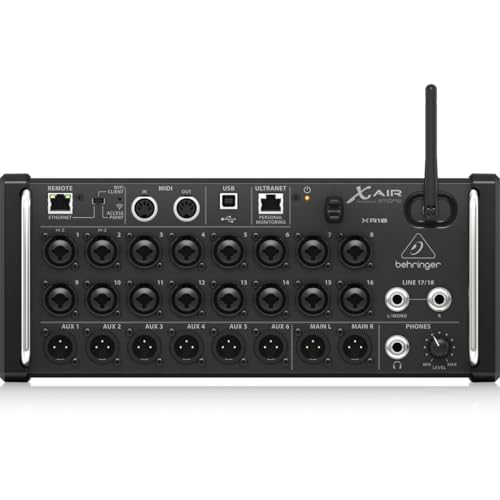
Behringer X AIR XR18 Digital Mixer — Best Overall — Check on Amazon
The stage box that defined the class: 16 Midas-designed preamps, built-in Wi-Fi, full processing on every channel, and multitrack USB recording, in a box that sits on the stage floor. Bands mixing themselves from tablets start their research here, and most end it here too.
Allen & Heath CQ-18T Digital Mixer — Best Touchscreen Mixer — Check on Amazon
Allen & Heath’s answer to the stage box: a compact digital mixer with its own 7-inch touchscreen, so control never depends on a borrowed tablet, plus Wi-Fi for remote tweaks. The premium pick for users who want digital power with a surface they can touch.
Soundcraft Ui12 Remote-Controlled Digital Mixer — Best Browser-Controlled — Check on Amazon
The Ui12’s trick is universality: it is controlled from any device with a browser — phone, tablet, laptop, any brand — with Soundcraft’s stage processing and Lexicon and DigiTech effects heritage inside. The flexible, no-app-required digital starter.
Behringer FLOW 8 Digital Mixer — Best with Physical Faders — Check on Amazon
Digital brains, analog hands: the FLOW 8 keeps real 60mm faders on the surface while apps and Bluetooth handle the deep settings. For small acts and streamers who want recall and effects without surrendering the fader, this is the bridge product done right.
Zoom LiveTrak L-12 Mixer/Recorder — Best Mixer-Recorder for Bands — Check on Amazon
Part mixer, part multitrack recorder: the LiveTrak L-12 captures every channel to SD card while it mixes, with separate headphone mixes for the band. For rehearsals, live demos, and podcast panels, it collapses two purchases into one surface.
Tascam Model 12 All-in-One Production Mixer — Best Studio Production Hub — Check on Amazon
Tascam’s Model 12 is a recording studio shaped like a mixer: 12-track multitrack recording, a full USB interface, and DAW control, under a surface of real faders and knobs. For home studios that think in songs rather than streams, it is the centerpiece pick.
How These Picks Were Chosen
Picks were verified feed, with channel counts, preamp claims, and control methods matched to each manufacturer’s specification. The class boundary was policed in both directions: analog boards with a USB port were kept in the compact audio article, and DJ controllers and podcast interfaces without genuine mixing were excluded here.
Ranking followed the digital value proposition in order: processing and recall, control method (stage box, touchscreen, faders), recording capability, and ecosystem maturity. Each pick leads a distinct control philosophy, because in digital mixing the interface is not a feature of the product — it is the product, and choosing it wrong makes every other specification irrelevant.
Ecosystem maturity broke several near-ties. The XR18’s enormous installed base means every problem a new owner will ever meet has a documented answer and a video; that knowledge commons is a real product feature in a class where the interface must be learned. The newer entrants earned their places on the strength of their control philosophies despite smaller communities — a bet this guide makes openly, because the touchscreen and fader philosophies serve readers the stage-box consensus leaves cold.
The 6 Best Compact Digital Mixers
Each review covers who the mixer suits, three strengths, three trade-offs, its verified specifications, and a bold verdict. Prices are not printed — digital pro-audio pricing shifts with bundles and seasons — so check the current price on Amazon for your shortlisted models.
Behringer X AIR XR18 Digital Mixer — Best Overall
The XR18 suits working bands, worship teams, and small venues that mix from the audience or the stage. Sixteen programmable Midas preamps take a full band — drums, backline, vocals — with preamps borrowed from a console lineage far above this price class. The integrated Wi-Fi access point means the box creates its own network for control, and the multi-channel USB interface records every input separately to a computer, which no analog compact at any size can do.
Strengths
- 16 Midas preamps — a full band on one stage box
- Multitrack USB recording of every channel
- Scene recall and full per-channel processing
Trade-offs
- No physical controls — a dead tablet means a silent rig
- Built-in Wi-Fi can struggle in crowded RF venues; many owners add a router
- The app workflow is a genuine learning curve for analog hands
| Channels | 18 (16 mic preamps) |
| Control | Tablet/computer app, integrated Wi-Fi |
| Interface | Multi-channel USB audio interface (per Amazon listing title) |
In service, the XR18’s killer feature is position: the mixer lives at the stage, cables stay short, and the engineer — often the singer — mixes from where the audience hears. Each musician can adjust their own monitor mix from a phone, which ends the between-song hand-signal negotiations that eat small-gig soundchecks. Scenes save the whole night: walk into the same venue next month and recall it.
The honest risks are digital risks. Control depends on a network and a charged tablet; professionals mitigate with an external router and a backup device, and you should budget both from day one rather than after the first dropout. Firmware and app updates should be done at home, never at the venue. Managed with that discipline, the XR18 is the most capability per dollar in this entire batch of articles.
Recording deserves its own sentence: capturing sixteen separate tracks of a live set, for the price of the mixer you already needed, changes what a small band can do — live albums, honest rehearsal review, content for a year. If multitrack matters to you at all, this pick’s badge understates it.
Best for: Bands and worship teams mixing from stage with full processing and recording / Not suited for: Operators who need physical knobs or have no tablet discipline
Check the current price on Amazon

Allen & Heath CQ-18T Digital Mixer — Best Touchscreen Mixer
The CQ-18T suits bands, venues, and engineers who love digital recall but distrust a control-less box. The built-in touchscreen runs the whole mixer — gains, EQ, effects, scenes — with Allen & Heath’s famously legible interface design, while Wi-Fi lets a singer adjust a monitor from the stage and Bluetooth handles playback audio without a cable. It is the digital mixer for people who have watched a tablet battery die at the wrong moment and sworn never again.
Strengths
- Integrated touchscreen — no external control device required
- Allen & Heath interface clarity and processing quality
- Wi-Fi remote control plus Bluetooth playback
Trade-offs
- Premium pricing in the compact digital class
- Touchscreen mixing still slower than faders for some hands
- Smaller user community than the Behringer ecosystem
| Control | 7-inch touchscreen (per Amazon listing title) |
| Connectivity | Wi-Fi, Bluetooth |
| Type | Compact digital mixer |
The CQ interface philosophy deserves the praise it gets: the screens answer the question the operator actually has — what does this channel sound like, what is loud, what is feeding back — with visual tools like gain assistants and feedback detection that genuinely help smaller teams. Setup that takes an hour on a first-generation digital board takes minutes here, and that is a feature a working band uses every single show.
Value analysis is the counterweight. Against the XR18, you pay a premium for the surface and the polish, with a similar job description. Buyers who already own and trust a tablet rig may find the Behringer’s economics unbeatable; buyers equipping a venue, a school, or their own peace of mind will find the CQ-18T’s self-sufficiency worth every increment.
It is also the most presentable pick in the list for corporate and event work, where a sleek touchscreen surface reads as professional in a way a stage box and a tablet on a music stand does not. In AV-for-hire, appearances are a line item, and this mixer invoices well.
Best for: Bands and venues wanting digital power with a built-in control surface / Not suited for: Budget buyers already equipped with a trusted tablet
Check the current price on Amazon

Soundcraft Ui12 Remote-Controlled Digital Mixer — Best Browser-Controlled
The Ui12 suits smaller bands, duos with full instrumentation, and venues whose operators arrive with whatever device they own. Browser control is the differentiator: there is no app to install, update, or discover has been discontinued; if it runs a browser, it runs this mixer. Inside, Soundcraft’s processing chain includes effects from Lexicon and amp modeling heritage from DigiTech, giving guitarists a direct-in option most stage boxes lack.
Strengths
- Control from any browser — total device freedom
- Lexicon effects and DigiTech amp modeling heritage
- Compact 12-input format for smaller acts
Trade-offs
- 12 inputs cap the band size it can serve
- Browser control can feel less slick than a native app
- Wi-Fi discipline still required, as with all stage boxes
| Inputs | 12 |
| Control | Remote, browser-based (per model line) |
| Type | Remote-controlled digital mixer (per Amazon listing title) |
For a duo or trio carrying their own PA, the Ui12 is a sweet spot: enough inputs for voices, instruments, and playback, monitor mixes controllable from the stage, and a footprint that vanishes into the cable case. The browser model also ages gracefully — the mixer cannot be orphaned by an app store decision, a longevity argument few digital products can make.
Bands should count inputs with the discipline this guide keeps recommending: two guitars, bass, keys in stereo, four drum mics, and three voices exceed twelve faster than intuition suggests. If the count is close, the XR18’s sixteen preamps are the safer buy; if the count fits with room, the Ui12’s flexibility is a genuine pleasure.
Installations are a sleeper use: a Ui12 in a rehearsal room, gym, or community hall can be run by whoever is present, from whatever they carry, with settings password-kept from the curious. That any-device property, mundane on paper, is the feature venue managers end up praising most.
Best for: Smaller acts and venues wanting app-free, any-device control / Not suited for: Full bands needing more than 12 inputs
Check the current price on Amazon

Behringer FLOW 8 Digital Mixer — Best with Physical Faders
The FLOW 8 suits solo and duo performers, small streamers with live ambitions, and presenters whose rig must be operable by touch. Eight inputs cover voice, instrument, and playback formats; two FX processors provide the reverb and delay small acts need; Bluetooth streams backing audio from a phone; and the USB interface records or broadcasts the mix. The app unlocks full EQ and scene management, but the show can be run from the surface alone — the design brief in one sentence.
Strengths
- Real faders plus app depth — both control philosophies
- Bluetooth audio and USB interface built in
- Two FX processors for vocal and instrument polish
Trade-offs
- 8 inputs limit it to small formats
- Deep settings still live in the app
- Not a multitrack recorder like the XR18
| Inputs | 8 |
| Faders | 60 mm channel faders (per Amazon listing title) |
| Effects | 2 FX processors |
| Extras | Bluetooth audio, app control, USB interface |
The FLOW 8 understands something the stage boxes forget: at a small gig, the most common adjustment is one fader, now, by feel. Keeping that gesture physical while digitizing everything else — EQ curves, effects parameters, scene storage — is the correct compromise for its class, and performers who have tried to ride a vocal level on a touchscreen in stage light will recognize the wisdom immediately.
Streamers are the second audience: the FLOW 8 works as a USB interface with hardware faders for voice and game or music balance, a tactile upgrade over software sliders. It will not multitrack a band, and it will not run a festival stage; within small-format live and streaming work, it is one of the most sensibly designed products in this entire batch.
Buy it with its case or bag solution sorted — a surface mixer travels differently from a stage box, and the faders deserve protection. Owners who treat it like the small console it is, rather than the indestructible box it is not, report exactly the long service its design promises.
Best for: Small acts and streamers wanting faders plus digital depth / Not suited for: Full bands or multitrack recording
Check the current price on Amazon

Zoom LiveTrak L-12 Mixer/Recorder — Best Mixer-Recorder for Bands
The LiveTrak L-12 suits bands that rehearse and record in the same room, podcast panels with several microphones, and live acts who want a board-quality recording of every show without a laptop. Twelve tracks record to SD card independently of the mix, five headphone mixes let each musician hear their own balance, and the surface keeps physical faders — Zoom designed it for musicians’ hands, not engineers’ tablets. It also works as a USB interface when the studio calls.
Strengths
- True multitrack recording to SD — no computer needed
- Five individual headphone mixes for rehearsals
- Physical faders and a musician-first layout
Trade-offs
- Effects and processing depth trail the stage boxes
- SD workflow means file management after sessions
- Larger footprint than a stage box digital
| Type | Mixer / multitrack recorder (per Amazon listing title) |
| Recording | 12-track to SD card (per model line) |
| Audience | Musicians and podcasters (per Amazon listing title) |
The rehearsal use case is transformative and underrated: record everything, every time, with each player hearing their preferred mix, and a band’s improvement curve steepens visibly within a month. The same hardware then walks into the gig as the front-of-house mixer and walks out with the show on a card. No other pick in this list covers that arc.
Podcast panels should note the fit too: multiple microphones, individual headphone mixes so guests hear themselves properly, and a multitrack card to edit later — the exact specification panel shows struggle to assemble from interfaces. The trade is processing polish; the LiveTrak’s channel processing is competent rather than luxurious, and engineers chasing studio-grade live effects should look at the XR18 or CQ-18T.
File discipline is the ownership tax: name sessions, offload cards, keep spares. Bands that build the habit own an archive; bands that do not own a drawer of mysterious SD cards. It is a small tax for the only pick here that remembers everything.
Best for: Bands and podcast panels wanting mixing plus multitrack capture / Not suited for: Buyers prioritizing deep live processing over recording
Check the current price on Amazon

Tascam Model 12 All-in-One Production Mixer — Best Studio Production Hub
The Model 12 suits songwriters, home producers, and small studios that record multitrack and mix with their hands. Every input can be captured to its own track on SD, the board doubles as a multi-channel USB interface for a DAW, and its control surface can run the DAW’s transport and faders — three workflows, one footprint. Tascam’s decades in recorders show in the details: click output for tracking, straightforward punch-in, and a layout that teaches itself.
Strengths
- 12-track multitrack recording built in
- Mixer, interface, and DAW controller in one
- Tactile surface — real faders and knobs throughout
Trade-offs
- A studio tool first — less aimed at stage-box live work
- Size and price exceed the streaming-focused picks
- Learning the recording workflow takes an evening or two
| Type | All-in-one digital multitrack mixing/recording studio (per Amazon listing title) |
| Tracks | 12-track multitrack |
| Interface | USB audio interface |
The Model 12’s argument is consolidation with quality: instead of an interface here, a control surface there, and a mixer somewhere else, one well-made unit holds the studio’s center and holds it for years. For producers who track bands or layer their own performances, the ability to record without the computer even awake — then mix down through real faders — is a workflow luxury that becomes a habit fast.
Live-sound buyers should be clear about the boundary: the Model 12 can mix a small show, but it was not born for the stage floor, and the XR18 and CQ-18T serve that world better. Its home is the studio desk, where its recording depth, interface channels, and DAW integration make it the most complete single purchase in this guide.
Longevity is the quiet closer. Tascam supports its recording lines for years, the surface has no tablet dependency, and the skills learned on it — tracking, comping, mixing on faders — are the permanent skills of production. Buyers building a studio to grow into will find this the hardest pick to outgrow.
Best for: Home studios and producers wanting an all-in-one recording hub / Not suited for: Stage-box live mixing or minimal streaming desks
Check the current price on Amazon
Comparison Table
| Pick | Badge | Key spec | Best for |
|---|---|---|---|
| Behringer X AIR XR18 Digital Mixer | Best Overall | 18 channels, 16 Midas preamps, Wi-Fi, multitrack USB | Bands and worship teams mixing from stage with full processing and recording |
| Allen & Heath CQ-18T Digital Mixer | Best Touchscreen Mixer | 7-inch touchscreen, Wi-Fi, Bluetooth, Allen & Heath processing | Bands and venues wanting digital power with a built-in control surface |
| Soundcraft Ui12 Remote-Controlled Digital Mixer | Best Browser-Controlled | 12 inputs, browser-based control on any device, Lexicon/DigiTech processing | Smaller acts and venues wanting app-free, any-device control |
| Behringer FLOW 8 Digital Mixer | Best with Physical Faders | 8 inputs, 60mm faders, Bluetooth, 2 FX processors, USB interface | Small acts and streamers wanting faders plus digital depth |
| Zoom LiveTrak L-12 Mixer/Recorder | Best Mixer-Recorder for Bands | 12-track recorder, mixer + interface, individual headphone mixes | Bands and podcast panels wanting mixing plus multitrack capture |
| Tascam Model 12 All-in-One Production Mixer | Best Studio Production Hub | 12-track multitrack studio, mixer + USB interface, DAW control | Home studios and producers wanting an all-in-one recording hub |
Sort the table by the control column first. A stage box, a touchscreen surface, and a fader surface are three different instruments that happen to share a job title; your hands already know which one they trust, and the rest of the row is supporting evidence.
Note the two recorder rows. The LiveTrak and Model 12 trade some live-processing glamour for the ability to capture everything, and for bands whose growth depends on content and honest rehearsal review, that trade is frequently the smartest one in the table — even when a stage box looks more impressive on paper.
How to Choose the Best Compact Digital Mixers for Your Rig?
Choose the control surface before anything else, because you will touch it a thousand times for every once you admire a specification. Stage boxes (XR18, Ui12) put the mixer at the inputs and the engineer anywhere — ideal for self-mixing bands, demanding for operators who think with their hands. Touchscreen surfaces (CQ-18T) restore a dedicated control place with digital recall. Fader surfaces (FLOW 8, LiveTrak, Model 12) keep the analog gesture and add digital memory underneath. There is no wrong philosophy; there is only the one you will still like in month six.
Count inputs second, with the discipline used throughout this batch: microphones and stereo sources listed by name, plus headroom. Digital mixers make expansion painless in every way except the one that matters — the inputs are fixed at purchase. Then weigh recording: none, stereo, or multitrack is a fork that separates these six picks cleanly, and bands should decide it before falling for any interface.
Finally, plan the network. App-controlled mixers live or die by Wi-Fi quality; the built-in access points are fine for rehearsal rooms and optimistic at festivals. A compact external router is the least glamorous and most recommended accessory in digital live sound.
Digital vs Analog Compact Mixers: An Honest Comparison
Digital wins on processing, memory, and remote control: compressors on every channel, scenes recalled in a second, monitors adjusted from the stage. Analog wins on immediacy, legibility, and independence: every control visible at once, nothing to boot, pair, update, or charge. For a band that plays the same show weekly, digital’s scenes are transformative. For a community hall with rotating volunteers, analog’s honesty is a feature no processor can emulate.
Sound quality, at the level of these picks, is not the deciding factor it once was — the preamps and conversion in this list are all comfortably professional. Decide on workflow. The musicians in this guide’s audience mostly land digital for performance and keep an analog compact for rehearsals and emergencies, which is not indecision; it is the mature rig.
Scene Recall and Monitor Mixes: The Two Features That Sell Digital
If you demo one digital capability, demo scenes. A scene stores every gain, EQ, effect, and level; recalling it turns a forty-minute soundcheck into a five-minute confirmation. Venues, set lists, even individual songs can hold scenes, and for acts playing repeat rooms the consistency compounds into a reputation for sounding professional everywhere.
Monitor mixes are the second revelation. On the stage-box picks, each performer adjusts their own monitor feed from a phone — more of themselves, less of the drummer, exactly the balance that makes musicians play confidently. Engineers who have watched a band’s performance improve from this feature alone stop describing digital mixers as gadgets and start describing them as band equipment.
How to Run Soundcheck on a Digital Mixer in Fifteen Minutes
The digital soundcheck has a rhythm. Minute zero to three: recall the scene, confirm every control device is connected, and line-check each input with a word and a strum. Minutes three to eight: monitors first, while the band is fresh — each performer confirms their own mix from their own device, which parallelizes the slowest part of the analog check. Minutes eight to thirteen: mains at performance volume, engineer walking the room with the tablet, trimming the two or three frequencies the room insists on. Minutes thirteen to fifteen: full-band loudest song, final headroom check, scene saved under tonight’s name.
The prerequisites are all upstream: gains learned from last time, the scene maintained, the network boring. A band that keeps those three faiths discovers that the fifteen-minute soundcheck is not a stunt but the normal consequence of a system that remembers. A band that treats each show as a first date will spend the analog hour regardless of the mixer under their hands.
How to Set Up a Compact Digital Mixer for a Live Band
Step 1 — Place the mixer at the stage (stage-box models) and run the shortest cable paths to drums and backline. Step 2 — Connect control properly: join the mixer’s network, or better, connect your dedicated external router, and confirm every control device connects before a single note. Step 3 — Gain stage per channel using the app’s meters, storing headroom for the loudest moment. Step 4 — Build monitors first: give each performer their mix and let them adjust their own balance from their phones.
Step 5 — Dial the mains from the audience position — the whole point of remote control — with the band at full performance volume. Step 6 — Save the scene, name it for the venue and date, and export or back it up. Step 7 — Set the failure plan: a charged backup control device, the router’s credentials on paper in the case, and one person who knows the reboot order. Step 8 — Update nothing on show day. Firmware and app updates happen at home, followed by a full test, or they do not happen.
Step 9 — Rehearse the failure, once. At a practice, kill the control tablet deliberately and execute the recovery: backup device out, connected, mixing. A band that has done this once treats a real dropout as a shrug; a band that has not treats it as a crisis. Step 10 — Debrief and re-save. After the show, note what changed, update the scene deliberately, and back it up again. Scenes are living documents, and the discipline of the debrief is what keeps them true.
Common Buying Mistakes
Trusting built-in Wi-Fi at a crowded venue. The external router is not optional at scale. Updating firmware at the gig. The oldest digital rule; it is broken weekly and regretted weekly. No backup control device. A stage box with a dead tablet is furniture. Counting inputs optimistically. Digital inputs are fixed; the stereo keyboard and the extra drum mic are real. Skipping scenes. Buying digital and mixing from scratch nightly wastes the product’s core value. Learning the app at soundcheck. The interface is the instrument — practice it at home like one.
One scene for everything. A scene per venue and per band configuration is the entire point; a single overwritten scene is analog mixing with extra steps. Letting everyone edit everything. Give performers monitor access, keep mains and gains under one owner’s hand, and the system stays coherent.
Wi-Fi for Digital Mixers: Making Remote Control Reliable
Every app-controlled mixer in this guide creates or joins a wireless network, and the reliability of your show is the reliability of that network. Built-in access points are engineered for convenience — short range, modest congestion handling — and they perform exactly to that brief in rehearsal rooms and small venues. Crowded RF environments, where hundreds of phones hunt for networks, are where they falter, usually mid-show.
The professional mitigation is boring and total: a dedicated dual-band external router, connected by cable to the mixer, with its network name hidden and its password known to the band. Place it high and clear of bodies, keep control devices on its band exclusively, and test the full system at performance volume — RF behavior changes when rooms fill. Ten minutes of network discipline converts the digital mixer’s greatest anxiety into its most reliable feature.
Digital Mixer Processing: What the Built-In Tools Actually Do
Four processors do most of the work. The high-pass filter strips rumble from vocals and instruments that produce no useful low end. The parametric EQ shapes tone precisely — cutting a boxy frequency beats boosting three pleasant ones. The compressor evens a performance’s dynamics, keeping quiet words audible and loud notes civilized, and it is the single processor that most separates amateur from professional live sound. The gate silences a channel between phrases, cleaning drum kits and noisy stages.
Effects complete the chain: reverb places a voice in a space, delay adds dimension, and both should be applied like seasoning. The discipline across all five is subtraction first — remove problems before adding character — and the scene system in these mixers exists so that once you have learned that discipline on your own band, you never have to rediscover it under time pressure.
Digital Mixers in Worship and Education: Recall Is a Ministry
Recurring events are where digital recall stops being a convenience and becomes infrastructure. A worship mixer holds a scene for the Sunday band, another for the midweek choir, another for a wedding’s string quartet and a single microphone — each recalled by name, each sparing a volunteer team a from-scratch setup. A school mixer holds the assembly, the jazz band, and the theater production as separate worlds in one box. The CQ-18T’s touchscreen suits these rooms because the control surface is always present; the XR18 suits them when one tech runs everything from a tablet in the third row.
The governance habit that makes this work is scene discipline: one person owns the master scenes, changes are saved deliberately and named clearly, and a printed card explains the three recalls a substitute operator might need. Digital mixers reward that light administration enormously — and punish its absence with the special confusion of a hundred unnamed scenes. Name yours like you will hand them to a stranger, because one day you will.
Troubleshooting Digital Mixers: Dropouts, Freezes, and Forgotten Passwords
Problem: the app loses connection mid-show. Almost always RF congestion or range: bring the router higher and closer, keep control devices on the dedicated network, and reconnect calmly — the audio never stopped. Problem: a channel is silent after recalling a scene. Check the mute group and the channel’s input assignment before anything else; scenes store routing as faithfully as levels, including your mistakes. Problem: the mixer will not update or the app demands a version match. Update at home, as a pair — mixer firmware and app together — and test the full rig afterward.
Problem: forgotten admin password. Every platform here has a documented reset procedure; perform it at home, record the new credentials in the band’s shared vault, and tape nothing to the mixer itself. Problem: feedback appears in a recalled scene that was fine last month. The room changed — audience, curtains, temperature, microphone positions. Scenes store the mixer, not the physics; keep the feedback tools and a fresh ring-out in your routine. Digital problems feel mysterious and are almost always procedural, which is good news: procedures can be fixed by Friday.
The Total Cost of Going Digital: Routers, Tablets, and Cases
The mixer’s price is the entry fee, not the budget. A stage-box rig honestly adds: a dedicated external router, a control tablet that belongs to the rig rather than to a band member’s family, a backup control device (an older phone suffices), a case or rack that protects the box and its cabling, and the short, quality cables that keep stage wiring tidy. None of these is expensive alone; together they are the difference between a digital rig that feels miraculous and one that feels fragile.
Surface mixers shift the arithmetic rather than removing it: the CQ-18T deletes the tablet line but adds a surface case; the LiveTrak and Model 12 add SD cards, spares, and file storage to the ledger. None of this argues against digital — the analog alternative carries its own outboard, cabling, and effects costs, usually larger. It argues for budgeting the system, not the box, which is the habit this guide has recommended in every category it covers.
Final Recommendation
For most bands, the Behringer XR18 remains the class-defining buy: preamps, processing, multitrack, and an ecosystem of knowledge around it. The Allen & Heath CQ-18T is the premium answer for buyers who want that power behind a real touchscreen. Smaller acts should weigh the Ui12’s any-browser flexibility and the FLOW 8’s faders; recording-first buyers should choose between the LiveTrak L-12’s band workflow and the Model 12’s studio depth. Decide your control philosophy, check the current price on Amazon, and budget the router.
And if the decision still feels heavy, borrow the tiebreaker from working engineers: choose the mixer whose control surface you can operate while looking at the band, not at the mixer. Presence is the product your audience is buying; the right digital board is the one that gives it back to you.
- Behringer X AIR XR18 Digital Mixer (Best Overall) — Check on Amazon
- Allen & Heath CQ-18T Digital Mixer (Best Touchscreen Mixer) — Check on Amazon
- Soundcraft Ui12 Remote-Controlled Digital Mixer (Best Browser-Controlled) — Check on Amazon
- Behringer FLOW 8 Digital Mixer (Best with Physical Faders) — Check on Amazon
- Zoom LiveTrak L-12 Mixer/Recorder (Best Mixer-Recorder for Bands) — Check on Amazon
- Tascam Model 12 All-in-One Production Mixer (Best Studio Production Hub) — Check on Amazon
Keep exploring the mixer range on this site: Best Compact Audio Mixers Best Compact Portable Sound Mixers Best Compact Audio Mixers Micromix Best Digital Mixers Best Mixers For Live Sound
Frequently Asked Questions
Do digital mixers sound better than analog ones?
At this level, they sound different in workflow, not obviously better in raw quality. The preamps in these digital picks are professional-grade, as are the analog picks in the sibling article. Digital’s advantages are processing, recall, and remote control — not a magic sonic upgrade.
What happens if the tablet dies during a show with a stage-box mixer?
The mix keeps playing at its last settings — audio does not stop — but you lose control until another device connects. This is why the guide insists on a backup control device and, for the touchscreen CQ-18T, why some buyers pay to remove the dependency entirely.
Can I record multitrack with a compact digital mixer?
Some can. The XR18 records every channel over USB; the LiveTrak L-12 and Model 12 record multitrack to SD cards. The Ui12 and FLOW 8 focus on the live mix and stereo capture. Decide which you need before buying, as it is not an upgradeable feature.
Do I need an external router for an app-controlled mixer?
For rehearsals and small rooms, the built-in Wi-Fi is usually sufficient. For crowded venues, an external dual-band router is strongly recommended — it is the standard professional practice with stage-box mixers and inexpensive insurance.
How many inputs does a band need on a digital mixer?
List every microphone and stereo source, then add headroom. A typical five-piece with a fully mic’d kit lands between 12 and 16 inputs, which is why the XR18’s 16 preamps are the class benchmark and 12-input models suit smaller acts.
Can each musician control their own monitor mix?
Yes — on the stage-box and touchscreen picks, performers can adjust their own monitor feed from a phone app. It is one of digital mixing’s most valued features and a major reason bands switch.
Are digital mixers hard to learn?
The concepts transfer directly from analog — gain, EQ, levels — but the interface must be learned deliberately. Budget two rehearsals to fluency, use the assistants and presets the modern boards provide, and never let show day be practice day.
Should a church or school buy a digital mixer?
If one trained operator runs it, digital’s scenes are a gift — one recall for the service, one for the school play. If rotating volunteers run it, an analog compact or the fader-equipped FLOW 8 is usually the kinder purchase.


