Disclosure: airfryerkitchensupply.com is reader-supported. When you buy through links on our site, we may earn an affiliate commission at no extra cost to you.
Where to buy
Every linked pick in this guide to the best audio mixers under 100 was verified against Amazon’s catalog on 2026-11-21, so the model names and specifications below are the models you will actually land on. Start with Behringer XENYX 802S Premium Analog 8-Input Mixer with USB, Mackie Mix8 8-Channel Compact Mixer, Mackie Mix5 5-Channel Compact Mixer. Any pick described without a link is flagged honestly as unlinked in our notes. Check the current price on Amazon from any pick’s link, because finishes, bundles and stock rotate often.
The best audio mixers under 100 dollars live in the most contested tier in home audio: enough money for a real mixer with real preamps, not enough for the professional small-format boards. Every pick here was verified, and we used the API’s price data internally to confirm each model genuinely belongs in the under-$100 tier at verification time — street prices move, so check the current price on Amazon before deciding.
The tier divides by destination. Streamers and podcasters should start with the USB-equipped Behringers; live-first users get Mackie’s build; entertainers who live on backing tracks get Pyle’s Bluetooth and playback features. What the tier will not give you — multitrack recording, many microphone preamps, silent studio-grade everything — is named honestly in each review rather than discovered after purchase.
Key Takeaways
- Count XLR microphone inputs, not headline channels.
- USB on small mixers sends a stereo mix — not multitrack recording.
- Set gain before faders; gain structure decides hiss and distortion.
- Match the mixer to its destination: speakers, stream, or both.
In this guide
Quick Picks
- Best Overall: Behringer XENYX 802S Premium Analog 8-Input Mixer with USB — the complete starter: XENYX preamps, honest inputs and USB streaming in one box.
- Best Build Quality: Mackie Mix8 8-Channel Compact Mixer — Mackie toughness and clarity for live-first mixing without USB.
- Best Ultra-Compact: Mackie Mix5 5-Channel Compact Mixer — five channels of Mackie in the smallest footprint here.
- Best for Solo Streaming: Behringer XENYX 502S Premium Analog 5-Input Mixer with USB — one microphone plus computer audio, streamed — the solo creator’s right size.
- Best Bluetooth Features: Pyle PMXU63BT 6-Channel Audio Mixer with Bluetooth — Bluetooth, MP3 playback, phantom power and effects for entertainer-hosts.
- Best Budget Connectivity: Pyle PAD43MXUBT 4-Channel DJ Audio Mixer — every socket a beginner owns: combo inputs, Bluetooth, USB, RCA and 3.5mm.
How These Picks Were Chosen
Every mixer in this guide was verified against Amazon’s catalog for airfryerkitchensupply.com on 2026-11-21: we searched by brand and model, matched the returned listing title, and only then took the ASIN used in the links. For budget-tier guides we also used the API’s returned price data as an internal sanity check that each pick genuinely sits in the tier the search names — those figures move constantly, which is why this guide discusses tiers rather than printing prices.
Ranking weighed the things that decide whether a small mixer gets used or gets sold: microphone preamp quality and noise, how many genuinely usable mic inputs there are (headline channel counts include line inputs you may never use), EQ that can fix a real room problem, clean headphone monitoring, and whether the USB connection — where fitted — behaves as a proper audio interface for recording and streaming.
We discounted marketing arithmetic. A ’12-channel’ mixer with two mic preamps is a two-microphone mixer with extra line inputs, and we describe it that way. Effects counts were treated similarly: a handful of usable reverbs and delays beat a long list of novelty presets. Build quality, knob feel and the availability of a proper power supply all counted toward the final order.
The 6 Best Audio Mixers Under $100

Behringer XENYX 802S Premium Analog 8-Input Mixer with USB — Best Overall
The XENYX 802S is the most complete answer this budget tier offers: a proper analog mixer with Behringer’s XENYX preamps and a USB streaming interface, in the current S-series generation. It suits podcasters, small streaming setups and musicians who need to mix a microphone, an instrument and playback sources, then send the result to a computer.
Strengths
- USB streaming interface built in — no separate audio interface needed
- XENYX preamps are the proven budget standard for clean gain
- 8 inputs give room for mic, instrument and stereo playback together
Trade-offs
- USB streaming is a simple stereo send, not multitrack recording
- At the top of this guide’s budget tier
- Knobs rather than faders — less visual for live mixing
| Inputs | 8 (analog) |
| Connection | USB streaming interface |
| Type | Analog mixer |
What separates the 802S from cheaper boards is that nothing about it feels like a toy. The preamps have enough clean gain for typical dynamic and condenser microphones, the EQ can genuinely correct a boxy room or a dull voice, and the USB connection makes it a streaming interface the moment it is plugged in. The eight inputs are honestly distributed — enough microphone capacity for a two-person podcast with instruments or playback on top. For a first serious mixer, or a small permanent streaming desk, this is the pick the rest of the tier is measured against.
One underappreciated 802S virtue is resale and reuse: because it is a real mixer and a real interface, it migrates — from podcast desk to rehearsal room to a child’s first recordings — instead of being discarded when the first use case ends. The knob-based layout also teaches mixing properly: gain, EQ and level are separate physical decisions, a discipline that software-only beginners never learn. In a tier full of disposable electronics, the 802S is the pick most likely to still be working, and wanted, in five years.
Long-term, the Behringer XENYX 802S Premium Analog 8-Input Mixer with USB asks for the standard courtesies of analog equipment: faders and knobs exercised occasionally so they stay clean, dust kept out of the channel strips, and transport in a bag or case rather than loose in a boot. None of this is burdensome, and the reward is a board that sounds at year five exactly as it did at month one — analog mixers, treated kindly, are among the longest-lived tools in music.
Best for: Podcasters, streamers and home musicians wanting one box that mixes and records / Not suited for: Bands needing many microphone inputs, or anyone needing multitrack USB. Check on Amazon to check the current price on Amazon.

Mackie Mix8 8-Channel Compact Mixer — Best Build Quality
The Mackie Mix8 is the rugged, no-USB traditionalist of this guide: an 8-channel compact analog mixer from the company whose small boards defined the category, built for people who mix to speakers or a separate recorder rather than straight to a laptop. It suits rehearsal rooms, small venues and keyboard or submix duties.
Strengths
- Mackie build quality — metal chassis that survives transport
- Clean, simple layout a beginner can learn in an evening
- A proven design with a long production history
Trade-offs
- No USB — recording requires a separate interface
- Sits at the top of the under-100 tier
- Fewer convenience features than the streaming-oriented rivals
| Channels | 8 |
| Type | Analog compact mixer |
| Brand line | Mackie Mix Series |
The Mix8 makes its case with durability and clarity of purpose. The channel strip does what it says, the headphone monitoring is honest, and the chassis feels like equipment rather than electronics. In rehearsal rooms and small live setups — the places small mixers actually get abused — that toughness is worth more than a feature list. The absence of USB is the deliberate trade: this is a mixer for mixing, to powered speakers or into an existing recording chain. If your workflow is live-first, the Mix8 is the grown-up choice in this tier.
The Mix8’s second career is as a submixer: keyboard players, drummers with electronic kits and DJs with multiple players all use boards like this to premix their world into one stereo pair for the main desk. That role values exactly what the Mix8 has — clean summing, honest headphone monitoring, a chassis that tours — and nothing it lacks. Buying it for a band’s front-of-house today and a submix tomorrow is a legitimate strategy, and part of why this long-running design keeps its place in the tier.
Owners also find that the Mackie Mix8 8-Channel Compact Mixer teaches its own replacement criteria: the day you consistently need one more microphone input, one more monitor send or a cleaner print of a quiet source, you will know precisely which tier to buy next and why. Equipment that educates its owner that clearly has done more than its job, whatever its price class.
Best for: Rehearsal spaces, small live rigs and submixing duties / Not suited for: Streamers who need USB recording in the same box. Check on Amazon to check the current price on Amazon.

Mackie Mix5 5-Channel Compact Mixer — Best Ultra-Compact
The Mix5 is the Mix8’s smaller sibling: five channels in a footprint that fits a desk corner, a DJ booth edge or a carry-on. It suits solo performers, presenters and anyone whose real requirement is one microphone plus music playback, mixed reliably.
Strengths
- Tiny footprint suits desks and small booths
- Mackie build and preamp quality at a lower tier step
- Simple enough for presenters and non-engineers
Trade-offs
- One main microphone channel class — not a multi-mic board
- No USB recording
- Outgrown quickly if your act adds members
| Channels | 5 |
| Type | Analog compact mixer |
| Brand line | Mackie Mix Series |
Small mixers are bought for the gigs you actually have, and for a solo act — one voice, one instrument or playback — the Mix5 covers the whole job without spare channels gathering dust. The single full microphone channel is the honest limitation and the honest appeal: everything is devoted to the one source that matters. Build quality follows the Mackie pattern, which matters for a board that lives in a gig bag. Presenters, celebrants, solo musicians and small fitness or class instructors will find this is all the mixer they need.
Presenters and celebrants deserve a specific mention in the Mix5’s case: one excellent microphone channel, playback for walk-in music, and a board a venue volunteer can be taught in five minutes is a complete professional toolkit for spoken-word work. The same logic serves fitness instructors and market demonstrators. The Mix5 fails only when the act grows members — at which point it becomes the backup board every act needs anyway, rather than a wasted purchase.
Long-term, the Mackie Mix5 5-Channel Compact Mixer asks for the standard courtesies of analog equipment: faders and knobs exercised occasionally so they stay clean, dust kept out of the channel strips, and transport in a bag or case rather than loose in a boot. None of this is burdensome, and the reward is a board that sounds at year five exactly as it did at month one — analog mixers, treated kindly, are among the longest-lived tools in music.
Best for: Solo performers, presenters and one-mic-plus-music setups / Not suited for: Duos and bands needing several microphone inputs. Check on Amazon to check the current price on Amazon.
Behringer XENYX 502S Premium Analog 5-Input Mixer with USB — Best for Solo Streaming
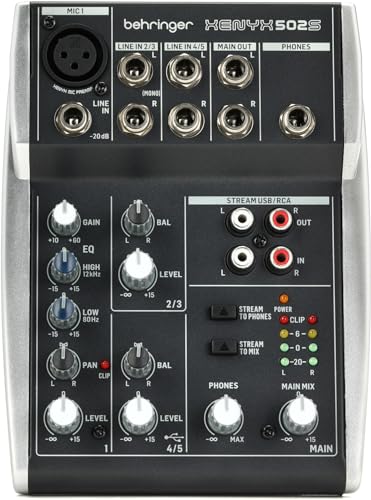
The 502S is the streaming starter: five inputs, one XENYX microphone preamp and a USB streaming interface in the smallest footprint of the USB-equipped picks. It suits a solo streamer, podcaster or online teacher whose setup is one good microphone plus computer audio.
Strengths
- USB streaming at the lowest step of the USB-equipped tier
- XENYX preamp handles one microphone properly
- Compact enough for a permanent desk setup
Trade-offs
- One microphone input — guests need another solution
- Stereo USB send only, not multitrack
- Limited EQ and routing compared with the 802S
| Inputs | 5 (analog) |
| Connection | USB streaming interface |
| Type | Analog mixer |
Most solo creators need exactly one thing from a mixer: their microphone, gained cleanly, with computer audio blended in and the mix sent back to the stream. The 502S is purpose-built for that triangle and charges you for nothing beyond it. The XENYX preamp is the same family as the bigger boards, so the voice quality does not feel like a compromise tier. Its limits are equally clear — a second microphone has nowhere proper to go — so treat it as the right-sized tool for a one-person show, not a down-payment on a panel programme.
The 502S makes a sensible first purchase precisely because its ceiling is clear: the day a co-host arrives, you will know exactly why you are upgrading, and the 502S will still serve as a travel or backup interface. Until that day, it does the solo job with the same preamp family as boards twice its ambition. Streamers should pair it with a decent dynamic microphone and spend the savings on acoustic treatment — the room, not the mixer, is the next bottleneck at this level.
Owners also find that the Behringer XENYX 502S Premium Analog 5-Input Mixer with USB teaches its own replacement criteria: the day you consistently need one more microphone input, one more monitor send or a cleaner print of a quiet source, you will know precisely which tier to buy next and why. Equipment that educates its owner that clearly has done more than its job, whatever its price class.
Best for: Solo streamers, podcasters and online teachers with one microphone / Not suited for: Two-host shows or any multi-microphone recording. Check on Amazon to check the current price on Amazon.

Pyle PMXU63BT 6-Channel Audio Mixer with Bluetooth — Best Bluetooth Features
Pyle’s PMXU63BT packs the longest convenience list in this guide into the tier: six channels, Bluetooth streaming, a USB computer input, a built-in MP3 player, phantom power for condenser microphones and 16-bit DSP effects, positioned by Pyle for band and studio use. It suits entertainers and karaoke or small-event hosts who play backing tracks as much as they mix microphones.
Strengths
- Bluetooth and MP3 playback built in — backing tracks need no extra gear
- 48V phantom power supports condenser microphones
- DSP effects add reverb for singers without extra boxes
Trade-offs
- Preamp refinement trails the Behringer and Mackie picks
- Feature density means a busier, less elegant panel
- Brand support network is thinner than Mackie or Yamaha
| Channels | 6 |
| Connection | Bluetooth, USB computer input, built-in MP3 player |
| Features | 48V phantom power, 3-band EQ, 16-bit DSP effects |
Judge the Pyle by the jobs it is built for and it makes sense: a singer-host at a small event needs tracks, a microphone with a touch of reverb, and everything in one box that pairs with a phone. The PMXU63BT does all of that without a laptop or a separate player. Where it concedes ground is sonic polish — the preamps and EQ are workmanlike rather than refined — and panel elegance. For entertainment-first use, where convenience is the product, that is a fair trade and a popular one.
For the PMXU63BT, think of Bluetooth as a stage feature, not a convenience: the host who can start a backing track from across the room, phone in hand, runs a smoother event than the one tethered to a cable. Phantom power similarly future-proofs the act — a condenser microphone for announcements or a singer is a plug-in away. The Pyle’s compromises are in refinement, not capability, and for entertainment work capability is what the audience hears.
Long-term, the Pyle PMXU63BT 6-Channel Audio Mixer with Bluetooth asks for the standard courtesies of analog equipment: faders and knobs exercised occasionally so they stay clean, dust kept out of the channel strips, and transport in a bag or case rather than loose in a boot. None of this is burdensome, and the reward is a board that sounds at year five exactly as it did at month one — analog mixers, treated kindly, are among the longest-lived tools in music.
Best for: Karaoke hosts, small-event entertainers and backing-track performers / Not suited for: Recording-focused users who prioritise preamp quality above features. Check on Amazon to check the current price on Amazon.

Pyle PAD43MXUBT 4-Channel DJ Audio Mixer — Best Budget Connectivity
The PAD43MXUBT is the connectivity bargain: four channels with two proper combo XLR inputs, Bluetooth, a USB audio interface, plus 3.5mm and RCA aux inputs for phones and legacy players — the widest socket collection in this guide at its lowest tier step. It suits DJs, mobile entertainers and beginners whose sources are all different shapes.
Strengths
- Combo XLR/6.35mm inputs accept mics, guitars and line sources alike
- Bluetooth, USB, RCA and 3.5mm — every source connects somehow
- Headphone jack for cueing and monitoring
Trade-offs
- Four channels is the ceiling — plan the act around it
- Build and preamps are budget-grade
- Not the choice for critical recording
| Channels | 4 |
| Connection | Bluetooth, USB audio interface, 3.5mm and RCA aux inputs |
| Inputs | 2 combo XLR/6.35mm mic/line/guitar inputs, headphone jack |
Every beginner owns a drawer of mismatched sources: a phone, an old media player, a guitar, a microphone with the wrong plug. The PAD43MXUBT is the mixer that says yes to all of them, and the combo inputs mean the two main channels take professional microphones properly too. As a first DJ or mobile-entertainment mixer it removes friction everywhere except ultimate sound refinement. Bands and recording users should step up to the Behringer or Mackie picks; entertainers juggling sources will find this the most accommodating board in the tier.
The PAD43MXUBT’s combo inputs deserve emphasis because they are rare at this step of the tier: a socket that accepts an XLR microphone, a guitar jack or a line source is professional thinking, and it means the beginner’s first real microphone works from day one. Add the RCA input that rescues older media players and the 3.5mm that takes any phone, and this is the mixer least likely to say no to anything in a starter’s kit bag. Its ceiling is channels and refinement, and it states both honestly.
Owners also find that the Pyle PAD43MXUBT 4-Channel DJ Audio Mixer teaches its own replacement criteria: the day you consistently need one more microphone input, one more monitor send or a cleaner print of a quiet source, you will know precisely which tier to buy next and why. Equipment that educates its owner that clearly has done more than its job, whatever its price class.
Best for: DJs, mobile entertainers and beginners with mixed sources / Not suited for: Bands or recordists needing more channels or finer preamps. Check on Amazon to check the current price on Amazon.
Comparison Table
| Pick | Badge | Key spec | Best for |
|---|---|---|---|
| Behringer XENYX 802S Premium Analog 8-Input Mixer with USB | Best Overall | USB streaming interface | Podcasters, streamers and home musicians wanting one box that mixes and records |
| Mackie Mix8 8-Channel Compact Mixer | Best Build Quality | Analog compact mixer | Rehearsal spaces, small live rigs and submixing duties |
| Mackie Mix5 5-Channel Compact Mixer | Best Ultra-Compact | Analog compact mixer | Solo performers, presenters and one-mic-plus-music setups |
| Behringer XENYX 502S Premium Analog 5-Input Mixer with USB | Best for Solo Streaming | USB streaming interface | Solo streamers, podcasters and online teachers with one microphone |
| Pyle PMXU63BT 6-Channel Audio Mixer with Bluetooth | Best Bluetooth Features | Bluetooth, USB computer input, built-in MP3 player | Karaoke hosts, small-event entertainers and backing-track performers |
| Pyle PAD43MXUBT 4-Channel DJ Audio Mixer | Best Budget Connectivity | Bluetooth, USB audio interface, 3.5mm and RCA aux inputs | DJs, mobile entertainers and beginners with mixed sources |
How to Choose an Audio Mixer: Count Microphones, Not Channels
The first discipline of mixer shopping is translating headline channels into microphone inputs. A mixer advertised as 8-channel may offer two XLR microphone preamps and three stereo line inputs — perfect for a podcaster with playback sources, useless for a four-vocal band. Find the XLR count in the listing and plan around it: every singer, miked instrument and drum overhead consumes one.
Next, decide the destination. If the mix goes to a computer for streaming or recording, a built-in USB interface removes a whole device from the desk. If it goes to speakers, the USB may never be used and the money is better spent on preamps and build. Neither choice is wrong; buying for a destination you do not have is.
Preamps, Phantom Power and EQ: The Sound-Shaping Core
The microphone preamp decides how clean your quietest source sounds. Named preamp families in this guide — XENYX, Onyx, D-PRE — exist because gain without hiss is genuinely hard at budget prices. If you use condenser microphones, confirm 48V phantom power is present; dynamic microphones do not need it, but the day a condenser arrives you will.
EQ is the second core tool. Three-band EQ with a sweepable or well-chosen midrange can rescue a boxy room or a nasal voice; simple bass/treble shelves cannot. For voices, the midrange is where intelligibility lives, so treat mid control as a near-requirement for speech and singing alike.
Effects, Monitoring and the Headphone Test
Built-in effects in this class are shared: one processor, sent to from each channel. For live vocals a usable reverb matters; for podcasting, effects are usually added later in software and a dry, clean recording is worth more. Decide which world you live in before paying for the other’s features.
Monitoring deserves equal weight. You need to hear the mix as the audience or the recording hears it, on headphones, without the main speakers — every pick here supports headphone monitoring, but check the routing suits you: streamers often need to hear themselves with zero latency, which analog mixers provide naturally.
Budget Tiers and When to Step Up
Within a budget tier, the money buys preamp quality, channel count and build — in that order of audibility. Step up a tier when you run out of microphone inputs, when preamp hiss appears in quiet recordings, or when the board’s physical survival is in doubt from weekly transport. Do not step up for features you cannot name a use for; a mixer that fits the act beats a mixer that impresses the catalogue.
How to Set Up an Audio Mixer for the First Time
Connect in the right order
With everything powered off, connect microphones and instruments to the inputs, the main outputs to speakers or your computer, and headphones to the phones output. Power up the mixer first and speakers last to avoid thumps.
Set gains before faders
Bring channel faders to unity, then raise each channel’s gain while the source performs at its loudest until the level meter peaks healthily without clipping. Gain structure set here decides the noise floor of everything downstream.
EQ after gain
With gain set, use EQ sparingly: cut the frequencies that offend before boosting the ones that flatter. For voices, a gentle low cut removes rumble and handling noise immediately.
Add effects by send
Raise the effects send on vocal channels a little at a time until the reverb is felt rather than heard as an echo. Effects are seasoning; the dry voice stays in charge.
Balance the mix
Bring faders up one source at a time, loudest foundation first, and check the result on headphones and speakers. Save or photograph the settings once it sounds right — your future self at the next gig will be grateful.
Record a test
If your mixer has USB, record thirty seconds and listen back critically for hiss, hum and clipping. Fixing a ground-loop hum now — by moving a power supply or cable — beats discovering it in a published episode.
Common Buying Mistakes
Counting channels instead of microphone inputs
The classic first-mixer mistake. Count XLR preamps; that is your real microphone capacity.
Buying USB multitrack expectations from a stereo mixer
Most small mixers send a stereo mix to the computer, not separate tracks. If you need per-channel recording, you need an interface-class device.
Setting faders first and gain wherever
Bad gain structure means hiss or distortion no fader can fix. Gain first, always.
Drowning vocals in effects
Shared reverb is easy to overdo. If the audience can hear the effect as an effect, it is probably too much.
Ignoring phantom power until a condenser arrives
Check for 48V before you need it; adding it later means a new mixer or extra boxes.
Skipping the headphone check
Mixing only on room speakers hides hum, hiss and imbalance that headphones expose instantly.
A Last Word on Expectations at This Tier
Set the expectation correctly and this tier delights: a mixer under a hundred dollars today does what a small professional board did a generation ago, minus the metalwork budget and the service contract. It will not be silent enough for a broadcast studio, it will not record a band one channel at a time, and its knobs will never feel like a console’s. Within its brief — a voice made clean, a few sources blended, a stream or a small room served — the picks here are not compromises but instruments, chosen by working creators and musicians in large numbers for exactly those jobs.
Buy the one matched to your destination, learn its gain structure in the first week, and spend the money you saved on the microphone and the room. That allocation, repeated by generations of engineers before you, is the real best-buy advice in this entire guide.
Troubleshooting the Three Noises Every Small Mixer Makes
Hiss is a gain-structure confession: somewhere a stage is set too low and a later stage is compensating. Find it by muting channels one at a time until the hiss localises, then raise that channel’s preamp gain and lower its fader until the balance returns without the noise. If the hiss survives with every channel muted, it lives in the output stage or the monitoring chain — swap the headphone or speaker feed before blaming the board.
Hum is almost always a connection story: an unbalanced cable run beside a power supply, two devices powered from distant sockets forming a ground loop, or a guitar with single-coil pickups sitting near a transformer. Shorten and balance the signal cables first, power the whole chain from one strip second, and only then suspect the mixer itself — in practice, it is almost never the mixer itself.
Crackle is mechanical: a dirty fader, a worn jack, a cable whose conductor is letting go strand by strand. Exercise the suspect control through its travel a dozen times, substitute cables one at a time, and note which channel misbehaves. These three noises account for nearly every small-mixer complaint ever filed, and all three are diagnosable in ten minutes with the method above — before any purchase, return or repair is contemplated.
Setting a Budget for the Whole Signal Chain
The under-$100 mixer should never consume the whole audio budget, because the chain around it decides what listeners hear. A sensible split for a starter streaming or music setup gives the microphone the largest share after the mixer, keeps a real allowance for balanced cables and a closed-back headphone pair, and holds a small reserve for the stand, clip or shock mount that keeps handling noise out of the recording. Buyers who spend everything on the board and record through a free headset have optimised the wrong link.
The good news is that this tier’s picks are chosen to be chain-friendly: standard XLR and jack connections everywhere, no proprietary cables, power supplies in the box. Nothing here traps you in an ecosystem, and every accessory you buy for these boards — cables, headphones, microphones — transfers intact to the under-$500 tier when the work outgrows this one. That transferability is the hidden value of buying recognised formats at recognised brands, and it is priced into this guide’s ranking even when it never appears on a spec sheet.
Plan the chain, buy the board that fits your destination, and keep the reserve for the accessory you discover you need in week two. There always is one, and it is always a cable.
Your First Mixer and the Upgrade Path It Starts
A first mixer is also a first lesson in what you actually do with audio. Streamers discover within a month whether a co-host is coming — the 502S’s single preamp answers that question by force — and musicians discover whether they record or only amplify. The under-$100 tier’s real function in a creative life is to make those discoveries cheaply, with equipment good enough that the discoveries are about you, not about the gear’s failures.
The upgrade path from here is well signposted: more preamps and routing lead to the under-$500 boards in our companion guide; multitrack ambitions lead away from mixers entirely, toward interfaces and digital recorders; live ambitions lead toward the band shortlist. None of the picks here blocks those paths — the Mackies become submixers and backups, the Behringers become travel interfaces — which is the mark of a tier bought well.
Buy the mixer for the show you are making this season, learn gain structure on it until the lessons are reflexes, and let the work itself tell you what the next tier needs to be. That is how every engineer you admire started, usually with a board very much like these.
Cables, Microphones and the Rest of the Budget
A mixer is the centre of a system, and the system fails at its cheapest cable. Budget for balanced XLR cables for microphones — balanced connections are what reject the hum and interference that plague home studios — and keep cable runs as short as the room allows. A mixer upgrade spent on cables first is a cliché because it keeps being true.
Microphone choice interacts with the mixer more than with any recorder: a low-output dynamic microphone needs the clean gain that separates the named preamps in this guide from anonymous ones, while a sensitive condenser needs phantom power and less gain. Buy the mixer and microphone as a pair on paper before buying either in fact, checking output, required gain and power against each other.
Finally, headphones are part of the mixer purchase in practice: you cannot judge gain, EQ or effects without hearing them honestly. A closed-back pair that isolates the room lets you monitor at low level without the speakers colouring your decisions — the cheapest accuracy upgrade in the whole chain.
One Mixer, Two Disciplines: Live Sound and Recording
A mixer used live and a mixer used for recording look identical and are operated almost oppositely. Live, you mix for a room that changes as it fills, you ride faders constantly, and effects are part of the performance. Recording, you mix for a fixed listener, you print as clean a signal as possible, and effects are usually deferred to software where they can be undone.
The boards in this guide straddle both worlds deliberately: analog immediacy for the room, a USB stereo send for the record. The discipline is to know which world you are in on a given night. Bands that record their live mix should accept the compromise knowingly — the mix that flatters a room rarely flatters headphones — and engineers who do both keep two sets of notes, one per discipline.
Whichever world dominates your use, buy for that one. The recurring theme of this guide — destination first, features second — is simply this section compressed into a sentence.
Three Buyers, Three Different Right Answers
The new streamer has one dynamic microphone, a gaming PC and a desk that is also a dining table. Their right answer is the 502S or 802S: USB streaming, a proper preamp, and nothing to learn beyond gain. Every pound of the tier spent elsewhere — on channels they will never patch — is wasted for this buyer.
The acoustic duo plays café corners with two microphones and a guitar. They need the Mix8’s build and a second real preamp, they do not need USB, and their right answer looks nothing like the streamer’s. The third buyer, the karaoke host, needs tracks more than purity: Bluetooth, an MP3 player and a reverb for singers make the Pyle PMXU63BT the correct tool. One tier, three professions, three winners — which is why this guide refuses a single overall verdict beyond its ranked default.
Gain Structure: The Skill That Makes Any of These Mixers Sound Good
Every mixer in this guide can sound clean or dreadful depending on one discipline: gain structure. Each stage — microphone preamp, channel, bus, output, recorder — has a range where it is quiet and undistorted. Set each stage to work in the middle of that range and the whole chain stays clean; push one stage into distortion to compensate for another set too low and no downstream adjustment can repair it.
The practical routine is simple. Set the loudest source first, raise its preamp gain until the meter peaks healthily on the loudest passage, then leave the gain alone and mix with faders. Quiet sources get more gain; loud sources get less; the faders end up in a similar row, which is how you know the structure is right. Hiss means a gain somewhere is too low and a fader too high; distortion means the reverse.
This is also why named preamps matter at budget prices: they forgive imperfect gain structure with more clean headroom. But no preamp forgives everything, and the ten minutes spent learning gain staging will improve your sound more than the next tier of equipment would.
Final Recommendation
The full shortlist, for convenience: Behringer XENYX 802S Premium Analog 8-Input Mixer with USB, Mackie Mix8 8-Channel Compact Mixer, Mackie Mix5 5-Channel Compact Mixer, Behringer XENYX 502S Premium Analog 5-Input Mixer with USB, Pyle PMXU63BT 6-Channel Audio Mixer with Bluetooth, Pyle PAD43MXUBT 4-Channel DJ Audio Mixer. Each link lands on the exact model verified for this guide; check the current price on Amazon there before you decide.
For most readers, the Behringer XENYX 802S is the under-$100 answer: it mixes, it streams, and its preamps do not embarrass a good microphone. Solo creators can save a step with the 502S; live users should take a Mackie — the Mix8 for versatility, the Mix5 for size; entertainers juggling tracks and sources should take a Pyle.
If your needs outgrow this tier — more microphones, multitrack ambitions, band duty — step up deliberately with our guides to Best Audio Mixers Under $500 and Best Band Mixers, and compare the value angle in Best Bang For Your Buck Audio Mixers.
Frequently Asked Questions
Can a mixer under $100 sound good?
Yes, within honest limits. The named preamps in this guide — XENYX and Mackie’s — deliver clean gain for typical microphones, and the noise floor is fine for streaming, podcasting and small live work. What the tier does not buy is the last degree of silence and headroom that studio recording demands.
Do these mixers record to a computer?
The Behringer S-series and Pyle models here include USB connections that send the stereo mix to a computer for streaming or recording. The Mackie Mix models are analog-only — they mix to speakers or a separate interface. None of the mixers in this tier record each channel separately.
How many microphones can I actually connect?
Count the XLR inputs, not the headline channels. In this guide that ranges from one (502S) through two (Mix5 class and the Pyle PAD43MXUBT’s combo inputs) to the fuller complement of the 802S. Line inputs are for keyboards, players and instruments at line level — not microphones without a preamp.
Do I need phantom power?
Only for condenser microphones. If you own or plan a condenser, confirm 48V phantom power — the Pyle PMXU63BT advertises it explicitly. Dynamic microphones, including most stage and podcast dynamics, do not need it.
Mixer or audio interface — which should a streamer buy?
If you have one microphone and never mix live sources, an interface alone is simpler. A mixer earns its place when you blend several sources — microphone, game audio, music, a guest — with hands-on control and zero-latency monitoring, which is exactly the streaming scenario these picks serve.
Why do some mixers here have effects and others not?
Effects serve live singers; recording workflows usually add effects later in software. The Pyle boards include DSP effects for the entertainment use case; the Mackies omit them for purity and price. Choose by where the mix is heard — a room, or a recording.


