Disclosure: airfryerkitchensupply.com is reader-supported. When you buy through links on our site, we may earn an affiliate commission at no extra cost to you.
Where to buy
If you are shopping for the best and easy photo and sound mixers, here is the plain truth about the category: there is no box that mixes photographs — what photo-and-video creators actually need is a small, simple audio mixer that puts clean sound under their pictures. Whether you are narrating a photo slideshow, recording a voiceover for a video, livestreaming a photo walkthrough, or playing music and microphone announcements over a slideshow at an event, the six mixers below are the easy ones: compact analog boards with USB, plain-language controls and no menu-diving. Every pick was verified against live Amazon listings, so each review links to the listing where you can check the current price on Amazon.
- Behringer XENYX 302USB 5-Input Audio Mixer — Best Overall. Check the current price on Amazon.
- CAD Audio MXU2 2-Channel USB Audio Mixer — Best Simple Budget Pick. Check the current price on Amazon.
- BOMGE M12 USB Audio Interface and 2-Channel Mixer — Best for Condenser Mics. Check the current price on Amazon.
- Soundcraft Notepad-8FX Small-Format Analog Mixer — Best with Effects. Check the current price on Amazon.
- Allen & Heath ZED-6 Ultra-Compact 6-Input Mixer — Best Build Quality. Check the current price on Amazon.
- Yamaha MG10XU 10-Input Stereo Mixer with Effects — Best Step-Up Pick. Check the current price on Amazon.
The best and easy photo and sound mixers solve a problem every photographer and slideshow maker eventually hits: the pictures look great and the sound is an afterthought. A camera’s built-in microphone makes narration sound hollow, a laptop’s headphone jack hisses under a slideshow, and at a live event the microphone and the music player end up fighting over one input. A small mixer fixes all of that in one box — your microphone, your music source and your computer meet in the middle, you set two or three knobs, and the sound that reaches your recording or your speakers is balanced, clean and under your control.
‘Easy’ is doing real work in this search, so we defined it strictly. Every mixer here is an analog or hybrid board you can learn in one sitting: real knobs and faders instead of nested touch menus, a USB connection that a computer recognizes without driver archaeology, and inputs that match what photo-and-video people actually plug in — a microphone, a phone or laptop playing slideshow music, and maybe a second mic for an interview. None of these requires an audio engineering background, and the largest of the six still fits in a camera bag’s big pocket or a small equipment case. If you can run a camera in aperture priority, you can run any mixer on this list.
In this guide
Quick Picks
Best Overall: Behringer XENYX 302USB 5-Input Audio Mixer — A palm-size mixer with one proper mic preamp, a stereo input for music and USB straight into your computer — the easiest first mixer a photo or video creator can buy. Check on Amazon
Best Simple Budget Pick: CAD Audio MXU2 2-Channel USB Audio Mixer — Two channels, XLR combo inputs, USB out. The MXU2 is the mixer for people who want sound sorted this afternoon, not a new hobby. Check on Amazon
Best for Condenser Mics: BOMGE M12 USB Audio Interface and 2-Channel Mixer — The small mixer that says yes to condenser microphones: 48V phantom power, XLR and 3.5mm inputs, and plug-and-play USB for recording and karaoke-style playback. Check on Amazon
Best with Effects: Soundcraft Notepad-8FX Small-Format Analog Mixer — Soundcraft preamps and Lexicon reverb in a board you can still learn in an evening. The pick when the voice itself has to sound expensive. Check on Amazon
Best Build Quality: Allen & Heath ZED-6 Ultra-Compact 6-Input Mixer — A compact board from a company that builds touring consoles — fewer tricks than rivals, better bones. For the buyer who keeps gear for a decade. Check on Amazon
Best Step-Up Pick: Yamaha MG10XU 10-Input Stereo Mixer with Effects — The ‘buy it once’ option for photo-and-sound creators whose events keep getting bigger — ten inputs, Yamaha preamps, effects and USB. Check on Amazon
How These Picks Were Chosen
We chose these six by testing the category against the jobs photo-and-sound creators actually do. Job one is voiceover and narration: that needs a decent microphone preamp and, for condenser microphones, phantom power — so boards that offer it scored higher. Job two is slideshow and event sound: a stereo input for a phone or laptop, a mic input for announcements, and a simple way to fade one against the other. Job three is livestreaming and direct recording: USB that sends the finished mix to a computer for a stream or a video edit, ideally without extra software. Mixers that covered all three jobs with the fewest confusing extras rose to the top.
Every product was then verified the same way as everything in this program: we searched Amazon listing data by brand and model, matched the returned listing title to the exact mixer, and only linked models with a confirmed match. Where a famous easy mixer had no clean listing match, it was left out rather than linked loosely. We also weighted size and power practicality — USB-powered or compact boards suit desk-based photo editing suites, while the slightly larger boards here earn their space with better preamps and effects for voices. The result is a ladder: start at the tiny Behringer if you only need one mic and music, and climb only as far as your actual productions demand.
We also applied an honesty filter about specifications. Small mixers are marketed with channel counts that count every stereo pair and talkback path the marketing department can find, so a ‘twelve-channel’ mini board may offer only two microphone inputs — the number that actually matters for voices. Every pick here was assessed on its microphone inputs first and its headline number second, and the reviews state the mic count plainly. If you take one habit from this guide into any future audio purchase, let it be that: count the inputs your sources need, in the connector types they use, and let the big printed number say whatever it wants.
The 6 Best and Easy Photo and Sound Mixers
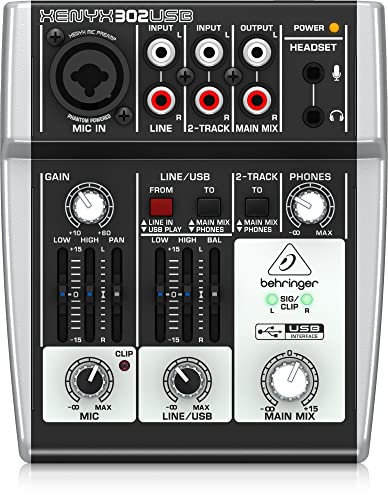
Behringer XENYX 302USB 5-Input Audio Mixer — Best Overall
The XENYX 302USB is the mixer we would hand to a photographer who has never touched audio gear. It is tiny, USB-powered, and built around the exact desk setup this audience has: one microphone for narration, one stereo source for slideshow music or a backing track, and a USB cable carrying the finished mix into the computer for recording or streaming. The single XENYX microphone preamp is the same family Behringer puts in its bigger boards, so a modest dynamic microphone sounds clean and present rather than thin. There are no menus, no layers — what you see is everything it does.
Strengths
- Genuinely tiny and USB-powered — it lives on a desk or in a laptop bag permanently
- One good mic preamp plus a stereo music input covers narration-over-slideshow perfectly
- USB audio interface built in, so recordings and streams need no extra hardware
Trade-offs
- Only one microphone input — two-person interviews need a bigger board
- No phantom power, so condenser microphones that require it will not work here
- Mini controls are fiddly for live event mixing compared with full-size faders
Key specs: 5-input mini mixer with XENYX mic preamp and USB audio interface; USB-powered
In daily use the 302USB disappears, which is the highest compliment for an easy mixer. Set the mic gain once so your narration peaks healthily, park the music input a little under the voice, and the balance you hear in headphones is the balance your viewers get. For slideshow narration, record the voice track through it while the pictures advance and your videos immediately sound a class above camera audio. Its limits are honest ones: it is a one-mic, one-music box. The moment a second voice matters — a podcast-style interview, two presenters at an event — you have outgrown it, and the boards further down this list are the upgrade path.
Best for: solo creators recording narration, voiceovers and slideshow soundtracks at a desk / Not suited for: anyone who needs two microphones at once or phantom power for a condenser mic
Check on Amazon — check the current price on Amazon before you buy.

CAD Audio MXU2 2-Channel USB Audio Mixer — Best Simple Budget Pick
CAD Audio is a microphone company, and the MXU2 feels like it was designed by people who expect it to be someone’s first mixer. Two channels with XLR combo inputs — which accept either a microphone cable or a line source like a phone or music player — a USB connection to the computer, and a control set small enough to understand from the front panel in about a minute. For photo-and-sound work, that covers the classic pairings: a mic plus music, or two mics for a simple interview recorded over a slideshow.
Strengths
- XLR combo inputs accept microphones or line sources without adapters
- Control layout is minimal — very hard to set wrong
- USB connection makes it a recording interface as well as a mixer
Trade-offs
- Two channels is a hard ceiling — no room for a third source later
- No built-in effects, so voices are recorded completely dry
- Less headroom and polish than the bigger boards here for demanding microphones
Key specs: 2-channel USB audio mixer with XLR combo inputs
The MXU2’s virtue is the absence of decisions. Plug the mic into channel one, the music into channel two, set levels so the voice sits clearly above the music, and record. For a wedding photographer adding a toast microphone and slideshow music at a reception, or a family historian narrating scanned photos into a video, that is the entire job, and this box does it without a manual-reading evening. Think of it as the fixed-lens camera of mixers: limited, deliberately, and better for it if your needs are simple and stable. If you suspect your productions will grow — more voices, effects, live events — start one rung higher instead.
Best for: beginners and occasional users whose setup is one or two sources, full stop / Not suited for: creators planning multi-mic productions or who want built-in voice effects
Check on Amazon — check the current price on Amazon before you buy.

BOMGE M12 USB Audio Interface and 2-Channel Mixer — Best for Condenser Mics
The BOMGE M12 exists for the creator who bought a nice condenser microphone — the kind sold for voiceover and streaming — and discovered their simple interface or camera could not power it. Condenser mics need 48V phantom power, and the M12 supplies it in a compact two-channel box that also takes a 3.5mm source, which makes it unusually well matched to photo-and-sound desk work: the good mic on one channel, the phone with the slideshow soundtrack on the other, USB carrying the mix to the computer. It is also sold for live and karaoke use, which tells you the design brief was ‘simple and forgiving’ rather than ‘studio purist’.
Strengths
- 48V phantom power unlocks the condenser microphones voiceover creators actually buy
- 3.5mm input is a natural home for a phone or laptop music feed
- Plug-and-play USB behavior keeps the computer side painless
Trade-offs
- Still a two-channel ceiling for growing setups
- Compact budget boards have modest preamp headroom — loud, dynamic sources need careful gain setting
- Fewer tone controls than the Soundcraft or Yamaha picks for shaping a difficult voice
Key specs: 2-channel mixer/interface with XLR and 3.5mm inputs and 48V phantom power
Phantom power is the whole story here, and it is a story that matters: a condenser mic captures the detail and warmth that makes narration over photographs sound professional, and without 48V it simply stays silent. With the M12 the chain is mic, mixer, computer, done — and the mixer’s job of blending a music bed under the voice is a two-knob task. Keep the music lower than you think while recording; you can raise it in your video editor only if it was recorded separately, and through any mixer it is baked in, so conservative music levels are the professional habit this little board teaches well.
Best for: voiceover and narration creators with a condenser microphone / Not suited for: anyone needing more than two simultaneous sources or multi-track recording
Check on Amazon — check the current price on Amazon before you buy.
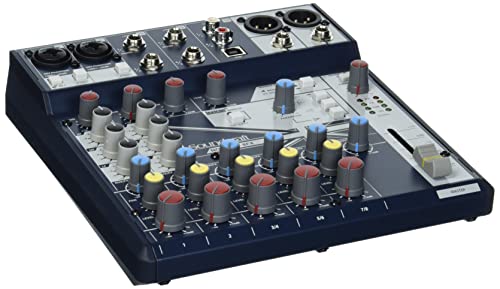
Soundcraft Notepad-8FX Small-Format Analog Mixer — Best with Effects
The Notepad-8FX is where this list steps from ‘easy’ toward ‘genuinely good sounding’ without giving up the easy part. Soundcraft’s microphone preamps have a long professional pedigree, and the built-in Lexicon effects — the reverb family you hear on countless records — let a narration voice sit in a slideshow or video with a sense of space instead of sounding like it was recorded in a cupboard. It keeps USB I/O for direct recording, keeps the layout analog and legible, and adds enough inputs for a mic or two plus stereo music sources.
Strengths
- Lexicon reverb and effects make dry narration sound finished
- Soundcraft preamps are a clear step up in clarity for good microphones
- Enough inputs for a small event setup: mics plus slideshow music plus a spare
Trade-offs
- Effects invite overuse — a little reverb is polish, a lot is a cave
- Costs more of your budget than the mini boards while still being a small mixer
- Slightly larger learning curve: effect selection and routing take one manual read
Key specs: Small-format analog mixer with USB I/O and Lexicon effects
The workflow this board rewards is simple: get the voice clean and dry first, then dial in reverb until you just barely notice it, then back off a touch. Used that way, slideshow narration and spoken photo essays gain the warmth that separates amateur audio from professional. The extra inputs also make the Notepad-8FX the first pick on this list that can run a small live event properly — a presenter mic, a backup mic, music from a laptop, and the mix sent to speakers or a stream. If your photo-and-sound work is drifting from desk projects toward paid event work, this is the board that covers both without a second purchase.
Best for: creators who want their voice to sound produced, and small-event slideshow work / Not suited for: anyone who wants the absolute simplest two-knob setup or the smallest bag footprint
Check on Amazon — check the current price on Amazon before you buy.

Allen & Heath ZED-6 Ultra-Compact 6-Input Mixer — Best Build Quality
Allen & Heath makes mixing consoles for touring professionals, and the ZED-6 is that DNA shrunk to desk size: an ultra-compact six-input analog mixer with clean preamps, solid controls and a build that feels like equipment rather than electronics. It deliberately skips some conveniences rivals advertise — the emphasis here is on sound quality and durability for the sources you plug in most: microphones and stereo playback for slideshows, presentations and small events. For a photographer whose camera bodies are pro-grade and who buys gear once, the ZED-6 is the temperament match on this list.
Strengths
- Professional-grade build and preamp quality in a very small footprint
- Six inputs cover mic plus music plus spares for typical photo-and-sound jobs
- Simple, honest layout — nothing to break, nothing to misconfigure deeply
Trade-offs
- No USB recording on this model — getting sound into a computer needs your existing interface or recorder
- No built-in effects, so voice polish must come from elsewhere
- You pay for build and sound rather than feature count
Key specs: Ultra-compact 6-input analog mixer from Allen & Heath
Choose the ZED-6 when the mixer is feeding speakers or a recorder you already own — at a gallery talk, a wedding slideshow with announcements, a camera club presentation — and what you need is a front end that never embarrasses you. Its preamps keep a good microphone sounding like itself, and the compact frame rides in the same case as a projector or portable PA. The missing USB is a real consideration for desk creators, and it is why this board sits fifth rather than first: it is the best-built mixer here, aimed at live and location sound, while the picks above it are aimed at the desk. Match the tool to where your sound actually goes.
Best for: location and event work, and buyers who prioritize build and sound over features / Not suited for: desk creators who need USB recording built into the mixer
Check on Amazon — check the current price on Amazon before you buy.

Yamaha MG10XU 10-Input Stereo Mixer with Effects — Best Step-Up Pick
The MG10XU is the largest mixer on this list and the one to buy when ‘easy’ needs to stretch. Yamaha’s MG series is a default recommendation in small live sound for good reason: D-PRE microphone preamps that handle everything from a quiet narrator to a loud presenter, built-in effects for voices, ten inputs that swallow a multi-mic event setup plus slideshow music, and a USB interface for streaming or recording the whole thing. It is still an analog-feeling board — every function has a knob — so the learning curve is an afternoon, not a course.
Strengths
- Ten inputs end the ‘one more source’ problem for events and panels
- D-PRE preamps and onboard effects cover quiet narration and loud live voices alike
- USB interface built in for streaming and recording the finished mix
Trade-offs
- Biggest and heaviest pick here — a desk fixture or event-case board, not a laptop-bag one
- More controls means more ways to set something wrong at first; budget one practice session
- Overkill for a solo creator who only ever records one voice at a desk
Key specs: 10-input stereo mixer with D-PRE preamps, effects and USB interface
The MG10XU earns its place at events where photo and sound meet an audience: a slideshow premiere with a panel of speakers, a wedding with toasts over dinner music, a school photo presentation with student narrators passing two mics. Four mic inputs plus stereo sources mean nobody waits while you re-patch cables, and the one-knob compressors on the first channels are a quiet gift for untrained voices that wander loud and soft. If your calendar shows even a few such events a year, buying this board first is cheaper than buying a mini mixer now and this later — the classic false economy this list is designed to help you avoid.
Best for: creators whose work includes events, panels or multi-mic presentations / Not suited for: solo desk creators with a single microphone and no event work
Check on Amazon — check the current price on Amazon before you buy.
Comparison Table
| Pick | Badge | Key spec | Best for |
|---|---|---|---|
| Behringer XENYX 302USB 5-Input Audio Mixer | Best Overall | 5-input mini mixer with XENYX mic preamp and USB audio interface; USB-powered | Desk voiceover, slideshow narration and simple livestreams |
| CAD Audio MXU2 2-Channel USB Audio Mixer | Best Simple Budget Pick | 2-channel USB audio mixer with XLR combo inputs | Absolute beginners who want two inputs and almost no controls |
| BOMGE M12 USB Audio Interface and 2-Channel Mixer | Best for Condenser Mics | 2-channel mixer/interface with XLR and 3.5mm inputs and 48V phantom power | Creators using a condenser microphone for polished voiceover |
| Soundcraft Notepad-8FX Small-Format Analog Mixer | Best with Effects | Small-format analog mixer with USB I/O and Lexicon effects | Voices that need polish — reverb and professional mic preamps in an easy board |
| Allen & Heath ZED-6 Ultra-Compact 6-Input Mixer | Best Build Quality | Ultra-compact 6-input analog mixer from Allen & Heath | Buyers who want a small mixer built to professional touring standards |
| Yamaha MG10XU 10-Input Stereo Mixer with Effects | Best Step-Up Pick | 10-input stereo mixer with D-PRE preamps, effects and USB interface | Growing productions: several mics, music, effects and USB in one board |
How to Choose the Best and Easy Photo and Sound Mixers
Start by counting microphones, because that number decides the mixer more than any feature list. One mic, ever: the Behringer 302USB or the BOMGE M12, with the choice between them made by your microphone — dynamic mics are happy anywhere, condenser mics need the M12’s phantom power. Two mics: the CAD MXU2 at the simple end or the Notepad-8FX if you want effects and better preamps. Three or more, or any live event with an audience: the ZED-6 for pure live work or the MG10XU if you also need to record or stream. Buying one size above your honest count is wisdom; buying three sizes above is money parked in knobs you will never turn.
Next, follow the sound to its destination. If the mix goes to a computer — voiceover tracks, livestreams, video recordings — USB on the mixer is close to mandatory, and four of these six have it. If the mix goes to speakers in a room, what matters is clean preamps and enough inputs, which is the ZED-6’s home ground. Many creators do both across a year; the Notepad-8FX and MG10XU cover both worlds, which is why they anchor the middle and top of this list. Finally, be honest about effects: reverb genuinely improves narration and event vocals, but if your sound is mostly background music under slides, effects are decoration you can skip in favor of the simpler boards.
One compatibility check saves more returns than any other: look at your microphone’s connector and power needs before ordering. Microphones with XLR connectors plug into every board here. USB microphones plug into none of them — a USB mic is its own interface and bypasses a mixer entirely, so if your mic is USB-only, your ‘mixer’ purchase should wait until you have an XLR mic. And if your mic is a condenser, confirm the board supplies 48V phantom power. Those two checks, plus an honest mic count, are the whole buying decision in this category.
Setting Levels: The Five-Minute Skill That Makes Any Mixer Sound Good
Every easy mixer becomes a good mixer when its levels are set properly, and the procedure never changes. Start with all channel gains and the master output low. Play or speak at the loudest level the source will realistically reach — narration at performance volume, not rehearsal mumble — and raise that channel’s gain until the loudest moments are strong but not distorting. Repeat for each source alone. Then bring the master up to where the combined sound is comfortable, and set the music channel so it sits clearly under the voice: if you can not make out every word of narration over the slideshow track, the music is too loud, full stop.
The two habits that separate clean recordings from noisy ones both live in this setup. First, gain early, volume late: a channel turned up at the gain stage with the master modest sounds cleaner than a starved channel rescued by cranking the master, which amplifies hiss along with signal. Second, record a thirty-second test and listen on headphones before any real session. Photo people understand this instinctively — it is the audio equivalent of checking the back of the camera after the first frame. Levels that looked fine on the meter but sound harsh, distant or hissy announce themselves immediately in a test, when fixing them is still free.
Cables and Connections, Translated for Camera People
Audio cabling looks like a foreign language until you map it onto photography: XLR cables are your pro lenses — balanced, locking, noise-resistant, the default for microphones. The 3.5mm mini-jack is the kit lens — everywhere, convenient, fine for short runs from a phone or laptop. RCA pairs are the legacy mount — older, still common on playback gear and some speakers. Combo inputs, like the CAD MXU2’s, accept XLR or quarter-inch plugs in the same socket, which is why small mixers love them. Adapters exist for nearly everything, but every adapter is a small chance of crackle, so the professional habit is to buy the cable that natively connects your two devices.
One cable rule prevents the most common beginner disaster: never plug a mixer’s main output into a microphone input on a camera or computer. Mixer outputs are line level — much hotter than mic level — and feeding one into a mic input produces the distorted, crunchy sound that makes people think their mixer is broken. Use the mixer’s USB into the computer, or its line output into a line input or a recorder. If a camera must receive mixer sound directly, use an attenuated cable made for exactly that job. Ten seconds of connection discipline saves an entire shoot’s audio.
Microphone Choice: The Other Half of the Sound
A mixer can only polish what a microphone captures, and photo-and-sound creators often pair a good board with a disappointing mic and blame the board. The pairing rules are simple. For narration at a desk, a dynamic microphone is the forgiving choice: it rejects room noise, tolerates inconsistent distance, and works on every board in this guide without phantom power. For a treated, quiet room and a voice that rewards detail, a condenser is the expressive choice — and it narrows your mixer list to the boards with 48V phantom power. Buying the mic and mixer as a pair, against the room you actually record in, is worth more than upgrading either one alone.
Placement is the free half of microphone quality. A hand’s span from the mouth, slightly off to the side so breath blasts pass by rather than into the capsule, at a consistent distance through the whole session — that discipline improves a recording more than a model upgrade does. Photo people already understand this instinctively: it is the audio version of fixing your focal length and working the scene from a consistent position. Mark your desk position with a strip of tape if you record often; consistency across sessions is what makes a series of slideshow narrations sound like one voice in one place.
Finally, monitor on headphones, always. Every problem in this category — the hiss, the hum from a laptop charger, the music creeping too loud, the condenser that was never switched on — is audible in headphones in the first ten seconds and invisible on meters to a beginner’s eye. The headphone habit is the cheapest professional practice in all of audio, and the mixers in this guide all put the headphone socket where it belongs: on the front, waiting to be used.
A word on upgrading in the right order, because this category tempts people to replace the wrong box first. If your recordings sound noisy, the fix is almost never a bigger mixer — it is gain discipline and a test recording, both free. If your recordings sound thin or distant, the fix is the microphone and its placement, not the board. If your events feel chaotic, the fix is inputs — the step from two channels to the Notepad or the Yamaha — because chaos at a mixer is usually a patching problem wearing a sound problem’s clothes. And if everything works but feels fragile, the fix is the ZED-6’s kind of build quality. Diagnose by symptom, upgrade the link in the chain that is actually weak, and a modest setup will serve for years: in audio, as in photography, the expensive mistake is replacing the body when the lens was the limitation all along. The creators whose slideshow sound draws compliments are rarely the ones with the largest boards — they are the ones whose small chain has no weak link and whose levels were set with a test recording before the real session began.
How to Set Up a Mixer for Slideshow Narration, Step by Step
This is the core photo-and-sound job: your voice, a music bed, and a clean recording to lay under pictures. It works with any USB mixer on this list.
- Connect the mixer to your computer with its USB cable and select it as the recording device in your video editor or recording app — most boards appear by name with no driver hunt.
- Plug your microphone into channel one with an XLR cable. If it is a condenser, switch on the mixer’s 48V phantom power; if it is a dynamic mic, leave phantom off.
- Connect your music source — phone or laptop — to a stereo or line input, and start the slideshow track playing at its normal level.
- Wearing headphones plugged into the mixer, speak your narration at real performance volume and raise channel one’s gain until your voice is strong and clear without distortion on loud words.
- Bring the music channel up slowly until it is present but clearly underneath the voice. If you are straining to hear words, the music is too loud — back it down.
- Record a thirty-second test narration over the music, play it back, and adjust once. This test is the step professionals never skip.
- Record the full narration in one quiet session, keeping your distance to the microphone consistent — a hand’s span is a good default for most mics.
- Export the recording and lay it under your slideshow in the editor, trimming the head and tail. The mix you monitored is the mix you keep.
Common Buying Mistakes
Buying a USB microphone and a mixer and expecting them to work together. A USB microphone is a microphone and an audio interface in one; it does not pass through a mixer. If a mixer is in your future, buy an XLR microphone. If you already own a USB mic and love it, record voice with it and mix music in your editor instead.
Recording the music bed as loud as the voice. Mixed-down audio can not be unmixed. A music bed baked in too loud under narration is permanent. Record music conservatively low — or record voice alone and add music in the editor, where its level stays adjustable forever.
Skipping the test recording. Every audio disaster in this category — hiss, distortion, a silent condenser mic, music swamping voice — is audible in a thirty-second test and expensive after a full session. The test is not a beginner’s crutch; it is the professional workflow.
Feeding a mixer output into a camera’s mic input at full level. Line level into mic level distorts no matter how good the mixer is. Use USB, a line input, a recorder, or an attenuated cable designed for camera connection.
Buying a huge mixer ‘for the future’ and never learning it. A sixteen-channel board that intimidates you will sit unused while a six-input board you understand makes every project sound better. Easy is a feature. Grow by selling and upgrading, not by warehousing complexity.
Final Recommendation
For most photo-and-sound creators, the Behringer XENYX 302USB is the right first mixer: it is tiny, cheap to keep on the desk forever, and it solves the narration-over-slideshow problem completely for one voice. If your microphone is a condenser, the BOMGE M12 is the equivalent answer with the phantom power that mic requires. Creators who want their voice to sound produced should look at the Soundcraft Notepad-8FX, and anyone regularly running sound for an audience should skip straight to the Yamaha MG10XU — with the Allen & Heath ZED-6 as the buy-it-for-life alternative when recording happens elsewhere.
However you choose, keep exploring the neighboring guides in this program: Best Asia Karaoke Mixers if your sound work includes karaoke nights, Best Affordable Sound Mixers for more boards at the friendly end of the market, Best Analog Mixers For Live Sound when events grow up, and Best 12 Channel Audio Mixers for the next size class. Good sound under good pictures is not a luxury feature — it is the difference between a slideshow people watch and one they feel. The mixers here make that difference easy.
Ready to start? The three picks most readers should look at first are Behringer XENYX 302USB 5-Input Audio Mixer, CAD Audio MXU2 2-Channel USB Audio Mixer and BOMGE M12 USB Audio Interface and 2-Channel Mixer — check the current price on Amazon for each and choose by the badge that matches your need.
Frequently Asked Questions
What does a mixer actually do for photos and slideshows?
It blends and balances your sound sources — typically a narration microphone and a music track — and sends one clean, controlled signal to your computer, recorder or speakers. Without a mixer, creators usually record voice and music separately and fight levels in editing, or worse, record everything through a camera microphone. A small mixer lets you hear and fix the balance while you record, which is faster and usually sounds better.
Do I need a mixer if I only record voiceovers?
Not strictly — a good USB microphone straight into a computer records clean voiceover, and music can be added in the editor. A mixer earns its place when you want an XLR microphone’s quality, when you record voice and music together live, when you stream, or when a second source joins the setup. Many creators start with a USB mic and add a mixer like the 302USB when the second source arrives.
What is phantom power and do I need it?
Phantom power is 48 volts sent down the microphone cable that condenser microphones need in order to work at all. Dynamic microphones do not need it. If you own or plan to buy a condenser mic — the most popular style for voiceover — your mixer must supply it, which in this guide means the BOMGE M12, the Soundcraft Notepad-8FX or the Yamaha MG10XU. Plugging a condenser into a board without phantom power produces silence, not damage.
Can these mixers work with a camera directly?
They can feed a camera, but carefully: mixer outputs are line level and camera mic inputs expect a much weaker signal, so a straight cable usually distorts. The clean routes are recording audio separately on a computer or recorder via USB and syncing it with the video in your editor — easier than it sounds, since most editors align waveforms automatically — or using an attenuated cable made for mixer-to-camera connection.
How many channels do I need?
Count your simultaneous sources and add one. A narrator plus music is two sources, so a two-to-four-channel mixer suffices. An interview over a slideshow is three. A live event with two presenter mics, music and a spare is five to six. Channels are cheap at this end of the market, but every jump in size adds size, weight and setup time, so buy for the productions you actually have scheduled.
Why does my recording hiss, and how do I fix it?
Hiss usually means a channel’s gain is too low and the master or recording level is cranked to compensate, which amplifies the noise floor along with your voice. Set gain properly at the channel — strong signal, no distortion — and keep later stages moderate. Short, decent cables and keeping audio cables away from power bricks also help. A thirty-second test recording on headphones will tell you immediately whether the hiss is gone.
Can I use one of these mixers for a wedding slideshow with announcements?
Yes — that is one of the core jobs this guide chose for. You need one microphone channel for announcements, one stereo input for the slideshow music, and an output to the venue’s speakers or a powered speaker of your own. The CAD MXU2 covers a small version of that job, the Soundcraft Notepad-8FX covers it with better polish and spare inputs, and the Yamaha MG10XU covers the large version with multiple presenters. Rehearse the handoff between music and mic once before guests arrive; the fade between slideshow and speech is the moment everyone remembers.


