Disclosure: airfryerkitchensupply.com is reader-supported. When you buy through links on our site, we may earn an affiliate commission at no extra cost to you.
Where to buy
All six USB-equipped analog mixers below are current Amazon listings: the Yamaha MG12XU as the best all-round choice, the Mackie Onyx16 for multitrack recording, the Behringer XENYX X1204USB for budget buyers, the Soundcraft Notepad-12FX for compact desks, the Allen & Heath ZEDi-10FX for a four-channel interface hybrid, and the Mackie ProFX12v3+ for modern features including Bluetooth. Check the current price on Amazon, and verify the USB channel count in the manual of the exact model — it is the specification this entire category turns on.
Introduction
The best analog mixers with USB combine two tools musicians used to buy separately: a hands-on analog mixing surface and a USB audio interface that talks to a computer. The combination is powerful because it removes friction from the moments that matter — recording a rehearsal without setting up an interface, streaming a performance with real faders under your hands, tracking a demo with latency-free analog monitoring, or simply playing music from a laptop through a proper mixer at a live show. But the category hides one crucial distinction that product names never reveal: what the USB connection actually carries.
Most analog mixers with USB send a stereo signal — the finished main mix — to the computer, and receive a stereo playback feed in return. That architecture is perfect for recording performances, rehearsals, podcasts, and streams, and for playing computer audio through the PA. A smaller number of mixers send several discrete channels, and a select few send every channel individually for true multitrack recording. This guide verifies each pick against its current Amazon listing and labels its USB architecture explicitly, so you can buy the board whose USB does the job you actually have in mind.
We judged these boards as mixers first — preamp quality, EQ, routing, build — and as interfaces second, because a USB mixer that disappoints as a mixer will be replaced no matter how convenient its cable is. Whether your destination is a DAW, a streaming application, a video call, or a simple stereo recorder, the six boards below are the strongest current options at their tiers. Read the guide with your own dominant use in mind — the sections that follow are organized so that a streamer, a band, and a studio can each find their deciding criteria quickly, because in this category the right answer genuinely depends on which of those chairs you sit in.
In this guide
Quick Picks
- Best Overall: Yamaha MG12XU — D-PRE preamps, one-knob compression, and dependable stereo USB for recording and playback.
- Best Multitrack: Mackie Onyx16 — every channel to the DAW over USB, plus SD recording, in a full analog console.
- Best Budget: Behringer XENYX X1204USB — stereo USB, compressors, and effects at the most accessible tier here.
- Best Compact: Soundcraft Notepad-12FX — Lexicon effects and USB in a desktop-sized Soundcraft.
- Best Interface Hybrid: Allen & Heath ZEDi-10FX — a 4-in/4-out USB interface with guitar DI inputs inside an analog mixer.
- Best Modern Features: Mackie ProFX12v3+ — USB recording with Bluetooth playback and the GigFX+ effects library.
How These Picks Were Chosen
We started with analog mixers that include a USB audio interface — boards with no USB path were excluded by the search itself — then verified each against its live Amazon listing. The scoring put USB architecture first, because stereo, multi-channel, and multitrack USB are different products wearing similar names: each pick below states plainly which it is. Mixer fundamentals came next: preamp noise and headroom, EQ design, monitor routing for latency-free recording, and the USB return path for playback and overdubbing. Build quality and tier value completed the picture. As throughout this series, value is discussed qualitatively by tier rather than as printed prices, which change too often to print responsibly.
The 6 Best Analog Mixers With USB

Yamaha MG12XU — Best Overall
The MG12XU is the USB mixer most buyers should start with, because it does the common jobs flawlessly. Its stereo USB connection records the board mix to any DAW or recording app and plays computer audio back through the mixer, while the analog side offers eight D-PRE mic preamps with a quiet, detailed character, one-knob compressors on the main channels, three-band EQ with high-pass filters, and Yamaha’s SPX effects. Rehearsals, demos, streams, services, and small gigs all run through this board without a workaround anywhere.
Strengths
- D-PRE preamps give USB recordings a clean, professional front end.
- Simple, dependable USB behavior — select it and record.
- Compressors and clear layout suit engineer-performers.
Trade-offs
- USB is stereo only; no per-channel multitrack.
- Effects are shared and practical rather than deep.
- Monitor sends are modest for complex stage setups.
The MG12XU’s real strength is the absence of friction. It behaves identically in a DAW session, a livestream, and a live show, so the operator learns one tool instead of three. Small studios record overdubs through it with analog monitoring, churches archive services with it, and bands capture every rehearsal because capture costs nothing. If your USB needs are stereo — and for most owners they genuinely are — this is the board that defines the category’s sweet spot.
Best for: small studios, bands, churches, and streamers recording stereo / Not suited for: multitrack remix workflows. Check the current price on Amazon.

Mackie Onyx16 — Best Multitrack
The Onyx16 is the exception that proves the category’s rule: its USB interface is fully multitrack, streaming the individual channels to a DAW as separate tracks while the analog surface — Onyx preamps, Perkins EQ with sweepable mids, a complete monitor section — works exactly like a conventional console. An SD recorder captures sessions with no computer attached. For anyone whose USB requirement is “record the whole band properly,” this is the only architecture that satisfies it, and the board justifies its flagship position in this guide on that basis alone.
Strengths
- True multitrack USB recording, channel by channel.
- SD capture provides a computer-free backup of every session.
- Studio-grade EQ and monitoring make it a complete console.
Trade-offs
- Premium tier and the largest footprint here.
- Multitrack workflow demands setup and file discipline.
- More capability than stereo users will ever touch.
Used well, the Onyx16 collapses a studio’s equipment list: mixer, interface, and backup recorder become one surface. Record the gig multitrack, remix it in the DAW during the week, and run the next gig from the same board with the lessons applied. The analog path never depends on the computer, so rehearsals and shows proceed even when the laptop stays home. Buy it when multitrack is a requirement, not an aspiration — it is priced and sized for people who will use it weekly.
Best for: multitrack recording of bands, hybrid studios, live-session capture / Not suited for: buyers who only need stereo USB. Check the current price on Amazon.

Behringer XENYX X1204USB — Best Budget
The X1204USB puts a working USB mixer within reach of first-time buyers without stripping the essentials: eight XENYX mic preamps, one-knob compressors on the first four channels, a three-band EQ in the British tradition, two aux sends, a 24-bit effects processor, subgroups, and a stereo USB interface for recording and playback. As a first board for a band, a school, or a home studio, it teaches the complete workflow at the friendliest tier in this guide.
Strengths
- Most features per dollar here, USB included.
- Compressors and effects support complete beginner recordings.
- Subgroups and control-room outputs exceed its tier’s norms.
Trade-offs
- Stereo USB only.
- Preamps get noisy near maximum gain; build trails the premium picks.
- Shared effects rather than per-channel processing.
The honest verdict is that the X1204USB’s recordings are limited by rooms and microphones long before they are limited by the board, which makes it the rational first purchase for exactly the buyers it targets. It also has a sensible second life as a rehearsal or backup board after a studio upgrades, because its USB convenience remains useful forever. Confirm its behavior with your operating system during the return window, as with any budget interface, and it will serve reliably.
Best for: first-time buyers, schools, rehearsal rooms, budget home studios / Not suited for: multitrack recording or high-gain quiet sources. Check the current price on Amazon.

Soundcraft Notepad-12FX — Best Compact
The Notepad-12FX shrinks the USB mixer to desktop scale without shrinking its standards. Four Soundcraft mic preamps, quick musical EQ, a Lexicon effects engine — a rarity at this size — and a USB audio interface fit into a board that shares a desk with a laptop comfortably. Podcasts, voice work, acoustic demos, and small streams all run through it with a professionalism that pure interface boxes rarely match for hands-on control.
Strengths
- Lexicon effects make tracked vocals and streams sound finished.
- USB interface keeps a small desk to one box and one cable.
- Soundcraft preamps at the compact tier.
Trade-offs
- Four mic preamps cap ensemble recording.
- Stereo USB only, with simplified routing.
- Compact controls reward a tidy, well-lit setup.
Judge this board by desktop sessions and it excels: two podcast hosts and a guest recorded cleanly, a songwriter’s guitar and voice captured with a touch of Lexicon space, a stream whose music and microphone are balanced by faders instead of software sliders. Its ceiling is scale, not quality, and many owners keep it as the podcast or mobile rig after a larger board arrives. For small rooms, it is the most charming complete package in this guide.
Best for: podcasters, desktop studios, singer-songwriters, small streams / Not suited for: band recording. Check the current price on Amazon.
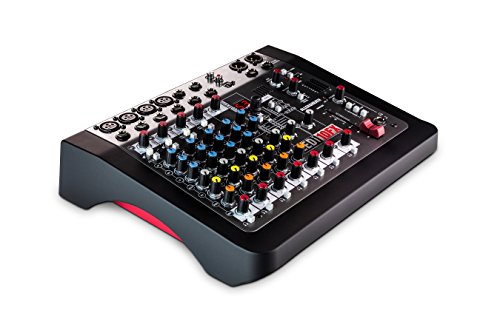
Allen & Heath ZEDi-10FX — Best Interface Hybrid
The ZEDi-10FX occupies the intelligent middle of the USB spectrum: its interface is 4-in/4-out, so a computer receives up to four discrete channels — a vocal, a guitar DI, and a stereo pair, as separate tracks — while analog monitoring stays latency-free and two dedicated guitar inputs with amp character make direct recording effortless. It is the board for buyers who need real multitrack but only ever record a few sources at once, which describes a large share of home studios precisely.
Strengths
- Four discrete USB channels — genuine multitrack at compact scale.
- Guitar DI inputs remove the need for separate direct boxes.
- Allen & Heath preamp and build quality.
Trade-offs
- Four inputs is a firm ceiling for simultaneous sources.
- Simpler EQ than the larger ZED models.
- Small surface, best suited to desk work.
The ZEDi-10FX’s design shows an understanding of how small studios actually record: rarely more than four sources at once, often a guitar direct, always with a performer who needs to hear themselves without delay and with a little reverb that does not print. Its onboard effects serve exactly that monitoring role. As a USB mixer it is the most thoughtfully specified compact board in this guide, and the one we recommend when the multitrack question is real but small.
Best for: home studios recording small combinations, guitar-based production / Not suited for: drum kit or ensemble tracking. Check the current price on Amazon.

Mackie ProFX12v3+ — Best Modern Features
The ProFX12v3+ updates the USB mixer for current habits: stereo USB recording for sessions and streams, Bluetooth input for reference tracks and break music from a phone, the GigFX+ effects library for performers, and Onyx preamps with single-knob compressors for the tracking side. A USB blend control makes it easy to balance computer playback against live inputs — the exact juggling act streamers and teachers perform daily.
Strengths
- Bluetooth playback integrates phones and reference tracks seamlessly.
- USB blend and monitoring designed for hybrid record/stream work.
- Onyx preamps keep recordings clean and quiet.
Trade-offs
- Stereo USB only.
- One monitor send limits stage cue flexibility.
- The richest feature set here takes an evening to learn.
For the growing class of rooms that record, stream, teach, and perform with the same rig, the ProFX12v3+ removes a dozen small frictions that other boards leave in place. Its USB recording is the standard stereo architecture — buy it knowing that — but everything around that architecture is tuned for how hybrid creators actually spend their hours. It is the most contemporary board in this guide, and for its intended user, the most convenient.
Best for: streamers, teachers, hybrid creators, small live acts that record / Not suited for: multitrack recording. Check the current price on Amazon.
Comparison Table
| Pick | Badge | Key spec | Best for |
|---|---|---|---|
| Yamaha MG12XU | Best Overall | Stereo USB, D-PRE preamps, compressors | General recording and live use |
| Mackie Onyx16 | Best Multitrack | Multitrack USB + SD recording | Recording bands per-channel |
| Behringer XENYX X1204USB | Best Budget | Stereo USB, compressors, subgroups | First boards and schools |
| Soundcraft Notepad-12FX | Best Compact | USB, Lexicon FX, 4 preamps | Desks and podcasts |
| Allen & Heath ZEDi-10FX | Best Interface Hybrid | 4×4 USB, guitar DI inputs | Small multitrack rigs |
| Mackie ProFX12v3+ | Best Modern Features | Stereo USB, Bluetooth, GigFX+ | Streaming and teaching |
How to Choose an Analog Mixer With USB
Answer one question first: what will the USB connection carry in your sessions? If the answer is “the performance” — a rehearsal, a service, a stream, a stereo source — then stereo USB is not a limitation but the correct tool, and you should choose among the stereo boards by mixer quality: preamps, EQ, monitoring, build. If the answer is “individual tracks I will rebalance later,” only multitrack architecture qualifies, and in this guide that means the Onyx16 for full bands or the ZEDi-10FX for small combinations. Writing your answer down before shopping prevents the category’s one expensive disappointment.
Second, examine the return path. USB on a mixer is bidirectional: the computer’s playback comes back into the board for monitoring, overdubbing, and live playback duties. Check how that return is routed — a dedicated channel with EQ and fader control is the most flexible arrangement, while a fixed return to the mains is simpler but harder to balance against live inputs. Streamers and teachers should weight this heavily; pure recording setups less so. Third, check driver expectations for your operating system. Many USB mixers are class-compliant and need no driver; others use a manufacturer driver for best performance. Either is fine — what matters is confirming current support for your system before the purchase, not after.
Fourth, keep the mixer criteria in charge. USB is one feature among many, and the board will spend most of its life being a mixer: gain staging sources, shaping them with EQ, feeding monitors and headphones, surviving transport. A board with a modest stereo USB and excellent analog design — the MG12XU is the type specimen — serves most owners better than a feature-stacked board with mediocre preamps. Buy the mixer; let the USB be its very useful bonus, unless multitrack is your stated requirement, in which case buy the architecture first and the mixer second.
How to Set Up a USB Mixer for Recording and Streaming
Connect the mixer to the computer with a short, quality USB cable, directly to the machine rather than through a hub, and power the mixer before opening your recording or streaming software so the device is enumerated cleanly. In the software, select the mixer as both the input and output device; this single selection is what makes overdubbing and monitoring coherent. Set the session or stream to a standard sample rate and leave it there — consistency prevents the pitch and sync surprises that come from mixed settings across applications.
Build the monitoring path in analog. Route headphones and speakers from the mixer, bring the computer’s playback return up on its channel or return, and balance live inputs against playback using the board’s controls. If the board offers a USB blend or monitor mix control, use it to set the performer’s balance between their live input and the backing. Then gain-stage as you would for any recording: loudest source, peaks comfortably below clipping at the channel, and a test recording played back before the real session. For streaming, add one step — record a minute locally and listen for the hums, echoes, and double-monitoring artifacts that streams inherit from misrouted returns; double monitoring, where the performer hears both the analog path and a delayed software path, is the most common USB-mixer fault and is cured by muting the software monitoring.
Finish by saving the configuration: a photograph of the board, a saved session template in the DAW, and the streaming application’s audio settings noted. USB mixers reward this small administration enormously, because the setup that took an hour the first time takes two minutes every time after — which is precisely the convenience the category promises.
Common Buying Mistakes
The first mistake is the category’s signature: reading “USB mixer” as “multitrack interface.” Most USB mixers are stereo devices. The manual’s interface specification — not the product name, not the channel count — is the only reliable statement of what the USB carries. The second mistake is ignoring the return path and discovering during the first overdub session that computer playback cannot be balanced against live inputs the way the workflow requires.
Third, buyers choose by USB and forget the mixer: too few mic preamps for their sessions, no aux send for the effects or monitor they need, EQ too simple for their sources. Fourth, they connect through hubs and long bargain cables, then blame the board for dropouts that a direct, quality cable cures. Fifth, they skip the compatibility check with their operating system and software during the return window. Sixth, they expect the mixer’s controls to operate their DAW — analog boards do not send control commands; they shape audio. Buy with those six realities in view and the USB mixer category delivers exactly the convenience it advertises.
Final Recommendation
Start with the Yamaha MG12XU unless a specific requirement points elsewhere: it is the most complete stereo USB mixer here. Go to the Mackie Onyx16 for multitrack, the Allen & Heath ZEDi-10FX for small-scale multitrack, the Behringer XENYX X1204USB for budget, the Soundcraft Notepad-12FX for a compact desk, and the Mackie ProFX12v3+ for streaming-era features.
A closing thought on value: in this category, the expensive mistake is rarely the board that cost too much — it is the board whose USB architecture did not match the work, replaced within the year at full price again. The five minutes spent confirming an architecture, described repeatedly in this guide because it matters repeatedly, is the highest-value research in the entire purchase. Everything after it — preamps, EQ, monitoring, build — is a matter of tier and taste, and on those the six boards here will not steer you wrong.
Whichever board you bring home, spend its first session deliberately: connect it directly, run the test recording, save the template, and photograph the surface. USB mixers are convenience equipment, and their convenience is fully realized only when the setup becomes a saved habit rather than a fresh puzzle each time. Owners who invest that first hour report the same experience across every tier in this guide — the board simply disappears into the work, recordings happen because they cost nothing, and the analog surface they actually wanted is there under their hands for every rehearsal, session, stream, and show.
More in this series: Best Analog Mixers That Work With Pro Tools, Best Analog Mixers For Live Sound And Studio, Best Analog Mixers For Studios, Best Analog Mixers For Live Sound, Best Analog Mixers Synthesizer.
USB Mixer Use Cases, One by One
Recording rehearsals and shows is the use case that sells the category, and stereo USB serves it perfectly: the mix you balanced in the room is the recording, captured with one cable and no interface setup. Bands use these captures for booking demos and honest self-critique; churches archive services; teachers keep lesson records. The discipline it teaches — mix it right in the room — improves the live sound itself, which is a benefit no specification sheet mentions. Podcasting and voice work form the second use case: a USB mixer gives hosts hardware control over several microphones, a guest feed from the computer, and effects or compression for polish, all monitored without latency. The Notepad-12FX and ZEDi-10FX are the natural fits, sized and priced for the desk.
Streaming is the third use case and the fastest-growing: the mixer becomes the stream’s entire audio department, blending voice, instruments, game or presentation audio, and alerts under physical faders. The ProFX12v3+ was designed with this room in mind. The fourth use case is the quietest and maybe the most valuable — playback. A USB mixer is also the best way to get computer audio into a real sound system: reference tracks during mixing, backing tracks at shows, video sound at events, break music at services. Owners consistently report that the return path, bought as an afterthought, becomes the feature they use every single day. When you evaluate boards, weigh all four use cases against your own week; the right board is the one that serves the three you actually have.
Latency, Explained Without Tears
Latency is the delay between a sound entering a system and being heard, and it is the subject of more confusion than any other in this category — so here is the practical version. When you record through USB into a computer and listen back through the computer, the sound makes a round trip through converters and software buffers, and that trip takes time: enough, at careless settings, for a singer to hear their own voice trailing behind them, which no performer can work with. The USB mixer’s answer is architectural, not computational: you listen to yourself through the analog mixer, where the delay is effectively zero, while the computer records in the background and its playback joins you in the headphones through the board’s return.
This is why every board in this guide can claim latency-free monitoring honestly, and why buffer settings — the usual latency battleground — matter so little in a mixer-based setup that you can set them for stability and forget them. The one configuration to avoid is listening through both paths at once, which produces an echo or a hollow, comb-filtered sound; mute the software’s input monitoring and let the board do the job it was built for. With that single rule observed, latency simply stops being a topic in your studio, which is one of the strongest everyday arguments for this entire product category.
Care and Longevity for a Board That Is Also an Interface
A USB mixer has two lives to protect: the analog surface and the digital connection. The analog care is the familiar routine — case it in transport, exercise the pots and faders monthly, keep dust and drinks away from the surface. The digital care is newer but simple: use a short, quality USB cable, connect directly to the computer, and avoid yanking the connector sideways, because the USB port is the one part of the board that a cable can genuinely wear out. Keep the cable that works in the board’s case so a substitute of unknown quality never gets substituted at a show.
Software housekeeping completes the picture. When a manufacturer offers a driver or firmware update, install it during a quiet week, not the night before a session, and re-run your thirty-second test recording afterward to prove the system still behaves. Keep a note of the working configuration — operating system version, driver version, the DAW’s device settings — so that when something changes months later, you can identify what moved. Boards maintained this way serve for many years; the analog sections of the picks here are built for a decade, and there is no reason the digital edge should shorten that life if it is treated with the same modest respect.
USB Mixer or Separate Interface? The Honest Trade
Because a USB mixer competes with the mixer-plus-interface combination, the trade deserves a direct statement. The integrated board wins on simplicity: one purchase, one power supply, one surface, no gain staging between two devices, and monitoring that is analog by construction. It wins on live usefulness too, since the same box runs the show and records it. The separate combination wins on specialization: interfaces offer more discrete inputs per dollar at the multitrack end, converters and drivers are their whole purpose, and each half can be upgraded without replacing the other. Studios that already own a good interface should usually keep it and buy the best analog board for their remaining needs — possibly one without USB at all.
The deciding questions are practical. Do you record and perform with the same rig? Integrated. Is your recording mostly multitrack studio work with occasional live use? Separate, or the Onyx16. Is the operator a volunteer, a student, or yourself at midnight? Integrated, for the setup that cannot be wired wrong. Notice that sound quality does not decide this trade at the tiers in this guide — the preamp families here are the same ones sold in respected standalone products — workflow does. Choose the workflow you will actually enjoy weekly, because the best system is the one that gets switched on.
Reading a USB Specification Like a Professional
Since the whole purchase turns on one specification, here is how to read it. Find the manual’s interface section and look for the sentence that counts channels in both directions: a stereo board will describe a two-channel send and a two-channel return, whatever its total mixer channel count. A multitrack board will state a number that matches or approaches its input count, and will usually name the feature prominently — manufacturers are proud of multitrack and never hide it. A four-channel hybrid like the ZEDi-10FX states its 4×4 configuration plainly. If the documentation you can find never counts the USB channels at all, assume stereo; that assumption has protected more buyers than any other rule in this category.
While you are in the manual, note three more things: whether the USB send is tapped before or after the main fader (which decides whether your fader rides print to the recording), whether the return lands on a channel with EQ or directly on the bus (which decides how flexibly you can balance playback), and whether the board can record and play back simultaneously at full quality, which overdubbing requires and all six picks support. Five minutes with these three sentences tells you more about living with the board than an hour of feature lists, and it is the same five minutes the engineers who wrote this guide spent on every candidate.
Three Buyers, Three Right Answers
A four-piece band wants to record every rehearsal, stream one show a month, and stop renting a board for gigs. Their recording need is the stereo performance; their live need is a dozen channels with compression on the vocals and playback for break music. The MG12XU answers all of it in one purchase, and the money not spent on multitrack buys the microphones their recordings actually need. A producer recording a duo — two voices, two guitars, everything tracked as separate Pro Tools-style tracks for a meticulous mix — has the opposite shape: few sources, total post-production control. The ZEDi-10FX’s four discrete channels are not a compromise for this buyer; they are the exact specification, at a size and tier that leave budget for the room’s treatment.
A school music department needs a board that students can run, that records concerts to a laptop, and that survives being moved between the hall and the classroom weekly. Their honest answer is the X1204USB: full workflow, forgiving price if the worst happens, and every feature a student needs to learn on. Three buyers, three different boards from the same six — and in each case the deciding document was the buyer’s own week, written down. That exercise, five honest minutes with your calendar and your session habits, is worth more than any single recommendation in this guide, including ours.
Gain Staging When the Destination Is a Recording
Recording through a USB mixer adds one link to the classic gain chain: after the channel gain and the mix bus comes the digital converter, which has an absolute ceiling. The working method is to stage each channel exactly as you would for live sound — loudest source, peaks just below the channel’s clip point — then set the overall level arriving at the computer so the loudest moment of the whole mix peaks comfortably below digital full scale, leaving headroom for the moment the performance gets louder than the soundcheck, as performances do. Digital clipping is unforgiving and cannot be repaired afterward, while a recording that peaks a few decibels lower costs nothing in a modern system; err on the side of room.
Watch both meter systems while you learn a new board: the mixer’s own meters tell you about the analog stages, and the software’s meters tell you what the converter actually received. When the two disagree wildly, the manual’s note about where the USB send is tapped explains the difference, and a single test recording at a known level calibrates your intuition permanently. Engineers who do this calibration once, on the first day, never clip a USB recording again — a small ritual with an outsized payoff, and one more reason the first week with a new board should include a complete, deliberate test session.
Small Details: Connectors, Cables, and Ports
The physical USB layer is unglamorous and decisive. Most mixers use a USB-B port — the sturdy, squared connector inherited from printers and interfaces — which locks in well and survives stage life; newer designs increasingly offer USB-C, which suits modern laptops without adapters. Either is electrically fine; what matters is the cable. Keep it short, buy one from a reputable maker, and treat it as part of the instrument: a spare belongs in the case. Avoid unpowered hubs between mixer and computer, since hubs are the most common source of dropouts and recognition failures in otherwise healthy setups, and if a hub is unavoidable, use a powered one and test the complete chain before the session that matters.
On the computer side, dedicate a port to the mixer where you can, and keep the software configuration stable once it works: the same port, the same cable, the same device settings, saved in your templates. USB audio is mature and reliable, and nearly every horror story in this category traces back to a changed variable — a new hub, a borrowed cable, an updated driver the night before a show. Stability is a habit, and in a USB mixer rig it is the habit that everything else depends on.
Frequently Asked Questions
Do all USB mixers record multitrack?
No. Most analog mixers with USB record the stereo main mix only. Multitrack models — which send each channel to the computer separately — are the exception and advertise the capability explicitly, as the Mackie Onyx16 does. A middle category, represented by the Allen & Heath ZEDi-10FX, sends a few discrete channels. Always confirm the USB channel count in the manual. This is the single most consequential check in the category, because the mixer’s headline channel count and its USB channel count are independent numbers, and only the USB count determines what your recordings can become afterward — a stereo performance you must love as played, or a set of tracks you can rebalance at leisure.
Can I use a USB mixer for streaming?
Yes — it is one of the category’s best uses, and for many owners it becomes the primary use within a year. A mixer that is already the room’s sound center is naturally the stream’s sound center too. The mixer appears as an audio device in streaming software, giving you hardware faders, EQ, compression on some models, and effects for your voice and sources, plus easy mixing of computer playback with live inputs. Boards like the ProFX12v3+ add blend controls and Bluetooth specifically for this workflow. Streamers consistently cite one advantage over software-only setups: when something goes wrong mid-stream — a loud guest, a silent source, a game that suddenly shouts — a physical fader fixes it in one motion without alt-tabbing out of the broadcast. Set the stream’s audio device once, save the configuration, and the mixer becomes the permanent, dependable front end of the channel.
Do USB mixers need drivers?
Many are USB class-compliant and work with the operating system’s built-in audio support; some manufacturers provide their own driver for lower latency or extra features. Either approach is fine in practice. Check the product’s support page for your operating system version before buying, and install any recommended driver before the first session. Class-compliant boards have one long-term advantage worth weighing: they depend on the operating system’s own audio support, which is maintained for everyone, so they tend to keep working across computer upgrades with no action from you. Driver-based boards can offer tighter integration and extra routing, at the cost of depending on the manufacturer’s update cadence. Neither is a reason to reject a board you otherwise love — but verify the current state of support during the return window, when changing your mind is still free.
Can a USB mixer replace an audio interface?
For stereo recording and small-scale work, yes — that is the point of the category. A USB mixer gives you preamps, EQ, monitoring, and conversion in one box. Dedicated interfaces pull ahead when you need many simultaneous discrete inputs, specialized features, or the absolute smallest desk footprint; multitrack mixers like the Onyx16 close most of that gap. There is also a workflow dividend that spec sheets miss: because the mixer is always set up and always the room’s monitoring center, recording becomes a one-click decision instead of a setup project, and rooms with USB mixers simply end up recording far more of what they play — rehearsals, lessons, first drafts of songs — than rooms where capture requires assembly. Over a year, that archive is worth more than a marginal difference in converter specifications.
Why does my USB recording sound different from what I hear in the room?
The USB feed captures the board’s mix as the mixer produces it, which may tap the signal before or after parts of the output section depending on the model, and your room’s speakers and acoustics color what you hear live. Compare on headphones at the board, check where the manual says the USB send is tapped, and remember the recording is the more honest document — adjust the mix to the recording if the recording is the product. A practical routine follows from this: whenever the recording matters, do a short test capture and listen to it on headphones before the session, then make your balance decisions against the recording rather than the room. Engineers who adopt that habit stop being surprised by their own mixes, and the USB board — which makes the test capture a ten-second job — is what makes the habit cheap enough to keep.
Can I play music from my computer through a USB mixer at a live show?
Yes. The USB return brings computer audio into the board for playback through the PA — walk-in music, backing tracks, video sound — typically on a dedicated channel or return with its own level control. It is one of the most-used conveniences of the category at live events, and all six boards here support it. Two habits make it dependable: keep the computer’s own volume at a fixed, healthy level and control the show volume from the board, so levels are predictable from night to night; and soundcheck the playback path with the actual files you will use, because a track that is dramatically quieter or louder than the band will announce itself at the worst possible moment if the first time you hear it is during the show.


