Disclosure: airfryerkitchensupply.com is reader-supported. When you buy through links on our site, we may earn an affiliate commission at no extra cost to you.
Where to buy
Each board below is listed on Amazon by its manufacturer or an authorized dealer: the Allen & Heath ZED-16FX as our overall studio pick, the Mackie Onyx16 for multitrack recording, the Allen & Heath ZEDi-10FX as a compact mixer-interface hybrid, the Mackie 1402VLZ4 for a purist analog front end, the Allen & Heath ZED-24 for large sessions, and the Soundcraft Notepad-12FX for small desks. Check the current price on Amazon on the exact listing, because several ranges include smaller or non-USB variants with near-identical names.
Introduction
The best analog mixers for studios are not simply live boards that happen to be indoors. A studio mixer is a recording instrument: its preamps print onto every track, its EQ shapes sources before the DAW ever sees them, its monitoring path is what the engineer trusts for every decision, and its noise floor sets the ceiling on the quietest material you can capture. Studios keep choosing analog boards in a digital age for concrete reasons — hands-on control with zero latency, channel strips that commit a sound at the source, summing that many engineers find forgiving, and a working surface that never asks for a firmware update in the middle of a session.
This guide selects six analog mixers across the realistic studio spectrum: the project studio tracking a full band, the hybrid room that records and rehearses, the small desk built around a laptop, and the purist front end feeding a separate interface. Every model was verified against its current Amazon listing, so names, formats, and feature claims match products you can buy today. We judged preamp noise and headroom first, EQ musicality second, recording architecture third — separating stereo USB convenience from true multitrack capture — and monitoring flexibility throughout, because a studio board you cannot monitor through comfortably will be replaced no matter how good its preamps are.
An honest framing before the picks: if your studio records one source at a time into a DAW, a dedicated interface plus plug-ins may be the leaner tool. Analog mixers earn their desk space when several sources are captured together, when performers need latency-free monitoring with real faders, or when an engineer simply works faster and commits more confidently with hands on knobs. The six boards below are the strongest current answers for those studios.
In this guide
Quick Picks
- Best Overall: Allen & Heath ZED-16FX — sixteen channels of DuoPre gain, swept-mid EQ, and studio-minded USB routing for band tracking.
- Best Multitrack: Mackie Onyx16 — per-channel multitrack USB and SD recording with Perkins EQ, a true console front end for a DAW.
- Best Compact Hybrid: Allen & Heath ZEDi-10FX — a mixer and 4×4 USB interface in one, with guitar DI inputs for direct tracking.
- Best Purist Front End: Mackie 1402VLZ4 — Onyx preamps and bulletproof construction feeding your existing interface with zero fuss.
- Best for Large Sessions: Allen & Heath ZED-24 — sixteen mic channels plus stereo inputs for choirs, big bands, and ensemble recording.
- Best Small Desktop: Soundcraft Notepad-12FX — Lexicon effects, USB, and Soundcraft preamps scaled for a bedroom or podcast studio.
How These Picks Were Chosen
We started from the analog mixers that project-studio owners actually build rooms around, then verified each one against its live Amazon listing. Digital consoles and digital mixer-recorders were excluded even when marketed to studios, because this guide’s promise is an analog signal path with hands-on channel strips. Scoring weighted the studio fundamentals: preamp equivalent input noise and gain range, because quiet sources expose everything; EQ design, favoring swept mids that fix problems without plug-ins; the recording path, distinguishing stereo USB, multi-channel USB interfaces, and full multitrack; monitor and control-room flexibility, including headphone feeds for performers; and build quality appropriate to a semi-permanent installation. Value was judged by tier rather than by any printed price, since street prices change and a studio board is a multi-year fixture.
The 6 Best Analog Mixers for Studios

Allen & Heath ZED-16FX — Best Overall
The ZED-16FX is the board most project studios should buy first and replace last. Sixteen channels built on Allen & Heath’s DuoPre preamps give a full band — drums, bass, guitars, keys, vocals — a consistent front end with headroom to spare, and the three-band EQ with swept mids lets the engineer shape each source while tracking instead of deferring every decision to the mix. The onboard effects cover tracking reverb for vocalists who sing better with space in their headphones, and the USB connection supports a flexible stereo workflow for capturing the board mix and feeding overdubs.
Strengths
- Sixteen genuine mic/line channels track a complete band in one pass.
- Swept-mid EQ is musical and precise, reducing corrective plug-in work later.
- Robust, serviceable build suits a board that anchors a room for years.
Trade-offs
- USB capture is stereo-oriented rather than per-channel multitrack.
- No channel compression; dynamics control happens in the DAW or outboard.
- Full-size footprint demands a real desk or stand, not a shelf.
Studios love this board for how its mixes translate. Because the EQ and summing are honest, a balance that sounds right in the room records right, and engineers spend their mix time on arrangement and effects rather than repair. The channel layout also teaches good habits: clear gain staging, sensible routing, and a monitor section that behaves like a larger console’s. Paired with a separate multitrack interface via its direct-friendly routing, or used as a stereo capture board for live-in-the-studio sessions, the ZED-16FX remains the benchmark mid-size analog studio mixer.
Best for: project studios tracking bands, hybrid rehearsal studios / Not suited for: engineers who need per-channel USB multitrack in the same box. Check the current price on Amazon.

Mackie Onyx16 — Best Multitrack
The Onyx16 removes the classic analog compromise by recording every channel separately: its multitrack USB interface streams the individual inputs to your DAW, and an SD card slot captures the session with no computer attached. On the analog side, Onyx preamps with generous gain, British-voiced Perkins EQ with sweepable mids, and a well-equipped monitor section make it a legitimate console, not an interface wearing a mixer costume. For studios whose sessions are performances — bands playing together, ensembles, live-in-studio video — it is the most complete tool in this guide.
Strengths
- True per-channel multitrack recording over USB, plus SD capture as backup.
- Perkins EQ shapes sources at tracking with studio-grade control.
- Strong monitor section with talkback-friendly workflow for engineer-performer communication.
Trade-offs
- The deepest feature set here requires the most setup and file management.
- Premium tier; overkill for studios recording one or two sources at a time.
- Size and weight favor a fixed installation.
The workflow the Onyx16 enables is the one professional hybrid studios are built on: perform together, capture everything, decide later. A drummer’s rushed fill can be edited, a vocal can be rebalanced against the band, and a great take with a flawed mix is no longer a loss. Meanwhile the analog path stays fully usable with no computer in sight, which keeps rehearsals and writing sessions friction-free. If your studio’s identity is capturing real performances, this board is the centerpiece to build around.
Best for: studios recording live bands and ensembles, live-session video production / Not suited for: minimal one-mic setups. Check the current price on Amazon.
Allen & Heath ZEDi-10FX — Best Compact Hybrid
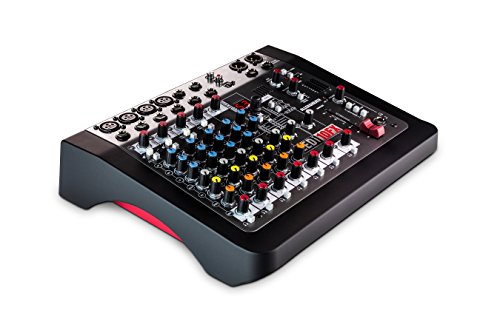
The ZEDi-10FX fuses a compact analog mixer with a 4-in/4-out USB audio interface, which makes it uniquely capable for small studios: record up to four channels discretely — say, vocal, guitar DI, and a stereo pair — while mixing and monitoring in analog with zero latency. Its GSPre preamps are derived from Allen & Heath’s large-format designs, and the two dedicated guitar DI inputs with modeled amp character let guitarists track direct without extra boxes. Onboard effects from the ZED FX library cover vocal space and tracking ambience.
Strengths
- 4×4 USB interface records discrete channels, not just the stereo mix.
- Dedicated high-impedance guitar inputs simplify direct guitar and bass tracking.
- Compact footprint with full-size sound and proper XLR outputs.
Trade-offs
- Four mic preamps cap ensemble work; drums require submixing or another solution.
- EQ is a simpler three-band design than the larger ZED boards’.
- Small surface means smaller controls — fine at a desk, less so in dim rooms.
For the singer-songwriter studio, the podcast room that also records music, or the producer who tracks small combinations, the ZEDi-10FX hits a sweet spot nothing else here matches: real multitrack capability at desktop scale, with analog monitoring that keeps performers comfortable. It also serves as an excellent first “real” board for engineers learning gain staging and EQ on hardware before graduating to a larger console, because its signal flow is honest and its manual is genuinely instructive.
Best for: small studios, singer-songwriters, podcast-plus-music rooms / Not suited for: full drum kit tracking. Check the current price on Amazon.

Mackie 1402VLZ4 — Best Purist Front End
Not every studio needs USB in the mixer. If you already own a good interface, the Mackie 1402VLZ4 offers what interfaces lack: six Onyx mic preamps with a wide 60 dB gain range and very low noise, a flexible Alt 3-4 routing scheme, and a control-room section that manages monitors and sources like a console twice its size — all in a steel chassis with sealed rotary pots that will outlast several computer upgrades. It is the classic front end: sources in, shaped and summed in analog, stereo out to your converters.
Strengths
- Onyx preamps deliver quiet, high-headroom gain for demanding microphones.
- Alt 3-4 bus and source matrix give console-style routing flexibility.
- Legendary VLZ durability; a buy-it-for-a-decade tool.
Trade-offs
- No USB and no effects — it presumes an existing interface and DAW processing.
- Six mic preamps limit simultaneous tracking.
- Rotary level controls lack the at-a-glance readability of faders.
Studios use boards like this in specific, smart ways: as a drum submixer printing a balanced kit to two interface channels, as a keyboard and synth summing station, as the monitor controller and talkback hub of a larger rig, or as the tracking front end for engineers who prefer printing EQ’d analog channels. Its preamps flatter dynamic and ribbon microphones that expose lesser gain stages, and its simplicity means it never becomes the bottleneck in a session. Buy it as infrastructure, not as a gadget.
Best for: studios with an existing interface, submixing and summing duties / Not suited for: buyers needing an all-in-one USB solution. Check the current price on Amazon.

Allen & Heath ZED-24 — Best for Large Sessions
When sessions outgrow sixteen channels — a choir with a band, a big-band date, a school ensemble, a theater cast recording — the ZED-24 provides sixteen mono mic channels and four stereo channels on 100 mm faders with the same DuoPre preamps and swept-mid EQ philosophy as its smaller sibling. The long faders matter in ensemble work, where balancing sections is a game of half-decibel moves, and the four aux sends feed multiple headphone mixes or a combination of performer feeds and effects.
Strengths
- Channel count covers ensembles that defeat mid-size boards.
- 100 mm faders enable precise section balancing.
- Consistent ZED sound and workflow scale up from smaller rooms.
Trade-offs
- No onboard effects; budget for outboard or DAW ambience.
- Stereo USB only, so large multitrack sessions need a separate interface strategy.
- The largest footprint here; plan the desk around it.
Institutional studios — schools, churches with recording programs, community arts centers — are this board’s natural home, because it handles the biggest day of the year without rentals and behaves identically on ordinary days. Engineers also appreciate the insert points across the mono channels for patching outboard compressors on key sources like lead vocal and bass. As a fixed installation expected to serve a decade of sessions, the ZED-24’s combination of count, sound, and serviceability is difficult to beat at its tier.
Best for: ensemble, choir, and institutional studios / Not suited for: small desks or multitrack-in-one-box seekers. Check the current price on Amazon.

Soundcraft Notepad-12FX — Best Small Desktop
The Notepad-12FX proves a desktop board can still be a real studio tool. Four Soundcraft mic preamps, per-channel EQ suited to quick source shaping, a Lexicon effects engine for tracking ambience and vocal confidence, and a USB audio interface fit in a surface that shares a desk with a laptop and monitors without crowding. For voice recording, acoustic demos, and small-format production, it covers the whole signal chain in one compact unit.
Strengths
- Lexicon effects at a desktop scale — vocalists can track with real ambience.
- USB interface simplifies a small studio to one box and one cable.
- Soundcraft preamp quality at the most accessible tier in this guide.
Trade-offs
- Four preamps is a hard ceiling for ensemble work.
- Simplified EQ and routing compared with full-size boards.
- Compact controls reward a tidy, well-lit desk setup.
Judge the Notepad-12FX by its intended sessions and it shines: a podcaster recording two hosts and a guest, a songwriter layering guitar and voice, a video producer who wants hardware faders for a stream’s music and mic. Its limitations are all about scale, not quality, and many owners keep it as a submixer or mobile rig after graduating to a larger console. As an entry into analog studio workflow, it teaches the right lessons on equipment that does not embarrass the recordings.
Best for: bedroom studios, podcasters, and compact production desks / Not suited for: band tracking. Check the current price on Amazon.
Comparison Table
| Pick | Badge | Key spec | Best for |
|---|---|---|---|
| Allen & Heath ZED-16FX | Best Overall | 16 channels, DuoPre, swept-mid EQ | Band tracking in project studios |
| Mackie Onyx16 | Best Multitrack | Multitrack USB + SD, Perkins EQ | Capturing performances to remix |
| Allen & Heath ZEDi-10FX | Best Compact Hybrid | 4×4 USB interface, guitar DI inputs | Small studios and direct tracking |
| Mackie 1402VLZ4 | Best Purist Front End | Onyx preamps, Alt 3-4 routing, no USB | Front end for an existing interface |
| Allen & Heath ZED-24 | Best for Large Sessions | 16 mic + 4 stereo channels, 100 mm faders | Ensembles and institutions |
| Soundcraft Notepad-12FX | Best Small Desktop | 4 preamps, Lexicon FX, USB | Bedroom and podcast studios |
How to Choose an Analog Mixer for a Studio
Start with your session, not the catalog. Write down the largest combination of sources you record simultaneously — not your total microphone collection, but the biggest single take. A songwriter overdubbing alone needs two to four preamps and should optimize for quality and monitoring, which points to the ZEDi-10FX or Notepad-12FX. A band tracking live needs eight to sixteen, which points to the ZED-16FX or Onyx16. An ensemble program needs the ZED-24’s count. Buying for the biggest real take, plus one spare channel, prevents both the cramped board and the empty one.
Next, decide how recording reaches the computer. Three architectures appear in this guide: stereo USB (captures the board mix), multi-channel USB interfaces built into compact mixers (the ZEDi-10FX’s 4×4), and full multitrack (the Onyx16). They are not interchangeable, and no cable or adapter upgrades one into another. If you print stereo mixes confidently, stereo USB is simpler and cheaper. If you edit and rebalance after the take, multitrack is mandatory. Studios that already own a capable interface can skip USB entirely and buy the best analog front end — the logic behind the 1402VLZ4’s inclusion.
Then evaluate monitoring, the most underrated studio specification. Performers need a headphone feed they can balance against the backing without latency, and engineers need a control-room path that does not color decisions. Boards with flexible aux sends, a proper control-room section, and easy talkback arrangements make sessions run noticeably smoother. Finally, plan the desk: measure your surface, allow for cable access behind the board, and leave room for the outboard, controllers, and second monitor that studios accumulate. A board that fits the room gets used daily; one that crowds it gets resented.
How to Set Up a Studio Mixer for a Tracking Session
Begin before the musicians arrive. Connect microphones and DIs to their planned channels, label the board with the session’s channel plan, and set approximate gains from your notes on each source. Check every cable by wiggling it at both ends while listening — intermittent cables announce themselves in setup, not during the best take, if you give them the chance. Configure the monitoring path: the engineer’s control-room feed, each performer’s headphone mix, and a touch of board reverb on the vocal channels so singers hear themselves in a flattering space without printing that reverb to the recording.
During the session, gain-stage each source at performance level, engage high-pass filters on everything that does not need deep bass, and make EQ decisions conservatively — small cuts at the board, boosts mostly in the mix, because printed EQ cannot be unprinted. If the board records multitrack, verify the DAW is receiving every channel before the first full take and do a thirty-second test recording played back over the monitors; this single habit has saved more sessions than any equipment purchase. Keep a session log: channel assignments, gain settings, microphone positions, and takes. The log is what turns a good day into a repeatable sound, and it costs nothing but the discipline to write it.
After the session, back up recordings in two places before breaking down the setup, photograph the board and microphone positions for recall, and note anything that fought you — a noisy channel, a headphone mix complaint, a hum that appeared when a particular device powered up. Studios improve through this loop of small corrections, and a dependable analog board is the constant that makes the loop possible.
Studio Signal Flow, Demystified
Understanding signal flow matters more in a studio than any single feature, because most studio problems are routing problems wearing a disguise. The healthy mental model is a river: sources enter at channel inputs, gain sets the water level, EQ shapes the channel, inserts divert the flow through outboard and back, aux sends tap the flow for headphones and effects, subgroups gather channels into manageable streams, and the main bus carries the finished river to the monitors and the recorder. When something sounds wrong, walk the river from the source: is the gain sane, is a filter engaged by accident, is an insert half-patched, is the channel accidentally routed away from the mains?
Two studio-specific flows deserve attention. The first is the performer cue path: performers hear a mix built from aux sends, often pre-fader so the engineer’s mix moves do not disturb them, and the quality of that path determines the quality of the performance — singers who hear themselves clearly and comfortably simply sing better takes. The second is the print-versus-monitor decision: whether each processing choice is recorded or only heard. Analog boards make this tangible, because a channel’s EQ is printed when the channel feeds the recorder and only monitored when the recorder taps the signal earlier. Knowing exactly where your board’s USB or outputs tap the flow — before or after EQ and fader — is the difference between intentional printing and accidental commitment, so read that page of the manual for whichever pick you buy.
Common Buying Mistakes
The most expensive mistake is confusing advertised channels with microphone preamps. A “24-channel” studio board may carry sixteen preamps; a “12-channel” compact may carry four. Count preamps against your biggest simultaneous take, because preamps are the ceiling that cannot be raised later. The second mistake is assuming all USB mixers multitrack. Most send stereo; the manual’s USB specification is the only trustworthy source, and this guide labels each pick’s architecture explicitly.
Third, buyers starve the monitoring budget: excellent preamps feeding poor monitors produce unreliable mixes, so balance the spend across board, monitors, headphones, and room treatment. Fourth, they buy a board with no spare channels and discover the ceiling at the first session with a guest. Fifth, they ignore ergonomics — a board whose controls are cramped or whose metering is unreadable will slow every session for a decade. Sixth, they overlook the used market’s trap in reverse: an older analog board can be a bargain, but only after every channel, pot, and the USB connection (if any) has been tested with your own computer and microphones.
Final Recommendation
Most studios should start with the Allen & Heath ZED-16FX: it tracks a band, teaches good habits, and anchors a room for years. Choose the Mackie Onyx16 when multitrack capture defines your work, the Allen & Heath ZEDi-10FX for a compact hybrid desk, the Mackie 1402VLZ4 as a front end for an interface you already trust, the Allen & Heath ZED-24 for ensembles, and the Soundcraft Notepad-12FX for the smallest serious desks.
A studio board is also a teaching tool, whether or not teaching is on the agenda: assistants, band members, and collaborators all learn the room by watching its center. A board whose signal flow can be explained in one pass — source, gain, EQ, routing, destination — trains everyone who touches it, and that quiet educational value compounds across every session the room ever runs. It is one more reason to choose a board with an honest layout over one with a longer feature list.
Whichever board anchors your room, give it a proper first week: wire it completely, label every channel, run a line check on every input, and record one complete session start to finish before judging it. Studio tools reveal themselves in workflow, not in unboxing, and every pick in this guide has satisfied working engineers for years once that first week is behind them. Buy once, set it up carefully, and let the room get on with making records.
More from this series: Best Analog Mixers For Live Sound And Studio, Best Analog Mixers With Usb, Best Analog Mixers That Work With Pro Tools, Best Analog Mixers For Live Sound, Best Analog Mixers Synthesizer.
The System View: Room, Monitors, and Mixer Together
A studio mixer never works alone, and buying decisions improve when the whole chain is considered at once. The room contributes more to a recording than any preamp: an untreated room’s reflections print onto every microphone, and no channel EQ fully removes them, so even modest treatment — bass absorption at corners, a controlled first-reflection zone around the mix position — upgrades every board in this guide simultaneously. Monitors are the second half of the truth-telling system. The mixer’s control-room path should feed monitors you trust at a calibrated level, because an engineer who constantly second-guesses the monitoring makes timid decisions at the board.
Headphones deserve the same seriousness in a tracking studio. Performers judge the session through the cue mix, and a board with enough aux sends to give the singer and the drummer different balances will extract better performances than a marginally quieter preamp ever will. When budgeting, treat the mixer, monitors, two good headphone sets, and basic treatment as one purchase spread over time, in that order of daily impact. The boards here are all good enough that the surrounding system, honestly assessed, is where the next real improvement lives.
Working Methods: Printing EQ, Summing, and Hybrid Mixing
Owning an analog board changes how an engineer works, and three methods define the craft. The first is printing decisions: using the channel EQ and gain while tracking so the recorded sound arrives nearly finished. Printing rewards confidence and speeds up mixing enormously, and it is why the swept-mid EQ on the ZED boards matters — a vocal that needs 3 dB less at 300 Hz gets exactly that, at the source, forever. The discipline is restraint: print the corrections you are sure about, leave the creative extremes for the mix, and document what you printed in the session log.
The second method is analog summing: sending groups of DAW tracks back through the board so the final mix passes through analog circuitry. Engineers who use it describe mixes that glue together with less effort, particularly dense band material. It requires enough board channels for your stem count and a way to record the summed result — another reason the larger ZED and Onyx boards anchor hybrid rooms. The third method is the board as performance surface during mixing: riding faders by hand, muting and unmuting sections, and treating the mix as a played performance rather than a drawn automation graph. All three methods are legitimate, all are impossible without the hardware, and together they explain why studios that could work entirely in the box keep a board at the center of the room.
Ownership: Keeping a Studio Board Session-Ready
Studio boards live gentler lives than touring mixers but face their own enemy: stillness. Pots and faders that sit untouched for months develop noisy spots, so the monthly habit of exercising every control through its full travel is the cheapest maintenance in the studio. Dust is the second enemy; a cover over the board when the room is idle, and a soft brush for the surface, keep grit out of the fader slots. The third is the mystery fault before a session — prevented by a standing rule that the room gets a five-minute line check at the start of every session day, so problems are found when they are cheap.
Keep the board’s documentation, your channel-plan templates, and session logs together, and keep one spare of anything proprietary — above all the power supply if it is external. Finally, treat the board as the room’s reference standard: when something sounds wrong, the board’s consistency is how you isolate whether the fault is a microphone, a cable, a plug-in update, or the monitors. A dependable analog mixer is not just an input device; it is the studio’s measuring instrument, and the six boards in this guide are all consistent enough to hold that role for years.
Choosing by Studio Type: Four Common Rooms
The bedroom producer’s room records voice, guitar, and the occasional guest. Space is the binding constraint, monitoring happens at low volume or on headphones, and the board must share a desk with a computer. The Notepad-12FX and ZEDi-10FX were designed for exactly this room, and the ZEDi’s discrete four-channel recording gives the room a growth path toward small-ensemble work without a second purchase. The project band room is the opposite: drums live there, volume is a tool, and the board is the room’s permanent center. The ZED-16FX or Onyx16 belongs in it, chosen by whether the band remixes its recordings (Onyx) or prints confident stereo captures (ZED).
The institutional room — school, church, community studio — values durability, legibility for rotating operators, and channel count for the biggest event of the year; the ZED-24’s long service record in such rooms is its recommendation. The professional hybrid room, where paying clients record, adds one more criterion: the board must inspire confidence on sight and never be the reason a session stalls, which favors the Onyx16’s completeness or a ZED front end paired with a proven interface. Notice that budget alone did not decide any of these rooms; the work pattern did. That ordering — work first, then features, then price tier — is the reliable way to choose from this guide.
Cables, Patchbays, and Grounding: The Unglamorous Essentials
Studios reveal cable quality mercilessly because recordings preserve every flaw. Use balanced connections everywhere the equipment allows, keep cable runs as short as the room permits, and separate audio cables from power cables where they must cross, crossing at right angles rather than running parallel. A mixer with channel inserts and multiple outputs invites a patchbay as the studio grows; even a half-normalled bay that brings the board’s key ins and outs to a front panel saves the connector wear and setup errors that accumulate when engineers repatch behind the desk in the dark.
Grounding discipline prevents the hums that haunt hybrid rooms. Power the mixer, interface, computer, and monitors from the same circuit or power distribution where possible, so their grounds agree; lift a ground only through proper audio tools like a DI box’s ground lift, never by defeating a safety earth. When a hum appears, change one connection at a time and note the result — studios that troubleshoot methodically fix hums in minutes, while studios that swap cables randomly teach the hum to hide. None of this is glamorous, and all of it is audible on every recording the board will ever make, which is why it belongs in a guide about choosing the board itself: the best mixer in a badly wired room sounds like a bad mixer.
A Listening Checklist for Comparing Studio Boards
Specifications narrow the field, but a short listening routine settles close calls. Bring the same two sources to every audition: your most demanding microphone on your quietest material — a fingerpicked acoustic guitar or a soft vocal — and a familiar stereo recording you know intimately. On the quiet source, raise the gain to the level you would actually track at and listen for the noise floor’s character: a faint, even hiss at extreme gain is normal and workable, while buzz, whine, or a noise floor that pumps with the signal disqualifies a channel. On the familiar recording, run it through a stereo channel at unity and compare against the source played directly to the monitors; a good board adds nothing you can name.
Then work the EQ the way you work in sessions: cut a few dB of low-mid from the acoustic guitar and listen for whether the sound thins gracefully or collapses, boost a little presence on the vocal and check for harshness, and sweep the mid control across a resonant frequency to judge how precisely it finds problems. Finally, test the workflow, not just the sound: build a small mix of four sources in five minutes, set up a headphone feed, and record a pass. The board that lets you do all of that without consulting the manual is the board your studio will actually enjoy, and in this guide that test is precisely what separates the six picks from the wider field.
Expansion Paths: Growing Around the Board You Buy
A well-chosen studio board should not need replacement when the studio grows; it should change jobs. The common paths are worth picturing before you buy. A compact board like the ZEDi-10FX or Notepad-12FX often becomes the mobile and podcast rig when a larger console arrives, because its USB convenience remains useful forever. A mid-size board like the ZED-16FX becomes the tracking front end feeding a larger interface, or the summing and monitoring hub of a DAW-centered room. The 1402VLZ4’s entire career is this principle — it is bought as infrastructure and simply accumulates roles: submixer, monitor controller, location rig.
Growth also arrives as outboard: a first hardware compressor on the vocal insert, a better reverb on an aux, a dedicated headphone amplifier when performers multiply. Boards with inserts, multiple auxes, and subgroups — the larger picks here — absorb that growth gracefully, while the compact boards reach a ceiling sooner but cost less to begin with. Neither path is wrong; the mistake is buying a ceiling you will hit this year. If your studio’s calendar shows bigger sessions coming, buy the board those sessions need and let it be slightly large today. Studios forgive an oversized board within a month; they resent an undersized one at every session.
Digital Details on Analog Boards: USB, Drivers, and Latency
Even an analog studio board has a digital edge wherever USB appears, and three practical points decide whether that edge behaves. First, class compliance: boards that work as standard USB audio devices need no driver on modern systems and tend to age gracefully as operating systems change, while boards depending on a manufacturer driver should be checked against your current OS version before purchase — a five-minute check that prevents the classic studio heartbreak of a perfect board and an unsupported driver. Second, latency: for recording, the board’s analog monitoring path is the real solution, letting performers hear themselves directly through the mixer with effectively no delay while the DAW records in the background, so judge a board’s monitoring design rather than chasing buffer settings.
Third, recording resolution and clocking are handled by the board’s converters on USB models; in practice, every board in this guide records at quality levels appropriate to its tier, and the audible differences between them come from their analog stages, not their digital specifications. Studios that need higher-end conversion can always route a non-USB board like the 1402VLZ4 into a dedicated interface — which is precisely the modular advantage of the purist front-end approach. Treat the USB as one subsystem among several, verify it on your own computer during the return window, and the digital edge of an analog board will stay as dependable as the rest of it.
Frequently Asked Questions
Is an analog mixer better than an audio interface for a home studio?
It depends on how you record. If you capture several sources at once, need latency-free performer monitoring with real controls, or like shaping sounds while tracking, a mixer wins. If you record one source at a time and mix entirely in the DAW, a focused interface is simpler. Many studios use both: the mixer as front end and monitor hub, the interface as the multitrack recorder.
What does “multitrack USB” mean on a studio mixer?
It means the mixer sends each input channel to the computer as its own track, so drums, bass, guitars, and vocals can be edited and balanced separately afterward. Stereo USB, by contrast, sends only the finished mix. In this guide the Mackie Onyx16 is the full multitrack option, and the ZEDi-10FX offers a middle path with four discrete channels.
How quiet should studio mixer preamps be?
Look for low equivalent input noise figures and, more practically, test with your quietest microphone and source. The preamp families in this guide — DuoPre, Onyx, Ghost-class designs in the wider series, and Soundcraft’s desktop preamps — are all chosen because they stay clean at the high gains that dynamic and ribbon microphones demand on soft sources. As a working rule, if a preamp sounds quiet and composed with your softest source at tracking gain in your own room, it is quiet enough — trust that test over any single specification printed in a brochure, because it includes your microphones, your cables, and your room in the measurement.
Can I mix in the DAW and still use an analog mixer?
Yes. Common hybrid workflows include tracking through the mixer’s preamps and EQ into the DAW, summing stems back through the board for analog character, and using the mixer purely as a monitor controller and headphone hub. The board does not have to do everything to earn its place; it has to do its assigned jobs better than the alternatives. Many engineers find the combination — digital editing precision with analog tracking and summing — gives them the fastest path to a finished record, because each domain handles the work it is genuinely best at and the mixer remains the tactile center where the music is actually touched.
Do I need subgroups in a studio mixer?
Subgroups help when you process or balance families of sources together — a whole drum kit, a stack of backing vocals — and when you print submixes to limited recorder inputs. Small studios recording few sources rarely miss them; band-tracking studios use them constantly. The larger boards here provide them; the compact picks trade them for size.
How do I connect studio monitors to an analog mixer?
Use the mixer’s control-room or monitor outputs where provided, with balanced cables to your powered monitors, and set the monitor level control as your everyday volume knob so the main mix level stays consistent for recording. If the board lacks a dedicated control-room path, the main outputs can feed the monitors, with the recorder fed from a subgroup or record output instead.


