Disclosure: airfryerkitchensupply.com is reader-supported. When you buy through links on our site, we may earn an affiliate commission at no extra cost to you.
Where to buy
If you are shopping for the best analog mixers for daw use, start with the shortlist below. Every board here is a current model sold through Amazon, which is where we recommend buying studio-leaning mixers: the listing states the exact USB configuration — and on this topic the USB configuration is the whole decision — and returns are painless if the interface side disappoints. Start with the Soundcraft Signature Plus 12 if you want one box that mixes and multitracks, and check the current price on Amazon under the full model name.
- Soundcraft Signature Plus 12 — check the current price on Amazon and confirm the exact configuration on the listing before you order.
- Allen & Heath ZEDi-10FX — check the current price on Amazon and confirm the exact configuration on the listing before you order.
- Mackie ProFX12v3+ — check the current price on Amazon and confirm the exact configuration on the listing before you order.
- Allen & Heath ZED-14 — check the current price on Amazon and confirm the exact configuration on the listing before you order.
- Behringer XENYX QX1204USB — check the current price on Amazon and confirm the exact configuration on the listing before you order.
- Yamaha MG12XU — check the current price on Amazon and confirm the exact configuration on the listing before you order.
The best analog mixers for daw work solve a specific tension: you want the hands-on, zero-latency, knob-per-function feel of an analog desk, but the recording has to land in a digital audio workstation as separate, editable tracks. A plain analog mixer with a USB socket does not automatically solve it. Most analog mixers send the computer a single stereo copy of the main mix — fine for capturing a finished performance, useless for remixing the vocal on Tuesday. The boards that genuinely serve a DAW either carry a multitrack USB interface that streams each channel separately, or earn their place as an analog front end feeding the interface you already own.
This guide separates those two honest roles and refuses a third, dishonest one. Picks one to three are true hybrids: analog surfaces with multitrack or flexible USB recording built in, verified from their listings. The remaining picks are stereo-USB boards recommended openly as front ends and live-to-DAW capture devices, with the limitation stated in every review rather than buried. If a seller’s copy implies multitrack recording from a stereo device, that is marketing, not engineering, and this guide will not repeat it.
Why not simply buy an audio interface and mix in the box? Many producers should, and the buying guide below says so plainly. But a mixer in front of a DAW gives you things an interface does not: tactile gain and EQ while tracking, latency-free monitoring through hardware, a summing point for synths and drum machines, and a surface a collaborator can understand at a glance. For project studios built around hardware instruments and live vocals, that combination is not nostalgia — it is workflow.
Check the exact variant on the listing before ordering, particularly where a brand sells the same mixer with and without the multitrack option.
In this guide
Quick Picks
Soundcraft Signature Plus 12 — Best Overall for DAW. The rare analog desk whose USB is a real interface: a 4×4 USB-C connection at up to 192 kHz, Ghost preamps with deep gain, Sapphyre EQ, dbx compression and Lexicon effects for monitoring.
Allen & Heath ZEDi-10FX — Best Compact Multitrack Hybrid. Allen & Heath says the quiet part in the product name: a compact hybrid mixer and 4×4 USB interface in one, with guitar DI inputs and a deep library of onboard effects.
Mackie ProFX12v3+ — Best for Streamers Who Record. Onyx preamps, Bluetooth playback, GigFX+ effects and multi-mode USB recording aimed at people whose DAW sessions and live streams are the same event.
Allen & Heath ZED-14 — Best Analog Front End. A proper touring-quality analog surface — six DuoPre channels, four stereo inputs, long faders — for studios that record through a separate interface and mix with their hands.
Behringer XENYX QX1204USB — Best Budget DAW Starter. The starter hybrid in spirit: XENYX preamps with compressors, a Klark Teknik multi-effects processor and a USB interface, at the budget tier of this list.
Yamaha MG12XU — Best for Live-to-DAW Capture. D-PRE preamps, SPX effects and a 4-bus layout in Yamaha’s most live-friendly format — the board for recording the gig itself, straight to a laptop.
How These Picks Were Chosen
Candidates were verified against the Amazon catalogue, and the first filter was the USB implementation itself: multitrack streaming, stereo-only capture, sample-rate ceiling and whether the interface is class-compliant or driver-based. Boards whose listings could not confirm the interface details were excluded from the hybrid picks rather than guessed at.
After the interface, the scoring follows tracking reality: preamp gain and noise (you record what the preamp gives the converters, forever), EQ usefulness while tracking, monitoring flexibility — a proper control-room path and zero-latency hardware monitoring matter more in a studio than at a gig — and build quality for a desk that will be touched daily. Effects were scored last and lightly: in a DAW workflow, onboard effects are for monitoring comfort, since the recorded tracks should usually be dry.
- USB type stated exactly: multitrack channel count, or stereo-only with no ambiguity
- Sample-rate and bit-depth ceiling of the interface, from the verified listing
- Preamp gain range and noise floor, because tracking captures both permanently
- Zero-latency hardware monitoring path for recording vocals and instruments
- EQ that helps at tracking time without forcing decisions you cannot undo
- Driver model — class-compliant convenience versus manufacturer driver performance
- Analogue summing and routing for hardware synths, drum machines and outboard gear
The 6 Best Analog Mixers for DAW

Soundcraft Signature Plus 12 — Best Overall for DAW
The Signature Plus 12 suits the project-studio owner who records a few sources at once — vocal, guitar, a stereo synth — and wants analog gain, EQ and compression on the way in, with each source arriving in the DAW on its own track. It is the centrepiece pick of this guide because it refuses the usual compromise.
Strengths
- 4×4 USB-C interface at up to 192 kHz — genuine multitrack capture, not a stereo mixdown
- Ghost preamps with up to 65dB of gain handle quiet ribbons and dynamic mics
- dbx one-knob compressors and Lexicon effects for tracking and monitoring polish
Trade-offs
- Four simultaneous USB tracks is generous for this class but not a full drum kit
- Premium tier pricing within this list — it replaces a separate interface in the budget
- 192 kHz capability exceeds most project needs; the benefit is headroom, not magic
| USB interface | 4×4 USB-C, up to 192 kHz |
| Preamps | Ghost mic preamps, up to +65dB gain |
| EQ / dynamics | Sapphyre EQ; dbx one-knob compressors |
| Effects | Lexicon effects for monitoring and live use |
Start with the interface, because it rewrites what an analog mixer can be in a studio. A 4×4 USB-C connection means four channels stream into the DAW independently while four return — enough to track a vocal, a DI guitar, and a stereo keyboard simultaneously, each editable afterwards, while monitoring through the analog surface with no software latency. Most ‘USB mixers’ offer a tenth of that honesty. If your recording life is built from small combinations of sources rather than full bands, this is the architecture you actually need.
The analog side justifies the hybrid. Ghost preamps — derived from Soundcraft’s high-end consoles — bring the gain and the low noise that tracking demands, and the Sapphyre EQ has the asymmetric character that makes broad, musical moves while recording without carving the source into a corner. The dbx compressors are the tracking safety net: a few dB of one-knob control on a vocal prevents the clipped take that no plugin can repair.
Who should skip it? Anyone recording full drum kits to separate tracks, who needs eight or more simultaneous inputs and should buy a dedicated interface, and anyone whose DAW work is entirely in the box, for whom this is an expensive monitor controller. For the large middle ground of singer-producers and hardware-synth studios, it is the most complete answer in this guide.
Session reality check: four tracks also means four returns, so a DAW mix can come back to the board in stereo pairs for analog summing of stems — drums and bass on one pair, instruments on another — giving a small studio a taste of console mixing without a console budget. Few owners use this on day one; many grow into it, which is the mark of a well-judged purchase.
Best for: project studios tracking vocals, guitar and synths to separate DAW tracks / Not suited for: full-band multitrack recording needing eight-plus simultaneous inputs
Check on Amazon — check the current price on Amazon for the exact variant described here.
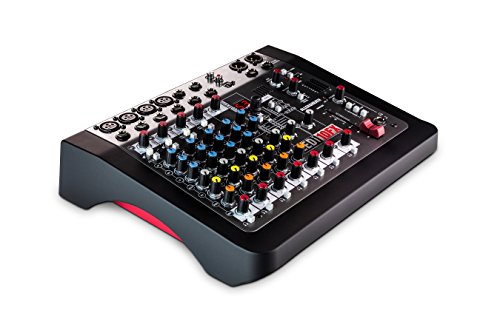
Allen & Heath ZEDi-10FX — Best Compact Multitrack Hybrid
The ZEDi-10FX is for the solo producer, songwriter or podcaster who tracks one or two sources at a time and wants the smallest possible footprint without giving up multitrack capture. Its guitar DI inputs make it the natural desk for singer-guitarists who record.
Strengths
- 4×4 USB interface — four channels to the DAW from a genuinely compact board
- Guitar DI high-impedance inputs capture acoustic and electric guitar properly
- A deep onboard effects library for monitoring and live use
Trade-offs
- Four mic preamps total; the multitrack count and the preamp count are both four
- Compact surface means shared controls and short faders
- Effects quantity invites overuse on recorded tracks — print dry, monitor wet
| USB interface | 4×4 USB audio interface |
| Inputs | Mic/line with guitar DI stages on key channels, plus stereo inputs |
| Effects | Onboard multi-effects library with 61 presets |
| Form | Compact desktop hybrid mixer |
The ZEDi-10FX was designed DAW-first in a way its rivals were not: Allen & Heath built the 4×4 interface into the mixer’s identity rather than bolting a stereo USB socket onto a live board. In practice you can record a vocal and a DI guitar on separate tracks while a stereo backing track returns from the DAW through the board, monitoring everything through hardware with effects on your voice and zero software latency in your headphones. That is the complete home-recording loop, in a box that fits beside a laptop.
The guitar inputs deserve their own sentence, because DI quality decides whether direct guitar tracks are usable or merely present. The high-impedance stages preserve the low end and pick attack that a line input strangles, so both acoustic pickups and electric guitars feeding amp simulations in the DAW arrive with their character intact. Songwriters who demo with guitar and voice will feel this advantage on every take.
Its ceiling is equally clear: four preamps and four USB channels. A duo tracking live together fits; a trio does not. Buy it sized for the sessions you actually run — one or two people, a handful of sources — and it is arguably the most rational DAW mixer in this entire guide.
For podcasters, the same 4×4 routing solves the classic two-host-plus-guest-plus-music problem with every voice on its own track for editing — a workflow that normally demands a dedicated podcast interface, delivered here inside a mixer that also runs a small live event without complaint.
Best for: solo producers and singer-guitarists tracking a few sources multitrack / Not suited for: sessions needing more than four simultaneous recorded channels
Check on Amazon — check the current price on Amazon for the exact variant described here.

Mackie ProFX12v3+ — Best for Streamers Who Record
The ProFX12v3+ fits the creator whose mixer serves three masters: a small live rig, a streaming desk and a DAW front end. Its multi-mode USB recording and Bluetooth input reflect how hybrid work actually happens now — backing tracks from a phone, a mix to the computer, a performance to the room.
Strengths
- Onyx preamps with generous clean gain for dynamic microphones
- Multi-mode USB recording adapts to streaming, mix capture and DAW tracking basics
- Bluetooth playback input removes a cable from every rehearsal and stream
Trade-offs
- USB recording is not a full multitrack interface of the Signature class — verify your exact tracking plan
- Feature depth means menus; slower to learn than a plain analog board
- Larger footprint than the compact hybrids here
| Preamps | Onyx mic preamps |
| USB | Multi-mode USB recording and playback |
| Wireless | Bluetooth playback input |
| Effects | GigFX+ effects engine |
Mackie built the v3+ generation for the reality that a mixer is now content infrastructure. The USB implementation offers modes for the jobs creators actually do — sending a polished stereo mix to a stream or DAW, capturing performances, and feeding backing material back through the board — while Bluetooth quietly becomes the feature you use daily, for rehearsal playback, walk-in music and reference tracks without a cable hunt.
The Onyx preamps carry the recording side. Streaming microphones, especially the popular large dynamic models, are gain-hungry, and the Onyx stage feeds them cleanly where lesser boards hiss. Paired with the GigFX+ engine for a touch of monitored reverb, a voice arrives at the DAW or the stream sounding produced rather than merely captured.
Position it honestly in the DAW hierarchy: this is the flexible capture-and-create board, not the multitrack specialist. If your DAW sessions are built one or two tracks at a time over backing material — the dominant pattern in modern home production — its modes match your life better than a purist interface does. If you track bands, the Soundcraft above is your pick.
Creators should note the headphone story: a board designed for streaming usually provides the cue and monitor flexibility to hear yourself, the DAW and a call guest in the right balance. On the ProFX12v3+ that balance is a physical control, not a software panel — during a live broadcast, that difference is worth more than any single specification.
Best for: streamers and small acts recording performances and content to a DAW / Not suited for: purist multitrack tracking of full bands
Check on Amazon — check the current price on Amazon for the exact variant described here.

Allen & Heath ZED-14 — Best Analog Front End
The ZED-14 is for the studio that already owns an interface and wants what an interface cannot give: a real analog summing and monitoring surface with quality preamps for tracking through, aux sends for hardware effects, and faders long enough to mix a performance rather than draw one.
Strengths
- DuoPre preamps and MusiQ EQ as an analog front end for any interface
- Spacious layout with long-throw faders built for hands-on mixing
- Stereo USB for quick mix capture alongside your main interface
Trade-offs
- USB is stereo only — multitrack recording still belongs to your interface
- Desk space and tier price of a serious console, not a compact accessory
- No onboard effects — monitoring polish comes from your outboard or DAW
| Inputs | 14 channels: 6 mono mic/line plus 4 stereo |
| Preamps | DuoPre with swept-mid MusiQ EQ |
| USB | Stereo USB in/out |
| Surface | Long-throw faders, touring-quality build |
There is a mature studio pattern this board serves perfectly: track through analog quality into a multitrack interface, then mix by summing stems back through an analog surface where fader rides are performances, not mouse drawings. The ZED-14’s DuoPre preamps make it a legitimate tracking front end — six channels of clean, musical gain and EQ for drums overheads, guitars and vocals — while its aux sends integrate hardware reverbs and compressors into the DAW loop.
The stereo USB, modest as it sounds, earns its keep daily: quick reference mixes, recording a rehearsal or a podcast without opening the main interface session, and a simple playback path from the computer. Think of it as the board’s notebook, while your interface remains the studio’s hard drive.
Buy this board for its surface and its preamps, in that order, and it will outlast several generations of the computers connected to it. Buy it expecting the USB socket to replace an interface and you will be disappointed — a distinction this guide exists to make clear.
A final front-end virtue: outboard integration. With aux sends and channel inserts in reach of the DAW loop, a favourite hardware compressor or reverb stops being decoration and becomes part of the tracking chain — printed deliberately, by choice, which is exactly how outboard should be used.
Best for: studios pairing an analog surface and preamps with an existing interface / Not suited for: buyers expecting multitrack recording from the mixer alone
Check on Amazon — check the current price on Amazon for the exact variant described here.

Behringer XENYX QX1204USB — Best Budget DAW Starter
The QX1204USB is for the beginner building a first DAW desk on a fixed budget: a couple of microphones, a keyboard, a guitar, and a computer that needs to hear all of it. It teaches the complete mixer-plus-DAW workflow for the least money in this guide.
Strengths
- Channel compressors and a Klark Teknik effects processor at a budget tier
- USB interface included for stereo capture and playback with a DAW
- Subgroup architecture that teaches real mixing technique
Trade-offs
- Stereo USB only — plan overdub-style recording, not multitrack sessions
- Preamp noise at high gain limits quiet-source recording
- Build quality suits a fixed desk, not a touring life
| Inputs | 12 inputs, XENYX mic preamps with one-knob compressors |
| Effects | Klark Teknik multi-effects processor |
| USB | USB audio interface, stereo |
| Buses | 2 subgroups plus main mix |
Every studio starts somewhere, and the QX1204USB’s virtue is completeness at a starter tier: preamps with compressors to keep a first vocal take under control, effects so monitoring does not feel like a hospital room, subgroups that teach signal flow, and a USB socket that puts the mix into a DAW tonight rather than after the next purchase. Beginners learn faster on a surface where everything is visible, and this board shows them the whole craft.
The recording method it teaches is the classic one: build the backing, then overdub one source at a time against DAW playback. Stereo USB supports that workflow fully. What it cannot do is capture a live trio to separate tracks — and a beginner who understands that limit, and records within it, will make better music than one fighting the wrong tool.
Expect the usual budget compromises in noise floor and feel, and expect to outgrow it if recording becomes serious. As a first desk that costs less than the mistake of buying the wrong specialist gear, it earns its place.
The subgroup lesson generalises: once a beginner understands buses on this board, every professional console in every studio reads as a larger version of the same idea. Teaching value is a real feature in a first desk, and this one has it.
Best for: beginners building a first mixer-and-DAW desk on a budget / Not suited for: multitrack session work or very quiet sources
Check on Amazon — check the current price on Amazon for the exact variant described here.

Yamaha MG12XU — Best for Live-to-DAW Capture
The MG12XU suits the band, church or school whose DAW work is capturing real performances: set the live mix, send it to a laptop over USB, and have a faithful stereo recording of the night. Its subgroup buses also feed multitrack-adjacent workflows through an external interface.
Strengths
- D-PRE preamps keep live vocals clean at real-world gain levels
- 4-bus architecture routes groups flexibly to recorders and interfaces
- SPX effects and one-knob compressors simplify live operation
Trade-offs
- USB capture is the stereo mix (or bus feeds), not per-channel multitrack
- Rotary-knob surface on some channel sections slows fast live rides
- No per-channel USB means studio overdub work is basic
| Inputs | 12 inputs with D-PRE mic preamps |
| Buses | 4-bus (2 subgroups) plus main |
| Effects | SPX effects; one-knob compressors |
| USB | USB interface for stereo recording and playback |
Most recordings made with mixers are not studio productions; they are documents of live events — the service, the school concert, the band’s best night — and the MG12XU is engineered for exactly that. Its D-PRE preamps stay clean at the gains live vocals demand, its compressors keep a service or show level without an engineer hovering, and the USB feed hands the laptop a balanced stereo mix that sounds like the room heard it.
The 4-bus design is the subtle advantage. Subgroups let you route, say, all vocals to one pair of outputs and instruments to another, feeding an external multitrack interface or a backup recorder with something more flexible than a flat mix. It is not multitrack from the board itself, but it is the most graceful bridge between a live desk and a DAW-centred archive.
For a studio-first buyer, the hybrids above are better tools. For the huge real-world category of ‘we perform live and we want it recorded properly’, this Yamaha is the most sensible board in the guide.
Church and school operators should value the MG12XU’s consistency: the same board, with the same layout, sits in thousands of venues, so a substitute operator or a borrowed engineer is never starting from zero — and the recording of the event inherits that reliability.
Best for: bands, churches and schools recording live performances to a DAW / Not suited for: studio multitrack tracking from the mixer alone
Check on Amazon — check the current price on Amazon for the exact variant described here.
Comparison Table
Read this table by the USB column first — it is the honest dividing line of the whole category — then by preamp count and surface. Two boards here are true multitrack hybrids, one is a flexible creator desk, and three are stereo-USB boards recommended openly for front-end and live-capture roles.
| Pick | Badge | Key spec | Best for |
|---|---|---|---|
| Soundcraft Signature Plus 12 | Best Overall for DAW | 4×4 USB-C 192 kHz multitrack, Ghost preamps | Hybrid tracking for small source counts |
| Allen & Heath ZEDi-10FX | Best Compact Multitrack Hybrid | 4×4 USB interface, guitar DI inputs, 61 FX presets | Compact multitrack for solo producers |
| Mackie ProFX12v3+ | Best for Streamers Who Record | Onyx preamps, multi-mode USB, Bluetooth, GigFX+ | Streaming plus DAW capture in one desk |
| Allen & Heath ZED-14 | Best Analog Front End | 6 DuoPre preamps, 4 stereo inputs, stereo USB | Analog front end and summing surface |
| Behringer XENYX QX1204USB | Best Budget DAW Starter | Compressors, Klark Teknik FX, stereo USB | First DAW desk, overdub workflow |
| Yamaha MG12XU | Best for Live-to-DAW Capture | D-PRE preamps, 4-bus routing, stereo USB capture | Recording live events faithfully |
How to Choose an Analog Mixer for DAW Work
Decide your simultaneous-track number before anything else. If you record one or two sources at a time against backing tracks, a 4×4 hybrid or even a stereo board covers you. If you record a live trio or a drum kit, no mixer in this class replaces an eight-input interface — buy the interface and add a mixer as a front end if you still want one. This single decision sorts the entire market, and getting it wrong is the expensive mistake this category is known for.
Second, understand monitoring. When you record through a mixer, you should monitor through the mixer: the analog path adds no latency, while routing your voice through the DAW and back adds a delay that singers find maddening. Check that the board lets you hear your live input mixed with DAW playback, ideally with effects on the monitored voice while the recorded track stays dry. Every pick here supports that pattern; the hybrids do it most elegantly.
Third, sample rates and drivers. A 192 kHz specification sounds impressive and matters little for most project work — 48 kHz or 96 kHz is where real sessions live — but driver quality matters daily. Class-compliant USB connections work anywhere with no installs; manufacturer drivers can offer lower latency and extra routing. On a shared or frequently rebuilt computer, class compliance is a genuine feature, not a compromise.
Multitrack, Stereo and the Space Between: Reading USB Specifications Honestly
Multitrack USB means each input channel travels to the computer separately: four channels in means four tracks in the DAW. Stereo USB means the board mixes everything first and sends the finished stereo mix. Both are legitimate; they serve different recordings. The dishonesty in this market is presentational — a stereo board photographed next to a DAW on a laptop implies a multitrack workflow it cannot deliver.
There is also a middle path worth knowing: boards with subgroups can send two or three sub-mixes to a separate interface, and boards used purely as front ends let an interface do all conversion while the mixer provides preamps, EQ and summing. Many respected project studios work exactly this way. The ZED-14 in this list exists for them.
Finally, check where the USB tap sits. On better designs the stereo feed can be taken pre- or post-fader, and the multitrack feeds on hybrids are typically post-preamp and pre-EQ or post-EQ depending on the model — which decides whether your printed tracks carry the board’s EQ. There is no universally right answer, but there is a right answer for your workflow, and it is in the manual of the exact model you are buying. Read that page before ordering.
Setting Up Your Mixer and DAW Together
The physical chain is simple: sources into the mixer, USB from mixer to computer, monitor speakers or headphones fed from the mixer’s outputs — not the computer’s. In the DAW, select the mixer as both input and output device, create tracks assigned to the individual USB channels on a hybrid (or the stereo pair on a stereo board), and set the session sample rate to match the interface. Record-enable a track, sing, and confirm the level in the DAW sits healthy without clipping — digital clipping at the converter cannot be undone.
Then set the monitoring balance: your live voice from the analog path, the backing from the DAW return, blended on the board. If your board offers a USB playback channel, ride it like any other source. Keep the DAW’s software monitoring off for any source you are hearing through the mixer, or you will hear both paths with a chorus of latency between them.
Hybrid Mixer or Interface Plus Controller? The Honest Comparison
Once a hybrid mixer’s price approaches a good interface’s, the comparison deserves honesty. A dedicated interface typically offers more simultaneous inputs per unit of money, better converters on paper, and a smaller footprint. What it does not offer is a surface: gains you can grab, EQ you can sweep while a vocalist performs, a monitor mix you can rebuild in seconds without opening a mixer window on screen. Producers who work alone and think in software often prefer the interface; producers who record other people, or who play an instrument while engineering, consistently reach for the hybrid.
There is also a longevity argument that rarely appears in specifications. An analog surface remains fully useful when its USB generation ages: the ZED-14 pattern — mixer as front end to whatever interface comes next — means a good board survives three computers and two interfaces. A hybrid bought for its preamps and layout, like the two multitrack picks here, degrades gracefully into exactly that role. Buy the analog side for a decade and treat the interface side as a bonus with a shorter horizon, and the economics of every pick in this guide improve.
Whichever route you choose, keep one principle: the recording chain is only as honest as its weakest specification. A multitrack claim you have not verified, a gain stage you have not tested, a return path you have not listened to — each will introduce itself during your most important session. Spend one evening testing the full loop with throwaway material, and the setup will never surprise you when it matters.
How to Record Your First Multitrack Session with a Hybrid Mixer
This routine assumes a hybrid from this guide — the Soundcraft or the ZEDi — and a vocal-plus-guitar session, the most common first multitrack job. The same steps scale to any small combination of sources.
- Connect the mixer by USB, open your DAW, and select the mixer as the audio device for both input and output. Set the session to 48 kHz unless you have a reason to choose otherwise.
- Create three tracks: vocal, guitar, and a stereo track for any keyboard or backing source. Assign each to its own USB input channel from the mixer.
- Set gains on the board, not in the software: perform the loudest part of the song and set each preamp so the DAW meter peaks comfortably below clipping with room to spare.
- Turn off software monitoring on the tracks you will hear through the mixer. Monitor your live sources through the analog path and the backing through the USB return.
- Add a touch of the board’s reverb to your headphone mix only, keeping the recorded tracks dry — you can add better reverb in the mix, but you cannot remove printed reverb.
- Record a thirty-second test, play it back, and check each track alone: the vocal track should contain no guitar, the guitar track no vocal. If they bleed through the USB routing, your channel assignments are wrong — fix them now, not after the take.
- Record the full take. When you stop, your tracks are already separate, labelled and ready to edit — the entire point of the hybrid workflow.
Finish by saving the session with the board’s settings noted — a phone photo of the mixer surface is the analog era’s session recall, and it works. Note the gain positions especially; returning to match a punch-in next week is far easier with the photograph than from memory.
Troubleshooting
Problem: You hear an echo or doubling on your voice while recording → software monitoring in the DAW is on at the same time as the mixer’s hardware monitoring. Mute or disable input monitoring on the record track and listen only through the analog path.
Problem: All your instruments arrive on one stereo track despite buying a hybrid → the DAW tracks are all assigned to the same USB input pair. Assign each track its own input channel in the DAW’s input matrix, and confirm the mixer is in its multitrack USB mode if it offers one.
Problem: Recorded tracks sound distorted while the mixer sounds clean → the converters are clipping after the preamp. Lower the channel gain slightly and make up level with the fader for monitoring; the recorded tap on most hybrids follows the gain stage, not the fader.
Problem: The computer does not see the mixer at all → work from the cable outward: try the board’s own USB port rather than a hub, confirm the mixer is selected as the device in the DAW (not just the operating system), and install the manufacturer’s driver if the model requires one.
Problem: Latency makes playing to the backing track feel sluggish → you are monitoring through the software. Route monitoring through the mixer as described above; if you must monitor a software instrument, lower the DAW buffer size for the tracking session and raise it again for mixing.
Common Buying Mistakes
Buying a stereo USB mixer for multitrack work. The defining mistake of this category, and the reason this guide repeats the distinction in every review. Stereo in means stereo in — no setting changes it.
Printing effects and heavy EQ to recorded tracks. Reverb and aggressive EQ are mix decisions. Recorded dry and flat-ish, a track can be anything later; recorded wet and carved, it can only be one thing. Monitor with effects, record without them.
Setting levels in the software instead of at the preamp. Gain belongs at the board. A too-quiet preamp boosted in the DAW brings its noise floor up with it; a clipped preamp cannot be un-clipped by any fader downstream.
Ignoring the return path. A hybrid is a conversation: tracks go up, playback comes back. Boards and setups that make the return awkward — no dedicated USB channel, no blend control — slow every session. Test the full loop, not just the recording direction.
Chasing sample-rate numbers. A stable 48 kHz session with good gain staging beats a fragile 192 kHz session every time. Spend attention on microphone position and preamp gain, where the audible differences actually live.
Final Recommendation
For most readers, the Soundcraft Signature Plus 12 is the answer: a real 4×4 multitrack interface inside a genuinely good analog mixer, with preamps and EQ that respect the tracks they feed. Solo producers who work smaller should take the ZEDi-10FX and enjoy the same multitrack honesty in a compact, guitar-friendly form, while creators who stream as much as they record are best matched by the Mackie ProFX12v3+.
The stereo-USB picks earn their places in defined roles: the ZED-14 as an analog front end and summing surface beside an existing interface, the QX1204USB as the budget teaching desk, and the MG12XU as the live-capture specialist. Choose by the recording you actually make — simultaneous tracks, overdubs, or live documents — and the right board selects itself.
Start here: Soundcraft Signature Plus 12, Allen & Heath ZEDi-10FX, Mackie ProFX12v3+ — check the current price on Amazon for each before you decide.
Related guides in this series: Best Analog Mixers; Best Analog Mixers With Usb; Best Analog And Hybrid Mixers; Best Audio Mixers For Home Studios; Best 10 Channel Mixers; Best Alternative Windows Audio Mixers.
Frequently Asked Questions
Can an analog mixer really record multitrack to a DAW?
Yes, if it is a hybrid with a multitrack USB interface, like the Soundcraft Signature Plus 12 or the ZEDi-10FX in this guide — each streams four channels independently. A standard analog mixer with USB streams only the stereo main mix. The product name and listing will state the interface type; if it does not say multitrack or list a channel count for the USB connection, assume stereo.
How many tracks can I record at once with the picks here?
Four simultaneous tracks with either multitrack hybrid, which covers vocals, guitar and a stereo source together, or four individual sources. The stereo-USB picks record one stereo mix at a time, which suits overdub workflows and live capture. Full drum kits and live bands need a dedicated multitrack interface with more inputs.
Should I record with the mixer’s EQ and effects applied?
Generally no. Record tracks dry and close to flat, using the mixer’s EQ only to fix genuine problems like rumble (a high-pass filter is always safe). Use onboard effects in your headphones for confidence while singing, but keep them off the recorded track — mix decisions belong to the mixing stage, where they can be changed.
What sample rate should I use with a mixer interface?
48 kHz is the sensible default for music that may meet video, and it keeps files and latency manageable. Higher rates up to the 192 kHz the Soundcraft offers are available if your workflow demands them, but microphone choice, placement and gain staging will affect your sound far more than the rate you choose.
Do I still need an audio interface if I buy one of these mixers?
With a multitrack hybrid, for small source counts, no — the mixer is the interface. With a stereo-USB board, the mixer can serve as a simple stereo interface for overdubs and capture, but serious multitrack work still needs a dedicated interface, with the mixer acting as its analog front end.
Why monitor through the mixer instead of the DAW?
Because the analog path is instantaneous. Software monitoring routes your voice into the computer and back, adding a delay that makes singing and playing feel disconnected. Monitoring through the mixer while the DAW records silently in the background gives you zero-latency confidence and clean tracks at the same time.


