Disclosure: airfryerkitchensupply.com is reader-supported. When you buy through links on our site, we may earn an affiliate commission at no extra cost to you.
Where to buy
Every unit in this guide to the best 110 volt portable battery back options — portable power stations with real 110V AC outlets — is a current Amazon listing, verified through Amazon’s own product data before we wrote a word about it. Start with the Anker SOLIX C1000 Gen 2 if you want the strongest all-round combination of capacity, output, and recharge speed, the EF ECOFLOW Delta 3 if home backup during outages is the main job, the Jackery Explorer 300 if camping and travel come first, the BLUETTI Elite 30 V2 if you need fast UPS switchover for a computer or router, the MARBERO 300W if budget leads the decision, and the Daran 89.6Wh if you want the smallest unit that still offers a real AC outlet. Check the current price on Amazon for the model you choose, and confirm the capacity in watt-hours on the listing, because several of these brands sell look-alike units in multiple sizes.
Introduction: what a “110 volt portable battery back” actually is
If you typed best 110 volt portable battery back into a search box, the product you are almost certainly looking for is a portable power station: a rechargeable battery pack with a built-in inverter that turns stored DC power into standard 110V AC — the same electricity that comes out of a wall outlet — so it can run or charge ordinary household devices anywhere. The “back” in the keyword is short for backup, and backup is the heart of the category: keeping a router, a CPAP, a laptop, lights, a phone, or a small fridge alive when the grid drops, or carrying wall-outlet power to a campsite, a job site, a tailgate, or a vendor stall where no outlet exists.
Two numbers decide whether a given unit fits your life, and both are printed in every spec box in this guide. The first is capacity in watt-hours (Wh): how much energy is in the tank. The second is continuous AC output in watts (W): how much power the inverter can deliver at once, with a higher short “peak” or “surge” figure for motor starts. A 300Wh station can run a 30-watt router for roughly ten hours, or a 300-watt appliance for roughly one hour — but only if the appliance stays under the inverter’s watt ceiling. Buyers who match only the watt-hours and ignore the watt ceiling are the ones leaving disappointed reviews; both numbers matter, and our buying guide below walks through the arithmetic in plain language.
The market has also quietly standardized on a better battery chemistry. Most current models in this guide use lithium iron phosphate (LiFePO4) cells, which tolerate far more charge cycles than the older lithium-ion packs, run cooler, and are the right choice for a unit that will sit charged in a closet for months waiting for an outage. Every pick below uses LiFePO4 per its manufacturer’s listing, except where noted. Finally, a note on charging speed: the newest mid-size stations recharge from a wall outlet in about an hour, which changes how you use them — a station that refills during a brief grid restoration or over a lunch stop is a genuinely different tool from one that needs all night.
Portability deserves one honest sentence before the picks. In this category, capacity is weight: the ultra-compact Daran in this guide rides in a camera bag, the 300Wh-class units are one-hand carries, and the 1,024Wh pair are two-hand, trunk-and-closet machines that you move deliberately rather than casually. None of that is a flaw — but buyers who imagine carrying a fridge-capable station on a hiking trail should recalibrate now. Match the unit to the distance it will actually travel: across a room during an outage, across a campground, or across town in a car.
In this guide
Quick Picks
- Best Overall — Anker SOLIX C1000 Gen 2: 1,024Wh LiFePO4 capacity, 2,000W continuous output, and a full wall charge in about 49 minutes, with UPS capability. The complete package. Check the current price on Amazon
- Best for Home Backup — EF ECOFLOW Delta 3: 1,024Wh and 1,800W of output with a 56-minute full charge, sized for fridges, lights, and work-from-home gear during outages. Check the current price on Amazon
- Best for Camping and Travel — Jackery Explorer 300: 292Wh in a grab-and-go frame from the brand that defined the category, with solar charging for off-grid weekends. Check the current price on Amazon
- Best for UPS Switchover — BLUETTI Elite 30 V2: 288Wh, 600W output with power-lifting headroom, and a 10-millisecond UPS switchover that keeps computers and routers alive through a blackout. Check the current price on Amazon
- Best Budget — MARBERO 300W Portable Power Station: 237Wh with a pure sine wave 110V outlet, USB-C, USB-A, and DC outputs at the lowest price tier in this guide. Check the current price on Amazon
- Best Ultra-Compact — Daran Portable Power Station 89.6Wh: a pocket-class 100W unit with a real AC outlet and fast PD charging, for phones, cameras, and light duty. Check the current price on Amazon
How These Picks Were Chosen
We verified every unit through Amazon’s product data feed for this site, matching each model and ASIN against the manufacturer’s own listing. A power station only qualified if its listing confirms a genuine 110V AC outlet (not just USB and DC outputs, which many “power banks” hide behind), a stated capacity in watt-hours, and a stated continuous AC output in watts. We excluded the anonymous stations whose listings quote fantasy capacities — a common trick is advertising milliamp-hours at cell voltage to inflate the number, or quoting “peak” watts as if they were continuous. Where a brand sells the same shell in several capacities, we picked the size that fits the role and named it exactly.
The six roles mirror how people actually buy these: a do-everything mid-size unit, a home-backup specialist, a camping classic, a UPS-focused unit for electronics, a budget entry point, and an ultra-compact for light loads. All six use LiFePO4 cells per their listings, because for a backup device that may sit at full charge for months, cycle life and thermal stability are not luxuries. Solar charging is supported across the list (panels are sold separately unless a listing says otherwise), and we note charge times from the manufacturers’ own figures — wall charging, not the much slower car or small-panel numbers that listings like to headline.
One methodological caution that applies to the whole category: runtime estimates in this article are arithmetic, not promises. We show you how to do the division yourself in the buying guide, including the inverter-efficiency haircut every honest estimate needs, because the single most common source of disappointment with these products is a buyer multiplying nameplate numbers and expecting laboratory results in a storm.
The 6 Best 110 Volt Portable Battery Backup Units
Anker SOLIX C1000 Gen 2 — Best Overall
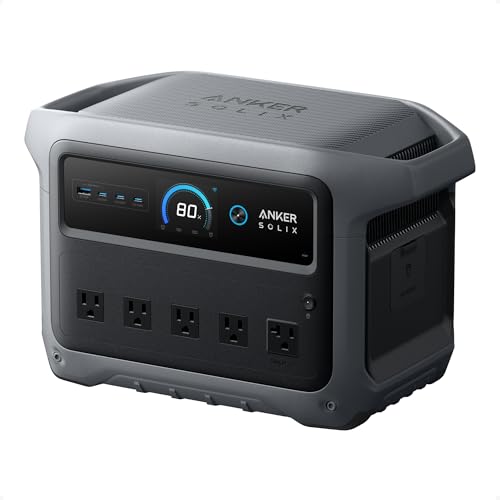
The Anker SOLIX C1000 Gen 2 is where the category’s threads come together: 1,024Wh of LiFePO4 capacity, a 2,000W continuous inverter (3,000W peak for surges), and wall charging fast enough to refill the whole unit in about 49 minutes per Anker’s listing. That charge speed is not a party trick. In an outage with intermittent grid returns, or on a trip with one café stop, it is the difference between a battery that is ready and a battery that is a rumor. Anker also builds in UPS functionality, so the same unit can live under a desk guarding a computer and NAS, then go camping on the weekend.
Strengths
- 2,000W continuous output runs genuinely demanding loads — power tools, a microwave in short bursts, a full-size fridge with headroom to spare
- 49-minute full recharge is the fastest in this guide and transforms outage and travel usability
- LiFePO4 chemistry and Anker’s support network suit a buy-it-for-years purchase
Trade-offs
- Mid-size means mid-weight: this is a two-hand carry to the car, not a toss-in-a-tote unit
- Premium price tier relative to no-name 1,000Wh stations; you are paying for the inverter quality, charge speed, and warranty
- At 1,024Wh it will not run high-draw heating appliances for long — no battery this size will, whatever the listing implies
Key specs (from the manufacturer’s listing)
- Capacity: 1,024Wh, LiFePO4
- AC output: 2,000W continuous, 3,000W peak
- Recharge: full charge in about 49 minutes (wall)
- Functions: UPS capability; solar charging supported
Who is it for? The buyer who wants one station to cover the home office during outages, the fridge during a storm, and the campsite in summer — and who charges it from the wall far more often than from a panel. Its output ceiling means you rarely have to ask “can it run this?”; its capacity means the honest question is only “for how long?” If your loads are small and your budget is firm, the BLUETTI or MARBERO below will serve you for less. If you want the unit that ends the research, this is it.
Best for: households wanting one station for backup, travel, and occasional heavy loads / Not suited for: buyers who need multi-day whole-home backup, which is a job for much larger stations or a generator
Check the current price on Amazon

EF ECOFLOW Delta 3 — Best for Home Backup
EcoFlow’s Delta 3 matches the Anker on capacity — 1,024Wh of LiFePO4 — with a 1,800W inverter, 100W USB-C output for fast laptop charging, and a 56-minute full wall charge. Its design center is the home: quiet operation, fast turnaround between outages, and enough output to keep a refrigerator, lights, a router, and a laptop running as a system rather than forcing you to choose which one gets power. For apartment dwellers who cannot run a generator — no balcony fuel storage, no exhaust, no noise complaints — a unit like this is not the compromise option; it is the only option, and the Delta 3 is its most polished form.
Strengths
- 1,800W output covers the realistic outage load list — fridge, lights, network gear, laptops — simultaneously
- 56-minute full recharge means a brief grid return fully resets your backup
- 100W USB-C output fast-charges modern laptops without touching the AC inverter, which saves battery
Trade-offs
- Slightly lower continuous output than the Anker; marginal for the very largest single loads
- Like all 1kWh stations, runtime on a fridge is measured in hours, not days — plan food and charging accordingly
- Solar input is supported but a panel large enough to matter is a separate, non-trivial purchase
Key specs (from the manufacturer’s listing)
- Capacity: 1,024Wh, LiFePO4
- AC output: 1,800W; USB-C output up to 100W
- Recharge: full charge in about 56 minutes (wall)
- Role: home backup and camping solar generator
The Delta 3 versus the Anker C1000 is the closest call in this guide. Choose the EcoFlow if your use is home-first — its ecosystem of expansion and solar accessories is deep, and its controls are tuned for set-and-forget outage duty. Choose the Anker if raw output and the fastest possible recharge matter more. Either way, you are buying the current state of the art at the 1kWh size, and the honest difference between them is smaller than the difference between this class and everything below it.
Best for: apartment and house backup for fridge, lights, network, and work gear / Not suited for: buyers needing to run well pumps, large power tools all day, or multi-day outages without recharge access
Check the current price on Amazon

Jackery Explorer 300 — Best for Camping and Travel
The Explorer 300 is the archetype: 292Wh in a compact, handle-topped box that has ridden in more truck beds and tent vestibules than any competitor. It will not run your fridge through the night, and it is not trying to. Its job is the camp kit — phones, camera batteries, lights, a drone, a small fan, a laptop top-up — plus emergency duty at home for the router and a lamp. Jackery’s listing for this unit specifies a LiFePO4 backup battery, solar charging support (panel sold separately), and the simple, legible interface that made the brand the default recommendation for non-technical buyers.
Strengths
- The most field-proven small station on the market, with accessories and panels everywhere
- Genuinely portable: one-hand carry, car-friendly size, simple controls anyone can run at 2 a.m.
- LiFePO4 pack per the current listing, a real upgrade for a model line this established
Trade-offs
- 292Wh is a weekend-of-small-loads budget; CPAP users must do the math carefully and disable heated humidification
- Output ceiling excludes kettles, hair dryers, space heaters, and most kitchen appliances
- Recharge speed is ordinary compared with the newest fast-charge models in this guide
Key specs (from the manufacturer’s listing)
- Capacity: 292Wh, LiFePO4
- Role: camping, travel, hunting, blackout essentials
- Charging: wall, car, and solar (panel sold separately)
Buy the Explorer 300 if your backup plan is about communication and light rather than refrigeration: phones alive, router up, a lamp on, cameras charged. It is also the right gift purchase — the relative who would never research a power station will understand this one in five minutes. If your outage plan starts with the words “the fridge,” skip to the 1,024Wh pair at the top of this guide.
Best for: campers, travelers, and light-duty home backup for network and lighting / Not suited for: fridge backup, CPAP with heated humidifier, or any heating appliance
Check the current price on Amazon

BLUETTI Elite 30 V2 — Best for UPS Switchover
The BLUETTI Elite 30 V2 is a 288Wh, 600W station with a party trick that matters enormously to one specific buyer: a 10-millisecond UPS switchover. When the grid fails, it takes over so fast that a desktop computer, a router, or a NAS does not notice — no reboot, no corrupted write, no dropped call. Its “power lifting” mode stretches the inverter to run loads up to 1,500W that are mostly resistive, and it recharges from empty to 80 percent in about 45 minutes. As a desk-side insurance policy that also does camping duty, it is the most thoughtfully aimed small station in this guide.
Strengths
- 10ms UPS switchover genuinely protects computers, routers, and storage from blackout interruptions
- 600W continuous output with power-lifting headroom covers electronics far better than rival 300W-class units
- 45-minute 0–80% fast charge keeps turnaround short between outages
Trade-offs
- 288Wh is a short bridge, not a long backup: it saves your work and keeps the network up for hours, not the house for a day
- Power-lifting mode does not suit sensitive electronics or motor loads; it is for simple resistive loads
- Buyers who never need UPS are paying for a feature they will not use — the MARBERO is the value alternative
Key specs (from the manufacturer’s listing)
- Capacity: 288Wh, LiFePO4
- AC output: 600W; power lifting up to 1,500W
- UPS switchover: 10ms
- Recharge: 0–80% in about 45 minutes
The Elite 30 V2 is the pick for the work-from-home reader whose real fear is not darkness but data loss: the dropped meeting, the crashed render, the NAS rebuilding its array. Set it between the wall and your desk gear and forget it; it will also happily run the camp lights in July. That dual life is exactly what a portable battery backup should offer at this size.
Best for: home-office UPS duty, routers, NAS and desktop protection, plus light travel use / Not suited for: long fridge runtime or buyers who want maximum watt-hours per dollar with no UPS need
Check the current price on Amazon

MARBERO 300W Portable Power Station — Best Budget
The MARBERO is the honest entry point: 237Wh of capacity, a 300W inverter with a pure sine wave 110V AC outlet, and the full spread of small outputs — USB-C, USB-A, and DC — at the lowest price tier in this guide. Pure sine wave matters more than the brand name here: it is the waveform that motors, audio gear, and sensitive chargers expect, and many ultra-cheap stations quietly substitute a modified wave that buzzes, heats, and occasionally refuses to run things. The MARBERO does the important thing right and trims elsewhere.
Strengths
- Pure sine wave AC at a budget tier — safe for the full range of small electronics
- Complete output set (AC, USB-C, USB-A, DC) covers phones, lights, cameras, and small fans without adapters
- Small and light enough for a glovebox-to-picnic-table life
Trade-offs
- 300W ceiling and 237Wh capacity confine it to small loads; it is a charger and light source, not an appliance backup
- Build and interface are functional rather than premium, and long-term brand support is thinner than Anker or EcoFlow
- Solar charging works but slowly at this size; wall charging is the realistic refill
Key specs (from the manufacturer’s listing)
- Capacity: 237Wh, lithium battery
- AC output: 300W, pure sine wave 110V outlet
- Outputs: AC, USB-C, USB-A, DC
- Role: camping and emergency small-load backup
Choose the MARBERO if the job list reads: keep phones and a hotspot alive in an outage, run LED lights and a fan at camp, charge camera and drone batteries in the field. It does those jobs properly, with the right waveform, at a price that does not require a family meeting. The moment the job list grows to fridges or computers-with-UPS, move up this guide — not because the MARBERO is bad, but because physics charges for capacity.
Best for: budget buyers covering phones, lights, fans, and camera gear / Not suited for: appliance backup, UPS duty, or CPAP users without a careful runtime test
Check the current price on Amazon

Daran Portable Power Station 89.6Wh — Best Ultra-Compact
The smallest pick here is barely a “station” at all: 89.6Wh of LiFePO4 in a power-bank-sized unit that nonetheless includes a real AC outlet delivering 100W (200W peak), plus fast PD charging for phones and tablets. That AC outlet is the whole point. It runs the things USB cannot: a camera battery charger with a wall wart, a small lamp, an older laptop brick, a label printer at a market stall. Under 100Wh also means it sits within the size airlines generally allow in cabin baggage — check your carrier’s current rules before flying — which no other pick in this guide can claim.
Strengths
- A real 110V AC outlet in a unit small enough for a jacket-pocket-to-daypack life
- LiFePO4 cells, unusual at this size, for better cycle life and stability
- Fast PD charging covers modern phones and tablets at full speed
Trade-offs
- 89.6Wh is minutes-to-a-few-hours territory for AC loads; it is a bridge and a charger, not a backup system
- 100W AC ceiling excludes almost all appliances; even some laptop bricks under load will push it
- Cost per watt-hour is the highest here — miniaturization is what you are paying for
Key specs (from the manufacturer’s listing)
- Capacity: 89.6Wh, LiFePO4
- AC output: 100W, 200W peak
- Charging: PD fast charging; solar input supported
- Role: ultra-portable charging with an AC outlet
The Daran is a specialist: for the photographer whose charger only speaks AC, the market vendor running a small printer, the traveler who wants one brick for every device including the odd wall-wart. If your needs start at “keep the router up all evening,” buy the BLUETTI or Jackery instead. If your needs are measured in grams, this is the only pick that fits.
Best for: ultra-light travel, camera and device charging, wall-wart appliances under 100W / Not suited for: any appliance backup, CPAP, or multi-device outage duty
Check the current price on Amazon
Comparison Table
| Pick | Badge | Key spec | Best for |
|---|---|---|---|
| Anker SOLIX C1000 Gen 2 | Best Overall | 1,024Wh, 2,000W, 49-min full charge | One station for home and travel |
| EF ECOFLOW Delta 3 | Best for Home Backup | 1,024Wh, 1,800W, 56-min full charge | Fridge, lights, network in outages |
| Jackery Explorer 300 | Best for Camping and Travel | 292Wh, solar-ready | Camp kit and light essentials |
| BLUETTI Elite 30 V2 | Best for UPS Switchover | 288Wh, 600W, 10ms UPS | Computers, routers, NAS |
| MARBERO 300W | Best Budget | 237Wh, 300W pure sine wave | Phones, lights, fans on a budget |
| Daran 89.6Wh | Best Ultra-Compact | 89.6Wh, 100W AC outlet | Travel charging with real AC |
How to Choose a Portable Battery Backup: The Two-Number Method
Step 1: List your loads and their watts. Every device you care about has a wattage on its label or in its manual. Typical outage essentials: a router and modem draw 10–20W together, LED lights 5–15W each, a laptop 30–65W, a modern fridge 100–200W while its compressor runs (and it cycles on and off), a CPAP 30–60W without heated humidification and much more with it. Heating appliances — space heaters, kettles, hair dryers — draw 1,000–1,500W and drain any portable battery with humiliating speed; plan to live without them on battery.
Step 2: Check the ceiling. Add up the watts of everything that must run at the same time. That total must sit under the station’s continuous AC output, with headroom for motor surges when a fridge or pump starts. A 300W station cannot run a 400W load for one second, no matter how big its battery is. This is the check most buyers skip.
Step 3: Do the runtime division honestly. Runtime in hours ≈ (capacity in Wh × 0.85) ÷ load in watts. The 0.85 accounts for inverter and conversion losses — any estimate that skips it is marketing. A 1,024Wh station running a 120W average fridge load gives roughly seven hours. A 288Wh station running a 15W router gives roughly sixteen hours. Run this arithmetic for your own list before you buy, and you will never be surprised in a storm.
Step 4: Match recharge speed to your scenario. If outages in your area come with brief restorations, or your station travels and refills at stops, fast wall charging (the Anker and EcoFlow here refill in about an hour) is worth real money. If the station lives at a cabin and charges all week, it is not. Solar input is a genuine capability on all six picks, but a panel produces its rating only in strong, direct sun; treat solar as a range extender, not a refill plan, unless you buy a large panel and have the sky for it.
Step 5: Prefer LiFePO4 for backup duty. A backup battery spends its life waiting, often at full charge, sometimes in a hot garage. Lithium iron phosphate tolerates that life — many more cycles, better thermal stability — far better than the older lithium-ion chemistry. All six picks here use LiFePO4 per their listings except the budget MARBERO, whose listing specifies a lithium battery without the LiFePO4 designation; at its price and light-duty role, that is a fair trade, but daily-cycled users should step up.
How to Set Up Your Battery Backup Before the Power Goes Out
Step 1: Charge it fully, then check the firmware and settings. Unbox, charge to full from the wall, and set the AC timeout and screen behavior if the unit offers an app or menu — you want the inverter to stay on for backup duty, not auto-sleep.
Step 2: Run a live drill with your real loads. Plug in the actual router, lamp, and laptop you plan to protect. Watch the station’s output wattage readout — it tells you the true draw, which is often lower than label ratings — and let it run for thirty minutes. Note the percentage used; that is your personal runtime calibration.
Step 3: Stage it where it will be used. A backup in a garage box helps no one at midnight. Keep the station within cord reach of the devices it protects, with its charging cable connected or coiled beside it, and a flashlight on top. For UPS-style duty (the BLUETTI’s specialty), leave it inline permanently: wall → station → computer and router.
Step 4: Maintain the charge quarterly. LiFePO4 units hold charge well, but “well” is not “forever.” Put a recurring reminder on your calendar: top the station up every three months, and run the drill again before storm or fire season in your region.
Problem: the station shuts off while running a small load like a CPAP or router. → Many units auto-sleep when output is very low or when a timeout is set. Disable the AC auto-off in settings, or keep a tiny additional load plugged in. Test this at home on a normal night, not during the outage.
Problem: the fridge starts, the station beeps and cuts out. → The compressor’s start surge exceeded the inverter’s peak. You need a higher-output unit (the 1,800–2,000W picks here shrug this off) or a fridge-only strategy with nothing else on the circuit at start.
Problem: solar charging is far slower than the panel’s rating. → Panels are rated in laboratory sun. Angle the panel directly at the sun, eliminate even partial shading, and expect strong midday hours to do most of the work. This is physics, not a defective unit.
Battery Backup vs a Fuel Generator: An Honest Comparison
Readers cross-shopping this category always ask the generator question, so here is the straight answer. A fuel generator wins on raw endurance: with a can of gasoline it produces kilowatts for days, runs well pumps and large tools, and costs less per watt of output. If your outages are multi-day, rural, and involve big motor loads, a generator is the correct tool and no article about batteries should talk you out of it.
The battery station wins everywhere else. It is silent, which at 3 a.m. in a dense neighborhood is not a luxury but a relationship strategy. It produces no carbon monoxide, so it can live and work indoors — in an apartment, a bedroom, a nursery — where a generator can never go. It starts instantly, needs no fuel storage, no oil, no pull cord, no carburetor gummed up from sitting. It sips from solar panels. And for the most common real-world outage — a few hours, a few times a year — it covers the actual load list (lights, phones, router, laptop, fridge cycling) with capacity to spare. The households that end up happiest often own the logic in that order: a battery station as the always-ready first responder, and a generator only if their outage history genuinely demands one. Note also what the battery cannot do in this comparison: it cannot be “refueled” in five minutes unless your station fast-charges from a wall that happens to be live somewhere — which is precisely why the one-hour recharge times on the Anker and EcoFlow picks matter, and why we weighted them so heavily.
Sizing Scenarios: Three Households, Three Answers
The apartment work-from-home household. Loads: router and modem (15W), a laptop (45W), one LED lamp (10W), phones. Total draw about 70W, ceiling trivially met by any pick here. The real question is switchover and duration: the BLUETTI Elite 30 V2 keeps the network and a laptop alive through the workday-length outage and protects the desktop through the blip-length ones. If a desktop PC rather than a laptop is the work machine, its higher draw shortens the bridge — the drill in our setup section tells you exactly how long yours is.
The suburban family house. Loads: fridge (averaging 120W as it cycles), router (15W), several lights (30W), phones, a TV for news and kids (80W). Simultaneous draw is modest — under 300W — but duration is the battleground, and the fridge never sleeps. This is the 1,024Wh class’s home turf: the Anker or EcoFlow runs this list through an evening and a night, and fast wall charging exploits any mid-outage grid return. Families in hurricane or ice-storm country should treat 1kWh as the floor, not the ceiling, and consider that a second unit or an expansion path beats one giant station for flexibility.
The camper, vendor, and job-site user. Loads vary wildly: a market vendor’s printer and card reader, a photographer’s chargers, a camper’s lights, fan, and phones, a contractor’s battery-tool chargers at a site without power yet. Portability dominates the decision, and the answer splits by ambition — the Jackery Explorer 300 for the classic camp kit, the MARBERO for the budget version of the same, the Daran when the whole kit must fit in a camera bag. The contractor charging tool batteries all day is the exception: that is a 1,024Wh job wearing a small-station costume, and the Anker’s output and recharge speed earn their tier there.
Common Buying Mistakes
Confusing watts with watt-hours. Watts are the size of the door; watt-hours are the size of the room behind it. A “3,000W” headline on a tiny station describes a surge the inverter survives briefly, not a capacity to run your house. Both numbers, always, before buying.
Believing milliamp-hour marketing. Small power banks advertise mAh measured at cell voltage (around 3.7V), which makes numbers look three times larger than the same energy in watt-hours at 110V. Convert or ignore: Wh is the only honest common currency, and it is what every spec box in this guide uses.
Planning to run heating appliances. A space heater on the largest pick here empties it in well under an hour. Batteries are for light, communication, refrigeration, and electronics. Heat comes from insulation, blankets, and — where safe and legal — combustion heaters designed for the purpose, never from a portable power station strategy.
Buying for the once-a-decade storm and neglecting the monthly use. The best backup is the one you also use — camping, yard work away from outlets, a vendor stall, a tailgate. Units that live in your routine stay charged, tested, and familiar. Units bought in fear and shelved are discovered empty at the worst moment.
Ignoring the CPAP humidifier setting. Heated humidification can triple a CPAP’s draw. Most successful CPAP-on-battery setups disable the heater and humidifier for backup nights. Test your exact setup at home before relying on it.
Load Discipline: Getting a Full Night Out of a Small Station
The difference between a station that “died at 2 a.m.” and one that “lasted the whole outage” is rarely the battery — it is how the load was managed. A few habits multiply any unit’s useful runtime. Run electronics from DC and USB outputs whenever the option exists: charging a phone or running a light from USB skips the inverter entirely, and the inverter’s own standby draw — several watts just to stay awake — is pure waste on a small battery. If everything you need can run on DC for an hour, switch the AC section off and let the inverter sleep.
Sequence the big loads. A fridge’s compressor and a laptop charger and a fan can all run from a mid-size station, but starting them in the same second stacks their surges. Stagger starts by a few seconds and marginal setups stop tripping. Keep the fridge door closed and let it coast: a modern fridge holds safe temperatures for hours unopened, so many experienced outage households run it in shifts — an hour on, a couple of hours off — tripling effective coverage from the same watt-hours.
Finally, watch the readout and learn your house. Every pick in this guide displays output watts and estimated remaining time. During your first drill, note which loads are vampires (game consoles and older TVs in standby are famous) and which are mirages (the 1,200W kettle that runs for four minutes costs about 80Wh — affordable as a deliberate treat, ruinous as a habit). Backup power rewards households that know their numbers, and the station itself teaches them to you if you let it.
Final Recommendation
For most households, the Anker SOLIX C1000 Gen 2 is the buy: the output to run real loads, the capacity for a serious outage evening, and a recharge speed that forgives poor planning. Home-backup specialists should take the EF ECOFLOW Delta 3 and its outage-tuned design. Campers and travelers are best served by the Jackery Explorer 300, desk workers by the BLUETTI Elite 30 V2 and its true UPS switchover, budget buyers by the MARBERO 300W, and the weight-obsessed by the Daran 89.6Wh. Run the two-number check for your own loads before ordering, check price on Amazon, and confirm the exact capacity on the listing.
A battery backup is one piece of a household-power plan. Readers building theirs out will also want our base guide to the Best 110 Volt Battery Back, our sibling guide to the Best 110 Volt Portable Space Heater (to understand exactly why heaters stay off battery), the Best 100 Watt 12 Volt Solar Panel for off-grid recharging, and the Best 110 12 Volt Inverter if you are building a vehicle-based setup instead.
Frequently Asked Questions
What size portable power station do I need for a refrigerator?
Start with output and capacity separately. The inverter should be rated at least 1,000W continuous to handle compressor surges comfortably — the 1,024Wh picks in this guide qualify — and capacity decides duration: a typical modern fridge averaging 100–150W gets roughly six to eight hours from 1,024Wh. For overnight-plus coverage, either recharge mid-outage or step up to a larger station.
Can a portable battery backup run a CPAP all night?
Often, yes, with planning. A CPAP without heated humidification typically draws 30–60W, so a 288–300Wh station can cover a night and a 1,024Wh station covers several. With the heated humidifier on, draw can triple and even mid-size stations struggle. Test your exact machine and settings at home first, and consider a DC converter for your CPAP if one exists — it avoids inverter losses entirely.
How long will a power station hold its charge in storage?
LiFePO4 stations lose charge slowly and tolerate storage well, but plan on topping up every three months and storing between roughly half and full charge in a cool, dry place. A station checked quarterly will be ready; one forgotten for two years may not be.
Is it safe to use a portable power station indoors?
Yes — that is one of its defining advantages over a fuel generator. There is no exhaust and no carbon monoxide, so stations are safe in apartments and bedrooms. Keep vents unobstructed, keep the unit dry, and use the same common sense you would with any large battery: no damaged cables, no charging under bedding.
Can I charge a power station with solar panels?
All six picks here accept solar input, with panels sold separately unless a bundle listing says otherwise. Real-world charging runs well below panel ratings except in strong direct sun, so size the panel generously and treat solar as extending runtime and topping up over a day rather than refilling quickly.
Can I leave a power station plugged in all the time as a backup?
For units with a specified UPS or standby mode, like the BLUETTI Elite 30 V2, yes — that pass-through duty is what they are designed for. For other models, check the manual: many tolerate it, but the healthiest routine for a non-UPS station is to charge it fully, unplug it, and top it up quarterly. Either way, keep the vents clear and the unit somewhere you will actually reach it in the dark.
Will a portable power station work while it is charging?
Most modern stations support pass-through charging — powering loads while plugged into the wall or a panel — which is exactly how UPS-style setups work. Heavy simultaneous charge-and-discharge generates heat, so for a long outage shift it is kinder to the battery to charge fully, unplug, and run, then recharge during the next window. For short blips and desk duty, pass-through is fine and is the entire point.
What is the difference between a power station and a UPS?
A UPS is designed to switch to battery within milliseconds and bridge short outages for electronics; most power stations switch too slowly for a desktop computer to survive, unless — like the BLUETTI Elite 30 V2 here — they specify a true UPS switchover time around 10ms. If computer protection is the job, buy the specified UPS function, not just a big battery.