Disclosure: airfryerkitchensupply.com is reader-supported. When you buy through links on our site, we may earn an affiliate commission at no extra cost to you.
Where to buy
Every board in this guide to the best afordable studio mixers (that spelling is how many buyers search for them — affordable studio mixers, in plain English) is a current model sold on Amazon by the brand or an authorised seller, and each pick links to its exact listing so you can check the current price on Amazon. Mixer listings are frequently bundled with cables, headphones or cases, so confirm whether the listing is the mixer alone or a bundle, and that the model suffix matches — an XU, FX or c suffix changes what the board can do.
- Yamaha MG10XU 10-Input Stereo Mixer with Effects — Check on Amazon and confirm the exact model variant and bundle contents before ordering.
- Mackie ProFX12v3 12-Channel Mixer with USB and Effects — Check on Amazon and confirm the exact model variant and bundle contents before ordering.
- Behringer XENYX X1204USB Premium 12-Input Mixer — Check on Amazon and confirm the exact model variant and bundle contents before ordering.
- Soundcraft Notepad-12FX Small-Format Analog Mixing Console — Check on Amazon and confirm the exact model variant and bundle contents before ordering.
- PreSonus StudioLive AR8c Analog Mixer with Studio One Pro — Check on Amazon and confirm the exact model variant and bundle contents before ordering.
- Allen & Heath ZEDi-10FX Compact Hybrid Mixer and USB Interface — Check on Amazon and confirm the exact model variant and bundle contents before ordering.
Shoppers hunting for the best afordable studio mixers are really asking one question: how good a recording and mixing desk can a home or project studio afford before the law of diminishing returns kicks in? The honest answer is: surprisingly good. The six boards in this guide come from the names that dominate affordable audio — Yamaha, Mackie, Behringer, Soundcraft, PreSonus and Allen & Heath — and every one of them can produce clean, releasable recordings in the right hands.
But affordable studio mixers share one trap that catches more buyers than any other: the USB connection on most analog boards records only the stereo main mix, not each channel separately. That is fine for vocals over backing tracks, podcasts and solo work — and a deal-breaker for recording a drum kit. This guide flags exactly which picks break that limit and which do not, because choosing wrong here means buying twice.
Each pick below is assigned to the studio it serves best: an all-round benchmark, a studio-and-live all-purpose board, a budget feature champion, a compact desktop console, a recording-workflow package, and a quality step-up with genuinely flexible USB. Read the trade-offs closely; in this category, the right mixer is the one whose limits you will never personally hit.
In this guide
Quick Picks
Yamaha MG10XU 10-Input Stereo Mixer with Effects — Best Overall
Yamaha’s MG10XU is the affordable studio mixer we recommend first: clean, quiet preamps, a sensible 10-input layout, built-in effects for tracking and small live jobs, and Yamaha’s reputation for building mixers that simply keep working. It is the safe pair of hands in this price class. Check the current price on Amazon
Mackie ProFX12v3 12-Channel Mixer with USB and Effects — Best for Studio and Live Versatility
Mackie’s ProFX12v3 pairs Onyx microphone preamps with the GigFX effects engine and USB recording in a 12-channel frame that works as happily at a small gig as in a studio corner. If one mixer has to do both jobs, this is the versatile pick. Check the current price on Amazon
Behringer XENYX X1204USB Premium 12-Input Mixer — Best Budget
The X1204USB is the budget overachiever of this group: 12 inputs, XENYX preamps with per-channel compressors on the mic channels, British-style EQ, a 24-bit effects processor and a USB audio interface, at the friendliest tier here. For a first studio mixer, the feature-per-money ratio is hard to argue with. Check the current price on Amazon
Soundcraft Notepad-12FX Small-Format Analog Mixing Console — Best Compact Studio Mixer
The Notepad-12FX squeezes Soundcraft’s console heritage into a small footprint: USB I/O for recording and playback, and Lexicon effects — the reverb name from professional studios — in a board that fits where full-size mixers cannot. The compact pick for serious small rooms. Check the current price on Amazon
PreSonus StudioLive AR8c Analog Mixer with Studio One Pro — Best for Recording Workflows
The AR8c is the recording-focused pick: a hybrid mixer-interface designed around capturing performances, bundled with PreSonus Studio One Pro software so the path from plugging in to a finished mix lives in one ecosystem. For studios that record more than they perform, it is the thoughtful choice. Check the current price on Amazon
Allen & Heath ZEDi-10FX Compact Hybrid Mixer and USB Interface — Best Sound-Quality Step-Up
The ZEDi-10FX is the step-up pick: Allen & Heath’s compact hybrid pairs a proper 4×4 USB interface — four channels in and out, not just a stereo mix — with a library of 61 studio-quality effects. If sound quality and recording flexibility top your list, this is where the affordable class peaks. Check the current price on Amazon
How These Picks Were Chosen
We filtered the affordable studio mixer market on five criteria. First, preamp quality: a studio mixer’s microphone preamps define its noise floor, so every pick comes from a maker with a genuine preamp pedigree. Second, honest channel accounting: headline input counts include line inputs and stereo channels, so we assessed the number of actual microphone inputs separately — that is the number that limits real sessions. Third, the USB story: we verified what each board actually sends to a computer, because stereo-mix and multitrack USB are entirely different tools wearing similar clothes. Fourth, effects usefulness: built-in effects had to be good enough for headphone mixes and small live work, not just present. Fifth, build and support: these boards get carried, knocked and used daily, so brand service networks and track records counted.
Badges were then assigned by use case rather than raw ranking. A podcaster, a singer-songwriter and a four-piece band need three different boards at the same budget, and a single league table would mislead all three. Where a pick has a hard technical limit — stereo-only USB being the big one — it is stated in the review’s trade-offs and repeated in the buying guide, because discovering it after purchase is the most common regret in this category.
We also weighed the unglamorous ownership factors that decide whether a board is still in daily use a year later: how much desk space it consumes, whether the controls make sense in a dark room, how hot it runs during long sessions, and whether replacement power supplies and parts are easy to source. Studio gear lives a harder life than its spec sheet suggests, and a mixer that is pleasant to live with gets used more, learned more deeply, and ultimately produces better recordings than a theoretically superior board that frustrates its owner.
The 6 Best Afordable Studio Mixers, Reviewed

Yamaha MG10XU 10-Input Stereo Mixer with Effects — Best Overall
The MG10XU suits home and project studios that record vocals, guitars and keyboards, run a couple of microphones at once, and occasionally take the same mixer out for a small live gig. It does not suit engineers who need to record a full drum kit to separate tracks — like most mixers in this class, its USB connection sends a stereo mix to the computer, not every channel separately.
Strengths
- Clean, low-noise preamps that flatter vocals and acoustic instruments
- Straightforward layout with per-channel EQ and built-in effects for tracking and live use
- Yamaha build quality and reliability at an affordable tier
Trade-offs
- USB recording is a stereo mixdown, not multitrack — a hard limit for drum recording
- Four microphone inputs is the real ceiling, despite the ’10-input’ headline
- No per-channel inserts or subgroups at this size and tier
Key specs (verified)
- Format: 10-input stereo mixer (verified via Amazon listing)
- Effects: built-in effects engine
- Role: studio recording and small live sound in one board
The MG series earned its reputation on preamp behaviour. At sensible gain settings the MG10XU stays quiet, which matters more in a bedroom studio than almost any feature: hiss printed into a vocal take cannot be removed later, and this board gives you clean gain for typical condenser and dynamic microphones without drama.
The layout is deliberately unglamorous, and that is a compliment. Every control does what its label says, the EQ is musical rather than surgical, and the built-in effects are genuinely useful for giving a singer a little reverb in their headphones while tracking — the kind of small comfort that produces better performances. For podcasters and streamers, the same simplicity means you can set it once and stop thinking about it.
Understand the USB limit before you buy. The MG10XU records the main stereo mix to your computer. For vocals over backing tracks, solo instruments, keyboards and spoken word, that is entirely sufficient and beautifully simple. For a band that wants every microphone on its own track for later mixing, it is the wrong tool — look at hybrid recorders or a true multitrack interface instead, and see the buying guide below before spending anything.
Best for: home studios recording one or two sources at a time, plus podcasters and small live acts. / Not suited for: engineers who need multitrack drum or full-band recording over USB.
Check the current price on Amazon

Mackie ProFX12v3 12-Channel Mixer with USB and Effects — Best for Studio and Live Versatility
The ProFX12v3 suits creators and small bands who split time between recording at home and playing live — open mics, duo gigs, rehearsal rooms. Twelve channels give real headroom for a few microphones plus instruments and playback. It does not suit purist studio engineers chasing multitrack capture; its USB path is likewise a stereo mix, and its strengths are flexibility and toughness rather than recording depth.
Strengths
- Onyx mic preamps with generous, clean gain for this tier
- GigFX effects engine covers reverbs, delays and chorus for live and tracking
- 12-channel frame leaves room for extra mics, instruments and playback sources
Trade-offs
- Stereo-only USB recording, like most affordable analog mixers
- Bigger and heavier than the compact picks — a commitment of desk space
- Feature depth means a slightly longer learning curve for beginners
Key specs (verified)
- Format: 12-channel analog mixer (verified via Amazon listing)
- Preamps: Onyx microphone preamps
- Effects: GigFX engine; USB recording built in
Mackie built its name on mixers that survive being carried around, and the ProFX12v3 keeps that DNA. The chassis feels ready for a gig bag, the faders and knobs are positive rather than flimsy, and the channel count means a singer, two guitars, a keyboard and a playback laptop can all live on one board without repatching.
In the studio, the Onyx preamps are the headline. They deliver clean gain that suits dynamic microphones — the kind podcasters and live vocalists actually use — without the hiss that gives away cheaper boards. The GigFX engine is more than a token: the reverbs and delays are good enough to use for headphone mixes while tracking and for the PA at a small show, which saves carrying a separate effects unit.
The honest boundary is the same one that defines this whole category. This is an analog mixer with a stereo USB convenience output, not a multitrack recorder. Buy it as the flexible centre of a small studio-and-live rig and it is excellent value; buy it expecting to mix a recorded drum kit channel by channel afterwards and you will be frustrated for reasons that have nothing to do with its quality.
Best for: creators and small bands who need one mixer for home recording and small live shows. / Not suited for: multitrack recording projects or minimal desk setups.
Check the current price on Amazon

Behringer XENYX X1204USB Premium 12-Input Mixer — Best Budget
The X1204USB suits beginners and budget-conscious home studios that want maximum features per pound spent: several mic inputs, simple one-knob compression to tame uneven vocals, and USB to get sound into a computer. It does not suit buyers who prioritise the quietest possible preamps or the longest service life — at this tier, some refinement is traded away for the feature list.
Strengths
- One-knob compressors on mic channels genuinely help uneven singers and speakers
- British-style EQ is forgiving and musical for beginners
- Full feature set — FX, USB interface, subgroups of routing — at a budget tier
Trade-offs
- Preamps are serviceable rather than class-leading; high gain settings reveal the tier
- Long-term durability and resale trail the Yamaha and Mackie picks
- Stereo USB recording only, as with the rest of this class
Key specs (verified)
- Format: 12-input, 2/2-bus mixer (verified via Amazon listing)
- Preamps: XENYX mic preamps with compressors
- EQ and FX: British-style EQ; 24-bit multi-FX processor; USB/audio interface
The feature that earns this mixer its badge is the compressor knob. Beginners’ biggest recording problem is uneven levels — a singer who whispers a verse and belts a chorus. A gentle squeeze of the one-knob compressor on the way in keeps takes usable without any engineering knowledge, and almost no rival at this tier offers it.
The British-style EQ deserves its mention too: the midrange control is placed where voices and guitars actually live, so small tweaks do useful work instead of just making things louder or duller. Combined with a proper effects processor, the board lets a small studio produce finished-sounding headphone mixes and live sounds with very little outboard gear.
The trade-offs are the predictable budget ones. Push the preamp gain hard with a quiet dynamic microphone and you will hear more hiss than the Yamaha or Mackie picks produce. The physical build is lighter, and heavy gigging will age it faster. Kept in a home studio and used at sensible gains, though, it delivers a remarkable amount of mixer for the money — which is exactly what a first board should do.
Best for: beginners and budget home studios wanting the most features per pound, especially for vocals. / Not suited for: buyers who need the quietest preamps or heavy-duty gigging durability.
Check the current price on Amazon

Soundcraft Notepad-12FX Small-Format Analog Mixing Console — Best Compact Studio Mixer
The Notepad-12FX suits small studios, desktop producers and singer-songwriters whose workspace is a desk corner rather than a dedicated room. It covers a few microphones and instruments with proper console EQ and quality effects. It does not suit bands or anyone needing many simultaneous mic inputs — the compact frame is the point, and channel-hungry sessions belong on the 12-channel picks.
Strengths
- Lexicon effects bring genuinely classy reverb and delay to a small board
- USB I/O handles recording and computer playback in a desktop-friendly size
- Soundcraft EQ and console layout feel a class above the budget norm
Trade-offs
- Fewer channels and mic inputs than the 12-channel rivals
- Stereo USB recording only — no multitrack capture
- Compact controls are closely spaced for larger hands
Key specs (verified)
- Format: small-format analog mixing console (verified via Amazon listing)
- Effects: Lexicon effects (reverb, delay and more)
- Interface: USB I/O for recording and playback
Effects are where small mixers usually embarrass themselves, and the Notepad-12FX is the exception in this group. Lexicon reverbs have a density and smoothness that cheap built-in effects rarely manage, and for a singer tracking with reverb in their headphones — or a solo performer playing small venues — that quality is audible in the performance, not just the spec sheet.
The desktop footprint changes how you work. A mixer that lives permanently within arm’s reach gets used for everything: routing computer audio, a quick vocal take, a keyboard jam. The Notepad’s size makes that lifestyle realistic in rooms where a full 12-channel board would dominate the desk and slowly migrate into a cupboard.
Count your inputs honestly before choosing it. A vocal mic, a guitar, a stereo keyboard and computer playback fill this board comfortably. Add a second singer, a drum machine and a bass DI and you are out of room — at which point the Mackie or Yamaha picks are the right answer. Compactness is a feature only when your sessions are compact too.
Best for: desktop studios, singer-songwriters and small rooms wanting quality effects in a small footprint. / Not suited for: bands or sessions needing many simultaneous microphone inputs.
Check the current price on Amazon

PreSonus StudioLive AR8c Analog Mixer with Studio One Pro — Best for Recording Workflows
The StudioLive AR8c suits recording-first users: songwriters capturing demos, podcasters who edit seriously, and small studios that want mixer tactility with a proper software home. The bundled Studio One Pro software is a genuine part of the value. It does not suit live-first users who need many channels at a gig, or engineers committed to a different recording program who would leave the bundle unused.
Strengths
- Hybrid design built for recording workflows, not just live mixing
- Studio One Pro software included — a complete record-and-mix environment
- Mixer tactility with interface convenience in one compact unit
Trade-offs
- Value case weakens if you already own and love different recording software
- Channel count is modest for full-band live work
- Recording-first design is less road-oriented than the Mackie pick
Key specs (verified)
- Format: 8-channel hybrid mixer/interface (verified via Amazon listing)
- Software: Studio One Pro included
- Role: recording and production workflows for small studios
Most affordable mixers treat the computer as an afterthought — a stereo USB socket and good luck. The AR8c was designed the other way around: it assumes the mixer is the front end of a recording setup, and the included Studio One Pro software completes that picture. For a new studio, opening one box and having hardware and software that were designed to work together removes a week of configuration friction.
The hybrid approach pays off in daily habits. You mix with real knobs and faders while tracking — faster and more musical than mousing around a screen — and the session lands in software that speaks the same language as the hardware. Podcasters who edit every episode and songwriters building demos layer by layer feel this benefit most.
The caveat is ecosystem commitment. If you are already fluent in another recording program, the bundled software adds little and the Yamaha or Mackie picks may serve you better as pure mixers. And like its rivals, this is a small-format board: eight channels is a songwriter’s studio, not a full band’s live rig. Judged as a recording front end for small projects, though, it is the most complete package here.
Best for: recording-first small studios, songwriters and podcasters who will use the bundled software. / Not suited for: live-first users or engineers committed to a different recording platform.
Check the current price on Amazon
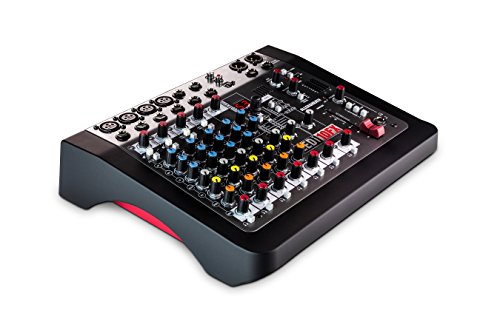
Allen & Heath ZEDi-10FX Compact Hybrid Mixer and USB Interface — Best Sound-Quality Step-Up
The ZEDi-10FX suits quality-focused small studios: engineers recording a few sources at once who want better conversion, more flexible USB routing and effects they will actually use. The 4×4 USB interface is its defining advantage over stereo-only rivals. It does not suit buyers who need lots of channels, or beginners who want the simplest possible board — its depth rewards users who will explore it.
Strengths
- 4×4 USB interface records more than a stereo mix — real flexibility for small sessions
- 61 studio-quality effects models built in
- Allen & Heath preamp and EQ pedigree from professional live consoles
Trade-offs
- Top of this guide’s tier; the budget picks cost considerably less
- Compact channel count still limits full-band work
- Deeper feature set asks more of beginners than the Behringer or Yamaha
Key specs (verified)
- Format: compact hybrid mixer with 4×4 USB interface (verified via Amazon listing)
- Effects: 61 studio-quality FX models
- Role: quality-first recording and small live work
That 4×4 USB specification is the most important line in this review. Where stereo-only mixers hand your computer one finished mix, the ZEDi-10FX can send separate sources over USB — a vocal on one track, a guitar on another — which means real mixing decisions can happen after the performance instead of being baked in forever. For a small studio, that is the difference between a mixer that records and a mixer that merely digitises.
The effects library is the second headline. Sixty-one models sounds like marketing inflation until you realise it covers the working set a small studio actually reaches for: reverbs for vocals, delays for guitars, modulation for keys. Having them inside the board, recallable and latency-free for headphone mixes, keeps sessions moving.
You pay for this in two currencies: money — it tops this guide’s tier — and simplicity. Newcomers can absolutely grow into it, and the core mixing path is conventional, but the Behringer and Yamaha picks are gentler first boards. For a second-mixer buyer upgrading from a basic interface, or a quality-first beginner willing to learn, the ZEDi-10FX is the affordable class at its best.
Best for: quality-focused small studios wanting multitrack-capable USB and deep effects. / Not suited for: buyers needing many channels or the lowest possible spend.
Check the current price on Amazon
Comparison Table
| Pick | Badge | Key spec | Best for |
|---|---|---|---|
| Yamaha MG10XU 10-Input Stereo Mixer with Effects — Check on Amazon | Best Overall | 10-input stereo mixer (verified via Amazon listing) | home studios recording one or two sources at a time, plus podcasters and small live acts. |
| Mackie ProFX12v3 12-Channel Mixer with USB and Effects — Check on Amazon | Best for Studio and Live Versatility | 12-channel analog mixer (verified via Amazon listing) | creators and small bands who need one mixer for home recording and small live shows. |
| Behringer XENYX X1204USB Premium 12-Input Mixer — Check on Amazon | Best Budget | 12-input, 2/2-bus mixer (verified via Amazon listing) | beginners and budget home studios wanting the most features per pound, especially for vocals. |
| Soundcraft Notepad-12FX Small-Format Analog Mixing Console — Check on Amazon | Best Compact Studio Mixer | small-format analog mixing console (verified via Amazon listing) | desktop studios, singer-songwriters and small rooms wanting quality effects in a small footprint. |
| PreSonus StudioLive AR8c Analog Mixer with Studio One Pro — Check on Amazon | Best for Recording Workflows | 8-channel hybrid mixer/interface (verified via Amazon listing) | recording-first small studios, songwriters and podcasters who will use the bundled software. |
| Allen & Heath ZEDi-10FX Compact Hybrid Mixer and USB Interface — Check on Amazon | Best Sound-Quality Step-Up | compact hybrid mixer with 4×4 USB interface (verified via Amazon listing) | quality-focused small studios wanting multitrack-capable USB and deep effects. |
How to Choose an Affordable Studio Mixer
Count microphone preamps, not inputs. A ’12-input’ mixer might offer four microphone preamps, with the remaining inputs as line-level and stereo channels for keyboards, playback and instruments. For most home studios, two to four good mic preamps is the honest requirement: vocals, an acoustic guitar, a stereo pair for piano or drum overheads. Count the microphones you will genuinely plug in at once, and let that number — not the headline — size your board.
Decide the USB question before anything else. If you record one or two sources at a time and mix as you go, a stereo-USB mixer is simple and sufficient. If you want to record several sources simultaneously and mix them later, you need multitrack USB: in this guide only the Allen & Heath ZEDi-10FX breaks the stereo limit, with its 4×4 interface, and the PreSonus AR8c is designed around a recording workflow. Everyone else should also consider whether a dedicated audio interface plus software mixing serves them better than an analog board — the guide’s next section covers that fork honestly.
Phantom power and gain range matter for microphones. Condenser microphones need +48V phantom power, which all six picks provide, but check the gain range if you use quiet dynamic microphones for podcasting or broadcasting: they demand lots of clean gain, and this is where the Yamaha, Mackie and Allen & Heath preamps justify themselves over the cheapest boards.
EQ and effects: enough is enough. Three-band EQ per channel covers home-studio correction comfortably. Built-in effects are for headphone comfort while tracking and for live work; your recording software’s effects will almost always be better for the final mix, so treat board effects as a convenience, not a reason to overspend — unless, like the Soundcraft’s Lexicon set, they are good enough to print.
Studio Mixer or Audio Interface: Which Do You Actually Need?
This is the fork every home-studio buyer reaches, and there is no universal right answer. Choose a mixer if you regularly combine several sources at once, play live, run a podcast with co-hosts in the room, or simply think better with physical faders under your fingers. A mixer also works with the computer off — jam sessions and rehearsals do not need a booted laptop. Choose an audio interface instead if you record strictly one source at a time, want the cleanest possible conversion per pound, and are happy mixing entirely in software. Many mature small studios eventually run both: an interface for tracking precision, a small mixer for monitoring, talkback and live work. Starting with the tool that matches your dominant activity — recording or performing — avoids the classic mistake of buying a performance board for a recording problem.
How to Set Up a Studio Mixer for Recording
- Connect in order. Microphones to the mic inputs with XLR cables, instruments to line inputs or DI channels, computer to the USB connection, and your monitor speakers to the main or control-room outputs. Power the mixer before the speakers, and speakers off before powering down.
- Set gain properly (gain staging). With the channel fader at unity, sing or play at your loudest expected level and raise the preamp gain until the loudest peaks sit comfortably below clipping — strong but never in the red. Good gain staging is 80 percent of a clean home recording.
- Use phantom power deliberately. Switch +48V on only for condenser microphones, and plug mics in before enabling it. Ribbon microphones and unbalanced sources should never see phantom power.
- Record dry, monitor wet. Send a little board reverb to the headphones so the performer feels inspired, but record the clean signal. Reverb can be added in mixing; it cannot be removed.
- Check the USB routing. Confirm in your recording software that the mixer is the selected input and output device, record a ten-second test, and listen back on headphones before the real take. Most ‘broken mixer’ stories are actually a wrong software setting.
- Label everything. Tape labels under channels — vocal, guitar, keys, playback — save more session time than any feature on any board in this guide.
Common Buying Mistakes
- Buying headline channels instead of mic preamps. Twenty inputs with four preamps will not record an eight-microphone drum kit.
- Assuming USB means multitrack. On most affordable analog mixers it means a stereo mix. Verify before buying, every time.
- Oversizing the board. A big mixer eats desk space and adds noise paths you do not need. Buy for your real session size, plus one spare channel.
- Ignoring the monitoring path. If you cannot easily control speaker and headphone levels independently, daily recording becomes friction. Check the control-room and phones sections.
- Spending on effects instead of preamps. Software effects are superb and often free; clean preamp gain cannot be added later. Prioritise accordingly.
- Forgetting cables and stands. A mixer is one line in the budget. Microphones, XLR cables, stands and headphones complete the studio — leave room for them.
Mixer Specs, Translated: What Actually Matters
Preamp gain and noise. The two preamp numbers worth understanding are gain range and noise. Gain range tells you whether the preamp can drive quiet dynamic microphones — podcast-style dynamics are hungry, and a preamp that runs out of clean gain forces you to accept hiss. Noise is often described as EIN (equivalent input noise): in plain terms, lower is quieter, and the practical test is whether a spoken vocal at normal level sits on silence or on a faint hiss bed. Every pick here is quiet enough for real work at sensible gains; the step-up Allen & Heath and the Yamaha are the calmest of the group.
Aux sends and monitoring. An aux send is a separate mix you can route elsewhere — most importantly to headphones or stage monitors. One aux send means one shared monitor mix; two means the singer and the guitarist can hear different balances. Home studios recording one performer at a time can ignore this spec; bands and podcast panels cannot. Check also whether the headphone output has its own level control independent of the main speakers — a small thing that prevents the classic accident of blasting monitors while adjusting headphones.
Inserts, subgroups and direct outs. These are the routing luxuries that affordable boards mostly omit, and mostly you will not miss them. Channel inserts let you patch a hardware compressor into one channel; subgroups let you fade several channels together; direct outs feed multitrack recorders. Their absence is precisely why prices stay affordable, and why engineers who need them step up to larger consoles or hybrid recorders. Knowing they are absent — rather than discovering it mid-session — is the point of reading the trade-offs in each review above.
Build details that predict lifespan. Metal chassis, nutted potentiometers and smooth, even fader travel are the physical tells of a board built to last. Knobs that wobble when new become crackly controls within a few years, because dust and oxidation get into loose assemblies first. This is the quiet reason the Yamaha, Mackie and Allen & Heath picks command their tiers: not features, but the probability of still working perfectly in year seven.
Troubleshooting: Common Studio Mixer Problems
Problem: Hiss on every recording. → The preamp gain is too low and level is being added later, or an unused channel is turned up. Raise the channel gain so peaks are strong without clipping, mute every channel you are not using, and make level up at the preamp, not the fader.
Problem: The computer does not see the mixer. → Check the USB cable is a data cable, select the mixer as both input and output device in your recording software, and restart the software after connecting. On some systems the mixer must be powered and connected before the program launches.
Problem: Vocals sound boxy or muddy. → You are probably too far from the microphone or recording in an untreated room corner. Move closer to the mic, lower the gain to compensate, and pull a little low-midrange out with the channel EQ rather than adding top end.
Problem: A loud buzz under everything. → Usually a ground loop or an unbalanced cable run near power supplies. Use balanced XLR or TRS cables, plug the mixer and computer into the same power strip, and keep audio cables away from wall-wart power bricks.
Problem: The singer cannot hear themselves properly. → Build the headphone mix deliberately: raise their channel in the monitor path, add a touch of board reverb for confidence, and keep backing tracks lower than feels natural — performers pitch better when they hear themselves clearly above the track.
A Note on Buying Used, Bundles and Warranties
The used market for studio mixers is large, and previous-generation boards from the brands in this guide can be excellent value — analog mixers age slowly, and a well-kept Yamaha or Mackie from a home studio is often indistinguishable from new in performance. If you buy used, test every channel with a microphone, work every fader and knob through its full travel listening for crackle, and check the USB connection with a computer before paying. Scratchy controls and intermittent channels are the common faults, and both are audible within two minutes of testing.
Bundles deserve the same scrutiny. A mixer bundled with headphones, a microphone and cables can be a genuinely efficient way to start a studio, but only if the bundled items are ones you would choose anyway; a bargain bundle padded with a microphone you will replace in a month is not a bargain. Finally, weigh the warranty: a new board from an authorised seller carries manufacturer support, which on a product built around dozens of moving controls is worth more than the small saving an unauthorised import usually offers. In a category where one faulty channel can end a session, boring purchasing decisions are the right ones.
Final Recommendation
For most home studios, the Yamaha MG10XU is the affordable studio mixer to buy first (check the current price on Amazon): clean preamps, sane layout, and reliability that lets you forget the board and make music. Small bands and creators who also play live should take the Mackie ProFX12v3 (check the current price on Amazon); beginners on the tightest budget should take the Behringer X1204USB and its genuinely useful compressors (check the current price on Amazon). Desktop studios will love the Soundcraft Notepad-12FX, recording-first buyers the PreSonus AR8c bundle, and quality-chasers the Allen & Heath ZEDi-10FX — the one pick here whose USB goes beyond a stereo mix.
Comparing neighbouring corners of the mixer market? These companion guides use the same approach: Best Affordable Recording Mixers Best Affordable Sound Mixers Best Affordable Mixers For Streaming Best Audio Mixers For Home Studios Best Analog Mixers For Studios Best 12 Channel Audio Mixers.
Frequently Asked Questions
How many channels do I need in a home studio mixer?
Most home studios need two to four microphone inputs and a few line inputs for instruments and playback. A 10- or 12-input board covers that with room to spare. Only full-band live recording demands more — and that usually demands multitrack capability too.
Can I record a drum kit with an affordable studio mixer?
You can record a good stereo picture of a kit with two to four microphones mixed down live, which suits demos and live recordings. Recording each drum to its own track for later mixing needs a multitrack interface or a hybrid like the ZEDi-10FX’s 4×4 USB — still limited to four simultaneous tracks.
What is phantom power and do I need it?
Phantom power is the +48V supply condenser microphones need to operate, sent down the XLR cable from the mixer. All six picks provide it. Dynamic microphones ignore it safely when connected with balanced XLR cables, but never connect unbalanced sources with phantom power on.
Is a mixer better than an audio interface for podcasting?
For solo podcasting, either works; an interface is simpler. For in-person co-hosts or guests, a mixer wins: everyone gets a channel, a headphone mix and physical level control, and the stereo USB output drops straight into your recording or streaming software.
Do built-in mixer effects get recorded?
On most analog mixers, effects applied to a channel are part of the stereo mix sent over USB, so yes — they are printed. That is why we recommend recording dry and using effects mainly in the headphone mix, unless a live or streamed performance is the final product.
Why does my recording sound noisy?
Usually gain staging: the preamp gain is too low and the level is being made up later, which raises the noise floor with it. Set the channel gain so your loudest peaks are strong but never clipping, keep faders near unity, and check that you are not recording a stereo mix with unused channels turned up and hissing.
Can I use a studio mixer for live streaming?
Yes — it is one of the best uses of this class of board. Your microphone, game or music sources and alerts each get a channel with physical level control, and the stereo USB output feeds your streaming software as a single tidy source. The Mackie and Yamaha picks are particularly popular for this because their layouts make live level-riding easy.


