Disclosure: airfryerkitchensupply.com is reader-supported. When you buy through links on our site, we may earn an affiliate commission at no extra cost to you.
Where to buy
Every candidate for the best 5 pro sound tablet mixers below was checked against live Amazon listings on the day this guide was written, and all six picks carry confirmed listings so you can check the current price on Amazon from each review. Tablet-controlled mixers are rackmount brains with no control surface, so the listing photos show a metal box, not a mixer as most people picture one — the app screenshots and the specifications are what to study, and each review below explains what the box actually does.
- Behringer X Air XR18 (Best Overall): Check the current price on Amazon
- Soundcraft Ui24R (Best Browser Control): Check the current price on Amazon
- Mackie DL16S (Best App Experience): Check the current price on Amazon
- Midas MR18 (Best Preamps): Check the current price on Amazon
- Soundcraft Ui16 (Best Budget): Check the current price on Amazon
- Allen & Heath CQ-20B (Best Compact Modern Design): Check the current price on Amazon
The search for the best 5 pro sound tablet mixers leads to the most quietly revolutionary corner of live sound: professional mixers with no faders at all. These are rackmount digital brains — full preamps, effects, recording and monitor mixing — controlled entirely from a tablet, phone or laptop. The mixer lives on stage in the rack where the cables are; the engineer mixes from wherever the audience actually hears the show.
Buyers usually arrive at this search wanting a top-five shortlist, and this guide reviews six because the category has six distinct answers: the value benchmark that defined the format, its premium-preamp sibling, the browser-controlled alternative that needs no app at all, the app-polish leader, the budget entry, and the newest compact design from a premium British maker. If you truly want five, the verdict lines make it easy to cut the one whose job you do not need.
Every pick was verified, and input counts and headline features in the spec boxes come from those verified listings. One warning that applies to the entire category and is repeated throughout this guide because it matters: a tablet mixer is only as reliable as the network it runs on, and professional users treat the router as part of the mixer. No static prices are printed; each pick links to its live listing.
A note on the word pro in this search: every system here is genuinely professional in capability — real preamps, real monitor mixing, real recording — and the differences between them are about workflow philosophy and scale, not about a consumer tier hiding in the list. The budget pick is a smaller professional system, not a toy, and it is badged by capacity rather than by quality.
In this guide
Quick Picks
Behringer X Air XR18 — Best Overall. The format-defining tablet mixer: 18 channels with 16 Midas-designed preamps, 12 buses for monitors and effects, built-in Wi-Fi and a multi-channel USB interface for recording every input. Check price on Amazon.
Soundcraft Ui24R — Best Browser Control. The largest and most flexible controller story in the class: 24 inputs, onboard processing, and control through a web browser, so any laptop, tablet or phone becomes a mixing surface with no app to install. Check price on Amazon.
Mackie DL16S — Best App Experience. The polish pick: a 16-channel rack mixer whose control app is widely regarded as the friendliest in the class, with multi-device support that lets the whole band mix monitors from their own phones. Check price on Amazon.
Midas MR18 — Best Preamps. The audiophile sibling of the XR18: the same 18-input tablet architecture upgraded with Midas PRO preamps, for engineers who hear the difference and record everything. Check price on Amazon.
Soundcraft Ui16 — Best Budget. The accessible entry into professional tablet mixing: 16 inputs with the same browser-control philosophy as its bigger sibling, at the tier where small bands and venues can justify the jump from analog. Check price on Amazon.
Allen & Heath CQ-20B — Best Compact Modern Design. The newest thinking in the class: a compact headless mixer from Allen & Heath with Wi-Fi and Bluetooth connectivity, smart setup assistance and a stage-box format designed to disappear into the rig. Check price on Amazon.
How These Picks Were Chosen
We shortlisted rackmount digital mixers designed from the start for tablet, phone or browser control — not surface consoles with a companion app, but true headless systems — and verified each by searching brand and model and matching the returned title. The six that survived span 16 to 24 inputs, which is the working range where tablet mixing serves bands, worship teams and small venues without compromise.
Scoring weighted preamp quality and input count first, then the control experience: app stability and layout, whether control is app-based or browser-based, how many devices can mix simultaneously (the feature that lets each musician run their own monitor mix), and multitrack recording for virtual soundcheck. Built-in Wi-Fi was treated as a convenience for rehearsals, not a professional network plan, and the reviews say so.
We also scored the failure modes, because headless mixing has specific ones: a dropped connection, a flat tablet, an app update the night before a show. Systems that mitigate those — wired control options, multiple simultaneous controllers, onboard recording that does not depend on the tablet — earned credit that spec sheets do not capture. The ranking reflects how these mixers behave on real stages, not just what they promise on boxes.
We excluded surface consoles with companion apps deliberately. A desk that also has an app is a different product with a different buyer, and including them would have blurred the question this search asks. Every pick here is genuinely headless: remove the tablet and there is no surface left, which is the defining trait of the class and the source of both its advantages and its disciplines.
Prices were excluded from scoring throughout, because tablet systems are so often bundled with racks, routers and tablets that a console-only price misstates the real investment; the tiers discussed in the reviews refer to the complete working system a buyer should budget for.
The 6 Best Pro Sound Tablet Mixers
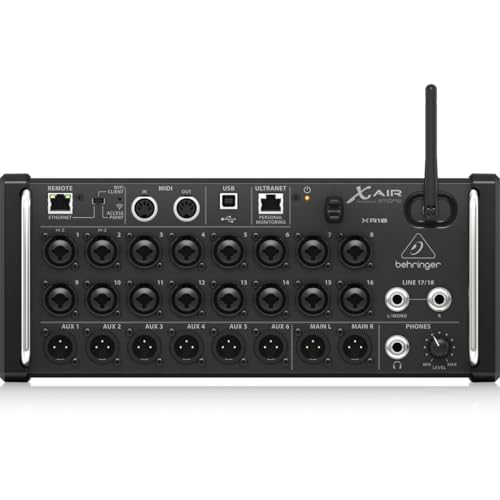
Behringer X Air XR18 — Best Overall
The XR18 is the mixer that proved a tablet could run a real show. Eighteen channels built around sixteen Midas-designed preamps, twelve buses that cover monitor mixes and effects properly, and a multi-channel USB interface that records every input separately for virtual soundcheck or a live album. It sits in a stage rack, connects to everything once, and turns any tablet into a front-of-house position.
It suits gigging bands, worship teams, small venues and engineers who mix their own shows from the stage or the room. Engineers who want a browser-only workflow or a larger input count should compare the Soundcraft picks; engineers who want the newest compact platform should see the CQ-20B.
Strengths
- Sixteen proper preamps and 18 channels cover full bands without compromise
- Multi-channel USB recording enables virtual soundcheck and live capture
- The broadest user community and accessory ecosystem in the tablet class
Trade-offs
- Built-in Wi-Fi is a rehearsal convenience; serious shows deserve an external router
- The app experience, while capable, is utilitarian beside the newest rivals
- No physical controls at all: a dead tablet means a silent engineer until a backup connects
| Channels | 18, with 16 programmable Midas preamps |
| Buses | 12 |
| Verified features | Integrated Wi-Fi module and multi-channel USB audio interface (per Amazon listing title) |
| Control | iPad and Android tablets |
The XR18 professional case is completeness. Monitor world is where tablet mixers live or die, and twelve buses mean the band gets real monitor mixes — which each musician can adjust from their own phone, ending the shouted requests across the stage that define amateur shows. Meanwhile the engineer walks the room with a tablet, mixing from the seats the audience paid for, which is an advantage no fixed front-of-house desk can match.
Its age shows only in polish. The platform is mature, the failure modes are known and documented by an enormous user base, and every accessory from rack ears to router recommendations has been battle-tested publicly. For a working band buying its first serious system, that maturity is worth more than novelty, and it is why the XR18 still takes the overall badge.
Best for: Gigging bands, worship teams and small venues that want the proven complete tablet system / Not suited for: Engineers who want browser control or the newest interface generation
Check on Amazon to see the current listing for the Behringer X Air XR18.

Soundcraft Ui24R — Best Browser Control
The Ui24R makes a different bet from every rival here: instead of an app, it serves its entire mixer interface through a browser. Any device with a screen and a connection — the venue laptop, a borrowed tablet, your phone — becomes a full control surface in seconds. For shared systems, guest engineers and institutions, that universality is a profound operational advantage.
Twenty-four inputs also make it the capacity leader of this guide, suiting larger bands, festival changeover rigs and venues. Engineers deeply invested in a rival app ecosystem, or bands that record every show multitrack as a core workflow, should compare the XR18 and DL16S carefully on recording details.
Strengths
- Browser control means zero app installs and instant guest-engineer access
- 24 inputs, the most in this guide, cover large bands and busy stages
- Multiple simultaneous controllers suit full-band personal monitor mixing
Trade-offs
- Browser interfaces can feel less tactile than a purpose-built app
- Like all headless systems, it depends entirely on network discipline
- Its larger capacity is wasted on small acts that fit in 16 inputs
| Inputs | 24 |
| Verified features | Rack-mountable, laptop or tablet controlled, onboard signal processing (per Amazon listing title) |
| Control | Web browser on any device |
The browser decision pays off in the situations that actually happen: the house tablet is flat, the guest engineer has a different phone, the school IT department forbids app installs. In each case the Ui24R is mixing in a minute while app-based systems are still pairing. Institutions — schools, churches, community venues — consistently underestimate how much this matters until the first time it saves an event.
Capacity is the second argument. Twenty-four inputs absorb the full band plus the extra vocalists, the playback rig, the MC microphone and the spares, which is the exact moment 16 and 18-input systems start forcing compromises. If your stage is growing, this is the pick that postpones the next upgrade the longest.
Best for: Venues, institutions and larger bands that value universal control and 24 inputs / Not suited for: Small acts that fit 16 inputs and engineers who prefer a dedicated app
Check on Amazon to see the current listing for the Soundcraft Ui24R.

Mackie DL16S — Best App Experience
The DL16S wins hearts through its software. Mackie control app is the one engineers describe as intuitive without caveats — clear channel views, fast navigation, and multi-device support that scales from one engineer with a tablet to a full band each running a personal monitor mix. Sixteen channels cover the core band and worship formats completely.
It suits bands that mix themselves, worship teams with volunteer engineers and anyone for whom the app is the mixer — which, in this category, is everyone. Engineers needing more than 16 inputs should take the Ui24R; record-every-show workflows should compare its recording approach against the XR18 before deciding.
Strengths
- The friendliest, fastest-to-learn control app in the tablet class
- Multi-device control suits full-band personal monitoring
- Compact stage-box format keeps the stage end tidy
Trade-offs
- Sixteen channels cap larger productions and festival rigs
- App-centric control means the experience lives or dies with your devices
- Ecosystem and community are smaller than the Behringer platform
| Channels | 16 |
| Format | Digital rack mixer (per Amazon listing title) |
| Control | App-based, multi-device |
In headless mixing, the app is not an accessory to the product — it is the product surface, and Mackie understood that earliest. Volunteer engineers learn the DL16S quickly, which is a genuine feature for churches and schools; self-mixing bands spend their attention on the show instead of the software; and the multi-device monitor workflow delivers the category signature benefit with the least friction in this guide.
The trade is capacity and ecosystem scale. Sixteen channels is a real ceiling, and the community of shared presets, tutorials and troubleshooting is thinner than the X Air world. For the band or team that fits the ceiling, those are acceptable prices for the best daily experience in the class.
Best for: Self-mixing bands and volunteer teams who want the easiest control experience / Not suited for: Productions needing more than 16 inputs
Check on Amazon to see the current listing for the Mackie DL16S.

Midas MR18 — Best Preamps
The MR18 asks a focused question: if the XR18 format is right, is it worth stepping up to Midas PRO preamps? For engineers who record their shows, run quiet acoustic material or simply know what PRO preamps do to a vocal at high gain, the answer is yes. The architecture — 18 inputs, tablet control, integrated Wi-Fi, multi-channel USB — is familiar; the front end is the upgrade.
It suits recording-focused bands, acoustic and worship engineers, and XR18 owners upgrading within a known workflow. Buyers who will never record and run loud bar stages may find the XR18 captures most of the value, and this guide badges the MR18 for sound quality precisely so that distinction stays honest.
Strengths
- Midas PRO preamps, the best microphone front end in this guide
- Multi-channel USB recording preserves the preamp quality into the DAW
- Shares the proven 18-input tablet workflow of its platform family
Trade-offs
- Premium tier over its sibling for a difference some stages will never reveal
- Same built-in Wi-Fi caveat: professional shows still want an external router
- App experience mirrors its platform rather than leading the class
| Inputs | 18, with 16 Midas PRO preamps |
| Verified features | Integrated Wi-Fi module and multi-channel USB audio interface (per Amazon listing title) |
| Control | iPad and Android tablets |
Preamp differences are subtle at bar-band volume and obvious everywhere else: the quiet fingerpicked guitar, the vocalist who sings at conversation level, the recording you listen to the next morning. The MR18 exists for those moments, and engineers who work them know the tier difference is smaller than the cost of capturing a great performance through a merely good front end.
Because it shares its platform logic with the XR18, the upgrade path is painless and the community knowledge transfers. Think of the choice as optical: same camera, better lens. If your work is looked at closely — recorded, streamed, listened to in quiet rooms — the lens is where the money belongs.
Best for: Recording-focused and acoustic engineers who prioritize preamp quality / Not suited for: Loud-stage buyers who will never hear or record the difference
Check on Amazon to see the current listing for the Midas MR18.

Soundcraft Ui16 — Best Budget
The Ui16 is how smaller acts enter the tablet world without entering flagship money. Sixteen inputs cover duos, small bands, worship teams and venue corners, and the browser-based control means the devices your team already owns — any phone, any tablet, the venue laptop — are the control surfaces, with nothing to buy and nothing to install.
It suits small bands, churches, schools and venues replacing an aging analog board. Acts that record multitrack as a core workflow or expect to outgrow 16 inputs within a year should price the XR18 and Ui24R honestly before choosing the savings.
Strengths
- Browser control on any device keeps total system cost down
- Sixteen inputs cover the core small-band and worship formats
- A gentler learning curve than app ecosystems for shared venues
Trade-offs
- Fewer inputs and less depth than the Ui24R above it
- Recording and processing scope trail the class leaders
- Success depends on the same network discipline as every headless system
| Inputs | 16 |
| Verified feature | Remote-controlled digital mixer (per Amazon listing title) |
| Control | Web browser on any device |
The Ui16 strongest argument is total system cost. Tablet mixers hide their real price in accessories — a tablet, a router, a rack — and a browser-controlled mixer that runs on devices already in the building removes the largest accessory from the list. For a school or small church, that can be the difference between approval and another year of the crackling analog board.
Within its capacity it performs the category essential trick completely: musicians adjust their own monitors, the engineer mixes from the room, and the stage stays free of a bulky desk and snake. Buyers should simply be honest about the ceiling — sixteen inputs is a size, not a suggestion — and this pick serves everyone who genuinely fits it.
Best for: Small bands, schools and venues entering tablet mixing on a budget tier / Not suited for: Recording-heavy workflows and acts likely to outgrow 16 inputs
Check on Amazon to see the current listing for the Soundcraft Ui16.

Allen & Heath CQ-20B — Best Compact Modern Design
The CQ-20B represents the current generation of headless design: compact enough to live in a gig bag or a small rack, connected by Wi-Fi and Bluetooth, and built around setup assistance that helps a band get a working mix faster — gain and feedback help aimed at the self-mixing musicians who are this category real majority.
It suits self-mixing bands, duos and small teams who value setup speed and modern assistance over raw channel count. Engineers running larger productions should take the Ui24R capacity; engineers invested in another platform app will weigh switching costs honestly.
Strengths
- The most modern, compact headless design in this guide
- Setup assistance features speed up self-mixed shows
- Wi-Fi and Bluetooth connectivity suit quick, cable-light deployment
Trade-offs
- A newer platform with a still-growing user community
- Compact format means fewer physical connections than full rack units
- Premium-brand tier above the budget entries
| Format | Compact digital mixer, headless stage-box style |
| Verified features | Wi-Fi and Bluetooth connectivity (per Amazon listing title) |
| Control | App-based tablet and phone control |
The CQ series insight is that most tablet mixers are operated by musicians, not engineers, and its assistance features are designed for that reality: faster setup, guided gains, and a mix that reaches acceptable quickly and excellent with practice. For a working band loading in at six and playing at eight, that design empathy is worth more than a deeper menu they will never open.
As the newest platform here, it carries the standard new-platform caveats — a smaller community, fewer third-party accessories, a shorter public track record — balanced against the standard new-platform dividend of current hardware and active development. Early adopters in this category have historically been rewarded, and the CQ-20B is the pick for buyers who think that way.
Best for: Self-mixing bands that value setup speed and modern assistance / Not suited for: Large productions and engineers committed to another platform
Check on Amazon to see the current listing for the Allen & Heath CQ-20B.
Comparison Table
The class divides by control philosophy and capacity: browser control (Ui24R, Ui16) versus app control (XR18, MR18, DL16S, CQ-20B), and 16-input compact systems versus 18 and 24-input full-band systems. The preamp column separates the MR18; the app column separates the DL16S; the capacity column separates the Ui24R.
| Pick | Badge | Key spec | Best for |
|---|---|---|---|
| Behringer X Air XR18 | Best Overall | 18 channels, 16 Midas preamps, 12 buses, multi-channel USB interface | Gigging bands, worship teams and small venues that want the proven complete tablet system |
| Soundcraft Ui24R | Best Browser Control | 24 inputs, browser-based control from any device | Venues, institutions and larger bands that value universal control and 24 inputs |
| Mackie DL16S | Best App Experience | 16-channel digital rack mixer with mature multi-device app control | Self-mixing bands and volunteer teams who want the easiest control experience |
| Midas MR18 | Best Preamps | 18 inputs with 16 Midas PRO preamps and multi-channel USB | Recording-focused and acoustic engineers who prioritize preamp quality |
| Soundcraft Ui16 | Best Budget | 16-input remote-controlled digital mixer with browser control | Small bands, schools and venues entering tablet mixing on a budget tier |
| Allen & Heath CQ-20B | Best Compact Modern Design | Compact headless digital mixer with Wi-Fi and Bluetooth connectivity | Self-mixing bands that value setup speed and modern assistance |
How to Choose a Pro Sound Tablet Mixer: The Network Is Part of the Mixer
Every other mixer category lets you shop the box. This one makes you shop the system: mixer, tablet, router and rack, because the box alone does nothing. Start with inputs — count your full stage honestly, including the spare channels experience teaches you to keep — and let that count choose between the 16, 18 and 24-input classes before any brand loyalty enters the conversation.
Then choose your control philosophy. Browser-based systems, the Soundcraft approach, turn any device into a surface instantly and forgive every dead battery and borrowed laptop. App-based systems offer deeper, more tactile interfaces and offline familiarity, at the cost of installs, updates and device management. Shared and institutional systems lean browser; dedicated band systems lean app. Neither is wrong, and choosing against your operating reality is the expensive mistake.
The router decision is the one professionals make and amateurs skip. Built-in Wi-Fi on any of these mixers is a rehearsal feature. A show deserves a dedicated external router, positioned high and clear, on a network name the audience cannot join, with a wired control option rehearsed as backup. Budget the router with the mixer, configure it at home, and the connection horror stories that follow this category around will happen to other people.
Finally, plan the human system. The signature benefit of tablet mixing is distributed control: each musician mixing their own monitors from a phone. That benefit requires a ten-minute rehearsal of who controls what, permission discipline so nobody mixes the front of house by accident, and one person who owns the master device. The technology is the easy half; the workflow is the product.
Do not forget the stage-side half of the system while shopping the control half. A tablet mixer concentrates inputs in one rack, which means instrument cables, DI boxes and microphone stands all route to one point. Venues and bands moving from a front-of-house snake layout should walk the stage with the input list and confirm the cable plan reaches the rack comfortably, because the neatest control system in the world cannot fix a stage that cannot reach its own mixer.
Tablet Mixing vs Traditional Consoles: An Honest Comparison
The traditional console keeps three advantages that matter. Physical faders are faster and more precise for riding levels in real time. A surface works with gloves, in glare, and through a spilled drink in ways a touchscreen does not. And a console fails more gracefully: a dead channel is not a dead show, while a dead network can be. Engineers who mix complex shows with constant fader work are not being nostalgic when they keep their surfaces.
The tablet system wins on position, price and distribution. The engineer mixes from the audience, which is the only seat that matters. The cost per channel undercuts surface consoles dramatically, because the expensive surface is a tablet you may already own. And monitor mixing distributes to the musicians themselves, which no single surface at any price can replicate. For the band and small-venue world, those three wins usually outweigh the fader argument.
The mature position, which most working engineers in this class adopt, is hybrid discipline: tablet system for the show, wired laptop connected as a backup surface, printed or screenshotted settings for the night, and a small analog mixer in the vehicle for the catastrophic day. Tablet mixing rewards the prepared and punishes the casual, and that sentence is the fairest summary of the entire category.
Recording and Virtual Soundcheck: The Tablet Mixer Superpower
Multi-channel recording changes what a small system can do, and it is the feature that most justifies stepping from analog to this class. Recording every input separately means the show can be mixed again later — for a live release, a stream, or simple self-improvement — and it means virtual soundcheck exists: play yesterday’s recording through the system and refine today’s mix without the band on stage.
The picks differ here, and buyers who record should verify the exact capability they need: how many tracks, to what destination, and whether recording continues if the tablet disconnects. The XR18 and MR18 built their reputations partly on this workflow; the other picks offer their own combinations of stereo and multitrack capture. Match the recording spec to the workflow you will actually run weekly, not the one you imagine running someday.
Virtual soundcheck deserves emphasis for worship and theatre especially, where the band or cast time is scarce and the room changes completely when the audience arrives. An hour of recorded material plus a tablet is a full soundcheck with nobody on stage, and teams that adopt it consistently sound a generation better than teams that line-check and hope.
Monitor Mixing for the Whole Band: Setting Up Personal Control
The workflow that sells this entire category takes twenty minutes to establish. Connect each musician phone or tablet to the mixer network, assign each device control of one monitor bus, and lock or guide each user to their own mix. Singers add themselves and the keyboard; drummers add the click and the bass; everyone discovers, usually with delight, that the monitor arguments of the analog era were a technology problem, not a people problem.
Permissions are the discipline that keeps the delight. Most platforms let the main engineer restrict what each device can control, and using those restrictions is professional practice, not mistrust: a phone in a pocket should not be able to change the front-of-house mix, and a guest device should control nothing at all. Set the permissions at setup, test them, and the system stays safe at showtime.
Start the band simple: one shared monitor mix, adjusted by the engineer, for the first show. Add personal control bus by bus as the team learns the system. The teams that rush to full personal mixing on day one spend their first show troubleshooting phones; the teams that phase it in spend their first show playing music, which is the correct order of priorities.
Accessories That Complete a Tablet Rig: Rack, Router, Tablet and Spares
A tablet mixer purchase is really four purchases. The rack comes first: enough space for the mixer, a power conditioner and the router, with ventilation and a latching door if it travels. Engineers consistently under-rack their first system and re-buy the case within a year, so count the wireless receivers and playback devices that will join the mixer and size the rack for the system it will become, not the one in the first photograph.
The tablet itself deserves a deliberate choice. A larger screen mixes faster and fatigues less; a dedicated show tablet, kept off personal accounts and automatic updates, behaves better than the family iPad borrowed on show day. A rugged case and a long charging cable are not accessories in this category — they are uptime equipment. Many engineers standardize on two identical tablets so a failure is a swap, not a diagnosis.
Spares complete the discipline: a backup router configured identically, spare network and power cables, a printed channel list and a small analog mixer or powered speaker path that can carry announcements if the entire digital system fails. That last item sounds extreme until the night it turns a catastrophe into an anecdote. Tablet rigs concentrate capability, and concentration always deserves a parachute.
How to Set Up a Tablet Mixer for a Live Band
A complete first-show setup: rack the mixer at the stage, build a proper network, connect the band, set monitors, and keep a backup plan — the sequence that separates reliable tablet rigs from the horror stories.
Step 1: Rack the mixer at the stage and connect everything once
Mount the mixer in the stage rack where the instrument and microphone cables naturally gather. Connect all stage inputs, the main outputs to the PA, and monitor outputs to wedges or in-ear transmitters. The beauty of the format is that this patch never changes: the mixer lives with the cables, and only the control travels.
Step 2: Build the network like it matters, because it does
Connect a dedicated external router to the mixer, position it high with clear line of sight to the room, and join it from your tablet. Use a network name and password the audience does not have. Keep the mixer built-in Wi-Fi as a rehearsal and backup tool. Test the connection from the furthest seat you will mix from before anyone plugs in an instrument.
Step 3: Connect a wired backup control device
Before soundcheck, connect a laptop by cable or keep a second tablet joined and open on the mixer. This is your insurance: if the main tablet dies, sleeps or updates at the worst moment, control continues without a silence. Rehearse switching to it once, at home, so the first time is not during a show.
Step 4: Set gains and the front-of-house mix from the room
Walk the room with the tablet while the band plays, setting gains per channel and building the main mix from the audience position. Save the scene immediately and name it for the venue and date. The ability to mix from the seats is the format headline benefit; use it from the first soundcheck, not as a party trick.
Step 5: Assign personal monitor control, with permissions
Join each musician device, assign each to its own monitor bus, and restrict each device to that bus. Have every musician build their mix while the band runs a song, with the engineer coaching levels. Confirm nobody device can reach the main mix, and confirm the engineer device can reach everything.
Step 6: Record the soundcheck and save two copies of everything
If your mixer records multitrack, capture the soundcheck for virtual soundcheck before the next show. Save scenes on the mixer and export or screenshot key settings to a second location. Tablet systems concentrate a whole show in files; treat those files with the same care as the hardware.
After the show, note what the network did: any dropouts, any dead zones in the room, any device that struggled. Tablet rigs improve venue by venue, and the engineers who log their networks build systems that stop surprising them.
Label the rack connections with the same care as a surface console patch. Headless systems get re-racked and borrowed too, and the next engineer — often you, in six months, in the dark — deserves a map.
Keep the router password and the scene backup in the same place as the spare cables. In a headless rig, information is a spare part, and it should be stored like one.
Common Buying Mistakes
Running a show on the built-in Wi-Fi
The most common and most preventable failure in this category. Built-in radios are for rehearsals and setup; a paying show deserves a dedicated external router placed properly. The cost is small and the failure it prevents is total.
Letting the tablet be a single point of failure
One tablet, one battery, one app install between the engineer and silence. Carry a second joined device or a wired laptop, keep everything charged, and disable automatic updates on show devices. Redundancy is the professional difference in headless mixing.
Giving every device full control
Unrestricted multi-device access ends with a pocket phone changing the main mix. Assign monitor buses per device, restrict everything else, and keep one master device. Permissions take five minutes and prevent the category most embarrassing accident.
Buying inputs for today’s band only
Tablet systems are replaced as units, so an input ceiling is a hard wall. The guest vocalist, the extra keyboard and the playback rig are coming; buy the class above your current count if the budget allows any stretch at all.
Ignoring the recording spec until the first session
Stereo capture and multitrack capture are different products wearing similar descriptions. If virtual soundcheck or live recording is part of your plan, verify track count and destination before purchase, not at the first soundcheck.
Treating the app like it will never change
Apps update, operating systems update, and a show device should do neither on show week. Freeze your control devices before important shows, test after any update at rehearsal, and keep one device on the known-good configuration as the reference.
Final Recommendation
For most bands and small venues, the Behringer X Air XR18 remains the tablet mixer to buy: complete, proven and surrounded by the largest community in the class. Step up to the Midas MR18 when preamp quality and recording justify it, choose the Soundcraft Ui24R for browser control and 24 inputs, and take the Mackie DL16S when app experience matters most.
The Ui16 is the honest budget door into the format, and the CQ-20B is the modern compact for self-mixing bands. Whichever you choose, buy the router in the same order and set the system up at home first — in tablet mixing, preparation is not part of the product, it is the product.
One final perspective for analog veterans considering the switch: rent or borrow a tablet system for one rehearsal before selling anything. Mix a full practice from the back of the room, let the band run their own monitors, and record it. Most skeptics convert on the evidence of their own ears within one session — and the ones who do not have learned something equally valuable about how they personally mix.
Keep exploring the cluster: Best 40 Channel Digital Mixers For Live Outdoor Sound Best 5 Channel Mixers Best 4 Channel Mixers Best 4 Channel Dj Mixers Best 3 Channel Dj Mixers
Frequently Asked Questions
How do tablet mixers work without faders?
The mixer itself is a rackmount box containing the preamps, processing and outputs. A tablet, phone or computer connects over Wi-Fi or a cable and provides the entire control surface as an app or browser interface. Your hands touch a screen; the audio never leaves the rack on stage.
Is tablet mixing reliable enough for professional shows?
Yes, with professional discipline: a dedicated external router, a backup control device connected, charged batteries and frozen software versions on show week. The systems in this guide run working bands and venues nightly. The unreliable setups are the ones that skip those steps, not the format itself.
Can each musician really mix their own monitors?
Yes — that is the signature workflow of this category. Each musician joins the mixer network with a phone or tablet and is assigned control of their own monitor bus, usually with permissions restricted by the engineer so they cannot affect the main mix.
What happens if the Wi-Fi drops during a show?
The mixer keeps passing audio with its current settings; what you lose is control until reconnection. That is why professionals run a dedicated router, keep a second device joined, and often keep a wired laptop connected — the show never stops, and control is restored in seconds.
How many inputs do I need in a tablet mixer?
Count your full stage: instruments, vocal microphones, playback, plus spares for guests and growth. Most bands land at 16 to 18; larger worship teams and festival rigs justify 24. Because these systems are replaced as units, buying one class above today’s count is usually the economical choice.
Can tablet mixers record the show?
Most can, but the capability varies from stereo capture to full multitrack recording of every input. The XR18 and MR18 in this guide are known for multi-channel USB recording. Verify the track count and recording destination of any model against the workflow you actually plan.


