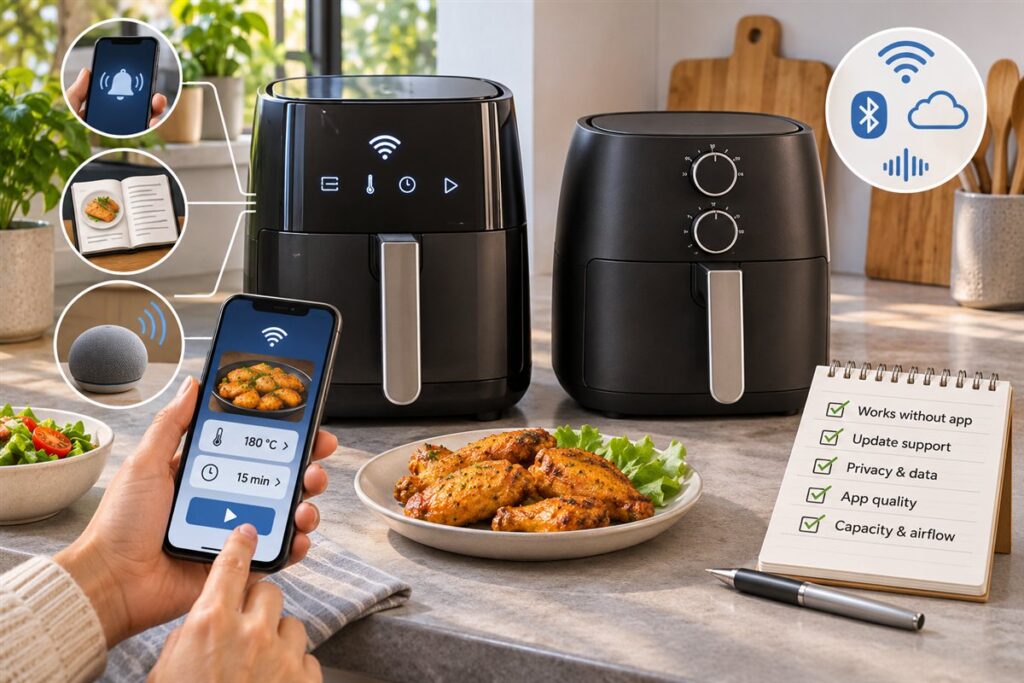
Smart air fryer features connect the appliance to a phone app or voice assistant so you can set programs and get alerts remotely. They can be handy for busy cooks, but the core of air frying is still airflow and heat, so basic models cook well without them.
Common Smart Features
- App control: set time and temperature from a phone, if the model allows remote operation.
- Recipe programs: guided cooking that sets a plan for you.
- Alerts: notifications when a cycle ends or when food needs turning.
- Voice control: commands through a home assistant.
- Update support: software changes delivered over a network connection.
Helpful or Extra
| Feature | Where it helps | Where it may be extra |
|---|---|---|
| Alerts | You are in another room | You stay near the kitchen |
| Guided programs | New cooks learning timing | You already know your routine |
| Voice commands | Hands full of food | You prefer touch controls |
| Remote launch of a cycle | Limited, since food must be loaded first | Most daily cooking |
Note that food needs to be loaded and the appliance placed safely before any cycle begins. Remote features should never replace being aware of a hot appliance in use.
Practical Points to Check
- Does the unit still work with its own buttons if the network drops or the app is unavailable?
- How does the maker handle app updates and support?
- Are the manual controls clear enough for everyone in the household?
- What information does the app ask for? Read the maker’s privacy information before you sign up.
- Is the physical build, such as basket size and airflow, suited to your cooking?
Who Gets Value From Smart Features
People who juggle many tasks, cook from guided programs, or like checking progress from a phone may enjoy them. Households that want the simplest operation, or that have a patchy home network, may prefer a unit with clear manual dials and buttons.
Do not let the features overshadow basics such as capacity, ease of cleaning and how much space the unit needs on your counter.
Thinking About Longer Use
Smart features rely on software and a connection, so think about how long you want the app to be useful. Ask the maker how long app support lasts and whether the unit works fully without it. A model that stays easy to use with its own buttons is a more flexible choice if the app changes or goes away.
How Connectivity Works in a Kitchen Appliance
A smart air fryer adds a small communication module to an ordinary cooking appliance. Most connect to your home network over Wi-Fi, and some use Bluetooth for a short-range link to a phone. The phone app then sends instructions such as time and temperature, and the appliance sends back status messages. A few models also link through a cloud service run by the maker, which is what lets you check on the unit when you are away from home.
It is useful to know which type of connection your model uses, because it affects reliability. A direct Bluetooth link works without internet but only within range, so you can start a program from the sofa but not from the office. A cloud link works from anywhere but depends on your home network, the maker’s servers, and the app all being available. If any one of these fails, the remote features stop, which is why the physical controls matter.
- Bluetooth: short range, often simpler to set up, and less dependent on servers.
- Wi-Fi with cloud: longer range and more features, but it relies on accounts and services.
- Voice assistant link: an extra layer on top of Wi-Fi, which may need further account steps.
- Local-only control: some units use your home network without a cloud service, so check the listing.
Read how the maker describes setup and which standards are supported. Home networks vary, and some older routers handle only certain frequency bands, so confirm compatibility before buying.
Data, Privacy, and Account Questions
When an appliance needs an app, it often needs an account too. That brings questions about what information is collected and how it is used. Before you set up a smart air fryer, find the maker’s privacy information and read what the app asks to access. Typical requests include your email address, your network details, and sometimes your location. Think about whether each permission is needed for the features you want.
A sensible approach is to share the minimum. If an app asks for access that has nothing to do with cooking, such as contacts or a microphone that is not tied to a voice feature, consider declining or choosing a model with fewer requirements. Use a strong, unique password for the account, and turn on extra sign-in protection if the maker offers it. Keep the app and the appliance up to date, since updates sometimes close security gaps.
- Read the privacy policy summary before creating an account.
- Check which permissions the app requests on your phone.
- Use a unique password rather than one you use elsewhere.
- Find out how to delete your account and data if you stop using the app.
- Consider putting smart devices on a separate guest or device network if your router allows it.
These steps do not make a device risk-free, but they let you make an informed decision about the trade-off between convenience and personal data.
App Quality, Updates, and Long-Term Support
A smart feature is only as good as the software behind it. Look at the app before you commit if you can. Check how clear the screens are, whether the language is easy to follow, and whether you can find a manual control screen quickly. Check which phone systems and versions are supported, as an app that stops working with a new phone update can leave the features unusable until it is fixed.
Long-term support is the part many buyers overlook. Appliances can last for years, but apps and services may be changed or withdrawn sooner. Ask the maker, or look in the listing, for any statement about how long the app and cloud service will be supported. Find out how updates are delivered, and whether they install automatically or need a manual step. Consider whether the appliance remains fully usable if the app is retired.
- Update policy: are fixes and security updates provided, and for how long?
- Offline fallback: can you still cook using the buttons or dial?
- Account dependence: does a lost password or closed account lock you out?
- Support contact: is there a clear route to get help with connection problems?
- Change history: look for notes about past app changes, if the maker publishes them.
A unit that treats the app as a bonus instead of a requirement is the more durable choice.
Setting Up and Using Remote Features Safely
Any appliance that heats up needs sensible habits, and remote control does not change that. Many makers require a physical step, such as closing the basket or pressing a button on the unit, before a remote start is accepted, and that is a good safety feature. Read what your manual says about unattended use. Even when remote start is possible, a hot appliance should be on a stable, clear surface with space around it.
Remote control works best for monitoring and fine adjustments, not for starting from scratch. Loading the basket, checking that nothing blocks the vents, and placing the unit away from curtains and edges still happen at the appliance. After setup, test the app with a simple program while you stand next to the unit, so you can see how it behaves when you change a setting or stop a cycle.
- Place the unit on a stable surface with the clearance given in the manual.
- Load the food before starting a remote program.
- Test the stop and pause commands while you are in the room.
- Learn how the physical controls override the app.
- Turn off remote start if you do not want it and the app allows that.
Never rely on notifications alone as a safety measure. Phones lose signal, run out of battery, or silence alerts. If you are leaving home, switch the appliance off and unplug it as you would any other.
Deciding Which Smart Features Are Worth Having
Not every smart feature is equally useful, and it helps to think about your own routine. If you often cook while busy with other tasks, notifications that tell you the cycle is done or that it is time to turn the food can be helpful. If you are learning, guided programs that suggest times and temperatures reduce guesswork. If you cook the same things every week, saved presets in an app or on the unit might be enough.
Voice control suits people who often have messy hands or limited mobility, but it depends on a working network and a compatible assistant. Remote start is the least practical for most households, since the food must be loaded and the appliance in place before any cycle can begin. A schedule function might appear to offer a ready meal on your return, but food safety limits keep raw and perishable food out of an unattended, unheated appliance for long.
- Likely worth it: alerts, simple presets, and clear guided programs.
- Situational: voice control and recipe libraries, depending on how you cook.
- Often unnecessary: remote start and elaborate scheduling.
- Always check: that the manual controls are clear and easy to use.
Weigh each feature against how much you would use it, how it affects the price qualitatively, and whether the core cooking hardware meets your needs first.
FAQ
Do I need Wi-Fi to use a smart air fryer?
Usually the manual controls still work without it, but check your model’s guide to be sure.
Do smart models cook better?
Not by themselves. Food results depend on heat, airflow and capacity. Smart features add convenience and guidance.
Can a smart air fryer start by itself while I am away?
Usually not without the food being loaded and a physical step at the unit. Check the manual for the safety rules on remote start, and avoid leaving a hot appliance unattended.
What happens to the app if the maker stops supporting it?
Remote features may stop working. Ask whether the appliance still works with its buttons or dial, and look for statements about support length before buying.
Do I need to create an account to use the app?
Often yes, though it varies by model. Read the privacy information first and decide whether the features are worth the data you would share.
Will it work on any home network?
Not necessarily. Some units support only certain Wi-Fi bands, so check the listing and your router settings. Setup guides usually explain the requirements.
Is a smart model harder to use for older family members?
It can be, if the physical controls are minimal. Look for a unit with clear buttons or dials so that anyone can cook without the app.
Are firmware updates important?
They can fix bugs and improve security. Find out how updates are delivered and whether the maker has a record of providing them.
Can I use voice commands to start any cooking program?
That depends on the model and the assistant it supports. Check which commands are listed in the manual, and expect limits for safety reasons.
The Short Version
Smart features add convenience through alerts, programs and remote settings, but they are optional. Choose them if you will really use them, and otherwise focus on size, build and simple controls.