The icons and names on an air fryer’s control panel, such as chips, chicken or fish, look like promises. In practice a preset is a stored combination of time, temperature and sometimes a pause or reminder. It is designed around a typical portion and starting condition, which may not match what you are cooking.
What to do
Read the program table in the manual and identify which settings you can adjust. Compare the intended food preparation with your recipe, including the portion size and whether the food is fresh or frozen. Check whether the program includes a separate stage or a reminder to shake the food, because that changes how you should interpret the displayed time.
In this guide
What a preset assumes
- Portion size: usually a typical load, not a full or very small one.
- Starting condition: chilled, frozen or room temperature food can behave differently under the same program.
- Preparation: cut size, oil and coating can all affect the result.
- Preheating: some programs include a warm-up, others expect you to add it.
- Adjustments: time and temperature may be changeable after the program starts, or may be locked.
Treat the preset as a starting point and compare what it assumes with what you are doing.
A mistake to avoid
Do not treat an icon as a universal recipe. A “chicken” program does not know whether you put in thin breast pieces or thick bone-in thighs, and it will not check that the food is cooked through. Doneness still depends on the model, the load and the food, and you should confirm it with the method recommended for that ingredient.
A detail worth checking
Work out which function changes timing and which changes settings. Similar program names can hide different behaviour, for example one program that changes temperature and another that changes only the time. Understanding the controls is more useful than assuming that two baskets, or two programs, will automatically finish together.
Try this practical check
Choose one program you use often. Write down what the manual says it assumes, such as portion, starting condition and any stages. Then compare those assumptions with what you are actually about to cook, before you start the appliance. If something differs, decide whether to adjust the time manually or use a manual setting instead.
Worked Example: Turning a Preset into a Working Plan
Imagine you load a handful of frozen potato wedges and press the chips preset. The display counts down, and when it ends the outside edges are dark while the centers feel soft. The preset did exactly what it was built to do, but it was built around a different load. Here is a sensible way to work through that kind of result.
- Note what the display showed when the cycle began: the time and the temperature, if your model shows both.
- Write down the amount of food, roughly, in handfuls or a fraction of the basket.
- Check the package or recipe for its own guidance and compare it with what the preset assumed.
- Next time, pick the preset again but adjust the time up or down once the cycle is running, if your model allows it.
- Record the result in one short line so you do not have to remember it.
After two or three tries you will have a personal version of that preset that suits your portion size. The label on the button stays the same, but your notes become the real instruction.
A Plain-English Glossary of Panel Terms
Different makers use different words for similar things. The table below groups the terms you are most likely to meet. Treat it as a general guide and confirm the exact meaning in your own manual.
| Term on the panel | What it usually means | What to check |
|---|---|---|
| Preheat | A short warm-up period before food goes in | Whether the model asks you to add food after a tone |
| Shake or turn reminder | A tone or flashing light partway through | Whether the timer pauses or keeps running |
| Keep warm | A low-heat hold after cooking ends | How long the hold lasts before the unit switches off |
| Dehydrate | A low, long setting for drying food | Whether it needs special trays |
| Reheat | A gentle cycle for already cooked food | Whether it suits the amount you have |
| Bake or roast | A mode that often uses a different fan pattern | Whether a tray or pan is needed |
If a term on your panel is not listed here, look it up in the booklet rather than guessing. A single unfamiliar word can change what the whole cycle does.
Troubleshooting Results That Miss the Mark
When food comes out wrong, resist the urge to blame the preset straight away. Work through the likely causes in order, from the simplest to the least likely.
Food is pale or soft
The basket may be too full, which blocks the moving air. Try a smaller batch, or cook in two rounds. Wet food also browns more slowly, so pat it dry before cooking.
Food is dark outside and underdone inside
The pieces may be too large or too thick for the preset. Cut them smaller and more evenly, or choose a lower manual setting for a longer time if your manual says that is fine.
Food is uneven across the basket
Pieces on top and at the edges often cook faster. Shake, turn or rearrange at the reminder, and keep the layer thin enough for air to pass around each piece.
The same preset behaves differently on different days
The temperature of the food at the outset matters. Food straight from the freezer behaves differently from food that has rested, and a warm appliance behaves differently from a cold one.
How Basket Load Changes the Outcome
A preset is a fixed recipe for heat and time, yet food comes in many shapes and amounts. The load you place in the basket is probably the largest variable you control. A thin, single layer lets hot air reach every surface, while a deep pile traps moisture and slows browning. Heavy, dense food such as thick cuts takes longer to warm through than light, thin food, even when both are labelled with the same icon.
Think of the preset as written for a typical middle-sized portion. If you are cooking far less, the food may finish early, so check sooner than the timer says. If you are cooking far more, expect to add time or split the batch. Either way, your eyes and the maker’s guidance matter more than the countdown alone.
Also keep in mind that some baskets have raised ridges or floors with holes, and others are flat. The shape of the base affects how well air moves under the food, which is another reason results vary from one appliance to the next.
Keeping a Simple Cooking Log
A small notebook or phone note turns trial and error into knowledge. You do not need anything elaborate. A useful entry has only four parts: the food, the preset or manual setting used, any change you made, and a short verdict such as “needed longer” or “just right”.
- Date or day, so you can spot patterns.
- Food and rough amount.
- Setting and any time changes.
- One word on the result.
Within a few weeks you will notice which presets match your habits and which you never use. That is a good sign, not a problem. Many people end up trusting only two or three presets and handling everything else manually, and there is nothing wrong with that approach.
If you share the appliance with family, keep the log somewhere everyone can see it, such as a note on the fridge. It saves repeated mistakes and helps newer users feel confident.
A Quick Checklist Before You Press Go
Use this short list when you are trying a preset on a new food. It takes less than a minute and removes most of the common surprises.
- Is the basket or drawer clean and fitted correctly?
- Is the food dry on the surface and cut to a similar size?
- Is the layer thin enough for air to move?
- Does the preset name match the food, or is it only close?
- Have you checked the package or recipe for its own guidance?
- Do you know where the shake or turn reminder falls?
- Will you check the food a little before the timer ends the first time?
For anything involving raw meat, poultry or fish, follow the maker’s instructions and official food guidance on safe cooking. Do not rely on a preset label alone to decide whether food is ready to eat.
When a Preset Is Not the Right Tool
Presets are convenient, but they are not always the best choice. Manual control often works better in these situations:
- Mixed batches, where several foods with different needs share the basket.
- Home-made recipes that give their own time and temperature.
- Very small or very large portions.
- Foods that need a gentle finish, such as pastry or delicate coatings.
- Reheating leftovers, where the original thickness matters more than the label.
In these cases, set the time and temperature yourself and watch the food. Over time you can compare your manual results with the preset to see how close the automatic version gets. Many people find that presets are great for the foods they are named after and less useful for everything else.
The key habit is simple: treat each label as an opening suggestion, check it against the food in front of you, and adjust. That approach keeps you in control and makes every appliance, whatever its buttons, much easier to use well.
Reading the Booklet Alongside the Buttons
The printed booklet is the one place where the maker explains what each preset is meant to do. Many owners skip it, then wonder why a button behaves in an unexpected way. Spend ten minutes with it once and you will save yourself a lot of guessing later.
What to look for
- A chart that lists each preset with its default time and temperature.
- Notes on maximum amounts for each food type.
- Whether the preset can be changed once it is running.
- Any warning about foods that should not be cooked in that mode.
- Guidance on cleaning, because residue can affect how food cooks.
If the booklet has been lost, most makers publish a copy on their support page. Search using the full model code printed on the base or back of the unit. Keep the file on your phone so it is close at hand when you cook.
Once you have read the chart, label the presets you plan to use with a small piece of tape or a note nearby. That tiny step makes the control panel feel far less mysterious, particularly for other people in the house who only use the appliance now and then.
Handling Foods That Fit No Preset
Some foods simply are not on the panel: stuffed vegetables, small pastries, dumplings, or a mix of leftovers. For these, think about what the food most resembles. A breaded piece behaves a bit like a frozen snack, a whole vegetable behaves a bit like a root vegetable, and a dense baked item behaves a bit like a bake cycle.
Choose the closest manual setting rather than a loosely matching preset, and keep a close eye on the food early on. Short checks at regular points tell you far more than a single long timer. If the outside is browning faster than the inside is warming, lower the temperature a little or cover the top loosely, as long as your manual allows it.
Write down what worked. A foreign-looking food that came out well becomes a reliable entry in your log, and you will not have to work it out again from scratch.

Products Worth a Look
As an Amazon Associate, Air Fryer Kitchen Supply earns from qualifying purchases. These picks come from our guide: 7 Best Air Fryers: Basket, Dual and Oven Styles (2026).
-
Ninja AF101, 4 Quart
-
COSORI TurboBlaze, 6 Quart
 Cosori TurboBlaze Air Fryer
-
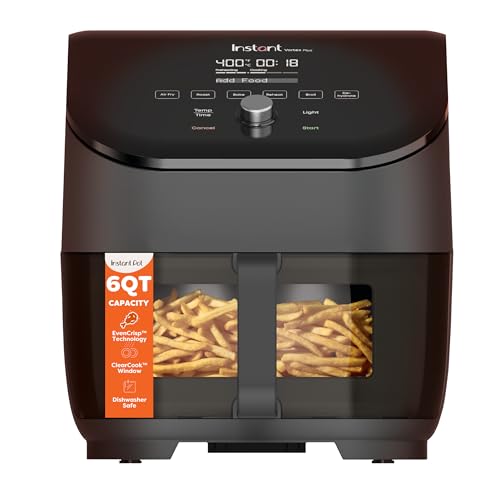
Instant Pot Vortex Plus ClearCook, 6 Quart
 Instant Pot Vortex Plus ClearCook 6 Qt 6-in-1 Air Fryer
Quick Answers
Can I change the time after choosing a preset?
On many models you can, but it varies. The manual will say which settings stay adjustable once a program is running.
Are presets more accurate than manual settings?
They are convenient, not necessarily more accurate. A preset is tuned for a typical load, and a manual setting gives you control when your food differs.
Why does the same preset give different results on different days?
The load, food temperature and basket temperature can vary. Keeping those consistent makes results easier to repeat.
Decoding Icons, Abbreviations and Names
Control panels use compact icons and short words to describe programs, and these are not standardized across brands or even across models from one maker. An icon of a drumstick might mean poultry, while a fish silhouette may cover all seafood. A mug or cake icon often signals baking, and a flame can stand for broil, roast or a high-heat mode. Because the symbols are small, the first step is to match each one with the legend in the manual.
Pay attention to abbreviations. A label such as “reheat” or “dehydrate” implies a very different heat profile from “fries” or “wings”. Some panels also use terms like “keep warm” or “proof”, which are not cooking programs at all. Reading them literally helps you avoid starting a cycle that does not match your food.
It also helps to sort the buttons into groups: food-specific presets, general modes such as air fry, bake, roast and broil, and utility functions like preheat, pause and timer. General modes typically give you control over time and temperature, while presets bundle choices for you. Once you know which group each button belongs to, you can decide when the shortcut is useful and when you would rather set things by hand. If the manual is lost, many makers publish digital copies on their support pages, so check there.
What the Display and Sounds Are Telling You
The screen does more than count down. Many models show the selected program, the set temperature, the remaining time and a heating indicator. Learn what each indicator means, because it tells you whether the unit is still warming up or already cooking. A countdown that starts before the unit has reached its target can behave differently from one that begins once heating is complete, so check how your model treats this.
Beeps and prompts are part of the program. Some units remind you to shake or turn food partway through, pause automatically when the basket is removed, and resume when it is replaced. Others offer a separate preheat sound. Knowing when the machine expects you to act prevents unexpected pauses and uneven results.
Look for settings you can change while a program runs, such as adding a few minutes or adjusting the temperature. If a model locks the program, you may need to cancel and start again, which can alter the timing. Keep an eye on error codes too. These typically relate to overheating, an open drawer or a sensor problem, and the manual explains what to do. If a code persists after you reset the unit following the manual, contact the maker or retailer support rather than continuing to use it.
Comparing Presets with Manual Modes
A preset is a convenience, but it is not always the best tool. Presets work well when your food resembles the one the program was designed around, such as a standard portion of frozen fries or a typical set of chicken pieces. They save you from remembering numbers and give a consistent starting point.
Manual modes are better when your food is unusual in size, density or moisture. Thick cuts, thin cuts, mixed loads and small portions all behave differently from the assumed load. In those cases, choose a general mode and set the temperature and time yourself, using the manual or recipe as a guide. You also get more control over mid-cook changes.
A practical approach is to use a preset as a first attempt, note the result, and then adjust. If the result is pale, add a short extra interval or raise the temperature slightly within the manual’s range. If it is dark, reduce time or temperature next time. Over a few cooks you build your own reference list for the foods you cook often. Remember that presets do not verify doneness, so use a thermometer for meat and poultry and follow official safe-temperature guidance, regardless of what the display says.
Portions, Frozen Food and Package Labels
The food package is another label worth reading. Frozen products usually include oven and air fryer directions, which are written for typical loads and may differ from a preset. If the package says to shake halfway or spread in one layer, follow it, even if the preset does not mention it. Where the package and the manual disagree, treat the manual as your safety reference and the package as a cooking reference, and start with the shorter time.
Portion size changes everything. A small portion cooks faster than a full basket, and a full basket may need longer or a mid-cycle shake. Presets are usually tuned for a certain range, so a very small load might finish early, while an overloaded basket may be undercooked and soggy. Match your portion to the instruction, or adjust the time and check earlier.
Starting temperature matters as well. Food straight from the freezer behaves differently from chilled or room-temperature food. Avoid thawing on the counter; use safe thawing methods when the instructions call for it. Coated, battered and sauced foods also respond differently to the same program, so read the package for guidance on oil and spacing. If the package gives a range, begin at the low end and extend in short steps.
Building Your Own Cheat Sheet
After you understand the labels, make them work for you. Keep a simple note, on paper or in your phone, listing the foods you cook most and the program or manual settings that gave the result you liked. Record the portion size, whether you preheated, how often you shook the food, and any adjustments. This turns a general preset into a personal one.
Update the note whenever you change something, and add observations about the food, such as pale, crisp or dry. Over time you will see patterns, for example that your model runs hot, or that certain presets finish early with small loads. Those insights are more reliable than a generic chart because they are based on your appliance and habits.
You can also label the panel itself with removable markers if a particular button is easy to confuse, or keep a printed copy of the manual’s program table near the machine. If more than one person uses the appliance, share the notes so everyone starts from the same point. Review your list occasionally, especially after a firmware update or if you move to a different model, since program definitions can change. A few minutes of record keeping saves wasted food and removes much of the guesswork from busy mealtimes.
Common Questions
Do all air fryers have the same preset names?
No. Names, icons and settings vary by brand and model. Check your own manual for what each one does.
Should I preheat when using a preset?
Follow your manual. Some presets include warm-up and others do not, so adding a separate preheat could change the result.
What if the preset cooks too fast?
Shorten the time or lower the temperature if your model allows it, and check the food earlier next time. Using a manual mode is another option.
Can I trust a preset for chicken doneness?
Use it as a starting point only. Confirm doneness with a food thermometer and official guidance for poultry.
Why does the timer pause during cooking?
Some models pause when the basket is removed or when a shake reminder activates. Check the manual for the behavior of your unit.
Where can I find a lost manual?
Many makers provide downloadable manuals on their support pages. Search using your model number from the label on the appliance.
Related reading
6 Best Dual Basket Air Fryers for Cooking Two Foods (2026)
Reference and further practice
Philips Airfryer manufacturer manual: model-specific use and care
Going Deeper: What This Guide’s Shortlist Cannot Show You
The reviews and comparisons above give you the facts about each air fryer preset labels on the shortlist. What they cannot give you is your own context: your kitchen, your routine and the people you share both with. The sections that follow are about that context. They dig into the criteria that decide long-term satisfaction, walk through the situations a air fryer preset labels actually meets in a real home, compare the picks above from the angle of daily life rather than specification, and finish with the care habits and questions that owners raise once the first month has passed. Read them with your own measurements and habits in mind, and let them argue with the shortlist where they need to.
Choosing a Air fryer preset labels: The Criteria in Depth
Every air fryer preset labels looks competent on a product page. The differences that matter emerge over months, and they cluster around a handful of criteria that are easy to rush past while shopping. Work through these six slowly, in order, and score your shortlist against each one in writing. A simple written score, even a rough one, protects the decision from the two forces that ruin most household purchases: a persuasive photograph and a persuasive discount. Neither of those forces will be present on the ordinary Tuesday when the product has to perform.
What a preset actually is on your machine
Start with what a preset actually is on your machine. A preset is a stored combination of temperature and time chosen for a typical portion, not a sensor that recognises your food, and reading it that way prevents most disappointments. In practice, this is where a air fryer preset labels either earns its place in your kitchen or becomes a quiet source of friction, because it shapes every single use rather than just the first impression. Before you commit, picture the most ordinary day you will spend with it, not the best day, and ask whether this point still works then. Write your answer down beside the other points on your shortlist, because a air fryer preset labels chosen on written evidence stays satisfying far longer than one chosen on a feeling in a shop or a photograph online.
The portion size the preset quietly assumes
Next, look closely at the portion size the preset quietly assumes. A program tuned for a modest handful behaves differently under a full basket, so the assumed load is the first thing to compare with your actual load. Shoppers often treat this as a minor detail, yet with a air fryer preset labels it tends to decide how the product feels after the novelty has worn off. Compare the options on your shortlist on this point alone, and be honest about your own habits while you do it: the right answer for a careful, patient household can be the wrong answer for a busy one. If a listing or a manual is vague about this point, treat the vagueness itself as information and favour the option that explains itself clearly.
The starting state the preset assumes
Give real weight to the starting state the preset assumes. Fresh or frozen, cold machine or warm, thick or thin: presets are written for one set of assumptions, and your food’s real state decides how far to adjust. This is the sort of factor that rarely appears in a headline, yet it is the one owners mention when they describe whether they would buy the same air fryer preset labels again. Think about how it interacts with the rest of your kitchen: the space it sits in, the people who share it and the routine it joins. A choice that fits those surroundings will be used more, cared for better and replaced later, which is the quiet definition of good value in any category.
How to adjust in small, recorded steps
Do not skip how to adjust in small, recorded steps when you compare models. Changing the time slightly while holding the temperature, or the reverse, teaches you what the preset needs for your portions far faster than random corrections. The temptation is to rank a shortlist by the features that are easiest to count, but a air fryer preset labels is judged in daily life by how its awkward points behave, and this is often one of them. If you can, test this point in person or find it described in the maker’s own documentation rather than in marketing copy. Where two options seem equal elsewhere, let this factor break the tie, and note the reason in your shortlist so the decision still makes sense to you months later.
A Air fryer preset labels in Real Life: Situations to Test Your Shortlist Against
Specifications describe a product; situations describe a life. The five scenes below are the ones a air fryer preset labels is most likely to meet, and each one reorders the priorities in the criteria above. Find the scene closest to your household and let it carry extra weight in your decision. If none of them resembles your life, that is valuable information too, because it means your deciding scene is unusual enough to deserve its own written list of demands before you spend anything.
Frozen fries under the fries preset with a fuller basket than usual
Picture frozen fries under the fries preset with a fuller basket than usual. In that situation, where the label is a fair starting point but the load demands a shake midway and a few extra minutes judged by eye. The lesson is to judge a air fryer preset labels against this kind of ordinary, repeatable moment rather than against an idealised one, because it is the ordinary moments, repeated weekly, that decide whether the purchase was wise. Think through the small steps involved, where your hands are, what else is happening in the kitchen at that moment, and which feature quietly does the work. If the option you are considering handles this scene gracefully, it will handle most of what your household asks of it.
Fresh chicken pieces under a poultry preset
Consider fresh chicken pieces under a poultry preset. Here, where thickness varies piece to piece and a thermometer, not the timer, has the final word on doneness. What matters is not whether a air fryer preset labels can cope once, in favourable conditions, but whether it copes calmly every time this scene repeats, with different people and different levels of patience. Run the scene mentally from start to finish: setting up, using, finishing and putting things away. The option that makes the whole sequence feel unremarkable is usually the right one, because unremarkable, in a working kitchen, is another word for well designed.
Reheating yesterday’s roast vegetables under a vegetable preset
Think about reheating yesterday’s roast vegetables under a vegetable preset. For this household, where a reheating job is gentler and shorter than cooking from raw, whatever the picture suggests. Notice how the priorities reorder themselves in this scene: the headline feature that dominates a product page may matter very little here, while a modest detail carries the day. That reordering is exactly why reading a guide against your own life, rather than against a generic ideal buyer, produces better decisions. If your home matches this scene, weight the relevant points in the criteria above more heavily and let the rest matter less.
A small batch of a food with no matching preset
Imagine a small batch of a food with no matching preset. In this case, where choosing the closest temperature behaviour and timing it yourself, with notes, beats forcing the food into the wrong category. The practical move is to prepare for this scene before you buy: measure for it, list what it needs and check the shortlist against that list, because retrofitting a solution afterwards is always more expensive in money or patience than choosing correctly once. A air fryer preset labels that fits this scene without improvisation will also tend to fit your unplanned moments, which is the closest thing to future-proofing a household purchase can offer.
Weighing the Approaches Side by Side
The main sections of this guide set out the options and the reasoning behind them. This comparison gathers the threads into one place, so the trade-offs can be judged together rather than piecemeal. No approach wins on every point, and any source that claims otherwise is selling rather than advising. What follows weighs the approaches against the criteria that matter most in a real kitchen: fit with the space, fit with the routine, effort to maintain, and forgiveness when life gets busy and the ideal method slips for a week or two.
On what a preset actually is on your machine, the honest position is this: a preset is a stored combination of temperature and time chosen for a typical portion, not a sensor that recognises your food, and reading it that way prevents most disappointments. Judged against the alternatives, that makes this point a genuine deciding factor for households where it bites hardest, and a minor one where it does not, which is why this guide keeps returning to your own situation rather than declaring a universal winner.
On the portion size the preset quietly assumes, the honest position is this: a program tuned for a modest handful behaves differently under a full basket, so the assumed load is the first thing to compare with your actual load. Judged against the alternatives, that makes this point a genuine deciding factor for households where it bites hardest, and a minor one where it does not, which is why this guide keeps returning to your own situation rather than declaring a universal winner.
On the starting state the preset assumes, the honest position is this: fresh or frozen, cold machine or warm, thick or thin: presets are written for one set of assumptions, and your food’s real state decides how far to adjust. Judged against the alternatives, that makes this point a genuine deciding factor for households where it bites hardest, and a minor one where it does not, which is why this guide keeps returning to your own situation rather than declaring a universal winner.
On how to adjust in small, recorded steps, the honest position is this: changing the time slightly while holding the temperature, or the reverse, teaches you what the preset needs for your portions far faster than random corrections. Judged against the alternatives, that makes this point a genuine deciding factor for households where it bites hardest, and a minor one where it does not, which is why this guide keeps returning to your own situation rather than declaring a universal winner.
Day-to-Day Care, Cleaning and Storage in More Detail
Ownership is the longest part of a product’s story and the part shopping guides most often skip. A air fryer preset labels asks for a small, regular investment of attention, and the five habits below are the ones that repay it. None of them is difficult, and all of them are easier in the first month, when they are being learned, than in the second year, when their absence has already done its quiet work. Adapt the rhythm to your household, but keep the rhythm: regularity is the entire mechanism by which care works.
Make it a habit to wipe the control panel with a soft, slightly damp cloth as the maker allows. This matters because greasy fingerprints obscure labels and touch controls alike, and a clean panel is a readable panel. Small, regular attention of this kind is what separates a air fryer preset labels that serves for years from one that declines quietly and is replaced early. Tie the habit to something you already do in the kitchen, such as a weekly clean or a seasonal clear-out, so it happens without willpower. The first few times, follow the maker’s guidance exactly; once the routine is familiar it takes minutes, and those minutes are repaid every time the product works exactly as it should.
Add this step to your routine: keep the booklet or a photo of its preset notes with your cooking log. The reason is simple: the explanation you need is usually needed mid-cook, not during a tidy-up. Owners who build this check into their normal rhythm rarely meet the problem it prevents, while owners who wait for a symptom usually meet it at the least convenient moment. If you share the air fryer preset labels with others, make the routine visible, on a note or in a shared list, so the standard does not depend on one person’s memory. Consistency, far more than any special product or tool, is the whole secret of keeping household equipment in good order.
Do not overlook this: review your preset notes every few months. It is worth the small effort because crossing out adjustments that no longer match your portions and keeping the ones that have proved themselves. Treat the first month with a new air fryer preset labels as the time to learn its particular version of this routine, since every model and material has its own preferences and its own early warning signs. The maker’s manual is the authority here, ahead of general advice including this guide, and where the two seem to differ, the manual wins. A routine grounded in the manual and repeated calmly will outlast any amount of enthusiastic but irregular deep cleaning.
Regularly, teach other household members your household adjustments. This is one of those tasks whose value only becomes obvious in its absence, because a sticky note inside a cupboard door saves everyone else repeating your experiments. Schedule it lightly and often rather than heavily and rarely, and keep whatever it needs within reach of the air fryer preset labels itself, since a tool stored in another room is a task postponed. While you do it, look at the whole item with fresh eyes: wear, looseness, marks and changes are easiest to catch during a familiar routine, and catching them early is what turns maintenance from a rescue into a rhythm.
Where People Commonly Go Wrong
The mistakes below are not careless ones. They are the reasonable-seeming shortcuts and assumptions that most owners make at least once, usually in the first season, and they are collected here so that your first season can skip the tuition fees. Each one follows the same pattern: a small decision, taken in a hurry or on an assumption, whose cost arrives later and disguised as the product’s fault. Recognising the pattern is most of the cure.
Pressing the picture and walking away for any food
A common misstep is pressing the picture and walking away for any food. The trouble is that presets reward supervision at the turn point and near the end, especially the first time a dish meets a program. The fix costs nothing but attention: pause at the moment this mistake usually happens, which is normally when you are hurried or working from habit, and do the slower, correct thing instead. If others in the household share this air fryer preset labels, share the reasoning too, because a mistake understood is a mistake avoided, while a rule without a reason is a rule quietly dropped within the month.
Assuming presets are standardised between brands
Watch out for assuming presets are standardised between brands. People fall into it because it feels efficient or harmless at the time, but the same picture can hide different temperatures and times on different machines, so a new machine resets your assumptions to zero. Build the alternative into your routine so the right action is also the easy action: prepare what you need in advance, keep the relevant check on your written list, and let the small upfront effort protect you from the much larger downstream one. Experience in any kitchen is mostly a collection of these small protections, learned once and applied without drama.
Correcting a preset’s result by changing everything next time
Another frequent error is correcting a preset’s result by changing everything next time. It persists because the consequence rarely arrives immediately, so the habit survives its own feedback. Remember that adjust one element, note it, and let the preset converge on your kitchen’s version over a few cooks. When you catch yourself about to do it, treat that moment as the product asking for the one thing it needs from you. A air fryer preset labels used with that level of attention will outlast and outperform a nominally better one used carelessly, which is worth remembering whenever an upgrade tempts you more than a habit change.
More Questions About a Air fryer preset labels, Answered
The main FAQ above covers the questions buyers ask before ordering. These are the questions owners ask afterwards, once the air fryer preset labels has met real life. The answers stay practical and, where a detail depends on your exact model, they point you to the manual or the maker, because that is where the authoritative version of the answer lives.
Why does the same preset give different results on different days?
Load size, starting temperature, piece size and even how the food was arranged all vary. The preset is constant; the food is not, which is why notes about your loads make results repeatable. As a rule of thumb, start from the guidance in the main sections above, test the answer against your own kitchen once, and adjust in small steps rather than changing your whole approach at once.
Should I preheat before using a preset?
Follow the booklet for your model and program. Some presets include the heat-up in their timing, others assume a warm start, and guessing wrong shifts the whole result. If your situation differs from the one described, the principle still holds even where the detail changes: measure first, follow the maker’s guidance where it exists, and let one observed result at a time refine what you do next.
Can I open the drawer during a preset without ruining it?
Yes, and you should at the turn point for most foods. Most machines pause and resume; work promptly so the basket does not lose its heat while you admire the contents. Most households find this settles into common sense after the first few uses. The important part is noticing the pattern early, while the habit is still easy to change, rather than after a season of small frustrations.
What do I do when my food matches two presets?
Choose by the food’s dominant trait: its thickness and what doneness means for it. Then adjust from the result and record which label served you better. When in doubt, choose the option that is easier to undo. With a air fryer preset labels, as with most household equipment, reversible experiments teach you plenty and cost you little, while irreversible ones demand certainty you rarely have at the start.
Is the preset temperature safe to change?
Presets are starting points, and adjusting the stored temperature or time within the machine’s normal controls is ordinary cooking. Stay within the maker’s guidance for the food type, especially for proteins. As a rule of thumb, start from the guidance in the main sections above, test the answer against your own kitchen once, and adjust in small steps rather than changing your whole approach at once.