Disclosure: airfryerkitchensupply.com is reader-supported. When you buy through links on our site, we may earn an affiliate commission at no extra cost to you.
Where to Buy
Budget office chairs are an Amazon-native category — the brands below sell direct, ship flat, and assemble at your desk. Every chair here was confirmed against its own Amazon listing data before earning a link: Furmax Office Chair, BestOffice Ergonomic Office Chair, Sweetcrispy Ergonomic Desk Chair, DUMOS Home Office Chair, TRALT Office Chair with Headrest, and SIHOO M18 Ergonomic Office Chair. Chair prices in this tier move constantly with coupons and sales, so check the current price on Amazon rather than trusting any figure in a guide — and measure your desk height and doorway before ordering any chair, at any price.
Introduction
The search for the best inexpensive comfortable office chairs is really a search for the point where cheap stops meaning punishing. Below a certain tier, office chairs are genuinely bad — plywood seats, foam that pancakes in a month, backs that force a slouch. But the six mesh chairs in this guide occupy the honest sweet spot above that floor: breathable mesh backs with real lumbar shaping, padded seats, adjustable height, and swivel bases, at the budget end of the market. Comfort at this tier is not about luxury; it is about three mechanical things done adequately — a back that meets your lower back, a seat that fits your thighs, and adjustments that let the chair fit you instead of the reverse. We verified each chair against its listing data, preserved the exact features each listing claims (flip-up arms, headrests, stated weight capacities), and flagged what the listings do not say. None of these chairs will out-sit a premium ergonomic chair costing many times more, and this guide will not pretend otherwise — but for home offices, study desks, and first apartments, they are the difference between working from a chair and enduring one.
Key Takeaways
- At the budget tier, mesh backs are the comfort feature that matters most: breathability plus lumbar shaping beats thin padding on a solid back.
- Match the chair to your body using the listing’s stated details — capacity, arm style, headrest — rather than by photos.
- Flip-up arms are the small-space feature; adjustable lumbar and 2D arms are the step-up features worth paying slightly more for.
- Every chair here assembles at home; budget fifteen unhurried minutes and keep the hardware sorted.
- Comfort is a fit problem before it is a price problem: the right budget chair, set up properly, will out-sit the wrong expensive one for most bodies and most workdays.
In this guide
Quick Picks
- Best Overall: Furmax Office Chair — the budget mesh benchmark: lumbar support, adjustable height, breathable mid-back, 360° swivel. Check the current price on Amazon
- Best Budget: BestOffice Ergonomic Office Chair — mid-back mesh, sponge seat, lumbar support, the simplest adequate chair in the guide. Check the current price on Amazon
- Best for Small Spaces: Sweetcrispy Ergonomic Desk Chair — mesh mid-back with flip-up arms that tuck the chair under the desk. Check the current price on Amazon
- Best Value Mesh: DUMOS Home Office Chair — ergonomic mid-back mesh with rocking mode and fixed armrests. Check the current price on Amazon
- Best with Headrest (Budget): TRALT Office Chair — adjustable lumbar, headrest, flip-up arms, listed 330 lb capacity. Check the current price on Amazon
- Best Step-Up Comfort: SIHOO M18 — adjustable lumbar support, 2D armrests, headrest, wide cushion, tilt lock, listed 330 lb capacity. Check the current price on Amazon
How These Picks Were Chosen
The filters were strict about what “inexpensive comfortable office chair” must mean. First, the product had to be a complete office chair — several high-ranking search results in this space are chair mats and seat cushions, which are accessories, not chairs, and were excluded on sight. Second, it had to be a genuine desk chair with the budget-comfort core: a shaped back with lumbar support, a padded seat, height adjustment, and a swivel base, each confirmed in the listing rather than assumed from photos. Third, gaming chairs, dining chairs, and kids’ study chairs were excluded — different briefs, different guides. Fourth, we spread the list across the real decision points in this tier: the absolute-budget chair, the small-space chair with flip-up arms, the headrest options, and one step-up model with genuinely adjustable ergonomics for buyers who can stretch slightly. Where a listing states a weight capacity, we print it; where it does not, the spec box says so instead of borrowing a number from a sibling model.
The 6 Best Inexpensive Comfortable Office Chairs
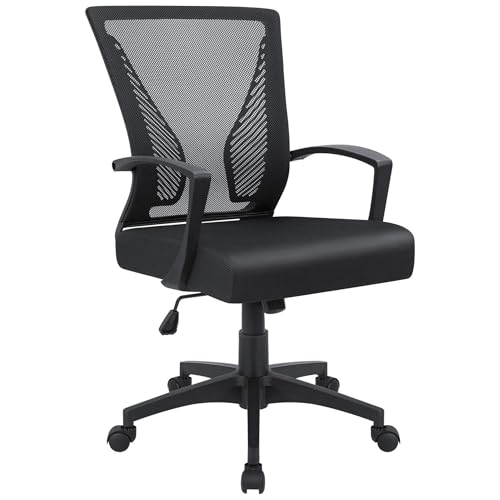
Furmax Office Chair — Best Overall
The Furmax is the chair that defines this tier for a reason: an ergonomic mesh desk chair with lumbar support, adjustable height, a breathable mid-back, fixed armrests, and a 360° swivel, sold in enormous numbers to home offices everywhere. Its comfort recipe is the category’s baseline done right — the mesh back flexes against your spine instead of forcing a posture, the lumbar curve lands where budget chairs usually forget to put one, and the padded seat is sized for real work sessions rather than waiting-room minutes. Assembly is the standard budget-chair ritual of a dozen bolts and an Allen key, and the result is a chair that disappears under you, which is the highest praise an inexpensive office chair can earn. If you are furnishing a home office from scratch and want the safest single answer at this tier, this is it.
Strengths
- Breathable mesh mid-back with lumbar support — the core budget-comfort features, present and correct
- Adjustable height and 360° swivel cover the essential fit adjustments
- The tier’s benchmark design, with a vast ownership base and easy familiarity for anyone who has sat in a modern home office
Trade-offs
- Fixed armrests — no height or width adjustment for arms at any point
- No headrest; taller users sit unsupported above the shoulders on long days
- The listing does not state a weight capacity figure
Spec box: Back: mesh mid-back with lumbar support | Arms: fixed | Adjustments: height, 360° swivel | Capacity: not stated in listing
The deeper case is about expectations managed well. The Furmax does not recline like a lounge chair, its cushion is honest foam rather than a suspension system, and its plastics are budget plastics. What it does is get the geometry right — back curve, seat depth, height range — and geometry is what your body notices at hour three. Thousands of home offices run on exactly this chair because the formula works: mesh where you sweat, curve where you bend, padding where you sit. Buy it as the default; upgrade only when you can name the specific feature you are missing, because this guide’s step-up pick exists for exactly that moment.
Best for: first home offices, remote workers on a budget, and anyone replacing a kitchen chair at a desk. / Not suited for: users who need a headrest, adjustable arms, or a stated high weight capacity.
Check the current price on Amazon
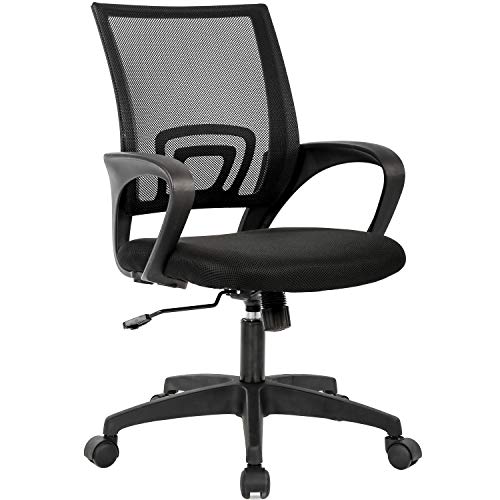
BestOffice Ergonomic Office Chair — Best Budget
BestOffice’s mid-back chair is the floor of acceptable — and that is a compliment at this tier, because so much below it is not acceptable at all. The listing describes a swivel desk chair with lumbar support, adjustable height, a breathable backrest, a sponge seat, and rolling wheels: the complete minimum kit for working at a desk without pain being the main event. The sponge seat is the honest difference from the Furmax — a simpler cushion that suits moderate daily hours well and very long days adequately. For a study desk, a teen’s homework station, a spare-room office used three days a week, or a landlord furnishing a rental, this is the rational purchase: every essential feature present, nothing decorative inflating the price, and a chair that assembles into something genuinely sittable.
Strengths
- Complete essential feature set — lumbar support, height adjustment, breathable back, padded seat
- The budget anchor of this guide: maximum adequacy per dollar
- Simple design that suits study desks and spare rooms as well as full offices
Trade-offs
- Sponge seat cushioning is the simplest in this guide — heavy daily users may want more
- No headrest and no arm adjustability
- The listing does not state a weight capacity figure
Spec box: Back: mid-back, breathable, lumbar support | Seat: sponge cushion | Adjustments: height, swivel | Capacity: not stated in listing
Think of this chair as the correct answer to a specific question: “What is the least I can spend and still work properly?” Students, occasional remote workers, and anyone furnishing a second desk will recognize their situation in that question. The chair’s limits appear at the extremes — ten-hour days, larger bodies, users with strong ergonomic opinions — and this guide has other picks for those readers. Within its brief, it is not a compromise; it is a tool correctly sized to its job, which is more than can be said for chairs costing twice as much with worse geometry.
Best for: students, study desks, spare-room offices, and strict budgets. / Not suited for: all-day-every-day power users or anyone needing stated high capacity.
Check the current price on Amazon

Sweetcrispy Ergonomic Desk Chair — Best for Small Spaces
The Sweetcrispy’s signature is in its arms: they flip up. That single feature transforms a chair’s relationship with a small room — arms up, the chair slides fully under the desk, reclaiming the floor space that a fixed-arm chair permanently occupies in a bedroom-office or a studio corner. The rest of the chair is the sound budget-mesh formula: an ergonomic mesh build with lumbar support, a mid-back, rolling swivel, and a padded seat, listed for home office, bedroom, and study use. Flip-up arms also help users who play instruments at their desks, who prefer to sit cross-legged, or who simply find fixed arms collide with their desk’s height. In a generous office the feature is a nicety; in a small one it is the difference between a chair that fits the room and a chair that fights it.
Strengths
- Flip-up arms let the chair tuck completely under the desk — the small-space feature
- Mesh mid-back with lumbar support and rolling swivel
- Arms-up mode suits cross-legged sitters and desk-side instrument players
Trade-offs
- Flip-up arms are not height-adjustable — they are simply up or down, not tuned
- No headrest in this particular configuration
- The listing does not state a weight capacity figure
Spec box: Back: mesh mid-back, lumbar support | Arms: flip-up | Adjustments: height, swivel | Capacity: not stated in listing
Small-space workers should also note what flip-up arms do for posture variety: with the arms parked, you can pull closer to the desk than fixed arms allow, which shortens the reach to the keyboard and unloads the shoulders. It is a subtle ergonomic win hiding inside a storage feature. Pair this chair with a tape measure — confirm your desk’s underside height against the chair’s arms-down footprint — and a small room stops being a reason to work from the bed.
Best for: bedroom offices, studios, small desks, and anyone who tucks their chair away. / Not suited for: users who want adjustable armrests or a headrest at this tier.
Check the current price on Amazon

DUMOS Home Office Chair — Best Value Mesh
DUMOS’s entry is the quiet value play: an ergonomic mid-back mesh chair with lumbar support, height adjustment, fixed armrests, a 360° swivel, and — the differentiator at this tier — a rocking mode, so the chair can tilt and rock rather than locking you into a single bolt-upright posture. Rocking sounds like a toy feature until you spend a day in a chair that forbids it; the ability to shift your weight and recline a few degrees during calls and reading is a real comfort mechanism, and many budget chairs omit it. The DUMOS is listed across home office, conference, and computer use, which matches its character: an unobtrusive, competent mesh chair that does the whole job description without a specialty. If the Furmax is the benchmark and the BestOffice is the floor, the DUMOS is the benchmark with a tilt — often the smartest money in the tier.
Strengths
- Rocking/tilt mode at a tier where many chairs sit completely rigid
- Ergonomic mesh mid-back with lumbar support and height adjustment
- Fixed armrests and 360° swivel complete the standard kit
Trade-offs
- Fixed arms — no adjustability beyond the standard setup
- No headrest
- The listing does not state a weight capacity figure
Spec box: Back: mesh mid-back, lumbar support | Arms: fixed | Extras: rocking mode | Capacity: not stated in listing
The rocking mode deserves one more paragraph, because it changes how a long day feels. Static sitting is the enemy — even perfect posture held motionless for hours loads the same tissues the same way. A chair that lets you rock redistributes that load continuously, in small doses, without a standing break. Ergonomists build expensive chairs around exactly this principle; finding any version of it at the budget tier is the DUMOS’s whole argument, and it is a good one. For the reader who fidgets, leans, and thinks better in motion, this is your chair in this guide.
Best for: restless sitters, call-heavy workdays, and value hunters who want tilt at a budget tier. / Not suited for: users needing a headrest or adjustable arms.
Check the current price on Amazon

TRALT Office Chair with Headrest — Best with Headrest (Budget)
The TRALT adds the two features budget chairs most often skip — a headrest and adjustable lumbar support — and wraps them in a mesh chair with flip-up armrests and a listed weight capacity of 330 lbs. The headrest changes the chair’s use profile: leaning back during a call or a video stops being a neck strain and becomes a rest position, which matters more as workdays lengthen. Adjustable lumbar, even in simple form, beats the fixed curve of the cheaper picks because lower backs are not a standard size. The flip-up arms borrow the Sweetcrispy’s small-space trick, making this the most feature-complete chair in the guide’s lower half — the one to shortlist if your body has already told you exactly which budget-chair compromises it refuses to accept.
Strengths
- Headrest included — rare at this tier, valuable on long days
- Adjustable lumbar support plus flip-up arms
- Listed 330 lb weight capacity gives larger users a stated figure
Trade-offs
- More features mean more assembly and more parts to keep adjusted
- Flip-up arms still lack height tuning
- Sits at the upper end of this guide’s budget band
Spec box: Back: mesh with headrest | Lumbar: adjustable | Arms: flip-up | Capacity: 330 lbs (as listed)
Who should stretch to the TRALT? The tall worker whose head clears a mid-back chair entirely. The lean-back thinker whose best ideas arrive at a recline. The larger user who needs a stated capacity rather than a hopeful guess. Each of those readers is poorly served by the cheaper picks no matter how sound they are, because the missing feature is the one their body asks for hourly. That is the correct way to spend within a budget: not on the most features, but on the specific feature your day demands.
Best for: taller users, lean-back workers, and anyone needing a stated 330 lb capacity with a headrest. / Not suited for: strict-minimum budgets or users who never recline.
Check the current price on Amazon

SIHOO M18 Ergonomic Office Chair — Best Step-Up Comfort
The SIHOO M18 is where this guide’s budget discipline relaxes by one notch, and the money buys adjustability — the real currency of ergonomic comfort. Its listing specifies a mesh-back chair with headrest, adjustable lumbar support, 2D armrests, a wide cushion, tilt lock, and a 330 lb capacity. Each of those is a fit dimension the cheaper chairs fix at the factory: lumbar you can position, arms you can move in two planes, a tilt you can lock at your angle, a seat wide enough to sit in rather than on. SIHOO’s ergonomic focus shows in that list — it reads like the checklist of a chair designed around bodies rather than around a price, even though the price remains firmly in the affordable band relative to premium ergonomic brands. For the full-time remote worker who will spend two thousand hours a year in this chair, the M18 is the rational ceiling of “inexpensive.”
Strengths
- Adjustable lumbar support, 2D armrests, and tilt lock — real fit adjustments
- Headrest and wide cushion suit longer bodies and longer days
- Listed 330 lb capacity
Trade-offs
- The most expensive chair in this guide’s budget band — inexpensive, not cheapest
- More adjustments mean a setup session to dial in, not just assembly
- Still a mesh budget chair in materials; premium-chair longevity is a different purchase
Spec box: Back: mesh with headrest | Lumbar: adjustable | Arms: 2D adjustable | Extras: tilt lock, wide cushion | Capacity: 330 lbs (as listed)
The honest framing: the M18 is the chair for the reader who has already owned a budget chair, knows exactly where it failed them, and finds each failure answered in this feature list. First-time buyers may not yet know which adjustments they need, and for them the Furmax remains the wiser default. But if your lower back has opinions, your elbows never land right, and your workday is measured in long unbroken sits, the step up to genuine adjustability is the best money in this entire guide — comfort you configure once and collect on every hour afterward.
Best for: full-time remote workers, users with specific fit needs, and upgraders from a first budget chair. / Not suited for: strict-minimum budgets or occasional-use desks.
Check the current price on Amazon
Comparison Table
| Pick | Badge | Key spec | Best for |
|---|---|---|---|
| Furmax Office Chair | Best Overall | Mesh mid-back, lumbar support, fixed arms | The default home-office chair |
| BestOffice Ergonomic Chair | Best Budget | Mesh mid-back, sponge seat, lumbar support | Students and strict budgets |
| Sweetcrispy Desk Chair | Best for Small Spaces | Mesh mid-back, flip-up arms | Bedroom offices, tuck-away storage |
| DUMOS Home Office Chair | Best Value Mesh | Mesh mid-back, rocking mode, fixed arms | Restless sitters who want tilt |
| TRALT Office Chair | Best with Headrest (Budget) | Headrest, adjustable lumbar, flip-up arms, 330 lbs listed | Taller and larger users |
| SIHOO M18 | Best Step-Up Comfort | Adjustable lumbar, 2D arms, tilt lock, 330 lbs listed | Full-time remote workers |
How to Choose the Best Inexpensive Comfortable Office Chairs
Start with your hours. A chair sat in for two hours a day needs adequacy; a chair sat in for nine needs adjustability. The honest dividing line in this guide runs between the first four picks (adequacy, well executed) and the last two (adjustable lumbar, headrests, tunable arms). Price your hours, not your hopes — occasional users overspend on features they will never adjust, and full-timers underspend into daily discomfort that costs more than the chair.
Second, fit the back to your back. Mid-back mesh chairs support up to the shoulder blades; a headrest extends support to the head when reclining. Lumbar support is the non-negotiable: fixed curves suit average builds, adjustable lumbar suits everyone else and anyone whose back has ever complained. If you are notably tall, short, or broad, weight the adjustable picks — the TRALT and the SIHOO — more heavily than raw price.
Third, respect the arms question. Fixed arms are fine when their height happens to match your desk and your elbows; flip-up arms solve small rooms and close desk work; 2D adjustable arms solve the elbows themselves. Arms that are wrong are worse than arms that are absent, because they shrug your shoulders for eight hours a day. When in doubt, choose the chair whose arms can get out of your way.
Fourth, check the numbers the listing actually gives you. Two chairs here state a 330 lb capacity; the others do not state one, and the correct response to an unstated capacity is not to assume — it is to choose a chair that states a figure your body fits within, with margin. Likewise measure your desk height, your doorway, and the floor the casters will roll on. Budget chairs are bought online and returned with difficulty; five minutes with a tape measure is the cheapest insurance in the whole purchase.
Finally, think about the room’s temperature and your own habits, because they quietly shape which chair feels comfortable by month two. Mesh backs reward warm rooms and warm people; in a cold basement office, the same breathability can feel drafty, and a throw over the chair back is the honest fix. Cross-legged sitters should weight seat width and flip-up arms; perchers who sit on the front edge should weight seat depth and a waterfall front; leaners should weight tilt and headrest. None of these preferences appears on a spec sheet, yet each predicts satisfaction better than any single feature. The chair that fits your habits will feel like the comfortable one, whatever its price — which is why this guide describes habits and bodies in every review instead of stopping at hardware.
Setting Up a Budget Chair So It Actually Feels Ergonomic
A budget chair adjusted well beats a premium chair adjusted badly, and the setup takes ten minutes you will repay daily. Work through it in order:
- Step 1: Set seat height so your feet rest flat on the floor with knees at roughly a right angle. Dangling feet and perched knees are the two most common setup errors.
- Step 2: Sit back fully so the lumbar support meets the small of your back. If your chair’s lumbar is adjustable, position it into the curve of your spine, not at your belt line.
- Step 3: Set armrests — or flip them up — so your elbows rest with shoulders relaxed and forearms roughly parallel to the desk. Shoulders that hike toward your ears mean the arms are too high or in the way.
- Step 4: Position the monitor so the top of the screen sits near eye level, an arm’s length away. A headrest chair invites leaning back; keep the screen close enough that leaning does not become squinting.
- Step 5: Tune the tilt. A slight recline with the tilt lock set — or the rocking mode free — spreads load across your back better than bolt-upright sitting.
- Step 6: Revisit after a week. Foam settles, bolts relax, and your body learns the chair; a second pass at the adjustments is where budget chairs become genuinely comfortable.
Mesh vs Padded: What Budget Buyers Should Know
Every chair in this guide uses a mesh back, and that uniformity is itself a finding: at this tier, mesh is simply the better technology. A mesh back breathes, so long sessions do not end with a warm, damp shirt; it flexes, so the back support moves with you instead of presenting a flat board; and it cannot suffer the budget-padded-back failure mode, where thin foam over plywood compresses into a hard shell within a year. Padded backs earn their place at higher tiers with sculpted foam and at executive tiers with leather aesthetics, but in the inexpensive band, mesh is where comfort-per-dollar lives. Seats remain padded in all six picks — foam over a base is still the right seat technology at this price — and the variation that matters there is cushion generosity and width, which is why the step-up pick’s wide cushion gets its own mention. If a budget chair you are considering elsewhere offers a fully padded back and a mesh price, be suspicious; in this tier, you can have the mesh back or the low price with real comfort, and this guide chose mesh six times.
Common Buying Mistakes
- Buying a chair mat or cushion thinking it is a chair. Accessories rank in the same searches. Confirm you are buying a complete chair with a base, a back, and arms as described.
- Ignoring capacity because it is unstated. An unstated capacity is not an unlimited one. Larger users should choose from the picks that state a figure — 330 lbs as listed — with margin to spare.
- Choosing by the photo’s recline. A chair photographed at a dramatic angle may lock upright in reality. Read for tilt and rocking features in the listing, as this guide did.
- Forgetting the desk in the chair purchase. Fixed arms plus a thick desktop plus a low underside equals a chair that cannot approach the desk. Measure, or choose flip-up arms.
- Expecting premium longevity at a budget tier. These chairs are honest tools with budget materials. Full-time users should expect a service life measured in years, not decades — and the step-up pick stretches it furthest.
- Skipping the setup. An unadjusted ergonomic chair is just a chair. Ten minutes with the setup steps above is worth more than the price gap between any two picks here.
Final Recommendation
For the typical home office, buy the Furmax — it is the tier’s benchmark for a reason. On the strictest budget or for a study desk, the BestOffice is the adequate minimum done right. Small rooms should take the Sweetcrispy and its flip-up arms; restless sitters should take the DUMOS and its rocking mode. If you need a headrest or a stated capacity, the TRALT delivers both at a budget tier, and full-time remote workers should stretch once to the SIHOO M18, whose adjustability pays out every working hour. Check the current price on Amazon before ordering — this tier’s prices move too much for any printed figure to survive — and run the setup steps the day the chair arrives.
One last consideration for households buying more than one chair — a desk for each partner, or a homework station per child: standardizing on a single model from this list simplifies everything downstream. Assembly becomes a practiced routine by the second chair, spare hardware is interchangeable, and when one chair eventually needs a caster or a bolt, the knowledge transfers. Mixed fleets look eclectic and maintain terribly. Pick the model that fits the most demanding sitter in the house, buy it for everyone whose needs it covers, and let the specialists — the headrest chair, the small-space chair — be deliberate exceptions rather than accidents of separate shopping trips.
Related guides for building out a workspace: Best Chairs Around 100, Best Desk Chairs For Extended Use, Best Customizable Office Chairs, Best Carpet For Under Desk Chairs, and Best Area Rugs For Under Office Chair.
Making a Budget Chair Last
Budget chairs die from neglect more than from defects, and the maintenance is measured in minutes per quarter. Tighten the assembly bolts after the first month — new chairs settle, and a loose bolt left alone becomes a wobble, then a stripped thread, then a discarded chair. Keep casters clean: hair and carpet fiber wound around the wheels are the leading cause of the drag and floor-scratching owners blame on the chair. Vacuum the mesh back occasionally and wipe it with a damp cloth; mesh that breathes is the comfort feature, and dust slowly closes it. If your floor is hardwood, confirm your casters suit it or add a chair mat — the related guides above cover exactly that pairing — because wheel damage to a floor costs more than any chair in this article. Finally, sit in the chair as designed: feet down, back against the lumbar, no perching on the front edge with the tilt locked against your knees. Budget chairs tolerate real use well; they tolerate misuse briefly. Treat the tool correctly and the inexpensive chair becomes the multi-year chair, which is the only definition of value this category should be judged by.
Who Should Buy Which Chair: Five Reader Profiles
Abstract advice sharpens when it is pinned to people. The new remote worker, furnishing a corner this week with a laptop and a deadline, should buy the Furmax and spend the savings on a monitor arm — the chair covers the sitting, and the remaining budget does more good at eye level than in a second chair feature. The graduate student in a shared house should buy the BestOffice: it will survive being borrowed, moved between rooms, and sat in sideways, and its price will not sting when it is eventually left behind or handed down. The studio dweller whose desk is also the dining table should buy the Sweetcrispy, because flip-up arms are the only feature that gives the floor back every evening. The back-sensitive office worker who has already tried a basic chair and found its fixed lumbar curve landing in the wrong place should skip directly to the TRALT or the SIHOO — adjustability is not a luxury for that reader, it is the entire purchase, and buying a second fixed chair would repeat the first mistake at a second price. The team lead furnishing three desks for a small office should standardize on the DUMOS or the Furmax: identical chairs simplify spares, assembly, and the inevitable day someone swaps a caster. Notice that none of these profiles is “the person who wants the best chair” — each is a situation with a constraint, and the right chair is the one whose strengths point at the constraint.
The True Cost of a Cheap Chair, Counted Properly
Skeptics rightly ask whether an inexpensive chair is a false economy, so let us count honestly. A budget chair’s cost is its price plus assembly time plus a realistic service life; a premium chair’s cost is a much larger price amortized over a much longer life, plus a warranty that has real value. For a chair used two hours a day, the budget math wins easily — the premium chair’s longevity is wasted on a light duty cycle. For a chair used ten hours a day, five days a week, the calculation tightens: the budget chair may need replacement inside the premium chair’s first warranty period, and the buyer should weigh the step-up pick in this guide as the middle path — adjustable enough for the duty, priced for the reality. What never makes sense is the unexamined purchase: the cheapest chair bought for the heaviest use, or the premium chair bought for a homework desk. This guide exists to make the match deliberate. Count your hours, name your constraints, and the inexpensive chair stops being a gamble and becomes what it should be — a correctly sized tool bought at a correctly sized price.
Reading a Budget Chair Listing Without Getting Fooled
This category’s listings reward the same skeptical reading as any other. First, confirm the product is a chair: search results in this space are salted with chair mats, seat cushions, and lumbar pillows, all photographed at chair-like angles. Second, separate stated specifications from ambiance — a capacity figure, an arm style, a named adjustment are facts; a model photographed mid-recline in a sunlit loft is a mood. This guide prints capacity only where the listing states it, and you should apply the same rule to any chair you consider elsewhere. Third, treat the word “ergonomic” as a claim to be verified against the feature list — lumbar support present? height adjustable? arms accounted for? — rather than as a certification, because in this tier it is a description, not a standard. Fourth, check what the arms do before anything else if your desk is unusual: fixed, flip-up, and adjustable arms lead to three different ownership experiences at the same desk. Fifth, read the assembly expectations honestly; every chair here ships flat and builds at home, and a buyer who cannot assemble should arrange help rather than discover the fact at 9 p.m. before a workday. Five minutes of this literal reading is what separates the reader who buys the right budget chair once from the reader who buys three wrong ones.
Frequently Asked Questions
What is the first thing to check when my budget chair feels uncomfortable?
Setup, before hardware. Re-run the adjustment sequence in this guide — seat height, lumbar position, arm interference, tilt — because most “uncomfortable chair” reports are actually unadjusted-chair reports. If a specific discomfort survives correct setup for a week, it is a genuine fit problem, and the fix is the pick in this guide whose feature list answers it, not a cushion stacked on a mismatch.
Can an inexpensive office chair really be comfortable for full-time work?
Yes, with the right expectations and the right pick — and with a realistic picture of what “comfortable” means across a full working week rather than across a showroom minute. A chair earns the word on Friday afternoon, after five days of meetings, deadlines, and posture drift, not in the first thirty seconds of sitting down. Judge every candidate in this guide by that standard and the tier makes sense. Full-time sitters should choose from the adjustable end of this guide — the TRALT or the SIHOO M18 — and invest ten minutes in setup. What budget chairs cannot offer is premium materials and decade-scale longevity; what they can offer is correct geometry, breathable support, and a workday that does not hurt.
Is mesh or a padded back better at this price?
Mesh, decisively, in this tier. It breathes, flexes with your back, and cannot pancake the way thin budget foam does. Every pick in this guide uses a mesh back for exactly that reason, with padded seats where padding belongs.
What weight capacity should I look for?
A stated figure that exceeds your weight with comfortable margin. Two picks here state 330 lbs in their listings; the others do not state a capacity, so larger users should choose from the stated-capacity models rather than guessing. Capacity is a safety and durability specification, not a marketing line.
Are flip-up arms worth it?
In small rooms, absolutely — they let the chair tuck under the desk and let you pull close for keyboard work. In large offices they are a convenience rather than a necessity. What flip-up arms are not is adjustable; if your elbows need a specific height, the 2D arms on the SIHOO M18 are the answer in this guide.
How hard are these chairs to assemble?
Budget chairs in this class assemble with a hex key and a dozen or so bolts, typically in fifteen to thirty unhurried minutes. Lay the hardware out first, leave bolts finger-loose until the frame is aligned, then tighten in sequence — and re-tighten after the first month of use.
Do I need a chair mat with a budget chair?
On hardwood and tile, a mat protects the floor from caster wear over months of rolling; on rugs it also stops the slow creep of the chair across the room during a long day of small movements; on low-pile carpet, it makes rolling noticeably easier; on thick carpet, confirm your chair’s casters are suited to it or choose a mat rated for the pile. The chair and the floor are a system — the related guides linked in this article cover mats and rugs for exactly this pairing.
How long will an inexpensive office chair last?
With the quarterly bolt checks and caster cleaning described in this guide, a budget mesh chair in regular home-office use should give years of service. Heavy daily use shortens that; occasional use extends it. The honest expectation at this tier is a tool that serves well for a good stretch of years — not the decade-plus lifespan that justifies premium pricing.
When should I step up to a premium ergonomic chair instead?
When you can name a need these chairs cannot meet: a specific medical-grade adjustment, a capacity beyond the stated figures, materials rated for a decade of daily use, or a warranty measured in many years. Until a need is that specific, the step-up pick in this guide covers full-time work honestly — and costs a fraction of the premium tier.


