Disclosure: airfryerkitchensupply.com is reader-supported. When you buy through links on our site, we may earn an affiliate commission at no extra cost to you.
Where to buy
Every linked pick below is sold on Amazon, where office chairs are easiest to compare because the listings state the adjustment ranges, weight capacities and certifications in the product details. Read the adjustment list carefully rather than the headline, confirm the stated capacity covers you with margin, and check price on Amazon at checkout time, because chair pricing moves with colour and configuration. Customizable means the chair can be fitted to your body, so the details are the product.
- Keratee Ergonomic Office Chair with Adjustable Lumbar Support, 3D Arms and Headrest — check price on Amazon
- CAPOT Ergonomic Mesh Office Chair, Adjustable Lumbar, 400 lbs — check price on Amazon
- ELABEST X100 Ergonomic Mesh Office Chair with Footrest — check price on Amazon
- MOLENTS Ergonomic Office Chair, BIFMA X5.1 Certified — check price on Amazon
- Marsail Ergonomic Office Chair with Lumbar Support and 2D Headrest — check price on Amazon
- SONGMICS Ergonomic Mesh Office Chair with Adjustable Lumbar Support — check price on Amazon
If you are shopping for the best customizable office chairs, start by ignoring the word ergonomic, which is printed on almost everything, and count the adjustments instead. A genuinely customizable chair lets you set seat height, lumbar support position or depth, armrest position, headrest position and backrest recline behaviour independently, because no two bodies need the same combination and a chair that fits your colleague can be wrong for you in three places at once.
The six picks below were chosen for the breadth and honesty of their adjustment lists as stated on their listings: chairs with multi-direction armrests, adjustable lumbar systems, adjustable headrests and, in one case, a footrest and a stated heavy-duty capacity. Certifications and capacities are reported exactly as the listings state them, and where a listing gives a number, such as a weight capacity, that number is treated as a hard limit rather than a suggestion.
Fit is personal in a way few products are, so this guide also explains how to set each adjustment once the chair arrives, in the order that makes the settings build on each other.
In this guide
Quick Picks
Keratee Ergonomic Office Chair with Adjustable Lumbar Support, 3D Arms and Headrest — Best Overall: Adjustable lumbar, 3D arms and a headrest on a high-back wide-seat frame, the most complete all-round adjustment set in this guide. — Check on Amazon
CAPOT Ergonomic Mesh Office Chair, Adjustable Lumbar, 400 lbs — Best Heavy-Duty Customization: A stated 400 lb capacity with 4D flip-up arms, a 3-level tilt backrest and a 3D headrest, the most adjustment on a heavy-duty frame here. — Check on Amazon
ELABEST X100 Ergonomic Mesh Office Chair with Footrest — Best with Footrest: 5D flip-up arms, adjustable 3D lumbar and a footrest on a big and tall mesh frame, built for people who work and recline in the same chair. — Check on Amazon
MOLENTS Ergonomic Office Chair, BIFMA X5.1 Certified — Best Certified Pick: A mesh chair whose listing states BIFMA X5.1 certification, with adjustable lumbar, 3D arms, tilt back and a wide seat. — Check on Amazon
Marsail Ergonomic Office Chair with Lumbar Support and 2D Headrest — Best Balanced Mesh Pick: Adjustable armrests, a contoured seat cushion, reclining function and a 2D headrest on a breathable mesh design. — Check on Amazon
SONGMICS Ergonomic Mesh Office Chair with Adjustable Lumbar Support — Best Compact Customization: Adjustable lumbar, headrest, flip-up arms and a 90 to 105 degree tilt on a wide-seat mesh chair from an established furniture brand. — Check on Amazon
How These Picks Were Chosen
Candidates had to be complete desk chairs with wheels and a real adjustment set, not stools, kneeling chairs, replacement parts or cushion accessories. Each shortlisted chair states several independent adjustments on its listing, covering at minimum seat height and lumbar support, with armrest, headrest, tilt or footrest adjustability adding to its customization case. Colour and finish variants of the same chair were deduplicated so the six picks are six different chairs.
Capacity honesty was part of the filter. Two picks state capacities well above the standard class, and those numbers are printed in their spec boxes exactly as listed so a larger buyer can shop without guessing. One pick states a BIFMA X5.1 certification on its listing, which is reported as listed. Nothing in this guide claims a medical benefit for any chair; adjustability is discussed as fit and comfort for long desk work, which is what these products can honestly offer.
The 6 Best Customizable Office Chairs

Keratee Ergonomic Office Chair with Adjustable Lumbar Support, 3D Arms and Headrest — Best Overall
This chair earns the top spot by covering the whole adjustment checklist in one listing: adjustable lumbar support, 3D armrests and an adjustable headrest on a high-back, wide-seat desk chair. That combination matters because customization fails when one link is missing, and the headrest is the link most chairs in this class leave fixed or omit entirely. If you want one chair to fit out properly and stop thinking about it, start here.
Strengths
- Adjustable lumbar, 3D arms and headrest cover the full fit checklist
- High back and wide seat suit taller and broader sitters
- Complete chair for home and office desk work, as listed
Trade-offs
- Listing does not state a weight capacity in its title, so confirm it on the product page
- 3D arms adjust in fewer directions than the 4D and 5D sets below
- Assembly and fitting take time to get the full benefit
| Adjustments stated | Adjustable lumbar support, 3D armrests, headrest |
| Frame | High back, wide seat, wheeled desk chair |
| Colour on this listing | Black |
Set this chair up in order: seat height first so your feet rest flat, lumbar second so the support meets the small of your back at belt height, arms third so your shoulders stay relaxed with elbows near ninety degrees, and headrest last so it meets the back of your head only when you lean back.
That sequence is the difference between owning an adjustable chair and actually being fitted by one, and it is worth the twenty minutes on the first day because every later hour at the desk inherits the settings.
Best for: most buyers who want one fully adjustable chair / Not suited for: buyers who need a stated heavy-duty capacity in writing
Check on Amazon — check the current price on Amazon and confirm the exact variant, size and colour on the listing before you order.

CAPOT Ergonomic Mesh Office Chair, Adjustable Lumbar, 400 lbs — Best Heavy-Duty Customization
Heavy-duty chairs often trade adjustability for strength, offering a big seat and little else. This CAPOT listing does the opposite: a stated 400 pound capacity alongside 4D flip-up armrests, a three-level tilt backrest, a 3D headrest and adjustable lumbar support on a mesh high-back frame. For a larger sitter who has been told to choose between a chair that holds them and a chair that fits them, this is the pick that refuses the trade.
Strengths
- Stated 400 lb capacity, the highest in this guide
- 4D flip-up arms adjust widely and clear the desk when needed
- 3-level tilt and 3D headrest add recline and head support control
Trade-offs
- Mesh seat and back feel firmer than padded upholstery
- Many adjustments mean a longer, more careful setup
- Flip-up arm mechanisms add moving parts to keep tightened
| Capacity stated | 400 lbs, as stated on the listing |
| Armrests | 4D, flip-up, as stated on the listing |
| Backrest | 3-level tilt, as stated on the listing |
| Headrest | 3D, as stated on the listing |
Treat the stated capacity as a ceiling, not a target, and leave margin for the way people actually use chairs, leaning, shifting and perching. The value here is that the margin exists at all, paired with adjustment range that lets a bigger frame be supported at the lumbar and head rather than simply accommodated by a wide seat.
The flip-up function deserves a mention beyond convenience: it lets the chair roll close to the desk for keyboard work and lets the sitter change posture across the day, which is a real part of customization that fixed arms quietly prevent.
Best for: larger sitters who refuse to give up adjustability / Not suited for: buyers who prefer a soft, padded seat feel
Check on Amazon — check the current price on Amazon and confirm the exact variant, size and colour on the listing before you order.

ELABEST X100 Ergonomic Mesh Office Chair with Footrest — Best with Footrest
The X100 is the recliner’s answer inside a desk chair: the listing describes a big and tall mesh chair with a footrest, 5D flip-up arms and adjustable 3D lumbar support. Five-direction armrests are the widest arm adjustment in this guide, and the footrest changes the chair’s second job, reading, calls and breaks, from a compromise into something deliberate. It is aimed at long-session users who stay in one chair all day.
Strengths
- 5D flip-up arms offer the broadest arm adjustment here
- Footrest supports genuine reclining breaks at the desk
- Adjustable 3D lumbar on a big and tall frame
Trade-offs
- Footrest chairs take more floor space when extended
- Mesh and footrest build is aimed at long sessions, not a small desk nook
- Listing title does not state a numeric capacity, so confirm it on the page
| Armrests | 5D, flip-up, as stated on the listing |
| Lumbar | Adjustable 3D lumbar support, as stated on the listing |
| Extra | Footrest, as stated on the listing |
| Frame | Big and tall mesh chair, as stated on the listing |
A footrest only earns its space if the backrest recline and headrest position let you actually rest, so set this chair up twice: once for upright work, and once for the reclined position, checking that the lumbar support still meets your back when the backrest is tilted. Many owners skip the second fitting and conclude the footrest is a gimmick.
Used properly, the work-and-rest pairing is the customization story here: one chair fitted for two postures beats a work chair plus a separate lounger for most home offices.
Best for: long-session users who recline at the same desk / Not suited for: small rooms where a footrest cannot extend
Check on Amazon — check the current price on Amazon and confirm the exact variant, size and colour on the listing before you order.

MOLENTS Ergonomic Office Chair, BIFMA X5.1 Certified — Best Certified Pick
Buyers who need a chair purchase to survive scrutiny, for a home office stipend, a small business or their own peace of mind, should look at this MOLENTS listing, which states BIFMA X5.1 certification alongside adjustable lumbar support, 3D armrests, a tilt back and a wide seat. Certification does not make a chair comfortable, but it does mean the chair’s structure and durability were tested against a published standard, which is more evidence than most listings offer.
Strengths
- BIFMA X5.1 certification stated on the listing
- Adjustable lumbar, 3D arms and tilt cover the core fit set
- Wide seat suits a range of body sizes
Trade-offs
- Certification covers structure and durability, not personal fit
- Mesh feel will not suit buyers who want deep padding
- Headrest is not part of this listing’s stated set
| Certification stated | BIFMA X5.1, as stated on the listing |
| Armrests | 3D, as stated on the listing |
| Seat | Wide seat, as stated on the listing |
| Back | Mesh, tilt back, as stated on the listing |
For a company or stipend purchase, keep the listing details with your records, because the certification claim lives on the product page and is the documentation a finance or facilities reviewer will ask for. For a personal purchase, treat the certification as a durability signal and still do the full personal fitting described in the how-to section.
The wide seat deserves a practical note: wider is not automatically better. If your thighs do not reach the armrests comfortably or the seat depth leaves the edge pressing behind your knees, width is working against you, and the adjustable arms on this chair are how you compensate.
Best for: stipend and small-office buyers who need documented standards / Not suited for: buyers who want a headrest included
Check on Amazon — check the current price on Amazon and confirm the exact variant, size and colour on the listing before you order.
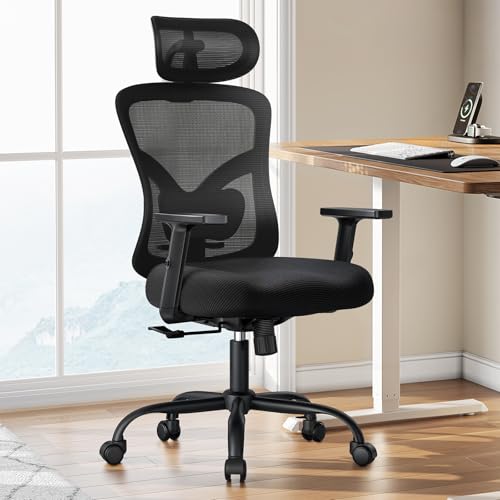
Marsail Ergonomic Office Chair with Lumbar Support and 2D Headrest — Best Balanced Mesh Pick
Marsail’s listing takes a slightly different route to customization: a contoured seat cushion doing part of the fitting work, adjustable armrests, a reclining function, height adjustment and a 2D headrest on a breathable frame. The contoured cushion matters because seat shape is the one fit element you cannot adjust on any chair, so a cushion shaped to distribute weight is a legitimate customization strategy rather than a comfort extra.
Strengths
- Contoured seat cushion addresses fit where adjustment cannot
- 2D headrest and reclining function included
- Breathable design suits warm rooms and long sessions
Trade-offs
- 2D headrest adjusts in fewer directions than the 3D sets above
- Armrest adjustment range is stated simply, so check the page for detail
- Contoured cushion fit is personal and cannot be changed if it misses your shape
| Headrest | 2D, as stated on the listing |
| Seat | Contoured seat cushion, as stated on the listing |
| Functions | Reclining function and height adjustment, as stated on the listing |
| Armrests | Adjustable, as stated on the listing |
Judge this chair in the first sitting by the cushion: your weight should feel spread across the seat rather than concentrated, and the contour should not push your legs into one position. If the contour agrees with you, the rest of the fit, arms, headrest, recline tension, is quick to dial in.
Best for: buyers who feel seat shape matters as much as adjustments / Not suited for: buyers who want maximum armrest adjustability
Check on Amazon — check the current price on Amazon and confirm the exact variant, size and colour on the listing before you order.
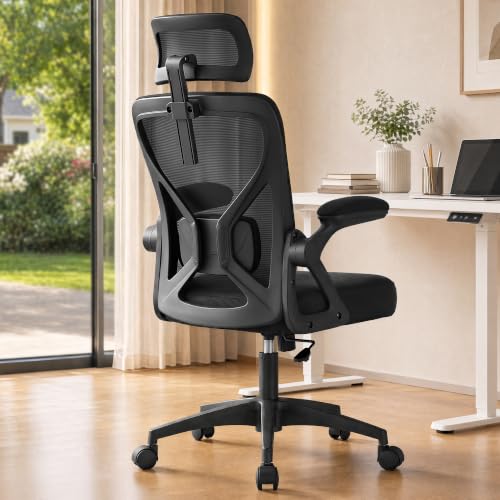
SONGMICS Ergonomic Mesh Office Chair with Adjustable Lumbar Support — Best Compact Customization
SONGMICS brings the tidiest package in this guide: adjustable lumbar support, a headrest, flip-up armrests and a stated 90 to 105 degree tilt range on a wide-seat mesh chair. The stated tilt range is narrower and more upright than the deep-recline chairs, which is honest positioning: this is a work chair that lets you lean back slightly, not a lounger, and the flip-up arms make it the easiest pick to tuck under a desk in a small room.
Strengths
- Flip-up arms let the chair tuck fully under the desk
- Stated 90-105 degree tilt range is honest, upright work positioning
- Adjustable lumbar and headrest included at a tidy footprint
Trade-offs
- Tilt range will disappoint buyers who want deep recline
- No footrest or multi-direction arm adjustment
- Wide seat in a compact chair still needs a personal depth check
| Tilt stated | 90-105 degrees, as stated on the listing |
| Armrests | Flip-up, as stated on the listing |
| Lumbar | Adjustable, as stated on the listing |
| Model | KIME Collection UOBN044BH01S, as stated on the listing |
Small-room buyers should measure the desk gap before anything else: with arms flipped up, this chair slides under most desks, which keeps a home office walkable and protects the armrests from the daily desk-edge knocks that loosen lesser chairs.
The upright tilt range also suits shared and family desks, where a chair that encourages a working posture and fits several users quickly, thanks to the adjustable lumbar and headrest, is worth more than a deeply personal recline setup.
Best for: small home offices and shared desks / Not suited for: buyers who want to recline deeply
Check on Amazon — check the current price on Amazon and confirm the exact variant, size and colour on the listing before you order.
Comparison Table
| Pick | Badge | Key spec | Best for |
|---|---|---|---|
| Keratee Ergonomic Office Chair with Adjustable Lumbar Support, 3D Arms and Headrest | Best Overall | Adjustable lumbar + 3D arms + headrest | most buyers who want one fully adjustable chair |
| CAPOT Ergonomic Mesh Office Chair, Adjustable Lumbar, 400 lbs | Best Heavy-Duty Customization | 400 lbs stated, 4D arms, 3-level tilt, 3D headrest | larger sitters who refuse to give up adjustability |
| ELABEST X100 Ergonomic Mesh Office Chair with Footrest | Best with Footrest | 5D arms, 3D lumbar, footrest, big and tall | long-session users who recline at the same desk |
| MOLENTS Ergonomic Office Chair, BIFMA X5.1 Certified | Best Certified Pick | BIFMA X5.1 stated, 3D arms, wide seat | stipend and small-office buyers who need documented standards |
| Marsail Ergonomic Office Chair with Lumbar Support and 2D Headrest | Best Balanced Mesh Pick | 2D headrest, contoured cushion, reclining | buyers who feel seat shape matters as much as adjustments |
| SONGMICS Ergonomic Mesh Office Chair with Adjustable Lumbar Support | Best Compact Customization | 90-105° tilt, flip-up arms, adjustable lumbar | small home offices and shared desks |
How to Choose the Best Customizable Office Chairs
Count adjustments, not adjectives
Write down the adjustments a listing actually names: seat height, seat depth if offered, lumbar height or depth, armrest directions, headrest directions, tilt range and tilt tension. A chair naming five or more independent adjustments is customizable in fact. A chair naming one, usually height, is adjustable in the way a stool is adjustable, whatever the headline says.
Armrest directions are counted in D: height only is 1D, adding width or angle makes 3D, adding fore-aft makes 4D, and the 5D set in this guide adds further rotation. More directions help most when your desk height, keyboard position or body width is non-standard.
Capacity is a hard limit, not a guideline
Where a listing states a capacity, treat it as the ceiling for the whole system, seat, cylinder, base and casters together, and keep real margin beneath it. The 400 pound stated capacity in this guide exists for buyers whom standard chairs quietly exclude, and it is printed in the spec box exactly as listed so the decision can be made on evidence.
If a listing does not state a capacity in its title, find it in the product details before ordering rather than assuming the class average. A chair that fits your back but not your weight is not a fit at all.
Mesh, padding and the seat you cannot adjust
Seat and back materials decide how a chair feels at hour six. Mesh breathes, holds its shape and feels firmer; padded upholstery feels softer at first and compresses over years. Neither is better in the abstract, but your climate and session length decide: warm rooms and long days favour mesh, which is why most of this guide is mesh.
Seat depth is the silent fit killer. Your back should meet the backrest with a small gap behind your knees. A contoured cushion, like the Marsail pick, shapes this contact; a plain deep seat on a shorter leg leaves the sitter perched forward, defeating the lumbar support entirely.
Headrests and footrests: the second posture
A headrest only helps if it adjusts to where your head actually rests when you lean back, which is why direction counts, 2D versus 3D, appear in the spec boxes here. Fixed headrests fit the average head and miss everyone else with great consistency.
Footrests serve the second posture: calls, reading and thinking away from the keyboard. If your workday includes long stretches of those, a footrest chair earns its footprint. If your day is continuous keyboard work in a small room, the same feature is furniture in your way.
Certification and buying for an office
A stated standard such as the BIFMA X5.1 certification on the MOLENTS listing speaks to structural testing and durability, which matters for stipend purchases, shared offices and anyone who has had a cylinder fail. It does not certify comfort or fit, and this guide does not pretend otherwise.
For any office purchase, save the listing details at order time, confirm the stated capacity and adjustment list match the delivered chair, and run every new user through the fitting sequence in the next section rather than letting each person improvise.
Seat depth and the two-finger rule
Seat depth is the adjustment most chairs do not offer and most sitters need. The working rule is a gap of roughly two fingers between the front edge of the seat and the back of your knees when your back is against the backrest. Much more and you are perching; much less and the edge presses where circulation lives. If a chair lacks depth adjustment, a shallower seat or a small cushion behind your back are the honest workarounds, and knowing that before purchase beats discovering it after.
This is also why wide-seat models deserve a personal check rather than an automatic preference. Width helps when depth and arm position still let you sit back fully; it hinders when the sitter ends up sitting forward on a large seat, lumbar support abandoned behind them.
Armrests versus the desk, again
The most common real-world failure of a well-fitted chair is the desk winning. If the armrests cannot go low enough, wide enough or away entirely to let the chair roll in, the sitter ends up reaching forward to the keyboard, and every careful lumbar setting is wasted on a posture the desk imposed. Flip-up arms, which appear on three picks in this guide, exist precisely to end that fight.
Measure your desk’s underside height and the gap between its supports before ordering, and compare them with the chair’s arm height range on its listing. Two minutes with a tape measure is the cheapest customization step in this entire guide.
Sharing a chair without losing the fit
In shared spaces, the best chair is the one whose adjustments are tool-free, obvious and quick. Gas-lift height, hand-turned lumbar and sliding arms can be refitted by each user in under a minute; bolted settings will simply never be changed, and the chair will fit whoever set it up first, forever. Several picks here adjust entirely by hand for exactly this reason.
A household trick worth adopting: photograph your fitted settings, arm height marks, lumbar position, tilt tension, on your phone. After a partner, a cleaner or a curious child has moved everything, the photograph restores your fit in a minute instead of a fresh twenty-minute session.
Gas lifts, bases and the parts nobody photographs
The cylinder that sets seat height and the five-star base that carries everything are the least marketed and most structural parts of a chair. A chair that slowly sinks through the day has a failing lift, and no lumbar adjustment compensates for sitting two inches lower than your fit. When comparing listings, any stated detail about the base material or lift class is worth more than another photograph of the headrest, because these are the components whose failure retires the whole chair.
Casters belong in the same paragraph: they are wear parts, they differ by floor, and they are usually replaceable. A chair whose wheels can be swapped for hard-floor or carpet variants has a longer, more adaptable life, which is customization continuing into year three rather than ending at unboxing.
Trying a chair when you cannot sit in it
Most of these chairs will be bought from a listing, not a showroom, so the trial happens at home in the first week. Make it a real trial: full work days, your real tasks, the fitting sequence run properly, and the week-one refit done before you decide. A chair judged on a ten-minute sit in a hallway has not been tried at all, and the honest verdict, for your body, only exists after days.
Keep notes if you are comparing two chairs across a returns window: which setting you changed, when your shoulders started talking, how the seat felt at hour six. Memory flatters whichever chair is currently in the room; notes do not. That small discipline converts an expensive guess into an experiment with a result.
A note on gaming chairs and executive styling
Two styling tribes border this category and deserve a word so buyers can place them. Gaming chairs borrow racing-seat looks and often include pillows rather than integrated adjustment; some are genuinely well adjustable, many are a fixed shell with accessories. Executive chairs prioritise upholstery and presence, and their adjustment lists are often shorter than their silhouettes suggest. Neither tribe is dismissed here; both are simply asked the same question as every pick in this guide: name your adjustments. A gaming or executive chair that names five real ones belongs on the shortlist beside the mesh chairs, and one that names one belongs nowhere near it, whatever its colours promise.
Styling still matters legitimately in one way: a chair you dislike looking at in a room you live in will be resented daily, and resentment is a real cost. Let the adjustment count build the shortlist, then let your eye choose freely inside it. That order, function first, taste second, is the whole method of this guide in miniature.
One more check before you buy
Consider who else will sit in the chair. A chair fitted perfectly to one person in a shared home office will be refitted constantly, which argues for adjustments that move easily by hand rather than tools, and for a model whose controls are intuitive enough that a partner or teenager can find their own fit in a minute.
Casters are a quiet customization point. Hard floors and soft floors want different wheels, and a chair that drags or rolls away undermines every careful setting above it. Check what the listing says about its wheels for your floor type, and remember the heavy-duty pick in this guide specifically lists PU wheels, which suit hard floors well.
Think about the chair’s second year, not just its first week. Mesh tension, cushion compression and armrest mechanisms all age, and the chairs that age best are the ones whose adjustments still move smoothly and hold position after thousands of small changes. A certification or a stated capacity is not a guarantee, but both correlate with chairs built to be used hard.
Finally, measure your desk before you measure yourself. Desk height decides seat height, desk depth decides whether a footrest can extend, and the desk gap decides whether flip-up arms matter. The best-fitted chair in the world loses to a desk it cannot work with, so let the room have a vote in the purchase.
Assembly is part of customization, oddly enough. A chair assembled with every bolt properly tightened holds its settings and stays silent; a chair thrown together creaks, drifts and loosens at exactly the joints you adjust most. Budget the unhurried half hour, tighten in the sequence the manual gives, and recheck the arm and back bolts after the first week.
Floors vote too. A chair that fits perfectly but rolls away on laminate or digs into carpet pile will be fought all day. The heavy-duty pick’s PU wheels suit hard floors; carpeted rooms may want the opposite choice. Check the listing’s wheel description against your floor before the chair arrives.
Consider the returns reality of a fit product. A chair is the furniture equivalent of a shoe: specifications narrow the field, but your body casts the deciding vote in the first week. Order from listings whose details you have read fully, keep the packaging until the first refit is done, and treat a swap as the process working, not failing.
A word on standing desks: if you alternate sitting and standing, your chair’s job changes. It becomes a perch-and-return seat used in shorter, varied sessions, which argues for easy height changes and arms that clear the desk at standing-desk heights. Fit the chair for the sitting hours you actually do, not the ones the desk brochure imagines.
Finally, revisit the fit when anything changes: a new desk, a new monitor height, a growth spurt in a teenager’s chair, or a change in your own body. Customization is not a ceremony performed once at unboxing; it is the standing ability to refit the chair to the life it is currently serving.
Monitor height is the chair’s silent partner. A perfectly fitted chair under a screen set too low produces the same hunched neck as a bad chair, because the body organises itself around the eyes. Set the screen so its top third is near eye level, then fit the chair; fitting the chair first and the screen never is the commonest half-finished setup in home offices.
Breaks are part of the specification no listing can sell you. Even the best-fitted chair is a device for sitting, and bodies are not built for eight unbroken hours of it. The recline and footrest picks in this guide support posture variety at the desk, and the timer on your phone supports the rest: stand, walk, refill water, and let the chair be one position among several in your day rather than the only one.
When the budget forces a choice between more adjustments and a better core chair, take the core: a sound seat, a sound lift and a sound back with height and lumbar adjustment will serve you better than a fragile chair offering nine directions of wobble. The picks in this guide were filtered for that order of priorities, and your own shortlist should be too.
How to Set Up a Customizable Office Chair, in Order
Adjustments interact, so order matters. Work through this sequence once, slowly, when the chair arrives, and again after the first week when the novelty has worn off and your honest posture shows up.
Set seat height first. Sit with feet flat on the floor and knees at roughly ninety degrees. If your feet dangle, every other setting will be built on a shrug. Use a footrest under your feet, not the chair’s, if your desk forces a higher seat.
Position the lumbar support. Raise or lower the lumbar unit until it meets the small of your back at about belt height, then set its depth so you feel supported without being pushed forward. You should be able to sit back and stay there without effort.
Fit the armrests to relaxed shoulders. Raise the arms until your forearms rest with shoulders down and relaxed, elbows near ninety degrees. Adjust width and angle so your arms are supported without being pushed outward, and flip or slide arms away for close keyboard work if your chair allows it.
Set the headrest for the lean-back position. Recline slightly and move the headrest until it meets the back of your head without pushing it forward when upright. A headrest you notice while typing is set wrong; it is there for the lean, not the work posture.
Dial the tilt and tension. Set the tilt range for how you work, upright lock for continuous typing or free tilt for varied tasks, and adjust tension so the chair supports your weight in recline without either dumping you backward or fighting you.
Recheck after a week. Live with the settings for a full work week, then repeat the sequence quickly. Bodies report fit honestly over days, not minutes, and one five-minute refit after week one is the step most owners skip and most benefit from.
Common Buying Mistakes
Buying the word ergonomic. The word appears on chairs with one adjustment and chairs with nine. Count the named adjustments on the listing and let that number, not the adjective, drive the shortlist.
Ignoring stated capacity. Exceeding a chair’s stated capacity voids the fit and stresses every component. If a listing does not state a capacity where you can find it, that absence is itself information.
Setting the chair once, randomly. Random adjustment order produces random fit. Height, then lumbar, then arms, then headrest, then tilt, in that sequence, takes twenty minutes and is the entire point of paying for adjustability.
Choosing deep recline for a typing job. A lounger’s tilt range on a keyboard desk leaves you reaching forward from a leaned-back seat. Match the tilt story to the work: upright ranges for typing, deep recline and footrests for mixed work.
Forgetting the desk in the equation. Chair fit is chair plus desk. Arm height against desk height, chair width against the desk gap and footrest extension against your floor space all decide whether a well-fitted chair can actually be used as fitted.
Final Recommendation
For most buyers, the Keratee is the sensible default: the full adjustment checklist in one chair, with nothing important left fixed. Larger sitters should go straight to the CAPOT and its stated 400 pound capacity, and long-session users who take calls and reading breaks at the same desk will get the most from the ELABEST X100 and its footrest.
Choose the MOLENTS when a documented standard matters, the Marsail when seat shape has been your problem with past chairs, and the SONGMICS when the room is small and the chair must disappear under the desk at the end of the day. Whichever you pick, do the fitting sequence properly in the first week; a customizable chair only pays off once it has actually been customized to you.
Shop the verified picks: Keratee Ergonomic Office Chair with Adjustable Lumbar Support, 3D Arms and Headrest · CAPOT Ergonomic Mesh Office Chair, Adjustable Lumbar, 400 lbs · ELABEST X100 Ergonomic Mesh Office Chair with Footrest · MOLENTS Ergonomic Office Chair, BIFMA X5.1 Certified · Marsail Ergonomic Office Chair with Lumbar Support and 2D Headrest · SONGMICS Ergonomic Mesh Office Chair with Adjustable Lumbar Support
Related guides on this site: Best Area Rugs For Under Office Chair · Best Built Chairs · Best Breakfast Chairs · Best Blue Bedroom Chairs · Best Camper Lounge Chairs
Related guides
Frequently Asked Questions
What does customizable actually mean in an office chair?
Independent adjustment of the parts that meet your body: seat height, lumbar position or depth, armrest position in up to five directions on the chairs here, headrest position and backrest tilt behaviour. The more of those a listing names, the more of the fit you control.
Are 4D and 5D armrests worth it?
If your shoulders are broad or narrow, your desk is an unusual height, or you split time between keyboard and writing, yes: width, angle and fore-aft movement are what let forearms rest naturally. For a standard desk and build, a good 3D set covers most needs.
How much weight capacity should I look for?
At minimum, a stated capacity comfortably above your weight, with margin for movement and leaning. Treat the stated figure as a hard ceiling for the whole chair, and prefer listings that state the number plainly, as the heavy-duty pick in this guide does.
Does an adjustable chair fix back pain?
This guide makes no medical claims. A well-fitted chair supports a comfortable working posture, and adjustability makes that fit achievable for more bodies, but pain has many causes and persistent pain deserves professional advice, not a furniture purchase alone.
Mesh or padded seat for long days?
Mesh breathes and keeps its shape, feeling firmer across a long day. Padding feels softer initially and slowly compresses. Warm rooms and long sessions generally favour mesh; shorter sessions and a preference for cushion favour padding. Your past chairs are the best evidence for your own preference.
How long does proper setup take?
About twenty minutes the first time, following the order in this guide: height, lumbar, arms, headrest, tilt. Budget a five-minute refit after the first week. That half hour is the difference between owning adjustments and benefiting from them.
What is the difference between 3D, 4D and 5D armrests?
The number counts the directions the armrest moves. Height is the base direction; width and pivot angle build toward 3D; fore-and-aft sliding typically makes 4D; and 5D sets add further rotation or extension. More directions matter most for non-standard desks, broader or narrower shoulders, and mixed keyboard and writing work.
Do I need a headrest on an office chair?
Only if your work includes leaning back: calls, reading, thinking, video. For continuous upright typing, a headrest is unused furniture that can even push the head forward if set badly. Two picks in this guide omit it deliberately, and several include it for mixed work; your work pattern, not the checklist, decides.


