Disclosure: airfryerkitchensupply.com is reader-supported. When you buy through links on our site, we may earn an affiliate commission at no extra cost to you.
Where to buy
All six desktop vacuums below are sold on Amazon, which is where we recommend ordering: the model variants (battery versus rechargeable, color options) are clearly listed, and returns are easy if a vacuum’s noise or size does not suit your desk. Most people start with our Best Overall pick, the ODISTAR Desktop Vacuum — check price on Amazon. Keyboard warriors should look at the Hayousui Keyboard Vacuum — check price on Amazon, and anyone who also wants to clean a car or PC case should see the Brigii 2-in-1 Mini Vacuum — check price on Amazon. We do not print fixed prices because they change with promotions — check the current price on Amazon for the exact model named in each review.
Introduction
The best desktop vacuums solve a problem every desk owner knows and nobody talks about: the slow accumulation of crumbs, eraser shavings, pencil dust, pet hair and keyboard grit that a normal vacuum is too big, too loud and too much trouble to deal with. So it stays — until a palm-sized desktop vacuum enters the picture. These mini machines live on the desk itself, come out for a twenty-second sweep after lunch or a study session, and put away in a drawer. The category splits into two families: the little rotating table sweepers, like the ODISTAR and IGOKOTI, that glide over a desk picking up dry debris, and the mini handheld vacuums, like the Brigii, Hayousui and Fanttik, that add nozzles, brushes and enough suction for keyboards, drawers and car seats.
This guide covers both families honestly. A desktop vacuum will not replace your household vacuum, deep-clean a carpet or pick up anything wet — and we say plainly which jobs each pick can and cannot do. What the right one does brilliantly is keep a workspace perpetually tidy with almost zero effort, which is why students, teachers, drafters, crafters and snack-at-desk office workers swear by them. Every product and ASIN here was verified before receiving a buy link, so the model you order is the model reviewed — an important check in a category full of lookalike copies.
In this guide
Quick Picks
- Best Overall: ODISTAR Desktop Vacuum — the classic rotating table sweeper with up to 400 minutes of endurance. Check price on Amazon
- Best 2-in-1: Brigii Mini Handheld Vacuum — vacuum and air duster in one featherweight cordless body. Check price on Amazon
- Best for Keyboards: Hayousui 4.3Kpa Keyboard Vacuum — suction, HEPA filtration and an LED light for PC cleaning. Check price on Amazon
- Best Budget: IGOKOTI Desk Vacuum — USB-rechargeable mini sweeper for desks and counters. Check price on Amazon
- Best Premium: Fanttik Slim V8 APEX — a 4-in-1 cordless mini vacuum and air duster with one-touch emptying. Check price on Amazon
- Best for PC Cleaning: Meudeen Air Duster & Computer Vacuum — a high-speed duster-vacuum built for keyboards and cases. Check price on Amazon
How These Picks Were Chosen
We judged desktop vacuums on the jobs they are actually hired for. Pickup performance on dry desk debris — crumbs, eraser shavings, hair, paper dust, spilled glitter and craft scraps — mattered more than headline suction numbers, because a sweeper that gathers crumbs in one pass beats a stronger vacuum that scatters them. Battery life and charging practicality came next: a desk gadget that is always flat is desk clutter, so long endurance, USB charging and honest battery claims scored heavily. Size and noise mattered too — these machines run in offices, classrooms and shared study spaces, often while other people work nearby. We looked for washable or easily emptied dust cups and filters, because a mini vacuum whose filter clogs in a month stops being used. Finally, every pick is a genuine branded product verified; this category is flooded with anonymous copies of the ODISTAR design, and we linked only models whose listings we could confirm.
The 6 Best Desktop Vacuums
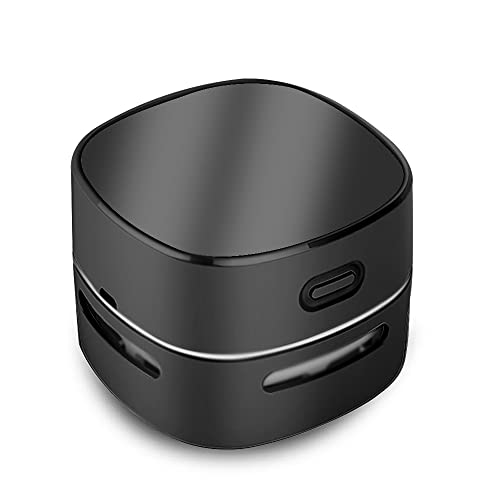
ODISTAR Desktop Vacuum — Best Overall
The ODISTAR is the design that defined the category: a palm-sized round sweeper that you glide across the desk while its rotating brushes and suction gather crumbs, eraser dust and hair into a sealed compartment. This rechargeable version offers up to 400 minutes of endurance, so it lives on the desk for weeks between charges and simply becomes part of the furniture. It suits students, teachers, office workers and anyone whose desk collects dry debris daily. It is not a tool for keyboards’ deepest crevices or car interiors — the handhelds below exist for that — but for flat-desk tidiness, nothing here is easier: pick it up, sweep, put it down.
Strengths
- Effortless glide-over-desk cleaning with 360° rotatable design
- Very long endurance — up to 400 minutes per the maker
- Quiet enough for offices, classrooms and libraries
Trade-offs
- Designed for flat surfaces, not nooks and keyboards
- Dry debris only — no liquids or sticky spills
- Small dust compartment needs regular emptying in messy desks
Key specs: Mini table dust sweeper; up to 400 mins endurance; 360° rotatable design; rechargeable; for desk dust, crumbs and keyboard surfaces.
The ODISTAR’s genius is behavioral rather than technical. Because using it takes twenty seconds and no setup, people actually use it — after every sandwich, every pencil-sharpening, every craft session — and a desk cleaned in twenty-second bursts never becomes a weekend project. The brushes flick debris inward rather than scattering it, the body turns corners around monitor stands and mug coasters, and the noise is a soft whir that will not interrupt a call. Teachers buy them for classroom desks, parents for homework tables, and office workers for the crumb zone in front of the keyboard. If your mess is flat, dry and daily, this is the desktop vacuum to own.
Best for: everyday desk crumbs, classrooms and homework tables / Not suited for: deep keyboard cleaning or cars
Check the current price on Amazon

Brigii Mini Handheld Vacuum — Best 2-in-1
The Brigii stretches the desktop category in both directions: it vacuums like a mini handheld and blows like an air duster, switching roles with its attachments. At just 356 grams it is light enough for one-handed use around a desk, inside drawers, along window tracks and out in the car, and its washable HEPA filter keeps running costs at zero beyond electricity. It suits desk owners whose mess escapes the desktop — crumbs in the keyboard, dust in the PC case vents, debris in the car footwell — and anyone who wants one small tool instead of a sweeper plus canned air. It is still a mini: rug deep-cleaning and big spills are beyond it.
Strengths
- Vacuum and air duster in one 356g cordless body
- Washable HEPA filter — no consumable costs
- Attachments reach keyboards, drawers and car crevices
Trade-offs
- Small dust cup fills quickly on big jobs
- Blower mode needs care around loose papers
- Not a substitute for a household vacuum
Key specs: 2-in-1 cordless vacuum and air duster; 356g lightweight; washable HEPA filter; multi-nozzle handheld design.
The Brigii earns its place by ending two annoyances at once. The vacuum side handles the desk, keyboard surround and drawer bottoms; the duster side clears the keyboard’s key gaps, PC fans and camera gear without a disposable can running out mid-job. Owners who work on electronics appreciate the control — a duster you can feather beats a freezing canned-air blast — and the whole kit stores in a desk drawer. For a student or home-office worker whose cleaning territory is “desk plus everything within reach of it,” the Brigii is the most versatile tool in this guide.
Best for: desk-plus-car cleaning and electronics care / Not suited for: floors or large debris
Check the current price on Amazon
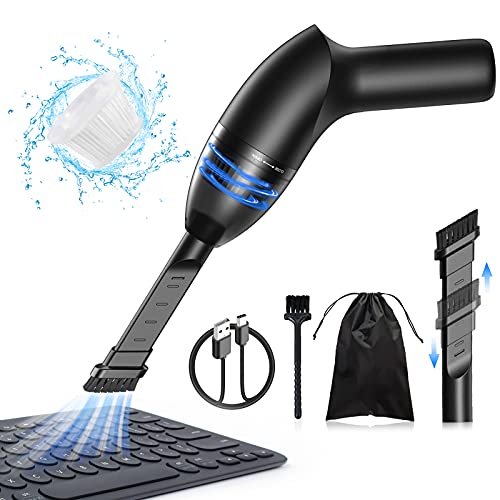
Hayousui 4.3Kpa Keyboard Vacuum — Best for Keyboards
The Hayousui is a specialist: a mini handheld built around keyboard and computer cleaning, with 4.3Kpa of suction, a HEPA filter, an LED light to show the dust hiding between keys, and a PC cleaning kit in the box. It suits mechanical keyboard owners, IT staff, gamers and anyone whose workspace centers on a computer that collects dust like a magnet. The nozzle set gets between keys and along monitor bezels in a way the flat sweepers cannot, and USB recharging means it lives happily in a laptop bag or desk drawer. As a general desk sweeper it works, but its heart is in the keyboard.
Strengths
- Purpose-built suction and nozzles for keyboards and PCs
- LED light reveals dust in key gaps and vents
- HEPA filtration and USB recharging
Trade-offs
- Specialist shape is less elegant for flat-desk sweeping
- Small bin needs emptying during big clean-outs
- Suction is tuned for dust and crumbs, not heavy debris
Key specs: 4.3Kpa suction; mini handheld computer vacuum; USB rechargeable; HEPA filter; LED light; PC cleaning kit.
Anyone who has tipped a keyboard upside down knows what lives inside one. The Hayousui’s combination of suction plus brush attachments lifts that mixture of crumbs, hair and dust without the compressed-air habit of driving debris deeper into switches. The LED sounds like a gimmick until you use it in the shadow under a monitor shelf and watch a month of dust light up. For offices that maintain rows of workstations, one of these per floor keeps keyboards presentable between deep cleans — and presentable keyboards are, in the end, what this entire category is really about.
Best for: mechanical keyboards, gaming setups and IT desks / Not suited for: large flat-desk sweeping as a first choice
Check the current price on Amazon

IGOKOTI Desk Vacuum — Best Budget
The IGOKOTI is the friendly-priced entry into the rotating sweeper family: a mini counter and tabletop vacuum, USB rechargeable, with the same glide-and-gather approach as the ODISTAR and up to four hours of endurance. It suits students in dorms, kids’ homework desks, kitchen counters that collect flour and coffee grounds, and anyone curious about the category who wants to try it at the gentlest tier. Expect the same honest limits as every sweeper here — dry, light debris on flat surfaces — delivered with a little less polish than the Best Overall pick.
Strengths
- USB rechargeable — charges from a laptop or phone brick
- Up to 4 hours of endurance for daily micro-cleans
- Works on desks, counters and tables alike
Trade-offs
- Flat surfaces only; no keyboard nozzles
- Build feels lighter than the ODISTAR
- Small compartment, frequent emptying for big messes
Key specs: Desk vacuum cleaner mini; USB rechargeable; cordless energy-saving design; up to 4 hours endurance; 360° rotatable.
The IGOKOTI’s charm is how many surfaces it quietly adopts. In a dorm it patrols the study desk; in a kitchen it lives beside the coffee station gathering grounds; in a craft room it handles paper trimmings and sequin escapes. USB charging is the practical headline — no proprietary cable to lose, no battery drawer to raid — and the size invites leaving it out, which is exactly where a desktop vacuum does its work. As a first desktop vacuum, or a second one for the kitchen counter, it is the easiest recommendation in this guide to justify.
Best for: dorms, kitchen counters and first-time buyers / Not suited for: keyboard deep cleaning
Check the current price on Amazon

Fanttik Slim V8 APEX — Best Premium
The Fanttik Slim V8 APEX is what happens when a desktop vacuum grows up: a sleek 4-in-1 cordless mini vacuum and air duster with Type-C charging and one-touch emptying, finished like a piece of tech rather than a novelty gadget. It suits car owners who detail their own interiors, desk workers who want the premium object, and anyone who values the hygienic, press-button emptying that keeps dust off your hands. Its natural territory spans desk, keyboard, car seat seams and stroller crumbs. The premium tier buys design and convenience; the suction story remains mini-vacuum honest.
Strengths
- 4-in-1 vacuum and duster functions in a slim body
- One-touch emptying keeps hands clean
- Type-C charging matches modern cables
Trade-offs
- Premium tier pricing for a mini vacuum
- Compact bin suits maintenance cleans, not big spills
- Too capable to leave as a classroom free-for-all
Key specs: 4-in-1 portable mini vacuum and air duster; Type-C charge; one-touch emptying; cordless handheld.
Fanttik built its name on well-made small tools, and the V8 APEX shows it: the attachments seat positively, the emptying mechanism works with a press rather than a shake over the bin, and the whole unit feels like it belongs beside a good laptop rather than in a junk drawer. Drivers rate it for the seams and rails where crumbs and grit accumulate between proper valets, and desk users rate it for the same reason around monitor bases and speaker grilles. If you want one mini vacuum that covers desk and car with a bit of pride of ownership, this is the one.
Best for: car-plus-desk owners who like quality tools / Not suited for: bulk debris or wet messes
Check the current price on Amazon

Meudeen Air Duster & Computer Vacuum — Best for PC Cleaning
The Meudeen takes the opposite approach to a sweeper: instead of gliding, it blasts and sucks with a high-speed motor — 110,000 RPM in duster terms — making it the PC builder’s pick. It cleans keyboards, case fans, radiators and vents the way canned air used to, but rechargeably and repeatedly, and flips to vacuum duty for the debris it loosens. It suits gamers, PC builders, repair benches and dusty home offices. It is louder and more intense than the sweepers, and loose desk papers must be secured before a session — this is a workshop tool that visits the desk, not a desk ornament.
Strengths
- Powerful cordless air duster replaces disposable canned air
- Vacuum mode collects what the blower loosens
- Built for keyboards, PC cases and electronics
Trade-offs
- Too strong and loud for a gentle desk tidy
- Blower will scatter unsecured papers
- Overkill for crumbs alone
Key specs: Computer vacuum cleaner and air duster; cordless; 110,000 RPM motor (maker’s figure); keyboard cleaning focus.
The economics alone make the Meudeen’s case: a household that builds PCs or maintains several computers burns through canned air at a silly rate, and a rechargeable duster ends that subscription while working better — no pressure fade as the can empties, no freezing spray. Paired vacuum mode answers the fair criticism of blowers, that they relocate dust rather than remove it: blow the case out over a surface, then vacuum the fallout. For a pure desk-crumb brief, buy the ODISTAR; for a battlestation that needs real maintenance, buy this.
Best for: PC builders, gamers and repair benches / Not suited for: quiet offices or paper-strewn desks
Check the current price on Amazon
Comparison Table
| Pick | Badge | Key spec | Best for |
|---|---|---|---|
| ODISTAR Desktop Vacuum | Best Overall | Rotating sweeper, up to 400 mins endurance | Daily desk crumbs |
| Brigii Mini Handheld | Best 2-in-1 | Vacuum + air duster, 356g, washable HEPA | Desk, drawers and car |
| Hayousui Keyboard Vacuum | Best for Keyboards | 4.3Kpa, HEPA, LED light, PC kit | Keyboards and PCs |
| IGOKOTI Desk Vacuum | Best Budget | USB rechargeable, up to 4 hrs endurance | Dorms and counters |
| Fanttik Slim V8 APEX | Best Premium | 4-in-1, Type-C, one-touch emptying | Desk and car detailing |
| Meudeen Air Duster Vacuum | Best for PC Cleaning | 110,000 RPM duster + vacuum | PC building and repair |
How to Choose a Desktop Vacuum
Match the tool to the territory. If your mess is flat and dry — crumbs on a desk, shavings on a homework table, flour on a counter — a rotating sweeper like the ODISTAR or IGOKOTI is the most pleasant tool ever made for it: silent, instant and oddly satisfying. If your mess hides — between keys, inside drawers, along car seat rails — you need a handheld with nozzles, and the choice becomes which ecosystem of attachments suits you: the Hayousui for keyboards, the Brigii for a bit of everything, the Fanttik for premium desk-and-car duty. If your mess is inside machines — PC cases, fans, vents — a duster-vacuum like the Meudeen or the Brigii’s blower mode is the correct instrument, and a sweeper will only disappoint you.
Then weigh the daily-life factors. Battery strategy matters more than suction in this category: a sweeper with hundreds of minutes of endurance, or a handheld that charges over the same USB-C cable as your phone, will be ready when you reach for it; a gadget with a proprietary charger in a drawer will not. Noise decides where the tool can live — sweepers whisper, dusters announce themselves. Filter and bin design decide whether you will still be using it in six months: washable filters and one-touch emptying keep ownership cost and friction at zero. And be honest about liquids and weight: no pick here is a wet vacuum, and none will lift a spilled bowl of cereal — they are maintenance tools that keep a tidy desk tidy, which is a different and very valuable job.
How to Use a Desktop Vacuum for a Permanently Tidy Desk
The method is rhythm, not effort. Keep the vacuum on the desk, charged, within arm’s reach of the mess zone — the moment it lives in a cupboard, the habit dies. Sweep in short passes immediately after the mess is made: crumbs after eating, shavings after sharpening, glitter after crafting. Work from the back of the desk toward yourself so debris ends in front of you rather than behind the monitor, lift the keyboard weekly and sweep beneath it, and give the keyboard itself a nozzle pass — or a duster blast outdoors — once a fortnight. Empty the dust compartment over a bin as soon as debris reaches the fill line, tap or rinse the filter as the maker directs, and let washable filters dry completely before refitting. Once a month, use the handheld’s crevice tool along drawer runners, cable trays and the gap behind the desk where crumbs migrate. That is the entire system: twenty seconds at a time, and the deep-clean never becomes necessary.
Sweepers vs Handhelds vs Dusters: The Three Families Explained
Rotating sweepers gather with brushes as much as suction, which is why they excel at visible debris on hard, flat surfaces and struggle in crevices. Their virtues are silence, simplicity and battery life measured in weeks of micro-cleans. Handheld mini vacuums trade that elegance for reach: a nozzle concentrates suction into key gaps, seams and corners, and attachments multiply their territory from desk to car. Duster-vacuums add the third capability — moving air — which no suction tool can replicate inside a PC case or keyboard switch plate. Most tidy desks need exactly one family; electronics-heavy desks often end up with two, typically a sweeper for daily crumbs and a duster-vacuum for monthly machine maintenance. Buying the family that matches your dominant mess is the whole secret of satisfaction in this category.
Matching a Desktop Vacuum to Your Workspace
The snack-at-desk office worker. Your enemy is the crumb halo in front of the keyboard and the coffee-ground scatter by the mug. A sweeper living beside the monitor — the ODISTAR — clears both in seconds without leaving your chair, and its quiet whir will not draw a single glance in an open-plan office.
The student and the homework table. Eraser shavings, sharpener spill and paper trimmings are a sweeper’s home turf, and a budget USB model like the IGOKOTI charges from the same laptop that runs the homework. In a dorm, add the keyboard pass: crumbs migrate into laptops, and a fortnightly nozzle clean is cheap insurance.
The teacher’s classroom. Thirty desks of pencil dust and craft debris is a big ask for one mini vacuum, but as a spot tool for the teacher’s desk and the art corner, a sweeper earns its place — quiet enough not to disturb a reading lesson, simple enough for a trusted helper to use.
The crafter and maker. Glitter, sequins, thread ends, paper dust and bead escapes respond beautifully to a sweeper’s brushes, which gather light debris that suction alone skids across the table. Keep a handheld nearby for the sewing machine’s lint traps and the corners a sweeper cannot enter.
The gamer and PC builder. Your desk is the easy part; your machine is the mission. A duster-vacuum — the Meudeen, or the Brigii in blower mode — maintains fans, radiators and keyboards, while the sweeper handles the desk surface between sessions. This two-tool pattern is the battlestation standard.
Care, Maintenance and Troubleshooting
The vacuum has lost its pickup. Nine times in ten the filter or bin is full. Empty the compartment, tap the filter clean or rinse it if the maker allows, let it dry fully, and try again before concluding anything is broken. Mini vacuums have small reserves of suction; they notice a clogged filter immediately.
The sweeper pushes crumbs instead of gathering them. Check the brushes for wound-up hair and thread, which lift the brushes off the surface. Clear them with an old toothbrush, confirm the body sits flat, and slow your passes — sweepers gather on a glide, not a scrub.
The battery seems to die faster than it used to. Deep discharges age small batteries. Top up little and often rather than running the tool to empty, store it charged, and if a model uses replaceable cells, fresh ones usually restore it completely.
The duster blew dust everywhere except out. Technique, not a fault — work outdoors or over a bin where possible, blow in short bursts from inside the case outward, then vacuum the fallout. Secure desk papers first; a duster respects no filing system.
It smells stale when it runs. The bin has held organic crumbs too long. Empty it, wash the bin and filter if the design permits, dry everything completely, and resume the empty-early habit that prevents the smell returning.
Suction Numbers, Explained Honestly
Listings in this category shout numbers — pascals, RPM, watts — and most of them mislead more than they inform. A keyboard vacuum’s kilopascal figure describes suction at the nozzle under test conditions; it says little about how the tool gathers crumbs in the real world, where brush design, nozzle shape and the seal against the surface matter more. A duster’s RPM describes motor speed, not the useful force of its air jet at the distance you will actually hold it. And a sweeper may publish almost no numbers at all while outperforming everything on its home turf, because its brushes do the gathering and suction merely assists. The honest way to compare is by job: for flat debris, judge by brushes and glide; for crevices, by nozzle design and attachments; for PC dust, by the combination of blowing and recovery. That is how this guide’s picks were ranked — and why the “weakest” tool on paper, the ODISTAR, is Best Overall for the job most desks actually have.
Attachments and Accessories: What Each One Is For
The crevice nozzle is the workhorse attachment: it concentrates suction into seams, drawer corners, keyboard edges and car seat rails. The brush nozzle agitates while it sucks, which is what frees dust from keycaps, speaker grilles and textured surfaces without scratching them. Extension tubes buy reach into PC cases and behind desks. Blower nozzles narrow a duster’s jet for fan blades and switch plates. If a kit includes a storage case or a charging stand, treat it as a genuine feature — tools that live together, charged, get used; tools scattered in a drawer do not. When comparing two handhelds at similar tiers, the attachment set is often the real difference, and it is worth choosing the kit that matches your territory rather than the one with the longest accessory list photographed beautifully.
Safety and Etiquette for Shared Spaces
Desktop vacuums are gentle machines, but shared spaces reward a little discipline. Never vacuum liquids, hot ash or anything smoldering — these are dry-debris tools with small motors and filters. Keep dusters away from faces and from delicate open mechanisms, and give colleagues a moment’s warning before a blower session in a quiet office. In classrooms, agree which desks the sweeper serves and empty it over a bin, not a wastebasket full of paper it will happily re-scatter if tipped. At home, keep charging cables tidy and the tool itself out of toddler reach — the bins are small, the parts are smaller, and a desktop vacuum is interesting to exactly the wrong age group. Follow those basics and these are among the most household-friendly gadgets you can own.
What Ownership Costs: Batteries, Filters and Canned Air
The honest economics of this category favor the rechargeable and the washable. A sweeper with hundreds of minutes of endurance and a rinse-clean filter costs effectively nothing to run for years. A duster-vacuum replaces a recurring canned-air habit that PC-heavy households barely notice themselves paying for, can after can. The costs to watch are proprietary: a model whose filter is a sealed consumable sold by one seller, or whose charger is a unique brick, carries a quiet subscription. Every pick in this guide was chosen partly to avoid that trap — USB or Type-C charging, washable or widely available filters, and brands established enough to still be selling parts when you need them. Buy the tool whose fifth year looks as cheap as its first, and a desktop vacuum becomes one of the best-value objects on the desk.
Common Buying Mistakes
Expecting a desktop vacuum to replace a household vacuum. These are maintenance tools for dry surface debris. Floors, rugs and big spills still belong to the big machine.
Buying a sweeper for a keyboard problem. Flat sweepers cannot reach between keys. Keyboard mess needs a nozzle handheld or a duster-vacuum.
Ignoring the charging system. A proprietary cable that gets lost makes the vacuum landfill. USB and Type-C charging keep these gadgets alive for years.
Letting the filter clog. A mini vacuum with a choked filter loses what little suction it has. Empty the bin early and clean the filter on schedule.
Using a duster around loose papers. A 110,000 RPM blower treats unsecured notes as confetti. Clear or weigh down papers before a PC-cleaning session.
Storing it in a cupboard. Desktop vacuums work because they are present. On the desk, charged, they get used; stored away, the crumbs win.
Pet Hair, Litter Grit and the Home-Office Desk
Homes with pets add two desk problems: hair that drifts onto every surface, and — near any desk within range of a litter area — fine grit that cats distribute with dedication. Sweepers handle desk hair well, because their brushes gather it rather than blowing it onward, and a daily pass keeps a home-office desk presentable for video calls. Grit is heavier than crumbs, so work slowly and let the brushes feed it in rather than skating over it. The handhelds earn their keep here too: a nozzle pass along the chair base, the desk’s cable tray and the cat’s favorite windowsill perch removes in a minute what a lint roller session cannot. Empty bins more often in pet homes — hair mats quickly in a small compartment — and rinse filters on schedule, because pet dander loads a mini filter faster than office dust does. None of this replaces the household vacuum’s floor work; it keeps the desk, the one surface you touch all day, at a standard the floors rarely match.
Small Spaces, Dorms and Travel Desks
In a small space, a desktop vacuum replaces a cupboard’s worth of cleaning gear with one drawer item. Dorm rooms are the extreme case: no storage, no household vacuum of your own, and a desk that serves as dining table, library and workshop. A USB-charged sweeper or mini handheld covers all of it, charges from the laptop, and — being quiet — can run during a roommate’s nap without incident. The same logic serves van desks, boat cabins, caravan tables and the folding tray of a frequent traveler working from rentals: dry debris appears wherever humans eat and work, and the tool that handles it should be the size of the problem. If your life includes more than one desk, note that these tools are cheap and small enough to duplicate — one at home, one at the office beats one carried back and forth and forgotten on the day it is needed.
A Week With a Desktop Vacuum: What Actually Changes
Day one, you sweep the desk three times because it is new and satisfying. By day three, the novelty has settled into something better: a reflex. The sandwich ends, the sweeper glides, the desk is clean — ten seconds, no decision involved. By the end of the week you notice the second-order effects. The keyboard surround, previously a permanent crumb archaeology, is simply clean. The desk’s far corners, where dust used to retire, get a pass whenever the vacuum is already in your hand. Guests at a homework table stop brushing shavings onto the floor. Nothing dramatic has happened, and that is the point: the desk has crossed from “cleaned occasionally” to “never really dirty,” a state no weekly deep-clean achieves because it spends six days a week decaying. Owners consistently describe the purchase less as buying a vacuum and more as deleting a chore — and they describe the surprise that the cheapest tool on the desk is the one they would replace first if it vanished.
When to Upgrade — and When One Tool Is Enough
Start with one tool matched to your dominant mess and live with it for a month; the category rewards experience over speculation. Upgrade signals are specific: you keep borrowing a handheld for the keyboard, so the sweeper needs a partner; the duster comes out weekly for the PC, so the handheld’s blower deserves a dedicated machine; the kitchen counter has adopted the desk’s sweeper permanently, so the desk needs its own again. Downgrade signals exist too — a premium handheld sitting unused because the sweeper handles everything is a sign the simple tool was the right answer all along, and there is no shame in the tidy desk it produces. The households happiest with this category own one or two small tools, each with a named job and a named home, charged and within reach. That, more than any spec in this guide, is the setup that keeps a desk clean for years.
Buying a Desktop Vacuum as a Gift
Few small gifts land as reliably. For a student, the IGOKOTI or ODISTAR pairs with the new school year perfectly — practical, fun to use, and priced at the friendly tier where a gift should sit. For a teacher, a sweeper for the desk is the rare classroom gift that is neither mug nor candle. For a PC-building friend, the Meudeen or Brigii says you understand their hobby’s least glamorous chore. For a colleague, choose the quiet sweeper over the duster — thoughtfulness includes their neighbors. In every case the gift works because it solves a universal, slightly embarrassing problem the recipient definitely has and would never buy their way out of. Wrap it with a note that says “for the crumbs” and watch it become the most-used object on their desk within the week.
Final Recommendation
Whichever family you choose, judge it after a month of real desk life rather than a first afternoon: the right desktop vacuum disappears into your routine so completely that you notice it only on the rare day you work at someone else’s crumb-covered desk and reach, instinctively, for a tool that is not there.
Order of purchase, if you are furnishing a workspace from scratch: the sweeper first, because daily crumbs are every desk’s guaranteed mess; the keyboard handheld second, once you see what accumulates in a month; the duster-vacuum third, when the PC’s fans tell you it is time. Bought in that order, each tool arrives exactly when its job has made itself obvious.
For most desks, buy the ODISTAR and enjoy the tidiest workspace you have ever had for twenty seconds a day. Keyboard-focused users should take the Hayousui, all-rounders the Brigii, and budget or dorm shoppers the IGOKOTI. The Fanttik Slim V8 APEX is the premium desk-and-car choice, and the Meudeen belongs on every PC builder’s bench. Choose the family that matches your mess, keep it charged and on the desk, and crumbs become a solved problem.
Related reading on this site: Best Mini Vacuums · Best Handheld Vacuums · Best Keyboard Vacuums · Best Car Vacuums · Best Cordless Vacuums For Desks
Frequently Asked Questions
What can a desktop vacuum actually pick up?
Dry, light debris: crumbs, eraser shavings, pencil and paper dust, hair, glitter, craft scraps, coffee grounds and keyboard grit. It will not handle liquids, sticky spills or heavy objects — those are beyond any mini vacuum’s design. Think of the test this way: if you could gather it with a brush and dustpan without pressing down, a desktop vacuum can gather it faster and without the dustpan’s habit of leaving a line of dust at its edge. If it needs scrubbing, soaking or real weight behind it, it belongs to a different tool entirely.
Are desktop vacuums loud?
Rotating sweepers are very quiet — suitable for offices, classrooms and shared study spaces, and unobtrusive enough to use during a call without muting yourself. Handhelds are a little louder, roughly at the level of an electric toothbrush’s bigger cousin, and duster-vacuums like the Meudeen are the loudest of the three families, in short maintenance bursts. If your workspace is a library-grade silent room, the sweeper family is your only choice — and fortunately, for the flat-desk jobs those rooms generate, it is also the best one.
How long do the batteries last?
Sweepers are the endurance champions, with the ODISTAR rated up to 400 minutes and the IGOKOTI up to four hours of use. Handhelds trade endurance for suction and attachments, and charge over USB or Type-C, so topping up is painless. Translate those figures into real life: at twenty to sixty seconds per tidy, a sweeper’s charge represents hundreds of cleans — weeks or months of desk life — which is why owners describe charging as something that happens occasionally rather than a routine. A handheld used for a weekly keyboard and car session needs a similar occasional top-up; only duster-vacuums doing long PC sessions ask for regular charging attention.
Can a desktop vacuum clean a keyboard properly?
A nozzle handheld like the Hayousui, yes — its attachments and suction are designed for key gaps, and a duster-vacuum can blast out what suction cannot reach. A flat sweeper can only tidy the desk around the keyboard.
Do I need to replace filters?
Several picks here use washable filters — the Brigii’s HEPA filter rinses clean — which keeps running costs at zero. For any model, follow the maker’s cleaning rhythm; a clogged filter is the main cause of disappointing suction.
One more thing worth knowing: a desktop vacuum is also the rare gadget that improves the room it sits in for everyone else. A tidy desk photographs better on video calls, thinks better in the morning, and hosts a coffee without a crumb audit first — benefits nobody lists on the box and every owner eventually mentions.
Is a desktop vacuum worth it for a student?
For dorm and homework desks, emphatically yes. It keeps a small space tidy without borrowing a household vacuum, handles snack and stationery debris daily, and the budget picks cost less than the stationery they protect. There is also a habits argument: a student who keeps a desk tidy with a tool they enjoy using carries that standard into shared kitchens, lab benches and first apartments. Parents buying for a new school year consistently rank a desktop vacuum among the dorm purchases that actually get used all year, unlike most of the “essentials” list.