Disclosure: airfryerkitchensupply.com is reader-supported. When you buy through links on our site, we may earn an affiliate commission at no extra cost to you.
Where to Buy
All six chairs in this guide are sold on Amazon, where you can check price on Amazon for the current configuration, colour, and delivery options. Office and desk chairs are a category where the same model name covers several variants — with and without a headrest, in fabric or mesh, with different arm styles — so read the variant selector carefully on the product page and confirm you are ordering the version reviewed here. Start with the Quick Picks to find your shortlist, read the full reviews for the fit details that photos never show, and then work through the buying guide’s setup measurements before ordering, because most chair disappointment is a sizing and setup problem, not a product problem.
One important framing note before the picks. This guide evaluates chairs on comfort and ergonomic design — adjustability, support geometry, materials, and how they feel across a working day. A chair is furniture, not a medical device: nothing here treats, cures, or prevents any condition, and persistent back or neck pain is a conversation for a clinician, not a shopping page. What a well-chosen, well-adjusted chair can honestly do is support a neutral, comfortable posture and reduce the everyday strain of sitting badly for hours — and that is the standard these picks are judged against.
Introduction: Why Chairs End Up Hurting Your Back and Neck
People shopping for the best chairs for back and neck comfort usually arrive at the same place: a chair that looked fine in the showroom and feels wrong by three in the afternoon. The reasons are almost never mysterious. The best chairs for back and neck support share a set of design traits that cheap chairs skip: a backrest shaped to follow the spine’s natural curve rather than a flat slab, lumbar support that can be positioned where your lower back actually is, a headrest that meets the back of your head when you lean back rather than pushing it forward, a seat with enough depth control that the front edge does not press into your thighs, and arms that adjust so your shoulders can hang relaxed instead of shrugging toward your ears.
Neck discomfort in particular is usually a geometry problem with two causes. The first is screen position — a monitor set too low makes you crane forward all day, and no chair fully compensates for that, which is why this guide’s setup section covers desk and screen height alongside the chair itself. The second is a headrest that exists on paper but is adjusted wrong, or a backrest that reclines you into a slump. The picks below were chosen for adjustability that a real person can actually dial in: lumbar support that moves, headrests that move, and recline tension that can be tuned to your weight rather than set for an imaginary average user.
The market divides into three honest tiers. Premium ergonomic chairs from established office brands offer the deepest adjustability and the longest service life, at premium prices. Mid-range mesh chairs deliver most of the adjustment that matters — lumbar, headrest, arms, tilt — at a fraction of the cost, with simpler materials. Budget chairs cover the basics and suit lighter use. This guide includes all three tiers and says plainly what each step up actually buys you.
In this guide
Quick Picks
These six chairs cover the realistic spread of the back-and-neck comfort market, from a budget mesh chair to a premium ergonomic flagship. Each earned its slot for a distinct reason.
- SIHOO M18 Ergonomic Office Chair — Best Overall. Mesh back, adjustable lumbar support, and an adjustable headrest in one mid-range package — the most complete back-and-neck feature set for the money. Check price on Amazon
- Steelcase Leap Office Chair — Best Premium. A flagship ergonomic chair with a back that flexes and adapts as you move, built for a decade of daily use. Check price on Amazon
- HON Ignition 2.0 Ergonomic Office Chair — Best for Long Workdays. A durable workhorse from an established office brand, with adjustable lumbar support and a synchro-tilt that suits long seated days. Check price on Amazon
- Marsail Ergonomic Office Chair — Best High-Back Mesh. A high-back mesh design with adjustable lumbar support that suits taller users who find mid-back chairs end too low. Check price on Amazon
- TRALT Office Chair — Best Mid-Range Adjustable. An ergonomic desk chair with adjustable lumbar support and executive styling for home offices. Check price on Amazon
- Furmax Office Chair — Best Budget. An ergonomic mesh desk chair with lumbar support and adjustable height at the friendliest tier in this guide. Check price on Amazon
How These Picks Were Chosen
Every chair here was cross-checked against Amazon’s own catalogue data, so the models, feature descriptions, and formats match live listings. Picks were then filtered on the features that decide back and neck comfort in practice: a shaped backrest rather than a flat pad, lumbar support that is adjustable in height or depth (fixed foam bumps moulded into the back were treated as a weaker solution), a headrest on the models where neck support is the point, seat height range that suits typical desk heights, and arm adjustability.
Judging weighted adjustability over padding. Thick padding feels luxurious in a five-minute sit test and compresses into a hard pan within a year; geometry — the curve of the back, the position of the lumbar support, the tilt mechanism — is what still feels right in year three. Mesh backs were favoured for long-day breathability, with the premium padded exception of the Steelcase Leap, whose flexible back system works on a different and proven principle.
Excluded: gaming chairs with fixed bolster wings that force one posture, kneeling and saddle stools (interesting tools, but a different category with a real adaptation period), and any chair whose marketing promised medical outcomes. Comfort claims in this guide are kept to comfort language deliberately.
Assembly and ownership were considered as well. All six picks are home-delivered chairs that one person can assemble with the included tools in a typical session, and all are chairs a household can maintain without specialist service — a practical point for a purchase expected to be adjusted, moved, and cleaned for years.
The 6 Best Chairs for Back and Neck Comfort

SIHOO M18 Ergonomic Office Chair — Best Overall
The SIHOO M18 is the chair that makes the strongest case for most people, because it includes the complete comfort toolkit in one mid-range package: a breathable mesh back, lumbar support you can adjust, a headrest you can adjust, flip-up arms, and a tilt mechanism with tension control. For back and neck shoppers specifically, the combination of movable lumbar support and a movable headrest is the whole game — those are the two contact points that decide whether your lower back and your neck are supported where your body actually needs it.
Strengths
- Adjustable lumbar support and adjustable headrest — both contact points can be positioned to fit you
- Mesh back stays cool across long seated days
- Flip-up arms clear the desk for close work and store the chair neatly
Trade-offs
- Seat cushion is firmer than plush executive chairs — a preference, but noticeable on day one
- Arm adjustability is basic compared with premium 4D arms
- Mesh tension and build refinement sit below flagship brands
The setup that makes this chair work is worth describing, because the M18 rewards ten minutes of adjustment more than most. Set the seat height so your feet rest flat and your thighs slope very slightly downward. Raise the lumbar support until it fills the curve of your lower back — you should feel contact, not pressure. Then set the headrest so it meets the back of your head when you lean back to think, without pushing your head forward when you sit upright; if it pushes, it is too far forward or too high. Finally, tune the tilt tension so you can recline with gentle pressure rather than fighting the spring or falling backward.
Across a working week, the mesh back is the quiet advantage. Padded backs insulate, and by mid-afternoon a warm back is a restless sitter who shifts, slumps, and twists — the exact postures that leave backs and necks aching. Mesh keeps air moving, and a sitter who stays settled stays supported. For home offices without air conditioning, that difference is larger than any single adjustment knob.
Best for: Most home-office workers wanting adjustable lumbar and headrest support in one mid-range chair / Not suited for: Users who prefer deep plush cushioning, or very tall users who should check the back height first
This pick sits in the mid-range tier. Check the current price on Amazon and confirm the headrest variant before ordering.

Steelcase Leap Office Chair — Best Premium
The Steelcase Leap is the reference point of the ergonomic chair world, and its presence here is about one idea executed better than anywhere else: the back should move the way your back moves. Its flexible back system changes shape as you shift posture, so support follows you from upright typing to a reclined thinking lean instead of abandoning you the moment you move. Adjustable lumbar support, seat depth adjustment, and highly adjustable arms complete a package built for people who sit professionally, all day, for years.
Strengths
- Flexible back technology maintains support through posture changes
- Deep adjustability: lumbar, seat depth, arm height, width, and angle
- Commercial-grade build intended for a decade or more of daily use
Trade-offs
- Premium tier pricing — several times the cost of the mid-range picks
- Padded back runs warmer than mesh on hot days
- Headrest is not the centrepiece of the design; neck-focused buyers should test the fit logic in the review below
The honest conversation about the Leap and necks: this chair’s genius is spinal support through movement, and many owners find that when the back is properly supported and the desk setup is right, neck strain from compensating posture fades with it. But if your specific priority is a headrest to lean your head against during calls and reading, the SIHOO’s explicit adjustable headrest answers that need more directly at a far lower tier. Premium money buys the best back support in this guide; it does not automatically buy the best headrest.
Where the Leap earns its tier is time. Mechanisms stay smooth, foam stays resilient, and parts and support exist years later. Spread over a decade of daily work, the cost per year competes with replacing two mid-range chairs — and the support quality never dips in the way ageing budget foam does. For professionals whose chair is their primary work tool, that arithmetic is the real argument.
Best for: Full-time professionals wanting the deepest, most durable ergonomic support / Not suited for: Budget-conscious buyers, or anyone whose top priority is a headrest above all else
This pick sits in the premium tier. Check the current price on Amazon for the current configuration.

HON Ignition 2.0 Ergonomic Office Chair — Best for Long Workdays
HON is one of the established names in contract office furniture — the chairs bought by the pallet for real offices — and the Ignition 2.0 brings that lineage to individual buyers: adjustable lumbar support, a synchro-tilt mechanism that reclines the back and seat in a coordinated ratio, and build quality aimed at surviving daily institutional use rather than impressing in a showroom.
Strengths
- Synchro-tilt keeps a comfortable back-to-seat relationship as you recline
- Adjustable lumbar support positioned for long seated days
- Contract-grade durability from an established office brand
Trade-offs
- Styling is corporate rather than home-friendly
- Headrest availability depends on configuration — check the variant
- Fewer lifestyle features than consumer-focused rivals
Synchro-tilt deserves its explanation, because it is the feature long-day sitters feel most. In a basic chair, reclining tips the whole seat backward and lifts your knees; in a synchro-tilt, the back reclines more than the seat, opening your hip angle while your feet stay planted and your eyes stay near screen height. Across eight hours, that coordinated movement is what lets you change position — the single healthiest sitting habit — without leaving the chair’s support behind.
The Ignition’s other virtue is unglamorous: it is built to be sat in by different people, adjusted constantly, and knocked around by cleaners and facilities teams. Home users benefit from that overbuilding in the form of mechanisms that still work smoothly in year five. If your workday is genuinely long and your priority is a chair that disappears beneath you while you work, this is the pragmatic professional choice in the middle of this guide.
Best for: Long workdays, shared and home offices wanting contract-grade durability / Not suited for: Buyers prioritising home styling, or those who need a guaranteed headrest in the base configuration
This pick sits in the mid-range-to-premium tier. Check the current price on Amazon and confirm the lumbar and headrest configuration on the listing.

Marsail Ergonomic Office Chair — Best High-Back Mesh
The Marsail addresses a specific and common fit failure: mid-back chairs that end between the shoulder blades of taller users, leaving the upper back and neck with nothing to lean into. Its high-back mesh design extends support up the full back, pairs it with adjustable lumbar support, and keeps the breathability that makes mesh the long-day favourite.
Strengths
- High-back design supports the full back, suiting taller users
- Adjustable lumbar support and mesh breathability for long days
- Rolling, swivelling task format suits home and small offices
Trade-offs
- High back can overwhelm small rooms and small desks visually
- Shorter users should confirm the lumbar support drops low enough for them
- Refinement of mechanisms sits below the premium brands
Fit is individual in both directions, and this chair makes the point well. A high back is not automatically better: for a shorter sitter, the top of the backrest can meet the head awkwardly and the lumbar curve can sit too high. The Marsail’s adjustable lumbar support mitigates the second issue; the first is a tape-measure question — compare the back height against your seated shoulder height before ordering, a check the buying guide below walks through.
For the right user, though, the full-height back changes the reclining experience completely. Leaning back to read or take a call, your whole back stays in contact with support, your shoulders rest rather than perch, and your neck is not compensating for an unsupported upper back. Taller readers who have spent years folding themselves into mid-back chairs will recognise the problem this chair solves on the first sit.
Best for: Taller users and anyone who finds mid-back chairs end too low / Not suited for: Petite users, or very small home-office corners
This pick sits in the mid-range tier. Check the current price on Amazon for current colours and configuration.

TRALT Office Chair — Best Mid-Range Adjustable
The TRALT splits the difference between ergonomic task chair and executive styling: an ergonomic desk chair with adjustable lumbar support, a high back in the executive format, and the rolling, swivelling base home offices need. It suits buyers who want real lumbar adjustment but prefer a chair that looks like furniture in a living-room-adjacent office rather than equipment.
Strengths
- Adjustable lumbar support in an executive-style high-back format
- Comfortable padded feel for users who dislike mesh
- Home-office friendly appearance
Trade-offs
- Padded construction runs warmer than the mesh picks in summer
- Adjustment range is narrower than the SIHOO or the premium models
- Padding longevity is the long-term question, as with all padded chairs
The padded-versus-mesh decision is worth settling honestly, because this chair is the padded standard-bearer in the mid-range. Padding wins the first impression and the winter months; mesh wins hot rooms and very long days. If your office is climate-controlled and your seated stretches are moderate, the TRALT’s comfort is real. If you sit for six unbroken hours in a warm room, choose mesh and accept its firmer first impression.
As with every chair here, the lumbar adjustment only helps if you set it. Padded chairs hide a badly positioned lumbar support better than mesh — you feel cushioned either way — so take the setup seriously: sit, adjust until the support fills your lower-back curve, then check again after an hour, because padding settles and the right position reveals itself in use rather than in the first minute.
Best for: Home offices wanting executive looks with genuine lumbar adjustment / Not suited for: Hot rooms, or users wanting the widest adjustment range
This pick sits in the mid-range tier. Check the current price on Amazon before ordering.
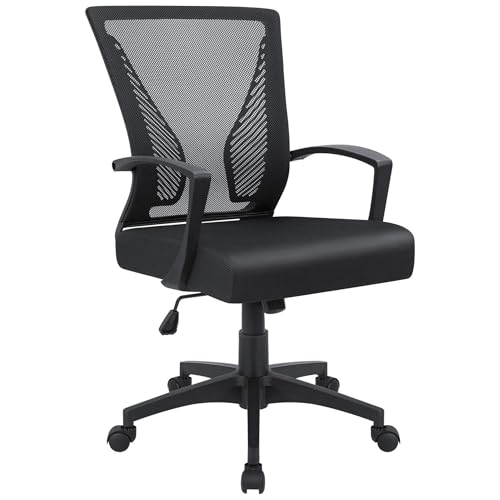
Furmax Office Chair — Best Budget
The Furmax is the long-running budget answer in this category: an ergonomic mesh desk chair with lumbar support, adjustable height, and a breathable back, at the friendliest tier in this guide. It is not pretending to be a flagship. It is the chair that gets a spare room, a student’s desk, or a first home office out of a dining chair and into something shaped for sitting.
Strengths
- Ergonomic mesh back with lumbar support at a budget tier
- Adjustable height suits a wide range of desks and users
- Breathable back and compact footprint suit small rooms
Trade-offs
- Lumbar support is a fixed-shape design rather than fully adjustable
- No headrest — neck-focused buyers should look at the SIHOO
- Materials and mechanisms are built to the price; heavy daily users will outgrow it
Set expectations the way the price sets them and the Furmax satisfies. The mesh back is genuinely shaped, the lumbar zone genuinely supports, and for a few hours a day it is a completely respectable place to sit. The compromises appear at the extremes: full-time professional use, heavier users, and anyone whose neck support needs a headrest. That is not a criticism — it is the definition of a budget tier done honestly.
The smart way to buy this chair is as a deliberate first step. If you are furnishing a home office from nothing, the Furmax plus the setup guidance in this guide — correct desk height, screen raised, feet supported — will feel like a transformation from a kitchen chair. If you later upgrade, it becomes the household’s second chair rather than a mistake. And if your budget stretches one tier higher today, the SIHOO M18 is where the headrest and adjustable lumbar support begin.
Best for: First home offices, students, spare desks, lighter daily use / Not suited for: Full-time heavy use, or anyone who needs a headrest
This pick sits in the budget tier. Check the current price on Amazon — it is the most affordable entry in this guide.
Comparison Table
| Pick | Badge | Key Spec | Best For |
|---|---|---|---|
| SIHOO M18 | Best Overall | Mesh back, adjustable lumbar, adjustable headrest, flip-up arms | Complete back-and-neck feature set at mid-range |
| Steelcase Leap | Best Premium | Flexible adaptive back, seat depth adjustment, 4-way arms | Professionals, decade-long daily use |
| HON Ignition 2.0 | Best for Long Workdays | Adjustable lumbar, synchro-tilt, contract-grade build | Long seated days, durability |
| Marsail Ergonomic Chair | Best High-Back Mesh | High-back mesh, adjustable lumbar support | Taller users, full-back support |
| TRALT Office Chair | Best Mid-Range Adjustable | Executive high back, adjustable lumbar support | Padded comfort with home-office looks |
| Furmax Office Chair | Best Budget | Mesh back, lumbar support, height adjustable | First setups and lighter use |
How to Choose a Chair for Back and Neck Comfort
Chair shopping fails when buyers shop features instead of fit. The sections below are the checks that decide whether a chair supports your back and neck — in that order.
Fit the Backrest to Your Back
The backrest should follow your spine’s S-curve: contact at the lower back’s inward curve, support through the shoulder blades, and no gap you can slide a hand into at the lumbar zone when you sit back. Height matters by body size — petite users need a back whose lumbar curve sits low; taller users need a back that reaches their shoulders, which is the Marsail’s reason to exist. If you can, compare the chair’s back height and lumbar position against your own seated measurements rather than trusting one-size product photography.
Lumbar Support: Adjustable Beats Moulded
Every back curves at a different height, so a lumbar bump fixed in one place fits the minority of sitters perfectly. Adjustable lumbar support — in height, depth, or both — lets you place support in your curve, and it is the single feature that most separates the picks in this guide. When you test a chair, the right sensation is filled and supported, never a hard push; too-aggressive lumbar support causes as much fidgeting as none.
The Headrest Question
A headrest supports your neck when you lean back — on calls, reading, thinking — and does almost nothing while you type upright, which is why screens and posture still matter more. Judge a headrest by adjustability: it should meet the back of your head without pushing it forward, and move out of the way of your upright posture. A fixed headrest at the wrong height is worse than none, because it dictates your head position all day.
Seat Depth, Height, and Arms
Seat depth is the silent comfort killer: too deep, and the front edge presses the backs of your thighs and pulls you into a slouch; too shallow, and your thighs feel unsupported. Look for roughly a fist’s width between the seat edge and the back of your knee. Seat height should let your feet rest flat with knees near ninety degrees — use a footrest if your desk forces the chair higher. Arms should adjust low enough to slide under the desk and sit at a height where your shoulders stay dropped and relaxed; shoulders shrugged toward your ears all day is a neck problem manufactured by armrests.
Mesh vs Padded, Settled Honestly
Mesh breathes, keeps its shape for years, and feels firmer at first. Padding feels plush immediately, insulates in summer, and slowly compresses. Neither is universally better; the honest rule is that long unbroken sitting in warm rooms favours mesh, while shorter sessions in cool rooms favour padding. Every pick in this guide declares which side it is on.
What Each Tier Actually Buys
The budget tier, represented by the Furmax, buys correct basic geometry: a shaped mesh back, a lumbar zone, height adjustment. The mid-range tier — SIHOO, Marsail, TRALT, and the HON at its upper edge — buys adjustability of the support itself: lumbar supports and headrests that move to meet your body, better tilt mechanisms, and materials that hold their shape longer. The premium tier, the Steelcase Leap, buys dynamic support that adapts as you move, the deepest adjustment range, and a service life measured in decades rather than years. The honest way to choose is by hours: the more of your life the chair carries, the more each tier’s advantages compound, and the more a false economy at the budget end costs in replacements.
How to Set Up Your Chair, Desk, and Screen for a Comfortable Working Day
A great chair in a bad setup still produces a sore evening. Work through these steps in order — each takes a minute, and together they matter as much as the chair itself.
- Set seat height first. Feet flat on the floor (or a footrest), thighs roughly level or sloping very slightly down, no pressure from the seat edge behind your knees.
- Position the lumbar support. Sit fully back, then adjust the lumbar support until it fills your lower-back curve with even contact. Recheck after an hour of real work.
- Set the headrest for leaning back, not typing. It should cradle the back of your head when you recline slightly, and stay clear of your head when you sit upright.
- Adjust the arms to your shoulders. Elbows near ninety degrees, shoulders visibly dropped. If the arms force a shrug, lower them or remove the conflict by raising the chair and using a footrest.
- Raise the screen. The top of the display should sit near eye level, about an arm’s length away, so your head balances over your spine instead of craning forward. Books or a stand are fine — this step does more for neck comfort than any single chair feature.
- Tune the recline and use it. Set tilt tension so you can lean back with gentle pressure, then actually change position every half hour or so. The best posture is the next posture; even a perfect chair cannot make eight frozen hours comfortable.
Tilt Mechanisms and Lumbar Systems, in Plain Terms
Two mechanism families decide how a chair moves with you. A centre tilt, common on budget chairs like the Furmax, pivots the whole seat-and-back unit from a point under the middle of the seat: lean back and your knees rise. It is simple, durable, and fine for moderate reclining. A synchro-tilt, as on the HON Ignition 2.0, reclines the backrest faster than the seat, opening the hip angle while your feet stay grounded — the better geometry for people who change position often through the day. Knee tilt pivots near the front edge of the seat, keeping feet planted on deep reclines, and appears mostly on executive chairs. Whichever mechanism a chair uses, look for a tension control matched to your weight and a tilt lock with more than one position; a chair that only locks bolt-upright trains you to sit frozen, which is the opposite of what the mechanism is for.
Lumbar systems come in four grades. Fixed moulded support is a curve built into the backrest — better than a flat back, fitted to an average that may not be you. Separate adjustable pads, found across the SIHOO, HON, Marsail, and TRALT picks, move in height and sometimes depth, and are the practical sweet spot. Tension-based systems use straps or dials to firm or soften the mesh’s lumbar zone, elegant when done well. Dynamic systems, the Steelcase Leap’s territory, change the back’s shape as you move. The grade matters less than the fit: any system you can position into your own curve beats a fancier one you cannot.
Armrests deserve the same plain treatment. Height-only arms cover most needs; width and pivot adjustments matter for narrow or broad shoulders and for angled tasks like drawing tablets. Fixed arms are the budget compromise to inspect hardest, because an arm at the wrong height cannot be ignored — it sets your shoulder position for every hour you sit. If a chair you love has fixed arms at a height that fights your desk, that is a genuine reason to choose a different chair.
Common Buying Mistakes
Buying the chair, ignoring the desk. A premium chair under a too-high desk with a low screen still produces shrugged shoulders and a craned neck. Budget for the setup, not just the seat.
Choosing by the five-minute sit test. Plush chairs win showrooms and lose afternoons. Geometry and adjustability predict month three; padding predicts minute three.
Assuming a headrest fixes neck comfort by itself. Screen height and posture habits dominate. A headrest supports reclined moments; it cannot undo a laptop hunch.
Skipping the adjustment session. Chairs arrive set for nobody. Ten minutes with the levers on day one is the difference between the chair you bought and the chair you meant to buy.
Expecting furniture to treat pain. A supportive chair improves sitting comfort; ongoing or worsening back and neck pain deserves professional assessment, not a more expensive chair.
A Realistic First Week With a New Ergonomic Chair
Day one with a properly adjusted chair often feels strange rather than wonderful, and that is normal enough to be worth warning about. If you have spent years slumped in a soft chair, an upright supported posture uses muscles that have been on holiday, and mild fatigue in the first days is your body adapting, not the chair failing. Give the setup a week of honest use before you judge it, adjusting in small steps: most people find their lumbar position and tilt tension need two or three refinements as the novelty wears off and real work reveals what an hour at the desk actually feels like.
By the end of the first week, the signs of a good match are specific. You stop thinking about the chair. You change position without leaving its support. The end of the workday feels different from the end of a day in the old chair — not miraculous, just noticeably less like you have been sitting all day. If instead you are perching on the front edge, avoiding the backrest, or stacking cushions on a new chair, something is unadjusted or unfitted, and the answer is to revisit the setup steps or the chair’s sizing, not to add padding over a geometry problem.
One more expectation to set: a chair improves the hours you spend sitting; it does not cancel them. Breaks, movement, and a screen at the right height remain the foundation, and the chair is the support act. Buyers who treat the chair as one part of that system are the ones who stay happy with it in year two.
Final Recommendation
Most buyers should start with the SIHOO M18 — it is the only mid-range pick here combining adjustable lumbar support with an adjustable headrest, and that pairing is what back-and-neck shoppers actually need. Professionals ready to invest in a decade of daily sitting should step up to the Steelcase Leap for back support, or the HON Ignition 2.0 for contract-grade long-day durability. Taller users should look first at the high-back Marsail, padded-comfort fans at the TRALT, and anyone furnishing a first desk on a tight budget will be well served by the Furmax — provided they do the setup work in this guide, which matters more than the tier.
If you are deciding between the two most likely finalists, the logic is simple. Choose the SIHOO M18 when you want the headrest-and-lumbar combination now, at a mid-range tier. Choose the Steelcase Leap when the chair is a ten-year professional tool and back support through movement outranks every other consideration. Choose the HON Ignition 2.0 when durability across long days is the priority, the Marsail when your height has defeated every mid-back chair you have tried, the TRALT when you want padding and a furniture look, and the Furmax when the budget is the budget — it will still be a clear step up from any dining chair.
Keep exploring the seating cluster: Best Office Chairs · Best Ergonomic Office Chairs · Best Desk Chairs · Best Lumbar Support Cushions · Best Standing Desks
Matching the Chair to Your Body and Your Work Style
Taller users should start with the Marsail’s high back and the SIHOO M18, then verify two numbers on the listing: backrest height and the top of the seat-height range. A chair whose seat cannot rise enough forces knees-up sitting, and a back that ends mid-shoulder-blade leaves the upper back unsupported no matter how good the lumbar zone is.
Petite users face the mirror problem: seat pans too deep and lumbar curves that sit too high. Prioritise chairs whose lumbar support adjusts downward and whose seat depth is modest — and be ready to add a footrest, which is a legitimate ergonomic tool, not an admission of defeat. The Furmax’s compact format suits smaller frames at the budget end; the Leap’s seat-depth adjustment solves the problem properly at the premium end.
Call-heavy workers spend real time reclined and listening, which is where headrests and synchro-tilt earn their keep: the SIHOO’s headrest and the HON’s coordinated recline both support that posture without a slump. Keyboard-intensive workers live upright, where lumbar position and arm height dominate — and where the honest priority is the setup routine in this guide rather than any recline feature.
Shared chairs — hot-desking households, partners alternating — need fast, intuitive adjustment above all. Every extra lever is a lever a second user will not touch, so a shared chair set wrong is worse than a simpler chair set right. The HON’s straightforward controls and durable build suit this pattern best in the guide.
Keeping a Chair Supportive for Years
A chair’s support fades gradually, and most users adapt to the fade instead of noticing it. Three habits slow the process. First, rotate your sitting: use the recline, stand for calls, and let the foam and mesh recover between long sessions rather than compressing the same spot for ten unbroken hours. Second, keep mechanisms clean and check the cylinder and casters yearly — a chair that sinks slowly or rolls badly changes your posture whether you notice or not, and both are cheap fixes compared with a new chair. Third, respect the padding: mesh can be vacuumed and wiped, padded upholstery benefits from prompt attention to spills, and direct sun ages both faster than use does.
Know the signs of a chair at the end of its supportive life: seat foam that stays compressed, a back that no longer returns your adjustment, tilt that lists to one side, a cylinder that sinks an inch during a long call. At that point the chair is furniture-shaped but no longer doing the job you bought it for, and replacing it is maintenance, not indulgence. The premium picks delay that day the longest — one of the few claims in this category that time reliably proves, and one worth weighing when a cheaper chair would need replacing twice in the same span.
Related guides
Frequently Asked Questions
Is a headrest necessary for neck comfort?
Not strictly — screen height and posture matter more — but a well-adjusted headrest genuinely helps during reclined moments like calls and reading. If you rarely lean back, prioritise lumbar support and your desk setup first.
Mesh or padded back: which is better for long days?
For long unbroken sitting, mesh usually wins on breathability and lasting shape. Padded backs feel better initially and in cool rooms. Match the material to your climate and session length rather than a universal ranking.
How long should a good office chair last?
Premium chairs are built for a decade or more of daily use; mid-range chairs typically serve several years; budget chairs suit lighter use and shorter horizons. Foam compression and mechanism wear, not appearance, mark the end of a chair’s supportive life.
My neck still aches in a good chair. What should I check?
Check the screen first — it should sit near eye level at arm’s length — then your armrest height, which should let your shoulders drop. If discomfort persists or worsens, see a clinician; a chair is comfort equipment, not treatment.
Are gaming chairs good for back and neck support?
Most gaming chairs use fixed bolster shapes and flat backs that suit one posture and fight others. The ergonomic task chairs in this guide, with adjustable lumbar support and headrests, are the more reliable route for all-day comfort.
Can I add a lumbar cushion or headrest to a cheaper chair instead?
Sometimes, and it is a reasonable budget strategy: a well-placed lumbar cushion can improve a flat-backed chair, and it lets you test whether targeted lumbar support helps your comfort before buying a chair built around it. The limits are stability and integration — cushions migrate, straps slip, and add-on headrests rarely align with a backrest that was not designed for one. Treat add-ons as a trial or a stopgap; if you find yourself relying on two of them daily, a chair with the support built in, like the SIHOO M18, is the cleaner long-term answer.
What seat height do I need for a standard desk?
Standard desks sit around a fixed height that suits a chair adjusted so your feet rest flat and elbows bend near ninety degrees at the keyboard. If your feet dangle at that elbow height, add a footrest rather than lowering the chair into a slouch.


