Disclosure: airfryerkitchensupply.com is reader-supported. When you buy through links on our site, we may earn an affiliate commission at no extra cost to you.
Where to buy
Clocks for low vision and hearing loss are a specialty category where the listing details — voice volume, digit size, button layout — decide everything, so buy where specifications and returns are painless: Amazon. All six clocks below were confirmed against live Amazon listings through our product-verification pass. The shortlist: the MASSII Talking Clock as the all-round voice-first pick, the extra-loud Talking Clock when both vision and hearing are limited, and the JALL Sunrise Alarm Clock when hearing is the issue and light can do the waking. Check the current price on Amazon from each product page, and if you are buying for a parent or relative, favor the listing whose controls you can talk them through over the phone — setup day is where these clocks are won or lost.
Introduction: two senses, four different clock problems
The best alarm clocks for vision and hearing impaired users are not one category but four, and buying the wrong quarter is the usual disappointment. Problem one is reading the time: low vision needs either very large, high-contrast digits or a clock that speaks the time on demand. Problem two is hearing the alarm: hearing loss needs volume, lower-pitched tones that survive high-frequency loss, or a channel that bypasses ears entirely — light, or vibration. Problem three is orientation: many buyers in this category are seniors for whom “what day is it, and is it morning or afternoon” matters as much as the hour, which is why day-and-date clocks fill this guide. Problem four is operation: a clock with twelve tiny buttons and a manual in six-point type fails its user no matter how good its display is. The six verified clocks below map onto those problems honestly — talking clocks that announce time, date, and reminders aloud; extra-large displays that can be read from across a room; a sunrise clock that wakes with light for sleepers who cannot rely on sound. A note on scope: these are consumer aids that make daily life easier and more independent. They are not medical devices, and sudden or worsening vision or hearing changes deserve professional assessment, not just a better clock.
In this guide
Quick Picks
- MASSII Talking Clock with 27 Alarms and Reminders — Badge: Best Overall. Voice announcement of time and date, many alarms and custom reminders, auto daylight-saving, and a dimmer — the complete voice-first clock.
- Talking Clock — Extra Loud Time & Date — Badge: Best for Combined Vision and Hearing Loss. Built and marketed for elderly, low-vision, and hard-of-hearing users who need the voice loud, clear, and simple.
- 11.5 Inch Extra Large Digital Clock — Badge: Best Large Display. A wall-or-table display with huge digits, loud talking time, and many alarms — readable from a bed, a chair, or across the room.
- GOLOZA 7 Inch Digital Clock with Talking Function — Badge: Best Day and Date Clarity. Full day, date, and period-of-day display with voice, multiple color modes, and auto-dimming for orientation-first users.
- HearEsy Talking Alarm Clock — Badge: Best Simple and Battery Operated. Large numbers plus a speaking function in a battery clock that works anywhere and survives power cuts.
- JALL Sunrise Alarm Clock — Badge: Best for Hearing Impaired (Light Wake). A wake-up light that simulates sunrise for sleepers who cannot rely on an audible alarm, with sound as a backup rather than the main event.
How These Picks Were Chosen
Selection started from the four problems above and required each pick to solve at least one of them properly rather than gesture at all of them. Voice quality and volume were weighted first for the talking clocks, because a clock that mumbles its announcement at one fixed volume serves neither the low-vision user who needs the voice nor the hard-of-hearing user who needs it loud — hence the emphasis on models with multiple volume levels and an extra-loud specialist. Display picks had to offer genuinely large digits with strong contrast and auto-dimming, because a bright clock that cannot dim ruins the sleep it is meant to protect. Orientation features — spelled-out day, date, and morning/afternoon indication — were treated as core, not decoration. Controls had to be few, large, and logical enough to set up with a user over the phone. And for the hearing-impaired wake problem, we included the light-based route honestly: a sunrise clock is not a bed-shaker, and the buying guide below names the vibrating bed-shaker category explicitly as the other channel to consider — no product is linked for it here because none was verified in this pass, and this guide does not invent listings.
The 6 Best Alarm Clocks for Vision and Hearing Impaired

1. MASSII Talking Clock with 27 Alarms and Reminders — Best Overall
The MASSII is the most complete voice-first clock in this roundup: it announces the time and date aloud, carries a deep bench of alarms and up to twenty custom reminders, adjusts itself for daylight saving, and dims across ten levels for the night. For a low-vision user, the announcement is the interface — press, listen, done — and the reminders extend the clock into a daily-living aid: medication times, appointments, the bins, spoken in the clock’s voice at the hour you set. It suits seniors living independently and anyone whose eyes need the clock to come to them. Check the current price on Amazon for the MASSII Talking Clock.
Strengths
- Full voice announcement of time and date — the core low-vision feature, done as the main interface rather than a novelty.
- Many alarms plus custom reminders make it a day-management tool, not just a wake-up device.
- Auto DST and a ten-level dimmer: set it once and it behaves all year and all night.
Trade-offs
- Feature depth means a real setup session; plan to configure it with or for the user the first time.
- The voice, while adjustable, is a synthesized announcement — clarity is good, warmth is not the point.
- Users with severe hearing loss should pair the voice with the extra-loud pick or a light/vibration channel for waking.
What elevates the MASSII is that it respects how its user actually lives. Independence is a stack of small certainties — knowing the time without finding glasses, being reminded without a caregiver’s phone call — and this clock provides them in one bedside object with one big, learnable interaction: press and listen. Set up the reminders with the user, in words they chose, and the clock starts paying for itself the same afternoon.
Best for: low-vision users and independent seniors who want voice time plus spoken reminders / Not suited for: anyone wanting a zero-setup clock, or severe hearing loss as the only channel for waking. Check the current price on Amazon.
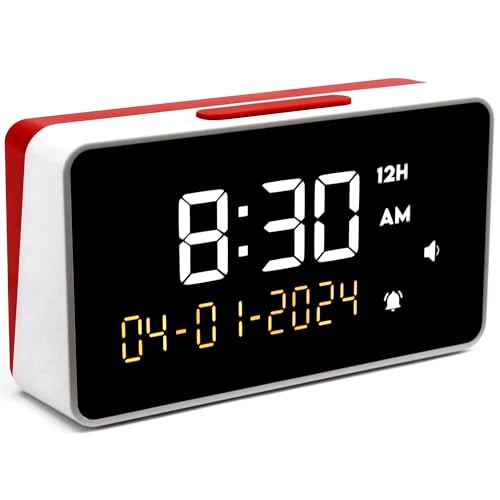
2. Talking Clock — Extra Loud Time & Date — Best for Combined Vision and Hearing Loss
When both senses are reduced — the hardest and most common real-world case in this category — the design brief narrows to two words: loud and simple. This talking clock is built and described for exactly that user: extra-loud spoken time and date for elderly, dementia, and low-vision users, made to be operated by people who cannot read a manual or a menu. The voice is the display, the volume is the accessibility feature, and the operation is deliberately minimal. It suits the parent or grandparent whose glasses and hearing aids both come off at night. Check the current price on Amazon for the extra-loud Talking Clock.
Strengths
- Extra-loud announcement — the rare talking clock specified for hearing impairment as well as vision.
- Dead-simple operation aimed at users who cannot manage menus, apps, or small buttons.
- Time and date spoken together, which serves orientation as well as timekeeping.
Trade-offs
- Simplicity means fewer extras: this is not the reminder-rich day manager the MASSII is.
- Extra loud is a household consideration — in shared rooms, the whole room hears the time too.
- Display-first users who can still read large digits may prefer the big-screen picks for silent checking.
The dignity in this product is its refusal to be clever. Every feature it omits is a wrong press that cannot happen, a setting that cannot be lost, a 2 a.m. confusion that cannot occur. For the combined-loss user, that restraint is not a limitation — it is the entire design philosophy, and it is why this clock, rather than a richer one, is the right gift for the relative who has started saying that new gadgets are “not for me.”
Best for: combined vision and hearing loss, dementia-friendly simplicity, night-time time checks without glasses or aids / Not suited for: feature seekers, shared quiet bedrooms, or app-minded users. Check the current price on Amazon.

3. 11.5 Inch Extra Large Digital Clock — Best Large Display
Some low-vision users can read a clock perfectly well — if the digits are the size of a hand. This 11.5-inch display is built on that premise: huge, high-contrast digits readable from across a room, twenty-seven alarms, loud talking time as a second channel, custom reminders, auto DST, and a ten-level auto-dimmer so the wall of numbers does not light the bedroom at night. It works on a wall, a dresser, or a kitchen counter, serving the whole day’s glances rather than only the bedside. It suits users with moderate low vision who still prefer reading to listening, and households where several people benefit from a big shared clock. Check the current price on Amazon for the 11.5 inch Extra Large Digital Clock.
Strengths
- The largest digits in this roundup — time readable from bed, chair, or doorway without glasses.
- Talking time included, so the display and voice channels back each other up.
- Auto-dimming across ten levels protects sleep; alarms and reminders cover the day-management bases.
Trade-offs
- It is furniture-sized: measure the wall or surface, and expect it to be the room’s visual anchor.
- Severe low vision will still outrun any display — those users belong with the voice-first picks.
- Placement flexibility is limited by its size and power needs compared with a small bedside unit.
The insight behind this clock is that most time-checks are glances, not alarms. A user who can read the hour from their armchair, mid-room, without fetching glasses stays oriented all day with zero interaction — no button, no voice, no interruption. Pair that ambient legibility with a talking backup for the worst-vision moments and you have covered both the day and the night in one object.
Best for: moderate low vision, shared household clocks, day-and-date orientation at a glance / Not suited for: severe vision loss, tiny nightstands, or minimalist rooms. Check the current price on Amazon.

4. GOLOZA 7 Inch Digital Clock with Talking Function — Best Day and Date Clarity
For many seniors the disorienting question is not the hour but the frame around it: Is it Tuesday or Thursday? Morning or evening? The GOLOZA answers with a 7-inch display that spells out the day, date, and time with multiple color modes for contrast preference, a talking function across ten volume levels, auto-dimming, and alarm and birthday reminders. It is the orientation specialist of the roundup, sized for a bedside or kitchen counter rather than a wall. Check the current price on Amazon for the GOLOZA digital clock.
Strengths
- Full spelled-out day and date with period clarity — the anti-disorientation feature set.
- Ten volume levels on the voice, so announcement loudness can be tuned to the user’s hearing.
- Color display modes let the user pick the contrast combination their eyes handle best.
Trade-offs
- Seven inches is bedside scale, not across-the-room scale — the 11.5-inch pick wins for distance.
- Color modes need a setup choice; the default may not be the user’s best contrast.
- As a dementia-friendly category product, its strength is clarity, not advanced scheduling.
Orientation clocks quietly prevent a category of household accidents: the 4 a.m. dressing for an appointment that is at 4 p.m., the double-dosed morning pill taken again in what felt like a new morning. A display that always shows the day and the part of the day removes those ambiguities at a glance. Set the GOLOZA’s color mode with its user, in their light, at their distance — contrast is personal, and the right mode is the one they demonstrate, not the one that looks best to you.
Best for: seniors who lose track of days, dementia-friendly households, bedside orientation / Not suited for: across-room reading or users who need the loudest possible voice. Check the current price on Amazon.

5. HearEsy Talking Alarm Clock — Best Simple and Battery Operated
The HearEsy strips the talking clock to its essentials and adds the one feature the mains-powered picks cannot match: batteries. It speaks the time, shows large numbers, and works on a nightstand, in a travel bag, in a power cut, or at a bedside with no free outlet — and for elderly users, a clock that keeps working through an outage, with no settings lost to a blackout, is a genuine safety property. It suits visually impaired users who want the speaking function without a feature festival, and anyone buying for hospital stays, guest rooms, or travel. Check the current price on Amazon for the HearEsy Talking Alarm Clock.
Strengths
- Battery operation: portable, outage-proof, and free of cable and outlet constraints.
- Speaking time with large-number display — both channels in a simple package.
- The lowest-friction setup in this roundup; an excellent first talking clock.
Trade-offs
- Batteries are a maintenance item; a flat battery is a silent clock, so keep spares and a routine.
- Fewer alarms, reminders, and display modes than the mains-powered picks.
- Voice volume is suited to personal, bedside use rather than the extra-loud specialist’s whole-room announcement.
There is a use case this clock owns outright: the unfamiliar room. Travel, hospital, a stay with family — the low-vision user’s own clock, with its known button and known voice, restores orientation in a strange place in a way a hotel clock never will. Battery power is what makes that portability real, and for many buyers that single property outweighs every feature the bigger clocks add.
Best for: travel, power-cut resilience, simple first talking clock, bedsides without outlets / Not suited for: reminder-heavy day management or the loudest voice requirement. Check the current price on Amazon.

6. JALL Sunrise Alarm Clock — Best for Hearing Impaired (Light Wake)
Every other pick in this guide still assumes sound can play some role. For the sleeper with significant hearing loss — aids out, world silent — the wake signal must change channel, and light is the channel this verified clock provides: a simulated sunrise that brightens gradually before the alarm time, rousing the sleeper the way dawn does, with conventional sounds available as a supplement rather than the mechanism. It also serves hearing users who simply wake badly to noise. It suits deaf and hard-of-hearing sleepers, couples where one partner must not be woken by the other’s alarm, and anyone whose mornings improve with light. Check the current price on Amazon for the JALL Sunrise Alarm Clock.
Strengths
- Wakes through vision’s other door — light — making it independent of hearing entirely.
- Gradual brightening is a gentler wake than any tone, with sound available as backup.
- Doubles as a bedside light and a partner-friendly silent alarm.
Trade-offs
- Light waking depends on the sleeper facing the room and not burying under covers; the heaviest sleepers may need the vibration channel instead.
- It is a wake device, not a talking or day-date clock — pair it with a voice pick if orientation is also needed.
- Summer’s early natural light can blur its effect in uncurtained rooms.
Be honest about the channel hierarchy for waking without hearing: vibration — a bed-shaker puck under the pillow or mattress — is the most forceful route, and light is the gentlest. This guide links the light route because it is the one verified in this pass; the buying guide below explains how to think about adding a shaker. For the large group of hard-of-hearing sleepers who do stir to brightness, the JALL turns a daily anxiety — will I sleep through it — into a non-event, and it does so without waking the person beside them.
Best for: deaf and hard-of-hearing sleepers, light-sensitive waking, couples with different schedules / Not suited for: users needing voice announcement or day-date orientation from the same device. Check the current price on Amazon.
Comparison Table
| Pick | Badge | Key spec | Best for |
|---|---|---|---|
| MASSII Talking Clock | Best Overall | Voice time/date, 27 alarms, 20 reminders, auto DST | Low vision, independent living |
| Talking Clock Extra Loud | Best for Combined Loss | Extra-loud voice, minimal controls | Vision + hearing loss |
| 11.5 Inch Extra Large Clock | Best Large Display | Huge digits, talking time, auto-dimmer | Reading from across the room |
| GOLOZA 7 Inch Clock | Best Day/Date Clarity | Spelled-out day/date, 10 volumes, color modes | Orientation, dementia-friendly |
| HearEsy Talking Clock | Best Simple/Battery | Speaking time, large numbers, battery powered | Travel, outages, simplicity |
| JALL Sunrise Clock | Best Light Wake | Sunrise simulation wake-up light | Hearing impaired waking |
How to Choose an Alarm Clock for Vision or Hearing Impairment
Choose the channel first, because everything else is decoration. Ask which of the four problems dominates: reading the time, hearing the alarm, knowing the day, or operating the device. If reading dominates and some vision remains, display size and contrast rule — the 11.5-inch clock for distance, the GOLOZA for bedside clarity. If reading is gone or impractical, the voice becomes the display: MASSII for features and reminders, the extra-loud talking clock when hearing is reduced too, HearEsy when simplicity and portability lead. If waking dominates and hearing is the loss, leave sound behind: light with the JALL, or a vibrating bed-shaker model — a puck that sits under the pillow or mattress and shakes the sleeper awake; that category exists and works, and while no shaker model is linked in this roundup because none was verified in this pass, it is the correct search to run for the heaviest sleepers and the profoundly deaf. If operation dominates — arthritis, cognitive load, technophobia — rank the clocks by what they omit: the extra-loud simple clock and the HearEsy are the low-friction answers. Finally, involve the user in the choice if you possibly can. Contrast preference, voice tolerance, and button feel are personal in ways a gift-buyer cannot guess, and a clock chosen with its user gets used; a clock imposed on them gets unplugged.
Volume, pitch, and why “loud” is not the whole story
Age-related hearing loss typically takes the high frequencies first, which is why many standard alarms — high, thin beeps — vanish for exactly the people who buy this category, while a lower, fuller tone or a spoken announcement remains audible. When comparing clocks, prefer models that state adjustable volume across many levels, like the MASSII and GOLOZA, and test the alarm in the actual bedroom, at night, with hearing aids out if that is how the user sleeps. If even the loudest voice on the extra-loud pick does not reliably wake the user, stop turning the volume knob and change channels: light, then vibration. Escalating volume past a household’s tolerance wakes everyone except, sometimes, the intended sleeper.
Contrast, digit size, and light discipline
For low vision, legibility is a ratio, not a size alone: bright digits on a true black background read at distances where the same digits in gray-on-gray fail. Spelled-out information beats abbreviations — “TUESDAY” cannot be misread the way “TUE” can at a squint — and red or amber night-friendly hues disturb sleep less than blue-white. The dimmer is a health feature, not a luxury: a clock bright enough to read at noon will glare at 3 a.m. unless it auto-dims, which is why every display pick here was required to have one. Position matters too: the clock belongs at the user’s natural sightline from the pillow and from their chair, not where the furniture looks symmetrical.
How to Set Up the Clock With Its User (A First-Day Routine)
Unbox and set the clock yourself first, in good light, with the manual — the user should never meet the clock in its unconfigured state. Set the time, date, and daylight-saving behavior; choose the display’s color mode or brightness with the room’s evening light in mind; set the alarms and any reminders in the user’s own words where the clock allows. Then do the transfer properly: sit with the user, demonstrate the one or two interactions they need — press to hear the time, how the alarm is stopped, what the snooze does — and have them perform each one twice, unaided, including once in the dark or without glasses if that is their real use case. Write the two or three key actions on a large-print card and leave it under or behind the clock. Set a phone reminder for yourself to check in after the first week: ask what confused them, adjust volumes and brightness, and fix the small frictions while they are still small. This thirty-minute routine is the difference between an accessibility product and a drawer object, and no specification on any listing can substitute for it.
The Household System: One Clock Is Rarely the Whole Answer
Think beyond the bedside, because orientation is needed all day. The households that manage best treat time information as a small network: a talking clock at the bedside for the night and the morning, a large-display clock where the day is spent — the 11.5-inch model in the kitchen or living room — and the user’s own routines anchored to both. A low-vision user who can hear the time in bed, read it hugely from their chair, and be reminded aloud about the midday dose is not “using three gadgets”; they are living in a house that tells them what they need to know, which is what sighted, hearing households get from every wall and screen without noticing. Budget accordingly: two well-matched clocks usually outperform one flagship, and the picks in this guide are deliberately tiered so a voice clock plus a display clock is an attainable system rather than a splurge.
The waking system deserves the same network thinking. The most reliable arrangement for a hard-of-hearing sleeper layers channels: the sunrise clock begins the wake gently, the voice or tone alarm stands behind it, and — for the heaviest sleepers or the highest-stakes mornings — a bed-shaker provides the guarantee. Layering sounds redundant until the morning it is not: a power cut, a clock unplugged by a cleaner, a night of unusually deep sleep. The battery-powered HearEsy, incidentally, is the layer that survives the power cut, which is why even a mains-clock household often keeps one as the understudy.
For Caregivers and Family Buyers: Getting This Purchase Right
Most of these clocks are bought by adult children for parents, and the failure pattern is consistent: the buyer optimizes for the features they find impressive and under-weights the Tuesday-morning reality of the person who must live with the thing. Invert that. Before ordering, answer four questions about the actual user. Can they read a large digit at bedside distance — test it with a printed page, not a guess. Can they hear a spoken announcement in a quiet room without aids — test it with a phone recording at arm’s length. What are their hands like — arthritis and tremor rule out small buttons and stiff controls regardless of every other merit. And what is their relationship with new objects — a parent who anthropomorphizes a simple clock will use it, while a parent presented with a “system” may quietly unplug it. Choose the simplest clock that covers the demonstrated needs, set it up in person if geography allows, and schedule the one-week check-in as part of the gift. The goal is not a clock that impresses the buyer at checkout; it is a parent who, three months later, cannot imagine the nightstand without it.
Common Buying Mistakes
- Buying features instead of a channel. A clock with forty functions that speaks too quietly, or displays too small, fails its only job. Match the channel — voice, display, light, vibration — to the loss first.
- Assuming louder solves hearing loss. High-frequency loss erases high beeps at any volume. Voice, low tones, light, or vibration are the answers; volume alone often is not.
- Skipping the dimmer. A non-dimming bright display in a bedroom trades orientation for sleep quality. Auto-dimming is non-negotiable in this category.
- Handing over an unconfigured clock. Setup is part of the product for this audience. Configure it, teach the two key actions, leave a large-print card.
- Ignoring power cuts and batteries. Mains clocks without backup forget the time and the alarm. Battery models like the HearEsy, or backup-equipped mains models, protect the wake-up that matters.
- Choosing for the user without the user. Contrast, voice, and control preferences are personal. A clock the user helped choose is a clock that stays plugged in.
What “Good” Looks Like Six Months Later
The final test of these clocks is not the first morning but the fiftieth. A well-matched clock becomes invisible infrastructure: the user stops mentioning it, the family stops worrying about the wake-up, and the small daily uncertainties it was bought to erase simply do not occur. A poorly matched one announces itself forever — in unplugged corners, in alarms set on phones instead, in a parent who has quietly returned to guessing the time from the light outside. If six months in you are in the second picture, do not conclude the category failed; re-run the channel question with what you have learned. Perhaps the voice needed to be louder and simpler, the display bigger and further away, the wake channel changed from sound to light. The six picks here span those corrections deliberately, so a second purchase informed by the first one’s evidence is usually the last purchase. Accessibility is an iteration, not an event — budget your patience for one round of it and the household will land where it needs to be.
Final Recommendation
For most low-vision buyers, start with the MASSII Talking Clock: voice-first, reminder-rich, and self-managing across seasons. For combined vision and hearing loss, choose the extra-loud Talking Clock and value its simplicity as the feature it is. Readers who still read should take the 11.5 inch display for distance or the GOLOZA for bedside day-and-date clarity; travelers and outage-prone homes, the HearEsy; and sleepers who cannot rely on sound, the JALL sunrise clock — with a bed-shaker search as the next step if light alone does not wake them. For related clocks in this program, see Best Alarm Clocks That Wake You Up With Light, Best Alarm Clocks To Wake Heavy Sleepers, Best Alarm Clocks Easy To Use, and Best Alarm Clocks Don Wake Your Partner.
Placement and Room Setup for Low-Vision and Hard-of-Hearing Clocks
Where the clock sits can matter as much as which clock it is. For a display clock, mount or place it on the user’s direct sightline from where they actually look — from the pillow, and from their usual chair — rather than on the room’s most convenient shelf. Kill the competition: a bright window behind a display washes its contrast out by day, and a lamp’s glare across the digits does the same by night, so angle the clock away from direct light sources and test its legibility at the worst hour, usually mid-afternoon glare. For a talking clock, the bedroom’s acoustics are the spec nobody lists: a voice announcement in a carpeted, curtained room carries cleanly, while the same volume in a bare, echoing room blurs — if announcements sound muddy, soft furnishings near the bedside often fix what volume cannot. Keep the clock’s one essential button findable by touch: a strip of tactile tape on the talk button is a thirty-second modification that low-vision users consistently rate as the best upgrade they own, and it costs nothing. Finally, route the power cable so it cannot be pulled loose by bedding or a vacuum — an unplugged accessibility clock fails silently, and a battery understudy like the HearEsy on the same nightstand is cheap insurance against exactly that silence.
A Day With the Right Clock: What Changes
It is worth spelling out what success looks like, because it is quiet. At 6 a.m. the sunrise clock has been brightening for half an hour and the sleeper surfaces without a jolt — or the voice alarm speaks the time and the reminder that today is the clinic day. At 6:05, a press of one large button announces the time and date aloud, and the morning’s first uncertainty — what day is it, did I oversleep — never forms. At breakfast, the big display in the kitchen confirms the hour at a glance from the table, no glasses fetched, no squinting. At midday the clock speaks its reminder and a dose is taken on time, without a daughter’s phone call. At 9 p.m. the display has dimmed itself to a ember, the day-date still legible for the last orientation check of the night. None of these moments is dramatic, and together they are the difference between a household that runs on anxiety and workarounds and a household that runs on information. That is what the six clocks in this guide are actually for, and it is why the setup routine and the channel matching matter more than any single specification: the product is not the clock, it is the day the clock makes possible.
Contrast that with the wrong purchase, which is equally quiet: a feature-rich clock with a dim, small display and a soft voice, unplugged by week two because every interaction was a small defeat. The user does not complain — they conclude that clocks are no longer for them, and the family concludes the category does not work. Both conclusions are wrong; the match was wrong. If you take one idea from this guide, take that one: in accessibility categories, matching beats maximizing, every time.
Frequently Asked Questions
What is the best alarm clock for someone who is legally blind?
A talking clock, because the voice replaces the display entirely. The MASSII is this guide’s overall pick for its announcement quality, reminders, and auto DST; the HearEsy is the simpler, battery-powered alternative. Set it up with the user and teach the press-to-listen interaction before anything else.
How do deaf people wake up to an alarm clock?
Through other channels: light, from sunrise-simulating clocks like the JALL, or vibration, from bed-shaker models that place a vibrating puck under the pillow or mattress. Many deaf sleepers use both, with the shaker as the guarantee. Choose based on how deeply the person sleeps and whether a partner shares the bed.
Are talking clocks loud enough for hearing-impaired users?
Some are — the extra-loud talking clock in this guide is specified for hearing-impaired users, and models with many volume levels like the MASSII and GOLOZA let you tune the announcement. Test in the real bedroom with hearing aids out. If the voice does not reliably reach the user, switch the waking channel to light or vibration rather than chasing more volume.
What clock is best for a parent with dementia?
An orientation clock that spells out the day, date, and time of day unambiguously — the GOLOZA is this guide’s pick — with simple controls and auto-dimming. Avoid clocks with abbreviations, small print, or deep menus, and set reminders for medication and routines where the model supports them, like the MASSII.
Do these clocks set themselves for daylight saving?
The main picks here — MASSII, the 11.5-inch clock, and others — include auto DST, which matters more than it sounds: a clock that is an hour wrong twice a year is a missed appointment or a missed dose waiting to happen. Confirm the feature on any model you choose, especially simpler battery clocks.
Should I choose a battery or plug-in clock?
Plug-in clocks with battery backup suit most bedsides: no battery changes, no silent failures, and the backup carries the alarm through outages. Pure battery models like the HearEsy win where outlets are scarce, for travel, and as the household’s outage-proof understudy. Whichever you choose, the rule is that the wake-up must never depend on a single point of failure.
When is a clock not enough — when should we see a professional?
When the change is sudden, worsening, one-sided, or accompanied by other symptoms, and whenever hearing or vision loss is new and unexplained. Clocks compensate for stable, understood limitations beautifully; they are not diagnostics. A hearing assessment can also unlock better solutions than any bedside product — modern hearing aids and alerting systems that flash lights or vibrate for doorbells, phones, and alarms across the whole house. Think of the clocks in this guide as one layer of an alerting household, and let professionals design the deeper layers when the need is there.
What if my parent refuses new technology?
Choose the clock that least resembles technology: the extra-loud talking clock or the HearEsy, with their minimal controls and single obvious interaction. Set it up completely before presenting it, demonstrate the one button that matters, and frame it as a clock that talks — which it is — rather than as an assistive device. Acceptance follows success; one good week usually settles the question.
Do talking clocks announce the time automatically?
Most announce on demand — a button press — and some can be set to chime or announce periodically. On-demand is usually the better arrangement: automatic hourly announcements disturb sleep and partners. The models here center on press-to-listen plus alarms and reminders at the times that matter.
How large should the digits be for low vision?
As large as the placement distance demands: a bedside clock read from two feet away can succeed at sizes that fail completely across a room. As a working rule, if the user must lean, squint, or fetch glasses, the digits are too small for that distance — which is why this guide’s distance pick is an 11.5-inch display. Test with the actual user at the actual distance, in evening light, before the return window closes.
Are these clocks suitable for children with vision or hearing impairment?
Many are — the talking clocks’ press-to-listen simplicity and the sunrise clock’s gentle light wake both suit children well, and a familiar voice announcement can anchor a child’s morning routine and independence. Choose with the child where possible, set the clock up in their room’s real light and sound, and prefer models whose alarms and reminders a parent can configure once and trust. For school-day reliability, layer channels just as you would for an adult: voice or display for information, light or vibration for the wake itself.
What is the best clock for someone who removes their hearing aids at night?
Do not rely on sound at all: choose the light channel — the JALL sunrise clock — as the primary wake, backed by a voice alarm for the mornings light is not enough, and consider a bed-shaker model as the guarantee layer for high-stakes days. Test the arrangement on a weekend before trusting it with a workday or an appointment.
How do I help a parent learn a new talking clock?
Set it up fully yourself, then teach only the two interactions that matter — hearing the time and stopping the alarm — with the parent performing each twice, including once in their real conditions (dark room, no glasses). Leave a large-print card with those steps by the clock, and check in after a week to adjust volume, brightness, and reminders. Thirty minutes of this outperforms any feature list.
Can one clock work for both low vision and hearing loss?
Yes — that is exactly the extra-loud talking clock’s brief, and the MASSII serves many combined-loss users too, pairing voice with a dimmable display. The key is redundancy of channels: voice plus display plus, for waking, light or vibration, so that whichever sense is having a bad day, another channel carries the information.

