A fingerprint door lock lets you open a door by touching a sensor, instead of using a key. Most models also offer a keypad code, a key backup or an app. They replace or add to a deadbolt or handle set, and they are popular for entry doors, garages and rental units.
We have not used these products ourselves, so this guide does not claim results from any lock. It describes features and construction only, and it shows how to choose by comparing listings. Follow the maker installation guide, and ask a locksmith if you are unsure about your door. Keep a short list of your must have features and compare it against each listing line by line. Photos can look alike, so the written details, the included parts and the maker support terms are where real differences tend to appear.
As an Amazon Associate we earn from qualifying purchases. Links on this site are affiliate links, and they do not change the information we give.
In this guide
Quick Picks
| Pick | Product | Best For |
|---|---|---|
| 1 | ULTRALOQ U-Bolt Pro WiFi Smart Lock | Most ways to unlock |
| 2 | Kwikset Halo Touch Fingerprint Smart Lock | Re-keyable key backup |
| 3 | eufy Smart Lock C220 | Built-in Wi-Fi on a simpler spec |
| 4 | Lockly Secure Plus Latch Edition | Peek-proof keypad |
| 5 | Hornbill Video Smart Lock with Camera | Built-in camera doorbell |
Our Picks
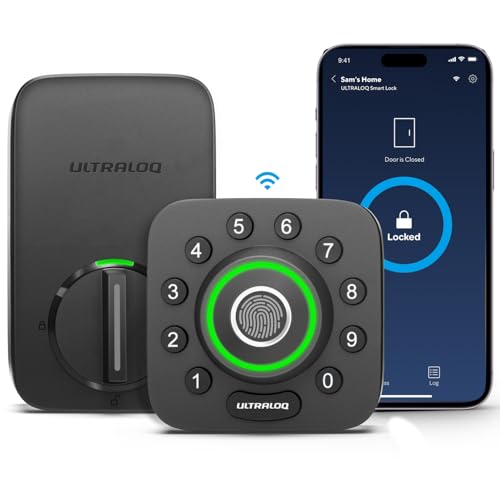
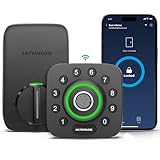
1. ULTRALOQ U-Bolt Pro WiFi Smart Lock — Best for most entry options
The U-Bolt Pro WiFi stacks eight entry methods on one deadbolt: AI-powered fingerprint ID, an anti-peep keypad, the U-tec app, auto unlock and auto lock, a web portal, shareable eKeys, voice control through Alexa or Google Assistant, and two mechanical keys. The fingerprint reader stores up to 100 prints, and the keypad holds up to 50 codes, so a household plus regular guests can all be enrolled. Wi-Fi is built in, so remote control needs no hub or bridge, and a door sensor is included so the lock can tell whether the door is actually shut before auto-locking. The zinc body is certified to ANSI Grade 1, the highest grade named in the listing, and the exterior is rated IP65 against dust and weather. It runs on four AA batteries. Choose it if the checklist in the guide above — sensor type, backup entry, app sharing and weather rating — needs every box ticked by a single unit.

2. Kwikset Halo Touch Fingerprint Smart Lock — Best for a re-keyable backup
The Halo Touch suits households that want an established lock brand and a key backup they can re-key themselves. Its fingerprint sensor stores up to 100 fingerprints across 50 users, and entry can also come from the Kwikset app or a traditional key. Kwikset’s SmartKey Security lets you re-key the physical cylinder to match an existing Kwikset key, which is handy when one lock in a houseful of the brand is being replaced. Wi-Fi is built in, so there is no hub to buy, and the lock supports geofence auto-unlock plus Alexa and Google voice control. The listing rates it BHMA Grade AAA for security, durability and finish. It fits doors 1-3/8 to 2 inches thick, the standard range covered in the guide above. Several finishes are offered on the listing, so match the finish to your existing hardware before ordering.

3. eufy Smart Lock C220 — Best for built-in Wi-Fi on a simpler spec
The C220 is the straightforward option in this group: a fingerprint deadbolt with built-in Wi-Fi at the simpler end of eufy’s range. Its self-learning AI fingerprint reader is the headline feature — eufy says recognition improves with use — and the lock offers six ways in: fingerprint, the eufy Security app, keypad, physical key, Apple Watch, and voice through Alexa or Google Assistant. It stores up to 50 fingerprints and 100 passcodes, enough for family plus timed guest codes. Battery life is listed at around eight months from eight AA batteries. The exterior carries an IP53 weather rating and BHMA Grade 3 certification, a step below the Grade 1 hardware elsewhere in this list, which is the main trade-off for the simpler spec. Installation is listed at about 15 minutes on standard deadbolt bores, with no drilling. Pick the C220 if you want fingerprint entry and remote app control without a door sensor or top-grade certification.
View eufy Smart Lock C220 on Amazon
4. Lockly Secure Plus Latch Edition — Best for a peek-proof keypad
The Secure Plus latch edition stands out for its keypad. Lockly’s patented PIN Genie design shuffles the digits across four buttons after every use, so numbers never sit in the same place and a watcher cannot reconstruct your code from finger positions or smudge patterns. Entry options include the 3D biometric fingerprint sensor, which stores up to 99 fingerprints and is designed to accept only real fingers, plus app control over Bluetooth, a physical key backup and emergency power options. Voice control through Alexa or Google Assistant needs Lockly’s Secure Link Wi-Fi hub, sold separately, so factor that in if remote access matters. The lock fits standard doors 1.38 to 2 inches thick, runs on four AA batteries with up to a year of listed life, and carries a five-year mechanical and finish warranty with two years on electronics. Choose it for rentals, offices or busy front doors where codes get typed in view of other people.
View Lockly Secure Plus Latch Edition on Amazon

5. Hornbill Video Smart Lock with Camera — Best for seeing visitors
The Hornbill T1 video lock folds a doorbell camera into the deadbolt, which suits doors with no separate doorbell wiring. The listing describes a 4-in-1 unit: a 2K HD camera, a ring doorbell with two-way audio, PIR motion detection and a fingerprint reader, with built-in Wi-Fi on 2.4GHz and app remote control, and no monthly fee for the core setup. Fingerprint entry is joined by IC cards, the app, auto lock and physical keys. Power comes from dual rechargeable batteries rather than disposables — worth noting against the battery section of the guide, since you recharge instead of swapping AAs. The exterior is rated IP65 for weather, and night vision covers after-dark callers. Pick this one if seeing and speaking to visitors from the same device matters more to you than a top security grade, which this listing does not claim.

What to Look For
| Factor | Why it matters | What to check |
|---|---|---|
| Sensor type | Optical and capacitive sensors read fingers in different ways. | Read the maker description and how many prints the lock can store. |
| Backup entry | A backup method helps if the sensor does not read or the power fails. | Check for a keypad, a physical key or an emergency power port. |
| Door fit | Door thickness, bore size and backset vary between homes. | Measure your door and compare with the maker fit list. |
| Power source | Locks run on batteries, and battery access matters. | See the battery type, the listed life and any low charge alerts. |
| App and sharing | Apps allow temporary codes and activity logs on some models. | Look for supported phones, hub needs and any account terms. |
| Weather and finish | Outdoor doors face rain, sun and cold. | Check the weather notes from the maker and available finishes. |
Setup and Care Tips
- Check that the door is aligned and that the existing bolt moves freely before installing.
- Follow the maker steps for the order of mounting plates, screws and wiring.
- Enroll fingers in the positions you use, and add a few extra scans for each finger.
- Keep a physical key or backup code somewhere that is not on the door itself.
- Wipe the sensor with a soft dry cloth and change the batteries on schedule.
Mistakes to Avoid
- Buying without measuring the door thickness and bore size.
- Relying only on the sensor when the fingers are often wet or dirty.
- Ignoring app terms or hub needs that come with smart features.
- Letting the batteries run down before you replace them.
- Skipping a test of the backup entry before you close the door behind you.
How a Fingerprint Sensor Reads Your Finger
Understanding the sensor helps you judge a listing. Most consumer door locks use one of two broad approaches. A capacitive sensor measures tiny electrical differences between the ridges and valleys of a finger. An optical sensor takes a small image of the surface of the finger. Each approach has strengths, and makers often describe their choice in a short phrase on the product page.
In practice, what matters to a household is how forgiving the sensor is. Dry skin, damp fingers, small cuts, cold weather and worn fingertips can all change how a print appears. A good lock lets you record the same finger several times, from slightly different angles, so it has more data to compare against. Some locks also allow you to store a limited number of different prints, which is useful for families.
Enrolling Prints the Right Way
Poor enrollment is a leading cause of frustration, and most of it is avoidable. Follow the maker’s steps, and use these habits to improve your results.
- Clean and dry the finger and the sensor surface.
- Press with a natural, steady pressure rather than a hard push.
- Lift and place the finger again at slightly different angles when the lock prompts you.
- Record the finger you will actually use at the door, such as an index finger or thumb, and register a backup finger too.
- Test each stored print a few times from standing at the door in your usual posture.
Children’s prints can change as their hands grow, so some families re-enroll young users from time to time.
Checking Your Door Before You Buy
A lock is only useful if it physically fits your door. Several measurements decide this, and the product listing normally states what it supports.
Door thickness
Locks are made for a range of door thicknesses. Measure the edge of your door and compare it to the range in the listing.
Backset
The backset is the distance from the door edge to the center of the main hole. Many doors use one of a few common distances, and many locks adjust between them.
Hole sizes and existing hardware
Look at your current deadbolt and handle holes. Some smart locks replace only the deadbolt, while others replace a full handle set. Confirm the style matches.
Door and frame condition
If the door sags or the bolt does not line up with the strike plate, fix that first. A new lock will not cure a misaligned door.
Power, Batteries and What Happens When They Fade
Fingerprint locks need electricity for the sensor and the motor, and most rely on batteries. Battery life depends on how often the lock is used, whether it stays connected to Wi-Fi, and the cold or heat around the door. Listings often quote a figure in months, which should be read as a rough guide.
- Choose a model that warns you with a sound, light or app message before the batteries run out.
- Look for an emergency method such as a physical key, a way to connect external power, or a code entry.
- Keep spare batteries of the type named in the manual somewhere indoors.
- Replace all cells together, as the maker advises.
Wireless Options Compared
| Connection | What it does | Things to consider |
|---|---|---|
| None, standalone | Works at the door only | Simple, with no app updates or remote access |
| Bluetooth | Lets a phone talk to the lock nearby | Short range, so remote control needs extras |
| Built-in Wi-Fi | Remote control and alerts through a home network | Can use more battery power |
| Hub or bridge | Connects through a separate device | Extra hardware, often better range |
Thinking About Security and Privacy
A lock protects your home, so a clear view of how it works is wise. Look for details about how fingerprint data is stored. Many makers state that print data stays on the lock rather than being sent to a server, but you should read the maker’s own explanation instead of assuming. Check whether the app supports account protection and whether the maker publishes software updates.
A fingerprint lock does not remove the need for a strong door, good hinges and a sturdy strike plate. For security questions that go beyond product features, ask a licensed locksmith or a security professional.
Installation Notes
Many people install these locks with a screwdriver, but the job does involve fitting parts into your front door, so go slowly. Read the instructions completely first. Remove the old hardware, check that the new latch and bolt move freely, and attach the exterior and interior parts as shown in the manual. Route any cable carefully so it is not pinched. Test the lock several times with the door open before you close it, so you do not lock yourself out. If you are unsure, a professional installer can help.
Troubleshooting Sensor and Door Problems
The lock does not recognise my finger
Clean the sensor, dry your hand and try again. If the problem continues, record the finger again with more samples.
It works inside but not in cold weather
Low temperatures affect both skin and batteries. Consult the operating range in the manual.
The bolt is sticky or slow
Check door alignment and the strike plate. A bolt that drags uses more power and can wear the motor.
The app loses connection
Check the home network, the distance from the router and the battery level.
Day-to-Day Care
Wipe the sensor with a soft, dry or slightly damp cloth, avoiding harsh cleaners. Check the screws on the lock body now and then, and keep the area around the keyway free of grit. Update the app and firmware when the maker releases changes, and delete the access of people who no longer need it.
Managing Household and Guest Access
One strong reason to choose a smart lock is control over who can come and go. Think about the people in your life and how each should enter.
- Family members: register fingerprints for adults and older children, and give younger ones a code or key as a backup.
- Regular helpers: a cleaner, dog walker or relative might receive a personal code that you can remove later.
- Short-term guests: many apps allow temporary codes that expire. Check that your chosen lock offers this and how many codes it can hold.
- Rental or shared properties: look for activity logs so you can see when codes were used.
Keep a simple record of who has which code, and look it over a few times a year. Remove anyone who no longer needs entry, and change shared codes when circumstances change.
Weather, Location and Durability
A lock on a sheltered front porch faces a milder life than one on an exposed garage door or a seaside cottage. Look for any statement about the operating temperature range and about protection against water and dust. Listings sometimes give an ingress rating, which is a code describing resistance to dust and water. Read what the code means from the maker, because the numbers are specific.
Exterior finishes matter too. Matte coatings hide fingerprints on the casing better than glossy ones, and metal bodies tend to feel sturdier than plastic. In coastal air, salt can attack finishes, so wipe the exterior from time to time.
Worked Example: Choosing for Three Different Homes
A busy family house
Several people come and go all day, children lose keys and hands are often grubby. A lock with generous print storage, a keypad backup and a clear low-battery warning suits this home. A sensor that tolerates slightly imperfect pressure helps too.
A small apartment
Here the focus might be on a tidy design, a deadbolt that fits an existing door and a key backup. Wi-Fi might be less important than reliable local use.
A rental unit
The owner wants to issue and remove codes without handing out keys. Remote code management and an access history become the main priorities, and fingerprint use may be secondary.
Common Buying Mistakes
- Skipping the measurements. A lock that does not match your door thickness or backset will not fit.
- Relying on one entry method. Always keep a second way in.
- Ignoring battery access. Make sure you can change cells without removing the lock.
- Assuming every lock works with your smart home setup. Check compatibility in the listing.
- Forgetting about the strike plate and door frame. A solid lock needs solid surroundings.
- Not enrolling enough samples. Rushed enrollment leads to missed reads.
Who Might Skip a Fingerprint Lock
These locks are convenient, but they are not for everyone. People who work with their hands in ways that wear the fingertips, such as bricklayers or those using strong chemicals, may find readers unreliable. Households with weak or unstable Wi-Fi may prefer a local-only model. Anyone who wants a mechanical-only door with no batteries to maintain might be happier with a traditional deadbolt. If your door is part of a fire-resistance regulated entry, ask your building manager or a licensed professional before changing hardware.
A Short Glossary
- Deadbolt: the sturdy bolt that extends from the door into the frame.
- Latch: the spring bolt that holds the door closed but is not a security feature on its own.
- Strike plate: the metal plate on the frame that receives the bolt.
- Backset: distance from the edge of the door to the center of the lock hole.
- Auto-lock: a setting that locks the door again after a set time.
- Firmware: the software inside the lock.
Final Pre-Purchase Checklist
- Measured door thickness, backset and hole sizes.
- Chosen the connection type that fits your home.
- Confirmed a backup entry method.
- Read about battery type and warnings.
- Checked what the maker says about data and updates.
Making the Most of Auto-Lock and Alerts
Two settings change daily life more than most people expect. Auto-lock re-secures the door after a set delay, which helps when you hurry out with your hands full. Choose a delay long enough for you to step through but short enough to be useful, and test it a few times. Alerts tell you when the door is opened, when a wrong print is tried repeatedly or when batteries run low. Turn on only the alerts you will actually read, otherwise they become noise. Keep in mind that app notifications depend on your phone and network, so never treat them as your only warning.
When to Call a Professional
Some situations go beyond a weekend job. If the door frame is damaged, if you need to cut new holes, or if the entry is part of a shared building with its own rules, a licensed locksmith or installer is the safer choice. They can also advise on strike plates, longer screws and reinforcement that suit your specific door.
Deeper Buying Criteria: What Really Matters
Sensor type shapes everyday reliability
Fingerprint readers differ in how they capture a print. Semiconductor sensors read the finger’s electrical properties and tend to reject fakes and work quickly; optical sensors photograph the print and can struggle with very dry or wet fingers. Whichever type a listing describes, look for how many fingerprints it stores and whether it learns from repeated use, because a lock that improves with use frustrates less in month six than in week one.
Backup access is not optional
Every fingerprint lock should offer at least two other ways in: a physical key for total power failure and a code for guests or for the day your finger is bandaged or dirty from the garden. Check how backup codes work — temporary codes for a cleaner or dog walker that expire are a genuine feature, not a gimmick — and confirm a key cylinder exists rather than assuming one from the photographs.
Power and the low-battery plan
These locks run on batteries, so the questions are how the lock warns you, how much grace it gives, and what happens at zero. Many models offer an emergency power contact on the outside for a temporary boost to get in. Plan to change batteries on the first warning rather than the last, and keep the physical key somewhere reachable that is not inside the locked house.
Door fit decides half the shortlist
Thickness, backset and the existing bore holes in your door limit which locks fit without new drilling. Measure your door before browsing and check the listing’s stated ranges against it. Renters and owners of listed or fire-rated doors must also consider whether replacing the lock is permitted at all, and whether the existing hardware must be retained.
Weather exposure for external doors
A lock on a sheltered porch lives a different life from one on a gate or an unsheltered back door. Look for a stated weather-resistance rating if the door faces rain, and remember that cold, wet or dirty fingers read less reliably on any sensor — one more reason the code and key backups matter in winter.
Real-Life Use Cases
Families with children
Children lose keys and forget codes less often than they lose keys — and their fingerprints are always with them. Enroll each child’s print carefully, re-enrolling as they grow if recognition fades, and keep a code as the household backup. The school-run morning is where this lock earns its price.
Rentals and house shares
The ability to add and delete users without changing a cylinder is the core benefit here. Temporary codes for guests and instant removal when a housemate leaves replace the locksmith visits of the key era. Check the user capacity in the listing against your real turnover.
Elderly relatives and accessibility
For hands with reduced grip or memory, pressing a finger can be far easier than turning a small key or remembering a code. Enroll more than one finger per person, and test recognition with the person’s actual hands — dry skin in older adults sometimes needs the code as the primary method instead.
Home offices and internal doors
Fingerprint locks are not only for front doors: a study, a rental suite within a house or a store room can gain simple access control without key management. Internal use relaxes weather and security demands, so a simpler model often serves better than a flagship front-door unit.
Step by Step: Setup and First Use
Installation is usually a screwdriver job on a standard door, but enrollment — teaching the lock your household’s fingers — is where long-term satisfaction is set. Do both slowly.
- Remove the old lock and check the door’s thickness, backset and hole sizes against the new lock’s template before fitting anything.
- Fit the latch and exterior unit, routing any cable through the door exactly as the manual shows, without pinching it in the bore.
- Mount the interior unit, connect the cable, insert batteries and run the lock’s self-check or calibration if it offers one.
- Set the master code first and write it somewhere secure outside the house’s usual hiding places.
- Enroll each user’s fingerprint following the maker’s guidance — usually several placements at slightly different angles — and enroll a second finger as a spare.
- Test every method from outside with the door open first: fingerprint, code, key and any app control, before trusting the lock with a closed door.
- Walk each household member through the low-battery warning and the emergency power method while nobody is actually locked out.
Care, Cleaning and Storage in More Detail
Keep the sensor clean with a soft dry cloth; oils and grit are the usual cause when a reliable lock starts hesitating. Clean fingers read better too, so a quick wipe of thumb and sensor solves most recognition complaints before any re-enrollment is needed.
Replace all batteries at once with fresh ones of a consistent type when the low warning appears, and note the date — a household rhythm of annual changes before winter removes most lockouts from your future.
Check the door’s alignment seasonally. A door that swells in summer makes the bolt drag, and the lock gets blamed for a carpentry issue; a dragging bolt also drains batteries as the motor strains against the frame.
How the Picks Compare
Compare the picks above by sensor type and user capacity first, then by backup methods, then by stated weather suitability for your door — in daily life you will feel those three in that order.
ULTRALOQ U-Bolt Pro WiFi Smart Lock
In this guide the ULTRALOQ U-Bolt Pro WiFi Smart Lock is the pick for most ways to unlock. Treat that as your starting hypothesis rather than a verdict: re-read its full section above, then check the listing for the details that decide fit in your case — the measurements, what is included in the box, and the care or setup the maker describes. If those details line up with your space and habits, this is likely your pick; if one of them clashes, the clash matters more than the recommendation, and another pick whose strengths sit elsewhere will serve you better.
Kwikset Halo Touch Fingerprint Smart Lock
The Kwikset Halo Touch Fingerprint Smart Lock earns its place here as the choice for re-keyable key backup. Its section above sets out where it shines and where it asks compromises of you, and both halves deserve equal weight. Before ordering, picture your own typical use — the room, the people, the routine around it — and test the pick against that picture rather than against a showroom ideal. Buyers who do this rarely return what they buy, because the decision was made against their real life rather than against a photograph.
eufy Smart Lock C220
Choose the eufy Smart Lock C220 if built-in Wi-Fi on a simpler spec describes your situation closely. That is the job it was picked to do in this line-up, and the comparison that matters is not against an imaginary perfect product but against the other four picks and the different strengths each of them leads with. Confirm the practicalities in its listing — size, included parts, and any setup or maintenance the maker specifies — and if they fit your circumstances, you can order with the calm of someone who has checked the things that actually go wrong.
Lockly Secure Plus Latch Edition
The Lockly Secure Plus Latch Edition is recommended above for peek-proof keypad, and that framing is the honest way to judge it. No pick in a line-up of five wins at everything; each trades something. Read its section for the trade it makes, decide whether that trade touches anything you care about weekly, and let the answer — not the headline position in the table — make the decision. If the trade lands on something you will never miss, the pick’s strengths are effectively free.
Hornbill Video Smart Lock with Camera
If your shortlist narrows to the Hornbill Video Smart Lock with Camera, the deciding questions are the ones its own section raises: does its size suit your space, does its way of working suit your routine, and does its upkeep suit your patience? It was picked for built-in camera doorbell, so households matching that description should find its compromises the easiest to live with. Verify the current listing details before ordering, since makers revise inclusions and specifications over a product’s life.
Before You Buy: Final Checks
Audit your door before shopping: thickness, backset, existing holes, which way it swings and how exposed it is to weather. Ten minutes with a tape measure removes half the listings from contention and all of the returns.
Decide your household’s backup policy on day one: who holds keys, where the master code is recorded, and whose fingers are enrolled as spares. A fingerprint lock is a small access system, and systems work when the boring decisions are made early.
Check the total cost of ownership, not just the ticket
Many purchases in this category carry quiet follow-on costs: consumables, replacement parts, accessories the listing photographs but does not include, delivery or installation, and the occasional professional service. Adding a realistic year of those costs to each candidate before comparing prices often reverses the ranking — the apparently dearer option with cheap, available spares and everything included can be the economical one by the second year. It also protects the household budget from the slow drip of small surprises that makes owners resent a purchase that is, itself, perfectly good.
Read the manual before the product arrives
Most makers publish the manual online, and twenty minutes with it before ordering is the most underused research in home shopping. The manual states the clearances, the maintenance rhythm, the parts that wear and the things the warranty excludes, in plain language the marketing page avoids. If the manual reveals a weekly task you know you will not do, or a clearance your room cannot give, you have learned it at the only moment the knowledge is free. Keep the manual after purchase too, ideally where the product lives.
Use the return window as a test, not a threat
A sensible way to buy anything that must fit a body, a room or a routine is to treat the first days as a structured trial: set it up properly, use it for its real job at least twice, and judge it against the two or three criteria you wrote down before ordering. Indecision kept past the return window helps nobody. If the product fails your own criteria, return it while the option exists; if it passes, you own it with a confidence no review can give you.
When the simpler model is the smarter buy
Feature lists grow because features are easy to print, not because households use them. For every extra function on a candidate, ask when you last needed it and when you realistically will. A simpler model often wins on reliability, on ease of cleaning and on the patience of the least technical person who will use it. The exception is a feature that removes a step you perform daily — that one earns its place even at a premium, because it pays you back every single day.
Questions worth asking the seller
Before ordering, a short message to the seller can settle what listings leave vague: what exactly is in the box, which replacement parts fit this version, what the product’s stated measurements include, and how warranty claims are handled in your country. Sellers who answer precisely are also, not coincidentally, the ones whose products tend to match their descriptions. Keep the answers with your receipt; they are part of the purchase record if anything is later disputed.
Secondhand and refurbished: a clear-eyed view
In many of these categories the used market is active, and a well-kept used example can be excellent value. The discipline is to check the wear parts first — they are where age lives — to confirm spares still exist for that version, and to price the used item against a new one with its warranty intact. Where safety, hygiene or precise fit is involved, the saving must be large to justify surrendering the warranty and the return window.
Ownership, Troubleshooting and Long-Term Value
Start troubleshooting with the boring causes
When something in this category disappoints, the cause is usually mundane: a fit that was never quite right, a wear part past its interval, a setting chosen once and never revisited, or dirt where dirt should not be. Work through those four before concluding the product itself has failed. Change one thing at a time and test properly, because changing three things at once teaches you nothing and often masks the real culprit. Keep a note of what you tried; if a professional or a warranty claim enters the picture later, that short history is the most useful document you own.
A seasonal check prevents most failures
Twice a year is a kind rhythm for almost everything in the home: clean it properly, inspect the parts that move, rub, seal or carry weight, tighten what has worked loose and replace what is visibly worn. Seasonal checks catch the cracked seal, the fraying edge and the slow leak while they are still small, cheap problems. Tie the habit to events you already observe — the start of heating season, the spring clean — so it happens without a reminder system, and photograph anything you are unsure about so you can compare it next season.
Repair or replace: an honest framework
Replace when safety is involved, when the core structure has failed, or when the repair costs a large share of a new item whose warranty would restart the clock. Repair when the fault sits in a wear part the maker still supplies, when the rest of the item is sound, and when you remain glad to own it. Sentiment is allowed in the calculation — a loved item repaired is not a financial error — but name it as sentiment rather than dressing it as economics, and never repair your way past a safety problem.
Making a warranty claim that succeeds
Warranty claims fail on paperwork more often than on merit. Keep the receipt, the model and serial details, and photographs of the problem as it appeared, and describe the fault plainly: what happens, since when, and what you have already tried. Contact the maker before arranging your own repair, since unauthorized repairs can void cover. Be polite, be specific and keep every reply. Most makers resolve clear, documented claims without drama; the vague and undocumented ones are the ones that drift.
Adapting the purchase as your life changes
Few household purchases serve one unchanging life. Rooms are rearranged, children grow, jobs change and hobbies deepen. The products that survive these changes are the ones with some adjustment in them — a size that tolerates a new space, a setting that suits a new user, a part that can be upgraded. When you feel a purchase no longer fits, check its adjustment range and accessories before replacing it; a small addition often restores the fit for a fraction of a replacement’s cost.
Teaching the household is part of setup
A product used by several people is only as well kept as its least-informed user. The five-minute household briefing — how it works, what never to do, where the manual lives, what to do when it misbehaves — prevents the majority of family-inflicted damage. Write the one rule that matters most on a label or card near the product if your household is busy. This sounds excessive until the first time a well-meaning relative solves a small problem with force.
Keep a simple ownership record
One note on your phone per purchase — date, seller, model details, warranty length and where the receipt lives — pays for itself the first time anything goes wrong, gets recalled or needs a spare part years later. Add the dates of services, part replacements and battery changes as they happen. When you sell or pass the item on, the record goes with it and quietly raises both its value and the next owner’s chances of keeping it working.
Storing it properly during its off-season
Many items in the home have a season, and storage is where their lifespan is quietly decided. Clean before storing, never after months of grime have set; dry everything fully; store in a place that avoids heat extremes and damp; and keep small parts, tools and instructions together in one labelled bag or box. A product retrieved clean, complete and ready earns its storage space. One retrieved dirty, damp and missing a part teaches the same lesson at a higher price.
Knowing when a professional should take over
Enthusiasm has a boundary, and it sits where safety systems, structural parts, gas, mains electricity or specialist calibration begin. Recognizing that boundary is competence, not defeat. A professional brings the right tools, the liability cover and, often, a warranty on the work itself. Choose one the way you chose the product: ask what they will check, what they will replace and what it will cost if they find nothing wrong. The answer’s clarity is the recommendation.
The second-year review
A year in, sit down with the purchase honestly for five minutes. Is it used as often as you predicted? Which feature turned out to matter, and which has never been touched? What has worn, and what surprised you pleasantly? This small review sharpens every future purchase, because it replaces the shopper you imagine yourself to be with the owner you actually are. It is also the right moment to buy the spare part, book the service or admit the mismatch and sell while the item still has value.
FAQ
What happens if the batteries die?
Most models include a backup such as a physical key or an external power port. Read the listing to see which one is offered and keep that backup within reach.
Can I fit a fingerprint lock to any door?
Not always. Door thickness, bore holes and the existing hardware matter. Compare your measurements with the maker fit list, and ask a locksmith if your door is unusual.
What happens if the batteries die completely?
The physical key still works, and many models accept a temporary emergency power boost through contacts on the exterior unit to let you use your fingerprint or code once. Knowing which method your lock offers — before the day you need it — is the whole trick.
Can wet or dirty fingers unlock the door?
Recognition drops with very wet, muddy or damaged skin on most sensors. Dry the finger, try a second enrolled finger, and fall back on the code when needed. This is normal behavior for the technology, not a fault with a particular lock.
How many fingerprints can a lock store?
Capacity varies widely by model, from a household handful to well over a hundred. Check the listing’s stated capacity against your household plus regular guests, and remember each person may enroll two or three fingers within that total.
Is a fingerprint lock secure enough for a front door?
A well-made model with a proper deadbolt, a key cylinder and sensible code management offers security comparable to a good conventional lock, with better key control. Look for recognized standards in the listing and fit it to a sound door and frame, since the strongest lock cannot help a weak door.
Can I install one in a rented home?
Only with the landlord’s permission, and models that fit existing holes without new drilling are the usual compromise. Keep the original lock to refit when you leave, and agree in writing who holds master codes during the tenancy.
The Short Version
Measure your door, check the backup entry and battery access, and compare sensor and app features. Treat every claim as the maker words and follow the installation guide closely.
Related Guides
- How to Choose the Best Keypad Door Locks: Buyer's Guide (2026)
- How to Choose the Best Sliding Door Locks: Buyer's Guide (2026)
- How to Choose the Best Smart Locks: Buyer's Guide (2026)
- 6 Best Refrigerator Locks: Child Safety and Cable Locks (2026)
- 6 Best Thermal Insulated Curtains: Panels and Door (2026)