A robot vacuum works best in homes with clear floors and a layout it can move through. Look at navigation, height, bin size and upkeep before you worry about extras. The sections below walk through your home, the features that matter, the first run, and the routine that keeps it working.
Is Your Home Ready
Robots handle open floors well, but cables, loose rugs with fringe, toys and low furniture can stop them. Walk through each room and note thresholds, steps and gaps. Many robots can climb only small lips, so check the maker’s figure.
In this guide
Features to Compare
| Factor | Why it matters | What to check |
|---|---|---|
| Navigation | Decides how well it covers rooms | Random, camera or laser mapping, as the guide describes |
| Height | Lets it pass under furniture | Body height against sofa and bed gaps |
| Bin size | Sets how often you empty it | Capacity, and whether a dock can empty it |
| Battery | Limits area per run | Run time, and whether it returns to charge by itself |
| Brush design | Affects hair handling | Tangle-resistant roller and side brush |
| App and schedule | Helps hands-free running | Timers, no-go zones and virtual boundaries |
| Mopping option | Useful on hard floors | Water tank, pad type and carpet avoidance |
Prepare for the First Run
- Lift cables, socks and small items.
- Tuck curtain cords and tassels out of the way.
- Place the dock on a hard floor against a wall, with clear space around it as the guide shows.
- Charge the unit fully before the first run.
- Watch the first cycle for blocked spots and adjust the layout.
A Walkthrough From Measuring to the First Clean
Work through these steps in order and you will avoid most surprises.
- Measure the gap under your sofa, bed and cabinets, and write the smallest number down. Compare it with the robot’s stated height.
- Note every threshold, door track and rug edge between rooms, and measure the tallest one.
- Decide where the dock will live. It needs a wall behind it, open floor in front of it and a nearby outlet. Follow the maker’s guide for placement and power, and use a licensed electrician if you need a new outlet.
- Choose the navigation type that suits the number of rooms. A single open room can suit simple navigation, while several rooms with doors usually call for mapping.
- Clear the floor, charge the unit, and run it once while you are home so you can see where it hesitates.
- After the first run, empty the bin, look at the brush, and add no-go zones or move items to fix any trouble spots.
- Only then set a schedule, ideally for a time when the floor is usually clear.
Common Scenarios
Small flat with one hard floor
Simple navigation and a modest bin can be enough. The main question is whether it fits under the bed and sofa, and whether the dock has a spot that is not a doorway.
Family home with toys
Toys and charging cables are the usual blockers. Run it after a tidy-up, and use virtual boundaries around play areas if the app offers them.
Home with long-haired residents
Hair wraps around rollers and wheels. A tangle-resistant brush helps, but plan to cut hair from the roller regularly, and favor a larger bin.
Mixed rugs and hard floor
Check that the robot can cross from hard floor to rug without stalling, and that a mopping model can avoid carpet if you choose one with a water tank.
Mistakes to Avoid
- Skipping the height measurement. A robot that is a little too tall will simply bump the furniture and leave a dusty strip behind.
- Putting the dock in a busy walkway. People knock it, and the robot may fail to find it when its path is blocked.
- Running it before clearing cables. Cords can be dragged along, which stops the run and can damage the cable.
- Expecting it to replace all vacuuming. Edges, corners and stairs still need another tool.
- Ignoring the care steps. Full bins and dirty sensors are a common reason for weak results.
Upkeep Is Still Needed
You still need to empty the bin, wipe sensors, clear brushes and rinse or replace filters, as the maker describes. Switch the unit off before cleaning its parts. A robot reduces daily effort but does not replace occasional manual vacuuming in corners and on stairs.
A simple routine
- After each run: empty the bin if it is full.
- Weekly: remove hair from the roller and side brush, and wipe the sensors and charging contacts with a dry cloth.
- Monthly: tap out or rinse the filter if the maker allows it, and let it dry fully before refitting.
- When parts wear: replace brushes and filters on the schedule in the guide.
Things It May Not Do
Robots can miss tight corners, edges along skirting boards and stair treads. They may also struggle with very dark rugs, glossy black floors or direct sunlight that confuses sensors, depending on the design. Plan to run a handheld or a standard vacuum for these jobs, and read the maker guide to see how the robot handles drops and stairs.
Quick Troubleshooting
| Symptom | Likely cause | What to try |
|---|---|---|
| Stops mid-room | Cable, sock or tassel caught | Clear the floor and check wheels and brush |
| Cannot find the dock | Dock moved or blocked | Give the dock open space and a wall behind it |
| Leaves a dusty line | Full bin or worn brush | Empty the bin and inspect the roller |
| Wanders without a pattern | Dirty sensors or dark floor | Wipe sensors and check the guide for floor limits |
| Short run time | Battery not fully charged | Charge fully and follow the maker’s battery advice |
Glossary
- Mapping: the robot builds a plan of your rooms so it can clean in lines.
- No-go zone: an area in the app that the robot will not enter.
- Virtual boundary: a line drawn in the app or by a device that the robot will not cross.
- Cliff sensor: a sensor that detects drops such as stairs.
- Self-emptying dock: a base that pulls the contents of the bin into a larger bag or container.
- Side brush: a small spinning brush that sweeps edges toward the main roller.
How Robot Vacuums Find Their Way Around
Navigation is the feature that separates a robot that cleans a room thoroughly from one that bumps around and misses spots. Understanding the main approaches helps you read a listing with more confidence, even when the marketing language is vague.
| Navigation approach | How it works in general | Typical behavior |
|---|---|---|
| Random or bump-based | Sensors detect obstacles and the robot changes direction | Covers floors over time, may overlap and miss corners |
| Gyroscope or sensor-guided | Tracks direction and distance to plan straighter rows | More orderly passes than random movement |
| Camera-based | Uses images of the ceiling or room to place itself | Can build a map, may depend on room light |
| Laser-based | Spins a sensor to measure distances around it | Builds a map and can work in low light |
None of these is perfect. Mirrors, dark floors, glass and very shiny surfaces can confuse some sensors, and black carpet or dark rugs may be read as a drop by cliff sensors. If your home has those features, look for notes in the manual or listing about how the robot handles them.
Features such as virtual boundaries, no-go zones and room-by-room cleaning usually depend on mapping. If you want them, confirm that the model you are considering actually offers them, and check whether an app is required.
Suction, Brushes and What They Really Do
Suction numbers on listings are hard to compare, because makers measure in different ways. A bigger figure does not always mean a better clean. The brush system, the shape of the intake and how well the robot seals against the floor all play a part.
Main brush designs
Bristle brushes agitate dust out of carpet fibers, while rubber or silicone rollers resist tangling and handle hair better. Some models combine both. If you live with long hair, a tangle-resistant design may save you time with a pair of scissors.
Side brushes
These sweep debris from edges and corners toward the intake. They can fling light debris or get wrapped with hair, so check how easily they can be removed and cleaned.
Floor type matching
- Hard floors: gentle brushing and a good seal usually matter more than raw power.
- Low-pile carpet: a brush that agitates helps lift fine dust.
- Thick rugs: many robots struggle with deep pile or fringe, so check the maker’s stated limits.
Rather than chasing the biggest number, read what the maker says about floor types and compare how many modes are available. Most robots offer quiet, standard and boost levels, and the quiet one is often enough for daily light cleaning.
Bin, Dock and Dust Handling Options
Where the dirt goes after a run shapes how much attention the robot needs from you. There are three broad setups, and each suits a different household.
- Onboard bin only: You empty it by hand after most runs. It is simple, but the bin is small, so heavy shedding means frequent trips to the trash.
- Charging dock without emptying: The robot returns to recharge and may resume a run, but you still empty the bin.
- Self-emptying dock: The robot moves dust into a larger bag or bin in the base. You empty that less often, though the dock takes more floor space and bags can be an ongoing cost.
Think honestly about how much effort you are willing to put in. If you have pets that shed, a self-emptying base may be worth the footprint. If your floors collect only light dust, a basic bin can be perfectly fine.
Also consider filters. Many models use a washable or replaceable filter, and the maker’s instructions say how often to clean or change it. Check whether replacement parts are easy to find, as a robot that cannot get new brushes or filters will lose performance over time.
Wet Cleaning and Mopping Add-Ons
Some robot vacuums also carry a water tank and a cloth pad. These can wipe light dust and fresh marks from hard floors, but they work differently from a hand mop and should be seen as a light finishing step.
Pad-based systems drag a damp cloth over the floor. Others spin pads or lift them over carpet. If you have both carpet and hard floors, look for a model that detects carpet and raises the pad, and check how the maker describes that function.
- Use only the cleaning liquid that the maker allows in the tank. Unsuitable solutions can harm seals.
- Wash pads after use, as damp cloth left in place can smell.
- Check which floors the maker says are suitable. Some wood, laminate and stone surfaces are sensitive to moisture.
- Keep the robot off rugs by using boundary features or physical barriers when mopping.
If you only want dry vacuuming, there is no need to pay for a mop feature. If your hard floors collect sticky spots, the extra function may be valuable, but do not expect it to replace an occasional manual clean for dried-on stains.
Apps, Schedules and Voice Control
Most mid-range and higher models offer a phone app. The quality of that app can influence your daily experience as much as the suction. A clear interface makes it simple to schedule a run, pick rooms and see what the robot did.
What a helpful app offers
- Scheduling by day and time.
- Room selection and cleaning order, when mapping is supported.
- Do-not-disturb hours for quiet evenings.
- A cleaning history and maintenance reminders.
Things to check
Look at which operating systems the app supports, whether you need an account, and whether the robot connects over a certain Wi-Fi band. Some models only work on one band, which can matter if your router combines them. Read the listing for privacy information about maps and stored data, and use the account settings the maker provides.
Voice control through a smart speaker is a convenience, not a necessity. If you plan to use it, confirm compatibility in the listing. If you prefer simple button operation, many models also have a physical clean button on top, and a plain schedule may be all you ever need.
Noise, Timing and Living With the Robot
A robot vacuum is quieter than a full-size upright in most cases, but it is not silent. Brush motion, suction and wheels all produce sound, and hard floors reflect more of it than carpets do.
Schedule runs for times when noise bothers you least. Many people choose mid-morning while they are out, or early afternoon. If you work from home, consider a quiet mode for meeting hours. If you have a light sleeper or a baby in the house, avoid scheduling near naps or bedtime.
Pets react differently. Some ignore the robot, while others stalk it or avoid the room. Introduce it gradually by letting it run while you are home, and keep food and water bowls out of its path.
- Run while the house is empty to avoid interruptions.
- Pick up cords, socks and small toys beforehand.
- Close doors to rooms you do not want cleaned.
- Keep the dock in a spot with clear space on both sides.
Lastly, listen for changes. A new rattle or grinding sound often means a brush is tangled or the bin is full, and a quick check usually fixes it.
Stairs, Thresholds and Obstacles
Robot vacuums handle flat floors, not stairs. Cliff sensors help them stop at edges, though no sensor system is perfect, so it is wise to use a barrier at open stairwells or balconies if the robot will run unattended.
Thresholds are another point to check. Door sills, raised rug edges and transition strips can stop a robot or leave it stuck. Manuals usually give a maximum climb height, and you can measure your thresholds with a ruler to compare. If something is too tall, a small ramp may help, though check it is stable and does not create a trip hazard.
Furniture matters. Low sofas, beds and cabinets may prevent the robot from getting underneath. Measure the clearance from floor to frame and compare it with the height of the robot in the listing, remembering that models with a raised sensor turret are taller.
- Measure the lowest furniture you want cleaned beneath.
- Measure the highest threshold the robot will cross.
- Note any steps or ledges that need a physical barrier.
- Compare each figure with the product details.
Cords, Small Items and Preparing the Floor
The biggest cause of a stuck robot is clutter on the floor. Cables, phone chargers, shoelaces, curtain tassels and loose fringe can wrap around brushes or wheels. A quick tidy before each run is the most reliable fix.
Some models include obstacle recognition that tries to steer around cords and objects. It can help, but it will not catch everything, so do not rely on it entirely.
A short pre-run sweep
- Lift cables onto furniture or tuck them into cord covers.
- Gather socks, toys and pet items.
- Tie up or lift curtain edges that hang to the floor.
- Flip rug fringe under or consider a boundary barrier.
Over time this becomes habit and takes about a minute. Homes with kids benefit from a basket that lives near the play area, so toys land in one place at day’s end. The reward is a floor that stays clear and a robot that finishes its job without needing rescue.
Fitting a Robot Into Your Budget of Time
Think of a robot vacuum as a way to buy back time, not as a total replacement for a regular vacuum. It handles daily light dust well, and you still need a full-size cleaner for stairs, upholstery, deep carpet and the occasional heavy mess.
Ask yourself what you really want it to do. If the answer is to keep hard floors tidy between deeper cleans, a simpler model may be enough. If you want mapping, room control and self-emptying, those extras suit larger homes or busy households.
Before deciding, list your must-haves and your nice-to-haves. Must-haves might be pet hair handling or the ability to pass under a bed. Nice-to-haves might be voice control. Compare candidates against that list, and read the maker’s care and warranty notes so you know what ongoing upkeep to expect.
Reading a Listing Critically
Listings for robot vacuums pack in many claims, and some matter more than others. Focus on concrete details you can verify: dimensions, bin capacity, battery information, supported floor types, included accessories and replacement part availability.
Be careful with vague phrases such as powerful, smart or ultra-thin. They describe nothing measurable. Look instead for named features, like a map that can be saved, a threshold climbing figure, or a stated run time on a standard mode. Where a figure comes from a maker, remember that real results depend on your floors, your clutter and the mode you choose.
- Check battery run time and whether the robot returns to charge and resumes.
- Look at what is in the box, including spare brushes and filters.
- Read the care section to see how often parts need cleaning or replacing.
- Note what is covered by the warranty and for how long.
When a listing lacks key numbers, treat that as a signal to compare it with another model. Clear information up front usually leads to fewer surprises once the box is open and the robot is on your floor.
It also helps to picture one ordinary week. Think about which rooms the robot would visit, how long you would want each run to last, and where it would rest between jobs. If you can describe that week clearly, you can match it to a model far more easily than by comparing feature lists in the abstract.
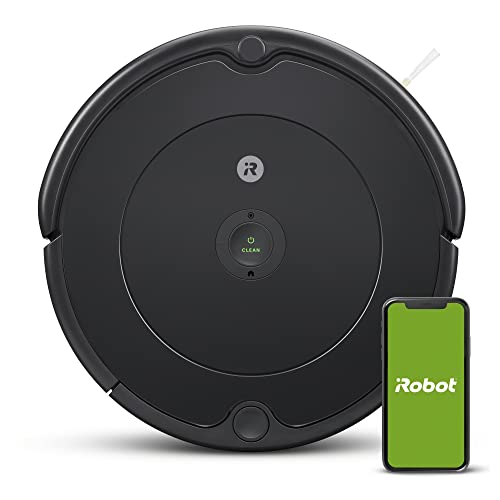

Ready to Buy? Start Here
If this guide helped you decide what to look for, these products are a place to start.


As an Amazon Associate we earn from qualifying purchases. Prices and availability are shown on Amazon.
Reading the Picks Above Like a Buyer, Not a Browser
By the time you reach this point in the guide, you have seen the main types, the features that matter and a shortlist of products worth a look. The next step is to slow down and read those picks the way an owner would, rather than the way a browser skimming a shop page would. Start by ignoring the order the products appear in. Order on a page is not a promise that the first option suits your home, your habits or your the floors it can reach across your home. Instead, line each pick up against the three or four jobs you actually need done. In this category, that usually means keeping on top of daily dust, crumbs and pet hair between deeper cleans. If a pick does not clearly serve your top jobs, it does not matter how many extra settings or accessories it carries.
A useful exercise is to write a short sentence for each pick, in your own words, saying who it suits and what you would give up by choosing it. Every design in this category involves a trade. A larger or more powerful option may handle bigger loads but be harder to store, louder in use or slower to set up. A compact option may fit your space beautifully yet ask you to work in smaller batches. Neither trade is wrong in itself. What matters is whether the trade matches the way you live. If you find you cannot write that sentence for a pick, you probably do not yet understand it well enough to buy it, and it is worth rereading the relevant section above before you decide.
Pay close attention to the honest limitations already noted for each product in this guide. Limitations are more useful than headline features because they describe the moments when you will feel friction: the awkward load, the tight cupboard, the noisy early morning, the part that needs regular attention. Picture those moments in your own week. A limitation that would only appear once or twice a year is easy to live with. A limitation that would appear every single time you use the product will wear you down, however good the product looks on paper. Buyers rarely regret choosing the option with the limitation they barely notice; they often regret choosing the one whose limitation meets them daily.
Finally, compare the picks on total ownership, not just on the day of delivery. Ask what each one needs from you over the following years: space when it is stored, attention when it is cleaned, replacement parts or consumables where the design uses them, and time each time you set it up and put it away. The guide above already gives you the raw material for that comparison. The pick that asks the least of you, while still doing your main jobs well, is very often the pick you will still be pleased with long after the novelty has worn off.
Planning Around Your Space and Routine Before You Order
Most disappointing purchases in this category are not badly made products; they are good products bought for the wrong space or the wrong routine. Before you order anything, measure the place where your robot vacuum will live and the place where it will be used, and write both sets of measurements down. Include the awkward details people forget: the swing of a cupboard door, the slope of a ceiling, the socket that sits just too far away, the doorway the product has to pass through on its way in and out of storage. A product that fits on paper but fights you every time you move it will slowly stop being used.
Next, think honestly about when the work happens. Your main use is keeping on top of daily dust, crumbs and pet hair between deeper cleans. Does that work happen in a rush before school or work, in a calm hour at the weekend, or in small bursts through the day? Timing changes what matters. A rushed routine rewards quick set-up, simple controls and easy emptying or tidying afterwards. A slower routine can absorb a product that takes longer to prepare but gives a better finish. Be suspicious of any choice that only works if your routine changes. Routines rarely change to suit appliances; appliances have to fit the routines that already exist.
Consider the other people in the household, too. If a partner, housemate, teenager or grandparent will also use the robot vacuum, its controls, weight and storage spot need to work for them as well, not just for you. The same applies if you have pets or small children: think about where the product will sit when it is not in use, what can be pulled, knocked or chewed, and whether hot, sharp or moving parts are safely out of reach during and after use. Following the maker's safety guidance is the baseline; arranging your space so that safe use is also the easy use is what makes it stick.
It also helps to plan the unglamorous end of the job. Where will wet, dirty, hot or finished items go the moment you are done? Where will the product itself rest while it cools, dries or charges, if that applies to the design you choose? Homes that answer those questions in advance tend to keep the area around the the floors it can reach across your home calm and clear. Homes that improvise usually end up with the product living permanently on a worktop or floor, quietly resented by everyone. A few minutes of planning now is cheaper than a replacement purchase later.
Everyday Use: Building a Routine That Actually Sticks
The difference between a robot vacuum that earns its keep and one that gathers dust is rarely the product itself. It is whether using it becomes a small, repeatable routine. The pattern that works for most households is simple: prepare the area, do the main job in a steady order, finish with a two-minute reset, and put everything back in the same place every time. That reset matters more than it sounds. The care basics for this category — emptying the dustbin, cleaning brushes and wheels, wiping sensors, and keeping the charging dock area clear — take far less time when they happen in small pieces after each use than when they are left to become a monthly excavation.
Work in a consistent order so the job becomes automatic. For this category, most people settle into a rhythm of dealing with the biggest or dirtiest items first, while their energy and patience are highest, and finishing with the small, quick items. If you share the work with others, agree the order once and keep it; a shared routine means anyone can pick the job up mid-way without confusion. If you live alone, the same consistency saves you decision-making on tired evenings, which is when corners get cut and products get blamed for poor results that really came from a rushed process.
Learn the early warning signs that something needs attention. In this category they are usually ordinary things: results taking longer than they used to, a new noise, a smell that was not there before, a part that no longer sits quite flush, or a finish that has quietly got worse over a few weeks. Those signs almost always point to a simple cause — something that needs emptying, cleaning, drying, tightening or replacing — rather than a failing product. Checking the maker's troubleshooting guidance at the first sign, instead of pushing on, protects both the product and your patience.
Keep the supplies for the job together, near the the floors it can reach across your home. A small caddy, box or drawer containing whatever your chosen design needs — cleaning cloths, the right detergent or consumable where one is used, and any small tools the maker supplies — removes the friction of hunting around before you start. Friction is the enemy of routines. Every extra minute spent fetching things is a minute that makes you more likely to skip the job, rush it, or leave the product out afterwards. Set the area up once, properly, and the routine will largely run itself.
Use Cases Buyers Often Overlook
The small home where everything must earn its space
In a flat or small house, the winning robot vacuum is the one that disappears gracefully between uses. That means thinking as hard about the stored size and shape as about performance in use. Check whether it folds, stacks, hangs or stands in a narrow gap, and whether getting it out is a one-handed job or a wrestling match. Small-home owners also benefit from choosing designs that handle keeping on top of daily dust, crumbs and pet hair between deeper cleans without needing a collection of extra attachments that each demand their own storage spot. One versatile product, stored well, beats three specialised products stored badly.
The busy family home
Family use is heavier, messier and less predictable. Loads are bigger, sessions are more frequent, and the product is more likely to be used by someone in a hurry. Prioritise sturdiness, simple controls that a tired person can operate without thinking, and parts that can be cleaned quickly. It is also worth choosing a design that tolerates interruption well, because family jobs rarely run start to finish without a pause. If the product will be used daily, treat durability and easy care as performance features in their own right, not as boring extras.
The renter who cannot change the room
Renters face a particular set of limits: no drilling, no plumbing changes, no replacing fixed fittings, and the need to leave everything as it was found. For this category, that points towards freestanding, movable designs that work with the room as it is, and towards checking the weight and footprint against floors and surfaces you do not own. Keep the packaging until you are sure the product suits the space, and photograph your set-up when it works well, so you can recreate it quickly if you move. A renter-friendly choice is one you could take with you and use just as happily in the next home.
The occasional user who needs it to just work
Not everyone uses their robot vacuum every week. If yours will come out mainly for guests, seasonal jobs or occasional deep efforts, your priorities shift again. You want a product that stores compactly, starts reliably after sitting unused, and does not demand a complicated set-up you have to relearn each time. Keep the maker's quick-start guidance with the product, and run it briefly every so often if the maker recommends doing so. For the occasional user, simplicity is not a compromise; it is the feature that decides whether the product gets used at all.
Cleaning, Care and Storage That Protect Your Purchase
Good care in this category is mostly about little and often. The core routine — emptying the dustbin, cleaning brushes and wheels, wiping sensors, and keeping the charging dock area clear — sounds unremarkable, but it is what keeps performance steady and prevents the slow build-up that eventually makes a product feel tired. Where the maker gives a cleaning schedule or names specific parts to wash, rinse or replace, follow that schedule rather than your own guess. Makers design those intervals around how the product actually wears, and stretching them rarely saves effort in the long run; it usually converts a two-minute task into a twenty-minute one.
Be careful with cleaning products themselves. Mild detergent and water suit most parts in this category, while harsh scouring, strong solvents or very hot water can damage finishes, seals and flexible parts. If a part is described as washable, that does not automatically mean it can go in a dishwasher or be soaked overnight; check the maker's wording for that specific part. Anything electrical should be unplugged and kept dry in the ways the manual describes, and anything washed should be completely dry before the product is used or stored. Damp storage is one of the most common causes of stale smells and shortened life in home equipment generally.
Storage deserves the same thought as use. Store the robot vacuum in its working shape where you can, rather than forcing it into a space that bends, crushes or strains part of it. Keep cords loosely coiled rather than tightly wound, keep small parts and accessories together in a labelled bag or box, and keep the manual — paper or a photo of its key pages — somewhere you can actually find it. If the product lives in a garage, shed or other unheated space for part of the year, check the maker's guidance on temperature and damp before assuming that is fine.
Once or twice a year, give the product a proper once-over: look for wear on the parts that flex, rub or seal; check fixings are snug; clean the places your weekly routine does not reach; and deal with small issues while they are still small. This is also the moment to ask whether your needs have changed. Households change — children grow, pets arrive, routines shift — and the honest answer might be that a different size or type would now serve you better. Looking after a product well and knowing when it no longer fits your life are both parts of owning things sensibly.
Mistakes That Make a Good Choice Feel Like a Bad One
The most common mistake is buying for the household you wish you had rather than the one you have. A robot vacuum chosen for occasional marathon sessions, imaginary guests or a future bigger home will usually be the wrong size, weight or complexity for your real week, which centres on keeping on top of daily dust, crumbs and pet hair between deeper cleans. Buy for your typical week, and check that the product can stretch to your busiest week without breaking you. The reverse mistake exists too: buying the smallest or simplest option when your loads are genuinely heavy, then working the product far harder than it was designed to be worked.
A second mistake is judging the first use too harshly — or too kindly. Many products in this category have a learning curve: the first few sessions are slower and messier while you find your rhythm, and some parts need a first clean, charge, rinse or run-in exactly as the manual describes. Give the product a fair handful of proper uses, following the guidance, before you judge it. At the same time, do not excuse real problems as learning curve. If something leaks, slips, overheats, smells wrong or simply does not do the job after correct use, that is a fault or a mismatch, and it is better raised with the seller promptly than lived with.
Third, people often neglect the cheap, boring parts of ownership: the filters, seals, pads, blades, liners or other replaceable bits a design may use. Performance in this category often fades not because the main product wears out but because a small supporting part is long past its best. If results decline, check those parts first, in the order the maker's troubleshooting section suggests. Keeping one spare of anything you replace regularly means a worn part never turns into a week of waiting and a job left undone.
Finally, avoid the upgrade spiral. It is easy, a month after buying, to start reading about the next model up and convincing yourself you chose wrong. Resist it. If your robot vacuum does your main jobs reliably, fits your the floors it can reach across your home and is easy for your household to live with, it was the right choice, whatever newer features appear. The best product in any home category is the one that quietly does its work for years. Chasing marginal improvements costs money, creates waste and rarely changes how your home actually feels day to day.
How the Picks in This Guide Differ in Daily Life
Specification tables have their place, and you will find the key details for each pick in the reviews above.
More Questions Buyers Ask Before They Commit
How long should a good robot vacuum last with normal home use?
There is no single honest number, because life depends far more on how often it is used and how well it is cared for than on the calendar. A robot vacuum used daily for keeping on top of daily dust, crumbs and pet hair between deeper cleans and looked after with the routine described in this guide — emptying the dustbin, cleaning brushes and wheels, wiping sensors, and keeping the charging dock area clear — should give years of steady service. The usual pattern is that small replaceable parts wear first, while the main body keeps going. If performance fades, check those parts and the maker's troubleshooting guidance before assuming the product itself is finished.
Is it worth paying more for a larger or more advanced model?
Only if the extra capacity or features match jobs you genuinely do. Bigger is not automatically better in this category: a larger robot vacuum can be heavier to move, slower to set up and harder to store in your the floors it can reach across your home. Pay more when the step up removes a problem you actually have — loads that do not fit, sessions that take too long, results that disappoint. If your current shortlist already covers your typical week comfortably, the simpler model is usually the smarter buy.
What should I check in the first week of owning it?
Use it properly several times, following the maker's instructions exactly, and pay attention to fit, comfort and results rather than speed. Check that all parts are present and undamaged, that everything sits, locks or connects as described, and that storage works in the real space you planned, not just on paper. Keep the receipt, packaging and warranty details until you are confident, and register the product if the maker offers registration. Small concerns are far easier to resolve in the first week than in the sixth month.
Can I use it in a rented home or a small flat?
Usually yes, provided you choose a freestanding, movable design and respect the limits of the space. Measure carefully, protect floors and surfaces you do not own, and avoid any set-up that needs drilling, plumbing changes or permanent fixings unless your landlord agrees. Renters often do best with designs that fold, stack or stand in a narrow gap, and that would move with them to a different home without becoming useless.
How do I know when a part needs replacing rather than cleaning?
Clean first, then judge. Many parts in this category look tired when they are simply dirty or damp, and recover fully once washed and dried as the maker directs. Replace a part when it stays damaged, distorted, cracked, loose or ineffective after proper cleaning, or when the maker's schedule says its time is up. If you are unsure, the maker's support pages usually describe the signs for each part. Keeping a note of when parts were last cleaned or changed makes the judgement much easier.
What is the best way to get consistent results every time?
Consistency comes from routine, not talent. Prepare the same way, work in the same order, and finish with the same short reset: emptying the dustbin, cleaning brushes and wheels, wiping sensors, and keeping the charging dock area clear. Most disappointing results in this category trace back to a skipped preparation step, an overloaded session or a part that needed attention. When a result disappoints, change one thing at a time so you learn what actually caused it. Within a few weeks, most owners find their results become predictable — which is when the product starts to feel effortless.
FAQ
Will it work on rugs and carpet?
Many handle low rugs, but long fringe and thick pile can cause trouble. Check the guide for suggested floor types.
Is it suitable for homes with pets?
It can help with hair, though accidents on the floor should be cleared before it runs. Keep the area free of anything that could be dragged around. Dust and hair on the wheels and sensors can also confuse it, so a quick wipe now and then helps it find its way.
Do I need a map to get good coverage?
Not always. In a single open room, simple navigation may be fine. In a home with several rooms, a map lets it clean room by room and return to the dock more reliably.
How often should it run?
That depends on how quickly your floors get dirty. Many people choose a schedule that matches busy days, as long as the floor is clear when it runs.
Can it run when no one is home?
It can, as long as you have cleared cables and small items beforehand, and the maker’s guide does not advise against it. Keep pet bowls and fragile items out of its path.
The Short Version
Choose a robot vacuum that fits your layout and floor types, with navigation and bin size you can live with. Prepare the floor, expect to do routine upkeep and follow the maker’s guide. Measure the gaps and thresholds before you decide, and keep another tool for corners and stairs.
Related Guides
- How to Choose a Vacuum Cleaner for Your Floors and Home Size
- How to Choose a Mop for Hard Floors in Kitchens and Halls
- How to Choose a Steam Mop for Your Floors and Your Space
- How to Choose the Best Robot Pool Cleaners: Buyer's Guide (2026)
- How to Choose the Best Robot Window Cleaners: A Buyer's Guide
- How to Choose a Vacuum for a Home With Pet Hair Every Day
- How to Choose a Cordless Stick Vacuum for Everyday Cleaning