Disclosure: airfryerkitchensupply.com is reader-supported. When you buy through links on our site, we may earn an affiliate commission at no extra cost to you.
Where to buy
Every clock below is sold on Amazon, and each one combines the three jobs this search asks for — alarm clock, phone charger, and speaker — in a single nightstand device. Open the listings to confirm the current version before ordering, because several of these models exist in near-identical variants that differ in exactly the detail that matters here: wired USB charging versus a wireless charging pad. The notes under each pick state plainly which charging you actually get.
- iHome Bluetooth Alarm Clock with Wireless Charger and USB Charging Station (iBTW112) — Best Overall: Check the current price on Amazon
- ANJANK Wooden Bluetooth Speaker Alarm Clock with FM Radio and Qi Wireless Charging Station — Best Looking on the Nightstand: Check the current price on Amazon
- DreamSky Alarm Clock Radio with Wireless Charging and Bluetooth Speaker — Best for Heavy Sleepers: Check the current price on Amazon
- Odokee Qi Wireless Charging Alarm Clock Radio with 10W Stereo Bluetooth Speaker — Best Speaker Sound: Check the current price on Amazon
- Brandstand CubieBlue Alarm Clock Charger with Bluetooth Speaker — Best for Guest Rooms and Travel Desks: Check the current price on Amazon
- Emerson SmartSet Alarm Clock Radio with Bluetooth Speaker and USB Port — Best Simple Classic: Check the current price on Amazon
The best alarm clocks with charger and speaker exist because the modern nightstand has quietly become a charging station, a speaker dock, and an alarm — and most people would rather own one device that does all three than a nest of cables doing it separately. A combination clock clears the phone off the pillow, gives it a fixed charging home, plays music and podcasts at bedside volume, and still does the one job a phone alarm does badly: waking you up on time even when the phone is silenced, dead, or in another room.
The category splits by charging style, and that split should drive your choice. Wireless-charging clocks carry a Qi pad on top — drop the phone down at night, pick it up charged — sometimes with a USB port as a second output for a watch or earbuds. USB-first clocks skip the pad and give you one or more ports, which charge anything with a cable and never care about case thickness or coil alignment. Both styles appear below, labeled honestly, because a buyer who wanted a pad and got a port (or the reverse) has bought the wrong clock.
Speaker quality needs honest framing too. These are bedside speakers: they are built for podcasts, talk radio, FM, and music at room-filling-but-not-party volume, with a few models offering genuinely stereo output. None replaces a dedicated bookshelf speaker, and this guide does not pretend otherwise. What they replace is listening through a phone speaker propped against a water glass — and at that job, every pick here is a large upgrade.
Alarm fundamentals still matter most. Dual alarms for couples and weekday/weekend schedules, a dimmer that goes dark enough for light-sensitive sleepers, a battery backup that holds the alarm through an outage, and controls you can operate half-asleep: those are the criteria that decide whether you still like the clock in month six, and they run through every review below.
This guide also takes a position the category’s marketing avoids: the best combination clock is not the one with the longest feature list, but the one whose three jobs match your actual habits. A pad you cannot use because of your case, a speaker you never pair, or a radio band you never hear are not features — they are cost. Each review below therefore ends with an explicit not-suited-for line, and the buying guide explains how to audit your own habits before spending on any of them.
In this guide
Quick Picks
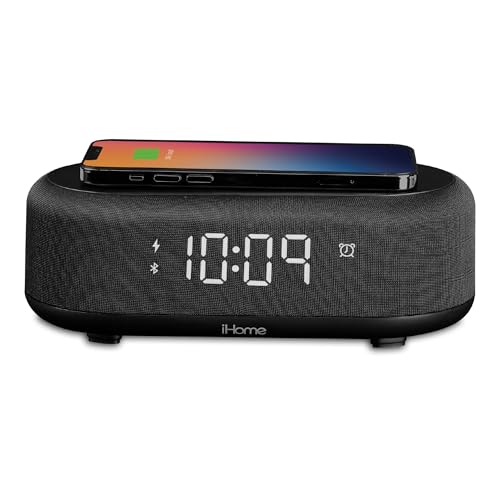
iHome Bluetooth Alarm Clock with Wireless Charger and USB Charging Station (iBTW112) — Best Overall. The complete package from the category’s most established brand: Bluetooth speaker, a wireless charging pad, and a USB charging port in one clock, sized for bedrooms, offices, and dorms. Check the current price on Amazon.
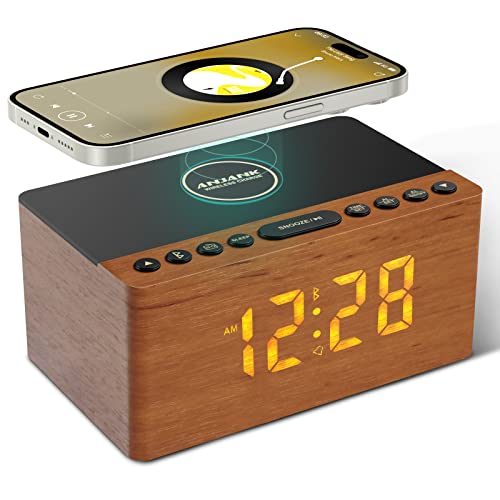
ANJANK Wooden Bluetooth Speaker Alarm Clock with FM Radio and Qi Wireless Charging Station — Best Looking on the Nightstand. A wood-finished clock that hides the full triple — Bluetooth speaker, FM radio, Qi wireless charging, plus a USB charger port — inside the warmest-looking cabinet in this guide. Check the current price on Amazon.
DreamSky Alarm Clock Radio with Wireless Charging and Bluetooth Speaker — Best for Heavy Sleepers. A clock radio aimed at people who sleep through alarms: loud alarm output, FM radio with a sleep timer, a wireless charging top, Bluetooth playback, and a display that dims all the way down. Check the current price on Amazon.
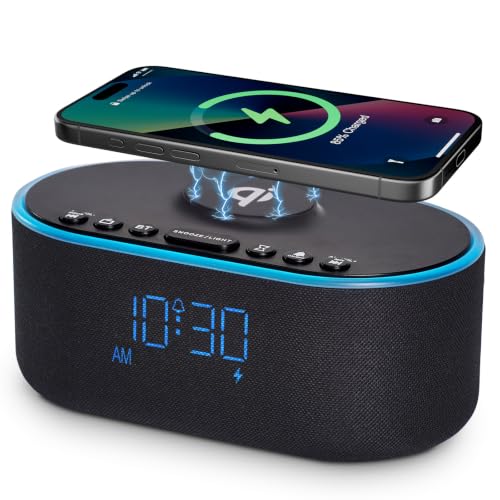
Odokee Qi Wireless Charging Alarm Clock Radio with 10W Stereo Bluetooth Speaker — Best Speaker Sound. The audio-first pick: a Qi-certified fast wireless charger on top and a 10W stereo Bluetooth speaker underneath, with an FM radio and a dimmable display completing the clock. Check the current price on Amazon.
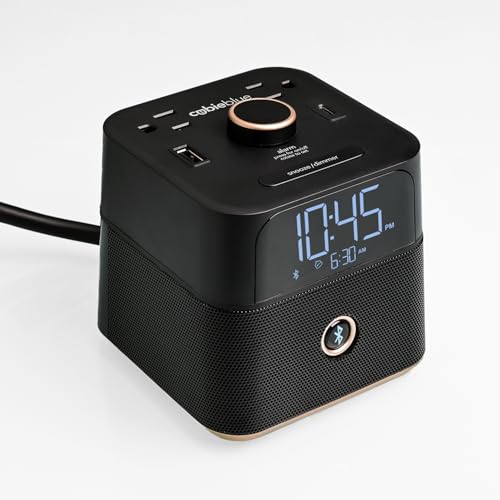
Brandstand CubieBlue Alarm Clock Charger with Bluetooth Speaker — Best for Guest Rooms and Travel Desks. The hospitality classic: a compact clock with two USB charging ports, two tamper-resistant power sockets, and a Bluetooth speaker — the design hotels chose when guests started arriving with three devices each. Check the current price on Amazon.
Emerson SmartSet Alarm Clock Radio with Bluetooth Speaker and USB Port — Best Simple Classic. The traditional clock radio, updated: Bluetooth speaker, a USB charging port for phones and tablets, a clear cyan LED display with night light, and Emerson’s SmartSet automatic time setting. Check the current price on Amazon.
How These Picks Were Chosen
Each pick was verified against this site’the Amazon catalogue data during this session, so the product names, charging types, and speaker features in this guide come from the actual current Amazon listings. That verification step matters unusually in this category: combination clocks are sold in dense families of look-alike models, and the difference between ‘has a wireless charger’ and ‘has a USB port’ is often one letter in a model name. Every pick below was matched to a listing whose title confirms both a charger and a speaker, as the search requires.
The criteria were, in order: charging honesty and usefulness (a pad that works through a normal case, or ports with enough output for a phone, not a trickle meant for earbuds); speaker usefulness at bedside range (clarity for voices, FM radio where offered, Bluetooth that pairs and stays paired); alarm depth (dual alarms, gradual or loud options, snooze you can find by touch); display behavior (a dimmer with a genuinely dark end, since a clock that lights the room fails its main job); and backup behavior in an outage.
Excluded: clocks with a speaker but no charger, clocks with a charger but no speaker, and phone docks that are not clocks at all. The search asks for all three functions, so all three are required for a place here.
A word on what was not used as a criterion: headline charging wattage and speaker wattage, compared raw across brands, mislead more than they inform in this category. A pad’s real-world charging depends on alignment and case; a speaker’s real-world quality depends on tuning and placement as much as on its rating. The reviews therefore treat those numbers as context — noted where the verified listing states them, as with the Odokee’s stereo speaker — and judge the functions by how they serve the nightstand’s actual jobs.
The 6 Best Alarm Clocks with a Charger and Speaker
iHome Bluetooth Alarm Clock with Wireless Charger and USB Charging Station (iBTW112) — Best Overall
Buy the iHome if you want the brief answered in full with the least research: it charges wirelessly, charges by USB as well, plays over Bluetooth, and comes from the brand that effectively defined the hotel-and-bedroom clock category. It suits a main bedroom nightstand where a phone, and often a second device, both need a home.
Strengths
- Both charging styles in one unit — wireless pad plus a USB port for a second device
- iHome’s alarm-clock ergonomics are mature: readable display, sensible controls
- Bluetooth speaker handles music, podcasts, and calls at bedside range
Trade-offs
- Wireless charging is overnight-speed charging, not a fast top-up before you go out
- Costs more than the USB-only clocks here, because it does more
- Pad placement requires the usual coil alignment — a badly centered phone charges slowly
| Charging (listing) | Wireless charger plus USB charging port |
| Speaker (listing) | Bluetooth |
| Use (listing) | Bedroom, office, dorm |
The iBTW112’s argument is completeness without clutter. The wireless pad takes the phone — the device you charge every night without exception — and the USB port takes whatever rotates through your life: a watch one month, earbuds the next, a partner’s phone when they forget their charger. Two charging paths cover a nightstand’s real traffic better than either alone.
As a clock, it benefits from iHome’s long practice at this exact product. Displays on combination clocks fail in two directions — too dim to read by day or too bright to sleep beside — and established clock makers calibrate that better than accessory brands branching into clocks. The same applies to alarm setting: a clock you can program confidently, half-asleep, in the dark, is worth more than a feature list.
The speaker is a bedside speaker in the proper sense: clear voices for talk and podcasts, pleasant music at the volumes a bedroom asks for. Buy it for the nightstand’s jobs and it does all of them well; buy it expecting living-room audio and you have misread the category — a distinction this guide applies to every pick.
Best for: Most buyers — one clock that charges two ways and plays over Bluetooth / Not suited for: Anyone who needs rapid wired fast-charging as the main event
Check on Amazon — check price on Amazon before you decide, because configurations and included accessories change between listings.
ANJANK Wooden Bluetooth Speaker Alarm Clock with FM Radio and Qi Wireless Charging Station — Best Looking on the Nightstand
Choose the ANJANK if your bedroom is decorated like a room rather than a gadget shelf. The wooden finish is the reason it exists, but it is not a style-over-substance pick: the verified listing confirms a Qi-certified wireless charging station, a USB charger port, FM radio, Bluetooth audio, and a dimmable display. It suits main bedrooms and guest rooms where a black plastic box looks wrong.
Strengths
- Wood finish looks like furniture, not equipment
- Qi-certified wireless charging plus a USB port — both charging styles again
- FM radio built in, for listeners who still start the day with broadcast
Trade-offs
- Wood-look cabinetry shows dust and needs a gentler wipe than plastic
- FM reception depends on your area and antenna placement, as with any radio
- The aesthetic is specific — it will not match a minimalist all-white room
| Charging (listing) | Qi-certified wireless charging station plus USB charger port |
| Audio (listing) | Bluetooth speaker, FM radio |
| Display (listing) | Dimmable |
Combination clocks cluster at two design poles: hotel-functional and phone-accessory. The ANJANK is the rare one designed as bedroom furniture, and that matters more than it sounds — the nightstand is the first and last thing you see each day, and a warm wood cabinet changes the feel of the object from equipment to furnishing. Guest rooms benefit most: visitors understand it instantly and their phones charge without a cable hunt.
Under the finish, the specification is complete in the way this search demands. Qi certification on the wireless charger is a real detail — it means the pad meets the standard’s interoperability and safety requirements rather than merely claiming compatibility — and the wired USB port covers the devices and thick cases that pads struggle with. FM radio, increasingly rare in this category, serves the large audience that still wakes to broadcast news and talk.
The honest costs are care and context. A wood-finish surface asks for a soft cloth rather than a spray-and-scrub, and the look commits you: it is warm and traditional, and in a stark modern room it will read as deliberately contrasting. Neither is a flaw; both are worth knowing before it is on your nightstand.
Best for: Main bedrooms and guest rooms where looks matter as much as function / Not suited for: Minimalist rooms, or buyers who want the simplest possible plastic clock
Check on Amazon — check price on Amazon before you decide, because configurations and included accessories change between listings.

DreamSky Alarm Clock Radio with Wireless Charging and Bluetooth Speaker — Best for Heavy Sleepers
Buy the DreamSky if your first requirement is actually waking up. The verified listing leads with a loud alarm for heavy sleepers, then adds the full combination — wireless charging, Bluetooth speaker, FM radio with sleep timer — around it. It suits deep sleepers, shift workers sleeping at odd hours, and anyone whose phone alarm has become background noise their brain ignores.
Strengths
- Loud alarm output aimed squarely at heavy sleepers
- Wireless charging pad keeps the phone off the pillow and on the nightstand
- Sleep timer on the radio is the right way to fall asleep to broadcast
Trade-offs
- A loud alarm in a shared room wakes the room — partners should agree before purchase
- Wireless charging is overnight-paced, like every pad here
- Feature-rich front panels take a day to learn by touch
| Charging (listing) | Wireless charging |
| Audio (listing) | Bluetooth speaker, FM radio with sleep timer |
| Alarm (listing) | Loud alarm for heavy sleepers |
| Display (listing) | Full-range dimming (0–100% class display) |
Heavy sleepers are failed by most combination clocks, which treat the alarm as a checkbox and the charger as the product. DreamSky reverses the priority: the alarm is the headline, with output intended to cut through deep sleep, and the charging and speaker features are built around a clock that first does its oldest job properly. If you have ever slept through a phone alarm’s polite chirping, you understand why this ordering matters.
The supporting features are chosen well for the audience. A sleep timer lets radio listeners drift off without the radio running all night — which also protects the alarm’s impact, because a brain marinated in all-night audio stops treating sound as a signal. The fully dimming display serves the same sleeper twice: darkness for sleeping, brightness for waking. And the wireless pad enforces the single best heavy-sleeper habit — the phone charges on the nightstand, not in the bed, so the alarm that wakes you is the clock’s, across the room’s small but crucial distance.
Set it up thoughtfully: a loud alarm clock rewards being placed where you must sit up to reach the snooze. Used that way, this is the pick that changes mornings rather than merely decorating them.
Best for: Heavy sleepers and shift workers who need an alarm with real output / Not suited for: Light sleepers, or couples where one partner wakes far earlier and quietly
Check on Amazon — check price on Amazon before you decide, because configurations and included accessories change between listings.
Odokee Qi Wireless Charging Alarm Clock Radio with 10W Stereo Bluetooth Speaker — Best Speaker Sound
Choose the Odokee if the speaker half of the search matters as much as the clock half — if your nightstand plays music every evening and podcasts every morning, and a mono beep-box speaker would disappoint you nightly. The verified listing specifies a 10W stereo Bluetooth speaker, which in this category is a genuine step up, alongside Qi-certified fast wireless charging.
Strengths
- 10W stereo Bluetooth speaker — the strongest audio specification in this guide
- Qi-certified fast wireless charging for the phone
- FM radio included for broadcast listeners
Trade-offs
- Stereo at nightstand scale is still nightstand scale — clarity over power
- Fast wireless charging generates warmth; very thick cases can slow or stop it
- Audio-first models cost more than beep-first models
| Speaker (listing) | 10W stereo Bluetooth speaker |
| Charging (listing) | Qi-certified fast wireless charger |
| Audio extra (listing) | FM radio |
| Display (listing) | Dimmable |
Most combination clocks have a speaker the way microwaves have a clock — present, functional, unloved. The Odokee’s stereo specification signals a different intent: two-channel output gives music actual shape at bedside distances, and voices in podcasts gain the clarity that makes a bedside speaker worth using daily. If the speaker will be used for hours a week rather than minutes, this is the pick whose priorities match yours.
The charging half keeps pace: Qi-certified fast wireless charging is the quickest pad charging in this guide, which matters for the top-up before dinner as well as the overnight charge. As always with pads, case thickness and alignment decide real-world speed, and a phone in a wallet case will charge like it is not trying. The dimmable display and radio round out a clock that covers the whole keyword without a weak third.
Who should not buy it: the buyer who only needs an alarm and a charge, and for whom the speaker is a nice-to-have. That buyer overpays here for audio they will not use — the Emerson or Brandstand below serves them better. This pick is for listeners.
Best for: Listeners who will use the speaker daily for music and podcasts / Not suited for: Buyers who only need an alarm plus a charge and rarely play audio
Check on Amazon — check price on Amazon before you decide, because configurations and included accessories change between listings.
Brandstand CubieBlue Alarm Clock Charger with Bluetooth Speaker — Best for Guest Rooms and Travel Desks
Buy the CubieBlue if charging capacity is your bottleneck: two USB ports plus two full power sockets means a phone, a tablet, a laptop brick, and a lamp can all live off one clock. It is the pick for guest rooms, home offices, and anyone whose nightstand currently hosts a power strip. The Bluetooth speaker covers audio; there is no wireless pad, and that is the deliberate trade for socket capacity.
Strengths
- Two USB ports and two tamper-resistant sockets — the most charging capacity here
- Hospitality-proven design: simple enough for a guest to use without instructions
- Compact footprint that works on desks as well as nightstands
Trade-offs
- No wireless charging pad — everything charges by cable
- Speaker is functional bedside audio, not the stereo experience of the Odokee
- Utilitarian looks: it reads as equipment, pleasantly sturdy equipment
| Charging (listing) | 2 USB ports, 2 tamper-resistant sockets |
| Speaker (listing) | Bluetooth |
| Design (listing) | Compact hospitality-style clock charger |
The CubieBlue comes from the hotel world, and its design priorities show in the best way. Hotels needed a clock a stranger could operate at midnight, that charged whatever the stranger brought, and that survived being knocked off nightstands in three time zones. The result is a clock with big, obvious controls, charging for everything, and no learning curve — qualities that translate directly to guest rooms and to older relatives’ nightstands.
The sockets are the differentiator nobody else in this guide offers. A USB port charges small devices; a socket charges anything, including the laptop and the lamp that was displaced when the clock arrived. Households fighting the one-free-outlet problem in older bedrooms will understand immediately why two sockets on the clock itself is the feature.
Accept its two honest limits and it is a superb buy: charging is wired-only, so pad devotees should take the iHome, and the speaker is a good bedside unit rather than an audio enthusiast’s pick. Within those lines, it is the most practical object in this guide.
Best for: Guest rooms, offices, and nightstands short on outlets / Not suited for: Buyers who specifically want a wireless charging pad
Check on Amazon — check price on Amazon before you decide, because configurations and included accessories change between listings.
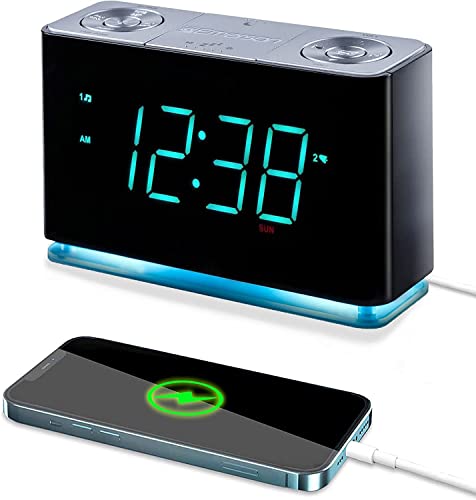
Emerson SmartSet Alarm Clock Radio with Bluetooth Speaker and USB Port — Best Simple Classic
Choose the Emerson if you want the classic clock-radio experience with the two modern additions that matter — Bluetooth and USB charging — and nothing you have to learn. SmartSet sets the time and date automatically when you plug it in and restores it after outages, which quietly removes the most annoying maintenance task every other clock here still has. It suits buyers upgrading an old clock radio and anyone buying for a parent.
Strengths
- SmartSet automatic time setting — plug in and the clock is right, even after outages
- Bluetooth speaker plus USB charging covers the keyword in the classic form factor
- Large, clear display with a night light, easy to read at a glance
Trade-offs
- Single USB port — one device charges at a time
- No wireless charging pad
- Traditional styling will not suit every room
| Charging (listing) | USB port for phones/tablets |
| Audio (listing) | Bluetooth speaker, clock radio |
| Display (listing) | 1.4-inch cyan LED with night light |
| Feature (listing) | SmartSet automatic time/date setting |
Emerson has made clock radios since before the category had competition, and the SmartSet shows what that experience is for: the clock sets itself. After a power outage — the moment every other clock in this guide blinks accusingly at you — the SmartSet restores the correct time and your alarm settings from its backup. It is a small feature that removes a recurring irritation for the entire life of the product.
The modern additions are integrated without disturbing the classic formula. Bluetooth pairing brings phone audio to the speaker; the USB port charges the phone overnight; the radio remains for broadcast. The cyan display is large and legible — this is the clock in the guide most comfortable being read across a room, and the built-in night light is a thoughtful touch for hallways-adjacent bedrooms and older eyes.
Its limits are capacity and novelty: one USB port, no pad, no stereo ambitions. For the buyer it targets — set it once, use it for a decade — those are the right things to leave out, and the price tier of the classic form factor reflects it.
Best for: Buyers who want a self-setting, classic clock radio with modern charging and Bluetooth / Not suited for: Households needing to charge several devices at once
Check on Amazon — check price on Amazon before you decide, because configurations and included accessories change between listings.
Comparison Table
| Pick | Badge | Key spec | Best for |
|---|---|---|---|
| iHome Bluetooth Alarm Clock with Wireless Charger and USB Charging Station (iBTW112) | Best Overall | Wireless pad + USB port, Bluetooth speaker | Most buyers — one clock that charges two ways and plays over Bluetooth |
| ANJANK Wooden Bluetooth Speaker Alarm Clock with FM Radio and Qi Wireless Charging Station | Best Looking on the Nightstand | Wood finish, Qi pad + USB, Bluetooth + FM | Main bedrooms and guest rooms where looks matter as much as function |
| DreamSky Alarm Clock Radio with Wireless Charging and Bluetooth Speaker | Best for Heavy Sleepers | Loud alarm, wireless charging, Bluetooth + FM | Heavy sleepers and shift workers who need an alarm with real output |
| Odokee Qi Wireless Charging Alarm Clock Radio with 10W Stereo Bluetooth Speaker | Best Speaker Sound | 10W stereo Bluetooth speaker, Qi fast charging | Listeners who will use the speaker daily for music and podcasts |
| Brandstand CubieBlue Alarm Clock Charger with Bluetooth Speaker | Best for Guest Rooms and Travel Desks | 2 USB ports + 2 sockets, Bluetooth speaker | Guest rooms, offices, and nightstands short on outlets |
| Emerson SmartSet Alarm Clock Radio with Bluetooth Speaker and USB Port | Best Simple Classic | USB charging, Bluetooth, SmartSet auto time | Buyers who want a self-setting, classic clock radio with modern charging and Bluetooth |
How to Choose an Alarm Clock with a Charger and Speaker
Start with the charger, because it is the feature you will use every single night. If your phone supports wireless charging and you keep it in a slim case, a pad clock (iHome, ANJANK, DreamSky, Odokee) gives you the drop-and-done ritual that makes the category delightful. If your case is thick, your phone is older, or you charge a rotating cast of devices, ports are the honest answer — and the Brandstand’s two USB ports plus two sockets are the maximum-capacity version of that answer. Many buyers are best served by the hybrid picks that include both.
What to expect from charging speed
Set expectations by physics, not by hope. Wireless pads charge at overnight pace — perfect for the eight-hour charge, mediocre for the twenty-minute top-up — and ‘fast’ wireless charging, as on the Odokee, narrows but does not close that gap. USB ports on clocks vary in output; they are sized for phones and small devices overnight, not for fast-charging a tablet under deadline. If rapid charging matters to you daily, keep a proper fast charger in the kitchen and let the clock do the overnight shift it is designed for.
Judging the speaker honestly
Bedside speakers should be judged on voice clarity first — podcasts, talk radio, news — because that is most nightstand listening, and on pleasant, non-fatiguing music reproduction second. Stereo output, as on the Odokee, is a real upgrade within the category. What no clock here does is fill a living room or host a party, and a buyer whose main use is loud music should buy a real speaker and a simpler clock instead of asking one box to be both.
Alarm and Display Features That Decide Long-Term Satisfaction
Dual alarms matter if you share the bed or keep different weekday and weekend times. A dimmer matters always: check that it goes genuinely dark, because a clock display at its lowest setting is still the brightest object in most bedrooms, and light-sensitive sleepers will tape over a display that cannot dim — at which point the clock has failed. Battery backup should preserve the alarm, not just the time display, through an outage. And snooze placement — a big top button you can find by touch — will be used more than any other control on the device. Judge clocks by these unglamorous details and you will judge them the way month six will.
Battery Backup, Outages, and What Still Works
A combination clock concentrates three functions into one power cord, which makes its outage behavior worth understanding before you need it. When the power fails, the charging and speaker functions stop — there is no battery big enough in a nightstand clock to charge a phone — but the clock’s backup system holds the time and, crucially, the alarm, so the one job that cannot fail does not. When power returns, self-setting models restore themselves; the rest keep time from the backup and simply resume. Test this once, deliberately: unplug the clock for a minute and confirm the time survives. It is a thirty-second check that converts a hope into a known fact.
Travel deserves a word too, because combination clocks tempt people to pack them. A clock-charger is genuinely useful in hotels and rentals — one plug replaces the clock you cannot read, the charger you forgot, and the speaker you miss — and compact models like the Brandstand were born in that world. Just remember the alarm settings travel with it: the clock that wakes you at home will wake you on holiday at the same hour unless you change it, which has started more vacations badly than any delayed flight.
How to Set Up Your Clock, Charger, and Speaker on Night One
Fifteen minutes of deliberate setup on the first night prevents the three classic failures of this category: a phone that did not charge, an alarm set for PM, and a display lighting up the room at 3 a.m.
Step 1: Place it and power it
Put the clock where you can read it from bed but must reach to touch — arm’s length is the snooze sweet spot. Plug it directly into the wall outlet, not a power strip shared with a heater or hair dryer, and install any backup batteries now, while you are thinking about it.
Step 2: Set time, date, and alarms
Set the time (or let a self-setting model like the Emerson do it), then set your alarm and check the AM/PM indicator twice — the single most common alarm failure in this category is a correctly set alarm on the wrong half of the day. Set the second alarm for your partner or weekend time if you use it.
Step 3: Pair Bluetooth and test the speaker
Pair your phone now, in daylight, and play something spoken and something musical. Learn which button controls volume on the clock itself, because at 6 a.m. you will not want to negotiate with your phone’s screen.
Step 4: Test the charge before you depend on it
Place your phone on the pad or plug it into the port and confirm the charging indicator — then check again in ten minutes. Thick cases, misaligned coils, and low-output ports all announce themselves in the first test if you bother to run one. Adjust placement or remove the case habit now, not after a dead-phone morning.
Step 5: Set the dimmer for the dark
Turn the room lights off and set the display brightness for actual night: readable when you look at it, invisible when you do not. If your clock has an auto-dimmer or a display-off option, configure it tonight.
Step 6: Do a full alarm rehearsal
Set a test alarm five minutes ahead and let it fire: confirm the sound, the volume, and that you can find the snooze and the off control by touch. An alarm you have rehearsed is an alarm you can trust, and trust is what lets you sleep.
After setup, keep the routine boring: phone on the same spot each night, alarm checked in the same glance. Combination clocks reward ritual — the whole point of the category is that charging, audio, and waking stop being three separate things to remember.
Common Buying Mistakes
Buying a pad clock for a phone in a wallet case
Wireless charging and thick or metal-containing cases do not mix. If your phone lives in a wallet case, a metal plate, or a grip ring, buy a port-based clock like the Brandstand or Emerson, or a hybrid like the iHome whose USB port gives you a wired fallback.
Assuming ‘USB port’ means fast charging
Clock USB ports are overnight chargers. Buyers who expect a quick top-up before leaving are disappointed daily. Read the pick notes: where fast charging is claimed and certified, as with the Odokee’s Qi pad, this guide says so; elsewhere, plan on overnight pace.
Ignoring the dimmer’s dark end
A clock that cannot go dark will be unplugged, taped, or turned to the wall within a month by any light-sensitive sleeper. The dimmer range is a core specification in this category, not a detail — the picks here were chosen partly because their displays behave at night.
Letting the phone stay the alarm anyway
The quiet failure mode: you buy the clock, charge the phone on it — and still set the phone’s alarm out of habit, leaving the phone in bed and the clock as furniture. Move the alarm to the clock deliberately on night one; that transfer is the product’s main benefit.
Placing the clock within arm’s roll
Too close and you will snooze in your sleep; across the room and you will resent it. Arm’s length — reachable when you reach, ignorable when you do not — is the placement every pick here is designed for.
Final Recommendation
For most buyers, the iHome iBTW112 is the answer: both charging styles, a Bluetooth speaker, and alarm-clock ergonomics from the brand that knows them best. Listeners should step to the Odokee for its stereo speaker and fast Qi charging; heavy sleepers to the DreamSky, whose alarm output leads its design.
For specific rooms, the specialists win: the ANJANK for a bedroom that deserves furniture rather than gadgets, the Brandstand CubieBlue for guest rooms and outlet-starved nightstands, and the Emerson SmartSet for anyone who wants the classic clock radio that sets itself and never needs a manual again.
Whichever you choose, run the night-one setup: test the charge, rehearse the alarm, set the dimmer in the dark. A combination clock set up properly disappears into the routine — and that disappearance is exactly what you are buying.
One last piece of advice from the category’s long history: buy for the nightstand you have, in the room as it is tonight — its outlets, its light, its sleepers — rather than for the renovated bedroom of next year. These six clocks cover the realistic versions of that room between them, and the right one will still be quietly doing all three of its jobs long after the feature lists are forgotten.
Check the finalists on Amazon: iHome Bluetooth Alarm Clock with Wireless Charger and USB Charging Station (iBTW112) · ANJANK Wooden Bluetooth Speaker Alarm Clock with FM Radio and Qi Wireless Charging Station · DreamSky Alarm Clock Radio with Wireless Charging and Bluetooth Speaker · Odokee Qi Wireless Charging Alarm Clock Radio with 10W Stereo Bluetooth Speaker · Brandstand CubieBlue Alarm Clock Charger with Bluetooth Speaker · Emerson SmartSet Alarm Clock Radio with Bluetooth Speaker and USB Port.
Frequently Asked Questions
Will a wireless charging clock work through my phone case?
Through most slim, non-metal cases, yes. Thick cases, wallet cases, metal plates, and magnetic grip accessories can slow charging drastically or prevent it entirely. If your case is in one of those categories, choose a hybrid clock like the iHome or ANJANK and use its USB port, or a port-based clock like the Brandstand — wired charging does not care about your case at all.
Do these clocks keep the alarm during a power outage?
The models in this category are designed with battery backup so that time and alarm settings survive an outage and the alarm still fires; the charger and speaker functions wait for the power to return. Backup details vary by model, so install the backup batteries when you set the clock up — a backup system without batteries is a hope, not a feature.
Can the speaker play my phone’s music and podcasts?
Yes — that is what the Bluetooth connection is for on every pick here. Pair once and the clock becomes your phone’s bedside speaker for music, podcasts, and audiobooks. Several picks also include FM radio for broadcast listening without the phone at all, which the reviews note individually.
Is wireless charging bad for my phone’s battery?
Overnight wireless charging is the gentle use case: moderate power over many hours. Pads generate some warmth, and heat is the thing batteries like least, so keep the pad area ventilated and avoid charging under a pillow. For most users charging nightly either way, the practical difference is small; users who fast-charge daily should use a wired fast charger for that job and the clock for overnight.
Which is better — one clock with everything, or separate devices?
One device wins on the nightstand for most people: one outlet, no cable nest, and a fixed home for the phone that keeps it out of the bed. Separate devices win if you need genuinely good audio or genuinely fast charging as a daily priority. This guide’s picks cover the combined case honestly, including where each one’s speaker and charger sit on the spectrum.
Why does my clock’s USB port charge so slowly?
Because it is designed to. Clock USB ports are sized for overnight phone charging, and some share output between ports when two devices are connected. If you need speed, use the clock for the overnight charge — its actual job — and keep a dedicated fast charger elsewhere in the house for top-ups.
Keep exploring: Best Alarm Clocks With Charger And Speaker Best Alarm Clocks With Usb Charger Best Alarm Clocks Under $50 Best Sunrise Alarm Clocks With Bluetooth Speaker Best Alarm Clocks Easy To Use Best Alarm Clocks For College Students


