Disclosure: airfryerkitchensupply.com is reader-supported. When you buy through links on our site, we may earn an affiliate commission at no extra cost to you.
Where to buy
All six clocks below are sold on Amazon, which is where we recommend ordering: model numbers are easy to verify, and returns are simple if a clock’s alarm tone turns out to be a bad match for your teenager. Most families start with our Best Overall pick, the DreamSky Small Digital Alarm Clock — check price on Amazon. If your student sleeps like a stone, look at the DreamSky Vibrating Alarm Clock — check price on Amazon, and if mornings are a daily battle, the gradual light of the JALL Sunrise Alarm Clock — check price on Amazon is the gentlest fix here. We do not print fixed prices because they change with promotions — check the current price on Amazon on the exact model named in each review.
Introduction
Finding the best alarm clocks for high school students sounds trivial until you have lived through a semester of missed buses. Teenagers are biologically wired to fall asleep late and wake late, while school start times ignore that completely — so the alarm clock on a high schooler’s nightstand has a harder job than the one on an adult’s. It has to be loud or clever enough to cut through deep teenage sleep, simple enough to set half-asleep at midnight after homework, reliable enough to survive a power cut the night before an exam, and — in many households — it doubles as the excuse to keep the phone charging in the kitchen instead of under the pillow.
The six clocks in this guide cover the real situations families described to us: the heavy sleeper who sleeps through three phone alarms, the light sleeper sharing a room with a sibling on a different schedule, the student whose desk is also their nightstand, and the household that wants one less screen in the bedroom. Every model was cross-checked before earning a buy link, and we have favored clocks with honest, student-proof basics — big snooze buttons, battery backup, dimmable displays that will not light up the room at 2 a.m. — over novelty features that stop being fun by October.
In this guide
Quick Picks
- Best Overall: DreamSky Small Digital Alarm Clock — big numbers, a real dimmer, USB charging and battery backup in one tidy box. Check price on Amazon
- Best Sunrise Wake-Up: JALL Sunrise Alarm Clock — light that builds before the sound, plus white noise and FM radio. Check price on Amazon
- Best for Shared Rooms: REACHER Wood Grain Sunrise Alarm Clock — sunrise light, sleep sounds and a fully dimmable display. Check price on Amazon
- Best Cordless: Peakeep Battery Operated Digital Alarm Clock — no cord, auto-dimming, and an alarm with adjustable volume. Check price on Amazon
- Best Simple Budget Pick: Sharp Digital Alarm Clock — keyboard-style controls a tired student cannot mis-set. Check price on Amazon
- Best for Heavy Sleepers: DreamSky Vibrating Alarm Clock — a bed shaker that goes under the pillow and wakes the sleeper, not the house. Check price on Amazon
How These Picks Were Chosen
We judged these clocks the way a school morning judges them. First, wake-up power: the alarm must actually rouse a teenager, whether through volume, a sunrise light curve, vibration, or a combination — a clock that fails at 6:15 a.m. fails entirely. Second, set-ability under pressure: controls had to be obvious enough that a student finishing homework at midnight can set tomorrow’s alarm correctly the first time, because the most common “broken alarm” story is really a mis-set one. Third, display behavior: a clock bright enough to read at noon must also dim to nothing at night, since a glowing display is its own sleep problem. Fourth, resilience: battery backup or full battery operation scored heavily, because the one morning the power flickers is always exam day. Fifth, bedroom fit: size for crowded nightstands, a snooze button findable by touch, and no ticking for analog-style sleepers. Finally, every product and ASIN here was verified against the manufacturer’s listing data, so the clock you order is the clock reviewed — no marketplace lookalikes, no substituted models.
The 6 Best Alarm Clocks for High School Students

DreamSky Small Digital Alarm Clock — Best Overall
The DreamSky is the clock we recommend when a family asks for one sensible answer. It suits the typical high schooler: a nightstand clock with large, clear numbers, an alarm volume that can be set assertively without being cruel, and a USB port that charges a phone or earbuds case overnight — which makes it much easier to win the “phone charges here, face-up, on the desk” negotiation. The brightness dimmer is the detail owners mention most: the display can be turned down to a faint glow that will not keep a light-sensitive teenager awake, then read easily in the morning. It is less suited to students who need vibration or a sunrise simulation; those specialists are below.
Strengths
- Large, easy-read numbers with a proper multi-level dimmer
- USB charging port for a phone or earbuds on the nightstand
- Battery backup keeps the alarm set through power cuts
Trade-offs
- Single alarm — no separate weekend setting
- No radio or nature sounds, just a classic alarm tone
- Compact size can be knocked around on a cluttered desk
Key specs: Large digital display; brightness dimmer; adjustable alarm volume; USB charging port; battery backup.
In everyday use the DreamSky succeeds by disappearing. Setting it takes seconds and the controls are where your thumb expects them, so there is no manual-diving at midnight. The alarm starts assertively and the snooze is a big, findable target — important, because a snooze button that requires eyesight and precision at 6 a.m. is a snooze button that gets the whole clock unplugged instead. Parents like the backup battery more than they expect: after the first overnight power flicker that leaves phone alarms dead but this clock still armed, it earns permanent nightstand status. For most students, most of the time, this is the right amount of clock — capable, calm and impossible to misunderstand.
Best for: most high school students and first alarm clocks / Not suited for: very heavy sleepers who need vibration
Check the current price on Amazon

JALL Sunrise Alarm Clock — Best Sunrise Wake-Up
The JALL attacks the morning problem from the other direction: instead of a louder shock, it wakes the sleeper gradually. Its light builds in brightness before the alarm time, imitating dawn in a dark bedroom, and by the time sound joins in — from a library of sounds, FM radio or Bluetooth audio — the student is surfacing rather than being ambushed. It suits teenagers who wake up groggy and furious, students with blackout curtains or basement rooms, and anyone whose winter mornings start long before the real sunrise. It is a bigger device than a basic clock, so the smallest nightstands should measure first.
Strengths
- Sunrise simulation that starts before the audible alarm
- 25 sounds plus white noise for falling asleep as well as waking
- FM radio and Bluetooth speaker built in
Trade-offs
- Larger footprint than a plain digital clock
- More settings to learn than a basic model
- Light-based waking works best in genuinely dark rooms
Key specs: Sunrise simulation wake-up light; 25 sounds; white noise sound machine; FM radio; Bluetooth speaker.
The honest case for sunrise clocks is about the first ten minutes of the day. Students who surface gradually tend to actually get up when the sound starts, instead of bargaining with the snooze button until the bus is a lost cause. The JALL also earns its place at night: its white noise and sleep sounds help students who study late settle down, which matters because no alarm clock can fully compensate for a 1 a.m. bedtime. Setup takes a little longer than a basic clock — you are choosing light curves and sounds, not just a time — but once configured it runs itself. For households where mornings have become a daily conflict, this is the pick that changes the tone of the whole routine.
Best for: groggy wakers, dark rooms and stressful mornings / Not suited for: tiny nightstands or minimalists
Check the current price on Amazon
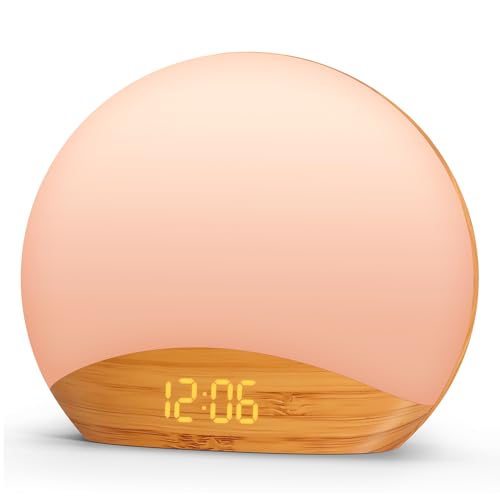
REACHER Wood Grain Sunrise Alarm Clock — Best for Shared Rooms
The REACHER combines a sunrise light with a proper sound machine in a wood-grain case that looks at home on a teenager’s desk. It suits siblings sharing a room, students in dorm-style setups, and anyone who falls asleep to white noise but wakes to light. The display dims all the way down — a genuine courtesy to a roommate — and the 26 sleep sounds give the falling-asleep side of the routine as much attention as the waking side. Students who need a truly loud alarm for deep sleep should pair it with the vibrating pick below rather than relying on light alone.
Strengths
- Sunrise wake light plus 26 sleep sounds in one unit
- Fully dimmable display respects a roommate’s sleep
- Wood-grain finish suits teen desks better than clinical white plastic
Trade-offs
- Sound output is gentler than a dedicated loud alarm
- Light waking is less effective for the deepest sleepers
- More features means a slightly longer first setup
Key specs: Sunrise simulation; 26 sleep sounds; white noise machine; dimmable digital display; wood grain finish.
Shared rooms are where ordinary alarm clocks cause diplomacy problems: one student’s 5:45 sports-practice alarm becomes everyone’s alarm. The REACHER’s light-first approach wakes its owner with less spillover than a blaring buzzer, and its sleep sounds mask corridor and household noise at the other end of the night — a real benefit in busy family homes where a younger sibling’s bedtime and a teenager’s study time overlap. The wood finish is not a trivial detail either; teenagers keep and use objects that do not embarrass them in front of friends. As a two-in-one replacement for a clock plus a separate white-noise app on a phone, it also quietly supports the phone-out-of-the-bedroom project many families are attempting.
Best for: shared bedrooms, dorms and noise-sensitive sleepers / Not suited for: students who sleep through everything
Check the current price on Amazon

Peakeep Battery Operated Digital Alarm Clock — Best Cordless
The Peakeep removes the cord from the equation entirely. Running on batteries, it can live on a bunk shelf, a windowsill, a study desk or wherever a teenager actually sleeps, with no cable trailing to a distant socket. It suits students whose bedrooms have one awkwardly placed outlet, families who rearrange rooms often, and anyone who wants the clock to keep perfect time through power cuts by design rather than by backup. The display is large, the digits auto-dim, and the alarm volume adjusts up to properly loud for heavier sleepers. The trade is obvious: batteries need replacing eventually, and there is no USB charging port.
Strengths
- Fully cordless — place it anywhere, including bunk beds
- Large display with auto-dimming for day and night
- Adjustable alarm volume that suits heavier sleepers
Trade-offs
- Batteries are an occasional replacement cost
- No USB port for charging devices
- No radio, sounds or sunrise light
Key specs: Battery operated; large digital display; auto dimming; adjustable volume; cordless placement.
There is a quiet brilliance to a clock that cannot be unplugged in a fit of 6 a.m. resentment and does not die when a breaker trips. Students use the Peakeep in places plug-in clocks cannot go — the head of a loft bed is the classic — and parents report it is the clock that survives room rearrangements, sleepovers and summer schedule changes without ever needing re-setting after an outage. Battery life on digital clocks like this is measured in months, not days, so the running cost is small; keep a spare set in the drawer and it is a non-issue. If your student’s room has more furniture than outlets, this is the practical answer.
Best for: bunk beds, outlet-poor rooms and power-cut peace of mind / Not suited for: students who want to charge a phone at the nightstand
Check the current price on Amazon

Sharp Digital Alarm Clock — Best Simple Budget Pick
Sharp’s clock is the antidote to feature overload. Its controls are laid out like a small keyboard — big, labeled and operable by touch — with a large snooze button and a front alarm switch that makes the clock’s state obvious at a glance. It suits younger high schoolers, students who have mis-set complicated clocks before, and grandparents buying a gift that must simply work. The red LED display is a classic nightstand look and easy to read, and battery backup guards the alarm setting. It will not simulate a sunrise or play the radio; it tells the time and wakes the student, and for many families that focus is the point.
Strengths
- Keyboard-style controls are almost impossible to mis-set
- Large snooze button and clear front alarm switch
- Battery backup protects the alarm through outages
Trade-offs
- Red LED display is a fixed style — no color or brightness themes
- No USB charging or extra features
- Basic alarm tone only
Key specs: Easy-access keyboard controls; large snooze button; front alarm switch; battery backup; red LED display.
Every family has a story about the morning a complicated clock was set to 6 p.m. instead of 6 a.m., or an alarm was armed for the wrong day. The Sharp is engineered against exactly that failure: the alarm switch is physical and visible, the time-setting controls are separated and labeled, and there is nothing to scroll, pair or configure. Its simplicity also makes it the easiest clock here for a student to operate in the dark without waking fully — which sounds minor until you have watched a teenager defeat a touchscreen clock at midnight and sleep through first period. As a first alarm clock for a new high schooler, or a dependable spare for the guest room during exam season, it is hard to fault.
Best for: younger students, gifts and anyone who values simplicity / Not suited for: students wanting sounds, radio or sunrise light
Check the current price on Amazon
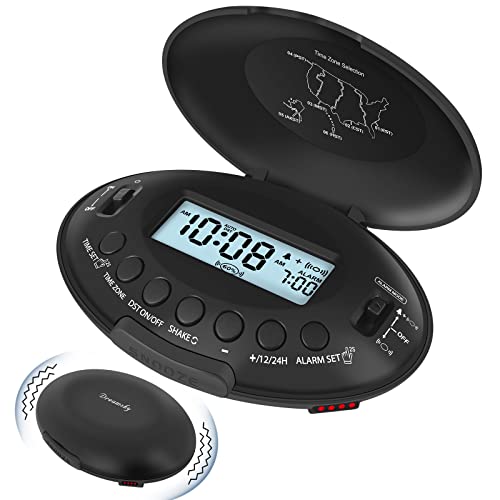
DreamSky Vibrating Alarm Clock — Best for Heavy Sleepers
Some teenagers do not need a better sound — they need a different sense entirely. The DreamSky Vibrating Alarm Clock puts a bed shaker under the pillow or mattress that buzzes its owner awake while the rest of the house sleeps on. It suits the deepest sleepers, students who share a room with a sibling on a later schedule, and teens who have simply adapted to sleeping through every tone ever invented. It is rechargeable and battery operated, so placement is flexible, and it is also a considerate choice for students with hearing difficulties. It offers no display-driven extras; it is a specialist tool, and it is superb at its one job.
Strengths
- Under-pillow shaker wakes the sleeper, not the whole house
- Designed for heavy sleepers and teens who ignore sound alarms
- Rechargeable and cordless, so it travels to camps and tournaments
Trade-offs
- No sunrise light, radio or sound library
- Shaker placement matters — it must sit where it will be felt
- Needs periodic recharging like any cordless device
Key specs: Vibrating bed shaker for under-pillow use; rechargeable battery operation; designed for heavy sleepers and teens.
The first morning with a shaker clock tends to convert skeptics. Vibration is much harder for a sleeping brain to file as background noise than a beep it has heard five hundred times, and because the shaker is local, a sibling three feet away often sleeps straight through — solving the shared-room problem from the opposite end to the REACHER. Coaches and parents of students with early training sessions rate these clocks highly for another reason: they end the era of the whole household being woken at 5:30 by an alarm meant for one person. Pair it with consistent bedtimes and it is the closest thing to a guaranteed wake-up this guide can offer.
Best for: very heavy sleepers and shared rooms / Not suited for: students who want light or sound features
Check the current price on Amazon
Comparison Table
| Pick | Badge | Key spec | Best for |
|---|---|---|---|
| DreamSky Small Digital | Best Overall | Dimmer, USB charging, battery backup | Most students |
| JALL Sunrise | Best Sunrise Wake-Up | Sunrise light, 25 sounds, FM/Bluetooth | Groggy wakers, dark rooms |
| REACHER Wood Grain Sunrise | Best for Shared Rooms | Sunrise light, 26 sleep sounds, full dimming | Siblings and dorms |
| Peakeep Battery Operated | Best Cordless | Battery powered, auto-dim, adjustable volume | Bunks and few outlets |
| Sharp Digital | Best Simple Budget Pick | Keyboard controls, big snooze, backup | Simplicity and gifts |
| DreamSky Vibrating | Best for Heavy Sleepers | Under-pillow bed shaker, rechargeable | Deep sleepers |
How to Choose an Alarm Clock for a High School Student
Start by diagnosing the actual morning problem, because each failure has a different cure. If the student never hears the alarm, the answer is wake-up power — volume, vibration or both — and the DreamSky Vibrating or a loud adjustable model like the Peakeep belongs on the shortlist. If they hear it but surface slowly and snooze repeatedly, light is often the missing ingredient, and a sunrise clock changes the shape of the whole wake-up. If the alarm “didn’t go off,” suspect the setting before the clock: mis-set alarms are the most common failure in this category, which is why control layout earned its own criterion in our selection.
Next, consider the room. A solo bedroom can take a louder, brighter clock; a shared room argues for vibration or light-first waking and a display that dims completely. Bunk and loft beds argue for cordless. A desk-nightstand hybrid argues for a compact footprint and, ideally, a USB port so the phone can charge visibly on the desk — the single most effective hardware change for families trying to end the phone-under-the-pillow habit. Then check the safety nets: battery backup or battery operation, an alarm that stays armed after the snooze limit is reached, and a display readable from the bed without glasses. Finally, involve the student in the choice. A clock they picked — for its wood finish, its radio, its sunrise glow — is a clock they will defend, set and actually use; an imposed beige box is a clock that gets “forgotten” on weekends and mysteriously unplugged before Mondays.
Dual Alarms, Snooze Design and the Small Print That Matters
Dual alarms sound like an obvious win for students — one for school days, one for Saturday practice — and for organized teenagers they genuinely help. But they double the mis-setting surface: the wrong alarm armed is the same failure as no alarm. Households with a history of setting errors often do better with a single, unmistakable alarm and a physical switch, which is why the Sharp’s front alarm switch appears in this guide as a feature and not a limitation. If you do choose dual alarms, spend the first Sunday checking together which alarm is armed for tomorrow; make it part of the weekly reset rather than a nightly gamble.
Snooze design deserves more respect than it gets. The snooze interval, the number of snoozes allowed, and the size and placement of the button shape the morning more than the alarm tone does. A generous, top-mounted button that a half-asleep hand can find without opening an eye is humane design; a small button beside identical small buttons is how clocks get slapped off the nightstand. Unlimited snoozing sounds kind and is usually the enemy — a capped snooze teaches the household where the real deadline is. When comparing models, treat the snooze as part of the alarm system, not an afterthought, and prefer the clock whose snooze a student can operate at their least competent moment of the day.
Finally, read the small print on power. “Battery backup” on a plug-in clock usually preserves the time and alarm setting through an outage but may not sound the alarm during the outage itself — acceptable in most homes, worth knowing in storm country. Fully battery-operated clocks like the Peakeep make no such distinction. Rechargeable specialists like the shaker need a charging rhythm, ideally a weekly top-up tied to an existing habit such as Sunday laundry. None of these details appears in a product’s headline, and all of them decide whether the clock is trusted by November.
How to Set Up a School-Morning Routine That Actually Works
A great clock still needs a routine around it. Set it up together on a Sunday evening, not in a Monday panic. Place the clock across the room if snoozing is the core problem — a student who must stand up to silence an alarm is a student who is awake — or under the pillow in shaker form for shared rooms. Set the alarm for the true latest wake time, then protect it: no second “just in case” alarm forty minutes earlier, because training the brain that the first alarm is negotiable is how snooze habits form. Use the clock’s strengths deliberately: sunrise owners should draw the curtains’ blackout properly so the light curve works; sound-machine owners should use the same sleep sound nightly as a wind-down cue after homework ends.
Then fix the other end of the night, because alarm clocks cannot repeal biology. A consistent lights-out — even on weekends, within reason — does more for Monday mornings than any volume setting. Charge the phone outside the bedroom or face-down on the desk where the DreamSky’s USB port waits, keep the clock’s display dimmed, and rehearse the first week: expect two or three rough mornings while the new wake time beds in, and judge the clock after a fortnight, not after day one. If a heavy sleeper still defeats a sound alarm after two honest weeks, escalate to vibration rather than volume — the shaker exists precisely for that student.
Sound, Light or Vibration: The Three Ways to Wake a Teenager
Every clock in this guide wakes its owner through one or more of three channels, and choosing the right channel matters more than choosing the right brand. Sound is the default and works for the majority: a clear tone at a volume tuned to the room. Its weakness is adaptation — the sleeping brain learns familiar sounds and files them as ignorable, which is why a clock that woke a student reliably in September can be slept through by March. Rotating tones, radio or a genuinely different sound resets that adaptation, one reason the JALL’s sound library and radio are practical features rather than decoration.
Light works upstream of hearing. Brightness that builds over twenty or thirty minutes nudges the sleeper through lighter sleep stages, so the moment of waking feels less violent and the temptation to snooze weakens. It is the kindest channel for groggy, slow-surfacing students and for winter mornings in dark rooms, but it has conditions: the room must be dark enough for the artificial dawn to register, and the deepest sleepers may ride through light alone. That is why both sunrise picks here pair light with sound rather than trusting light by itself.
Vibration bypasses adaptation almost entirely, because it is felt rather than heard and because it is private — a shaker under one pillow rarely disturbs a sibling. It is the channel of last resort and, for true heavy sleepers, often the first one that works. Its conditions are placement and power: the shaker must sit where the sleeper’s head or hand will feel it, and a rechargeable unit must be kept charged. Many families end up combining channels across the week — light and sound on ordinary days, the shaker drafted in for the 5 a.m. tournament start — and there is nothing wrong with a two-clock strategy for a student whose schedule swings that widely.
Matching the Clock to the Student
The athlete with 5:30 a.m. training. Reliability and privacy lead: the alarm must fire before the household wakes and must not wake it. A shaker clock is the respectful choice, backed by a clock with battery backup for the nights the power flickers. Early training also means early bedtimes matter more than alarm features — no clock fixes a midnight bedtime before a dawn start.
The night-owl homework finisher. This student’s problem is the front of the night, not the morning. A clock with sleep sounds and a dimming display — the REACHER or JALL — supports a wind-down ritual, and its sunrise function softens the cost of the late finish. Pair it with a hard rule about when homework ends; the clock can cue the routine, but the routine has to exist.
The sibling sharing a room. Diplomacy hardware: light-first waking or vibration for the earlier riser, a display that dims to nothing, and sleep sounds to mask the other sibling’s different bedtime. The REACHER was picked with this room in mind; the DreamSky Vibrating solves it from the other direction.
The student heading to boarding school or camp. Cordless wins. A battery clock like the Peakeep or the rechargeable shaker travels, survives unfamiliar rooms and outlets, and keeps working through the term without a charger cable being lost in week one. Simple controls matter doubly in a dorm, where a roommate may need to silence the thing.
The new freshman. Start simple and upgrade only if the evidence demands it. The Sharp or the DreamSky Small Digital teaches the habit of owning your own wake-up — arguably the real curriculum of the first high-school year — without a settings menu to hide behind. If a fortnight of honest use shows a specific failure (sleeps through sound, hates the shock, shares a room), the specialist picks above answer each failure by name.
The First Two Weeks: Bedding In a New Wake Time
Days one to three will feel rough regardless of the clock; judge nothing yet. Keep the wake time identical every day, weekends included within an hour, and get the student into daylight and movement quickly after waking — light through eyes and a body in motion are what set the body clock, the alarm merely starts the process. In week two, fine-tune one variable at a time: move the clock further away if snoozing persists, raise or lower volume to the minimum that works, or shift a sunrise clock’s light curve earlier if the student surfaces only at the sound. By the end of the fortnight the routine should run without negotiation. If it does not, the honest diagnosis is usually sleep quantity, not alarm quality — and the fix moves to bedtime, where this guide’s sound-machine picks can help build the wind-down that makes an earlier night possible.
A note for parents reading this guide at midnight after a bad morning: resist upgrading the clock and the lecture simultaneously. Change one thing — the clock, its placement, or the bedtime — and give it the full fortnight. Students cooperate with systems they helped choose and can see working; a clock that arrives as a punishment gets treated as one, and even the best shaker cannot out-vibrate resentment. The families who report the smoothest transitions are consistently the ones who framed the purchase as equipment for the student’s own goals — making the team, catching the early bus without a parental taxi, earning a later weekend curfew by proving weekday reliability — rather than as surveillance. Hardware starts the routine; ownership sustains it.
Troubleshooting: The Alarm “Didn’t Go Off” — and Other Morning Mysteries
The alarm genuinely did not sound. Work through the boring causes first, because they explain almost every case: the alarm was set for p.m. instead of a.m.; it was armed for weekdays only on a Saturday exam morning; the volume was left at zero after being used as a radio; or a power cut with no backup reset the clock entirely. Clocks with physical alarm switches and backup batteries — the Sharp and the DreamSky in this guide — are engineered to shrink this list, which is why we weighted those features so heavily.
The student woke, snoozed and slept in. This is a placement and permission problem, not a volume problem. Move the clock out of arm’s reach, agree a household rule that the first alarm is the real one, and consider a sunrise model that makes the pre-alarm period lighter and less snooze-friendly. If snoozing persists with a sound clock across the room, switch channels to vibration rather than escalating volume further.
The whole house wakes except the student. The alarm is loud but the sleeper is adapted to it. Change the sound entirely — radio instead of tone, tone instead of radio — or move to a shaker. Also look honestly at bedtime: a student sleeping five hours will defeat equipment that would wake them easily on eight.
The clock display keeps the student awake. Dim it fully, turn the clock to face the wall on nights when the time does not need checking, or choose an auto-dimming model like the Peakeep. A clock should be visible on demand, not glowing by default.
Weekend lie-ins wreck Monday. Sleeping until noon on Sunday shifts the body clock later and makes Monday’s alarm feel like the middle of the night. Keeping weekend wake times within an hour or two of school-day times — unpopular advice, effective advice — does more for Monday than any feature in this guide.
Common Buying Mistakes
Buying louder when the problem is depth of sleep. A teenager who sleeps through a loud beep has adapted to sound; vibration or light usually works where more decibels just wake the neighbors.
Choosing a clock with complicated controls. Every extra menu is a chance to mis-set the alarm at midnight. For most students, visible switches and labeled buttons beat touchscreens.
Ignoring the display at night. A bright, undimmable clock face is a sleep aid in reverse. Always check for a real dimmer or auto-dimming before buying.
No backup for power cuts. The alarm must survive the one flickering night before the big exam. Battery backup or full battery operation is not optional for a school clock.
Letting the phone stay the alarm. A phone alarm invites the phone into bed, with its midnight notifications and 1 a.m. scrolling. A dedicated clock is often bought as much for what it replaces as for what it does.
Placing the clock within arm’s reach of a snooze addict. If snoozing is the habit, distance is the feature. Put the clock where silencing it requires standing up.
Features Worth Paying For — and Features That Are Not
Because we do not print prices, think in tiers of usefulness instead. The features that earn their keep in a student’s room are unglamorous: a real display dimmer, battery backup, an alarm volume with genuine range, and controls that state their purpose. Each of these prevents a specific, common school-morning failure, and each appears across this guide’s picks at every level. Sunrise light and sound libraries sit in the next tier — not essential, but transformative for the specific students they suit, and worth the step up when mornings are a recurring conflict rather than an occasional scramble. Vibration is a specialist feature: pointless for a light sleeper, priceless for a heavy one, and priced accordingly.
At the other end, be skeptical of features that demo well and matter rarely. Elaborate projection displays that throw the time onto the ceiling amuse for a week and then get switched off. A dozen novelty alarm tones collapse into the one least annoying. App control for a device that sits within arm’s reach of the bed solves a problem nobody has, while adding a pairing failure mode everybody eventually meets. Temperature and humidity readouts are harmless but duplicate what a phone already told the student. The pattern to remember: pay for wake-up power, reliability and display manners; let the entertainment features be a bonus, never the reason. Every clock in this guide was chosen on the first list — the ones that also carry second-list features, like the JALL’s radio, carry them as extras on a sound foundation, not as substitutes for one.
One more consideration is longevity. A clock bought for a freshman may serve through graduation and into a first dorm room, so durability and timelessness beat trendiness: a wood-grain or plain black case ages better than a novelty shape, standard batteries and USB charging age better than proprietary docks, and a brand with a track record — Sharp, DreamSky, Peakeep — is likelier to still be answerable in four years. Buy the clock once, buy it for the student they will be at seventeen as much as the one they are at fourteen, and the purchase quietly becomes one of the better-value objects in the house.
Final Recommendation
Buy the clock before the term starts if you can, and let the student live with it through a few low-stakes weekends first — a wake time rehearsed in August is a habit by September, while a clock unwrapped the night before the first school day is one more new thing in a week full of them.
For most families, start with the DreamSky Small Digital: it is the complete, calm, sensible clock. Choose the JALL Sunrise if mornings are a battle of grogginess, the REACHER if a sibling shares the room, and the Peakeep if cords and outlets are the obstacle. The Sharp is the gift-proof simple option, and the DreamSky Vibrating is the final answer for the student who sleeps through everything. Pair whichever you choose with a consistent bedtime, and the school run gets quieter within a fortnight.
Related reading on this site: Best Alarm Clocks For Heavy Sleepers · Best Sunrise Alarm Clocks · Best Alarm Clocks For Kids · Best Vibrating Alarm Clocks · Best Digital Alarm Clocks
Frequently Asked Questions
Is a sunrise alarm clock really better for teenagers?
For groggy wakers, often yes. Gradual light before the audible alarm helps the brain surface in stages, so the sound feels less like an ambush and snoozing loses its appeal. Very deep sleepers may still need sound at full assertiveness — or vibration — alongside the light.
What is the best alarm for a student who sleeps through everything?
A vibrating bed-shaker clock such as the DreamSky Vibrating. Vibration is harder for a sleeping brain to ignore than a familiar beep, and it wakes only the sleeper. Combine it with a consistent bedtime; no alarm fully compensates for severe sleep debt.
Should the phone stay out of the bedroom?
Many families find mornings and bedtimes both improve when the phone charges outside the bedroom or on the desk. A dedicated alarm clock — especially one with a USB charging port on the desk — removes the “I need it for my alarm” argument entirely.
Does battery backup really matter?
Yes. Backup batteries keep the time and the armed alarm alive through overnight power flickers, which are common and always seem to land before important days. Fully battery-operated clocks like the Peakeep sidestep the issue completely.
How loud should a student’s alarm clock be?
Loud enough to wake its owner at the distance it will sit from the bed — adjustable volume matters more than maximum volume, because a clock that can be tuned is one that will be set appropriately instead of being unplugged. Remember that perceived loudness drops fast with distance and with doors, pillows and bunk curtains in the way, so a clock that seems excessive on the shop shelf may be merely adequate at the head of a loft bed. When in doubt, choose the model with the wider volume range rather than the single fixed blast.
Where should the clock go in the room?
On the nightstand for most students; across the room for committed snoozers; on the bunk shelf for loft beds, which is where a cordless model earns its keep. Shaker clocks belong under the pillow or mattress pad where the vibration will be felt.

