Disclosure: airfryerkitchensupply.com is reader-supported. When you buy through links on our site, we may earn an affiliate commission at no extra cost to you.
Where to buy
Every pick in this guide to the best alarm clocks easy to use was checked against Amazon’s own catalog data before it earned a link. Use the short list below to jump straight to a product page and check the current price on Amazon, or read the full reviews first and decide with the comparison table in front of you. If a pick is described as unlinked, it is covered honestly in the text without a purchase link, because we could not confirm a matching live listing for it.
- DreamSky Small Digital Alarm Clock with USB Charging Port — Best Overall: check price on Amazon
- Sharp Digital Alarm Clock with Keyboard Controls — Easiest Controls: check price on Amazon
- Peakeep Digital Alarm Clock with Large Display and USB Charger — Best for Seniors: check price on Amazon
- Emerson SmartSet Dual Alarm Clock Radio — Best Self-Setting: check price on Amazon
- HearEsy Talking Alarm Clock for Visually Impaired — Best Talking Clock: check price on Amazon
- Amazon Basics Small Digital Oval Alarm Clock — Best Simple and Small: check price on Amazon
The best alarm clocks easy to use share a philosophy: the time should be readable at a glance, the alarm should be settable in the dark without a manual, and the clock should never be the most complicated object in the bedroom. Modern clocks keep adding apps, Bluetooth pairing and touch menus, and for many buyers — seniors, guests, children, the deeply technology-tired — each addition is a subtraction. This guide compares six verified clocks chosen for genuine ease: big honest digits, physical controls, self-setting technology, spoken time, and the two backup features that actually matter, battery backup and an alarm that survives a power cut.
Tell yourself which kind of easy you need before choosing. Easy to read, easy to set, easy to hear and easy to never think about are four different products, and each pick below owns one of them.
A note on who this guide quietly serves: the person setting the clock is often not the person using it. Adult children buy for parents, hosts set up guest rooms, partners buy for partners who hate menus. Every pick below was judged by a simple test — could you hand it to its user, leave the room, and trust it to be working correctly that night? The six that passed are the six in this guide.
In this guide
Quick Picks
If you only have a minute, these are the short answers. Each pick below earned its badge for a different reason, and the full reviews further down explain exactly who should buy it and who should skip it.
DreamSky Small Digital Alarm Clock with USB Charging Port — Best Overall. Big numbers you can read without glasses, a dimmer that actually dims, adjustable alarm volume and dead-simple setting — the easy clock most bedrooms need.
Sharp Digital Alarm Clock with Keyboard Controls — Easiest Controls. Keyboard-style controls you can operate by touch, a big snooze button and a physical alarm switch on the front — the clock you can set half-asleep, literally.
Peakeep Digital Alarm Clock with Large Display and USB Charger — Best for Seniors. Big LED numbers, five dimmer levels, adjustable loud volume, battery backup and an explicitly easy set — designed for senior-friendly use and it shows.
Emerson SmartSet Dual Alarm Clock Radio — Best Self-Setting. SmartSet sets itself: plug it in and the time is right, with automatic daylight-saving adjustment — plus dual alarms and an AM/FM radio with 20 presets.
HearEsy Talking Alarm Clock for Visually Impaired — Best Talking Clock. Press and it speaks the time: a battery-operated talking clock with large numbers, designed for visually impaired users and seniors who want the time announced, not squinted at.
Amazon Basics Small Digital Oval Alarm Clock — Best Simple and Small. The minimalist’s clock: a small oval with an LED display, a built-in nightlight, snooze and battery backup — nothing to learn, nothing to configure, nothing extra.
How These Picks Were Chosen
Ease was tested as a set of concrete questions. Can the time be read without glasses from bed? Can the alarm be set, checked and switched off by touch in the dark? Does the clock recover from a power cut with its alarm intact? Can brightness and volume be adjusted to the sleeper rather than endured? We excluded app-dependent clocks entirely — a clock that needs a phone to set an alarm has failed this search by definition — and favoured physical buttons, physical switches and automatic time-setting. Senior-friendly and accessibility designs were weighted heavily, because ‘easy to use’ matters most to the people mainstream clocks serve worst. Only verified listings carry links.
The 6 Best Alarm Clocks That Are Easy to Use

DreamSky Small Digital Alarm Clock with USB Charging Port — Best Overall
‘Easy to use’ sounds like a low bar until you have fought a clock that needs a manual, two buttons held simultaneously and a YouTube video to change the alarm. The DreamSky is the opposite experience: large numbers legible across the room and without glasses, a dimmer dial for brightness, an alarm volume you can set rather than endure, and controls that do what their labels say. It is the clock we would hand to anyone who has ever said ‘just give me one that works’.
The USB charging port is the quiet daily win — your phone charges from the clock and the nightstand keeps one free outlet. Power comes via a USB-C adapter, and the display’s brightness range goes low enough for light-sensitive sleepers, which many cheap big-number clocks fail at by glowing like a runway at their dimmest setting.
Strengths
- Large numbers readable without glasses
- True dimmer and adjustable alarm volume
- USB port charges your phone at the nightstand
Trade-offs
- Single alarm only
- Plug-in design, not a travel clock
- No radio or extra features to learn — or enjoy
Key specs
- Large LED display with brightness dimmer
- Adjustable alarm volume
- USB charging port, USB-C adapter powered
It is a single-alarm, plug-in design, so couples with two schedules should look at the dual-alarm picks below. But for the core job — tell the time at a glance, wake me at a volume I chose, never make me think — this is the easiest clock in the guide and the one most buyers should simply order.
The DreamSky also passes the travel test better than its plug-in nature suggests: hotel rooms are notorious for glowing, cryptic or absent clocks, and this one’s small body and familiar controls make it the clock some frequent travellers pack deliberately. A clock you already know, in a strange room, set in twenty seconds — that is ease of use compounding.
The DreamSky’s final credential is consistency: it does nothing surprising, ever, and in an alarm clock that is the highest praise available. Buy it for the bedroom that matters most, set it once in five minutes, and expect to think about it approximately never again — which is the entire promise of this category, kept.
Bottom line: the clock to buy when you do not want to think about clocks. Big, dimmable, adjustable and simple — the DreamSky is this category’s centre of gravity.
Best for: most bedrooms and anyone tired of complicated clocks / Not suited for: couples needing two different wake times

Sharp Digital Alarm Clock with Keyboard Controls — Easiest Controls
Sharp designed this clock around a simple insight: the hardest moment to operate a clock is in the dark, half-awake. So the controls are a keyboard — distinct, findable buttons rather than a shared multi-function nub — the snooze is large, and the alarm on/off is a physical switch on the front where you can confirm it by touch. The red LED display is the classic easy-on-the-eyes night choice.
Battery backup protects the alarm through power cuts, which is the feature that separates a clock from a liability on the one morning it matters. The whole device is deliberately feature-light: no app, no Bluetooth pairing, no firmware, nothing to update or troubleshoot. For guest rooms, grandparents and anyone technology-fatigued, that restraint is the product.
Strengths
- Keyboard controls operable by touch in the dark
- Physical front alarm switch, big snooze button
- Battery backup keeps alarms through outages
Trade-offs
- Plain, functional styling
- No USB charging or smart features
- Red LED only — no colour choice
Key specs
- Keyboard-style easy-access controls
- Large snooze, front alarm switch
- Battery backup, red LED display
You give up dimming finesse and modern extras, and the styling is plainly functional. In exchange you get the most foolproof setting experience in this guide — the clock a household buys when ‘easy to use’ is not a preference but a requirement.
The Sharp’s keyboard layout has one more beneficiary: children learning to manage their own mornings. Distinct buttons with single jobs are teachable in one demonstration, and the physical alarm switch gives a child a satisfying, verifiable ritual — switch on at bedtime, switch off on waking. Many families find this becomes the first alarm clock a child operates entirely alone.
The Sharp rewards one small habit: leave the alarm switch ritual to muscle memory. Because the switch is physical and on the front, users develop a bedtime check — hand across the clock, switch confirmed — that no menu-driven clock can match. Reliability in alarm clocks is mostly ritual, and this design builds the ritual in.
Bottom line: if buttons have ever defeated you at midnight, the Sharp’s keyboard is your clock. Set it by touch, trust the switch, sleep.
Best for: guest rooms, grandparents and the technology-averse / Not suited for: buyers wanting charging ports or sunrise features

Peakeep Digital Alarm Clock with Large Display and USB Charger — Best for Seniors
Peakeep built this clock for the buyers most ‘smart’ clocks forget: people who want large numbers, strong volume when needed, and setting that does not require a grandchild’s visit. The display is big and high-contrast, brightness adjusts across five levels from nightstand-gentle to daylight-clear, and the alarm volume adjusts up to genuinely loud for deep sleepers and the hard of hearing, or down for light ones.
The USB charger keeps a phone topped up at the bedside, and battery backup guards the alarm against outages — the two practical extras that matter, with none of the app-pairing complexity that does not. The easy-set controls are the headline though: time and alarm are set with direct, labelled buttons, and the instructions fit the experience rather than fighting it.
Strengths
- Senior-friendly: big numbers, 5 dimmers, easy set
- Adjustable volume up to genuinely loud
- USB charging plus battery backup
Trade-offs
- Single alarm
- No radio or sunrise simulation
- Utilitarian appearance
Key specs
- Large LED display, 5 brightness levels
- Adjustable alarm volume, easy-set controls
- USB charger, battery backup
If you are buying for a parent or for your own future-proof nightstand, this is the considered choice: legible, audible, settable and backed up. It lacks dual alarms and radio, but it was never trying to be a media device — it is a clock, done considerately.
Peakeep’s five dimmer levels deserve emphasis because they solve the couple problem: one partner wants the time visible at a glance at 3 a.m., the other wants darkness. Five steps give that negotiation somewhere to land, where a three-step budget dimmer often leaves one partner turning the clock to the wall. Small range, daily peace.
For households buying two clocks — one for each side of the bed — the Peakeep pairs well with the DreamSky: the Peakeep’s louder, senior-friendly side for the deep sleeper, the DreamSky’s dimmer finesse for the light one. Matching by sleeper rather than by model is the mark of a household that has solved its mornings.
Bottom line: designed for seniors and perfect for anyone who shares their priorities — legibility, volume and a set-up with no mysteries. The considerate clock.
Best for: seniors, deep sleepers and low-vision-friendly bedrooms / Not suited for: couples needing dual alarms
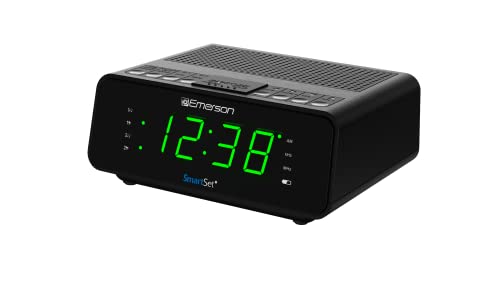
Emerson SmartSet Dual Alarm Clock Radio — Best Self-Setting
The easiest clock to set is the one you never set. Emerson’s SmartSet technology displays the correct time the moment you plug the clock in, and adjusts itself for daylight saving, power cuts and leap years thereafter. For the substantial number of people whose current clock has been blinking since 2019, that single feature justifies this pick before anything else is considered.
It is also the guide’s dual-alarm radio: two independent alarms for couples or weekday/weekend schedules, AM/FM with 20 presets for those who wake to news or music, a sleep timer for falling asleep to the radio, and a clear jade-green display that is easy to read and gentle at night. Setting the alarms themselves uses conventional buttons, helped by the fact that the clock’s time is never wrong to begin with.
Strengths
- Sets itself automatically, including daylight saving
- Dual alarms plus AM/FM radio with 20 presets
- Sleep timer and clear jade display
Trade-offs
- Display smaller than the big-number picks
- No USB charging port
- Radio features add buttons some minimalists will not use
Key specs
- SmartSet automatic time setting
- Dual alarms, AM/FM radio, 20 presets
- 0.9-inch jade LED display, sleep timer
The display is compact rather than huge, so across-a-large-room legibility goes to the DreamSky and Peakeep. But as the set-and-forget centre of a bedroom — right time guaranteed, two alarms, radio included — the SmartSet earns its name every single day.
The SmartSet’s self-setting also quietly solves the guest room: a clock that is always right, that no guest needs to set, and whose dual alarms a visiting couple can use without a tutorial. Hosts who have watched a guest miss a flight because a bedroom clock was blinking will understand why this pick earns its place on reliability alone.
The Emerson also handles the power-cut scenario with unusual grace: because its time is always internally maintained, an outage at 3 a.m. does not become a missed alarm at 7. Among all the anxieties this category exists to remove, the silent overnight outage is the most justified — and this is the clock that removes it most completely.
Bottom line: the right time, guaranteed, with two alarms and the radio included. For the household whose clocks are always wrong, the SmartSet is the permanent fix.
Best for: anyone whose clocks are always wrong, and couples / Not suited for: buyers needing the largest possible digits

HearEsy Talking Alarm Clock for Visually Impaired — Best Talking Clock
For some users, ‘easy to use’ means not needing to see the clock at all. The HearEsy announces the time in a clear voice at the press of a button, pairs the voice with a large-number display for those with partial sight, and includes day information that helps orient seniors — the combination that defines a proper day clock. It is battery operated, so it sits anywhere, travels between rooms, and keeps working through power cuts by design.
The design priorities are accessibility throughout: big controls, spoken feedback and no dependence on a phone app or Wi-Fi setup, which is precisely what makes it usable by the people it is built for. As an alarm it does its job plainly, and as a reassurance device — press, hear the time and day — families often find it becomes the most-used object in the house.
Strengths
- Speaks time and day clearly at a button press
- Large-number display supports partial sight
- Battery operated: portable and outage-proof
Trade-offs
- No radio, USB or smart features
- Voice announcements are its purpose — not for silent minimalists
- Alarm functions are simpler than dual-alarm models
Key specs
- Talking time announcement
- Large number day-clock display
- Battery operated
It is not a bedside media hub and does not try to be. Buy it for the person who asks others what time it is, who cannot read a display at night, or who simply prefers hearing the time — for them, this is not a niche product but the only pick in the guide that fully fits.
Families often discover the HearEsy’s second role: orientation. For a senior who wakes disoriented, one press delivers the time and the day in a calm voice, without lights, glasses or calling out. That moment of independence, repeated every morning, is worth more than any feature list in this guide — it is the difference between a clock and a care tool.
Placement tip for the HearEsy: put it where its user spends their morning, not only at the bedside. Many owners move it to the kitchen or armchair, because the time-and-day announcement serves the whole day’s orientation, not just the wake-up. A clock this usable rarely stays in one room.
Bottom line: for the user who needs to hear the time, nothing else in this guide is a substitute. The HearEsy is not the simple option — it is the correct one.
Best for: visually impaired users and seniors who want spoken time / Not suited for: buyers wanting radio or dual alarms

Amazon Basics Small Digital Oval Alarm Clock — Best Simple and Small
Sometimes easy means small and silent about itself. The Amazon Basics oval clock does the four things a bedside clock must — shows the time on a clear LED display, wakes you, offers a snooze, and keeps a battery backup for outages — and adds one thoughtful extra, a gentle built-in nightlight. There is no app, no radio, no menu tree. A child, a guest or a minimalist can use every function within a minute of unboxing.
Its compact footprint, about four and a half inches wide, suits crowded nightstands, dorms, travel bags and spare rooms where a big display would dominate. The oval design is softer than the usual black box, and the nightlight’s glow is enough to find the snooze by without lighting the room.
Strengths
- Nothing to configure: usable within a minute
- Built-in nightlight and battery backup
- Compact oval suits small nightstands and travel
Trade-offs
- Digits sized for bedside, not across the room
- No dimmer range or volume adjustment
- Single basic alarm
Key specs
- Size: 4.5 x 3.5 x 2.4 inches
- LED display with nightlight
- Snooze function, battery backup
The digits are sized for bedside distance, not across-room reading, and there is no dimmer sophistication or volume adjustment. As the simple second clock — guest room, dorm, travel, a child’s first alarm — it is exactly as easy as this category gets.
The little Amazon Basics oval is also the dorm room answer: cheap enough to lose without grief, simple enough to survive a roommate, small enough for a desk corner, and backed up for the morning of the exam. Not every clock needs to serve for a decade; some need to serve a semester flawlessly, and this one is built to exactly that brief.
The Amazon Basics oval also makes the considerate spare: keep one, unopened, in the linen cupboard. When a guest arrives, a child needs an alarm for a school trip, or the main clock fails the night before a flight, the spare solves it in a minute. Some products earn their place by being ready, and this is one.
Bottom line: the small, silent servant — guest rooms, dorms, travel and spares. The Amazon Basics oval proves easy can also be tiny and inexpensive.
Best for: guest rooms, dorms, travel and minimalists / Not suited for: anyone needing large across-room digits
Comparison Table
| Pick | Badge | Key spec | Best for |
|---|---|---|---|
| DreamSky Small Digital Alarm Clock with USB Charging Port | Best Overall | Large LED display with brightness dimmer | most bedrooms and anyone tired of complicated clocks |
| Sharp Digital Alarm Clock with Keyboard Controls | Easiest Controls | Keyboard-style easy-access controls | guest rooms, grandparents and the technology-averse |
| Peakeep Digital Alarm Clock with Large Display and USB Charger | Best for Seniors | Large LED display, 5 brightness levels | seniors, deep sleepers and low-vision-friendly bedrooms |
| Emerson SmartSet Dual Alarm Clock Radio | Best Self-Setting | SmartSet automatic time setting | anyone whose clocks are always wrong, and couples |
| HearEsy Talking Alarm Clock for Visually Impaired | Best Talking Clock | Talking time announcement | visually impaired users and seniors who want spoken time |
| Amazon Basics Small Digital Oval Alarm Clock | Best Simple and Small | Size: 4.5 x 3.5 x 2.4 inches | guest rooms, dorms, travel and minimalists |
How to Choose an Alarm Clock That Is Easy to Use
Rank your ease. If reading is the struggle, digit size and contrast decide everything: big LED numbers with a real dimmer, like the DreamSky and Peakeep here, beat any feature list. If setting is the struggle, look for direct buttons for time and alarm, a physical alarm switch you can verify by touch, or remove setting entirely with a self-setting clock like the Emerson SmartSet. If hearing is the struggle, adjustable volume — up as well as down — matters more than maximum loudness.
Then check the failure modes. Battery backup should preserve the alarm, not just the display. Snooze should be findable by a flat hand in the dark. And count the buttons: every shared, multi-function button is a future moment of standing in a lit bedroom at midnight reading tiny labels. The easiest clocks in this guide have a button per job.
Digital, Talking and Self-Setting: The Three Kinds of Easy
Standard digital clocks are easy when their controls are honest: labelled buttons, a dimmer, an adjustable alarm. Talking clocks remove vision from the equation entirely — press, hear the time and day — and for visually impaired users and many seniors they are not a compromise but the correct tool. Self-setting clocks remove memory from the equation: they arrive showing the right time and keep it through daylight saving and outages. Many households end up with two kinds: a self-setting or big-digit clock in the main bedroom, and a talking or simple clock where it serves best.
Brightness and Volume: The Two Adjustments That Decide Satisfaction
More easy-clock returns trace back to these two settings than to any defect. A display that cannot dim low enough will be turned to the wall or unplugged; an alarm fixed at one volume will be too loud for light sleepers or too quiet for deep ones. If you sleep lightly, prioritise the dimmer’s lowest setting; if you sleep deeply or hear poorly, prioritise adjustable, genuinely loud volume and consider a vibrating option. The picks in this guide were chosen with at least one of those adjustments done properly, and the best — DreamSky and Peakeep — do both.
Placing the Clock: Small Decisions, Better Mornings
Put the clock where your eyes land naturally when they open, at roughly pillow height and arm’s length — close enough to read and to reach the snooze by touch, far enough that its glow does not sit in your direct line of sight all night. If you are a determined snoozer, place it across the room; every clock in this guide can be heard from there, and the walk is the point. Keep it off the floor and away from the edge: the most common clock injury is a half-asleep swipe onto tiles.
For two-person rooms, the clock belongs on the side of the earlier riser, with the dimmer set for the lighter sleeper. That single negotiation, held once, prevents the nightly micro-argument that makes people hate their alarm clock — a device whose only job is to be trusted at the worst moment of the day.
When Easy Is Not Enough: Stepping Up Deliberately
Some sleepers outgrow simple clocks: shift workers with rotating schedules, couples with four different wake times, people who need light rather than sound. The honest path is to step up one feature at a time — dual alarms first, then radio or sunrise simulation — and to keep every other aspect of the clock as simple as the picks in this guide. Complexity should arrive by invitation, one feature deep, never as a bundle you must learn all at once.
And keep the simple clock when you upgrade: in the guest room, the bathroom, the child’s room. A house with one sophisticated clock and several honest ones has the balance right — sophistication where it is used daily and understood, simplicity everywhere a stranger, a child or a half-asleep hand meets the time.
Alarm Clocks for Children, Guests and Shift Workers
Children need the Sharp’s lesson in hardware: distinct buttons, a physical switch and an alarm loud enough to matter, with none of the phone-shaped distractions a tablet alarm brings to a bedroom. Set the ritual together for the first week — switch on at bedtime, switch off on waking — and the clock becomes the child’s own achievement rather than a parent’s nagging, mechanised.
Shift workers are the honest exception to this guide’s simplicity: rotating schedules can justify dual alarms and weekday/weekend programming, which the Emerson here begins to offer. The principle still holds — add only the features the schedule truly needs, keep the digits big and the backup real, and let the clock stay a clock even when the rota is complicated.
Your Pre-Purchase Checklist for an Easy Alarm Clock
Answer four questions about the sleeper, not the clock. Eyes: how big must digits be, and how dark must the room stay? Ears: how loud must the alarm be, and can it be turned down as well as up? Hands: can this person manage small buttons in the dark, or do they need a keyboard layout, a physical switch or a voice? Habits: is one alarm enough, or do two schedules share the room?
Then verify the safety net: battery backup that preserves the alarm, a snooze findable by touch, and — if setting is the known weakness — a self-setting model that removes the task entirely. Buy the clock that answers the sleeper’s four questions with the fewest compromises, set it up with the five-minute routine in this guide, and rehearse the alarm once while awake. That is the whole discipline of this category, and it works.
What a Month With the Right Clock Actually Changes
The first change is the disappearance of a small nightly friction you may not know you carry: the squint, the phone check, the ‘is that set?’ moment at the bedroom door. A clock with honest digits and a physical alarm state removes the question from the evening entirely. You glance, you know, you sleep. Households that switch from phone alarms or cryptic clocks describe the same surprise — the bedroom feels calmer, because the last object they interact with each night has stopped demanding anything from them.
The second change is reliability becoming boring. Battery backup that preserves the alarm, a self-setting movement that survives outages and daylight changes, a snooze that a sleeping hand cannot miss — none of these features is exciting, and together they produce the only exciting outcome an alarm clock can offer: a perfect record. The morning the power cut at 4 a.m. and the alarm still fired at 7 is the morning the clock pays for itself, and it is a morning every household eventually has.
The third change belongs to the people around the clock. The grandparent who stops calling to ask whether the alarm is set right. The child who owns their morning for the first time. The guest who wakes correctly in a strange house without a tutorial. Easy clocks export their ease to everyone who meets them, which is why this guide judged them by the hand-it-over test. Buy the clock that passes it for your sleeper, set it up once with care, and let it join the short list of household objects that simply never cause a conversation again.
The Phone Question: Why a Dedicated Clock Still Wins the Nightstand
Every easy clock in this guide competes with the phone already in your pocket, so the comparison deserves honesty. The phone wins on features and loses on everything this search values: it glows with notifications, tempts a midnight scroll, buries its alarm behind the same screen as everything else, and fails the hand-it-over test for children, guests and grandparents completely. A dedicated clock does one job, visibly, with the power out, without asking for updates, accounts or attention. For sleep, that single-mindedness is not nostalgia — it is engineering aimed at the actual goal, which is rest followed by a reliable waking.
The households that keep both usually settle into a sensible treaty: the phone charges in another room or face-down across it, and the clock owns the nightstand. Mornings start with a switch, not a feed. If that treaty appeals, the choice among these six is refreshingly small — big digits, talking voice, self-setting movement or simple oval — and every one of them will hold up its side of the bargain for years. The best alarm clock is the one that makes the phone’s alarm irrelevant, and easy, honest clocks are how that happens.
One Last Thought Before You Buy
If you take nothing else from this guide, take the rehearsal: whatever clock you choose, set its alarm for ten minutes ahead on the first afternoon and run the whole cycle awake — sound, snooze by touch, off by its proper control. That single rehearsal converts a new object into a trusted one, and trust is the entire product an alarm clock sells. The six clocks here earned their places by being trustworthy in different dialects — big digits, spoken time, self-setting certainty, keyboard honesty — and any of them, rehearsed once and backed up with fresh batteries, will hold your mornings more reliably than the glowing rectangle they replace.
How to Set Up an Easy Alarm Clock in Five Minutes
Unbox and power it first, then — before touching the alarm — set or confirm the time and set the display brightness for darkness, not for the lit room you are standing in. Sit or lie where you will sleep and check the digits from the pillow; adjust the dimmer until the numbers are clear but the clock is not glowing onto the ceiling.
Set the alarm for ten minutes from now and test the whole cycle: alarm sounds at a volume you approve, snooze found by touch with your eyes closed, alarm switched off with its physical control. This one rehearsal, done awake, prevents every 3 a.m. fumble. If your clock has battery backup, install fresh batteries now and note the date on them with a pen.
Finally, set the real alarm and verify it the way pilots verify instruments: read the alarm time aloud, confirm AM or PM, and confirm the alarm switch is on. Most ‘clock failures’ are PM failures. The thirty seconds of verification is the easiest habit in this entire guide.
A Note on Power Cuts, Travel and Other Real Life
Real life tests clocks in ways showrooms do not. The power cut at 4 a.m. is survived by battery backup — install fresh batteries when the clock arrives, replace them yearly on a date you will remember, and test the backup once by unplugging the clock and confirming the alarm still fires. Travel tests simplicity differently: the clock that survives a suitcase and a strange hotel room is the one with nothing to pair, nothing to charge on a proprietary cable and nothing to configure under jet lag, which is why the small, honest models in this guide keep appearing in frequent travellers’ bags. And daylight saving tests the household twice a year — the self-setting Emerson simply removes that test from your life, while every other clock here asks only for the thirty-second verification habit this guide teaches. Choose for the tests your life actually sets.
One final test separates the keepers from the returns: the second week. By then the novelty is gone, the settings have survived real mornings, a snooze has been found in the dark at least once, and the clock has either become invisible — the highest state an alarm clock can achieve — or has revealed the one friction that will annoy you for years. Judge it in that second week, while exchanges are easy, and be honest about the verdict. A clock that passes the second-week test will almost certainly still be on the nightstand, unconsidered and unfailing, a decade from now.
Trust, once earned that way, tends to last for years.
Common Buying Mistakes
Buying an app-controlled clock for a non-app person. If the alarm needs a phone and a pairing ritual, it is not easy to use, whatever the box says.
Ignoring the dimmer’s low end. A clock that glows at its dimmest will be unplugged within a week. Check the lowest brightness setting, not just that a dimmer exists.
Forgetting battery backup. The one morning the power cuts is the one morning the alarm mattered. Backup that preserves the alarm is essential, not optional.
Never testing the alarm. Set it for ten minutes ahead on day one and rehearse snooze and off by touch. Midnight is the wrong time to learn the buttons.
AM/PM errors. The classic. Read the set alarm aloud, including AM or PM, every time you change it.
Final Recommendation
Most buyers should simply take the DreamSky: big digits, a real dimmer, adjustable volume and a charging port in a clock with nothing to learn. If controls are the battle, the Sharp’s keyboard layout wins; for seniors, the Peakeep’s size, volume and easy set are purpose-built; for the set-and-forget household, the Emerson SmartSet never shows the wrong time; for spoken time, the HearEsy stands alone; and the Amazon Basics oval is the small, simple answer for spare rooms and travel. Choose by the kind of easy you need, test the alarm once while awake, and let the clock disappear into your routine — that disappearance is the product.
Best Alarm Clocks
Best Alarm Clocks For Seniors
Best Alarm Clocks For Heavy Sleepers
Best Sunrise Alarm Clocks
Frequently Asked Questions
What makes an alarm clock truly easy to use?
Big readable digits, one button per job, a dimmer and volume you can adjust, and battery backup that preserves the alarm. If setting it needs a manual or a phone app, it is not easy — whatever the marketing says.
Which alarm clock is best for seniors?
The Peakeep in this guide was designed for it: large numbers, five dimmer levels, adjustable loud volume and easy-set controls. For seniors with low vision, consider the HearEsy talking clock, which announces the time and day aloud.
What is a self-setting alarm clock?
A clock that displays the correct time as soon as it is plugged in and adjusts itself for daylight saving and after power cuts. Emerson’s SmartSet is the example here — you never set it at all.
Do easy alarm clocks have battery backup?
The good ones do, and it should preserve the alarm setting, not only the clock display. Sharp, Peakeep and Amazon Basics picks in this guide all include backup; check that fresh batteries are installed.
Are talking clocks only for visually impaired users?
They are designed for visually impaired users, but many seniors and families value them too: hearing the time and day aloud orients the morning without glasses, lights or squinting.
How do I stop waking up to a clock that is too bright?
Choose a clock with a genuine dimmer range and set it from your pillow in a dark room. If your current clock cannot dim low enough, turning its display to a lower setting at night or choosing a red-LED model like the Sharp helps.


